Shopify
 Stripe
 Slack
 Notion
 Google Workspace
 Confluence


Gladly API Explained: Authentication, Rate Limits, Webhooks and the Endpoints You'll Use (2026)


The Gladly API is a REST API at your own organization's domain (https://yourcompany.gladly.com/api/v1/), authenticated with HTTP Basic auth: the email of a Gladly user who has the API User permission, plus an API token that user creates. By default every organization gets 10 requests per second per HTTP method, webhooks retry a failed delivery four times over roughly an hour and a half before Gladly switches them off, and the endpoints most teams use first are conversations, conversation items, notes, topics and customer profiles. This guide covers each of those with the exact paths, and the places where Gladly's own documents disagree with each other.
Key takeaways
- The Gladly REST API uses Basic authentication with a user's email and an API token, and only users with the API User permission can create tokens.
- Gladly's default rate limit is 10 requests per second for each HTTP method across the whole organization, and the Reports API is limited to 10 requests per minute with 2 concurrent.
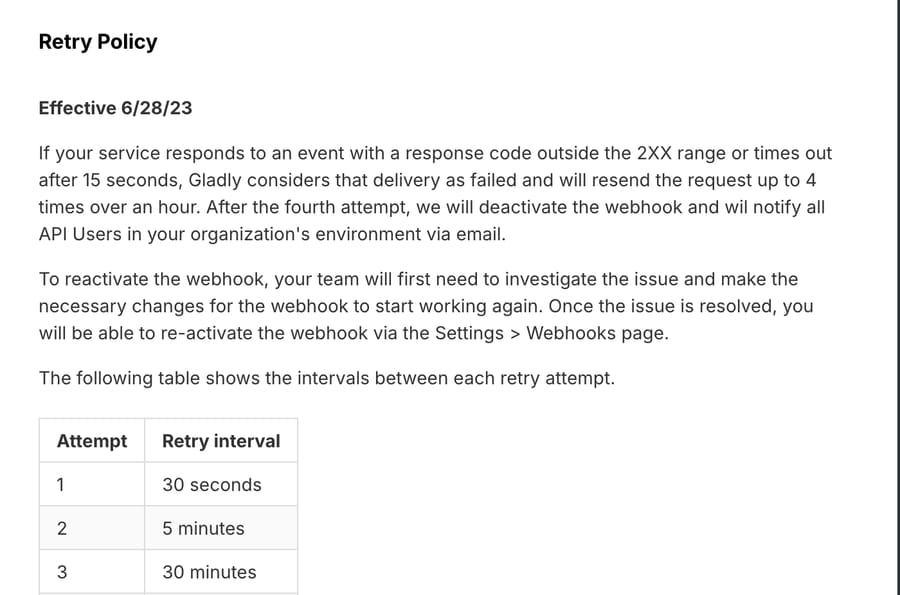
- A Gladly webhook that fails to answer within 15 seconds is retried four times, at 30 seconds, 5 minutes, 30 minutes and 1 hour, then deactivated.
- Internal notes are added with POST /api/v1/conversations/{conversationId}/notes, and the API documents no endpoint for editing or deleting a note.
- Gladly webhook payloads carry only IDs and the event name, so every event you act on costs at least one extra GET request to read the conversation.
| What you need | Where it lives in the Gladly API | The detail that bites |
|---|---|---|
| Base URL | https://{organization}.gladly.com, sandbox at {organization}.gladly.qa | A token is tied to one user and one environment, so a sandbox token fails in production |
| Authentication | HTTP Basic: agent email as username, API token as password | The token can make any API request; there are no scopes |
| Rate limit | 10 requests per second per method, per organization | Counted across every client using your organization's tokens |
| Read a conversation | GET /api/v1/conversations/{id} and GET /api/v1/conversations/{id}/items | Items are not paginated and stop at 1,000 |
| Reply | POST /api/v1/conversation-items/{itemId}/reply | Assigns the conversation to the API user if nobody owns it |
| Internal note | POST /api/v1/conversations/{id}/notes | No edit or delete endpoint for notes |
| Tag | POST /api/v1/conversations/{id}/topics | Takes topic IDs, not topic names |
| Route or close | PATCH /api/v1/conversations/{id} | inboxId is required when you change the assignee |
| Events | POST /api/v1/webhooks | Created disabled; must answer a PING to enable |
What can the Gladly API do, and what is it for?
Gladly's REST API reference groups its operations under 21 resources, from Agents and Answer Management to Topics and Webhooks. Most support teams touch five of them: Conversations (read, reassign, close), Conversation Items (the timeline: messages, notes, calls), Topics (Gladly's tags), Customers (profiles) and Webhooks (events out). The others matter for specific jobs: Communications sends a one-off SMS or email, Export pulls bulk data on a schedule, Reports generates the same reports as the UI, and Tasks covers Gladly's follow-up items.
There is also a second, separate API that runs the other way. The Lookup API is something you build and Gladly calls. When an agent opens a customer profile, Gladly sends a request to your Lookup Adaptor and shows what comes back, such as orders, loyalty points or subscription status. Gladly asks for a reply in under 5 seconds and cuts the request off at 15 seconds, and its reference warns that if one Lookup integration times out or errors, Gladly treats that as an error for all of them. Teams usually meet the Lookup API when they want order data on the profile and their store isn't covered by one of Gladly's built-in apps. If the end goal is answering "where is my order?" rather than just showing orders, our guide to automating order status in Gladly compares the routes.
Gladly's incentive here is visible in the design. A vendor that charges per team member seat and per AI resolution (see our Gladly pricing breakdown) wants your data inside Gladly, where agents and Gladly AI can act on it, so it gives you a well-documented way to push data in (Lookup, customer profiles, conversation items) and a deliberately thin event stream out (webhooks with IDs only). The thin stream is defensible on security grounds, and Gladly says so, but it also means anything you build outside Gladly pays for its reads in API calls.
How do you authenticate with the Gladly API?
Every request uses HTTP Basic authentication over HTTPS. The username is the email address of a Gladly user, and the password is an API token that user created. Gladly's own example is a curl call to /api/v1/organization with -u [email protected]:$GLADLY_API_TOKEN.
Getting a token takes two people if you aren't an administrator:
- An administrator opens Settings, then Users, finds the user and ticks the API User permission, keeping the user's Agent role in place.
- That user creates a token. The developer reference says to use More settings, then API Tokens, then Create Token; the help center version puts the same page under Settings, then App Developer Tools, then API tokens. Either way, the token is shown once, so copy it before you leave the page.
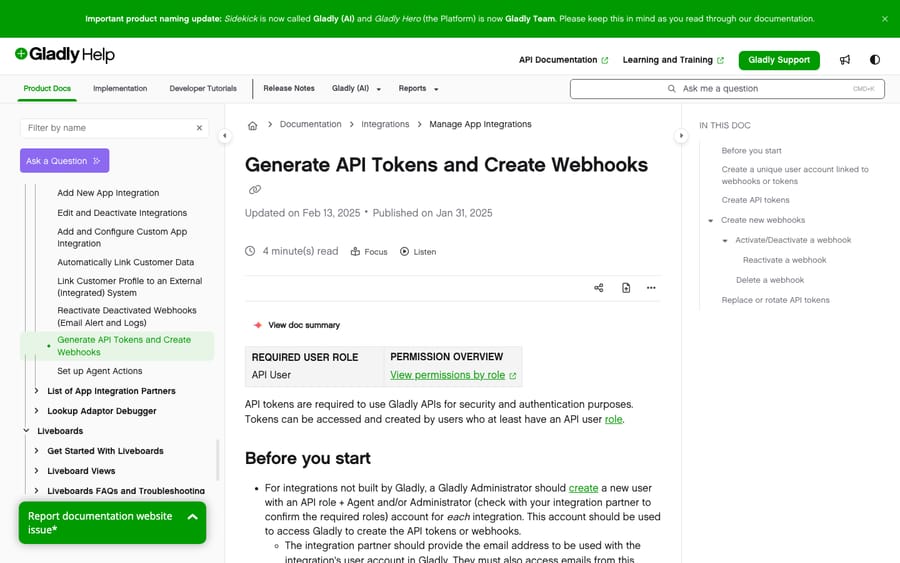
Three properties of these tokens decide how you should set them up:
- No scopes. Gladly's reference says an API token "can be used to perform any API request without restriction." There's no read-only token. If a tool only needs to read, you limit it in the tool, not in Gladly.
- One user, one environment. The help center says a token belongs to one user in one environment, so a token made by the same email in the sandbox won't work in production.
- The token dies with the user. If the user who owns a token or webhook is deactivated, every app using that token stops. That's why Gladly recommends a dedicated API user per integration, named so you can tell it apart in audits, rather than a real agent's account. Under SSO that user needs a sign-in route of its own, which our Gladly login guide walks through.
To rotate a token, Gladly's documented order is: create the new token, store it, delete the old one, then update your apps. Followed literally, that leaves your apps on a deleted token until you update them. A user can hold several tokens at once, so we'd swap the last two steps: update the apps to the new token, confirm they work, then delete the old one.
What are the Gladly API rate limits?
Gladly's rate limit section sets a default of 10 requests per second for each of GET, POST, PUT, PATCH and DELETE, with no concurrency limit on those. The limit is per organization, and Gladly says the remaining count "is calculated using the total number of requests received from all clients with your organization's API tokens." Your CSAT tool, your data warehouse sync and your AI agent all draw from the same 10.
The Reports API is stricter: POST requests to it are limited to 10 per minute and 2 concurrent requests across the whole organization. Gladly also says individual APIs may document their own limits and that it "may adjust limits to prevent abuse."
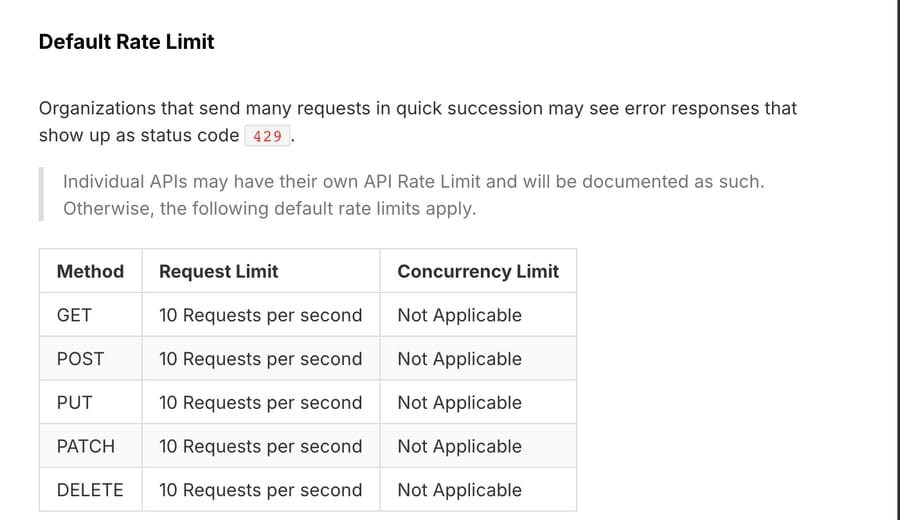
Two response headers tell you where you stand: Ratelimit-Limit-Second and Ratelimit-Remaining-Second. Go over and you get a 429. Gladly's recommendation is a client-side retry with exponential backoff plus some randomness, so a fleet of workers that all hit the limit at once don't all retry at the same instant.
Here is what 10 a second means for an integration that reacts to inbound messages. Because webhook payloads contain only IDs (more on that below), reacting to one new customer message takes at least:
- 1 GET for the conversation (status, assignee, inbox)
- 1 GET for the conversation items (the actual message text)
- 1 GET for the customer profile
- 1 POST for the reply, note or topic
That's 4 requests per message. At 10 GETs a second you can read about 3 messages a second, which is roughly 10,800 an hour, before any other integration takes its share. Most teams never come near that. The place it does bite is backfills: a script that walks 50,000 historical conversations at 2 GETs each needs 100,000 requests, which is at least 10,000 seconds, or about 2.8 hours at the full limit with nothing else running.
Which Gladly API endpoints will you use first?
Gladly's model is customer-first, so the objects nest differently from a ticketing API. A customer profile has a timeline. The timeline is split into conversations. Each conversation holds conversation items: chat messages, emails, SMS, calls, voicemails and notes. If you came from Zendesk, the conversation is the closest thing to a ticket, and an item is the closest thing to a comment. Our overview of what Gladly is covers the product side of that model.
Read a conversation. GET /api/v1/conversations/{conversationId} returns status, assignee, inbox and timestamps. GET /api/v1/conversations/{conversationId}/items returns the timeline in ascending order. That list is not paginated and returns at most 1,000 items, and a Gladly-Limited-Data response header tells you when a conversation has more than you got back. You can filter it by sessionId.
Reply. POST /api/v1/conversation-items/{itemId}/reply sends a reply to a specific item, on that item's channel. The body declares the type, such as EMAIL with an HTML body, or CHAT_MESSAGE with plain text. One side effect worth knowing: if no agent is assigned to the conversation, Gladly assigns it to the API user who made the call. An automated reply can quietly make your integration user the owner of a conversation.
Add an internal note. POST /api/v1/conversations/{conversationId}/notes with a body of {"content": {"body": "..."}}. The body accepts plain text or Gladly's limited rich-content HTML (links, images, headings, lists, bold and a few others). There is a GET for a single note but no PATCH and no DELETE. The general DELETE on conversation items only works on items of type CUSTOMER_ACTIVITY, and the redact endpoint lists messages, emails, voicemails and calls, not notes. In the app, Gladly's Add a Note article says notes can't be edited and only administrators can delete one. So a note written by an integration is effectively permanent unless an admin removes it by hand. Our guide to Gladly internal notes covers the in-app rules, including @mentions and why notes don't route.
Tag with topics. POST /api/v1/conversations/{conversationId}/topics takes a list of topicIds. You need the IDs first, from GET /api/v1/topics. Adding a topic that's already on the conversation is ignored, which makes the call safe to retry.
Reassign, route or close. PATCH /api/v1/conversations/{conversationId} changes the assignee, the status, or both. The assignee object requires an inboxId, with agentId optional, so you can move a conversation to another inbox without naming a person. Status takes OPEN or CLOSED, and a force flag decides whether to close a conversation that still needs a response. If the conversation was merged into another one, the PATCH returns 410 Gone with the surviving conversation's ID, and you reissue the update against that. A GET on a merged conversation behaves differently: it returns 301 Moved Permanently with a Location header pointing at the survivor, so a client that follows redirects gets a conversation whose ID differs from the one it asked for.
Find a customer. GET /api/v1/customer-profiles searches by one identifier at a time, for example ?phoneNumber=%2B14151234567 or an email address. It returns at most 50 profiles, newest update first. GET /api/v1/customer-profiles/{customerId} fetches one, and PATCH updates it.
Send something new. POST /api/v1/communications/sms and /email send a message to a customer outside an existing reply.
How do Gladly webhooks work?
You can create webhooks in the UI (Settings, App Developer Tools, Webhooks) or with POST /api/v1/webhooks. A new webhook is disabled by default. When you enable it or change its URL, Gladly sends a PING event, and your endpoint must answer with a 200 or the create or update fails.
Gladly's event list is long. The ones support integrations use most:
| Event | Fires when |
|---|---|
| CONVERSATION/CREATED | A new conversation is created |
| CONTACT/MESSAGE_RECEIVED | A message is received |
| CONVERSATION/NOTE_CREATED | A note is added to a conversation |
| CONVERSATION/TOPIC_ADDED | A topic is added |
| CONVERSATION_ASSIGNEE/UPDATED | The inbox or agent changes |
| CONVERSATION_STATUS/UPDATED | Status changes, for example OPEN to CLOSED |
| CONVERSATION/CLOSED and /REOPENED | A conversation closes or reopens |
| CUSTOMER_PROFILE/CREATED, /UPDATED, /MERGED | Profile changes |
There are also agent status, task, export and payment request events. The payloads are, in Gladly's words, "intentionally small: they contain only Gladly IDs and event names." Gladly gives two reasons: speed at high volume, and safety, because a misconfigured webhook leaks IDs rather than customer data. The cost is the extra GET calls in the rate-limit arithmetic above.
Securing them. Gladly offers Basic authentication (a username and password it sends with each request) or header-based tokens (custom headers it adds to each request). It recommends at least one. There's no payload signature, so treat the URL plus credentials as a secret.
When they fail. Gladly's retry policy, effective June 28, 2023: a response outside the 2xx range, or no response within 15 seconds, counts as a failure. Gladly retries up to 4 times, at 30 seconds, 5 minutes, 30 minutes and 1 hour. Gladly's page describes that as "over an hour"; added up, the intervals come to about 1 hour 36 minutes from the first failure to the last retry. After the fourth failure it deactivates the webhook and emails every API user in the organization. The reactivation guide says to read the webhook's logs first; Gladly keeps the last 100 requests from the past month. If your endpoint does slow work, answer 200 immediately and process the event in a queue, or a busy afternoon can switch your webhook off.
Polling instead. If you'd rather not run a public endpoint, GET /api/v1/events returns a stream of events for the entities and time range you ask for, as JSONL. Gladly says those events are up to 15 seconds behind real time. Polling also spends from the same rate limit, so it suits low-volume jobs like agent-status reporting better than reacting to every customer message.
How many. The developer reference says you're "limited to 20 webhooks for your organization." The help center's token and webhook guide says "Create up to 50 webhooks." Both were live on November 21, 2026. Plan for 20 until Gladly support tells you otherwise.
Which Gladly API errors should you handle?
Gladly uses standard HTTP codes. The ones worth coding for:
| Status | Meaning in Gladly | What to do |
|---|---|---|
| 400 | Bad input; the body lists error objects with a code | Read the code: blank, invalid, taken, too_long and so on |
| 401 | No authentication provided | Check the email and token pair |
| 403 | The user lacks permission for that resource | Check the API User permission and the user's role |
| 404 | Not found | Often a wrong ID, or a production ID used in the sandbox |
| 410 | The resource was merged into another | Retry against the ID in the response |
| 429 | Rate limit reached | Back off with jitter |
The 410 (and the 301 on a GET) are the Gladly-specific ones. Customer profiles and conversations get merged in day-to-day work (duplicate profiles are one of the common Gladly problems admins clean up), so an integration that stores IDs will eventually hold one that no longer exists. A 400 can also return the code moved, with the new ID in meta.new.
Where does the raw Gladly API stop being enough?
The API gives you the building blocks. Everything around them is yours to build: an event queue that answers webhooks inside 15 seconds, backoff that respects a shared 10-per-second budget, a store that maps topic names to IDs, handling for merged conversations, and, if the goal is automated replies, the part that decides what to say. That last part is most of the work, and it's where teams that set out to write "a quick integration" end up running a small software project.
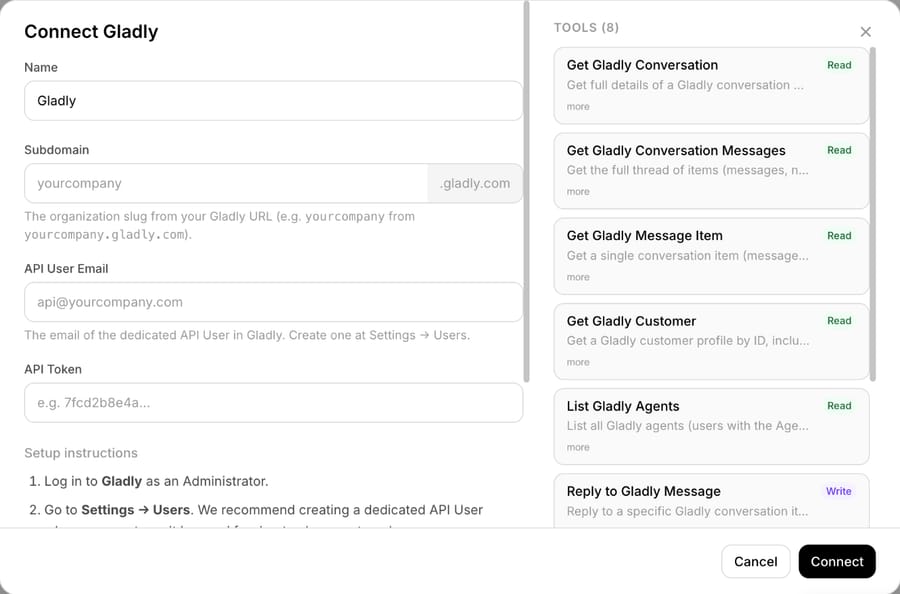
Macha is built on the same endpoints. Its Gladly connector authenticates with an API token and reads conversations, the full message thread, single message items, customer profiles and the agent list; it replies on the customer's channel, adds internal notes, adds topics, reassigns or changes status, and sends outbound messages. It starts on a new conversation or a new customer message, or on any Gladly webhook event you point at it. The Macha on Gladly page shows how those pieces fit into one agent.
The difference from building it yourself is who does the work. Macha's team analyzes your past conversations, builds the knowledge base and the agent, and runs it in safe mode first: the agent drafts replies as internal notes for your team to check, and only moves a category to live replies once the drafts are right. That setup, plus a dedicated success manager who handles changes after go-live, is included at about $0.40 per ticket. See the done-for-you setup for the steps.
Macha fits a Gladly team that wants an agent acting inside its existing conversations, with Shopify or Stripe lookups alongside, and doesn't want to staff an integration project to get there. A typical first job is triage: reading each new conversation, adding a topic and routing it to the right inbox with the same PATCH call described above. If you're weighing that against Gladly's own AI, our Gladly AI explainer covers what Gladly AI does natively. If you only need a nightly export into a warehouse, the API and a cron job are the cheaper answer.
How we researched this
Everything about the Gladly API comes from Gladly's public documents, read on November 21, 2026: the REST API reference (including its embedded OpenAPI specification, version 1.0, which we parsed for exact paths and request bodies) and four help center articles: Generate API Tokens and Create Webhooks, Reactivate Deactivated Webhooks, Add a Note to a Conversation, and Why is my reporting data not current?. If you've read a Freshdesk-style API before, our Freshdesk API explainer is a useful comparison: Freshdesk sets a per-minute limit by plan, while Gladly publishes one per-second default for every organization. We did not call the Gladly API ourselves for this article. The request counts and hour figures in the rate-limit section are our arithmetic from Gladly's published limit of 10 requests per second; real throughput also depends on response times. The 20 versus 50 webhook discrepancy is quoted from both pages as they stood on that date. The Macha connector details come from Macha's own integration listing and connector screen.
Common questions
Does Gladly have a public API?
Yes. Gladly publishes a REST API reference at developer.gladly.com, with an OpenAPI specification you can download. Access requires a Gladly account: a user needs the API User permission to create a token, and every call authenticates with that user's email and token.
Can I create read-only Gladly API tokens?
No. Gladly's reference says an API token can perform any API request without restriction, and there are no token scopes. Limit what an integration does inside the integration itself, and give each integration its own dedicated API user so you can audit and revoke it separately.
How do I add an internal note through the Gladly API?
Send POST /api/v1/conversations/{conversationId}/notes with a JSON body of {"content": {"body": "your note"}}. The body takes plain text or Gladly's limited rich-content HTML. Notes can't be edited or deleted through the API, so test against the sandbox at yourcompany.gladly.qa first.
What happens when a Gladly webhook fails?
Gladly retries a failed delivery up to four times over roughly an hour and a half (30 seconds, 5 minutes, 30 minutes, 1 hour). After the fourth failure it deactivates the webhook and emails every API user. Check the webhook's logs in Settings before you turn it back on.
Is there a Gladly sandbox for API testing?
Yes. Gladly says it can enable the API in a separate sandbox at https://{organization}.gladly.qa. Tokens don't carry over between sandbox and production, and Gladly's reporting data latency page says sandbox report data can lag by up to about 4 hours.
How do I get order data into Gladly without building a Lookup Adaptor?
If your store runs on Shopify or another platform Gladly has an app for, its built-in app shows orders on the customer profile without custom code. A Lookup Adaptor is for systems Gladly doesn't connect to. An AI agent layer like Macha reads Shopify or Stripe through its own connectors and uses Gladly's API only to read the conversation and reply.
If you'd rather have a Gladly agent built on these endpoints than build one yourself, you can start a trial with $50 of free usage (about 125 tickets), no credit card, no time limit; the Macha team does the setup, and pricing is one plan by monthly ticket volume.