Shopify
 Stripe
 Slack
 Notion
 Google Workspace
 Confluence


Common Gladly Problems and How to Fix Them: Rules, Duplicate Profiles, Reporting, Email and Tabs (2026)


The Gladly problems that come up most in user reviews and Gladly's own troubleshooting articles are rules that don't fire or route to the wrong inbox, one customer split across several profiles, reports that lag or need manual work, emails that fail to send, and slowness or missed calls, which often trace back to Gladly running in more than one browser tab. Each has a documented fix in Gladly's help center, and most come down to a setting: rule sort order, the text-matching type, profile merging, or one tab per agent. This guide takes each problem in turn, starting with the checks that rule out the common causes in a few minutes. Sign-in and SSO failures have their own walkthrough in our Gladly login guide.
Key takeaways
- Gladly rules use AND logic and only the first rule that assigns an inbox runs, so a broad rule sorted above a specific one is the most common cause of misrouted conversations.
- Gladly rules don't fire on conversations that Gladly AI is handling, and they only run once the conversation has been handed off to a human agent.
- Profiles merged by mistake in Gladly can't be unmerged, so the documented recovery is to strip the shared contact details and create fresh profiles for both customers.
- Most Gladly reports have about 1 hour of data latency in production, while AI Sessions reports refresh once a day at about 10:00 UTC.
- A failed Gladly email is resent every ten minutes for four hours before the timeline shows "Unknown error" and Gladly stops trying.

| Problem | Most common cause | Fix | Where to change it |
|---|---|---|---|
| Rule doesn't fire | Rule off, contradictory AND conditions, or Gladly AI still handling | Check the eight causes below | Settings, Rules |
| Wrong inbox | A broad rule sorted above a specific one | Move specific rules higher | Rules sort order |
| Keyword rule matches too much | Text matching set to Any ("change" matches "exchange") | Switch to Words | The rule's condition |
| Same customer, several profiles | New email, phone or shared number | Merge, or accept the Customer Match prompt | Customer profile |
| Wrong customer's messages on a profile | Accidental merge or a shared VoIP number | Recreate both profiles (merges can't be undone) | Customer profile |
| Report missing recent data | About 1 hour latency; AI reports daily | Wait for the next refresh | n/a |
| Email won't send | Bad address, full mailbox, spam block | Read the timeline error; switch channel | Conversation timeline |
| Missed calls, lag, wrong time tracking | Gladly open in more than one tab | One tab, in Chrome | Agent's browser |
Four checks to run before changing any Gladly settings
Four checks clear up a large share of "Gladly is broken" reports before anyone touches a rule.
- Is it Gladly or everyone? Gladly's platform issue guide points to its status page at gladly.statuspage.io and recommends subscribing by email. If there's an incident, nothing in your settings will fix it.
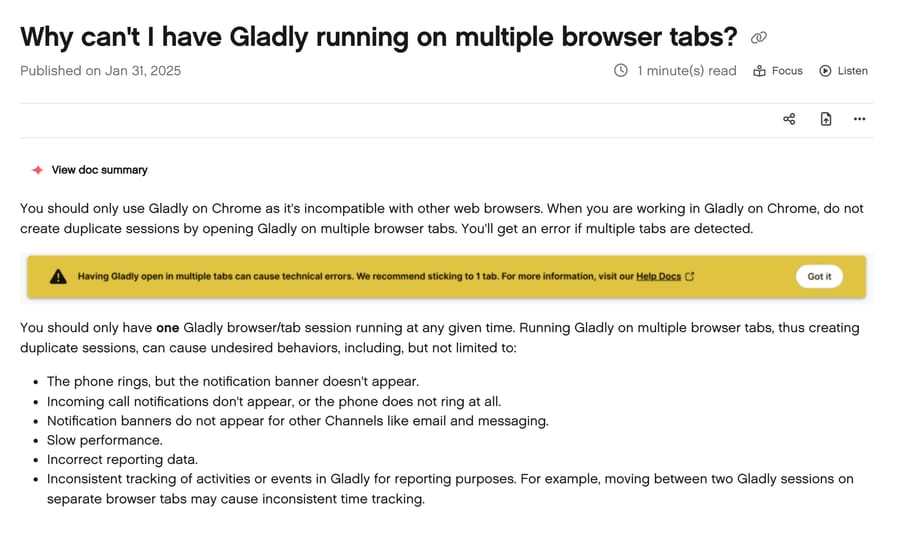
- Is the agent in one tab, in a supported browser? Gladly's software requirements page lists Chrome and Microsoft Edge, while its multiple-tabs article says Chrome only, so try Chrome first. Gladly also warns against running it in more than one tab. That one setting explains a surprising range of symptoms (see the tabs section below).
- Is the agent available and in the right inboxes? Gladly's not receiving work article says an agent only gets work when their channel availability is green and only from inboxes they're assigned to. On the Email, Task and Voicemail channel, email is routed automatically while the agent is available, but new tasks only arrive when they click Next.
- What does the timeline say? Gladly writes routing events, rule actions, merges and email failures onto the conversation timeline. Gladly's own wrong-inbox article says to check the timeline to see which rule fired. Read it before guessing.
If the problem started right after a configuration change, that's your first suspect. Gladly's rule engine processes rules in a fixed order, so one new rule can change the behavior of every rule below it.
Why isn't my Gladly rule firing?
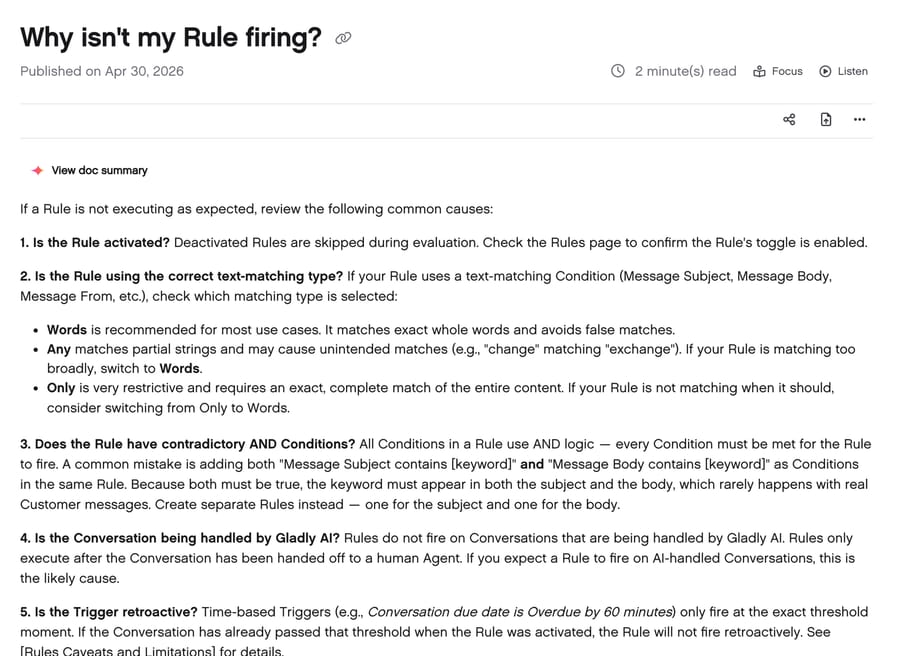
Rules come up in reviews. On Capterra, one director of a customer experience team wrote that some rules they built simply never worked for them, while praising Gladly's support for trying to help (Capterra reviews, read November 21, 2026). Gladly's rule troubleshooting article (published April 30, 2026) lists eight causes:
- The rule is off. Deactivated rules are skipped.
- Wrong text matching. Words matches whole words and is the recommended setting. Any matches partial strings, so "change" matches "exchange." Only needs the whole field to match exactly, which real messages rarely do.
- Contradictory AND conditions. Every condition in a rule must be true. "Subject contains refund" and "Body contains refund" in one rule means the word must appear in both. Gladly's fix is two separate rules.
- Gladly AI is handling the conversation. Rules don't fire on conversations Gladly AI is handling; they run after handoff to a person.
- The trigger isn't retroactive. A time-based trigger such as "overdue by 60 minutes" fires at that exact moment. Conversations already past it when you activated the rule won't be caught.
- A higher rule already acted. If a broader rule above yours already assigned an inbox, assigned an agent or sent an auto-reply, yours is ignored for that action.
- Message From or Message To on chat. Chat messages have no from or to address, so those conditions never match on chat.
- Lookup before Rules is off. A rule that depends on custom attributes from a Lookup Adaptor needs Lookup before Rules enabled, or the attributes aren't there when the rule runs.
Gladly's caveats page adds limits that look like bugs but aren't: rules can't prioritize one channel over another (routing follows the most overdue SLA), rules don't act on closed conversations, and due-date triggers stop applying once a conversation is in Waiting status. Two more catch phone teams: rules that route inbound phone calls may not run, because calls can route before rules do (voicemails aren't affected), and the SLA clock starts when a contact enters the queue, so time spent on Lookup Adaptor calls and rule evaluation counts against it. Gladly's example is a 30-second chat SLA where a 12-second lookup leaves 18 seconds for everything else.
Why are Gladly conversations going to the wrong inbox?
Gladly's wrong inbox article names one main cause: sort order. Only the first rule that assigns an inbox runs for a given trigger. Its example: a rule that routes messages containing "exchange" to an Exchanges inbox must sit above a rule that routes all email to General, or the General rule matches first and the Exchanges rule never runs.
The fix is mechanical. Open the Rules page, check which rule assigned the inbox (the timeline shows it), and move rules with more specific conditions above broader ones. A useful habit is to keep catch-all rules at the bottom and name them that way, so the next person to add a rule doesn't drop it beneath them.
The deeper problem is that keyword rules are a blunt classifier. "Return" appears in "return label," "returning customer" and "I'll return your call." Switching to Words matching helps, but no keyword list reads intent. That's one of the places where an AI layer earns its keep, which we come back to below.
Why does one customer have several profiles in Gladly?
One Capterra reviewer said the same person sometimes ends up with several profiles. It follows from Gladly's design. Gladly keeps one timeline per customer, so when a customer writes from a new email or calls from a new number, Gladly can't match them and creates a new profile.
Gladly's merge article describes two ways to fix it:
- Customer Match suggests a likely duplicate when another profile shares an email, phone number, social handle or customer ID. You'll see "Matching customers found"; click View matches, check the matched details and click Match or No Match.
- Merge is the manual version, where an agent searches for the other profile and merges them.
Three edge cases cause most of the pain:
- Abandoned calls. Gladly's article on abandoned calls says every abandoned call from a number it can't match creates a new profile, so a customer who hangs up twice before getting through can leave two empty profiles. The follow-up agent should search by phone number and merge.
- Different external IDs. If two profiles are linked to different records in the same external system, such as two Shopify stores, Gladly refuses the merge with "different external customer IDs." Its fix is to unlink one profile from the external system first, then merge.
- Merging the wrong people. Gladly says it's "not possible to unmerge Profiles that were merged by mistake." Its documented recovery is to note both customers' contact details, strip the phone numbers from the merged profile and change its email to a placeholder no customer will use, leave a note explaining what happened, then create fresh profiles for both customers. Gladly warns some history may be lost. Shared VoIP numbers can cause the same mix-up without anyone merging anything.
Gladly's choice here makes sense for a vendor whose pitch is one lifelong timeline per customer: its incentive is to merge aggressively, because a split history undercuts the product. The cost of a wrong merge lands on your team.
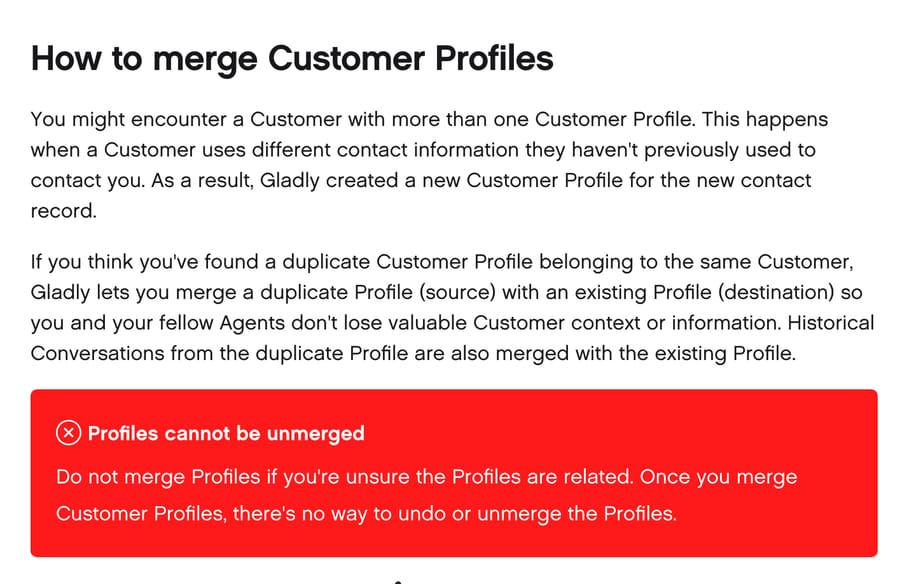
Because merges are permanent, we'd make No Match the default answer when the only shared detail is a phone number. Households and offices share landlines; emails are rarely shared.
Why are Gladly reports late or hard to use?
Reporting came up more than any other theme in the 25 Capterra reviews we read. The points repeat: reports feel segmented so managers pull numbers from several places, some key metrics take manual work, and one reviewer exports a task report to a spreadsheet every time to filter it. Gladly's built-in reporting isn't missing data so much as spreading it across reports and datasets, and its Insight Builder is where custom views live.
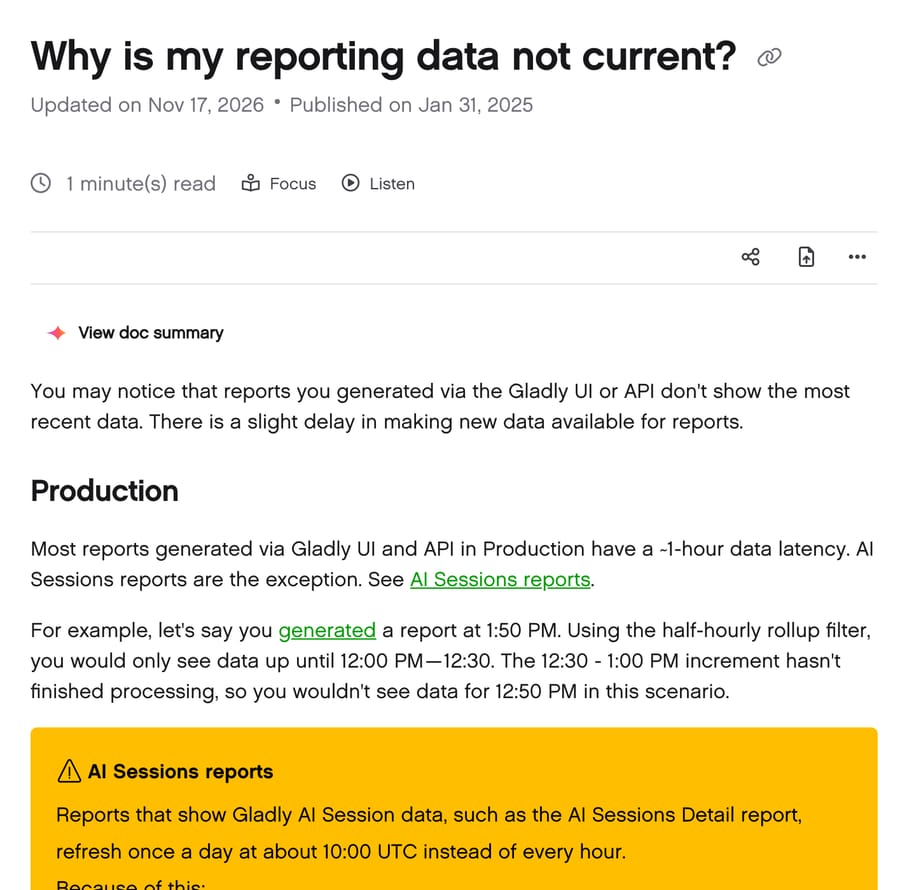
Some "missing data" is latency. Gladly's reporting latency article (updated November 17, 2026) says most reports in production have about 1 hour of latency. Its example: a report generated at 1:50 PM with the half-hourly rollup shows data up to the 12:00 to 12:30 block. AI Sessions reports are slower, refreshing once a day at about 10:00 UTC, so recent Gladly AI sessions don't show until the next daily refresh. In a sandbox, latency can reach about 4 hours.
If the Reports page won't load at all, Gladly's reports not loading article says its reporting partner needs third-party cookies in non-production environments; use Chrome and allow third-party cookies.
For reports Gladly's UI doesn't give you, the Gladly API has a Reports endpoint (limited to 10 requests a minute) and scheduled exports you can load into a warehouse.
Why won't Gladly send an email?
Gladly's email errors article says failed emails are resent automatically every ten minutes for four hours. After that, the timeline shows "Unknown error" and Gladly stops. That's 24 attempts, so a message stuck for an afternoon is already a lost message.
The errors and what Gladly says to do:
- Non-deliverable or mailbox does not exist: usually a typo, like gmail.con. Fix the address, or reach the customer by phone or SMS.
- Temporary delay due to high volume: the recipient's provider is throttling. It usually clears on its own.
- Mailbox full: try another channel or send later.
- Not delivering to a user who marked your messages as spam: the customer once marked a Gladly email as spam, and the customer has to unmark it.
- Unknown error: check the domain spelling, then have IT check whether links in your emails look suspicious to receiving servers.
On Capterra, one reviewer also mentioned the app lagging when sending emails. That's usually a connection problem rather than a delivery one, which is the next section.
Why is Gladly slow, or why do calls and notifications go missing?
Two causes cover most of it.
Gladly open in several tabs. One Capterra reviewer reported that opening a second Gladly page could crash the first and that a call would drop after ringing for about two seconds when two pages were open. Gladly's multiple tabs article lists the effects of duplicate sessions: the phone rings without a notification banner, incoming call alerts don't appear, email and messaging banners go missing, performance slows, and reporting and time tracking come out wrong. Gladly now shows a warning when it detects a second tab. The fix is one tab per agent.
An unstable connection. Gladly shows a banner when it detects a shaky network, and its unstable connection article says it can stop agents closing conversations or adding notes and tasks, end chats unexpectedly, block outgoing messages and leave customer data stale. One Capterra reviewer who works from home described lag and freezing on an unreliable connection. Gladly's advice starts with the newest Chrome and its network test.
Two smaller ones that look like bugs:
- Can't close a conversation. Gladly's article says it's usually an active phone call on the timeline, or required topics not yet applied, or clicking Next instead of Close.
- Chats ending on their own. Gladly ends messaging sessions after 15 minutes without a customer reply by default, set by the Same agent assignment time limit, with a hard maximum of 24 hours. An auto-ended session doesn't close the conversation; an agent still has to close it.
What can't Gladly's settings fix, and where does an AI layer help?
Most of the problems above are configuration, and a careful admin fixes them in an afternoon. Two aren't.
Keyword rules can't read intent. Every fix to routing in Gladly is a better keyword list or a better sort order. A message that says "I want to swap these for a smaller size" contains neither "exchange" nor "return," and a rule built on those words routes it to General. Rules also stop while Gladly AI is in a conversation, so routing logic has to live in two places.
Volume doesn't go down. The tabs, rules and merge fixes make agents faster. They don't take repetitive conversations off the queue.
Macha works as an AI agent layer on top of Gladly through its API. For routing, Macha reads the conversation the way an agent would, adds the right topic and moves it to the right inbox, so classification doesn't depend on which words the customer happened to use. For volume, Macha answers the repeat categories, such as order status from Shopify or return and refund triage, on the customer's channel. Every rollout starts in safe mode, with Macha's replies left as internal notes for agents to check (see the notes drafting use case), and moves to live replies one category at a time.
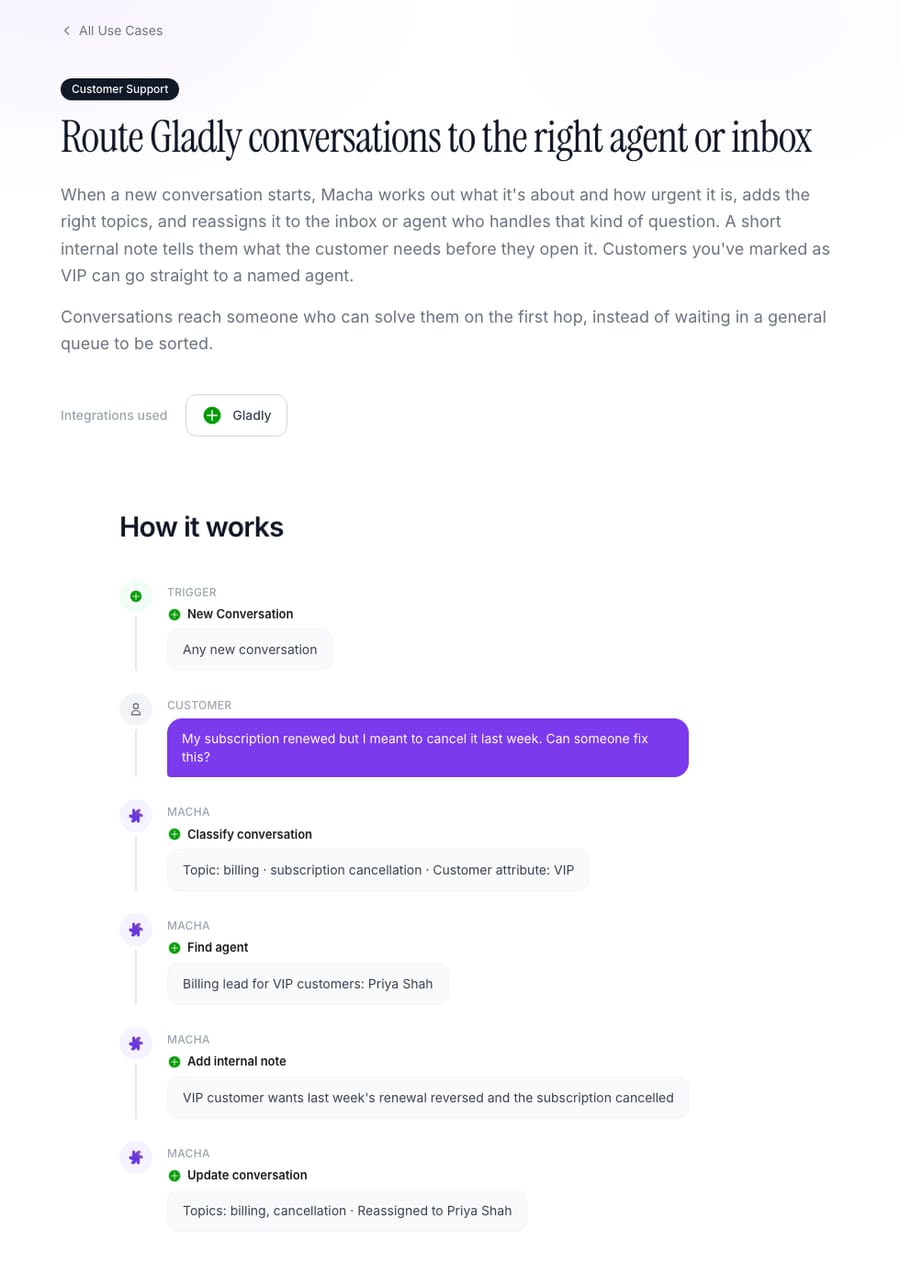
The Gladly connector reads conversations and customer profiles, replies, adds internal notes and topics, reassigns or changes status, and sends outbound messages, starting on a new conversation or a new customer message. The Macha team sets it up, analyzing your past conversations and building the knowledge base and agent, and a dedicated success manager handles changes after go-live, all included at about $0.40 per ticket. See Macha on Gladly, done-for-you setup and pricing.
Macha fits teams on Gladly whose rules keep growing to catch new phrasings, or whose queue is mostly the same few questions. If your issues are tabs, merges and report latency, the fixes above are free and you don't need an AI layer for them. If you do want one, our ranking of the best AI agents for Gladly compares the options that connect to it. For a comparison with Gladly's built-in AI, see our Gladly AI explainer; for the product basics, what Gladly is.
How we researched this
We read the first 25 reviews on Gladly's Capterra reviews page (4.8 stars from 142 reviews, page updated November 20, 2026) in a browser on November 21, 2026 and grouped the complaints into the themes above; we paraphrase and don't name reviewers. G2 and GetApp blocked automated access that day, so we didn't use them. Every fix comes from Gladly's public help center, read on November 21, 2026; each article is linked where it's used, and the dates shown are the ones on Gladly's pages. We checked each fix against the linked article on that date and captured four of them for the images above. We didn't reproduce these problems in a Gladly account. The arithmetic (24 email retries in four hours) is ours from Gladly's stated interval. The Macha connector details come from Macha's integration listing and its published Gladly use-case pages.
Common questions
Why do my Gladly rules stop working when Gladly AI is on?
Gladly's help center says rules don't fire on conversations Gladly AI is handling. They run after the conversation is handed off to a human agent.
How do I merge duplicate customer profiles in Gladly?
Accept the Customer Match suggestion when Gladly shows "Matching customers found," or search for the other profile and merge manually. If Gladly says the profiles have different external customer IDs, unlink one from the external system, such as Shopify, and try again.
Can I unmerge two Gladly profiles?
No. Gladly says profiles merged by mistake can't be unmerged. Its workaround is to strip the merged profile's phone numbers, change its email to a placeholder, add a note, and create new profiles for both customers, accepting that some history may be lost.
Why doesn't my Gladly report show today's data?
Most Gladly reports have about 1 hour of latency in production. AI Sessions reports refresh once a day at about 10:00 UTC, so the current day's Gladly AI sessions don't appear until the next refresh. Sandbox reports can lag by up to about 4 hours.
Why does Gladly warn me about multiple tabs?
Running Gladly in more than one tab creates duplicate sessions, which Gladly says can stop call and message notifications, slow performance and corrupt reporting and time tracking. Keep one Gladly tab open per agent.
Where do I check if Gladly is down?
Gladly's status page at gladly.statuspage.io. Gladly recommends subscribing to updates by email, and if you can't log in because of a platform issue, its help center links a separate support form.
If your Gladly queue is mostly the same few questions, start a trial with $50 of free usage (about 125 tickets), no credit card, no time limit; the Macha team sets up the first category with you.