Shopify
 Stripe
 Slack
 Notion
 Google Workspace
 Confluence


How to Automate Order Status in Gladly: Shopify Cards, Gladly AI Guides and an AI Agent Layer (2026)


There are three ways to automate "where is my order?" in Gladly. The Shopify app puts a customer's three newest orders and their tracking links on the customer profile, so an agent answers in seconds without opening Shopify. Gladly AI can answer the customer itself using Gladly's Shopify Track Order Guide template, billed per AI session. Or an AI agent layer such as Macha reads the Gladly conversation, looks the order up in Shopify, replies on the customer's channel, tags the conversation and closes it. This guide covers how each one works, what it costs, and the identity check every option needs before it shares order details.
Key takeaways
- Gladly's Shopify app shows a customer's three newest orders on the customer profile, with items, totals, shipping address and each shipment's tracking link, pulled live from Shopify.
- Gladly AI answers order status through a Shopify Track Order Guide template that you add, review, test in a side-by-side tester and then set as active.
- Gladly's Shopify app matches customers by exact email address, falls back to phone number, and shows no order data if no customer or more than one customer matches.
- Gladly's own Shopify article warns that order lookups can retrieve any order in the store, so it tells teams to verify a customer's identity before sharing order details.
- Gladly's Shopify App Store listing prices Gladly AI at $1.50 per AI Resolution and $0.25 per AI Assist, plus $120 a month per team member seat.

| Option | Who answers | What it needs | Cost shape | Best for |
|---|---|---|---|---|
| Shopify card on the profile | An agent, with the order on screen | Gladly's Shopify app connected | Included with the app; agent time | Teams that want people answering, faster |
| Gladly AI with the Track Order Guide | Gladly AI, on chat, email and its other AI channels | Shopify app on App Platform, a Guide set active | Per AI session: $1.50 per Resolution, $0.25 per Assist on the Shopify App Store listing | Brands buying Gladly AI anyway |
| Macha AI agent layer | Macha, replying inside the Gladly conversation | Macha's Gladly and Shopify connectors | about $0.40 per ticket, setup included | Teams that want the agent built and run for them, priced per ticket |
How does Gladly handle order status questions natively?
Gladly built its product for retail brands, so Shopify order data is a core feature, not an add-on. Gladly's Shopify on App Platform Overview (updated November 18, 2026) describes two pieces that share one connection:
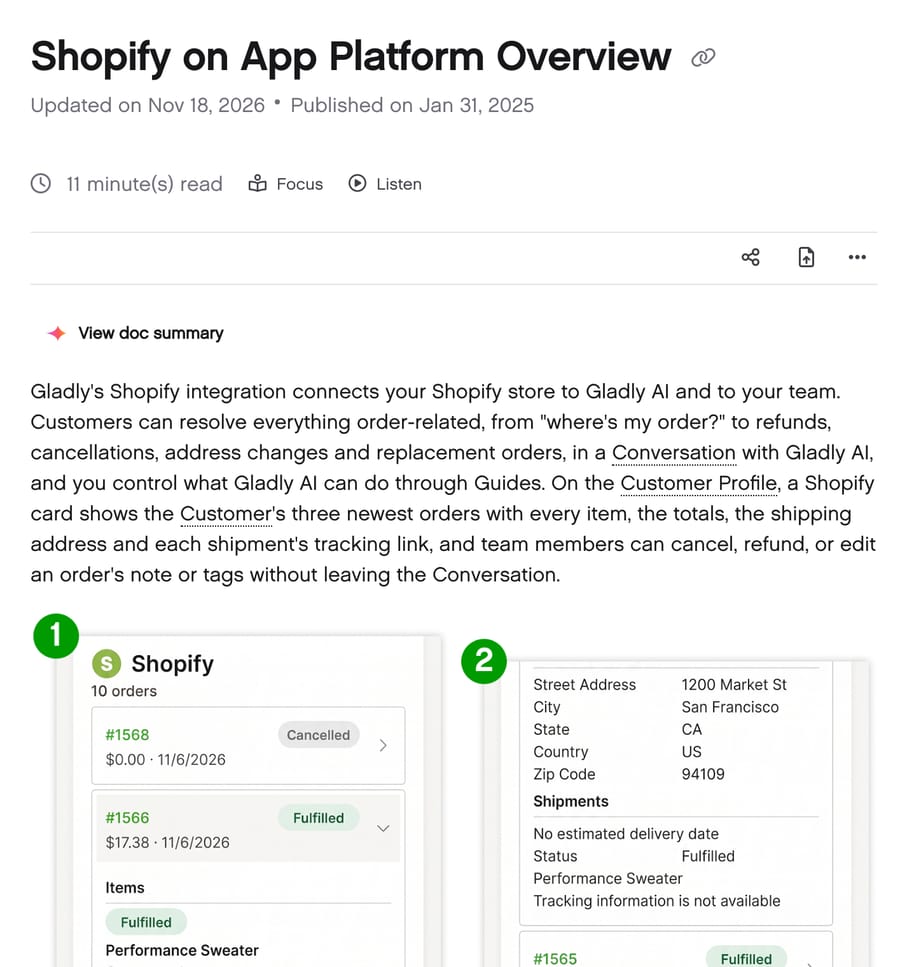
- For agents (Gladly Team): a Shopify card on the customer profile showing the customer's three newest orders, newest first. Each order shows its first item's picture, order number (linked to the order in Shopify), status, total and date. Open it and you see the items, order details, shipping address and Shipments: each shipment's status, contents and tracking link. The heading shows the customer's total order count.
- For Gladly AI: 21 Shopify actions the AI can use through Guides, including looking up orders by email, by phone number or by order number, and Get order details, which returns shipments with tracking, carrier delivery estimates, when each shipment was created and first scanned in transit, and the delivery promise made at checkout.
Gladly renamed its products recently: its help center says Sidekick is now Gladly (AI) and Gladly Hero is now Gladly Team. Older articles and videos still use the old names, which is worth knowing when you search their docs.
How do you set up the Shopify card for agents?
Connecting Shopify is short: in Gladly's settings you enter the store's subdomain and authorize the app in Shopify. Then, per Gladly's upgrade notes, add the Shopify card to the customer profile layout and the four agent forms (Cancel order, Refund order, Edit order note, Edit order tags) in Agent Actions. Teams on version 4 or earlier of the app need to re-authorize it to get the version 5 card, because the newer version asks Shopify for more permissions.
What decides whether the card shows anything is customer matching. Gladly's article spells out the rule:
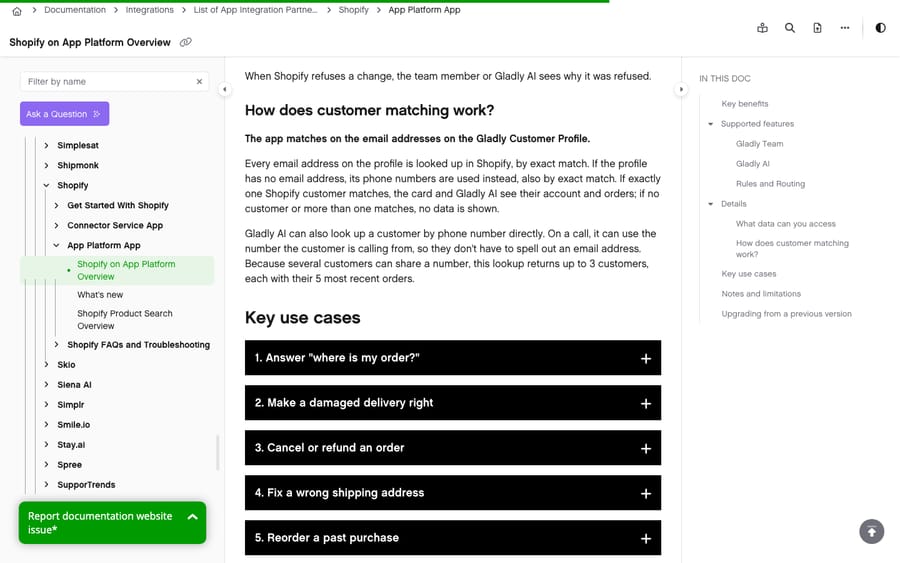
- Every email address on the Gladly profile is looked up in Shopify by exact match.
- If the profile has no email, its phone numbers are used, also by exact match.
- If exactly one Shopify customer matches, the card shows their orders. If none or more than one match, it shows nothing.
That rule explains most "the order card is empty" tickets. A customer who checked out as jane.doe@ and emails you from jdoe@ has no orders as far as the card is concerned. Gladly's missing order details article adds a second cause: if a customer's primary email or phone is changed in Gladly, unlink and relink the profile to Shopify. Mismatched emails also cause duplicate customer profiles, which our list of common Gladly problems and fixes covers.
With the card in place, a where-is-my-order email takes an agent one click into the order and a copy of the tracking link. That isn't automation, but it removes the slowest part, switching to Shopify admin and searching. For a team handling a few hundred order-status contacts a month, that may be all it needs.
Two limits worth knowing for agent-side actions: Gladly's older Shopify FAQ says Shopify Actions are all-or-nothing, so turning them on lets every agent cancel and refund orders, and the version 5 notes say administrators choose which actions team members and Gladly AI can use in Agent Actions. Check which version you're on before you assume either.
How do you automate order status with Gladly AI?
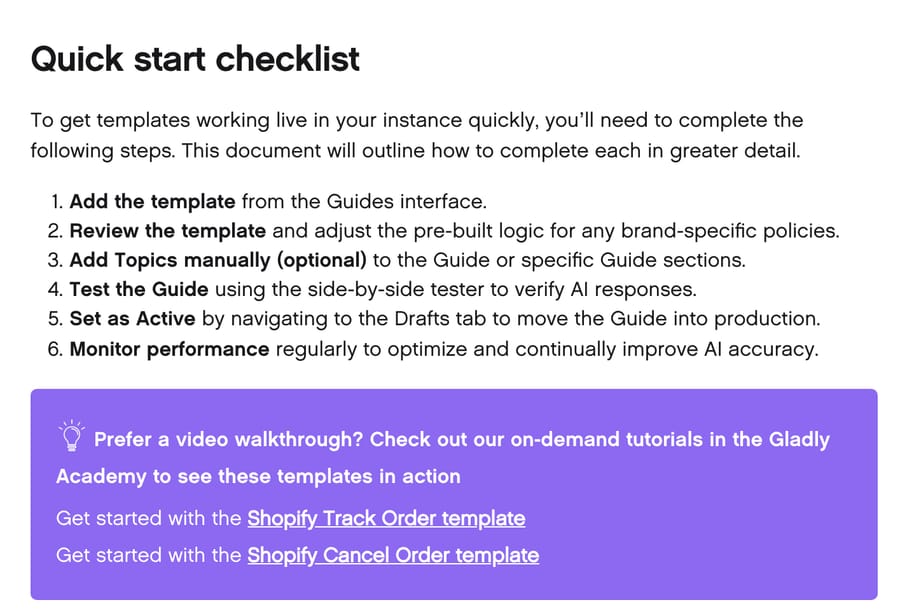
Gladly's Add Shopify Guide Templates article covers two pre-built Guides, Shopify Track Order and Shopify Cancel Order. Its quick-start checklist for either one:
- Add the template. In Gladly, open AI Agents, click Add Guide, and pick Shopify Track Order. If you have more than one storefront, choose which store's configuration the Guide uses.
- Review the template. The Guide opens with its Actions and Rules pre-filled. Adjust them to your policies and add guidance for edge cases.
- Add topics (optional) so the Guide triggers for the right inquiries.
- Test the Guide in the side-by-side tester, which simulates customer messages against the Guide.
- Set it active. New Guides start under Drafts; open the menu beside the Guide and choose Make Active.
- Monitor performance and adjust.
Gladly's Shopify article describes the result for a where-is-my-order question: Gladly AI finds the order and shares the shipment's tracking link, the carrier's delivery estimate, and when the shipment was created and first scanned in transit.
Three details from Gladly's docs shape how this behaves in practice:
- Rules pause while Gladly AI is handling a conversation. Gladly's rule troubleshooting article says rules don't fire on conversations Gladly AI is handling; they run after handoff to a person. Any routing or tagging you've built in Rules won't touch order-status conversations the AI resolves. We cover this and the other trade-offs in Gladly AI versus an AI agent layer.
- Guides are AI, Workflows are fixed steps. Per Gladly's What is Workflows? article, if you need the same steps every time, for example asking for an order number before anything else, Gladly's Workflows run a fixed sequence (Say, Ask, If, Use, Stop) before the Guide or before a handoff.
- What bills. Gladly's Workflows article says a Gladly AI session bills when Gladly delivers a message to the customer and reaches a billable outcome, Assist or Resolve. Work the customer never sees, like routing or tagging without a message, doesn't bill.
Which order-status cases should still go to a person?
"Where is my order?" has an easy answer only when the order shipped and the carrier is scanning it. Gladly's own Shopify card example shows the other case: a fulfilled order with "No estimated delivery date" and "Tracking information is not available." Whichever option you choose, decide up front what happens in these four:
| Case | What the data shows | What we'd have the agent do |
|---|---|---|
| Not shipped yet | Order unfulfilled | Give the order date and your stated dispatch time; don't promise a date |
| Shipped, no tracking yet | Fulfilled, no tracking number or scan | Say it has shipped and tracking can take a day or two to appear; offer to check back |
| Split shipment | Two or more shipments, one delivered | Name which items are in which shipment, with each tracking link |
| Tracking stalled or marked delivered but not received | Last scan several days old, or delivered | Hand off to a person, who can open a carrier claim or arrange a replacement |
The last row is where automation should stop. A "delivered but not received" reply needs judgement about refunds and replacements, and Gladly's own Cancel Order template is similarly cautious by default, allowing cancellation only for unshipped orders less than 24 hours old. Gladly AI's Guides and Macha's instructions can both route these to an agent instead of answering.
How do you verify the customer before sharing order details?
This is the step teams skip, and Gladly's own Shopify article is blunt about it: "Order lookups by order number, email or phone number can retrieve any order in your store. For security and privacy, verify the customer's identity (for example by confirming their ZIP code or phone number) before sharing order details or making changes."
An order number alone isn't proof of anything. Order numbers are short and sequential, they show up in forwarded emails and screenshots, and anyone who has one can ask a chatbot for the delivery address on it. Email is safer, because the customer has to be writing from that address, but chat and SMS don't prove an email address at all.
Gladly offers a built-in way to check. Its One Time Password feature sends a short code to the customer's email or phone, and the User address verification Workflow template runs the full flow. Gladly's OTP article says codes are valid for 10 minutes, and too many wrong codes within an hour lock that address out for 60 minutes. Email OTP needs an email endpoint configured first; SMS OTP works without setup, with Twilio's per-verification fee on your Twilio bill.
The practical rule we'd use with any of the three options:
| Channel | Safe to share tracking status? | Safe to share address or change the order? |
|---|---|---|
| Email from the address on the order | Yes | Yes |
| Chat or SMS, customer gives an order number only | Status only, without address | No, verify first (ZIP, phone or a one-time code) |
| Chat or SMS after a verified code | Yes | Yes |
What does automating order status cost in Gladly?
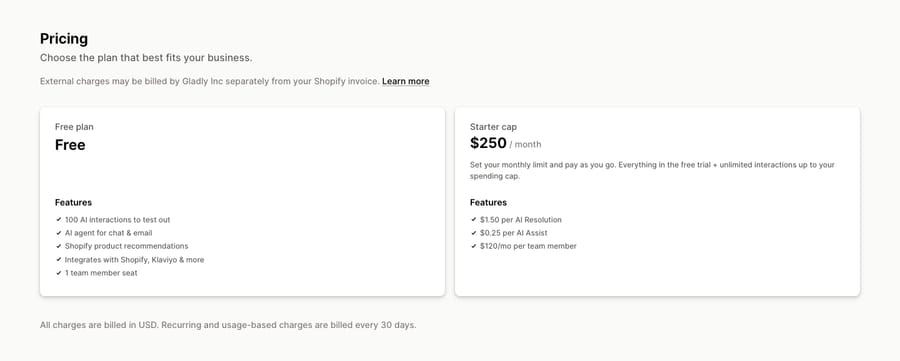
Gladly publishes no AI price on its own website. Its Shopify App Store listing, read November 21, 2026, does: a free plan with 100 AI interactions and one team member seat, and a Starter plan where you set a monthly spending cap and pay $1.50 per AI Resolution, $0.25 per AI Assist and $120 a month per team member. These are the self-serve rates on that listing; negotiated contracts can differ; our Gladly pricing breakdown covers the rest.
Here is the arithmetic for order status alone, at 1,500 where-is-my-order conversations a month:
- Gladly AI, if every one resolves: 1,500 × $1.50 = $2,250 a month, plus seats.
- Gladly AI, if a third hand off to an agent: 1,000 × $1.50 + 500 × $0.25 = $1,625 a month, plus seats.
- Macha: 1,500 tickets a month is the $599 tier on Macha's one plan (about $0.40 per ticket), with setup and monitoring included; pricing lists the other tiers.
Per-resolution pricing earns the vendor more as more of your contacts are resolved by AI, which is a reasonable thing for a vendor to want and an awkward thing for a buyer to budget, because a good month costs more. Per-ticket pricing is flat whatever the outcome. Neither model is wrong; they put the risk in different places. If you already run Gladly AI for other contact types, adding the Track Order Guide is the simplest path. If you don't, compare the totals at your own volume, and our ranking of the best AI agents for Gladly lists the other tools' prices at 1,500 conversations a month.
How does Macha automate order status inside Gladly?
Macha runs as an AI agent layer on top of Gladly. It doesn't replace Gladly AI or the Shopify card; it works inside the same conversations through Gladly's API. The Gladly order-status use case shows the flow:
- Trigger: a new customer message arrives in Gladly asking about an order.
- Read: Macha reads the conversation and the customer's Gladly profile.
- Look up: through its Shopify connector, Macha finds the customer's recent orders and the order in question, with its fulfillment status and tracking.
- Reply: Macha answers on the channel the customer used, with the carrier, tracking number and expected delivery date.
- Tidy up: Macha adds an order-status topic and closes the conversation.
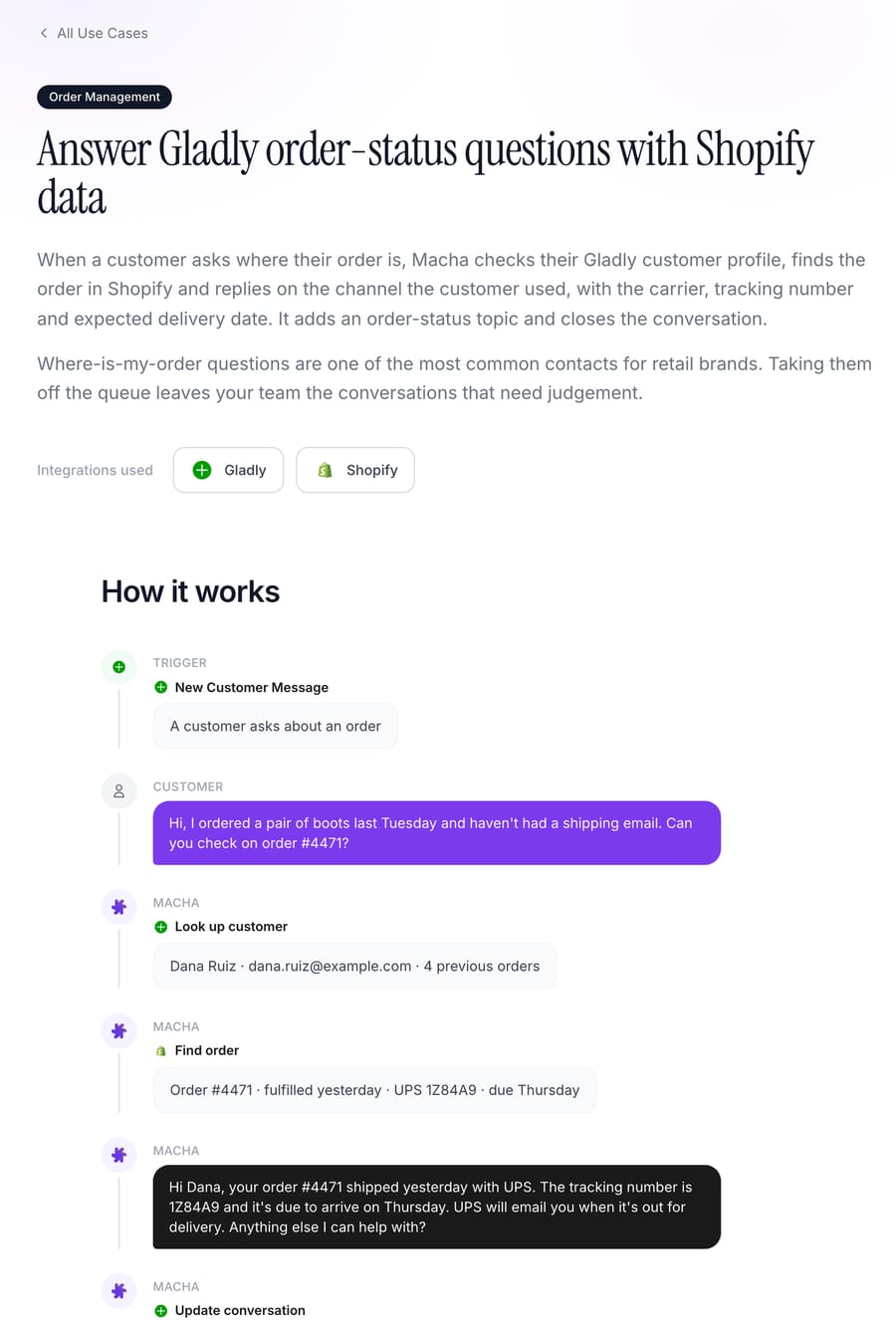
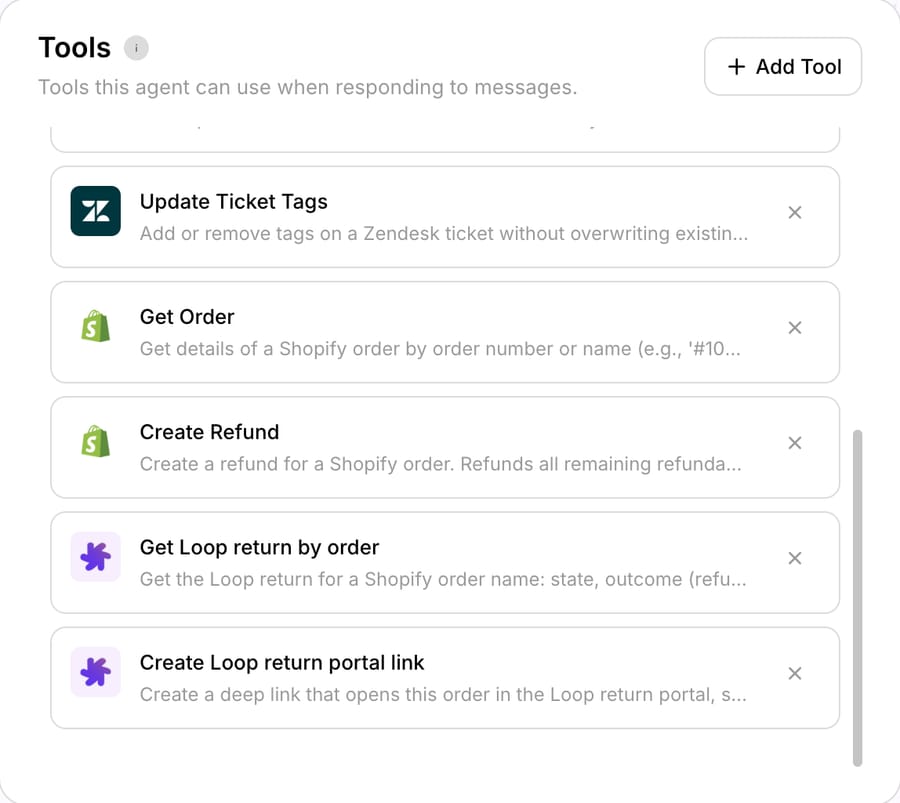
The Gladly side runs on the Gladly connector's write tools: Reply to Conversation on the customer's channel, Add Topics, Update Conversation (reassign or close), Add Internal Note for safe-mode drafts, and Send Outbound Message. The Shopify side is a set of tools on the agent, like the ones below.
Order status is usually the first category Macha takes on for a Gladly retail brand, for two reasons: it's high volume, and the right answer is a fact in Shopify rather than a judgement call. The rollout starts in safe mode, where Macha drafts each reply as an internal note for an agent to check and send (our guide to Gladly internal notes covers why notes suit this: customers never see them, and they don't change routing). When the drafts are consistently right, order status moves to direct replies, and the verification rule above is written into the agent's instructions (for example, share tracking status freely but confirm the ZIP code before giving an address). The same agent can then cover after-hours conversations when nobody is online.
The Macha team does that setup: analyzing your past conversations, building the knowledge base and the agent, and testing it before it touches a live conversation. A dedicated success manager handles changes after go-live, all included at about $0.40 per ticket. See Macha on Gladly and the done-for-you setup, or pricing for the volume tiers.
Macha fits teams on Gladly that want Shopify or Stripe lookups, Gladly topics and routing handled in one flow, and would rather have the agent built and run for them than configure Guides themselves. If you're already using Gladly AI across your chat channel and are happy with the per-session cost, the Track Order Guide is the shorter path. Our Gladly AI explainer covers Gladly AI in more depth.
How we researched this
The Gladly setup steps, matching rules, billing rules and security warning come from Gladly's public help center, read on November 21, 2026: Shopify on App Platform Overview (updated November 18, 2026), Shopify Overview, Add Shopify Guide Templates, What is Workflows?, Workflow Templates, One Time Password, Why isn't my Rule firing?, Shopify FAQs and Troubleshooting, and Can I limit Shopify Actions by Agent?. Gladly AI prices are from Gladly's Shopify App Store listing on the same date, which displayed the Starter cap in local currency for our location; the per-action rates were listed in US dollars. We checked each Gladly step against the help center on that date and captured two of its articles and Macha's use-case page for the images above. We did not run Gladly AI ourselves. The cost arithmetic is ours, assumes every conversation is a single AI session, and leaves out seats. The Macha flow is from Macha's published Gladly use case and our connector screen; example names and order numbers on that page are synthetic.
Common questions
Can Gladly show Shopify orders automatically?
Yes. Gladly's Shopify app adds a card to the customer profile with the customer's three newest orders, their items, totals, shipping address and each shipment's tracking link, pulled live from Shopify. It matches customers by exact email address, then phone number.
Why is the Shopify order card empty for some customers in Gladly?
Gladly shows order data only when exactly one Shopify customer matches the profile's email address (or phone, if there's no email). A different checkout email, no match or several matches all leave the card empty. Changing a profile's primary email or phone can also require unlinking and relinking it.
Can Gladly AI answer "where is my order?" by itself?
Yes. Gladly's Shopify Track Order Guide template lets Gladly AI look up the order and share tracking, the carrier's delivery estimate and shipping dates. You add the template, review it, test it in the side-by-side tester and set it active.
How much does Gladly AI cost per order-status conversation?
Gladly's Shopify App Store listing shows $1.50 per AI Resolution and $0.25 per AI Assist on its Starter plan, plus $120 a month per team member. A session bills only when Gladly AI delivers a message to the customer. Negotiated contracts can differ.
Should I verify customers before sharing order status?
Gladly recommends it. Its Shopify article warns that order lookups can retrieve any order in your store and says to confirm identity, for example with a ZIP code or phone number, before sharing order details. Gladly's One Time Password workflow can send a verification code.
Can an AI agent answer order status by email in Gladly too?
Yes. Gladly's Shopify App Store listing describes Gladly AI as an AI agent for chat and email. Macha does too: it triggers on new customer messages in Gladly on any channel, looks the order up in Shopify, replies on the same channel and closes the conversation, starting with drafts as internal notes until your team approves the category for live replies.
To try it on your own order-status conversations, start a trial with $50 of free usage (about 125 tickets), no credit card, no time limit; the Macha team sets it up with you.