Shopify
 Stripe
 Slack
 Notion
 Google Workspace
 Confluence


Gladly Login Guide and Troubleshooting: URLs, Password Resets, SSO Errors and Blank Screens (2026)


You log in to Gladly at your own company's Gladly address, or through your company's single sign-on provider such as Okta, never at a generic Gladly login page. Gladly's help center says each organization has its own login URL and warns specifically against using us-1.gladly.com/user/login. Most login failures come from five causes: the wrong URL, a password reset email going to the wrong address, an SSO email mismatch, a browser extension that blanks the screen, or Gladly open in more than one tab. This guide covers each one with Gladly's documented fix, and what administrators control on their side.
Key takeaways
- Each Gladly organization has its own login URL, and Gladly's help center tells agents not to use https://us-1.gladly.com/user/login, so the right address comes from your manager or SSO portal.
- A Gladly password must be at least 8 characters with an uppercase letter, a lowercase letter, a number and a special character, and it can't match your last 4 passwords.
- The SSO error "Account does not exist" in Gladly means the email address in your identity provider doesn't match the email on your Gladly user, and an administrator fixes it in Gladly.
- A blank screen after logging in to Gladly is usually caused by a browser extension, firewall or antivirus software, and opening Gladly in an incognito window tells you which.
- Gladly supports Chrome and Microsoft Edge only, and running Gladly in more than one browser tab causes missed call notifications, slow performance and wrong reporting data.

| Symptom | Most likely cause | Fix | Who fixes it |
|---|---|---|---|
| Login page doesn't recognize you | Wrong URL, or a sandbox or training URL | Get your company's Gladly URL or use the SSO portal | Agent, with manager |
| "Try again later" error | Bad network or wrong computer clock | Run Gladly's network test; set the clock to update automatically | Agent |
| First login fails | Invitation already used or expired | Admin resends the invitation; clear cookies before accepting | Admin |
| No password reset email | Spam folder, wrong email, or inactive account | Check spam; confirm the email in Gladly; confirm the account is active | Agent, then manager |
| "Account does not exist" (SSO) | Email in the identity provider doesn't match Gladly | Admin corrects the email in Gladly | Admin |
| "Not Able to Get to Gladly" (SSO) | User not configured for SSO | IT fixes the identity provider setup | IT |
| 403 app_not_enabled_for_user | Google Workspace app is off for that user | Turn the Gladly app on under User access | Google admin |
| Blank screen | Extension, firewall or antivirus blocking Gladly | Test in incognito; disable the blocker or allowlist Gladly | Agent, then IT |
| Error about multiple tabs | Gladly open in two tabs | Close all but one Gladly tab | Agent |
Where do you log in to Gladly?
There's no single public Gladly login page for agents. Gladly's Log Into Gladly article says how you sign in depends on whether your company uses single sign-on (SSO):
- If your company uses SSO, start from your identity provider, such as the Okta dashboard, and click the Gladly tile. Don't go to a Gladly URL directly.
- If you log in directly, use your company's own Gladly URL. Gladly's API reference shows each organization's domain in the form https://{organization}.gladly.com, but the help center tells agents to confirm the exact login URL with their manager rather than guess.
Gladly repeats one warning in two articles: "DO NOT use https://us-1.gladly.com/user/login to log into Gladly because each organization has its own unique login URL." If a search engine or an old bookmark sent you to a generic page, that's likely why your details aren't accepted.
There's a second URL trap. Gladly runs separate sandbox environments at addresses ending in .gladly.qa, and some companies have training or test instances. Gladly's I can't log in article lists "Ensure you are not logging into a Sandbox or training/test environment" as a first-login check. A sandbox account is a separate account, so your production password won't work there.
If you've forgotten your username, Gladly's answer is to ask your manager. Password resets and SSO both match on the email address Gladly has on file for you, and that may not be the one you'd guess.
Gladly has also renamed its products, which confuses searches. Its help center now carries a banner saying Sidekick is now called Gladly (AI) and Gladly Hero, the agent platform, is now Gladly Team. The login is for Gladly Team; customers never log in to Gladly to chat with you. Our overview of what Gladly is explains how the pieces fit.
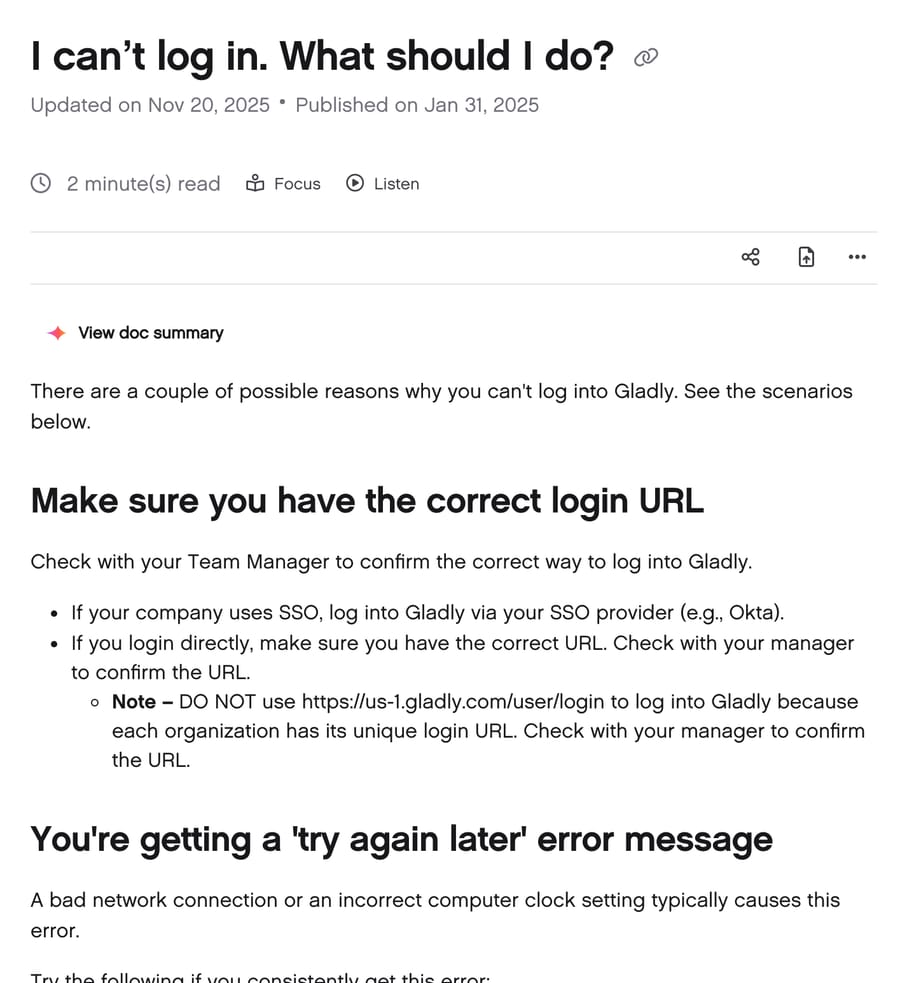
Why can't I log in to Gladly?
Work down this list in order. Each step is from Gladly's own troubleshooting articles.
1. Check the URL. As above, the right address comes from your manager or your SSO portal.
2. "Try again later." Gladly says this error is usually a bad network connection or a wrong computer clock. Run the network test linked from Gladly's working-from-home requirements page. If the network passes, check that your computer's date and time are set to update automatically. A clock that has drifted can make a secure sign-in fail even with the right password.
3. First time logging in. The email invitation to join Gladly works once. If your first enrollment didn't finish, an administrator has to resend it. Gladly's API token guide adds that a new user has 24 hours to accept an invitation before it expires. Before you accept the new one, clear your browser's cookies and cache so a half-finished session doesn't interfere.
4. Not sure you were invited. Ask your Team Manager to check your account status. They can add you or resend the invitation.
5. Existing account, wrong password. Reset it (next section).
6. SSO errors. See the SSO section below; these need an administrator or your IT team.
When none of that works, a user with the Team Manager or Administrator role can raise a ticket with Gladly Support from inside Gladly: open the menu in the top left and click Contact Gladly Support. Gladly lists its support hours as Monday through Friday, 6 AM to 6 PM Pacific Time, though requests can be submitted anytime, and asks that most requests be filed as P4. That's 60 primary hours out of 168 in a week, so a lockout reported at 7 PM Pacific on a Friday may not be picked up until Monday unless it's a platform outage. Weekend teams should make sure two people hold the Administrator role. If Gladly itself is down and nobody can log in, its platform issue guide links a separate support form and the Gladly status page at gladly.statuspage.io.
How do you reset a Gladly password?
From Gladly's password reset article:
- On your company's Gladly login page, click Forgot in the password field.
- Enter your email address and click Send Reset Email.
- Open the email titled "Reset your password" and click Reset Password.
- Enter a new password that meets the requirements.
- Click Change Password, then Sign In on the confirmation screen.
If your company uses SSO, there's no Gladly password to reset. Your password lives in your identity provider, so the reset goes through your IT team's process.
The password rules. Gladly's Password Management article says a password must have at least one lowercase letter, one uppercase letter, one number and one special character, be at least 8 characters long, and differ from your last 4 passwords. Administrators can raise the minimum length and set an expiry period (more on that below). If your admin raised the minimum, the reset form will reject passwords that meet Gladly's defaults.
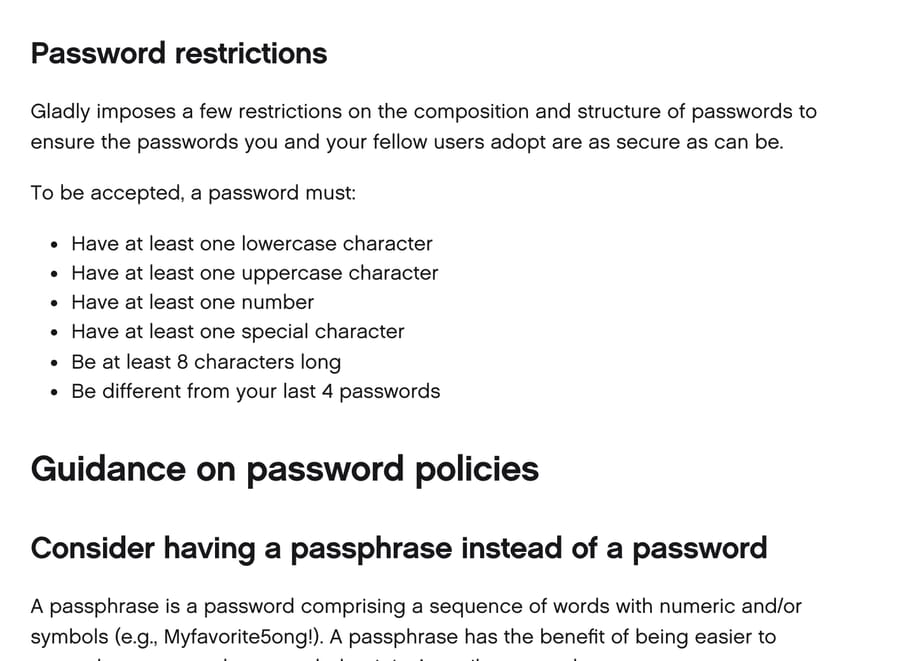
No reset email? Gladly's missing reset email article gives three checks:
- Look in your spam folder, and if the email is there, mark Gladly as a trusted sender.
- Make sure you used the email address your Gladly account is enrolled under. Gladly notes this is a common mismatch, and a manager can confirm the right address.
- Make sure your account is active. A deactivated user can't reset a password.
Gladly's article says the reset email arrives "if you are a registered user," so the form doesn't confirm whether an address has an account, which is standard practice so attackers can't test emails. The practical effect is that a typo in your email looks exactly like a lost email. Check the address before you check the spam folder twice.
How do you fix Gladly SSO login errors?
Gladly supports SAML 2.0 with any enterprise identity provider, and its SSO setup guide has step-by-step instructions for Azure Active Directory, OneLogin, Google Workspace and Okta. Gladly's troubleshooting article names two SSO errors and three common causes.
"Account does not exist." The email you sign in with at your identity provider doesn't match the email on your Gladly user. An administrator has to change the email in Gladly's user settings to match the identity provider exactly. This is the most common SSO failure we'd expect after a name change, a domain migration or an alias: Okta says jane.doe@, Gladly says jdoe@, and the two never meet.
"Not Able to Get to Gladly." Your user isn't configured for SSO correctly in the identity provider. That's for your IT team.
Certificate problems. Gladly lists an expired SAML certificate and the wrong certificate configured as common causes. Certificates expire on a schedule, so this tends to lock out everyone at once rather than one person. Gladly's fix is to rotate the certificate; when the identity provider's metadata changes, an administrator clicks Save on Gladly's Single Sign-On settings page and Gladly fetches the updated metadata from the stored URL.
Google Workspace: 403 app_not_enabled_for_user. Gladly's SSO setup guide says this means the user doesn't have access to the Gladly app in Google Workspace, even if they exist in Gladly. A Google admin opens Apps, then Web and Mobile Apps, finds Gladly, opens User access and turns it on for everyone who needs it.
Okta: users can't get in after setup. In Okta, users must be assigned to the Gladly app on its Assignments tab, and the same users must also exist in Gladly. Without JIT provisioning (below), Okta assignment alone doesn't create a Gladly user.
Why do I see a blank screen or a tab error after logging in?
Blank screen. Gladly's blank screen article says it's typically a browser extension stopping Gladly from loading. Firewalls and antivirus or spyware tools such as McAfee and Norton can do the same. The test is quick: open an incognito window, which runs without most extensions, and log in there. If Gladly loads, one of your extensions is the problem; turn them off one at a time. If it still fails in incognito, test with the firewall or antivirus tool paused, and if that fixes it, ask IT to allow Gladly through.
Wrong browser. Gladly's software requirements page says Gladly works with Chrome and Microsoft Edge, kept up to date. Its multiple-tabs article is stricter and says to use Chrome only. Either way, Safari and Firefox aren't supported. If you're on Edge and see odd behavior, try Chrome before anything else.
Multiple tabs. Gladly's multiple tabs article says Gladly shows an error if it detects itself open in more than one tab, and its help center lists what goes wrong if you ignore it: the phone rings without a notification banner, incoming call alerts don't appear, email and messaging notifications go missing, performance slows, and reporting and time tracking come out wrong. That last one matters to managers, because agent time reports are built from those sessions. Keep one Gladly tab per person.
"Unstable internet connection." Once you're in, Gladly can show a banner when it detects a shaky network. Its unstable connection article says an unstable connection can stop you closing conversations or creating notes and tasks, end chats unexpectedly and leave customer data stale. It's a network problem rather than a login one, but agents often read it as being "half logged out." For trouble that starts once everyone is signed in, such as rules that don't fire or reports that lag, see our guide to common Gladly problems and their fixes.
What do Gladly admins control about login?
Most login settings live under Settings, then Security and Compliance.
Single sign-on is all or nothing. Gladly's SSO management article says SSO isn't required but is strongly encouraged if you already use it elsewhere. Once it's on, every user must use it; you can't have some users on SSO and some on passwords. You also can't mix providers, so Google SSO and Okta can't run side by side. Gladly also says to upload new users only after SSO is activated.
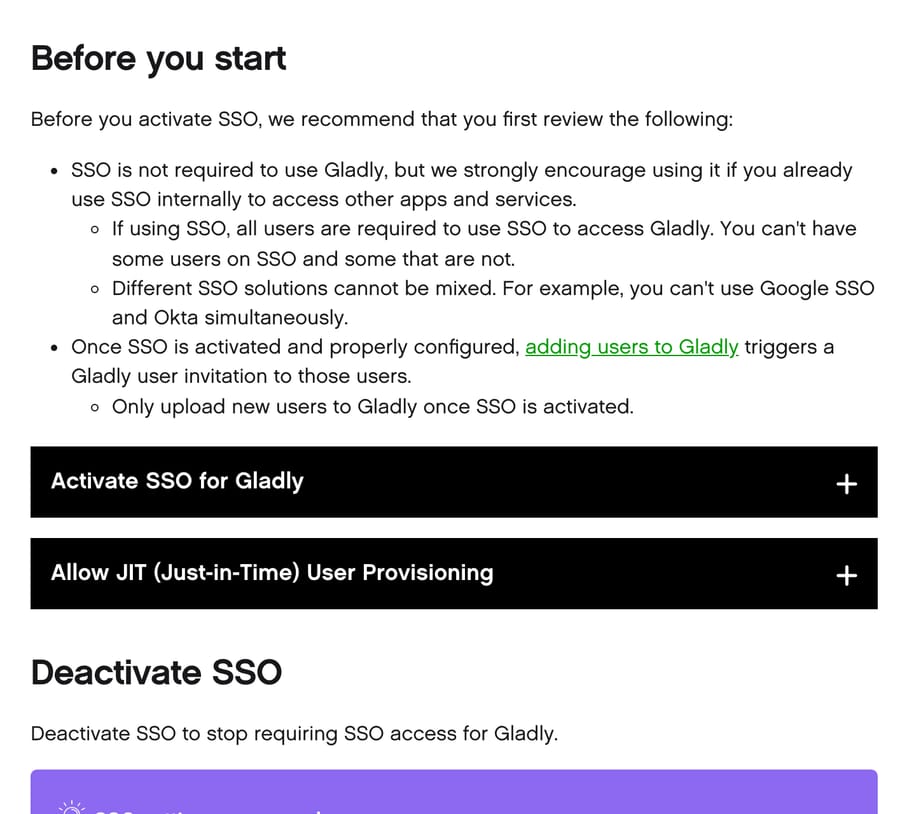
Force users to reauthenticate. Off by default. With it off, a user who logs out of Gladly but still has an active Okta or Azure session is signed straight back in when they return. Turn it on and they must authenticate again after logging out (closing the tab or going Away doesn't count as logging out).
JIT provisioning. With SSO on, Create new user on first login makes the Gladly account the first time someone signs in through the identity provider, with default roles and inboxes or ones mapped from SAML attributes. Gladly says JIT works only with Okta and PingOne.
Password rules without SSO. The Password Requirements page, which needs the Compliance Administrator role, sets the minimum length (default and minimum 8) and an expiry period in days. Leave expiry empty and passwords never expire. New rules apply at each user's next login, and anyone whose password doesn't comply is asked to change it then. Gladly's Password Management article recommends SSO for anything more custom than a 90-day expiry.
Two-factor authentication. Gladly's SSO setup guide says SSO is how you add 2FA or MFA. Don't confuse that with Gladly's One Time Password setting in the same menu: that sends verification codes to customers inside Gladly's AI workflows, for example before canceling an order, and has nothing to do with agent login.
Gladly's position on passwords is consistent across these pages: it supplies the basics and points anyone who wants more toward SSO. That matches who it sells to, and the incentive is plain: a help desk vendor gains little from building its own MFA and password policy engine. Brands with large contact centers usually run an identity provider already, and the identity provider, not the help desk, is where security teams want access policy to live.
What happens to integrations when users change or SSO is turned on?
Login settings also decide whether your integrations keep working, which is easy to miss when you're fixing a locked-out agent.
Gladly API tokens belong to a user, which our guide to the Gladly API covers alongside rate limits and webhooks. Gladly's integration guide recommends a dedicated user for each integration and warns that if that user is deactivated, "apps or external sources using the token or webhook linked to the user will stop working." Offboarding the wrong account during a cleanup can switch off your CSAT survey, your data sync or your AI agent in one click.
SSO adds a second wrinkle. Someone has to sign in as the integration user to create its API token, and once SSO is on, every Gladly user signs in through SSO. So a dedicated integration user needs an identity in your SSO provider too, which is worth arranging with IT before you turn SSO on rather than after an integration stops.
This is how Macha connects to Gladly. The Gladly connector authenticates with an API token from a Gladly user with the API User role, then reads conversations and customer profiles, replies, adds internal notes and topics, reassigns or closes conversations, and sends outbound messages. During setup the Macha team walks your admin through creating that user and token, so it's a dedicated account that nobody deactivates by accident.
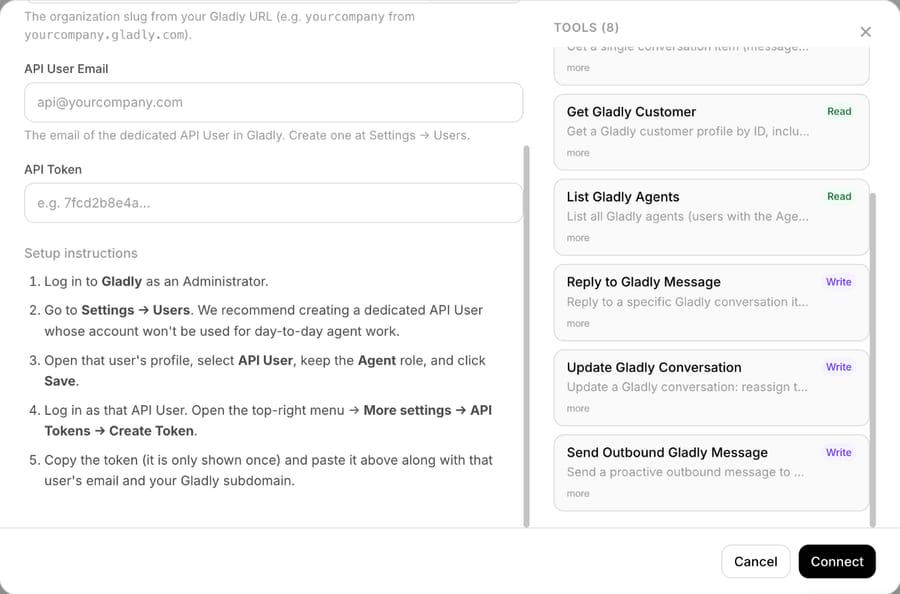
Macha fits teams already running Gladly that want an AI agent working inside their existing conversations rather than a second tool to log in to. Agents keep using Gladly as they do today; Macha's drafts and replies appear on the same timeline. The Macha team handles setup and a dedicated success manager handles changes after go-live, at about $0.40 per ticket, with $50 of free usage (about 125 tickets), no credit card, no time limit to start. The Macha on Gladly page shows the product, done-for-you setup explains the rollout, and pricing lists the volume tiers. If you're comparing options, our Gladly AI explainer covers what Gladly's built-in AI does.
How we researched this
Every login rule and error message in this article comes from Gladly's public help center, read on November 21, 2026: the 15 help center articles linked in the sections above. The organization domain format comes from Gladly's REST API reference. We captured three of those articles for the images above. We did not sign in to a Gladly account for this article, so we describe the documented behavior and say where Gladly's own pages disagree (Chrome only versus Chrome and Edge). The note about integration users under SSO is our reading of two Gladly rules together: tokens belong to a user, and SSO applies to every user. The Macha connector details come from Macha's own integration listing.
Common questions
What is the Gladly login URL?
Each company has its own. Gladly's help center says not to use https://us-1.gladly.com/user/login, because every organization has a unique login URL. Ask your manager for it, or sign in through your company's SSO portal if it uses one.
How do I reset my Gladly password?
Click Forgot on your company's Gladly login page, enter your email and click Send Reset Email, then follow the "Reset your password" email. If your company uses SSO, reset the password with your identity provider instead.
Why does Gladly say "Account does not exist" when I use SSO?
The email address in your identity provider doesn't match the one on your Gladly user. An administrator needs to update the email in Gladly so the two match exactly.
Which browsers does Gladly support?
Gladly's requirements page lists Chrome and Microsoft Edge, kept up to date. One of its troubleshooting articles says Chrome only, so if something misbehaves on Edge, switch to Chrome first.
Can I have Gladly open in two tabs?
No. Gladly shows an error when it detects more than one tab and says duplicate sessions cause missed call and message notifications, slow performance and wrong reporting data.
Does Gladly support two-factor authentication?
Through SSO. Gladly's setup guide says single sign-on is how you add 2FA or MFA to Gladly logins. The One Time Password setting in Gladly is for verifying customers in workflows, not for agent sign-in.
Do integrations need their own Gladly login?
Gladly recommends a dedicated user for each integration, with the API User role, because API tokens belong to a user and stop working if that user is deactivated. Under SSO, that user needs an SSO identity too.
If your Gladly team is ready for an AI agent that works inside the conversations you already log in to, start a trial; the Macha team sets it up with you.