




 Shopify
 Stripe
 Slack
 Notion
 Google Workspace
 Confluence


Gorgias AI Sounds Robotic? 8 Fixes in AI Agent's Tone of Voice Settings (2026)


When Gorgias AI Agent sounds robotic, the cause is usually a default left in place: the generic personality, the "AI Agent Bot" name, no banned phrases, the same reply length on chat and email, or thin knowledge that forces vague answers. Gorgias puts most of the fixes on one settings page, AI Agent, then Train, then Tone of voice, where you choose one of four personalities or write a custom one of up to 3,000 characters, set a greeting and sign-off, list forbidden phrases, and set verbosity per channel. The rest sit in skills, knowledge and the AI Feedback panel. Below are the eight fixes in the order we'd make them, one section each, what each one changes, and when the problem isn't tone at all.
Key takeaways
- Gorgias AI Agent's tone settings live under AI Agent, then Train, then Tone of voice, with four personalities: Friendly, Professional, Sophisticated and Custom.
- A custom Gorgias AI Agent personality takes up to 3,000 characters, and the greeting, sign-off and brand terminology fields take up to 600 characters each.
- Gorgias lets you set verbosity to Concise, Balanced or Detailed separately for email, chat, SMS and socials, with up to 1,500 characters of channel instructions.
- Gorgias's pricing table shows Brand voice and guardrails as not included on the Starter plan, while its help article lists the tone settings for all plans with AI Agent.
- Rating a conversation in Gorgias's AI Feedback panel doesn't change AI Agent's behavior right away; rating or editing the sources it used does.
| Symptom | Likely cause | Fix in Gorgias | Where |
|---|---|---|---|
| Every reply opens "Dear customer" and closes with the same line | Default greeting and sign-off | Write your own Greeting and Sign-off | Tone of voice, What to say |
| Stock phrases like "I understand your frustration" | No restrictions set | List them under Forbidden words, phrases, or behaviors | Tone of voice, What to avoid |
| Chat replies read like emails | One length for every channel | Set Verbosity per channel | Tone of voice, Channel-specific |
| Sounds polite but not like your brand | Generic personality | Custom personality with your style rules | Tone of voice, General |
| Signs as "AI Agent Bot" | Default name | Rename the AI Agent user | Settings, Users |
| Vague, hedged answers | Thin knowledge for the topic | Add guidance, articles or a skill | AI Agent, Knowledge and Skills |
| Right tone, wrong steps | Situational rules in tone settings | Move them to a skill | AI Agent, Skills |
| Same mistake keeps coming back | Feedback given only as a rating | Rate or edit the sources used | AI Feedback panel |
Why does Gorgias AI Agent sound robotic?
Customers notice three things: the same opener and sign-off on every message, phrases no person on your team would write, and answers that are technically correct but don't commit to anything. A July 2025 thread on r/shopify (thread) describes the result well. The original poster says Gorgias AI replies felt too "AI," and that customers kept asking to speak to a human because the responses weren't helping.
Those three symptoms have different causes. The first two are tone settings, and Gorgias gives you direct control over them. The third usually isn't tone. Gorgias's handover article says AI Agent "reviews a draft of its response before replying" and hands over when it doesn't have enough knowledge to answer reliably. Between a confident answer and a handover there's a band of tickets where it answers from partial knowledge, and those replies come out generic because the specifics aren't there to use. More personality won't fix that. More knowledge will.
There's also an incentive worth naming. Gorgias's billing documentation charges an automation fee "when AI Agent resolves a ticket without handing over the conversation to a human agent." A vendor paid per resolution earns more from an agent that answers than from one that hands over, so nothing in the billing pushes the defaults toward handing over. A bland reply that closes the ticket is a billable outcome, and one that sends the customer looking for a human is a cost the merchant absorbs in CSAT. Tightening tone and handover rules is on you.
How do you fix a robotic Gorgias AI Agent, step by step?
Work through these in order. The first five are settings you change directly; the last three fix problems that look like tone but aren't.
1. Which personality should you pick, preset or custom?
Go to AI Agent, then under Train select Tone of voice. On the General tab, Gorgias's tone of voice article offers four personalities: Friendly ("warm, inviting, encouraging"), Professional ("precise, polished, authoritative"), Sophisticated ("elegant, refined") and Custom.
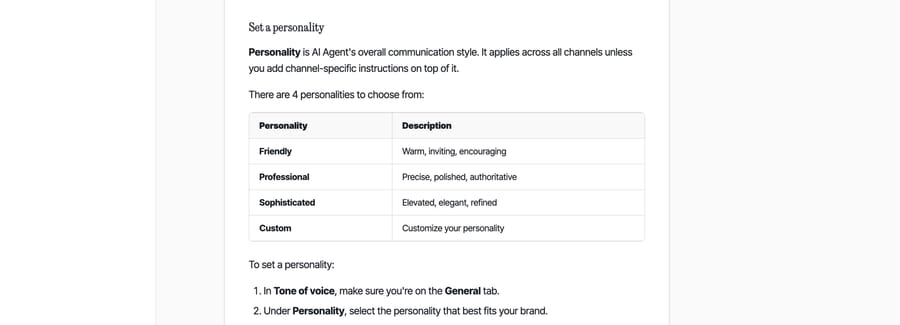
The three presets are adjectives, and an agent told to be "warm" writes the way everyone's agent writes when told to be warm. Custom is where a brand voice actually goes. It takes plain language, up to 3,000 characters. Gorgias says to focus on style principles: how AI Agent should sound, which words and phrases fit the brand, and which general behaviors to avoid.
What works in that field, from how support teams write style guides:
- Sentence shape. "Short sentences. One idea per sentence. No more than three sentences before the answer."
- Register. "Write like a friendly store associate, not a bank. Contractions are fine."
- Answer first. "Put the answer in the first sentence. Apologize only when we made a mistake."
- Two or three sample lines from replies your best agent actually sent, labeled as examples of the voice.
If your brand guidelines run longer than 3,000 characters, Gorgias suggests prioritizing what applies to every conversation. Rules for specific situations belong in skills (see the skills section below).
2. How do you fix a repetitive greeting and sign-off?
The What to say section has three fields of up to 600 characters each: Greeting, Sign-off, and Brand-specific terminology or acronyms. Gorgias's own examples: always greet with "Hi [Customer's First Name]," never "Dear" or "Hello"; always end with a set line; speak as "we/us/our" and capitalize product names.
One detail catches teams out on email. Gorgias says the sign-off "appears as a line before your email signature." If your email channel already has a signature that ends "Thanks, the Acme team," a sign-off that says "Best regards, Acme Support" stacks two closings, and doubled closings are one of the clearest signs a machine wrote the message. Pick one place for the closing.
3. How do you stop the stock phrases that give it away?
The What to avoid section has one field: Forbidden words, phrases, or behaviors. This is the fastest fix for the "too AI" complaint, because the phrases customers react to are predictable. Start the list with the ones your team would never write:
- "I understand your frustration" and "I completely understand"
- "I apologize for any inconvenience this may have caused"
- "Rest assured"
- "Please don't hesitate to reach out"
- "Is there anything else I can help you with today?" at the end of every message
- Restating the customer's question back to them before answering
Behaviors go in the same field: "Never promise a delivery date," "Never offer a discount unless the customer asks about price," "Don't use exclamation marks."
The Emojis section sits next to it. You can turn emojis off entirely or allow them with a list of allowed and forbidden emojis. An emoji in a reply about a lost parcel reads wrong to most customers, so if you allow them, restrict the list.
What the first three fixes change, in one reply. This is our example, not Gorgias output. A customer on chat asks, "Did my order ship yet?" With the defaults left in place, a reply often looks like this:
Dear valued customer, thank you for reaching out! I completely understand how important your order is to you. I'm happy to help. I've checked your order #4821, and I can confirm that it has shipped and is on its way. You can track it using the following link. Please don't hesitate to reach out if there's anything else I can help you with today! Best regards, Acme Support
With a custom personality ("short sentences, answer first, contractions are fine"), a "Hi [first name]" greeting, no sign-off on chat, the stock phrases on the forbidden list and Concise verbosity on chat, the same answer reads:
Hi Dana, yes, order #4821 shipped yesterday with UPS. Here's the tracking link: it should arrive by Friday.
Same facts, a third of the length, and nothing a person on your team wouldn't write.
4. How do you set a different reply length per channel?
A reply length that's right for email reads like a wall of text in a chat bubble. On the Channel-specific tab, select Email, Chat, SMS or Socials and set Verbosity to Concise, Balanced or Detailed. Each channel also gets an Instructions field of up to 1,500 characters for formatting rules. These build on the general personality rather than replacing it, and a channel you leave empty uses the general settings.
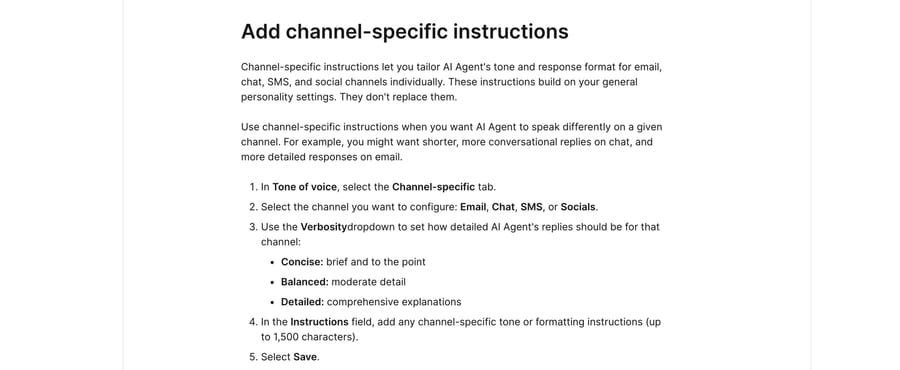
A reasonable starting point: Concise on chat and SMS, with "no greeting after the first message, no sign-off, one question at a time"; Balanced on email, with "short paragraphs, the answer in the first line, steps as a numbered list"; Concise on socials, with "never include order details in a public comment."
5. Should you rename "AI Agent Bot," and how do you disclose AI?
Gorgias's Change AI Agent's name article says AI Agent appears in your helpdesk as a user, and the default name is "AI Agent Bot." Change it under Settings, then Users, then AI Agent Bot. The name applies to all future AI Agent replies across every channel and store.
Renaming isn't the same as hiding it. The same article lists the disclosure options per channel: an email signature added under AI Agent, then Email; an SMS footer on the first message; and on chat, Gorgias adds "This chat is AI-powered for faster assistance." to the front of your privacy policy link.
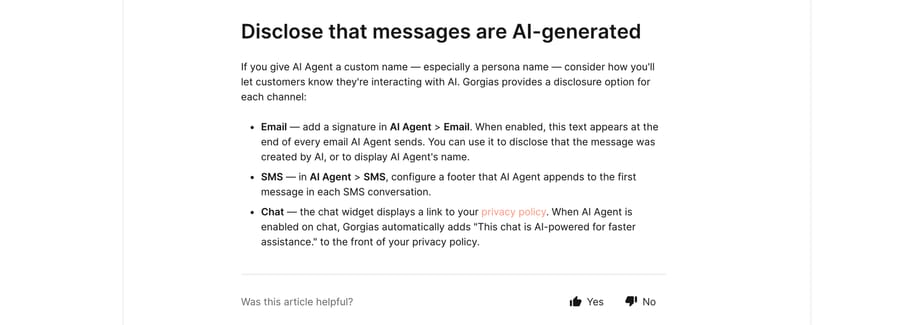
Our view: a name that fits the brand, plus a plain disclosure line, reads better than a fake human persona. Customers who find out later that "Sarah" was an AI tend to be harsher on every reply she sent.
6. Why do situational rules belong in skills, not tone?
If AI Agent sounds right but does the wrong thing, the instruction is probably in the wrong place. Gorgias says tone of voice is for style, and instructions about specific situations ("when a customer asks about returns, do X") belong in skills. A skill is linked to one or more intents, and AI Agent follows its instructions when it detects a matching one.
Putting "if the order is late, apologize and offer 10%" in the personality field makes every reply a little apologetic, including ones about products. Moving it into a skill for the late-order intent keeps the apology where it belongs. Our Gorgias AI Agent explainer covers when to use guidance, a skill or a Help Center article.
7. How do you fix vague answers caused by knowledge gaps?
Go back to the third symptom: answers that are polite and say nothing. Open a few of those tickets and click Show reasoning under AI Agent's message. Gorgias's coaching article says the reasoning summary lists the sources AI Agent used. If the list is short, or the sources don't cover the question, the fix is a guidance entry, a Help Center article or a skill for that topic, not a tone change.
Our review of Gorgias AI Agent from merchant feedback covers the recurring complaints, and most of the "it made something up" ones trace back to the same gap. If your team already has good answers saved as macros, those are the raw material; our guide to Gorgias macros covers how they're structured.
8. How do you test and coach AI Agent after each change?
After each change, use Playground at the top right of Tone of voice. Pick a channel, type a question, and read the reply. Gorgias says getting the tone right "may take a few iterations," and recommends testing each channel separately if you set channel instructions. For tests against a specific customer profile or order history, Gorgias's test conversations article covers the advanced options, and it warns to use a fake customer profile because actions can affect real order data.
Once AI Agent is live, coaching happens in the AI Feedback panel. In the Inbox, under the AI Agent views, To review lists closed tickets ready for feedback.
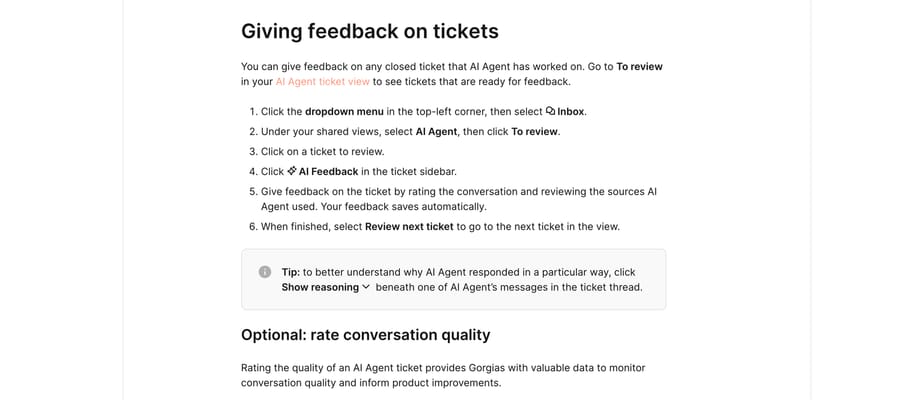
The distinction that matters: Gorgias says your rating of a conversation ("Bad," "Okay," "Good") is sent to Gorgias to improve AI Agent over time, and that ratings "don't immediately change the way AI Agent behaves in conversations with your customers." Rating the knowledge sources it used, or editing them from the ticket, is what changes future replies. If you've been rating conversations Bad and nothing improves, that's why.
Which plans include Gorgias AI Agent tone settings?
The two Gorgias pages don't quite agree. The tone of voice help article lists the feature for "All plans with AI Agent," for Owner, Admin and Lead roles, with Shopify stores. Gorgias's pricing page, which now includes AI Agent on every plan, has a Brand voice and guardrails row that shows a dash for Starter and a check for Basic, Pro and Advanced. If you're on Starter and can't find the settings above, that's the likely reason; check with Gorgias before upgrading for this alone. Our Gorgias pricing guide covers what else changes between tiers.
How does Macha keep replies sounding like your team?
Macha is an AI agent layer that runs inside the help desk you already use, Gorgias included. It treats voice as an output of setup rather than a settings page you tune after launch:
- The instructions start from your own replies. Macha's team analyzes about a month of your past tickets and writes the agent's instructions from how your team already answers each category: the phrasing, the length, what they offer and when they hand off.
- Every draft is read before go-live. The agent is tested on a sample of past tickets, and Macha's team reads the drafts before it touches a live ticket.
- Safe mode shows your team the tone first. Drafts land as internal notes in Gorgias, so your agents see exactly how replies sound and correct them before any customer does. Gorgias's billing article says changes that don't include a reply to the customer, including internal notes, don't make a ticket billable.
- Changes are someone's job. A dedicated success manager handles instruction changes after go-live, so "stop saying rest assured" is a message to a person, not a settings hunt.
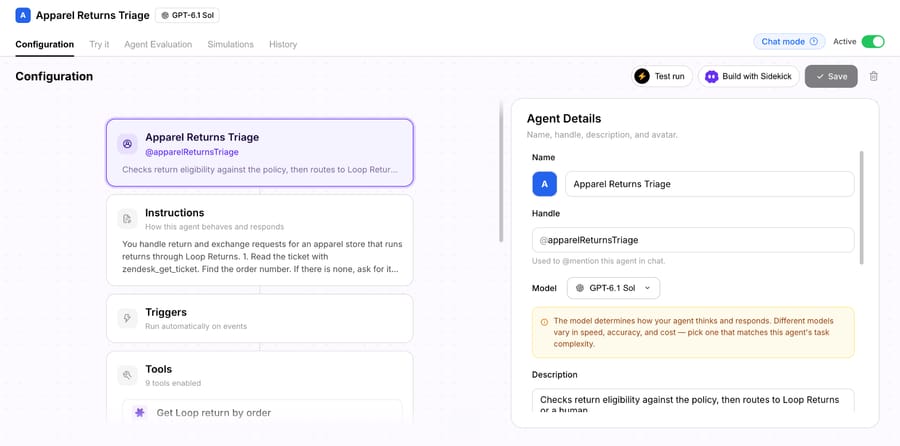
On Gorgias, the agent reads the ticket and the customer, searches your macros, looks up Shopify orders through Macha's Shopify connector, and posts a note or a reply, plus tags, status and assignment.
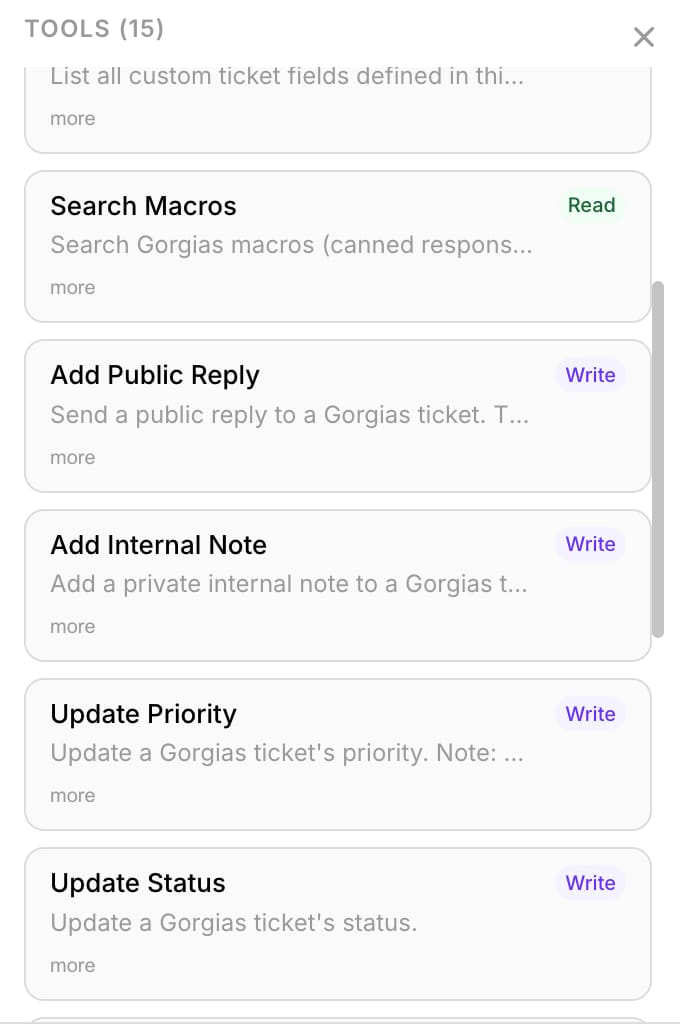
The use case for replying with macros and knowledge, the Gorgias integration and Macha on Gorgias show the workflow. For a broader look at drafting with AI in Gorgias, see our guide to drafting Gorgias replies with AI.
Macha fits teams on Gorgias that have tried tuning AI Agent and still get "can I talk to a human," and that want someone else to own the instructions. It's priced at about $0.40 per ticket, which includes setup and the success manager; pricing lists the tiers, and done-for-you setup explains the rollout. The trial is $50 of free usage (about 125 tickets), no credit card, no time limit.
Common questions
Where are the tone of voice settings in Gorgias AI Agent?
From the main menu, go to AI Agent, then under Train select Tone of voice. If more than one Shopify store is connected, pick the store from the dropdown at the top of the AI Agent menu first. Owner, Admin and Lead roles can change the settings.
How long can a custom Gorgias AI Agent personality be?
Up to 3,000 characters. The greeting, sign-off and brand terminology fields take up to 600 characters each, and each channel's instructions take up to 1,500. Gorgias recommends keeping the personality to style principles and putting situational rules in skills.
Can I stop Gorgias AI Agent from using certain phrases?
Yes. Tone of voice has a What to avoid section with a Forbidden words, phrases, or behaviors field. List the stock phrases you don't want, plus behaviors such as promising delivery dates. Test the result in Playground before going live.
Why did my feedback not change how Gorgias AI Agent replies?
Gorgias says conversation ratings are sent to Gorgias to improve AI Agent over time and don't immediately change its behavior. To change future replies, rate the sources AI Agent used in the AI Feedback panel, add a missing source, or edit the skill, guidance or article directly.
Do Gorgias tone of voice settings work in other languages?
Yes. Gorgias's help article says tone of voice instructions apply regardless of the language AI Agent replies in, and you can write them in English even if AI Agent serves customers in other languages.
Should Gorgias AI Agent pretend to be a person?
We'd advise against it. Gorgias lets you rename AI Agent and offers disclosure options on each channel: an email signature, an SMS footer, and an "AI-powered" line on chat. A brand-fitting name with a plain disclosure reads better than a persona customers later discover.
How we researched this
We checked every setting and limit in this article against Gorgias's public help center and pricing page, read on November 21, 2026: Customize AI Agent's tone of voice, Change AI Agent's name, Coach AI Agent and give feedback to improve its responses, Customize how AI Agent hands over to your team, Create a new skill for AI Agent, Preview AI Agent responses with test conversations, and How you're billed for using Gorgias. The plan note comes from the Brand voice and guardrails row of the pricing page's feature table, served in US dollars from our location. We didn't configure AI Agent in a Gorgias account for this article, and the example personality lines and banned phrases are our suggestions, not Gorgias defaults. The Reddit thread is paraphrased and linked without usernames. Macha's approach is described from its done-for-you setup process and a screen captured in Macha's demo workspace, where the agent shown runs on our Zendesk sandbox.