







 Shopify
 Stripe
 Slack
 Notion
 Google Workspace
 Confluence


Leaving Freshdesk? What Its Exports Miss, and How to Get Everything Out Before Deletion (2026)


Freshdesk's two built-in exports don't give you a complete copy of your help desk. The ticket export from the Tickets tab returns a CSV or Excel file of ticket fields with no replies, no private notes and no archived tickets. The account export from Admin returns XML with full threads, but attachments come as links rather than files, time entries and agents are missing, and custom fields arrive as internal keys. Freshdesk deletes an account 14 days after the subscription ends and says the account export can take up to 10 business days, so the safe plan is to start at least two weeks before your end date and fill the gaps through the API. This checklist covers what each export leaves out and how to close every gap.
Key takeaways
- Freshdesk's ticket export from the Tickets tab returns ticket fields as CSV or Excel and, in Freshworks' own words, does not include the entire conversation or archived tickets.
- Freshdesk permanently deletes an account and its data 14 days after the subscription end date, and Freshworks warns the account export can take up to 10 business days.
- A September 2026 r/sysadmin audit found the Freshdesk XML account export carried attachments as links that expire after 7 days, with no time entries and no agent records.
- Freshdesk's API rate limit is 100 calls a minute on Growth and 400 on Pro, so a 20,000-ticket pull at 3 calls a ticket takes about 10 hours on Growth and 2.5 on Pro.
- Run the full Freshdesk export while you're still on your current plan, because a downgrade before leaving cuts the API rate limit the extraction depends on.

| What you need to keep | Ticket export (Tickets tab) | Account export (Admin, XML) | API |
|---|---|---|---|
| Ticket fields | Yes, CSV or Excel | Yes | Yes |
| Replies and private notes | No | Yes, plus one hidden system note per ticket | Yes, per ticket |
| Archived tickets | No | Yes | By ID only: /tickets/archived/{id} and its conversations (no list endpoint) |
| Attachments as files | No | No, links that expire (reported 7 days) | Download each from its URL |
| Custom field labels | Yes | No, raw keys like cf_reference_number_5021295 | Join with /ticket_fields |
| Time entries | No | No | Yes, /time_entries |
| Agents and groups | No | Groups only | Yes, /agents and /groups |
| Automations, SLAs, canned responses | No | Not listed | Yes, documented endpoints |
Why doesn't one Freshdesk export give you everything?
Because each export was built for a different job, and none of them was built for leaving.
The ticket export is a reporting tool. You filter the ticket list, pick fields, and get a spreadsheet. Freshworks' article on it, modified 16 February 2026, says plainly that it "will NOT give you the entire conversation from the ticket or historical data (archived tickets)" and points you to the account export for that (Freshworks support). It needs the Admin or Supervisor role.
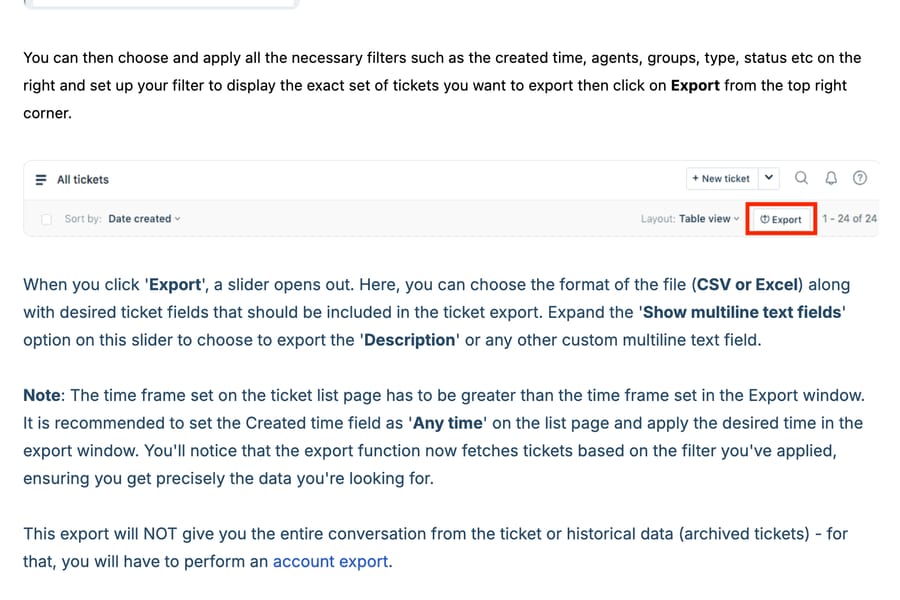
The account export is a data dump. An Account Administrator starts it from Admin > Account > Account Details, and Freshworks says it covers "all the data within your account (including tickets, solution articles, etc.)", emailed "in XML format" (Freshworks support). It's the closest thing to a backup. It's also the one people trust too much.
The API is the only route that reaches everything, and it's metered. Freshdesk's API reference says an account can purchase additional API calls to raise its rate limit, so the speed at which you can get your own data out is something the vendor charges for. The incentive runs one way: a slow exit costs Freshworks nothing and makes staying the easy option. No help desk designs its exit path to be pleasant, and Freshdesk is no worse than most.
Our step-by-step on the mechanics, with the query parameters, is how to export tickets from Freshdesk. This page is the exit audit: what's missing, and what to do about each gap.
What did the r/sysadmin audit find missing from the Freshdesk export?
In September 2026, after a Freshdesk price-rise thread in r/msp, a sysadmin audited both exports on a trial account with 43 tickets, 64 replies and notes, and 14 attachments, and posted the results (r/sysadmin thread). The findings, paraphrased:
- The ticket export: a CSV with 47 columns of ticket, requester and company fields. No threads, no notes, no attachments. The Tags column came back empty on every row, though every ticket had tags.
- The account export: more complete than expected. Descriptions, full threads including private notes, tags, custom fields, contacts, companies and groups.
- But in the account export: attachments were signed S3 links carrying X-Amz-Expires=604800, which is 7 days, not files. No time entries. No agents. Custom fields appeared as raw keys such as cf_reference_number_5021295 with no label. Every ticket carried a hidden system note, so the file showed 107 notes where the UI showed 64.
- The format: XML, so you write a parser before you can read anything, and nothing in either export tells you whether you got everything.
Two caveats. It was one trial account, and Freshdesk's behavior can differ by plan and account age. And the tester's 50 API calls a minute matches Freshdesk's API reference, which sets a default of 50 a minute for all trial users; paid Growth accounts get 100. Treat the thread as a checklist of things to verify on your own account, not as documentation.
The comments added two useful points. One reader had run the ticket export, then learned from the thread that it was close to useless before letting the account lapse. Another made the timing argument: a week is a data extraction window, not a migration window, so get the data out while the account is live and choose the destination afterward.
How long do you have before Freshdesk deletes your data?
Fourteen days after the subscription ends. Freshworks' cancellation article says Freshdesk "permanently deletes your account and account data 14 days after your subscription end date," and that you can reactivate by emailing support within 14 days of canceling. The same article tells you to export first, because "the export can take up to 10 business days" (Freshworks support).
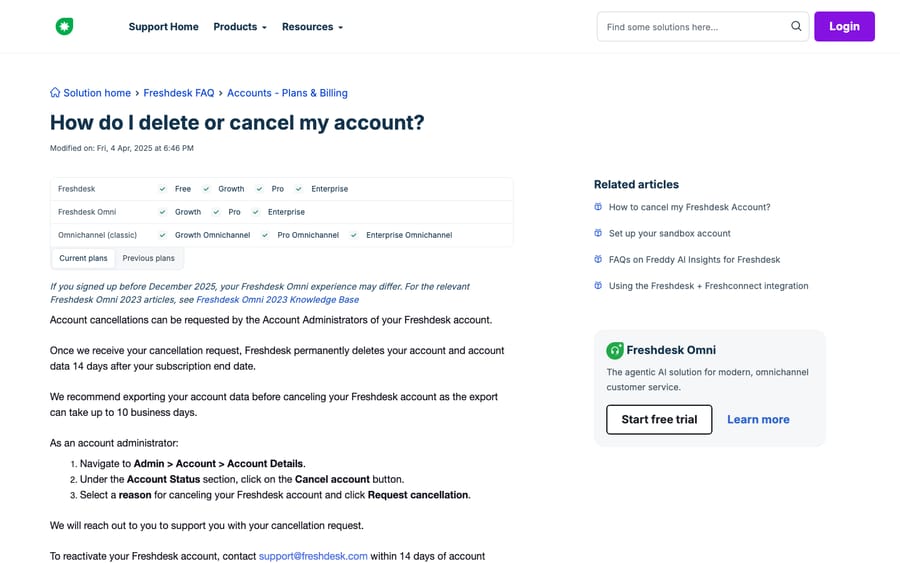
Put those two numbers together. Ten business days is two calendar weeks. If you request the account export on the day you cancel, it can arrive the same day the account is deleted. Start the account export at least two weeks before the end date, and start the API pull at the same time rather than waiting to see what the XML contains.
If you were on the old free plan, the clock is set by Freshworks rather than by you. The Free program now runs for 6 months and two agents, after which you upgrade or leave (Freshworks' Free program article, modified 22 September 2026). The poster in the August 2026 r/sysadmin thread about the free plan ending got an email; a reader in the September export thread described a phone call warning that the free account would expire unless they upgraded. Our free Freshdesk alternatives guide covers where those teams went.
What should you pull through the API that no export gives you?
Everything in the table's last column. Freshdesk's API reference documents an endpoint for each gap:
| Gap | Endpoint (Freshdesk API v2) | Why it matters |
|---|---|---|
| Full threads for live tickets | GET /api/v2/tickets/{id}/conversations | The ticket export has none; the API count matches the UI, so you can reconcile |
| Custom field labels | GET /api/v2/ticket_fields | Turns cf_ keys back into names a new desk can map |
| Time entries | GET /api/v2/time_entries | Billing history for MSPs and agencies; absent from both exports |
| Agents | GET /api/v2/agents | Who handled what; needed to map owners in the new desk |
| Groups | GET /api/v2/groups | Routing structure |
| Automation rules | GET /api/v2/automations/{automation_type_id}/rules | Your triggers and time-based rules, as JSON you can rebuild from |
| SLA policies | GET /api/v2/sla_policies | Targets and escalation settings |
| Canned responses | GET /api/v2/canned_response_folders, then /canned_response_folders/{id}/responses | Years of approved reply wording |
| Satisfaction ratings | GET /api/v2/surveys/satisfaction_ratings | CSAT history for reporting |
The configuration rows are the ones teams forget. A migration tool moves tickets and contacts; it usually doesn't move the rules that made the desk behave. You'll rebuild automations by hand in the new desk anyway, but rebuilding from a JSON copy of the old rules is an afternoon, and rebuilding from memory is a month of "why did this ticket not get assigned". Our Freshdesk migration checklist has the rebuild order.
Two behaviors from the thread to plan around. Archived tickets don't come back from the ticket list endpoint. The API can read one by ID (GET /api/v2/tickets/archived/{id} and its /conversations), but only the account export lists them, so keep the XML even after the API pull. And the API doesn't return the hidden system notes the XML includes, which is why API counts match the UI and the XML's don't.
How long does a full Freshdesk API pull take?
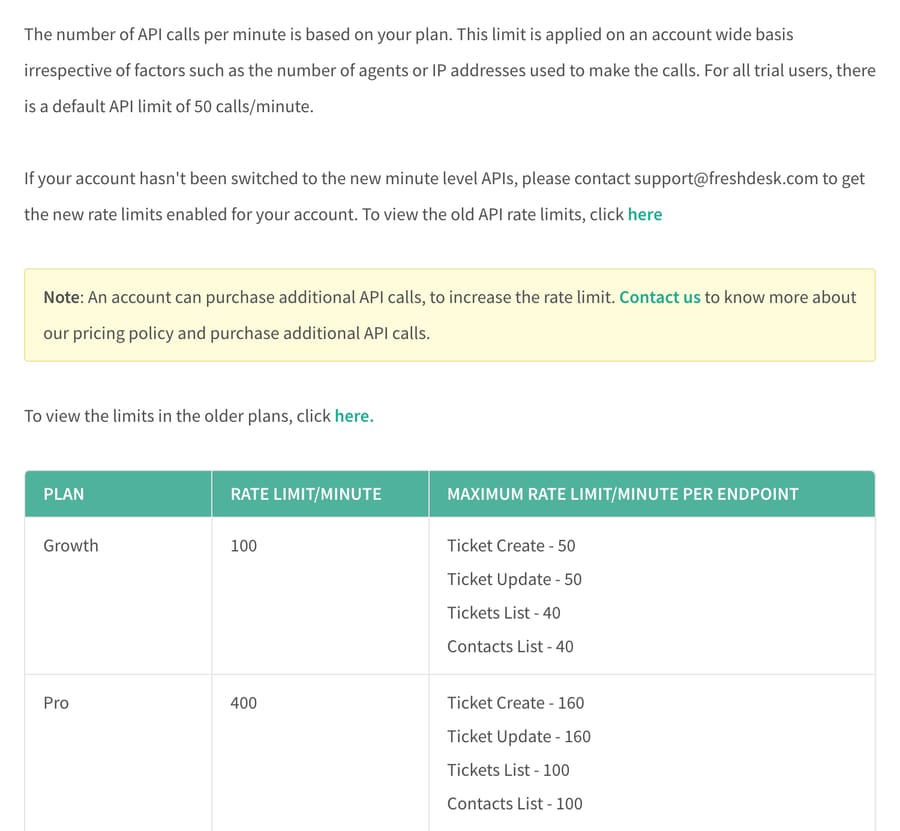
Longer than people expect, and it depends on your plan. Freshdesk's API reference sets the account limit at 100 calls a minute on Growth, 400 on Pro and 700 on Enterprise, with a Tickets List sub-limit of 40, 100 and 200.
The thread's estimate is 2 to 3 calls per ticket: the list call amortized across a page, a conversations call, and sometimes a second conversations page or attachment fetch. Take 3 calls and a 20,000-ticket account:
- Growth: 60,000 calls at 100 a minute is 600 minutes, about 10 hours.
- Pro: 60,000 calls at 400 a minute is 150 minutes, about 2.5 hours.
- Enterprise: at 700 a minute, about 1.5 hours.
Attachments add their own downloads, and the ticket list has a page ceiling, so large accounts walk forward in windows on updated_since rather than paging through. The Freshdesk API guide covers the auth and the windowing.
One commenter in the thread argued for pulling everything while you're still on the plan with the better rate limit. Teams trying to save money often drop to the cheapest tier for the last month, which quarters their extraction speed exactly when they need it. If you're on Pro, do the pull on Pro.
What should the exit checklist look like?
In order, starting at least two weeks before your subscription end date:
- Request the account export from Admin > Account > Account Details. Track it at Admin > Accounts exports. Keep the XML even after everything else is done, because it's the only place that lists archived tickets; use its IDs to pull them through the archived-ticket endpoints.
- Pull reference data first: ticket fields, agents, groups, contacts, companies. These are small and they make everything after them readable.
- Pull tickets and conversations through the API, windowed on updated_since, writing to disk as you go so the job can resume.
- Download attachments as files the moment you see the link. The thread found the export's links expire after 7 days; treat API attachment URLs the same way.
- Pull configuration: automation rules for each type, SLA policies, canned responses and folders, satisfaction ratings, time entries.
- Reconcile counts per entity. Tickets in the UI against tickets pulled; conversations per ticket against the UI. Expect the XML's note count to run higher because of the system notes.
- Spot-check 20 tickets by hand, including your longest escalations and anything with attachments.
- Only then cancel, and note the date. You have 14 days to change your mind.
If you'd rather pay someone, the best Freshdesk migration tools compares Help Desk Migration, ClonePartner, the native importers and a DIY API script on what they move and what they cost. Most of them move records into a destination desk. Fewer give you a standalone archive, so ask.
A cheaper middle path came up in the thread too: keep one Freshdesk seat for a few months as a read-only archive. It works if you only need occasional lookups. The commenter's objection is fair, though: the deadline moves rather than disappears, and when you finally cancel you may be on the cheapest tier with the slowest API.
Do you need to leave Freshdesk at all?
It depends why you're leaving. The two common reasons in 2026 threads are price (a 35% renewal increase reported in r/msp in September, and the free plan ending) and AI cost.
If it's the seat price, moving makes sense, and the checklist above is how you do it safely. The Freshdesk pricing guide has the current tiers: $19, $55 and $89 an agent a month on annual billing, checked 21 November 2026.
If it's Freddy, the AI meter, you have a cheaper option than a migration. Freddy AI Agent sessions are $49 per 100 after the first 500, whether or not the AI resolves anything, and Freddy AI Copilot is $29 an agent a month on Pro and Enterprise (Freshdesk pricing page, 21 November 2026). Swapping the AI layer doesn't need a new help desk, an export or a 14-day countdown.
Where Macha fits
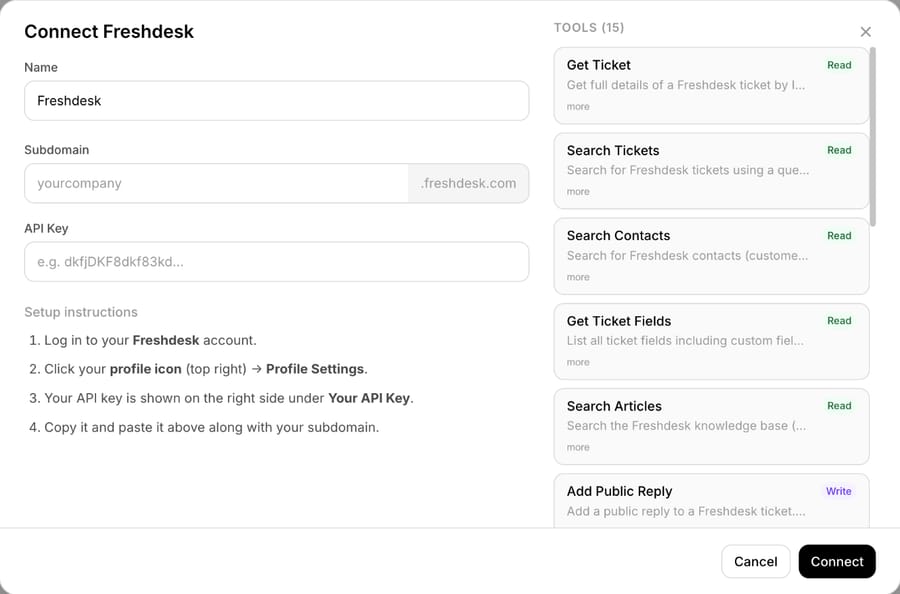
Macha runs AI agents inside the help desk a team already uses. On Freshdesk, the connector authenticates with an API key and gives an agent tools to read tickets with their conversations, search contacts and solution articles, read attachments, and write back: public replies, internal notes, priority, status, tags, fields and assignment (Macha's Freshdesk integration). A run starts automatically on Freshdesk's Ticket Created or Ticket Updated event.
Macha suits a team that likes Freshdesk well enough but is paying for Freddy sessions that don't resolve much, or that wants agents acting inside tickets without rebuilding years of automations on a new desk. It's the done-for-you option: the Macha team analyzes your past tickets, builds the knowledge base and the agent on your existing Freshdesk, and runs it in safe mode, drafting internal notes for your team to approve, until the drafts are right. That's included on the trial and every plan at about $0.40 per ticket, which covers setup and a dedicated success manager who handles your changes. If you do move, Macha runs on Zendesk, Freshdesk, Gorgias, Front, Gladly, Crisp, HubSpot or Intercom, so the agent comes with you; see Macha on Freshdesk and done for you.
Common questions
Does the Freshdesk ticket export include conversations?
No. Freshworks says the ticket export from the Tickets tab won't give you the entire conversation or archived tickets. You get ticket fields, plus the description if you expand "Show multiline text fields". For replies and private notes, use the account export or the API's conversations endpoint.
What format is the Freshdesk account export?
XML, emailed to the account administrator, per Freshworks' support article. You'll need a parser or a conversion script before you can open it in a spreadsheet, and custom fields appear as internal keys, so join them with the ticket fields list from the API.
Are attachments included in the Freshdesk export?
Not as files. The September 2026 r/sysadmin audit found the account export carried attachments as signed links set to expire after 7 days. Download them as soon as the export arrives, or pull them through the API.
How long does Freshdesk keep data after cancellation?
14 days after the subscription end date, after which Freshdesk permanently deletes the account and its data. Freshworks says the account export can take up to 10 business days, so request it at least two weeks before you cancel.
Can I keep Freshdesk as a read-only archive instead?
Yes, by keeping one paid seat. It's a reasonable choice for occasional lookups over a few months. Run the full API pull before you downgrade to that seat, though, because a lower plan means a lower API rate limit.
Can I add AI to Freshdesk instead of leaving?
Yes. Freshworks sells Freddy AI, and third-party agent layers such as Macha connect to Freshdesk through its API. Macha's team builds and runs the agent for you; the trial is $50 of free usage (about 125 tickets), no credit card, no time limit, with the pricing page showing the full table.
How we researched this
We read four Freshworks support articles on 21 November 2026: the ticket export article (225158, modified 16 February 2026), the ticket-content export article (237405, modified 22 May 2024), the helpdesk data export article (225487, modified 9 March 2023) and the cancellation article (225486, modified 4 April 2025). The rate limits and endpoint names come from Freshdesk's API reference, read the same day. The Freddy and seat prices come from Freshdesk's pricing page, read 21 November 2026 in USD.
The audit findings (47 columns, empty Tags column, 7-day attachment links, raw cf_ keys, 107 notes against 64, no time entries or agents) are one person's results on one trial account, posted to r/sysadmin in September 2026. We read the thread and its comments through the Arctic Shift Reddit archive on 21 November 2026 and paraphrase them without usernames. We checked each documented claim against Freshworks' own pages, but we didn't rerun the export on a Freshdesk account ourselves, so verify each gap on yours.
The pull-time arithmetic is ours: 20,000 tickets × 3 calls = 60,000 calls, divided by the published per-minute limit for each plan. Real runs take longer because of attachments and retries. The Macha connector details come from our own connector screen and integration listing. Examples are illustrative.
If the Freddy bill is the reason you're exporting, try the cheaper fix first: start a trial and have the Macha team set up an agent on the Freshdesk you already have.