





 Shopify
 Stripe
 Slack
Slack Notion
 Google Workspace
 Confluence

How Do You Lower Your Gorgias Bill Without Losing Coverage? (2026)


Gorgias bills on tickets that get a reply from your helpdesk, not on seats, so most of a bill you can cut is waste: Rule replies nobody needed, conversations split into second tickets, unused plan headroom and AI resolutions charged twice. Four levers remove it without reducing coverage.
Key takeaways
- Lowering a Gorgias bill means cutting wasted billable tickets: tighten auto-reply Rules, avoid conversation splits, right-size the plan tier and deflect repetitive volume without per-resolution double billing.
- Gorgias splits a conversation into a new billable ticket when an email reply arrives more than 10 days later, or a chat, SMS, voice or social DM message after 3 days.
- Gorgias plans run from Starter at $10 a month for 50 tickets to Advanced at $900 for 5,000, with overage at $0.40 on Starter and Basic and $0.36 on Pro and Advanced.
- Gorgias AI Agent charges an automation fee plus a ticket fee when it resolves a ticket alone, and interactions past the plan's bundle cost $1.50 each.
- A Pro brand automating 600 of 2,000 monthly Gorgias tickets pays about $1,165 a month at published prices, versus the $720 Featurebase estimated.

The cheapest way to lower a Gorgias bill is to stop paying for tickets that never needed a reply: Gorgias charges for every ticket that gets at least one message from your helpdesk, so auto-reply Rules, conversations that split into new tickets after 3 or 10 quiet days, an oversized plan and AI resolutions billed twice are the four places the money goes. None of the fixes cost you coverage.
| Lever | What it cuts | Effort |
|---|---|---|
| 1. Tighten auto-reply Rules | Billable tickets created by a Rule answering spam or no-reply mail | Low |
| 2. Work with the split windows | Second tickets when a customer replies after 10 days (email) or 3 days (chat, SMS, voice, social DMs) | Medium |
| 3. Right-size the plan | Overage at $0.40 or $0.36 a ticket, or unused headroom | Low |
| 4. Deflect repetitive volume | The ticket count itself, if the AI billing unit doesn't double the cost | High |
What does Gorgias actually charge for?
You can't cut a bill you don't understand, and Gorgias's model trips up a lot of teams. A ticket becomes billable the moment at least one message is sent from your helpdesk, whether that message comes from a human agent, AI Agent or an automated Rule. Per Gorgias's how you're billed documentation, the corollary matters as much: an inbound ticket that never gets a helpdesk reply is not billable, and neither are internal-only changes like tags, notes or assignee updates, nor replies you make outside the helpdesk (answering a Facebook DM in Facebook itself, for example).
Gorgias also filters newsletters, spam and auto-responders automatically, so you generally aren't paying for the marketing noise that lands in a shared inbox. On the Gorgias pricing page (checked 24 September 2026), the plans are Starter at $10 a month for 50 tickets (monthly billing only), Basic at $60 for 300, Pro at $360 for 2,000 and Advanced at $900 for 5,000. Annual billing drops Basic to $50, Pro to $300 and Advanced to $750 a month. Overage runs $0.40 a ticket on Starter and Basic and $0.36 on Pro and Advanced. Enterprise, for teams above 5,000 conversations a month, is custom pricing with no published overage rate. If any of that is fuzzy, our Gorgias pricing explained breakdown goes deeper, and what is Gorgias covers the product itself.
How do you stop spam and auto-replies from creating billable tickets?
Gorgias's automatic spam filtering is good but not perfect. The tickets that quietly cost you are the ones where a Rule fires an auto-reply to something that never needed one: an out-of-office bounce, a "do-not-reply" system email, a promotional address that slipped past the filter. Because a Rule-sent message makes a ticket billable, an over-eager auto-reply rule can mint billable tickets by the hundred during a campaign send.
Audit your Rules for any that reply broadly on inbound. Tighten conditions so auto-replies only fire on genuine customer intents (order status, returns, WISMO) rather than "any new email." Add sender-based exclusions for known no-reply and vendor addresses. The goal is simple: never let the helpdesk send the first message unless a customer actually needs an answer. This is the cheapest lever, because it removes cost without touching response quality.
Why do old conversations come back as new billable tickets?
This one causes the most billing shock, and the rule is precise. Gorgias splits a dormant conversation into a new ticket when the customer comes back after a channel-specific inactivity window, whether the old ticket was open or closed. The current windows in Gorgias's billing documentation:
- Email: a reply more than 10 days after the last message.
- Chat, Instagram DMs, Facebook Messenger and WhatsApp: a new message more than 3 days after the last one.
- SMS: a new message after more than 3 days.
- Voice: a call between the same two numbers after more than 3 days.
Chat and social DMs used to be described as never splitting; that's no longer what the documentation says. Each new ticket is billable only if it receives a helpdesk response, and in practice it usually does, which is why merchants describe getting charged twice for one conversation. Featurebase's pricing analysis puts it bluntly: "Reopened tickets after a few days of inactivity often count as new, meaning you might get charged twice for the same conversation," and "Volume spikes can double your costs overnight." You can't switch the windows off, but you can work with them:
- Resolve fully the first time. A conversation that's genuinely closed is far less likely to come back 11 days later. Ambiguous, half-answered tickets are the ones that boomerang.
- Finish slow back-and-forths inside the window. On chat and social the window is only 3 days, so a follow-up you promise "early next week" on a Thursday can land as a second ticket.
- Watch the WISMO pattern. "Where is my order?" threads that come back when the package is late are a classic double-count. Proactive shipping updates cut the return visit before it happens.
Should you move your Gorgias plan up or down?
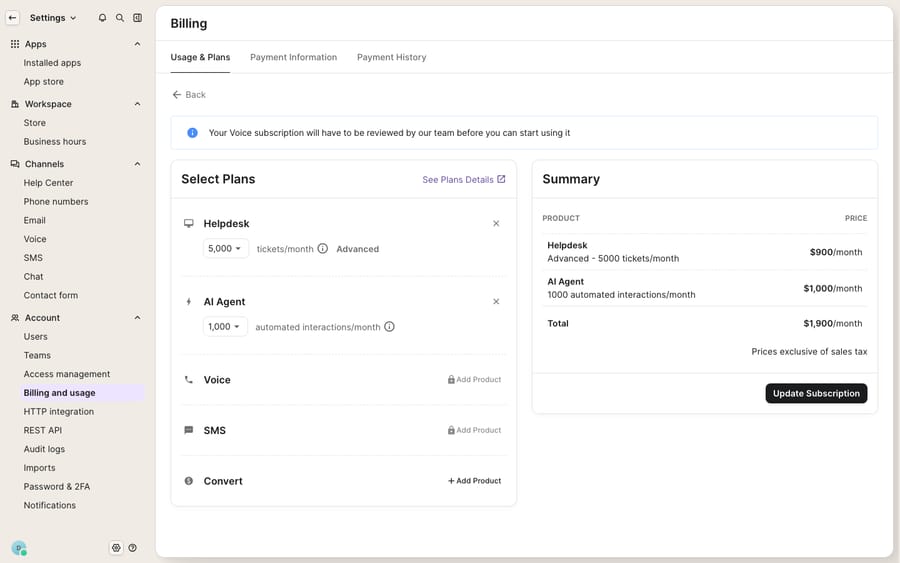
The screen above is where the biggest single adjustment usually lives. Under Settings → Account → Billing & usage, the Usage & Plans tab lets you adjust your ticket tier and AI Agent interaction tier directly, with a live Summary that recalculates as you change the dropdowns.
Right-sizing cuts both ways. If you pay overage every month, say you're on Pro (2,000 tickets) but run 2,600, the 600 extra tickets cost $216 at $0.36 each. That's still cheaper than Advanced here ($900 versus $576 monthly), but the break-even arrives fast: past about 3,500 tickets a month on monthly billing, Advanced wins. Conversely, if you provisioned for a Black Friday peak and now run at half that volume, you're paying for headroom you don't use, and stepping down (or removing an add-on you never adopted) is free money. Pull three to six months of actual ticket counts from the usage view before you touch the dropdown, and size to your typical month with a small buffer, not your worst one.
| If your pattern is… | The cheaper move is usually… |
|---|---|
| Heavy overage every month | Step up a tier once overage exceeds the price gap |
| Provisioned for a peak that passed | Step down to your typical volume + small buffer |
| Paying for add-on products you don't use | Remove them (the × controls) from the plan |
| Spiky/seasonal volume | Size to the median month, accept a few overage months |
| Stable volume, monthly billing | Annual billing: Pro drops from $360 to $300 a month |
Does deflecting volume with AI lower a Gorgias bill?
Every lever above right-sizes what you pay per ticket. Deflection is the only one that lowers the number of tickets, which is why it compounds. In an ecommerce inbox, a large share of volume is a handful of intents (WISMO, returns and exchanges, subscription changes, discount and address edits), and these are the questions that can be answered without a human opening the ticket.
Here the pricing model gets subtle. Gorgias's AI Agent is available on every plan and sold in prepaid bundles: 30 automated interactions on Starter and Basic, 190 on Pro and 530 on Advanced, priced at about $1.00 an interaction monthly or $0.90 annually (Pro's 190 cost $190, or $171 billed annually). Past the bundle, each interaction costs $1.50. The critical part is in Gorgias's billing docs: when AI Agent resolves a ticket without handing it to a human, you pay both the automation fee and the helpdesk ticket fee. A handover to a human means only the ticket fee. Flows, Order Management and Article Recommendations resolutions carry an automation fee too, but no ticket fee.
That dual charge is the source of the loudest complaints. Featurebase's example is a Pro brand automating 30% of 2,000 tickets and paying "roughly $720/month - nearly 2x the initial $360." At today's published prices the same brand pays more: 600 automated interactions on monthly Pro is $360 for the helpdesk, $190 for the 190-interaction bundle and 410 × $1.50 = $615 for the rest, $1,165 a month, unless it buys a bigger bundle. Our Gorgias AI Agent explained post covers the mechanics in full.
The takeaway isn't "avoid AI." Deflection is the best way to shrink a usage-based bill. It's that the billing unit decides whether AI saves you money or quietly doubles it, and a per-resolution fee means the vendor earns more the more resolutions it books, whatever the ticket fee already covered.
Is Gorgias still worth paying for?
For many Shopify-native brands, yes. The unified inbox, the Shopify/Shopify Plus integration that surfaces order and customer data beside the ticket, the macros and Rules, and a capable AI Agent are why Gorgias leads ecommerce support, and our Gorgias review credits all of that. Usage-based pricing is also fair in principle: a two-person store on Starter pays $10, not a per-seat tax.
But size for the complaints. The split-into-a-new-ticket mechanic surprises people, and on chat and social the window is only 3 days. Seasonal spikes can double a bill because ticket overage is uncapped. The AI double-billing structure confuses buyers, and $1.50 per interaction past the bundle makes an undersized AI tier expensive. Gorgias is also built around Shopify, a strength if you're on Shopify and a limitation if you aren't. If those tradeoffs push you past the point of right-sizing, our best Gorgias alternatives guide is the next stop. Otherwise, the four levers here will lower most bills without costing any coverage.
Where does an AI layer fit without changing help desks?
Macha runs on top of the Gorgias you already use as a native connector. It isn't a helpdesk replacement, and it doesn't change how Gorgias bills tickets: a reply Macha posts is still a message from your helpdesk, so the Gorgias ticket fee still applies. What changes is the AI cost unit. Macha charges per ticket, one conversation charged once however many messages it takes, so there's no second per-resolution fee stacked on the ticket. It reads and writes the same Gorgias tickets your team works, resolves the repetitive WISMO and returns volume before it needs a human, and can look up live order or account status through a custom tool that turns your REST API into something the agent can call. The whole cost is on the pricing page: it starts at $299 a month for up to 750 tickets, with setup and monitoring by the Macha team included. It fits Gorgias teams whose repetitive volume is large enough that the AI fee, not the ticket fee, has become the line item that moves.
FAQ
What counts as a billable ticket in Gorgias? Any ticket where at least one message is sent from the helpdesk, by a human agent, AI Agent or a Rule. Inbound tickets that never get a helpdesk reply, internal-only changes (tags, notes, assignee), and replies made outside the helpdesk aren't billable. Newsletters, spam and auto-responders are filtered out automatically.
Do reopened tickets cost extra? They can. Gorgias splits the conversation into a new ticket, billable if answered, when a customer replies more than 10 days later on email, or more than 3 days later on chat, SMS, voice, Instagram DMs, Facebook Messenger or WhatsApp. Resolving fully the first time and keeping follow-ups inside the window avoids the second ticket.
Why did my Gorgias bill spike? Usually one of three things: a seasonal spike pushing you into uncapped overage, an auto-reply Rule minting billable tickets, or AI Agent resolutions charging both an automation fee and a ticket fee, with interactions past your bundle at $1.50 each. The Usage & Plans view shows which.
Where do I change my Gorgias plan? Go to Settings → Account → Billing & usage → Usage & Plans. You can adjust the ticket tier and AI interaction tier from the dropdowns, remove add-on products, and see a live Summary before confirming.
Can I add AI without doubling my bill the way Gorgias's per-resolution AI can? Macha connects to Gorgias as a native layer and charges per ticket, one conversation charged once, rather than per resolution. Gorgias still charges its own ticket fee for replies sent from the helpdesk, but there's no automation fee on top. Gorgias stays your system of record.
Want to shrink the repetitive volume that drives your Gorgias bill? Start a free trial of Macha ($50 of usage, no credit card) and connect it to your Gorgias.






