





 Shopify
 Stripe
 Slack
Slack Notion
 Google Workspace
 Confluence

How Do You Set Up Chat Campaigns in Gorgias? (2026 Steps and Triggers)


A Gorgias chat campaign is a proactive message that fires in your chat widget when a shopper meets conditions you set, such as time on a product page or cart value. Which triggers you get depends on whether your widget is connected to Shopify and whether you pay for Convert.
Key takeaways
- Gorgias chat campaigns are built under Convert → Campaigns with Create Custom Campaign or Create Campaign From Library, then audience triggers, a message, and publish or schedule.
- Gorgias light campaigns cover help desks whose chat isn't connected to Shopify and support two triggers, Current URL and Time spent on page.
- A Gorgias chat widget connected to a Shopify store needs a paid Convert subscription to create any campaign, which unlocks cart value, exit intent and customer-tag triggers.
- A Gorgias campaign is free to display and becomes a billable chat ticket only when the shopper's first reply arrives.
- Macha answers a shopper's campaign reply inside the Gorgias thread and bills per ticket, with plans starting at $299 a month for up to 750 tickets.
To set up a chat campaign in Gorgias, open Convert → Campaigns, click Create Custom Campaign (or Create Campaign From Library), pick the audience triggers, write the message, then publish or schedule it. If your chat widget is connected to a Shopify store, you need a paid Convert subscription to create any campaign; stores without Shopify get light campaigns with two triggers, Current URL and Time spent on page.
| Light campaigns | Convert campaigns | |
|---|---|---|
| Who gets them | Any Helpdesk plan whose chat integration isn't connected to a Shopify store | Convert subscription plus a connected Shopify store |
| Triggers | Current URL, Time spent on page | Behavior, Cart, Customer and Other triggers, including cart value, exit intent and Shopify customer tags |
| Message tools | Basic message | Product cards, discount codes, email capture, AI Copy Assistant |
| Ticket cost | Free to display; the shopper's first reply creates a billable chat ticket | |
What is a Gorgias chat campaign?
A campaign is a rule that says "when a shopper meets these conditions, show them this message in the chat widget." It rides on top of Gorgias Chat and the chat widget you've already installed, so the first prerequisite is a working chat integration on your store. If Gorgias itself is new to you, what Gorgias is is the better place to start before you layer campaigns on top. Only admins can create and manage campaigns.
There are two flavors, and your store platform decides which one you get. Light campaigns are for help desks whose chat isn't connected to a Shopify store: WooCommerce, BigCommerce, Magento, headless or custom sites using a manual widget install. They're available on any Helpdesk plan and support exactly two triggers, Current URL and Time spent on page. Convert campaigns need a paid Convert subscription and a connected Shopify store, and they unlock targeting on cart activity, Shopify customer history, and more. Gorgias documents both in Chat Campaigns (checked 24 September 2026).
That split has a consequence Shopify merchants miss: once your widget is connected to Shopify, there's no free tier of campaigns to fall back on. Gorgias' help article states, "If your chat widget is connected to a Shopify store, you need a Convert subscription to create campaigns." The incentive is plain enough. Shopify stores are the ones where cart-value targeting makes money, so that's where Gorgias charges for it.
How do you start a campaign in Gorgias?
Everything lives in one place. Per Gorgias' Create a Convert Campaign documentation, campaigns are built from the Convert area of your account.
- In the left sidebar, open Convert → Campaigns.
- Click Create Custom Campaign to start from scratch, or Create Campaign From Library to browse pre-made templates (cart recovery, free-shipping nudges, product education) you can clone and edit.
- Under Set up the basics, give the campaign a clear internal name (e.g. "Cart > $75, free shipping nudge") and choose the language.
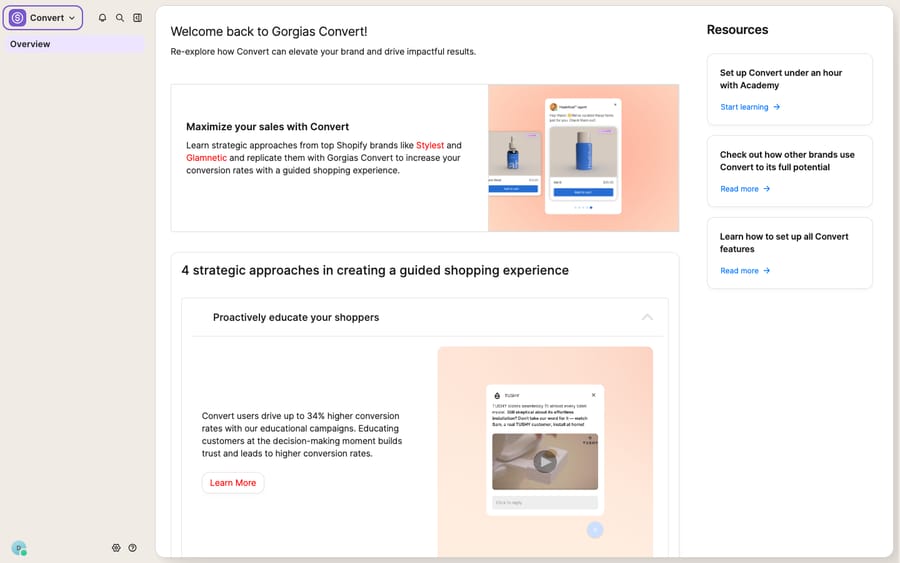
If your trial or account doesn't have a store connected yet, opening Convert → Campaigns may route you to this overview instead of the builder. On a Shopify store, the builder unlocks once the store is connected and Convert is enabled; after that, the audience and message steps below become available.
Which triggers can a Gorgias campaign use?
This is where campaigns earn their keep. Under Choose your audience, you add one or more conditions with + Add Condition, then set a delay (how long before the message fires), a device target (mobile, desktop, or both), and toggles for how replies and incognito visitors are handled. On Convert, Gorgias groups the triggers into four buckets:
- Behavior: Current URL, time spent on page, product tags viewed, number of visits, time spent per visit, exit intent, and out-of-stock product pages.
- Cart: product tags added to cart, and amount added to cart (cart value).
- Customer: Shopify customer tags, number of orders placed, total spent, and products purchased.
- Other: business hours and visitor location (by IP).
The art is combining them. A cart-abandonment campaign is Cart value ≥ $75 and Current URL contains /cart and exit intent, delayed a few seconds so it doesn't fire the instant the page loads. A pre-sales PDP nudge is time spent on page ≥ 30s with Current URL contains /products/. A loyalty upsell is number of orders placed ≥ 3 with a Shopify customer tag of "VIP".
How do you write the campaign message?
Under Write your message, pick which agent the message appears to come from in the From dropdown, then compose it. The Convert editor supports links, images, videos, emojis, Shopify product cards, discount codes, and email-capture forms, so a single campaign can show the shopper a product, hand them a code, and collect their email in one pop-up. There's also an AI Copy Assistant: describe what you want, regenerate, and apply.
Keep it short and specific to the trigger. A cart nudge that says "Still deciding? Free shipping kicks in at $75, and you're almost there" gives the shopper a reason, where a generic "Can we help?" gives them a bubble to close.
Can you schedule a campaign to start and stop on its own?
Yes. Under Publish your campaign you choose Publish now, Save and publish later, or Schedule. Scheduling lets you set explicit start and end dates and pick the timing (All day, Business Hours, Outside Business Hours, or a Custom weekly window), which is how you run a Black Friday campaign that auto-starts Thursday night and auto-stops Monday without anyone touching it.
A campaign also won't show in three cases: the widget is off, the shopper already interacted with the widget that session, or they opened chat before the trigger fired. Test in a fresh incognito session.
What does a campaign plan look like by funnel stage?
Here's how a store might map its funnel to three campaigns. The pattern to copy is the shape (match the trigger to intent, keep the message specific), not the exact thresholds.
| Stage | Trigger combination | Message angle | Type needed |
|---|---|---|---|
| Product page (PDP) | Time on page ≥ 30s + URL contains /products/ | "Questions about fit or materials? Ask us." | Light (non-Shopify) or Convert (Shopify) |
| Cart | Cart value ≥ $75 + URL /cart + exit intent | "Free shipping at $75, and you're almost there." | Convert (cart triggers) |
| Checkout / repeat buyer | Orders placed ≥ 3 + VIP customer tag | "Welcome back. Here's 10% for loyal customers." | Convert (Shopify data) |
Notice the gating: the PDP campaign only needs URL and time-on-page, so a non-Shopify store can run it as a light campaign. The moment you want cart value or customer tags, you need Convert and Shopify.
What happens when a shopper replies to a campaign?
Gorgias campaigns are good at what they do: they trigger the right message on the right page at the right moment, and the trigger engine is deterministic. But a campaign starts a conversation; it doesn't hold one. The pop-up is a scripted, one-way message. The instant the shopper replies ("Actually, does this ship to Canada?"), you're back to a normal ticket that a human has to read and answer. Per Gorgias, that reply is also the moment the campaign becomes a billable ticket: displaying the pop-up is free, and the first reply creates a chat ticket in your help desk.
The self-service that could answer the reply automatically lives in a different Gorgias product, Flows and the AI Agent. Gorgias' pricing page puts AI Agent on every plan and bills it when it resolves a conversation, so the price rises with each resolution.
This is the seam where an AI agent layer fits. The broader category of AI agents for customer service exists to do the part a scripted campaign can't: understand the shopper's actual reply and answer it. Macha is one such layer, and it runs on top of the Gorgias you already use as a live connector. It does not replace Gorgias, your chat widget, or your campaigns. When a shopper replies to a cart campaign, Macha's AI agent can read the message and answer the WISMO, sizing, returns, or subscription question in the same Gorgias thread, looking up live order or subscription status through a custom tool that turns your store's API into something the agent can call. The billing model differs too: Macha charges per ticket, one conversation charged once however many messages it takes, not per resolution. Plans start at $299 a month for up to 750 tickets, with setup and monitoring by the Macha team included. See the pricing page for the tiers.
The clean division of labor: let Gorgias campaigns open the conversation with the right proactive nudge, and layer an agent on top to answer what the shopper says back, so a cart nudge that gets a reply turns into a resolved question rather than a ticket sitting in the queue.
FAQ
Where do I set up chat campaigns in Gorgias? Open Convert → Campaigns in the left sidebar, then click Create Custom Campaign (or Create Campaign From Library for templates). You need a chat integration on your store, and only admins can create campaigns.
What's the difference between light and Convert campaigns? Light campaigns come with any Helpdesk plan when your chat isn't connected to a Shopify store, and they support two triggers: Current URL and Time spent on page. Convert campaigns require the paid Convert subscription and a connected Shopify store, and unlock cart value, order history, customer tags and exit intent.
Do chat campaigns require Shopify? Convert campaigns do. Light campaigns work on WooCommerce, BigCommerce, Magento, headless and custom sites with a manual widget install. If your widget is connected to Shopify, you need Convert to create any campaign.
When does a campaign cost me a ticket? Only when a shopper replies to the pop-up. Displaying a campaign is free; the first customer reply creates a billable chat ticket.
Can I add AI to Gorgias campaigns without replacing Gorgias? Yes. An AI agent layer like Macha connects to Gorgias as a live connector and runs on top of your existing chat and campaigns. When a shopper replies to a campaign, the agent can answer the follow-up question directly in Gorgias, while your campaigns stay the trigger that starts the conversation. Macha bills per ticket, one conversation charged once, not per resolution.
Ready to turn campaign replies into answered questions? Start with $50 of free usage and connect Macha to your Gorgias.






