







 Shopify
 Stripe
 Slack
 Notion
 Google Workspace
 Confluence


Is Breeze Customer Agent Worth It? An Honest 2026 Review From HubSpot's Docs and r/hubspot


Breeze Customer Agent is worth it if your team already pays for Service Hub Professional or Enterprise, gets most of its volume through chat, WhatsApp or Messenger, and has help content good enough to answer from. It costs 50 HubSpot Credits ($0.50) per resolved conversation, it's built into the inbox you already use, and HubSpot gives you 14 days of free access to find out. It isn't worth it yet if you need an agent you can trust on customer-facing edge cases without close supervision, which is the complaint behind the most-discussed r/hubspot thread about it this fall.
Key takeaways
- Breeze Customer Agent costs 50 HubSpot Credits per resolved text conversation, or $0.50, and needs a Professional or Enterprise HubSpot edition.
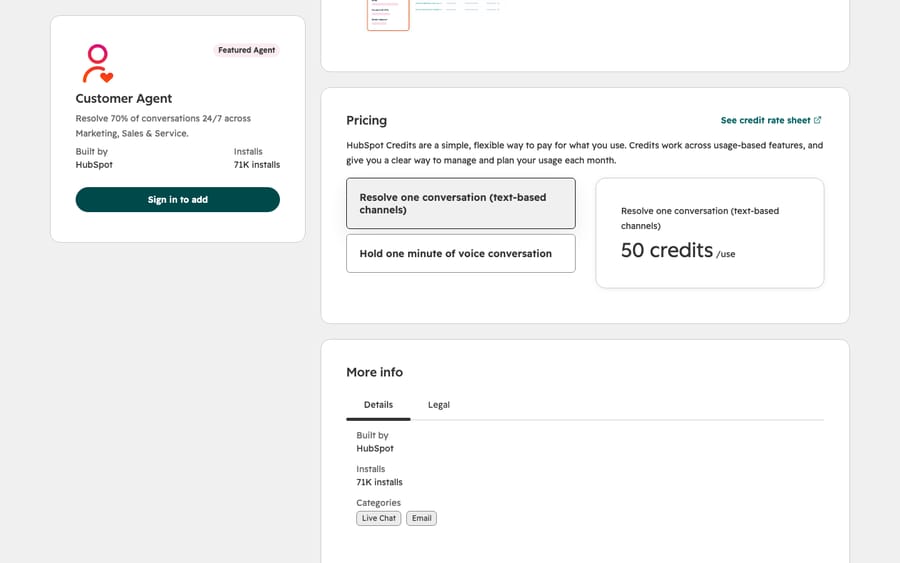
- HubSpot's marketplace listing shows Customer Agent at 71K installs and claims it resolves 70% of conversations; that figure is HubSpot's own average, not an independent test.
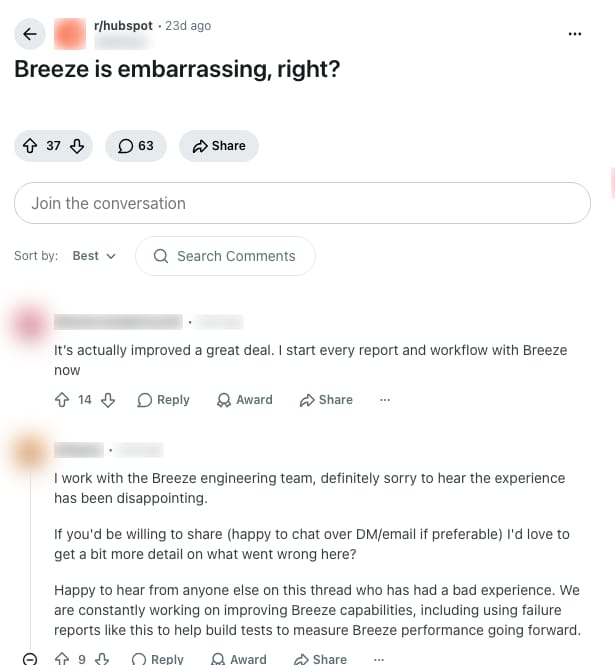
- The October 2026 r/hubspot thread "Breeze is embarrassing, right?" drew 62 comments; its poster said a chatbot kept talking past a canned reply it was told to use.
- Customer agent answers from its own knowledge sources under Train > Knowledge, which a March 2026 r/hubspot thread said meant building a separate knowledge setup for customer-facing use.
- HubSpot warns that private content added to customer agent "may still appear in responses", so internal-only documents shouldn't be added as sources.

What do you get from Breeze Customer Agent?
Here's our verdict on each part of the product, from HubSpot's documentation and what HubSpot users report.
| Area | What HubSpot documents | Our read |
|---|---|---|
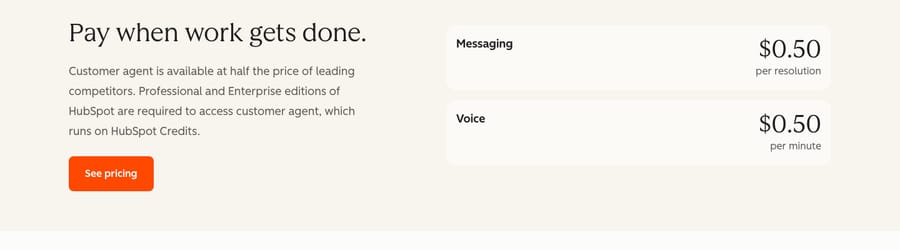
| Price | 50 credits ($0.50) per resolved text conversation; 50 credits per voice minute | Low per resolution; the definition of "resolved" is generous to HubSpot |
| Edition | Professional or Enterprise of a HubSpot hub | Expensive if you're on Starter; free to try if you're already on Pro |
| Channels | Chat, email, forms, WhatsApp, Facebook Messenger, voice | Six channel types, all inside HubSpot's own inbox, per HubSpot's page |
| Knowledge | Its own sources: HubSpot content, public URLs (up to 5,000 crawled), files, short answers | Good coverage; a separate setup from Breeze's internal agents |
| Trial | 14 days of access with a Professional or Enterprise seat | Long enough to judge it on real chats |
| Control | Guidelines, handoff phrases, chatflow targeting, credit limits | Enough to keep it narrow, if someone owns it |
| When credits run out | Stops being assigned to new conversations on every channel | A hard stop that customers notice first |
The short version: the product is cheaper and better connected to HubSpot data than most add-ons. What decides whether it's worth it is whether someone on your team has the hours to keep it narrow.
What is Breeze Customer Agent, exactly?
It's HubSpot's AI agent for customer conversations. HubSpot's product page now calls it "customer agent" and files it under Agent Hub, HubSpot's home for its AI agents; the Breeze name survives in the marketplace and in most people's vocabulary. It answers visitors from the content you give it, cites its sources, can take actions in the CRM, and hands off to your team when a visitor asks or a guideline says so.
It's a different product from Breeze Assistant, the internal copilot that drafts emails and builds reports. That distinction matters when you read reviews, because most complaints online are about the assistant, and people often don't say which one they mean. In the thread below, one commenter's first reply was to ask exactly that.
What are r/hubspot users saying about Breeze?
The October 2026 thread "Breeze is embarrassing, right?" is the clearest snapshot: 35 upvotes and 62 comments in the Reddit archive we read, and 37 and 63 on Reddit itself when we captured it on November 21. The post's author account now shows as deleted, so we read the original text from the archive. The poster runs an education program and described two failures:
- A workflow step that summarized children's details for enrollment kept getting ages wrong, even with detailed rules.
- A chatbot told to send a canned reply to hiring questions did send it. Then the visitor wrote "ok", and the bot carried on into cover-letter and interview tips for a long conversation. The poster called it a liability for client-facing use.
The replies split three ways. Some agreed: one person said Breeze gave them directions to menus that don't exist in HubSpot's own interface. Some disagreed: one said the help desk customer agent "has also worked well for us" and stayed on topic when people tried to break it. And a practical camp said the age problem is arithmetic, which a workflow formula should do, and that client-facing agents need a narrow lane with a hard stop after the canned answer. Two commenters who said they work at HubSpot replied asking for failure examples: one introduced themselves as the GM of Breeze, the other as working with the Breeze engineering team.
That's a fair summary of where the product is. The mechanics work. The guardrails hold best when the job is narrow, and they get weaker on open-ended follow-ups like the "ok" that kept the hiring chat going.
Why does customer agent need its own knowledge base?
In a March 2026 thread, "Does anyone find breeze to be confusing?", the poster said that after setting up knowledge for Breeze's internal agents, they had to build a completely separate knowledge setup and assign it to the customer agent. A commenter explained the split: customer agent faces customers, Breeze Assistant faces your team, and internal knowledge often contains things you don't want shown to website visitors.
HubSpot's own docs back the split up. Customer agent has its own sources under Service > Customer Agent > Train > Knowledge: synced HubSpot content (knowledge base articles, website pages, landing pages, blogs), public URLs with up to 5,000 crawled per domain, uploaded files, short answers, and knowledge generated from tickets and inbox conversations. Knowledge base articles re-sync when you update them; other sources re-sync weekly.
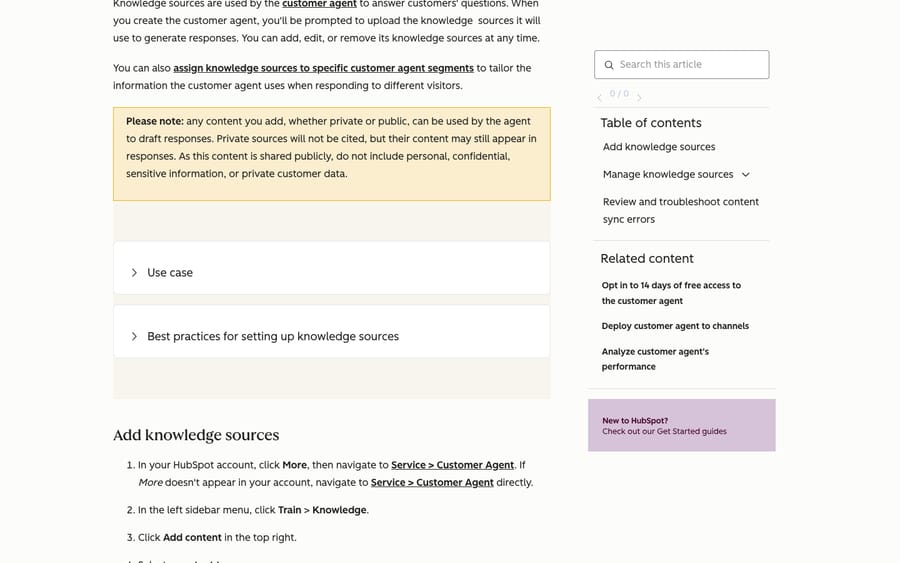
The warning in that screenshot is the part to read twice. HubSpot says private sources "will not be cited, but their content may still appear in responses," and tells you not to add "personal, confidential, sensitive information, or private customer data." So the separate setup is a feature as much as a chore. Treat customer agent's sources as public, and expect to spend a day or two curating them before go-live.
What does it really cost?
The unit price is low. HubSpot's product page lists $0.50 per resolution for messaging and says customer agent is "available at half the price of leading competitors." Service Hub Professional includes 3,000 credits a month, which cover about 60 resolutions; after that, extra credits cost $0.010 each.
Three things push the real number up:
- The edition. On Starter, you need Professional first: $90 a seat a month billed annually, plus a $1,500 onboarding fee. For five seats, that's $450 a month before a single credit.
- The definition of a resolution. HubSpot counts a conversation as resolved when the agent replies with a source and the visitor doesn't ask for a human. A workflow reassigning it to your team doesn't stop the charge, and HubSpot's docs don't exclude spam or bot chats.
- The shared pool. Customer agent draws on the same HubSpot Credits as marketing's AI workflows and other agents. When the pool is empty, customer agent stops taking new conversations on every channel until the reset date.
The incentive behind that design is worth seeing clearly. HubSpot sells seats first, and customer agent is a reason to buy Professional seats, so the agent is priced low per resolution and gated by edition. A low meter with a generous definition of resolved, drawn from a pool other teams share, means the bill grows with usage HubSpot counts, not with outcomes you've checked. Our customer agent pricing guide works the credit bill at three volumes, and our implementation cost guide adds setup by partners.
Who should turn Breeze Customer Agent on?
It's a good fit if three things are true:
- You're already on Service Hub (or another hub) at Professional or Enterprise, so the edition is a sunk cost.
- Most volume arrives as chat, WhatsApp or Messenger in HubSpot's inbox, where customer agent works natively.
- Your help content already answers the top questions, and someone owns it.
It's the wrong fit if you're on Starter and would upgrade only for the agent, if most of your volume is email tickets that need account lookups in other systems, or if nobody has a few hours a week to read its conversations. That last one sounds small. The Reddit thread above is what it looks like when nobody does it.
How do you test it in the 14-day free window?
HubSpot's pricing page says a Professional or Enterprise seat comes with 14 days of customer agent access, with "no restrictions on the number of messages or features." Use them on real traffic, not a demo script:
- Start narrow. Add only your top 20 help articles as sources and target the chatflow to your help pages, not the marketing site.
- Write the handoff rules first. Hiring, refunds, legal and anything account-specific should hand off by phrase or guideline.
- Try to break it. Send "ok", "yes", and off-topic follow-ups after each canned answer, like the case in the thread.
- Read every conversation on days 1 to 3, then a sample daily. Fix the article behind each wrong answer.
- Set a feature-level credit limit before the free window ends, so the first paid month can't surprise you.
- Compare resolved against reopened. HubSpot sets resolution 72 hours after the visitor's last message; check how many "resolved" chats came back as tickets.
At the end, you'll know your own resolution rate instead of HubSpot's 70%, and that's the number to price on.
Where Macha fits
Macha runs AI agents inside HubSpot Service Hub on the tickets your team already works, and it's built around the problem the Reddit thread describes: not trusting an agent with customers before you've seen it work. The Macha team analyzes your past tickets, builds the knowledge base and the agent, and runs it in safe mode, where the agent writes its reply as a note on the HubSpot ticket and a person approves it. Once the drafts in a category are right, that category switches to public replies. A dedicated success manager handles changes after go-live, on the trial and every plan, as part of done-for-you setup.
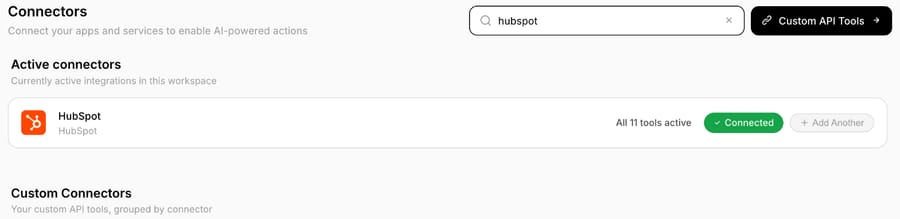
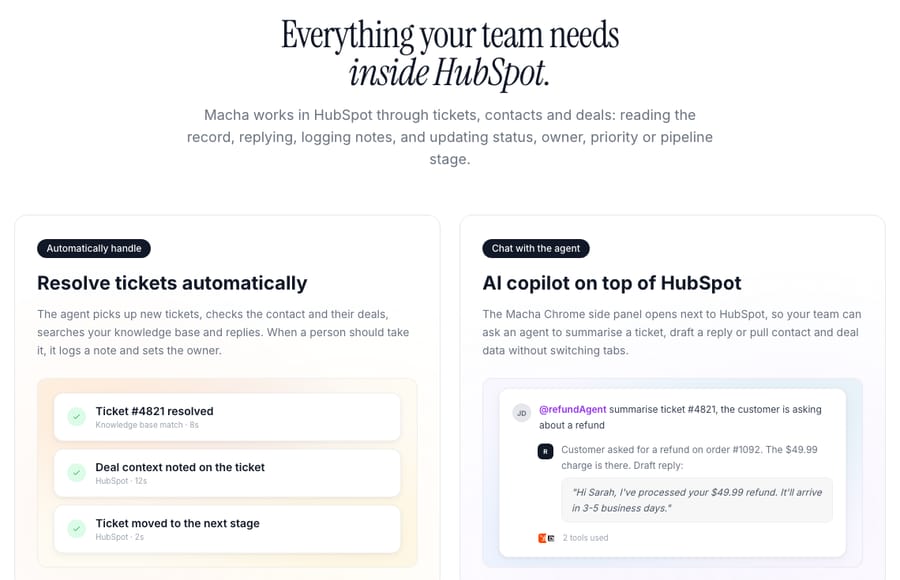
On HubSpot, the agent can search and read tickets, contacts and deals, reply, add notes, update ticket status, owner and priority, and move tickets or deals through a pipeline, with runs starting on New Ticket Created, Ticket Updated or New Contact Created. The HubSpot integration page lists all of them. It costs about $0.40 per ticket, and you can start with $50 of free usage (about 125 tickets), no credit card, no time limit.
Macha suits teams on HubSpot whose volume is tickets that need CRM context, and who want someone else to do the tuning. If your volume is mostly live chat in HubSpot's widget, customer agent is the more natural fit there, and the two can run side by side. The Macha on HubSpot page shows how the setup works.
Common questions
Is HubSpot Breeze Customer Agent any good?
It's good at answering common questions from well-written help content across chat, WhatsApp, Messenger and email, and it's cheap per resolution. It's weaker on open-ended follow-ups and edge cases, where users on r/hubspot report it drifting past its instructions. Keep its job narrow and review conversations weekly.
Is Breeze Customer Agent free?
Not after the trial. A Professional or Enterprise seat includes 14 days of access, then each resolved text conversation uses 50 HubSpot Credits ($0.50). Professional includes 3,000 credits a month, about 60 resolutions.
Does Breeze Customer Agent use the same knowledge as Breeze Assistant?
Customer agent has its own knowledge sources under Train > Knowledge, and HubSpot users on r/hubspot describe setting it up separately from Breeze's internal agents. HubSpot also warns that any content you add can appear in customer-facing replies, so keep internal documents out of it.
What is the difference between Breeze Assistant and customer agent?
Breeze Assistant is the internal copilot your team uses inside HubSpot to draft, summarize and build reports. Customer agent talks to your customers on your channels and bills per resolution. Many online reviews mix them up.
Can Breeze Customer Agent go off script?
Yes, sometimes. The October 2026 r/hubspot thread describes a chatbot that sent the canned reply it was told to, then kept chatting after the visitor said "ok". Tight handoff rules, narrow sources and testing follow-up messages reduce it.
What should I use instead of Breeze Customer Agent?
If you want an agent that works HubSpot tickets with CRM context and is set up and run for you, Macha is built for that. For the full list of options, including Intercom's Fin and eesel, see our Breeze alternatives and the best AI agents for HubSpot, scored.
How we researched this
We read these sources on November 21, 2026 and captured the screenshots on this page the same day:
- HubSpot's customer agent product page: pricing, channels, the 70% claim and the Agent Hub naming.
- Customer Agent on the HubSpot Marketplace: installs and the credit rate.
- Understand the customer agent (updated September 16, 2026): resolutions, handoffs, the 72-hour window and running out of credits.
- Manage customer agent knowledge sources (updated October 26, 2026): source types, the 5,000-URL crawl limit, re-sync timing and the private-content warning.
- HubSpot Products & Services Catalog and Service Hub pricing: credits, seat prices, onboarding fees and the 14-day access.
- r/hubspot threads "Breeze is embarrassing, right?" (October 2026) and "Does anyone find breeze to be confusing?" (March 2026), read through a Reddit archive and paraphrased without usernames.
We didn't run customer agent on a paid HubSpot account, so the review rests on HubSpot's documentation and users' reports rather than our own test of it. Macha's HubSpot capabilities come from Macha's own connector and product page, which we captured the same day. For how customer agent is set up step by step, see our customer agent guide, and for the help desk itself, our Service Hub review.