Intercom
 Shopify
 Stripe
 Slack
Slack Notion
 Google Workspace
 Confluence

Lindy AI vs n8n (2026): Which Should You Choose, and What Does 1,000 Tickets Cost?


Lindy is an AI teammate in Slack billed per person plus credits, while n8n is a workflow builder billed per run or free to self-host. For the same 1,000-ticket support month we estimate $149.95 to $349.95 on Lindy against €24 plus model tokens on n8n.
Key takeaways
- Lindy AI charges $29.99 to $199.99 per user a month plus pooled credits, while n8n charges per workflow run from €20 a month billed yearly, or nothing self-hosted.
- For 1,000 support tickets a month, Lindy AI costs an estimated $149.95 to $349.95, while n8n costs €24 plus about $19 to $63 in model tokens.
- n8n's Starter plan costs €24 a month (€20 billed yearly) for 2,500 workflow executions, and an execution costs the same however many steps a workflow runs.
- Lindy credits cost about one cent each, plan credits do not roll over, and extra credits cost $10 per 1,000 as top-ups.
- n8n's Koralplay case study reports the company automated 70% of its payment support tickets, saving 616 hours a week.

Lindy AI is an AI teammate in Slack billed $29.99 to $199.99 per user a month plus credits, while n8n is a workflow builder billed per run from €20 a month billed yearly, or free to self-host. For a 1,000-ticket support month we estimate $149.95 to $349.95 on Lindy against €24 plus about $19 to $63 of model tokens on n8n, so pick Lindy when non-technical people will ask it for work and n8n when someone technical will build and own the workflows.
Many pages that rank for this comparison describe a Lindy that no longer exists. Lindy's own comparison post, last updated in December 2025, still quotes a $49.99 plan and a free tier, while Lindy's pricing page today sells a Slack teammate per seat. Everything below was checked on September 19, 2026, and the Lindy and n8n pricing pages were re-checked on September 24, 2026. For the product overview, see our Lindy AI guide.
How do Lindy AI and n8n compare at a glance?
| Lindy AI | n8n | |
|---|---|---|
| What it is | An AI teammate in Slack that takes requests and runs routines | A workflow automation platform with AI agent nodes |
| Who builds | Anyone who can type a request; admins set up team routines | A technical builder who designs workflows node by node |
| How work starts | A person asks, or a routine fires on a schedule or event | A trigger fires: webhook, schedule, or an app event such as a new Zendesk ticket |
| Where it runs | Lindy's cloud only | n8n Cloud, or your own servers |
| Billing unit | Per user per month, plus pooled credits | Per workflow execution, "with unlimited steps" |
| Published price | Plus $29.99, Pro $99.99, Max $199.99 per user per month | Starter €24, Pro €60 a month (€20 and €50 billed yearly); Business €800 (€667 yearly), self-hosted |
| Free option | 7-day trial per Slack teammate | 14-day Cloud trial; Community edition free to self-host |
| AI model cost | Inside the credits | Gateway credits on Cloud Starter and Pro, or your own API keys |
| Our 1,000-ticket month (estimate) | $149.95 to $349.95 | €24 plus about $19 to $63 of model tokens |
| Ratings (Sep 19, 2026) | Trustpilot 1.7 (39), Capterra 3.5 (2), G2 4.9 (171) | Gartner 4.7 (18), Capterra 4.6 (48), Trustpilot 3.0 (49), G2 4.7 (314) |
| Customers shown | Logos incl. Shopify, Apple, NVIDIA, McKinsey (homepage) | Case studies incl. Vodafone, Delivery Hero, Koralplay |
The cost row is our estimate; the assumptions are in the cost section.
What is Lindy AI in 2026?
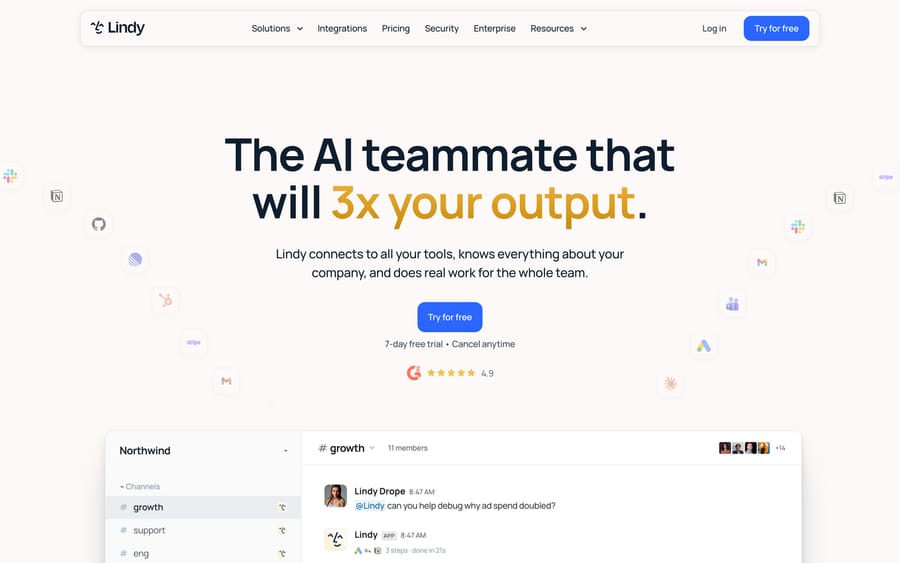
Lindy's homepage calls it an AI teammate that "connects to all your tools, knows everything about your company, and does real work for the whole team." Each person gets a private Lindy in Slack DMs, and the team shares one in channels. You @mention it with a job ("summarize yesterday's escalations," "draft a reply to this customer") and it works through your connected apps and posts the result back.
Recurring work goes into routines. Lindy's routines doc defines each one as a trigger, a plain-English prompt and a destination. Triggers can be a schedule or an event: "an email received or sent, a Slack message, a calendar event about to start, a meeting ending, and more." Team-wide routines can only be created by workspace admins, and they need Lindy Teammate set up in Slack first.
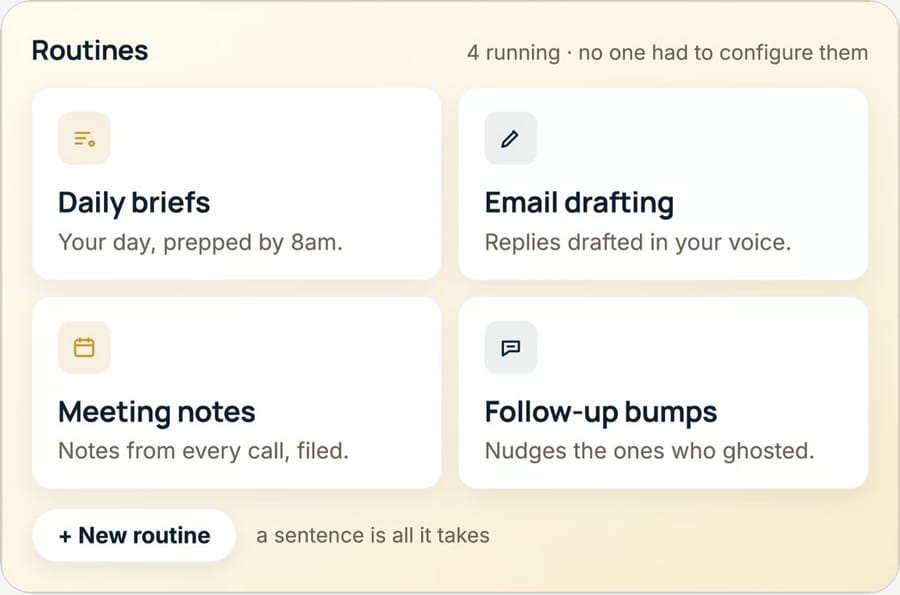
The mechanism that matters for cost is in the same doc. A normal routine "wakes Lindy up to think through your instructions again on every trigger." Every run is a fresh round of model reasoning, and every run spends credits. Lindy offers a way out, "Run this as a script," which converts a routine's instructions into Python so routine runs skip the model. It's available for personal routines only, not workspace ones.
What is n8n?
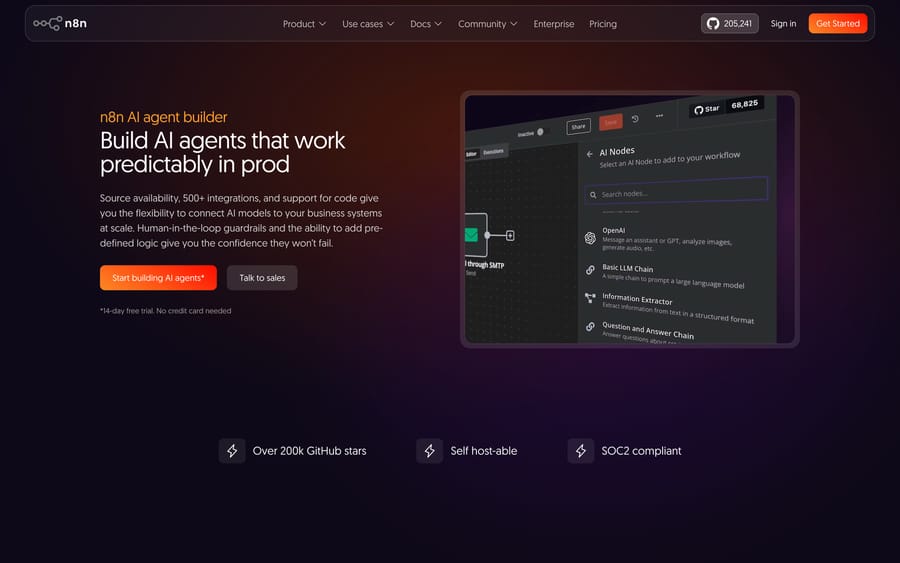
n8n is a workflow automation tool. A builder places nodes on a canvas: a trigger (a webhook, a schedule, or an app event such as the Zendesk Trigger), then steps that fetch data, branch on conditions, run code, and call apps. AI enters as nodes too. The AI Agent node takes a chat model, memory and a set of tools, and decides which tools to call.
The steps around the agent are fixed logic you control. n8n's human-in-the-loop feature pauses a workflow before an agent uses a tool you've flagged (sending a message, modifying records) and asks a person in Slack or chat to approve or deny it. n8n's AI agents page sells exactly this: "Human-in-the-loop guardrails and the ability to add pre-defined logic."
n8n is source-available rather than open source. Its code is under the Sustainable Use License, a "fair-code" license that allows free use "only for your own internal business purposes or for non-commercial or personal use." Running it for your own support team is fine; reselling it as a hosted service isn't.
One n8n customer story shows what the tool is best at. Koralplay says it automated 70% of its payment support tickets, saving 616 hours a week, with a workflow that authenticates, enriches the transaction, checks regulatory rules, updates the ticket in Notion and notifies the customer. The case study doesn't mention an AI model. Much of what support teams call automation is fixed logic, and n8n handles fixed logic without a model at all.
How do Lindy and n8n charge?
The two billing units reward different behavior.
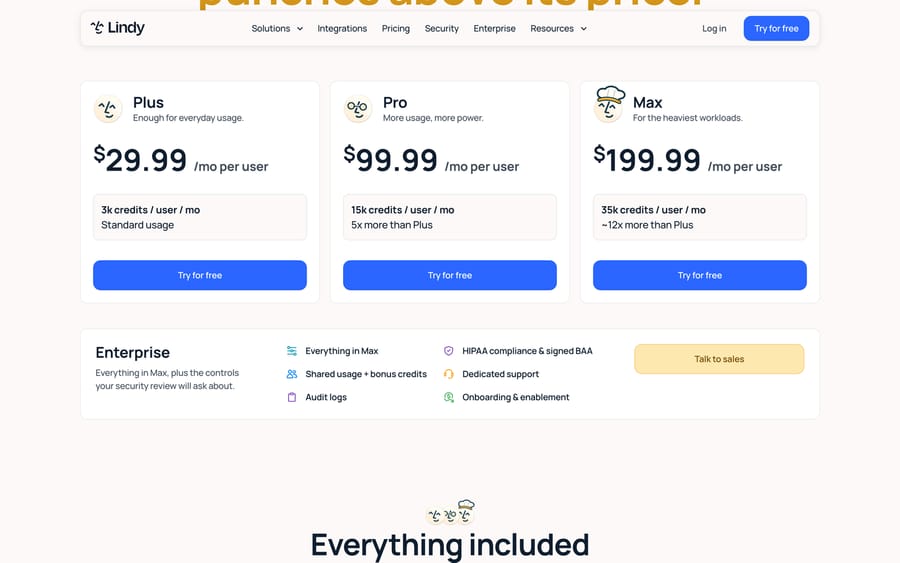
Lindy charges for people and for thinking. Per Lindy's pricing page, each seat adds 3,000 (Plus), 15,000 (Pro) or 35,000 (Max) credits a month to a pool the whole workspace shares. Credits are "about one cent each" in Lindy's docs, plan credits don't roll over, and when the pool runs low Lindy pauses instead of billing you. Extra credits cost $10 per 1,000 as top-ups, which never expire, or twice the regular rate if an admin turns on overages. Lindy publishes credit bands, not rates: 2 to 250 credits for an everyday ask such as drafting a reply, 250 to 1,000 for deep work such as triaging a day's queue. Any person who uses Lindy takes a seat, including the first time they @mention it in Slack. The pricing section of our Lindy guide walks through the credit math.
The incentive follows the meter: Lindy earns more as headcount grows and as each request needs more reasoning. The model is included, so there's no token bill, but you learn what a request costs only after it has run.
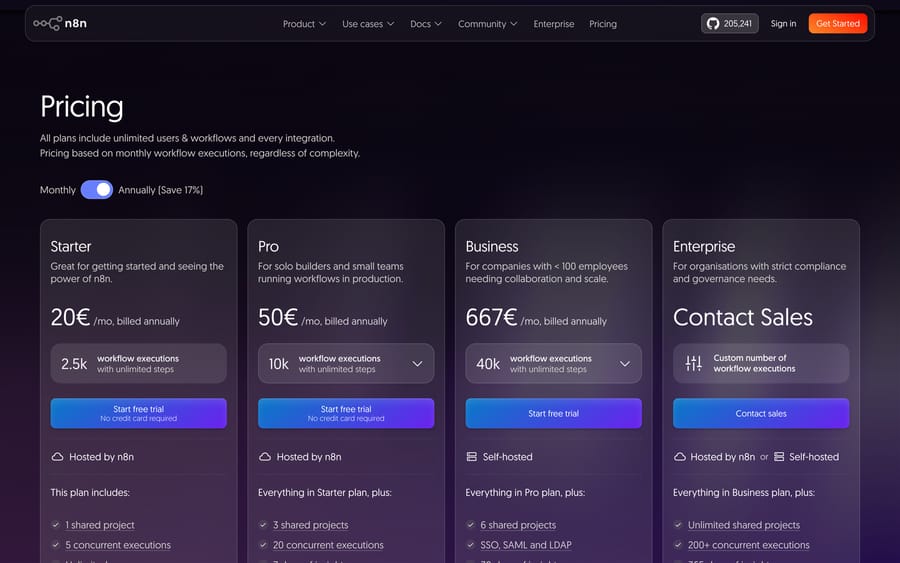
n8n charges for runs. n8n's pricing page defines an execution as "a single run of your entire workflow. It doesn't matter how many steps are in the workflow or how much data it processes." Starter is €24 a month (€20 billed yearly) for 2,500 executions and 5 concurrent runs. Pro is €60 (€50 yearly) for 10,000 and 20 concurrent runs. Business is €800 (€667 yearly) for 40,000 executions and is the self-hosted plan with SSO and Git version control. All plans include unlimited users. The "AI credits" on the pricing cards pay for n8n's own AI Assistant, which helps you build workflows; they don't pay for the models your workflows call.
Those models are a second bill. Since version 2.36.0, n8n Cloud's Starter and Pro plans offer Gateway credits: a prepaid balance that lets a node call OpenAI, Anthropic, Google and others "without provider accounts or API keys," billed per request at the rates on n8n's service pricing page. Gateway credits aren't available on Enterprise or self-hosted n8n, where you bring your own API keys. When the balance hits zero, nodes on Gateway credits fail until someone tops up.
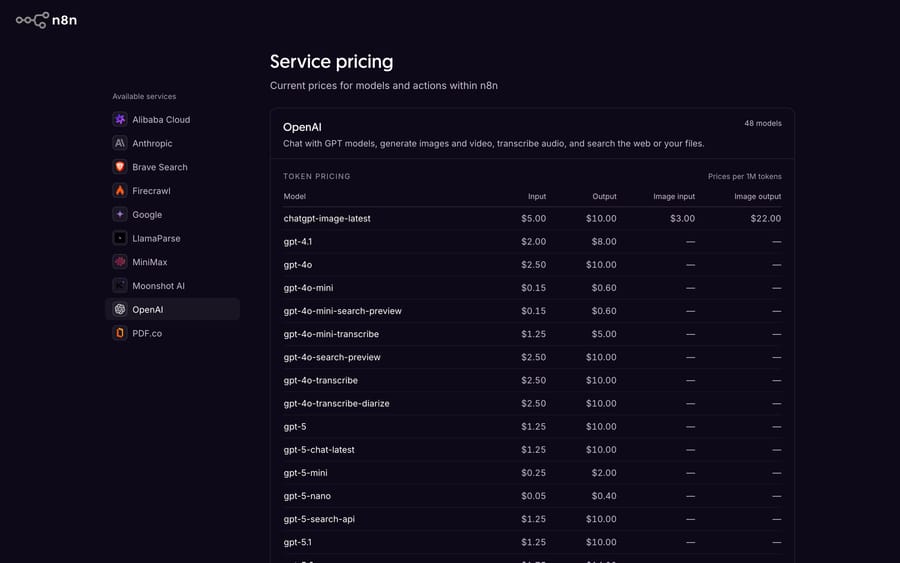
n8n's incentive is to earn on the number of runs and on the features you need (SSO, Git and environments sit on Business and above), not on how many people use it or how many steps a run takes. A 14-step agent costs the same execution as a 2-step one. The model tokens are visible per request, which makes the AI cost easy to audit and yours to control. On September 19, n8n's Gateway rates for gpt-5.4 and gpt-5.4-mini matched OpenAI's own list prices for the same models.
For buyers who procure through AWS, n8n's AWS Marketplace listing sells "Business - Self Hosted" at $9,600 for 12 months with 480,000 annual executions, which works out to $800 a month for Business's 40,000 executions a month. We found no Lindy listing on AWS Marketplace.
What does the same support workload cost on Lindy and n8n?
We priced one job both ways. A five-person support team wants every new ticket read, tagged and given a drafted reply for a person to review. We priced 1,000 and 3,000 tickets a month.
Lindy assumptions. All five people use Lindy, so there are five seats. A routine handles each ticket; we priced 10, 25 and 50 credits per ticket because drafting a reply sits in Lindy's 2-to-250 everyday band and Lindy publishes no per-ticket figure. We bought the cheapest mix of seat tiers and top-ups that covers the credits, and counted only the ticket routine, not the team's other requests.
n8n assumptions. A Zendesk trigger starts one execution per ticket event, 1.5 per ticket once customer follow-ups are counted. Each execution runs one AI Agent step that makes three model calls, 12,000 input and 800 output tokens in total, on Gateway credits. At n8n's listed rates that's $0.0126 per execution on gpt-5.4-mini ($0.75 in, $4.50 out per million tokens) and $0.042 on gpt-5.4 ($2.50 in, $15.00 out). Monthly billing.
| Monthly volume | Lindy at 10 credits/ticket | Lindy at 25 | Lindy at 50 | n8n Cloud, gpt-5.4-mini | n8n Cloud, gpt-5.4 |
|---|---|---|---|---|---|
| 1,000 tickets | $149.95 (5 Plus) | $219.95 (4 Plus + 1 Pro) | $349.95 (4 Plus + 1 Max + 3 top-ups) | €24 + $18.90 | €24 + $63.00 |
| 3,000 tickets | $249.95 (4 Plus + 1 Pro + 3 top-ups) | $489.95 (3 Plus + 2 Max) | $899.95 (1 Pro + 4 Max) | €60 + $56.70 | €60 + $189.00 |
The arithmetic for the middle Lindy cell: 1,000 tickets × 25 credits = 25,000 credits. Four Plus seats and one Pro seat carry 12,000 + 15,000 = 27,000 credits for $119.96 + $99.99 = $219.95; five Plus seats plus ten top-up blocks would cost $249.95. For n8n at 3,000 tickets: 4,500 executions pass Starter's 2,500, so it's Pro at €60, plus 4,500 × $0.042 = $189.00 on gpt-5.4.
On subscription cost alone, n8n is the cheaper tool by a wide margin, and its gap grows with volume, because a Lindy routine re-reasons on every ticket and an n8n execution costs the same whatever it does. Self-hosting the Community edition removes the €24 or €60 too, leaving your server and your own model bill.
The table leaves out the cost that decides most of these purchases. Someone has to build the n8n workflow: connect Zendesk, write the agent's instructions, add tools for order lookups, set up approvals, handle errors, and keep it working when an API changes. Lindy's cost is almost all in the table; n8n's biggest cost is a person's time, which neither vendor's pricing page lists. Our n8n build guide shows what that work involves.
Who sets up and maintains each one?
With Lindy, an admin installs the Slack app, each person connects their own accounts, and the team starts asking. A support lead can write "every weekday at 9, tag yesterday's untagged tickets and post the five angriest in #support" and have a routine without touching a diagram. Lindy's docs recommend a dry run before trusting a routine unattended, which fires it on real data without sending anything.
With n8n, the builder owns everything the model doesn't do. That's more work up front and more control after. You see every execution, can replay a failed one, and can put fixed rules (never refund above $50, always escalate chargebacks) in code the model can't talk its way around. n8n's own users say the learning curve is real. A Capterra reviewer, an owner in marketing and advertising, wrote in June 2025 that "The learning curve is very steep for beginners, especially if they don't have prior knowledge of APIs."
Lindy's guardrails have gaps a support lead should know about. Its integrations doc says "Guardrails apply in shared Slack threads only. Your web app chat, Slack DMs with Lindy, and iMessage and SMS aren't guarded." n8n's approval step sits on the tool itself, whatever started the run.
Is Lindy AI or n8n better for customer support?
For a support team, the useful question is who starts the work. Lindy is built around people asking it for things, plus routines on triggers. Its Zendesk integration covers the actions triage needs (search and list tickets, add tags, set fields, update tickets with comments). It suits a lead who wants help running the queue: morning triage, escalation digests, drafted replies someone reviews. The event triggers Lindy's routines doc names are email, Slack, calendar and meeting events; a new help-desk ticket isn't in that list, so check how a per-ticket routine would fire in your setup before you plan around one.
n8n starts from triggers, so running on every ticket as it arrives is its natural shape. It has Zendesk and Freshdesk nodes and can reach any help desk with an API through its HTTP node. What n8n doesn't give you is the support-specific layer: a knowledge base tuned for answers, evaluation of reply quality over time, handoff rules, reporting on what the agent resolved. You build those, or you go without.
What do users say about Lindy and n8n?
We read both products' public reviews on September 19, 2026, including G2, where Lindy rates 4.9 from 171 reviews and n8n 4.7 from 314, confirming the 4.9 G2 badge on Lindy's homepage.
| Source | Lindy AI | n8n |
|---|---|---|
| Trustpilot | 1.7 from 39 reviews | 3.0 from 49 reviews |
| Capterra | 3.5 from 2 reviews | 4.6 from 48 reviews |
| Gartner Peer Insights | No listing found | 4.7 from 18 reviews |
| G2 | 4.9 (171 reviews) | 4.7 (314 reviews) |
Lindy's complaints are about the bill and reliability. On Trustpilot, Jeremi Ramos gave three stars on August 18, 2026: "When Lindy works, it works!" followed by "Problem is getting it to work... and keeping it working." Two days later Yossi Coleman wrote that "the cheap price is just bait," describing unlimited use in the trial and higher costs after it. Capterra's Lindy page still lists a $49.99 starting price from the old product.
n8n's reviews split between people who build and people who get stuck. Capterra scores it 4.0 for ease of use and 4.6 overall. On Trustpilot, a four-star reviewer, Mattias from Sweden, wrote in July 2026 that n8n is "quite dificult to learn" but a "life saviour"; a one-star review in June said support could "only be contacted by email" after the reviewer lost account access. The Gartner Peer Insights page shows 4.7 from 18 reviews across two markets.
The pattern matches the billing units. Lindy's unhappy reviewers were surprised by what usage cost; n8n's were stopped by what building required.
How we researched this
We checked both vendors' pricing pages, docs and case studies on September 19, 2026. We captured the screenshots above from their public sites, pulled ratings from Trustpilot, Capterra and Gartner Peer Insights in a browser, and checked AWS Marketplace for both. We did not build an agent on either platform for this post, so the cost table is arithmetic on published prices, and the credits per ticket and tokens per run are our assumptions. G2 was checked the same day (Lindy 4.9 from 171 reviews; n8n 4.7 from 314).
Should you choose Lindy, n8n or neither?
Choose Lindy if your team lives in Slack. It suits teams that want one AI coworker across many jobs (inbox triage, meeting notes, CRM updates, a morning queue digest) with no one assigned to build anything. Budget on the seat price plus top-ups, and run a week on Plus seats before choosing tiers, because Lindy publishes credit bands rather than rates.
Choose n8n if you have a technical person who will own the workflows, you want fixed rules around the AI, you need to self-host for data control, or your volume makes per-run pricing matter. It is the cheaper tool in our model at both volumes, and the gap widens as tickets grow.
Consider neither if what you want is an agent answering and resolving tickets inside Zendesk, Freshdesk, Gorgias, Front, HubSpot or Intercom. Lindy would be a helper for the people working the queue, and n8n would mean building and maintaining a support product yourself. Macha fits teams already running one of those help desks. It's an AI agent layer on your help desk: agents run on each ticket inside the help desk you already use, priced per ticket, one charge however many replies it takes, from $299 a month for 750 tickets, with setup and monitoring by the Macha team. Our overview of AI agents for customer service compares the routes, and our Relevance AI guide covers a third option between the two.
Frequently asked questions
Is Lindy AI better than n8n? For different people. Lindy is better for non-technical teams in Slack who want to ask for work in plain English. n8n is better for teams with a builder who want predictable per-run costs, fixed logic around the AI, or self-hosting. In our model of 1,000 support tickets a month, n8n's subscription and model bill came to €24 plus about $19 to $63, and Lindy's to $149.95 to $349.95, before counting n8n's build time.
Is Lindy AI any good? Reviews are thin and split. Trustpilot rates it 1.7 from 39 reviews and Capterra 3.5 from 2; on G2 it holds 4.9 from 171 reviews (checked September 19, 2026), matching the badge on its homepage. The positive reviews praise what it can do, and the negative ones describe credits running out and results that vary from run to run.
Is there anything better than n8n? It depends what n8n is short on for you. If the learning curve is the problem, Lindy or Zapier's agents need less building. If you want a support agent rather than a workflow, a support-specific product saves you building the knowledge base, evaluation and handoff yourself. For self-hosted, per-run workflow automation, n8n's closest peers are other workflow tools.
Is n8n obsolete now? No. It's shipping AI features: the AI Agent node, human-in-the-loop approval for tools, evaluations, and Gateway credits (from version 2.36.0) that let Cloud workflows call OpenAI, Anthropic and Google models without API keys. Its GitHub repository showed about 205,000 stars on its pricing page on September 19, 2026.
Is n8n free? The self-hosted Community edition is free under the Sustainable Use License, for internal business or personal use. n8n Cloud has a 14-day trial with no card, then Starter at €24 a month (€20 billed yearly).
Do I need an OpenAI API key for n8n? Not on n8n Cloud Starter or Pro: Gateway credits let AI nodes run on a prepaid n8n balance. On self-hosted n8n and Cloud Enterprise you connect your own provider keys.
Can Lindy replace n8n? For request-driven work, often yes: routines with triggers cover a lot of simple automation without a diagram. For high-volume, per-event workflows with fixed rules, no. Each Lindy routine run re-reasons through its instructions and spends credits, while an n8n execution costs the same however many steps it takes.
Does Lindy have a free plan? No. Teammates who join through Slack get a 7-day free trial; direct signups are billed right away. The free plan that older reviews mention belonged to Lindy's earlier agent builder.
What is the best agentic AI currently? There isn't one answer, because "agentic" covers different jobs. For a coworker that takes requests in Slack, Lindy is one option; for automations you design and control, n8n; for answering customer tickets inside a help desk, a support agent layer. Pick by who starts the work and who maintains it.
If the work you want automated is answering tickets in your help desk, see Macha's pricing or start with $50 of free usage on your own tickets.
Sources: Lindy homepage · Lindy pricing · Lindy docs: Routines · Lindy docs: Pricing · Lindy docs: Understanding your usage · Lindy Zendesk integration · n8n pricing · n8n AI agents · n8n docs: Gateway credits · n8n service pricing · OpenAI API pricing · n8n docs: AI Agent node · n8n docs: Human-in-the-loop for tools · n8n Sustainable Use License · n8n case study: Koralplay · n8n on AWS Marketplace · Trustpilot: lindy.ai · Trustpilot: n8n.io · Capterra: Lindy · Capterra: n8n reviews · Gartner Peer Insights: n8n
Simple per-ticket AI pricing
One thread with one person is one charge, however many replies it takes.