





 Shopify
 Stripe
 Slack
Slack Notion
 Google Workspace
 Confluence

What Should You Know Before Switching to Gorgias? (2026)


Gorgias is usually the right move for a Shopify-first brand, but the surprises sit in the billing rules, the Shopify dependency and the Zendesk import. Here is what counts as a billable ticket, what AI Agent adds to the bill, and what the import leaves behind.
Key takeaways
- Gorgias bills by billable tickets rather than agents, from $10 a month for 50 tickets on Starter to $900 a month for 5,000 on Advanced.
- A Gorgias ticket becomes billable once any reply goes out from the helpdesk, including automatic Rule replies, and AI Agent resolutions add a separate automation fee.
- On email, a customer reply to a Gorgias ticket closed for more than 10 days opens a new ticket, which is billable once the team answers it.
- The native Zendesk-to-Gorgias import brings macros, users, tags and tickets from the last 2 years, but no attachments or CSAT ratings, at about 720 tickets per hour.
- Gorgias AI Agent is built around a connected Shopify store, so merchants on other platforms keep the helpdesk but get fewer storefront automations.

The three things merchants most often wish they had known before switching to Gorgias: it bills by ticket volume, not by agent (from $10 a month for 50 tickets on Starter to $900 a month for 5,000 on Advanced, billed monthly), its AI Agent adds a separate fee each time it resolves a ticket, and the native Zendesk import brings only the last 2 years of tickets, without attachments or CSAT ratings. Gorgias is still usually the right call for a Shopify-first brand, where the order sits inside the ticket and a rep can refund or cancel without leaving the conversation. The surprises are in the details, so here they are, checked against Gorgias's pricing page and help center on 24 September 2026.
| What to know | Detail |
|---|---|
| Billing unit | Billable tickets per month, never per agent |
| Helpdesk plans (monthly) | Starter $10 (50 tickets), Basic $60 (300), Pro $360 (2,000), Advanced $900 (5,000) |
| Overage | $0.40 a ticket on Starter and Basic, $0.36 on Pro and Advanced |
| AI Agent | Extra outcome-based fee when it resolves a ticket without a human |
| Zendesk import | 2 years of history; no attachments, no CSAT; about 720 tickets/hour |
| Storefront | Built around Shopify; the deepest actions assume a connected store |
How does Gorgias billing work, and why does it surprise people?
If you're coming from a per-seat tool like Zendesk, Gorgias's pricing works on a different axis and it's worth internalizing before you sign. Gorgias bills by billable tickets per month, not by agent. Add all the reps you want; what you pay against is conversation volume. On the annual plan the same tiers drop to $50 (Basic), $300 (Pro) and $750 (Advanced) a month; Starter is monthly only. For a lean team fielding high volume that can be a bargain. For a large team fielding modest volume, it can cost more than seats would.
The regret shows up in the edge cases. On the Shopify App Store, one-star reviews repeatedly describe bill shock: a merchant who tested the platform for a week and then received a $540/month charge they called a "scammy approach," another reporting $700+ in overage fees the company declined to refund, and a larger brand saying they paid roughly $13.5k/year on the Advanced plan before walking away (Shopify App Store reviews). The recurring complaint isn't the headline price. It's what counts as a billable ticket. Gorgias's billing doc says a ticket becomes billable once at least one message goes out from your helpdesk, "whether the message comes from a human agent, AI Agent, or an automatic reply from a Rule." On email, a customer reply to a ticket that has been closed for more than 10 days opens a new ticket, which is billable once you answer it. And when AI Agent resolves a ticket without handing it to a human, an outcome-based automation fee applies on top of the ticket fee. Inbound tickets you never reply to, tags and internal notes don't count. None of that is hidden malice, but it's the kind of thing you want to model before peak season, not explain to your CFO after it.
The takeaway isn't "don't switch." It's "estimate your true billable-ticket volume, including automation and reopens, and price the tier honestly." We walk through the full model in Gorgias pricing explained.
Does Gorgias work if you aren't on Shopify?
Gorgias is ecommerce-native, and most of its value comes from a deep Shopify connection; its pricing page also lists WooCommerce, BigCommerce and Magento integrations. The order timeline, refund and cancel actions, and much of the AI tooling assume that storefront link exists. If you're on Shopify, this is exactly why you're switching and it's a genuine strength. If you're not on Shopify, temper expectations: the core help desk still works across email, chat, and social, but the flagship AI Agent is built around a connected Shopify store (Gorgias's docs describe "a dedicated AI Agent for each Shopify store you connect," and its refund and cancel actions run in Shopify), so some of the deepest automations lose their teeth without that connector. Confirm what AI Agent can do on your platform in the demo before you commit.
Either way, list every integration you rely on today — your review app, your subscription tool, your 3PL, your marketing platform, and confirm each has a Gorgias path before you cut over. Reconnecting integrations and rebuilding the automations that sat on top of them is the single most underestimated line item in a migration.
What does the Zendesk-to-Gorgias import leave behind?
This is the one that surprises even careful teams. Gorgias's native Zendesk importer is real and it works, but it's selective in ways the sales conversation rarely spells out. Per Gorgias's own Migrate from Zendesk and Zendesk migration 101 docs, here's the shape of it.
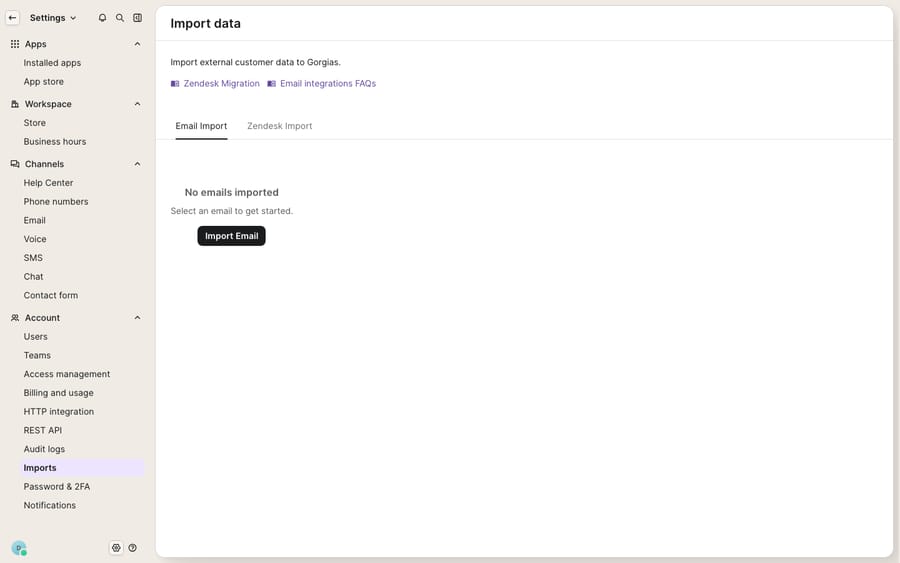
What comes over: macros, users, tags, and tickets — imported in that order (macros first, then users and tags, then tickets).
What gets left behind: attachments and CSAT/rating information. Gorgias states plainly, "We don't import attachments on tickets nor rating information." If you need image attachments on historical tickets or your satisfaction-score history for reporting, the native import won't bring them.
The 2-year cap: history extends two years maximum. Tickets updated in the last two weeks import first; the rest imports starting two years in the past and working forward. Anything older than two years simply doesn't migrate.
Status collapse: Gorgias has only two statuses, Open and Closed. Your Zendesk On-hold, Solved, and Closed tickets all land as Closed; Pending arrives closed with an automatic tag. If your workflows or reporting lean on granular statuses, you'll rebuild that logic.
Field type changes: integer fields import as decimal; regex and multiselect fields import as text (the original config is saved in the field description); credit-card fields also become text. Any automation keyed to a strict field type needs re-checking.
Speed: the import runs at roughly 720 tickets/hour on average, varying with how many messages each ticket holds, so a large history is a multi-hour (sometimes multi-day) job to plan around.
| Data | Native Zendesk → Gorgias import |
|---|---|
| Macros, users, tags, tickets | Imported (in that order) |
| Ticket history depth | Last 2 years only |
| Attachments | Not imported |
| CSAT / rating info | Not imported |
| Statuses | Collapsed to Open / Closed |
| Integer fields | Converted to decimal |
| Regex / multiselect fields | Converted to text |
| Typical speed | ~720 tickets/hour |
If attachments or CSAT history matter to you, that's the moment to reach for a paid migrator such as Help Desk Migration or ClonePartner, which earns its cost only if you genuinely need what the native tool skips. Otherwise, export your CSAT and any critical attachments from Zendesk before you flip the switch, and remember to turn off all channels in Zendesk once Gorgias goes live so you don't double-handle incoming messages.
How much setup work should you budget for?
Macros do import, but many teams treat the switch as a chance to start clean rather than carry over years of overlapping templates, which means an afternoon (or a week) of rebuilding rules, auto-tags, and views. Budget for it. Merchant sentiment on Gorgias's onboarding is genuinely mixed: plenty praise how fast a Shopify store gets to value, while a notable minority cite a steeper-than-expected rules engine and, separately, sales pressure during the trial and renewal windows. Go in knowing both are true. We collect the recurring friction in Gorgias common complaints and problems, and give the balanced verdict in our full Gorgias review.
Is switching to Gorgias worth it?
Gorgias earns its reputation for Shopify brands. The inbox is ecommerce-native, actions live inside the conversation, and for high-volume/lean-team shops the ticket-based model can genuinely beat per-seat pricing. Those are real, and if that's you, switching is often the right move. Start with what Gorgias is if you're still mapping the fit.
The regrets are equally real and entirely avoidable with planning: model your true billable-ticket volume (including auto-replies and reopens), confirm your Shopify dependency and every integration up front, and go into the Zendesk import knowing it caps at two years and drops attachments and CSAT. Export what you can't afford to lose, expect a status and macro rebuild, and hold firm through the sales cadence. Do that homework and the switch is smooth. Skip it and the surprises land after you've already migrated.
How do you add AI on top of Gorgias without replacing it?
Once you're live on Gorgias, the broader category of AI agents for customer service is what turns a thinner macro library into full coverage, reasoning over your help center and past tickets instead of matching a canned template. Macha is one such layer, and it sits on top of the Gorgias you already run. It is not a help desk replacement. It connects to Gorgias as a native integration and reads and writes the same tickets, drafting or sending grounded replies, triaging by intent, and looking up order or account status through a custom tool that turns a REST API into something the agent can call. Two things worth knowing for cost-conscious merchants coming off a billing shock: Macha bills per ticket, not per resolution: one conversation, charged once however many messages it takes, from $299 a month for 750 tickets (see the pricing breakdown). Setup and monitoring by the Macha team are included. Replies Macha posts through Gorgias still go out from your helpdesk, so Gorgias counts those tickets as billable under its own rules. The details of the connection live in the Macha–Gorgias integration.
FAQ
Does switching to Gorgias import my full Zendesk history? No. The native importer caps at the most recent 2 years of tickets, and it does not bring over attachments or CSAT/rating information. Export anything older or in those categories before you migrate, or use a paid migration tool if you must preserve them.
Will my Zendesk statuses and fields survive the move? Partly. Gorgias has only Open and Closed statuses, so On-hold/Solved/Closed all become Closed and Pending becomes closed-with-a-tag. Some field types also change on import (integer → decimal; regex and multiselect → text), so re-check any automation that depends on a strict type.
Why did my Gorgias bill come in higher than expected? Gorgias bills per billable ticket, not per agent. Any ticket that gets a reply from your helpdesk counts, including automatic replies from Rules and AI Agent replies, and on email a reply to a ticket closed more than 10 days earlier starts a new ticket. AI Agent resolutions also carry their own automation fee. Estimate your true billable volume, including automation and reopens, before choosing a tier, and revisit it around peak season.
Can I use Gorgias if I'm not on Shopify? The core help desk works across email, chat, and social regardless of platform, but Gorgias is Shopify-native and its flagship AI Agent is built around a connected Shopify store. Non-Shopify merchants keep the inbox but should expect fewer storefront automations.
Do I need to replace Gorgias to add AI after switching? No. An AI agent layer like Macha connects to Gorgias as a native integration and runs on top of it, drafting grounded replies and triaging by intent, while Gorgias stays your system of record. Macha bills per ticket (one conversation, charged once) rather than per resolution.
Planning your move and want the AI coverage ready on day one? Start a free trial of Macha and connect it to Gorgias once you're live.






