Intercom
 Shopify
 Stripe
 Slack
Slack Notion
 Google Workspace
 Confluence

Why Was My WhatsApp Template Rejected? Meta's Rules, the 24-Hour Window and Messages That Never Send (2026)


Meta decides template approval, template category, the 24-hour customer service window, messaging limits and the per-message rate, and your WhatsApp provider passes those decisions through without being able to change them. Below: which failures are Meta's, your provider's or yours, the error code and check for each, and the rate change Meta has published for October 1, 2026.
Key takeaways
- Meta decides WhatsApp template rejections, template recategorization, the 24-hour customer service window, messaging limits and the per-message rate, leaving only the provider markup and which template fires to anyone else.
- Meta's template review can take up to 24 hours, after which a template sits in a status such as In-Review, Rejected, Active, Paused or Disabled.
- A Utility template being recategorized as Marketing gets only 1-day advance notice from Meta, while accounts flagged for abuse are recategorized instantly with no notice at all.
- Sending a free-form WhatsApp message after the 24-hour customer service window closes returns Meta error 131047, which recommends sending a template message instead.
- Starting October 1, 2026, Meta charges the utility rate for service messages sent inside the 24-hour window once a business phone number passes a free monthly tier of 1,000.
WhatsApp templates get rejected, recategorized or blocked by Meta, not by your provider: Meta decides template review (up to 24 hours), category, the 24-hour customer service window (error 131047 when you reply late), messaging limits and the per-message rate. Your provider controls only its markup and its tooling. Knowing whose decision a failure is saves the two days people usually lose asking the wrong party. It also changes the fix: a Meta decision gets appealed or designed around, and there is no support ticket that reverses it faster.
Who owns each WhatsApp failure: Meta, your provider or you?
| What went wrong | Who decides | Where you see it | What you can do |
|---|---|---|---|
| Template rejected | Meta review | Template status "Rejected" | Rewrite and resubmit, or appeal |
| Utility template becomes Marketing | Meta's recategorization process | correct_category field, template_category_update webhook | Appeal within 60 days, or rewrite the copy |
| Free-form reply blocked | Meta's 24-hour window rule | Error 131047 | Send a template instead |
| 200 response, no message | Meta's async delivery | failed status webhook, error code | Read the webhook, not the HTTP status |
| Send blocked by volume | Meta's messaging limits | Error 130429 or 131049 | Slow down, or scale the tier |
| Number restricted | Meta policy enforcement | Error 130497 or account status | Business Support only |
| Rate you pay per message | Meta's rate card | Your provider's invoice | Nothing, beyond message design |
| Markup on top of that rate | Your provider | Your provider's pricing page | Negotiate or switch provider |
| Which template fires when | You | Your own flow | Everything |
Only the last two rows are anyone's decision but Meta's. That is the whole shape of the problem.
Why do WhatsApp templates get rejected or recategorized as Marketing?
A template is the only message type you can send to a customer who hasn't messaged you in the last 24 hours, so a rejected template is a blocked channel rather than a cosmetic problem. Meta's template documentation lists the states a template moves through: In-Review, Rejected, Active with a High, Medium or Low quality rating, Active with quality pending, Paused, Disabled and Appeal Requested. Review "can take up to 24 hours," which is the number to plan a launch around.
The more disruptive failure is not rejection. It is a template that was approved as Utility and later becomes Marketing, because Marketing costs several times more per message and is subject to per-user limits that Utility is not. On r/WhatsappBusinessAPI this is the most repeated complaint in the sub. One thread is titled "WhatsApp Template Keeps Getting Forced Into Marketing Category even Though It's Clearly Utility" and opens with a plain case: "I'm submitting a simple order confirmation template." Another, "Help with template classification guidelines", reports "One of our templates keeps getting reclassified as Marketing" and names the frustration as "Meta's lack of clarity with these rules."
Meta documents the process, and it is worth reading because it is not a review decision. Its template categorization page describes "a recurring process to identify and update approved templates" whose category doesn't match the guidelines. For a utility template moving to marketing, "A 1-day advance notice is provided before the template category is updated." For accounts flagged for abuse, the change is instant with no notice.
How do you get advance warning of a recategorization?
You do not have to wait for the notice. Meta exposes the pending decision as a field:
GET /<WHATSAPP_BUSINESS_ID>/message_templates?fields=category,correct_categoryThe rule is exact. If category and correct_category match, the change has already happened. If they mismatch and correct_category isn't empty or null, "the template's category will be updated on the first day of the next month with the correct_category value." If correct_category is empty or null, that template is unaffected.
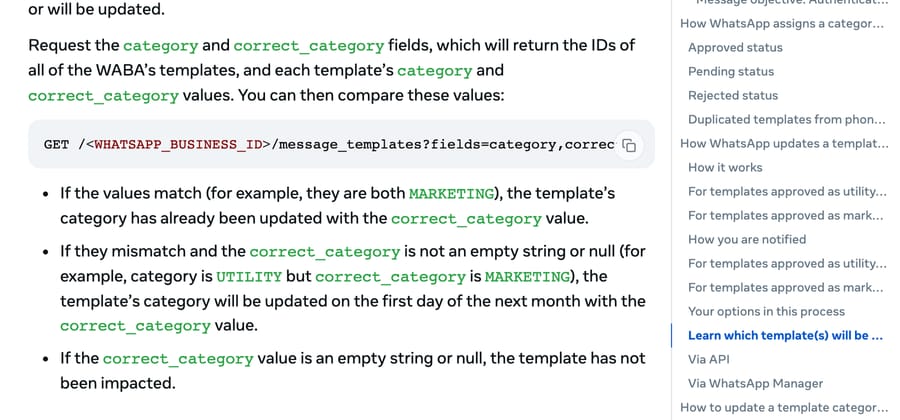
The check: run that query weekly against every template you rely on, and alert on any mismatch. Subscribe to the template_category_update webhook too, which carries new_category and previous_category. Between them you get up to a month of warning on a cost change, instead of finding it on an invoice.
The fix: you have 60 days to challenge a categorization change in Business Support, and separately you can request a review of an approved template within 60 days of creation. If the appeal fails, the copy is the lever. Meta defines Utility as non-promotional and either specific to or requested by the user, or essential to them, and says a Utility template becomes Marketing when it carries "promotional or persuasive intent." The practical version, from a practitioner reply in the r/WhatsappBusinessAPI thread "Template Utility keeps switching to Marketing": "Don't include any optional engagement. Make sure the message is directly tied to a user action. Avoid mixed intent." An order confirmation with a "see our new arrivals" button is a marketing template with a utility opening.
How does the 24-hour customer service window work?
Meta's pricing documentation states the rule in one line: "Template messages are the only message type that can be sent outside of a customer service window, to reach out to users." A customer message to your number opens a 24-hour window, and inside that window every non-template message is free. Outside it, only an approved template goes through.
When an agent replies late, Meta returns error 131047: "More than 24 hours have passed since the recipient last replied to the sender number," with the recommended action "Send a template message instead of a standard message to reach this recipient."
That is straightforward until the window seems not to open. The r/WhatsappBusinessAPI thread "Stuck on WhatsApp Cloud API 24-hour window error even when users message first" is that case, and the usual causes are mundane: the inbound message arrived on a different business phone number from the one sending, or the window is being measured from the wrong event. Another thread, "WhatsApp Cloud API: Meta returns 200 OK but I don't receive messages", reaches the same explanation from a different direction: "There is a hidden '24-hour' window that is only open when the recipient messages first."
The design consequence for an AI agent: if your agent can take longer than 24 hours to come back with an answer, a free-form reply is not available to it. Build a Utility template for the "we have an update on your issue" case and keep it approved, and treat the window as a hard constraint on your escalation path, the same way you would treat business hours. Our guide to AI-to-human handoff covers what should travel with the transfer when a human picks it up.
Why does the Cloud API return 200 when the message never arrives?
The single most confusing failure on the Cloud API is a success response followed by nothing. The explanation is that the HTTP response and the delivery are two different events. The send endpoint acknowledges that Meta accepted the request. Delivery is reported afterwards through webhooks, and Meta's status webhook reference lists four statuses: sent means "the message was successfully sent from our servers," delivered means it reached the user's device, read means it was displayed in an open chat, and failed "indicates failure to send or deliver the message to the WhatsApp user's device." A failed status carries an errors array with a code, a title, a message and a link to the documentation.
So the first move is not to retry. It is to subscribe to message status webhooks and log the code. These are the ones that account for most silent failures, quoted from Meta's error code reference:
- 131026, Message undeliverable. "Unable to deliver message. Reasons can include: The recipient phone number is not a WhatsApp phone number. Recipient has not accepted the new Terms of Service and Privacy Policy. Recipient using an old WhatsApp version." Nothing on your side fixes this one, which is why an r/WhatsappBusinessAPI thread on 131026 ends in the same list.
- 131047, Re-engagement message. The 24-hour window closed. Send a template.
- 131049. "This message was not delivered to maintain healthy ecosystem engagement." This is the per-user marketing template limit. Meta's advice is to wait at least 24 hours before resending.
- 130429, Rate limit hit. "Cloud API message throughput has been reached." Reduce send frequency.
- 131056. "Too many messages sent from the sender phone number to the same recipient phone number in a short period of time." Messages to other recipients still go through, which makes this easy to misread as a general outage.
- 130497. "The WhatsApp Business Account is restricted from messaging to users in certain countries." This is policy, tied to your business category, and only Business Support can change it.
Messaging limits are a portfolio ceiling, not a per-number one
Meta's messaging limits tiers run 250, 2,000, 10,000, 100,000 and Unlimited, and the number that matters is how they're scoped: limits are "calculated and set at the business portfolio level and are shared by all business phone numbers within a portfolio." Adding a second number does not double your capacity. Scaling up requires delivered volume and quality together, with the condition stated as sending "2,000 delivered messages outside of customer service windows to unique WhatsApp user phone numbers within a 30-day moving period, using templates with a high quality rating."
Quality is the part teams underweight. A template's rating is visible in its status (Active with High, Medium or Low quality) and a low rating both slows scaling and puts the template at risk of being paused. Blocks and reports from recipients drive it, so the cheapest protection is sending fewer templates people didn't want.
What changes in WhatsApp pricing on October 1, 2026?
Meta has published the next rate card, and it moves two things that directly affect a support agent's running cost. We checked Meta's own developer pricing page in a browser on September 21, 2026, because a scripted fetch returns a stale copy that omits this section; Zendesk announced the same change to its WhatsApp customers on August 10, 2026, and third-party rate trackers list the same October 1 terms. The wording under "Updates to rate cards" is Meta's:
- "Charging for service messages, with rates the same as those of utility and authentication, by market."
- "[New] Additionally, Meta will introduce a free monthly tier of 1,000 service messages per business phone number."
- "Charging for utility messages in response to users (within the 24h customer service window), which have not been charged since July 1, 2025."
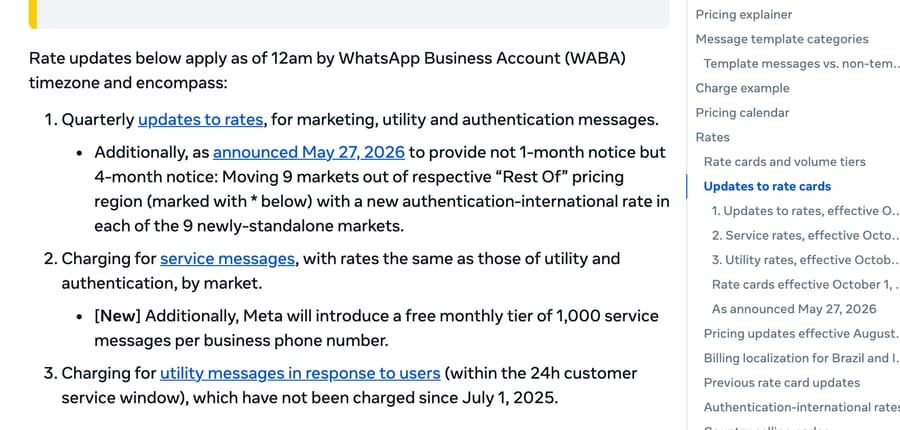
Read together: replies your agent sends inside the 24-hour window have been free since November 1, 2024, and from October 1 they cost the utility rate in your market once you pass 1,000 a month on that phone number. In North America that utility rate is $0.0034 per message, so 10,000 service replies a month becomes about $31 where it used to be $0. That is small in absolute terms and it is not zero, and it applies to every provider on the platform, because the charge is Meta's.
One more piece of timing worth knowing: Meta says it "may update pricing only on the 1st day of each quarter, thus up to 4 times per year: January 1, April 1, July 1, and/or October 1." So rate changes arrive on a schedule you can diary.
What does your WhatsApp provider (BSP) actually control?
Your BSP controls two things: the markup and the tooling. Their own pricing pages say so plainly. respond.io states that "WhatsApp fees are not included in any respond.io subscription." Twilio charges "$0.005 per message, inbound or outbound" on top of Meta's fees. Gallabox says conversations are "charged by Meta and reflected on your invoice with our markup." Interakt publishes per-plan rates and advertises "No Markup Charges" on Enterprise only. SleekFlow bills "Per SleekFlow rate card" plus US$15 a month for number hosting.
So the questions to ask a provider are narrow, because most of the surface isn't theirs:
- What is your markup on Meta's rate, per category, in writing?
- Do you expose the
failedstatus webhook and its error code to me, or do you swallow it? - Do you expose
correct_category, or do I query the Graph API myself? - Whose WhatsApp Business Account owns my templates and my number, and can I take them with me?
- What happens to my agent's replies when the 24-hour window closes: template, queue or silent drop?
Question 4 is the one people skip and regret. If the BSP owns the WABA, a migration is a Meta process rather than an export.
Where does an AI agent layer fit?
WhatsApp is a channel, and the harder half of a support agent is what happens after the message arrives: reading the ticket, finding the answer, taking an action, escalating cleanly. Macha is an AI agent layer on the help desk you already run, on Zendesk, Freshdesk, Gorgias, Front, HubSpot or Intercom, so a WhatsApp conversation that reaches one of those inboxes is handled in the same place as email and chat. We've written the setup for WhatsApp on Zendesk, WhatsApp on Gorgias and WhatsApp on Freshdesk.
The specific failure it answers here is the 24-hour one. An agent that resolves inside the window keeps replies free today and inside the 1,000-message allowance from October, and one that takes a day to come back needs a template every time. Macha bills per ticket, from $299/month for 750 tickets, at about $0.40 per ticket, and one thread with one person is one charge however many replies it takes, so a long WhatsApp exchange costs the same as a short one on our side. The Meta fees are separate and go through your provider either way. It suits teams already running one of those help desks. It is the wrong fit if WhatsApp is your only channel and you have no ticketing behind it, because then there is nothing for the agent to sit on top of. The trial is $50 of free usage (about 125 tickets), no credit card, no time limit, and the tiers are on the pricing page.
Frequently asked questions
Why does my WhatsApp template keep getting rejected? Rejection happens at Meta's review, which the documentation says "can take up to 24 hours." The template then sits in one of the statuses Meta lists, from In-Review and Rejected through Active with a quality rating, Paused and Disabled. Your provider cannot overturn it. Rewrite to match the category guidelines and resubmit, or request a review within 60 days of creation.
Why did my utility template become a marketing template? Because of a Meta process rather than a review decision. Meta runs "a recurring process to identify and update approved templates" whose category doesn't match the guidelines, gives one day of advance notice for a utility-to-marketing change, and changes it instantly with no notice for accounts flagged for abuse. Utility templates become marketing when they carry promotional or persuasive intent, or aren't tied to something the user did. The incentive behind the process is not hidden: marketing messages cost several times more per delivery, so a recategorization moves revenue to Meta and cost to you, which is why the appeal window and the advance-warning field are worth using.
How do I find out in advance that a template will be recategorized? Query GET /<WHATSAPP_BUSINESS_ID>/message_templates?fields=category,correct_category. If the two values mismatch and correct_category isn't empty, Meta will apply it on the first day of the next month. Subscribe to the template_category_update webhook as well, which carries new_category and previous_category.
What is the WhatsApp 24-hour window? A customer message to your business number opens a 24-hour customer service window. Inside it you can send free-form messages; outside it, only an approved template. Meta's own wording is that "template messages are the only message type that can be sent outside of a customer service window." Sending a free-form message late returns error 131047.
Why does the WhatsApp Cloud API return 200 but the message never arrives? Because the HTTP response confirms Meta accepted the request, not that it delivered the message. Delivery is reported asynchronously through status webhooks as sent, delivered, read or failed, and a failed status carries an errors array with the reason. Subscribe to status webhooks and read the code before retrying.
What does error 131026 mean? "Unable to deliver message. Reasons can include: The recipient phone number is not a WhatsApp phone number. Recipient has not accepted the new Terms of Service and Privacy Policy. Recipient using an old WhatsApp version." It is a property of the recipient, so no change on your side fixes it.
What are WhatsApp messaging limits? Tiers of 250, 2,000, 10,000, 100,000 and Unlimited, set at the business portfolio level and shared by every business phone number in that portfolio, so adding a number does not add capacity. Scaling up needs volume and quality together: Meta's condition is 2,000 delivered messages to unique recipients outside customer service windows in a 30-day moving period, using templates with a high quality rating.
Does WhatsApp charge for replies inside the 24-hour window? Not today. Meta stopped charging for non-template messages on November 1, 2024 and for utility templates sent in response to users on July 1, 2025. From October 1, 2026, Meta's published rate card charges for service messages at the same rates as utility and authentication, with a free monthly tier of 1,000 service messages per business phone number, and charges again for utility messages sent in response to users inside the window.
Is a template rejection my BSP's fault? No. Template review, category, the 24-hour window, messaging limits and the per-message rate are all Meta's. Your provider controls its markup on that rate, the tooling it gives you, and whether it exposes Meta's webhooks and fields to you. Those last three are fair things to hold a provider to.
Can I appeal a WhatsApp template decision? Yes, in Business Support. You have 60 days to challenge a categorization change from the date of the change, and you can request a review of an approved template within 60 days of creating it. An appeal that fails leaves the copy as the only lever, so write the template to be non-promotional and tied to something the customer did.
What should you do before October 1, 2026?
The WhatsApp failures that stop a support agent are almost all Meta's decisions arriving through somebody else's dashboard, and they have the same three answers every time: read the error code from the status webhook rather than the HTTP response, query correct_category before Meta changes it for you, and design the agent to answer inside the 24-hour window. Do those three and the only thing left to negotiate with a provider is the markup. Put a date in the diary for October 1, 2026, when replies inside that window start costing the utility rate past the first thousand a month.
Sources: Meta, Pricing on the WhatsApp Business Platform · Meta, Template categorization · Meta, Message templates · Meta, Messaging limits · Meta, Status messages webhook reference · Meta, WhatsApp error codes · r/WhatsappBusinessAPI, template forced into marketing · r/WhatsappBusinessAPI, 200 OK but no message
Meta documentation and rate cards checked September 21, 2026 and rechecked September 24, 2026, a week before the October 1, 2026 change. Next review by October 8, 2026.
Resolve tickets automatically with AI agents
Macha's AI agents work on top of the help desk you already use — no code.