Intercom
 Shopify
 Stripe
 Slack
Slack Notion
 Google Workspace
 Confluence

Why Is My Zendesk AI Agent Not Answering? 8 Causes and How to Check Each


A silent Zendesk AI agent is usually a Draft agent with no channel, a messaging channel set to Basic response, or a switched-off email automation trigger. Eight causes cover almost every case, and each has an admin screen you can check in about two minutes.
Key takeaways
- A Zendesk AI agent that stops answering is almost always blocked by one of eight admin settings, led by a Draft agent, a Basic response channel and a disabled email trigger.
- The most common cause is a Zendesk AI agent still in Draft with no channel connected, shown in the Status and Channels columns under Admin Center, AI, AI agents.
- Connecting a Zendesk AI agent to email auto-creates the trigger 'Ultimate.ai Multitouch Ticket Automation', which by default ignores tickets submitted by agents and breaks most self-tests.
- Zendesk's legacy AI agent functionality entered maintenance mode on August 31, 2026 and stops working entirely on December 10, 2026, so legacy bots are on frozen code.
- The Response type column under Channels, Messaging and social, Messaging can read Basic response, which stops a live, connected Zendesk AI agent from ever replying on that channel.

A Zendesk AI agent that stops answering is almost always blocked by one of eight admin settings, and the top three are an agent left in Draft with no channel connected, a messaging channel set to Basic response, and a switched-off email automation trigger. Each has a screen you can check in about two minutes, listed in the table below.
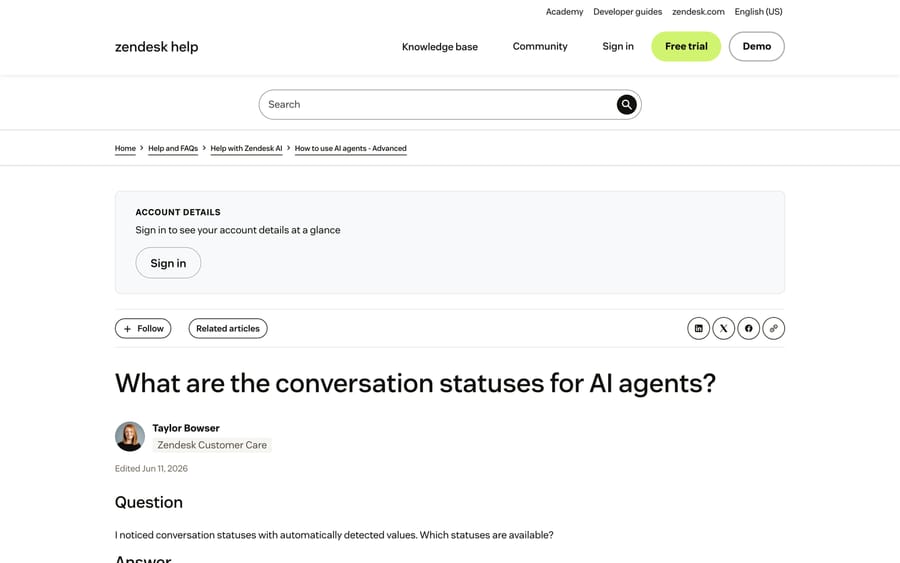
Before changing anything, read the conversation. Zendesk keeps a per-conversation status that tells you which half of the problem you have, and it's the single fastest thing to look at. An email AI agent that logs Not understood did not match the message. One that logs Recognized topic understood the message and then triggered no actions or replies, which is a different fault with a completely different fix. Processed means it acted but sent nothing except the default reply. Those distinctions are in Zendesk's own status reference, and skipping them is how teams spend a day rewriting intents for a problem that was a channel setting.
What are the eight causes, and where do you check each?
| # | Cause | Where to check |
|---|---|---|
| 1 | The agent is a draft, or no channel is connected | Admin Center › AI › AI agents › AI agents |
| 2 | The channel's response type is not your AI agent | Admin Center › Channels › Messaging |
| 3 | The email automation trigger is off, edited or excluded | Admin Center › Objects and rules › Triggers |
| 4 | The knowledge exists but the agent can't reach it | Guide article placement, plus the agent's sources |
| 5 | The language isn't active, or detection fell back | AI agent settings › Languages |
| 6 | It did reply, and something after it took over | The ticket events log |
| 7 | You're still on Essential or legacy functionality | Admin Center › AI › AI agents, "Essential (legacy)" |
| 8 | The ticket never reached the agent at all | Routing, requester type, and the mail connector |
1. Is the agent still a draft, or is no channel connected?
The most common cause is the most boring one, and it is visible from one screen. Go to Admin Center › AI › AI agents › AI agents. The list shows a Status column and a Channels column for every agent.
In our own sandbox the row reads Draft against "No channels connected", which is exactly what a silent agent looks like from the admin side. An agent in that state's working precisely as configured, and no amount of editing its answers will change anything.
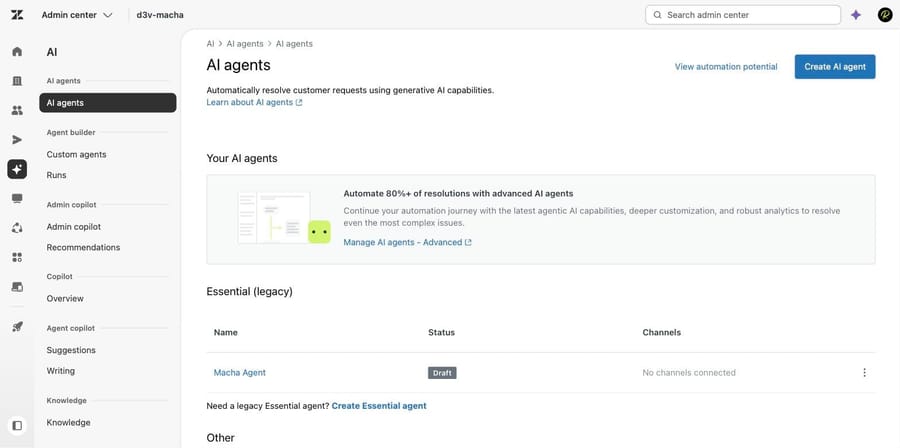
The fix. Publish the agent, then connect it to a channel. Note the shape of this page while you are on it, because it explains a lot of confusion: agents built in the newer experience sit at the top, legacy ones sit under an "Essential (legacy)" heading, and the advanced console opens in a separate tab through "Manage AI agents - Advanced". People troubleshooting in one of those places while their agent lives in another is a recurring pattern in r/Zendesk threads.
2. Is the channel's response type set to your AI agent?
An agent can be live and connected and still never speak, because the channel it is attached to is set to answer a different way. Go to Admin Center › Channels › Messaging and social › Messaging. The list carries a Response type column next to each channel.
Both channels in our sandbox read "Basic response", which means the widget answers with the basic messaging response and never hands the conversation to an AI agent. This column is the fastest check on the whole page and it's the one most likely to be skipped, because nothing about it looks like an error.
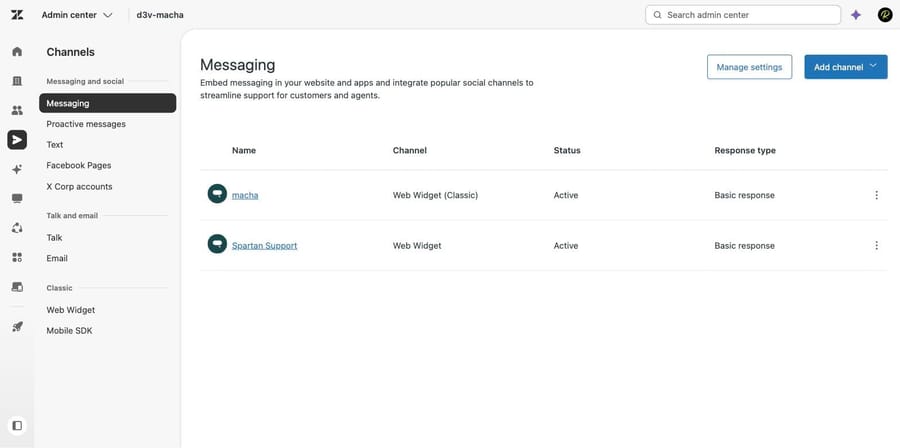
The fix. Open the channel and change the response type to the AI agent you published in cause 1. If the widget itself is not appearing for customers at all, that's a different problem and the Web Widget not showing covers it.
3. Is the email automation trigger off, edited, or excluded by another rule?
This is the cause that explains why a post about triggers keeps turning up for this search, and the connection's real rather than coincidental. When you connect an AI agent to an email channel, Zendesk creates a trigger for it automatically, named "Ultimate.ai Multitouch Ticket Automation: <AI agent ID>". That trigger is what fires the agent on a public comment. Deactivate it, edit its conditions, or add a condition elsewhere that excludes the ticket, and the agent goes quiet while everything in the AI console still looks healthy.
Two documented behaviors sit inside that trigger and account for a lot of "it ignores some tickets":
- By default the email automation trigger is configured so the AI agent does not respond to tickets submitted by agents. If you're testing by creating tickets as yourself, that's why nothing happens.
- Mail routed through the Microsoft Exchange or Gmail connectors is treated differently from mail arriving at a support address, and Zendesk's escalation analysis does not apply to those connector types.
The check. Open Admin Center › Objects and rules › Business rules › Triggers, search for "Ultimate.ai", and confirm the trigger is active and that its conditions still match a ticket that should have been answered. Then open the ticket's own events log and look for the trigger firing.
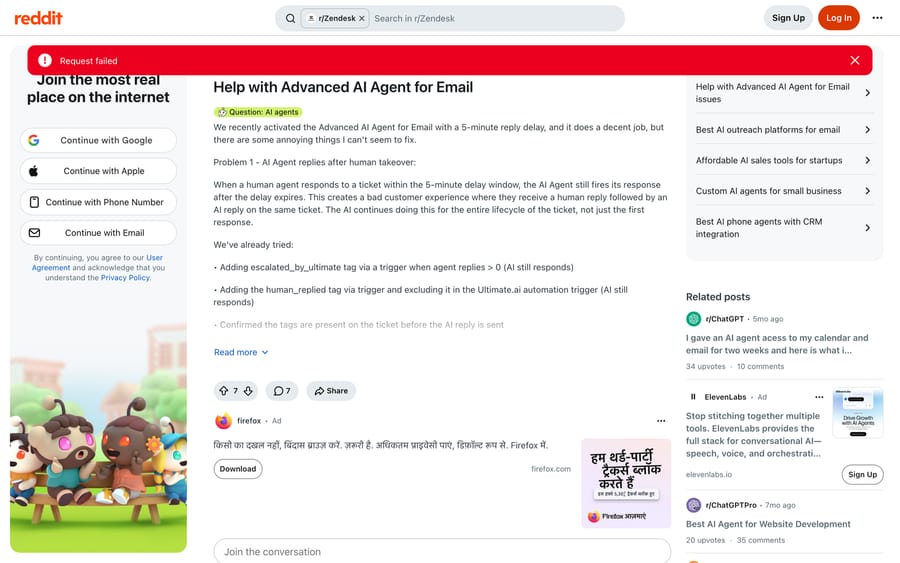
An r/Zendesk thread from June 2026 shows what this looks like in the field. A team running the Advanced AI agent on email with a five-minute reply delay found it replying after a human had already answered, and their own tagging workarounds did nothing, because the reply was queued before the tag existed. The fix another admin in the same thread describes is a condition on the auto-created trigger: add Ticket › Ticket | Is | Created to the list of conditions that must all be met, which limits the agent to one reply on ticket creation. Zendesk's own troubleshooting article recommends the same condition for the case where a bot answers, escalates and then answers again.
Zendesk triggers not firing has the general debugging sequence for triggers, including run order, and it applies here unchanged.
4. Does the knowledge exist where the agent can't reach it?
If the status says the agent understood and had nothing to say, the next thing to check is whether the content is reachable. Zendesk's troubleshooting article lists four states that block it, and all four look identical from the customer side:
- The help center is not active and published.
- Articles are unpublished, or their Placement › Visible to field does not allow customers and the AI agent to read them.
- A knowledge source was added in the wrong place, or the import did not complete.
- Different instances are on different rollout states, which matters when you are comparing a sandbox against production.
The check. Open the article in a logged-out private window. If you can't read it, the agent can't either. Then open the agent's own source list and confirm the article's section is inside it.
The fix. Publish, set the audience to everyone, and re-import anything that was crawled rather than linked. Auto-syncing the help center to an AI agent covers keeping that connection current, and the Zendesk knowledge base audit covers the sweep for content that is reachable but wrong.
5. Is the language inactive, or did detection fall back to English?
An agent that answers English customers and ignores everyone else is usually a language configuration and not a knowledge gap. Zendesk documents three shapes of this: the language has not been activated, the agent is falling back because it cannot detect or serve the target language, and the content exists but not in that language.
There is a fourth that catches people out, and Zendesk has its own article for it: the AI agent changes to English when there isn't enough text to detect a language. A two-word first message is enough to trigger it.
The check. Look at the conversation log for the language the agent decided on, then compare it against the agent's active languages and against the article's translations.
6. Did it reply, and something after it took over?
Sometimes the agent answered and you are looking at the aftermath. The ticket events log settles this in seconds, and it's worth checking before you change any configuration, because a reply that was sent and then superseded produces the same complaint as a reply that never happened.
Two patterns show up most. A human agent replied during a delay window, which the r/Zendesk thread above describes in detail. Or the conversation escalated and the escalation looks like silence: Zendesk's status reference distinguishes Assisted escalation, Agent escalation, Email escalation and Escalation failed, and only the last of those is a fault.
The related complaint is the agent that replies and never finishes. Another r/Zendesk thread from June 2026 describes a team four months into Zendesk AI whose replies were fine while tagging, CRM updates and categorization all still landed on humans. That isn't an outage; it's an agent scoped to drafting rather than to completing the work, and the fix is workflow rather than troubleshooting. If it is looping instead, stopping an infinite loop is the specific case.
7. Are you still on Essential or legacy functionality?
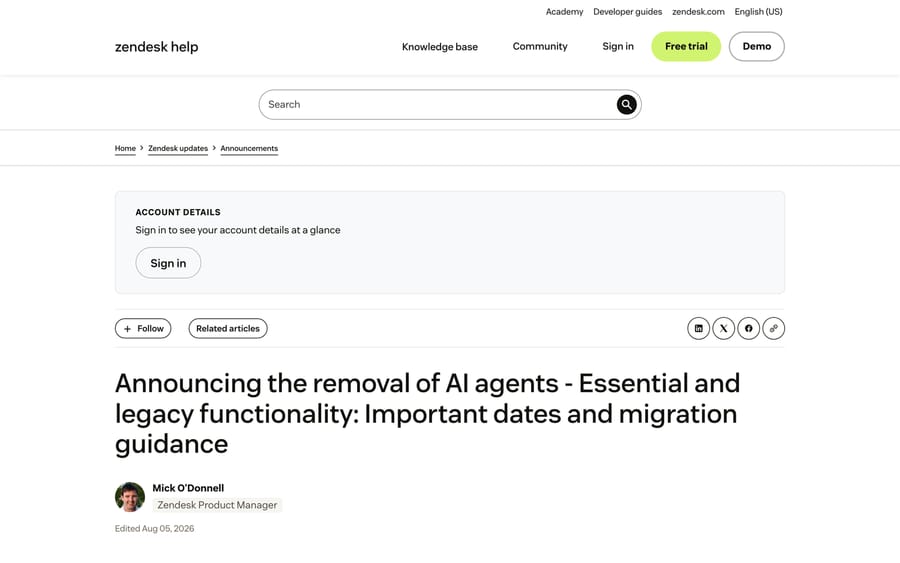
This one's got a date on it. Zendesk announced on June 23, 2026 that AI agents - Essential and legacy AI agent functionality are being removed, which covers the bot builder, answers, intents and autoreplies with articles. The legacy experience entered maintenance mode on August 31, 2026, with development stopped except for critical bug fixes. On December 10, 2026, in Zendesk's own words, "Any AI agents left on this technology will no longer function."
As of late September 2026 that means anything still running on legacy is on frozen code with a hard stop about eleven weeks away, and a bug you're chasing may be one Zendesk is no longer fixing.
The check. The "Essential (legacy)" heading on the AI agents page from cause 1 tells you immediately whether you have any.
The fix. Migrate to the upgraded experience. One thing to plan for while you do: the capabilities are folded into Suite and Support plans, and the resolutions those capabilities produce are still billed per automated resolution, so a migration can change the bill without anybody changing a price. What the Essential and legacy removal means covers the migration and the cost, and Zendesk AI pricing covers how automated resolutions are counted.
8. Did the ticket ever reach the agent?
The last cause is the one where everything in the AI console's correct and the conversation never arrived. Four things produce it:
- Routing assigned the ticket first. Omnichannel routing or a trigger above the AI trigger sent it to a group, and the agent was never in the path.
- The requester is an agent. Covered in cause 3, and worth repeating because it's the most common self-inflicted test failure.
- The mail arrived through a connector. Exchange and Gmail connectors behave differently from a support address.
- An escalation tag was applied upstream. Zendesk tags emails about non-support topics with
escalated_by_support_email, and a tagged ticket is left alone by design.
The check. Open the ticket's events log and read from the top. If no AI-related webhook or trigger appears at all, the fault is upstream of the agent and none of causes 1 through 7 apply.
In what order should you check the causes?
Run it in this sequence and you'll land on the right cause without changing anything you didn't need to:
- Read the conversation status. Not understood points at causes 4 and 5. Recognized topic or Processed points at causes 2, 3 and 6.
- Open the AI agents list. Status and Channels answer cause 1 and flag cause 7.
- Open the Messaging channel list and read the Response type column, for cause 2.
- Open the ticket events log, for causes 3, 6 and 8.
- Only then start editing answers or knowledge.
What doesn't Zendesk's own troubleshooting article cover?
Zendesk's article is good and it's the right first stop. It's filed under "How to use AI agents - Advanced", which means it's written for the advanced experience, and it describes the checks rather than showing the screens where you make them. The three things it leaves to you are the ones this page adds: the Response type column on the Messaging channel list, the exact name of the auto-created email trigger and the community-verified condition to add to it, and the fact that the conversation status taxonomy tells you which half of the problem you have before you touch anything.
If, after all eight, the honest answer is that the agent is configured correctly and still cannot do what you need, that is a scope problem rather than a fault. Macha fits teams already running Zendesk who want an agent that calls their own APIs inside the ticket and posts as a normal comment, priced per ticket from $299 a month for 750 tickets, with setup and monitoring by the Macha team included. It's the wrong choice if what you actually need is your help center published and your trigger switched back on. Alternatives to Zendesk's own AI agents covers the wider set honestly, including where staying with Zendesk is right.
It's also worth naming the incentive in how this gets billed. Zendesk charges per automated resolution, so the meter runs on conversations the agent closes and stops entirely on the ones it never answers. Silence costs you and costs the vendor nothing, which is why nobody's going to notice this for you.
How we researched this
We checked every admin path in this post inside our own d3v-macha Zendesk sandbox on 2026-09-21, and the two product screenshots come from that instance rather than from any customer's. The Zendesk documentation was read the same day, including the troubleshooting article, which Zendesk last edited on September 21, 2026 (re-checked September 24), the conversation status reference, the email-channel article and the removal announcement. Two r/Zendesk threads were read in full for the field behavior, using a headless browser because Reddit refuses scripted requests. One caveat worth stating: Google still indexes a Zendesk article called "Troubleshooting ticket automation in AI agents" that returns a 404 today, so we have not linked it.
Frequently asked questions
Where is the AI agents page in Admin Center now? Admin Center › AI › AI agents › AI agents. The same AI section also holds Custom agents and Runs under Agent builder, Admin copilot, Copilot, Agent copilot and Knowledge, which is why searching the older paths turns up nothing.
Why does my AI agent answer on chat but not on email? They are configured separately and the email side depends on an auto-created trigger. Check that the "Ultimate.ai Multitouch Ticket Automation" trigger for that agent is active, and remember that by default it's set not to respond to tickets submitted by agents, which breaks most self-tests.
The agent understood the question and said nothing. What is that? That's the Recognized topic status: understood the last message, triggered no actions or replies. Look at what the matched use case was supposed to do, rather than at the intent matching, and check whether the reply step depends on a knowledge source or an integration that failed.
Does a used-up automated resolution allowance stop the agent? Your allowance and your usage are worth checking any time behavior changes on a date boundary rather than after a configuration change. The counting rules and what each plan includes are a separate subject, covered in Zendesk AI pricing.
My bot worked for a year and stopped in September. Why? Check cause 7 first. Legacy AI agent functionality entered maintenance mode on August 31, 2026 and stops working entirely on December 10, 2026, so a legacy bot degrading this fall is the expected path rather than a coincidence.
How do I test without creating a ticket as an agent? Use the agent's own test console for intent and knowledge matching, and use a genuinely external end-user address for end-to-end tests. Testing as a team member is the single most common false negative, because the default trigger configuration excludes agent-submitted tickets.
Is the Web Widget not appearing the same problem? No, and it's worth ruling out early, because a missing widget and a silent agent produce the same customer complaint. Zendesk Web Widget not showing covers the snippet and content-security-policy causes.
What if the agent answers but the answer is wrong? That's a different diagnostic with a different cause list, and it starts from what the agent retrieved rather than from whether it fired. Why your AI support agent gave the wrong answer is the cross-vendor version.
If the eight checks clear and you want an agent that acts on your own systems from inside the ticket, Macha on Zendesk is the shape that fits; the pricing page has the per-ticket arithmetic, and a trial is $50 of free usage with no card.
Sources:
- Zendesk, Troubleshooting common issues with AI agents (edited Sep 21, 2026)
- Zendesk, What are the conversation statuses for AI agents?
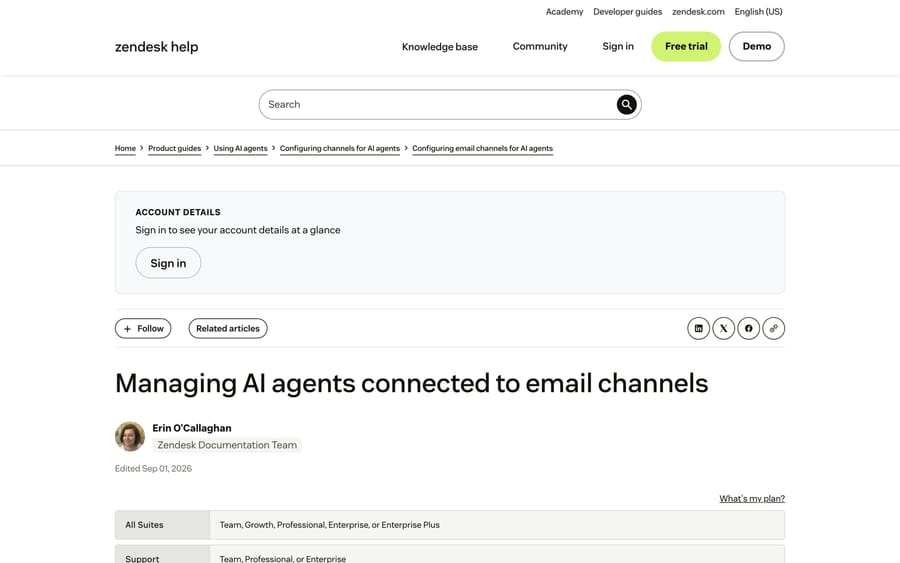
- Zendesk, Managing AI agents connected to email channels
- Zendesk, Configuring language detection for AI agents
- Zendesk, My AI agent changes to English when there isn't enough text
- Zendesk, Reviewing conversation logs for AI agents
- Zendesk, Announcing the removal of AI agents - Essential and legacy functionality
- r/Zendesk, Help with Advanced AI Agent for Email
- r/Zendesk, Zendesk AI keeps replying but never actually finishes the job
Add AI agents to your Zendesk
Macha reads the ticket, drafts the reply and takes the action, inside the Zendesk you already run.