





 Shopify
 Stripe
 Slack
Slack Notion
 Google Workspace
 Confluence

How Do You Automate Follow-Ups in Front with Sequences and AI? (2026)


Front automates follow-ups with sequences: up to 10 stages that each send only if the recipient hasn't replied, available on the Professional plan or above. Front's Autopilot can answer simple replies, and an AI agent layer can personalize each step and read what a reply actually means.
Key takeaways
- A Front sequence runs 1 to 10 stages, labeled A through J, and each stage after the first sends only if the recipient hasn't replied within a set number of days.
- Front sequences are available on the Professional plan at $65 a seat a month or above, so Starter teams at $25 a seat can't build them.
- Front stops a sequence for any recipient who replies to a stage, but automatic out-of-office replies do not stop it.
- Front's Autopilot bills each conversation once, $0.05 for triage, $0.39 for a handoff and $0.89 for a resolution, while Copilot is a $20 per seat per month add-on and Smart QA is Enterprise-only as of October 2026.
- Macha bills per ticket from $299 a month for 750 tickets, so a follow-up that reads a reply's intent and drafts an answer costs the same as a one-line reply.

To automate follow-ups in Front, build a sequence of up to 10 stages that each send only if the recipient hasn't replied after a set number of days, then add AI on top: Front's own Autopilot (billed once per conversation: $0.05 triage, $0.39 handoff, $0.89 resolution, as of October 2026) answers simple replies, and an agent layer can personalize each step. Sequences need the Professional plan ($65 a seat a month) or above, per Front's sequences guide and pricing page, both checked 24 September 2026.
| Piece | What it does | Cost (checked 24 September 2026) |
|---|---|---|
| Sequences | 1 to 10 stages, stop-on-reply, mail merge, 200 recipients | Professional ($65/seat/mo) or Enterprise ($105) |
| AI Compose | Rewrites a draft's tone, length and typos | All plans, up to 200 actions per teammate per day |
| Autopilot | Auto-replies to and resolves simple conversations | $0.05 triage / $0.39 handoff / $0.89 resolution per conversation |
| Copilot | Agent-assist drafting | $20/seat/mo add-on, included in Enterprise |
| Macha agent layer | Writes each step from live data, reads reply intent | Per ticket, from $299/mo for 750 |
How do Front sequences and follow-ups work?
A sequence in Front is a series of messages sent to a list of recipients, with automatic follow-ups for anyone who goes quiet. Per Front's guide to understanding sequences, a sequence can range from 1 to 10 stages (labeled A through J), and each stage after the first is a follow-up to the one before it. Sequences are available on the Professional plan or above.
The follow-up logic is the whole point. Each stage has a sending delay that triggers only if the recipient hasn't replied within a set number of days. Front's own example is "Follow up in 7 days if no reply", so a three-week nudge is simply stages B, C and D each set to send seven days after the previous one, provided the person still hasn't answered.
Two behaviors make sequences safe to run at scale:
- Stop-on-reply. Front is explicit: "If a recipient sends a reply to a sequence stage, subsequent stages will not send out to their email address." The moment someone engages, the chasing stops for them, so you don't badger a prospect who already wrote back. (Automatic out-of-office replies are the sensible exception; they don't stop the sequence.)
- Mail merge personalization. You can customize each message with variables using
{{variable}}syntax, pulling CSV columns through{{sequence...}}and contact custom fields through{{recipient...}}, with a fallback like{{variable|'there'}}for missing data. A sequence supports up to 200 recipients and up to 20 custom columns per send.
That's a capable outbound engine, and for straightforward campaigns it's all most teams need.
How do you build a follow-up sequence in Front?
Here's the standard flow for a support, sales, or CS follow-up sequence in Front:
- Build your list. Prepare a CSV whose first column is
email, plus up to 20 custom columns (first name, account, renewal date, open ticket ID, whatever you'll merge in). - Write stage A. The opener. Use
{{recipient.first_name}}and other variables so the "mass" email reads like a one-to-one note. Keep the subject deliberate: Front locks the subject after stage A and prepends "Re:" to later stages. - Set the follow-up cadence. For stages B onward, choose the delay: follow up in N days if no reply. A common three-touch pattern is B at +3 days, C at +7, D at +14.
- Let stop-on-reply do its job. Anyone who replies drops out of the remaining stages automatically. You only keep chasing the silent ones.
- Review engagement. After sending, check who opened and who replied, and at which stage, then fold that into your next campaign.
The friction is that steps 2 and 3 are the same for everyone. Mail merge swaps in a name and an account, but the argument, the tone, and the timing are fixed at authoring time. A prospect who half-replied "not now" gets the same stage C as one who ghosted entirely. That's the seam where AI earns its place.
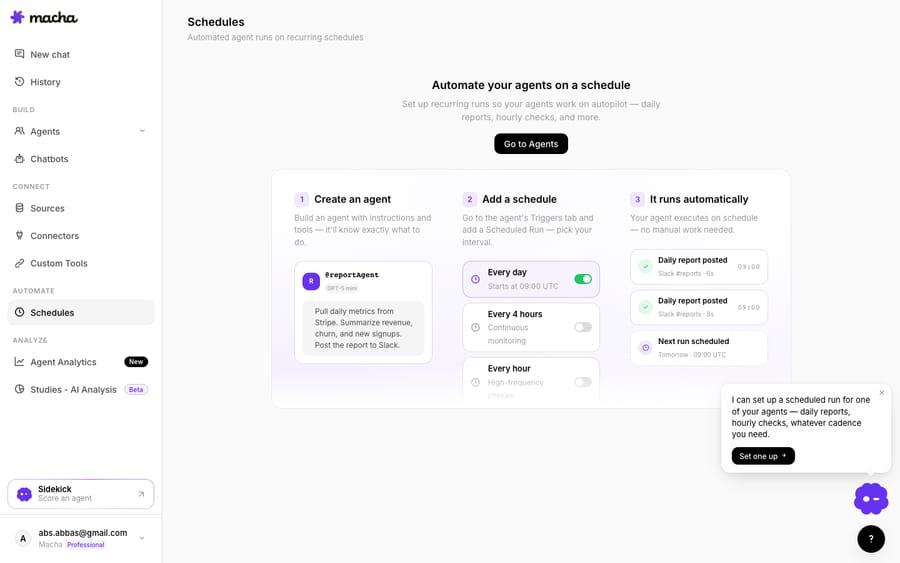
Above: a Macha demo-org agent's Schedules, recurring and triggered runs that power automated follow-ups and checks. This is a Macha agent demonstrating the capability, not a live Front conversation.
What can Front's native AI do for follow-ups?
Front credits itself with a long list of AI features, and it's fair to use what it does well before reaching for anything else. Of Front's AI features, three touch outbound and follow-up work directly:
- AI Compose polishes a draft as you write it: one click to make a message more professional or friendlier, fix typos, or change the length. It's available on all plans (up to 200 Compose actions per teammate per day), and it's useful when you're hand-writing a follow-up after a sequence flags a reply.
- Autopilot is Front's AI agent that can resolve conversations end-to-end; as of October 2026 its AI agents handle the conversations assigned to them, guided by Playbooks (the older auto-replies to selected topics are Front's legacy version), so when a sequence reply lands and it's a simple, known question, Autopilot can handle it without a human.
- Smart QA reviews tickets automatically and scores service quality, which is helpful for auditing how your team handles the replies your sequences generate.
One caveat: Front's older AI Answers chatbot is now a legacy feature, "no longer available for purchase", and Front points buyers to Autopilot Resolve instead. If you're planning around Front AI today, plan around Autopilot, not AI Answers.
So native Front AI already helps you write a follow-up (Compose) and auto-answer the simple replies (Autopilot). Where it stops is the personalization and reasoning inside the sequence itself.
What can an AI agent layer add to a static sequence?
A native sequence is deterministic: fixed stages, fixed copy, fixed cadence. AI Compose helps a human draft, and Autopilot can auto-reply to conversations assigned to it, but neither reaches into the sequence to make each step smarter for each person. That's the job of a dedicated AI agent layer running on top of Front.
Macha is that layer. It runs on top of the Front you already use through the Macha–Front connector. It does not replace Front, your shared inboxes, or your sequences. Here's where an agent adds what a static sequence can't:
- Personalized sequence steps. Instead of one templated stage C for everyone, an agent reads what actually happened (the prospect's last reply, the account's open tickets, the renewal date pulled live from your system) and drafts a follow-up tailored to that situation. Mail merge fills a blank; an agent writes the sentence.
- Smart stop-on-reply. Front's stop-on-reply is binary: any reply halts the chase. An agent can read the reply's intent: "send me pricing" (advance and answer), "wrong person" (route to the right contact), "not interested" (suppress), instead of treating every response identically.
- Follow-up drafting on a schedule. Macha's Schedules run recurring and triggered agent runs (every hour, every four hours, every day), so an agent can check for unreplied threads, draft context-aware nudges, and surface them for a teammate to send, rather than firing the same static stage on a fixed clock.
The mechanism underneath is that the agent understands intent, not just a merge field, and can pull real data through a custom tool that turns your REST API into something the agent can call at send time. If you want to build one, building an AI agent for Front walks through it, and connecting Front to Macha to route conversations to AI covers the wiring.
How do Front AI and an agent layer compare on cost?
The two approaches also price differently. Front's plans run $25/seat/mo (Starter), $65/seat/mo (Professional), and $105/seat/mo (Enterprise) per Front's pricing page, with sequences included in the seat on Professional and Enterprise (Starter doesn't get them). AI capabilities are mostly add-ons: AI Compose ships on all plans (200 actions/teammate/day), Copilot is a $20/seat/mo add-on (or included in Enterprise), Smart QA is Enterprise-only as of October 2026, and Autopilot is billed for its AI work: the pricing page lists it "starting at $0.05/conversation," and Front's help center bills each conversation once at the highest level reached, $0.05 for triage, $0.39 for a handoff (including AI drafts a person takes over) and $0.89 for a Resolution with no human reply (Front's Autopilot pricing, as of October 2026). The incentive in that unit is plain: Front earns more from Autopilot the more conversations it closes without a person, so the vendor's revenue tracks your deflection rate. Front's pricing tiers lay out exactly what unlocks where.
Macha prices on a different unit. It bills per ticket, one conversation charged once however many messages it takes, and never per resolution or per deflection. That distinction matters: an automation/orchestration layer does variable amounts of reasoning per conversation, and charging once for the whole thread means a follow-up that fetches a renewal date, reads a reply's intent and drafts an answer costs exactly the same as a one-line reply. Pricing starts at $299 a month for 750 tickets, about $0.40 each.
| Native Front sequence + Autopilot | Macha AI agent layer | |
|---|---|---|
| What it does | Fixed stages, mail-merge copy, stop-on-reply; Autopilot agents reply on conversations assigned to them | Personalizes each step from live data, reads reply intent, drafts context-aware follow-ups |
| Personalization | Merge fields ({{variable}}) | Agent-written, intent-aware |
| Stop-on-reply | Binary: any reply halts | Intent-aware: advance, route or suppress |
| Runs on top of Front | Native to Front | Yes, via the connector, never a replacement |
| Cost unit | Seat (Professional+) plus Autopilot per conversation ($0.05 / $0.39 / $0.89) | Per ticket, from $299/mo for 750 (see pricing) |
The clean division of labor: let Front sequences be the reliable dispatcher that sends and chases, and layer an agent on top for the reasoning: personalizing the step, reading the reply, and drafting the answer. For the mechanics of sequences themselves, see Front sequences explained; for the automation engine that pairs with them, Front rules explained; and for the wider picture, Front AI explained and the category of AI agents for customer service.
FAQ
How many stages can a Front sequence have? Between 1 and 10 stages (labeled A through J). Each stage after the first is a follow-up that sends only if the recipient hasn't replied within the number of days you set, for example "Follow up in 7 days if no reply."
Does a Front sequence stop when someone replies? Yes. If a recipient replies to any stage, the subsequent stages won't send to their address. Automatic out-of-office replies are the exception and don't stop the sequence.
Can I personalize a Front sequence? Yes, with mail merge. Use {{variable}} syntax to pull CSV columns ({{sequence...}}) and contact custom fields ({{recipient...}}), with a fallback like {{variable|'there'}}. A sequence supports up to 200 recipients and up to 20 custom columns. An AI agent layer goes further by writing each step from live context rather than filling a blank.
What happened to Front AI Answers? Front's older AI Answers chatbot is now a legacy feature, "no longer available for purchase." Front directs buyers to Autopilot Resolve instead, so plan around Autopilot for AI-powered replies.
Can I add AI to Front sequences without replacing Front? Yes. An AI agent layer like Macha connects to Front through the Macha–Front connector and runs on top of your existing inboxes and sequences; it doesn't replace them. Your sequences keep sending and chasing; the agent personalizes each step, reads reply intent, and drafts the follow-up. Macha bills per ticket, one conversation charged once however many messages it takes, never per resolution.
Which Front plan do I need for sequences? Professional ($65 a seat a month) or Enterprise ($105). Front's sequences guide says the feature is available on the Professional plan or above, so Starter teams at $25 a seat can't build them.
Ready to turn static follow-ups into smart, intent-aware ones? Start a free trial of Macha and connect it to your Front in minutes.






