





 Shopify
 Stripe
 Slack
Slack Notion
 Google Workspace
 Confluence

How Do You Auto-Assign and Route Front Conversations with AI? (2026)


Front's native assignment deals conversations out by rotation or by workload, which keeps volume even but never looks at what a customer wrote. Here is how round robin and load balancing behave, where Front's rules and AI stop, and how an AI agent layer routes by intent, language, VIP status and skill on top of the Front you already run.
Key takeaways
- Front auto-assigns conversations natively with round robin, which deals to the next online teammate, or load balancing, which assigns to the teammate with the fewest assigned conversations.
- Front's round robin skips offline teammates with no queue, while load balancing queues conversations and hands them to the next available online teammate.
- Front load balancing allows at most 100 conversations per teammate per workspace and requires the Professional plan, priced at $65 per seat a month on annual billing.
- Front's pricing page caps workspace rules at 10 on Starter and 20 on Professional, so keyword-based routing runs out of room before Enterprise's unlimited rules.
- Front Autopilot bills each conversation once, $0.05 for triage, $0.39 for a handoff and $0.89 for a resolution, while Copilot costs $20 per seat a month and Smart QA and Smart CSAT are Enterprise-only as of October 2026.

Front auto-assigns conversations two ways natively: round robin, which deals each new conversation to the next online teammate, and load balancing, which gives it to whoever has the fewest open conversations, up to a limit of at most 100 per teammate, and queues it when nobody is free. Neither reads the message, so routing by intent, language, VIP status or skill needs an AI agent layer on top of Front.
| Method | What it routes on | Plan |
|---|---|---|
| Round robin rule | Next online teammate in sequence | All plans (rules are on every plan) |
| Load balancing rule | Fewest open conversations, per-person limit, queues when full | Professional ($65/seat/mo annual) and above |
| Keyword and inbox rules | Subject text, sender domain, inbox | Starter up to 10 rules, Professional up to 20, Enterprise unlimited |
| AI agent layer (Macha) | Intent, language, account tier, topic | Per ticket, from $299/mo for up to 750 tickets |
How does Front round robin work?
Round robin is Front's simplest fair-distribution rule. You build it as a workspace rule with an assignment action, and Front deals each new inbound conversation to the next teammate in a rotating list. Per Front's guide to round robin vs. load balancing assignments, it automatically assigns conversations to online team members in turn, ensuring an even spread of work.
There's one behavior that surprises teams: round robin only assigns to teammates who are online. Front is explicit that "if all teammates are offline, the system won't assign the conversation," and there is no queue holding the message for later assignment. A conversation that arrives while a teammate is away is simply skipped for them, not reassigned when they return. That's fine for a support desk with steady coverage. It's a problem for a team with staggered shifts or time zones, where "the next person in the rotation" is regularly the wrong answer.
Round robin is also strictly positional. It knows the order of the list; it knows nothing about who is best for the conversation. A high-value renewal and a password reset are dealt out with identical logic.
What's the difference between round robin and load balancing?
Front's more capable native option is load balancing, and if round robin is disappointing you, this is usually the first upgrade. Load balancing assigns each inbound conversation to the teammate with the fewest assigned conversations, up to a limit you set per person, and it queues work when nobody is available. Front's docs note that "conversations are automatically queued and assigned to the next available online teammate," so unlike round robin, no conversation is dropped just because the timing was bad. When everyone is at their limit, the rule pauses and resumes as soon as someone drops below it, starting with the oldest unreplied conversation.
You configure the per-teammate ceilings under Settings → Workspace settings → Rules and macros → Assignment limits, entering a number for each person (the load balancing setup guide walks through it). The maximum is 100 per teammate per workspace, and 100 is also the default if you set nothing. Load balancing is available on the Professional plan or above, which is worth knowing before you build a rule that quietly won't work on Starter.
| Round robin | Load balancing | |
|---|---|---|
| Distribution logic | Next in sequence | Fewest assigned conversations |
| Queues when nobody's online | No: conversation skipped | Yes: held until someone's free |
| Per-person capacity limits | No | Yes (up to 100 per teammate per workspace) |
| Plan | Starter+ | Professional+ |
| Routes by intent/language/skill | No | No |
Both are genuine improvements over manual triage. But look at that last row: neither reads the conversation. They balance volume, not fit. That's the ceiling.
Where does rule-based routing in Front stop?
Front's rule engine, the thing underneath both assignment types, matches on patterns, not meaning. You can route on subject contains "invoice", from a specific domain, or conversation is in this inbox, and combine those with the assignment action. For the full mechanics of that engine, see Front rules explained.
The gaps show up the moment routing needs judgment:
- Intent. "I was double-charged and want it fixed" never contains the word refund, so a keyword rule misses it. Round robin and load balancing don't even look.
- Language. A French-language complaint and an English one are dealt to the same rotation. Nothing routes the French customer to a French-speaking teammate.
- VIP. Your top-tier account and a free-trial user get identical treatment unless you hand-build a domain condition and maintain it forever.
- Skill. A shipping question and an API integration question need different specialists; volume-balancing sends them wherever the rotation lands.
You can approximate some of this with a stack of workspace rules, but Front's pricing page caps them at 10 on Starter and 20 on Professional (unlimited only on Enterprise), they're brittle to maintain, and they're still blind to what a message actually says. That's the seam an AI layer fills.
How does an AI layer route by intent, language, VIP, and skill?
Macha is an AI agent layer that runs on top of the Front you already use. It doesn't replace Front, your shared inboxes, or your assignment rules. You keep round robin or load balancing doing the fair-distribution work they're good at. Macha's agent adds the reasoning layer above them: it reads the incoming conversation, works out what it's actually about, and routes accordingly using the Front connector's actions, which include assigning a teammate, updating tags, and posting internal comments with @mentions.
Because the agent reads the message rather than pattern-matching it, the routing playbook opens up:
- By intent. The agent classifies the conversation (billing, shipping, cancellation, technical) from what the customer means, not the words they happened to use, and sends it to the owning teammate.
- By language. It detects the customer's language and routes to a teammate who handles it, rather than dealing it into a generic rotation.
- By VIP. It can check account tier through a custom tool that calls your CRM or billing API, then escalate a high-value customer straight to a senior teammate.
- By skill. It matches the topic to the specialist who handles it, so an integration question doesn't land on someone who only does shipping.
Concretely, this is configured on the agent itself. Macha's Escalation Manager agent is given assignment and priority tools, so when a conversation matches its logic it can raise priority and assign the right owner without a human touching it.
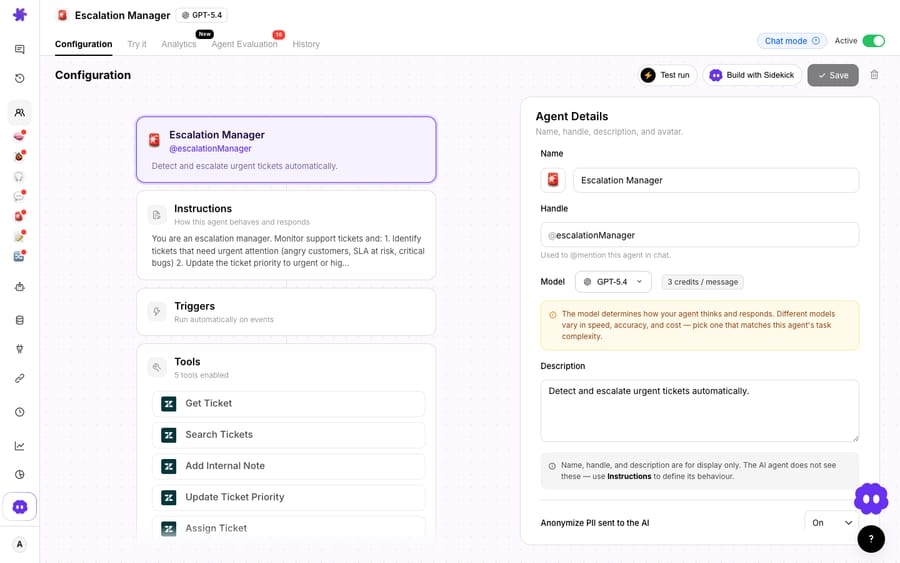
The screenshot above shows real Macha demo-org agents with the Assign Ticket capability. It illustrates the configuration, not a live connected Front conversation. For the routing mechanics end to end, connecting Front to Macha to route conversations with AI walks through it, and there's a deeper treatment in smart routing on Front with AI tagging and teammate assignment.
Is Front's own AI enough for routing?
To be fair, Front didn't stand still. Its native AI does real work, and for a lot of teams it's the right first step:
- Autopilot is Front's AI agent: Autopilot agents handle the conversations assigned to them, guided by Playbooks and knowledge sources (the older Topic-based auto-replies are Front's legacy version as of October 2026). It replaced the legacy AI Answers feature, which Front's own AI Answers page confirms is "no longer available for purchase." If you're evaluating it, Front AI explained covers the full lineup.
- Copilot drafts and rewrites replies for agents, which speeds up a busy inbox.
- Smart QA and Smart CSAT score conversations so managers can spot quality issues without reading every thread.
Where it stops is worth naming plainly. Autopilot deflects questions it recognizes from your Playbooks and knowledge base; it doesn't reliably resolve the multi-step, account-specific ones ("check this customer's actual order and fix it") without a data connection to reason over. Front's help center says only English is officially supported for its knowledge sources, which limits the language-routing story. And the billing stacks up. Front's pricing page lists Copilot at $20 per seat a month and Autopilot as usage-based, starting at $0.05 per conversation; Front's help center bills each conversation once at the highest level reached, $0.05 for triage, $0.39 for a handoff and $0.89 for a resolution (Front's Autopilot pricing, as of October 2026). Smart QA and Smart CSAT are no longer sold on Starter or Professional as of October 2026. Enterprise ($105 per seat a month on annual billing) includes Copilot, Smart QA and Smart CSAT; Autopilot is billed on top on every plan. The plan-by-plan breakdown is in Front pricing explained.
Macha's model is different by design. It bills per ticket, from $299 a month for up to 750 tickets with setup and monitoring included: one conversation, charged once however many classifications, assignments, lookups and replies it takes. It's never per resolution, so the bill doesn't hang on an outcome definition you don't control, and never per seat, so the cost tracks the volume you handle rather than the size of your team. You can see the current tiers on the Macha pricing page. The broader category context, what these agents are and where they fit, lives in AI agents for customer service.
The clean division of labor: let Front's assignment rules handle fair volume distribution and let native Autopilot deflect the easy repeats, then layer an AI agent on top for the routing decisions a rotation can't make, reading each conversation and sending it to the right person for the right reason.
FAQ
What's the difference between round robin and load balancing in Front? Round robin deals conversations to teammates in a fixed sequence and only assigns to people who are currently online, with no queue; offline teammates are skipped. Load balancing assigns to whoever has the fewest assigned conversations, respects a per-teammate limit (at most 100 per workspace), and queues work until someone is available. Load balancing requires the Professional plan or above.
Can Front auto-assign conversations by intent or language? Not natively in a meaningful way. Front's assignment rules match on patterns like subject keywords, sender domain, or inbox, and round robin and load balancing balance volume rather than reading the message. An AI agent layer like Macha adds intent, language, VIP, and skill-based routing on top of your existing Front rules.
Does Macha replace Front's assignment rules? No. Macha runs on top of the Front you already use through a live connector. Your round robin or load balancing keeps distributing work; Macha's agent adds the reasoning layer, reading each conversation and assigning it to the right teammate for the right reason.
Is Front's native AI enough for routing? Front's Autopilot, Copilot, and Smart QA are useful: Autopilot deflects known questions and Copilot drafts replies. But Front officially supports only English knowledge sources, Autopilot is billed per conversation ($0.05 triage, $0.39 handoff, $0.89 resolution, as of October 2026), and none of it routes by intent, language, VIP, or skill. That reasoning layer is where a dedicated AI agent adds value.
How many rules can I build in Front? Front's pricing page allows up to 10 rules on Starter, up to 20 on Professional, and unlimited rules on Enterprise, so a keyword-routing setup with many conditions can outgrow the lower plans.
How is Macha billed for routing conversations? Macha charges per ticket, one conversation charged once however many classifications, assignments, lookups and replies it takes, not per resolution and not per seat. Plans start at $299 a month for up to 750 tickets; current tiers are on the pricing page.
Want Front conversations routed by meaning, not just volume? Start a free trial of Macha and connect it to your Front.






