





 Shopify
 Stripe
 Slack
Slack Notion
 Google Workspace
 Confluence

What Are the Best Gorgias Migration Tools in 2026? Cost and Downtime Compared


Moving to Gorgias is two jobs: copying your records, which the tools handle well, and rebuilding your rules, macros and reports, which you do by hand whichever tool you pick. Help Desk Migration suits most sources, Gorgias's free importer suits Zendesk, and API or CSV suits teams with an engineer to own it.
Key takeaways
- Three paths move data into Gorgias: the paid Help Desk Migration service, Gorgias's free native importer for Zendesk only, and a do-it-yourself API or CSV route.
- Gorgias's native Zendesk importer brings up to two years of history, imports the most recent 14 days first, and splits any ticket over 250 comments into multiple closed tickets.
- Gorgias's Zendesk importer turns pending and solved tickets into closed ones and keeps only reply-text and status-change macro actions.
- Help Desk Migration does not migrate Organizations, CC recipients or attachments over 10 MB, and its free demo moves 20 random tickets and 20 knowledge-base articles.
- Neither Help Desk Migration nor Gorgias publishes a migration speed; Help Desk Migration says a migration takes from a few hours to a week.

The best Gorgias migration tool depends on your source: Help Desk Migration (a paid service that its homepage says covers 100+ platforms, with a free 20-ticket demo) for most help desks, Gorgias's free native importer (up to two years of history) if you're leaving Zendesk, and the API or CSV route only if an engineer owns the transformation. Picking wrong is the difference between a clean cutover and a support team fielding angry replies to ghosts.
What are the three ways to migrate to Gorgias?
A paid migration service (the category leader is Help Desk Migration) reads records out of your old system's API and writes them into Gorgias's, preserving the relationships between tickets, comments, tags, and agents. It handles almost any source platform: the Help Desk Migration homepage claims 100+ platforms supported and 60,000+ customers served.
A native importer is Gorgias's own built-in migration, and today that means one source specifically: Zendesk. If you're leaving Zendesk, Gorgias will pull your history for you at no extra tooling cost.
API or CSV is the do-it-yourself path — you export flat files (or script against the Gorgias REST API) and reshape them yourself. It's free and maximally flexible, and it's the most error-prone at any real volume.
Which one is right depends on where you're coming from, how much history you're keeping, and how much fidelity you actually need. Before you commit, it's worth understanding what Gorgias is built for — an ecommerce-first inbox — because that shapes what maps cleanly and what doesn't.
What does Help Desk Migration move into Gorgias?
Help Desk Migration (HDM), built by Relokia, is listed in Gorgias's own app store as "easy no-coding data migration into Gorgias", and it's the workhorse for anyone migrating from Freshdesk, Zendesk, Gorgias-to-something, Help Scout, or the long tail of platforms a native importer won't touch.
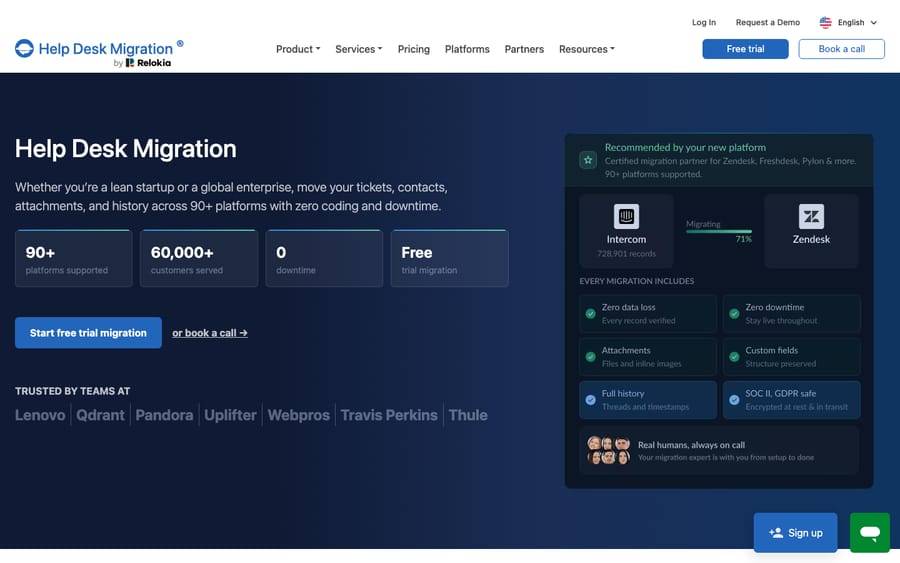
Per Help Desk Migration's Gorgias documentation, the following records transfer into Gorgias with their structure intact: tickets with full conversation history and comments; customers with name, email, phone, language, timezone, notes, and type; agents; tags and custom fields (string, boolean, date, number, select, and multi-select); knowledge base articles and categories with translations; macros with dynamic actions; attachments and inline images; call recordings; and side conversations. Contacts are matched so relationships stay intact rather than duplicating.
Two features matter when you can't freeze your queue. Delta migration transfers only the records created or updated during the initial full run, so nothing created mid-migration is lost — HDM markets this as a zero-downtime path. Interval migration lets you pause and resume in chunks. And before you pay a cent, the free demo migrates 20 random tickets and 20 knowledge-base articles so you can sanity-check the field mapping, and you can rerun it as many times as you like. Pricing is volume-based: you pay for the number of records you move, and the demo generates your quote. HDM doesn't publish a throughput rate; its FAQ says a migration can take anywhere from a few hours to a week depending on record volume, attachments and API limits.
How do the native importer, a paid tool and API/CSV compare on cost and downtime?
Here's the honest comparison. The right column is the one people skip and regret.
| Help Desk Migration (paid) | Gorgias native importer | API / CSV (DIY) | |
|---|---|---|---|
| Source platforms | 100+ per HDM (Freshdesk, Zendesk, Intercom, HubSpot, more) | Zendesk only | Anything you can export |
| Cost | Paid, priced by record volume; free demo first | Included with Gorgias | Free (your engineering time) |
| Ticket history | Full, threaded, with comments & tags | Up to 2 years, most recent first | Rebuild from flat files by hand |
| Speed | No published rate; a few hours to a week | No published rate; last 14 days imported first | Depends on your script |
| Downtime | None (delta migration catches stragglers) | None (continuous sync) | Depends; usually a freeze |
| Attachments | Yes (inline images become attachments; >10 MB skipped) | Not covered in Gorgias's docs; check in a test | Only if you handle them yourself |
| Big tickets | 30–40+ comments may need custom handling | 250+ comments split into multiple closed tickets | You decide |
| Config (rules, macros, reports) | Rebuilt manually (macros only Zendesk↔Gorgias) | Macros import; only reply-text and status actions survive | Rebuilt manually |
A fair rule of thumb: if you're leaving Zendesk, start with the native importer — it's free and built for exactly that path. If you're coming from anywhere else, or you need the fidelity and delta-migration safety net, Help Desk Migration almost always pays for itself in engineering time saved. Raw API/CSV is for teams with a specific transformation need and an engineer to own it.
What are the limits of Gorgias's native Zendesk importer?
If Zendesk is your source, Gorgias's own importer is the path of least resistance. Per Gorgias's Zendesk migration docs, it imports up to two years of your most recent data, then continuous sync catches anything created during the run so you don't drop a ticket. The sequence is deliberate: your most recent 14 days of tickets, fields, and macros are prioritized so recent work appears first, then the remaining history imports oldest-to-newest. Gorgias doesn't publish an import speed, so plan the cutover around the 14-day window rather than a finish time.
It's genuinely convenient, but the limits are real and worth planning around:
- Deleted and blank tickets from Zendesk are not imported.
- Any ticket with more than 250 comments is split into multiple, closed tickets in Gorgias.
- If you have more than 500 ticket fields in Zendesk, ticket fields are not imported at all.
- Statuses collapse to two. Pending and solved Zendesk tickets arrive as closed; every other status arrives as open.
- Macros lose most of their actions. Only reply-text and status-change macro actions are supported in Gorgias.
The status collapse is the one that bites. If your reporting depends on the difference between pending and solved, export that history from Zendesk before you switch it off.
What data does not survive a Gorgias migration?
This is the section people wish they'd read first. Two things get left behind: certain records the tools can't carry, and all of your configuration.
On the record side, HDM's Gorgias migration checklist is explicit that Organizations, CC recipients in tickets and attachments over 10 MB don't migrate, tickets with 30–40+ comments migrate only partially unless you pay for a custom split, and snoozed tickets need a custom method. And if you're exporting out of Gorgias yourself, the CSV export has its own honest caps: message-content exports cover only the most recent 30 days of the selected period, up to 100,000 tickets, only public messages are included, and internal notes, ticket events, Facebook wall posts, and Instagram media messages are all excluded. Standard view exports run up to 1 million tickets, and Gorgias warns that 1 million can take up to 10 hours.
On the configuration side, none of it ports as live behavior. Your Gorgias rules, macros, statistics, and third-party integrations are rebuilt by hand in Gorgias's own grammar. HDM's checklist supports macro migration only between Zendesk and Gorgias, and Gorgias's own importer keeps only the reply-text and status actions of each macro. Before you import, disable any active rules under Automation → Rules so historical tickets don't change status or fire notifications during the run — then re-enable them one at a time after you've spot-checked the import. That "one at a time" discipline on the way back up is what separates a calm cutover from chaos.
The practical takeaway: treat the config rebuild as a fresh implementation of Gorgias, not a copy-paste. It's often the larger of the two efforts, and it's the one worth doing deliberately rather than replicating every quirk of a system you're leaving for a reason. (If Freshdesk is your source, our Freshdesk to Gorgias migration guide walks that specific path.)
Where does an AI agent fit after you migrate to Gorgias?
Here's the reframe worth sitting with. The most laborious part of any Gorgias migration is rebuilding the behavior — the rules and macros that used to run your queue. If you're rebuilding that logic from scratch anyway, it's the ideal moment to ask whether every rule needs to be a brittle if-this-then-that automation, or whether some of it belongs to an AI agent that reasons over the ticket instead.
That's the seam where Macha fits. Macha is an AI agent layer that runs on top of the Gorgias you've just migrated into as a native connector — it does not replace your help desk, and it isn't a Gorgias alternative. It reads and writes the same tickets you migrated: drafting or posting grounded replies from the help center that came across, triaging by intent so the right ticket reaches the right team, and looking up order or account status through a custom tool that turns your ecommerce stack's REST API into something the agent can call. It's the difference between porting your queue and actually resolving it once you're there. Macha bills per ticket, starting at $299 a month for up to 750 tickets, with one conversation charged once however many messages it takes and setup by the Macha team included; see the pricing breakdown for how that maps to your volume.
The clean division: let a migration tool move your records, rebuild the rules that genuinely have to be deterministic, and let an agent take the reasoning-heavy work that used to eat your team's day.
FAQ
What's the best tool to migrate to Gorgias? For most non-Zendesk sources, Help Desk Migration is the standard choice — it's listed in Gorgias's own app store and transfers tickets, comments, tags, agents, custom fields, and knowledge base with relationships preserved. If you're leaving Zendesk, start with Gorgias's free native importer. Raw API/CSV is best only when you need a specific transformation and have an engineer to own it.
How much does a Gorgias migration cost? Help Desk Migration prices by the volume of records you move and generates a quote from a free demo (which migrates 20 sample tickets and 20 KB articles). Gorgias's native Zendesk importer is included with your plan at no extra tooling cost. API/CSV is free in dollars but costs engineering time — see Gorgias pricing for the underlying plan context.
Will migrating to Gorgias cause downtime? Not inherently. Both Help Desk Migration (via delta migration) and the native importer (via continuous sync) keep your old system live while records copy across and catch anything created mid-run. The bigger risk is active Gorgias rules firing on imported historical tickets — disable rules before import and re-enable them one at a time.
What data doesn't move when I migrate to Gorgias? Configuration never ports as live behavior: rules, macros, statistics, and integrations are rebuilt by hand. On records, Organizations, CC recipients and files over 10 MB don't transfer through HDM, while the native Zendesk importer skips deleted and blank tickets and collapses statuses to open or closed. Gorgias's own CSV export also excludes internal notes, ticket events, and social (Facebook/Instagram) messages, and caps message content to the most recent 30 days.
Can I add AI to Gorgias after migrating without replacing it? Yes. An AI agent layer like Macha connects to Gorgias as a native connector and runs on top of your migrated help desk — it doesn't replace Gorgias. It resolves tickets using the help center you brought across and triages by intent, while Gorgias stays the system of record.
Just moved to Gorgias and rebuilding your automation from scratch? Start a free trial of Macha and connect it to your Gorgias in minutes.






