Intercom
 Shopify
 Stripe
 Slack
Slack Notion
 Google Workspace
 Confluence

Chatfuel Pricing (2026): Plans, Real Costs and What You'll Actually Pay


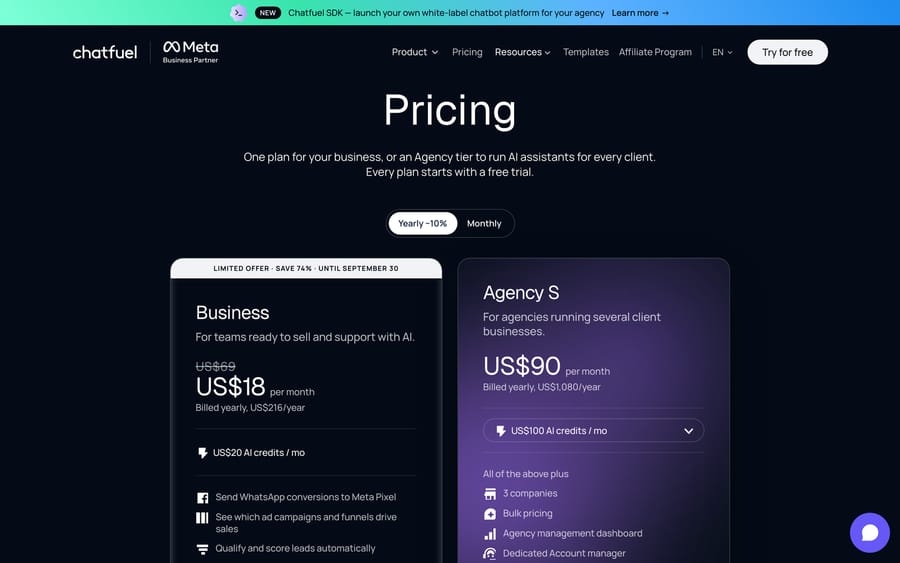
Chatfuel's Business plan is $20 a month, or $18 a month billed yearly, under a promotion that runs until September 30 against a $69 list price, and it comes with $20 of credit in a dollar wallet that pays for AI replies and WhatsApp message fees. Agency S is $100 a month, or $90 billed yearly, with $100 of credit, and every plan now includes unlimited contacts and teammates. The rate an AI reply draws from the wallet isn't published, so this page lays out the plans, the wallet rules, the promo deadline and a floor estimate of the monthly bill at 500, 3,000 and 10,000 AI chats.

| Plan | Monthly | Billed yearly | Credit in the wallet | What you get |
|---|---|---|---|---|
| Free | $0 | – | None | Comment auto-replies on Instagram, Facebook and TikTok |
| Business | $20 (list $69, promo to Sep 30) | $18/mo, $216 a year | $20 a month | 1 bot, all channels, unlimited contacts and teammates |
| Agency S (pricing page) | $100 | $90/mo, $1,080 a year | $100 a month | 3 companies, agency dashboard, bulk pricing, account manager |
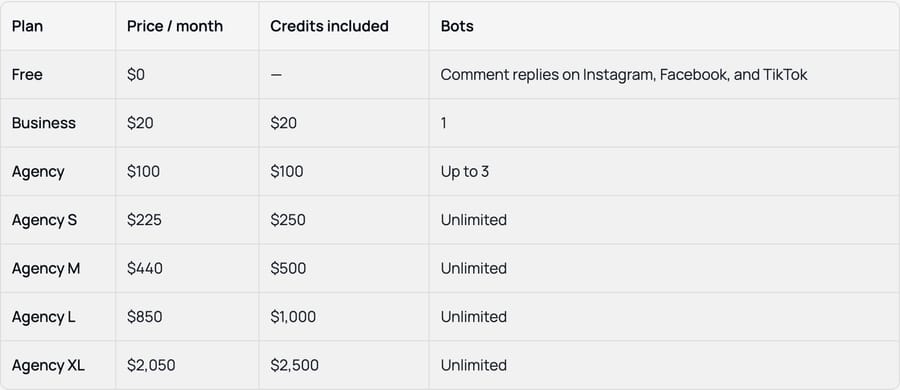
| Larger agency tiers (help center) | $225 to $2,050 | Discounted | $250 to $2,500 | Unlimited bots; more credit than the fee |
Prices checked September 19, 2026 on Chatfuel's pricing page and its help center article Chatfuel Plans and Pricing.
For what the product does, including Fuely AI's lead scoring and the agency reseller model, see our Chatfuel guide. This page stays on the bill.
The promo, the list price and the September 30 deadline
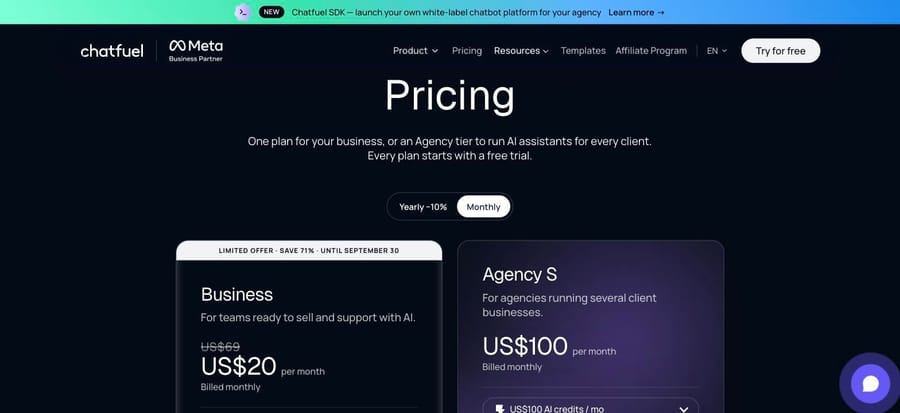
The Business card carries a banner: "Limited offer · save 74% · until September 30" on the yearly view, and "save 71%" on the monthly view, both against a struck-through $69. That makes the headline price conditional. If you sign up on the yearly plan before September 30, you pay $216 for twelve months. If you pay monthly, the $20 is what the page shows today, and it doesn't say what a monthly subscriber pays in October.
The help center's plan table, last updated August 9, 2026, lists Business at $20 with no promotion and no $69. The two pages don't agree on what Business costs after the offer ends, so ask before you choose monthly billing.
How the wallet works
Chatfuel describes every plan as "a subscription that gives you the platform, and a wallet — a balance in US dollars that covers what you actually use." On Business the fee and the credit are both $20, so the subscription is in effect a $20 minimum on usage.
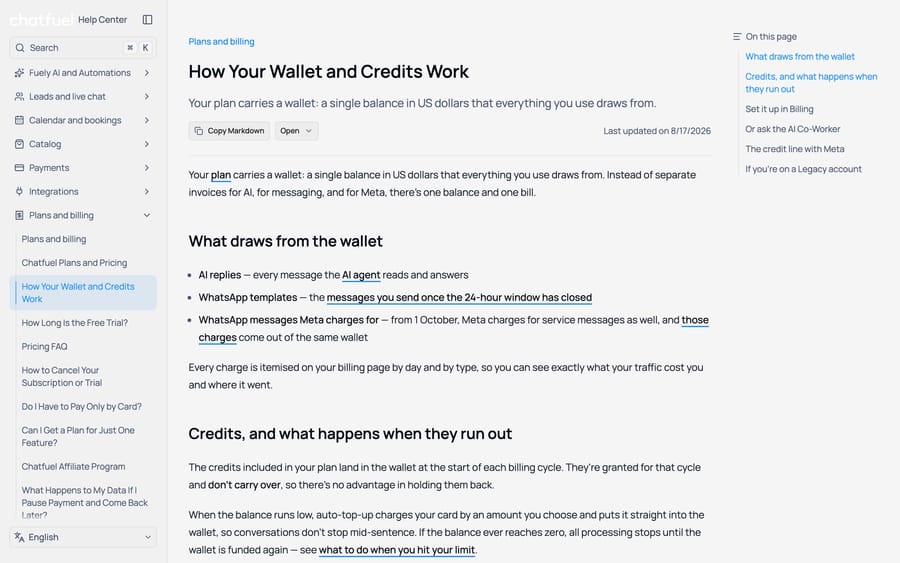
Three things draw from the wallet, according to the wallet article, last updated August 17, 2026:
- AI replies: every message the AI agent reads and answers.
- WhatsApp templates: messages sent after the 24-hour customer service window has closed, charged at Meta's rate.
- WhatsApp messages Meta charges for: Chatfuel says that from 1 October Meta charges for service messages as well, and those charges come out of the same wallet.
Credits "don't carry over", so a quiet month's unused $20 is gone. When the balance runs low, auto top-up charges your card an amount you choose. If the balance reaches zero, "all processing stops until the wallet is funded again": automations stop replying, but contacts, history and live chat stay available.
The third item needs checking. Meta's own WhatsApp pricing page, when we read it on September 19, still said service messages are free and listed October 1 rate changes only for a handful of countries. Budget for Meta's template fees by recipient country from its rate card, and ask Chatfuel what the October line item will be.
What an AI reply costs: not published
Neither the pricing page nor the billing articles give a price per AI reply or per token. Chatfuel's usage limits page, linked from the pricing page, explains what makes a reply expensive: the AI "reads through three things," your knowledge base, your instructions and the conversation history, and a 50,000-character knowledge base "takes more to read than one with 5,000."
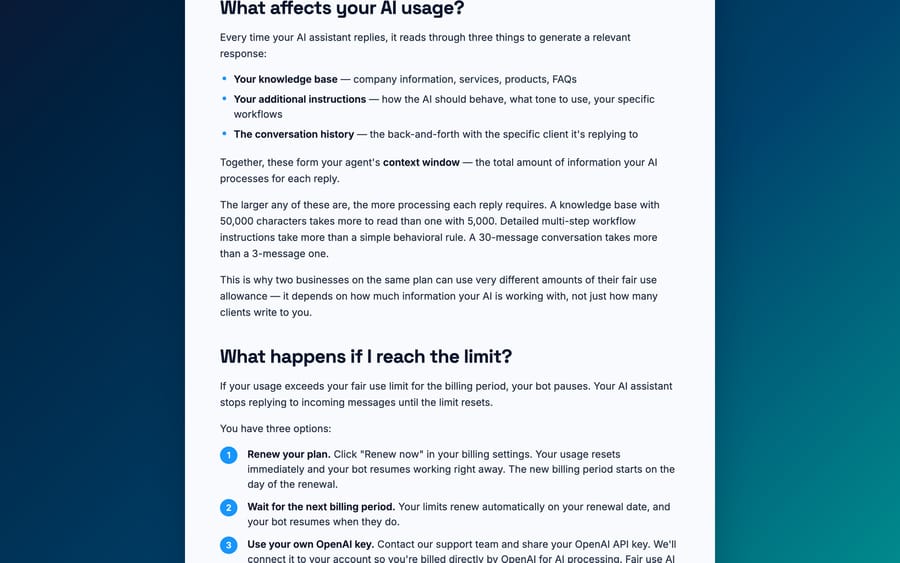
The same page offers three ways out when the allowance runs out: click "Renew now," which resets usage and starts a new billing period that day; wait for the next period; or give Chatfuel's support team your own OpenAI API key, after which "you're billed directly by OpenAI for AI processing" and the limits no longer apply. "Renew now" means paying the plan fee again early, which is a pricier way to buy credit than auto top-up. The own-key option is the only route to a per-reply price you can see, because OpenAI publishes its rates.
Worked costs at three volumes
With no published per-reply rate, we priced Chatfuel's AI at the lowest it could plausibly be: OpenAI's own list price for the tokens, with no markup. The real wallet draw will be at least this, and higher by whatever margin Chatfuel adds.
Assumptions, so you can change them. A chat has 4 AI replies. Each reply reads 4,000 input tokens (knowledge base, instructions and history) and writes 150. OpenAI's list prices are $0.25 per million input tokens and $2 per million output for GPT-5 mini, and $1.25 and $10 for GPT-5. That makes a reply $0.0013 on GPT-5 mini and $0.0065 on GPT-5. Meta's WhatsApp template fees are left out, because they depend on where your customers are and apply on any WhatsApp platform.
| Monthly volume | Who this is | AI replies | Usage on GPT-5 mini tokens | Usage on GPT-5 tokens | Cheapest Chatfuel bill (promo price) |
|---|---|---|---|---|---|
| 500 chats | A small store or a creator | 2,000 | $2.60 | $13.00 | $20 either way: inside the $20 credit |
| 3,000 chats | A busy Instagram or WhatsApp inbox | 12,000 | $15.60 | $78.00 | $20 (GPT-5 mini) to $78 (Business $20 + $58 top-up) |
| 10,000 chats | A large lead funnel | 40,000 | $52.00 | $260.00 | $52 (Business + $32 top-up) to $260 (Business + $240 top-up) |
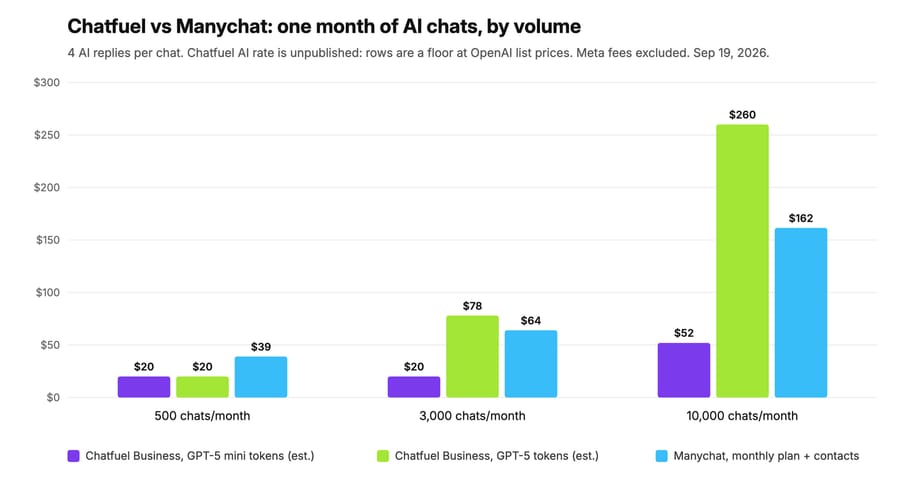
At 10,000 chats on GPT-5 tokens, the help center's larger tiers change the answer. Its Agency S at $225 includes $250 of credit, so $260 of usage would cost $235 there. On September 19 the pricing page listed only Business and a $100 Agency S, so treat the $225 tier as something to ask for.
If the $69 list price applies after September 30 and the credit stays at $20, add $49 a month to every Business row. The 500-chat bill becomes $69.
What drives the bill up
The AI rate you can't see. Every row above is a floor. Chatfuel's billing page breaks charges down "by day and by type", so a week of real traffic will show your actual per-reply cost. Run the trial long enough to read it before you commit to a yearly plan.
Prompt and knowledge-base size. Chatfuel's own limits page says a larger knowledge base, longer instructions and longer conversations all raise the cost of each reply. Trimming a knowledge base from 50,000 characters to what customers ask about is the cheapest saving available.
WhatsApp message fees. Templates sent outside the 24-hour window are charged per message at Meta's rate for the recipient's country, through your wallet. A weekly broadcast to 10,000 contacts is 40,000-plus template messages a month, and at that point Meta's fees can be larger than the plan.
The promo ending. The $20 and $18 prices are labeled a limited offer to September 30.
Plan scope. Chatfuel's pricing FAQ says "Your plan is directly linked to a specific company." A Trustpilot reviewer in Slovakia wrote in November 2025, "I paid 280$ for a yearly subscription" and couldn't use the bot after six months; Chatfuel replied that the plan was tied to a Facebook Page that had been disconnected. If you run more than one brand, you need a plan per brand, or an Agency tier.
What the billing model rewards
Chatfuel dropped the old billing unit. Plans used to be priced by contacts, which is why third-party pages still quote "active contacts" tiers, and why a G2 review quoted in our Chatfuel guide reported a plan climbing from $15 to $66 as a contact list grew. The current plans include unlimited contacts and unlimited teammates, and Chatfuel says there are "no seat fees, no per-channel fees, and no feature add-ons."
With the fee returned as credit on Business, the business model now earns from usage: the margin on each AI reply and on the Meta messages that pass through the wallet. That incentive is reasonable for the buyer in one way, since a bigger audience no longer raises the bill on its own. It's less clear in another, because the one rate that decides the bill isn't on any public page. The agency ladder rewards commitment: Agency XL's $2,050 buys $2,500 of credit, a 22% bonus, which suits an agency reselling Chatfuel to clients and marking it up.
How Chatfuel compares on price
Same volumes, same assumption of one chat per contact per month. Rivals' prices are from their live pages on September 19, 2026.
| Platform | Billing unit | 500 chats | 3,000 chats | 10,000 chats |
|---|---|---|---|---|
| Chatfuel | Plan fee as credit, then AI replies and Meta fees from a wallet | $20 (floor) | $20 to $78 (floor) | $52 to $260 (floor) |
| Manychat | Active contacts per month, AI on Pro and above | Pro $39 | Pro $39 + 500 × $0.05 = $64 | Business $99 + 2,500 × $0.025 = $161.50 |
| Voiceflow | Plan fee as credit, then $0.005 per customer message plus model tokens | $60 | $140 | $466 |
Manychat's figures are monthly billing; annual billing drops Pro to $29 and Business to $69. Voiceflow's figures use its Core 4.2 model and the per-reply cost from our own test run, with 4 customer messages per chat.
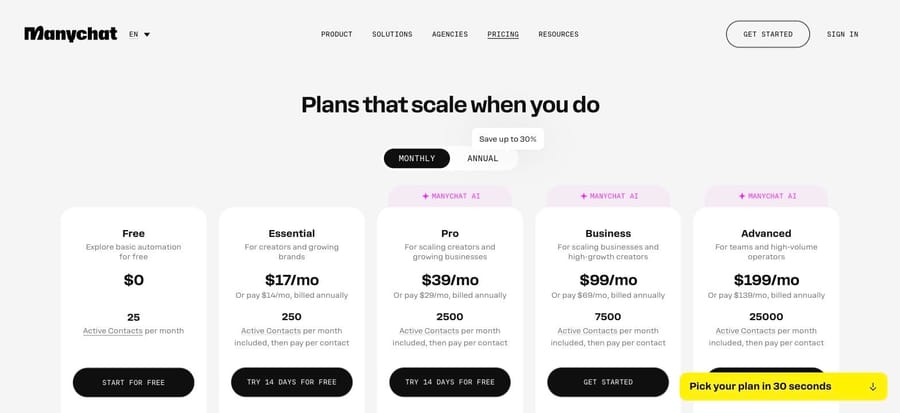
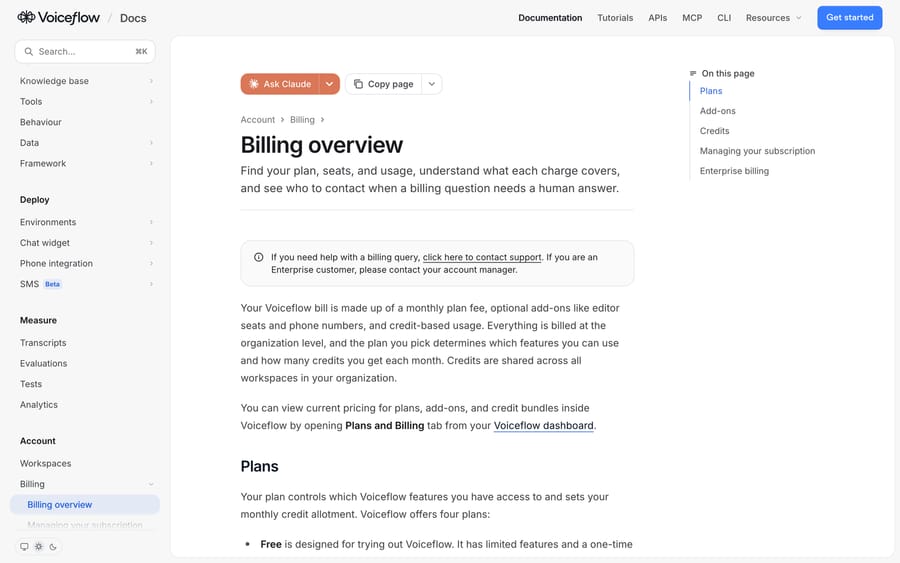
Manychat is the closest rival: same Meta channels, a no-code builder, and a published price that moves with the number of people who message you rather than with the AI's workload. Its bill is easier to forecast, because contacts are countable before you launch and AI usage isn't. Voiceflow is a heavier builder with a public per-token rate card, which is the cost transparency Chatfuel lacks. Botpress prices per conversation, from $150 a month billed annually for 250, and is priced for support teams rather than lead funnels.
Macha sits in a different place. It fits teams whose support conversations arrive as tickets in Zendesk, Freshdesk, Gorgias or Front, as an AI agent layer on that help desk: it reads the ticket, looks up the order, writes the reply or note and tags it, and a ticket is one charge however many replies it takes. At 3,000 tickets a month that's $1,199. That's the wrong tool for an Instagram lead funnel, where Chatfuel or Manychat fits better, and the right one if your bottleneck is a support queue in a help desk. See Macha on your help desk, and our overview of AI agents for customer service for the wider category.
What users say about Chatfuel's pricing
Chatfuel rates 4.4 out of 5 from 45 reviews on G2, 4.3 from 28 on Capterra (ease of use 4.1, customer service 3.7, value for money 4.0), and 3.2 from 14 on Trustpilot, all checked September 19, 2026. G2 blocked our browser partway through, so the quotes below come from Capterra and Trustpilot.
- Felix B., a self-employed co-founder in consumer goods, on Capterra in November 2024: "it was well worth the $15 we initially paid per month."
- Melissa P., director of communications at a 501 to 1,000 person education organization, on Capterra in January 2021: "The mid-pandemic changes in tiered pricing was inconvenient for a non-profit on a limited budget."
- The Trustpilot complaints that mention money are about access after paying, not the price itself, including the yearly subscription tied to a disconnected Facebook Page.
Both Capterra quotes predate the wallet model, and Chatfuel has changed how it prices more than once since then. Read the billing breakdown in your own account before trusting any third-party pricing page, this one included.
How we researched this
On September 19, 2026 we read Chatfuel's pricing page (yearly and monthly views), its help center articles on plans, the wallet, the free trial, the pricing FAQ and what happens at the limit, and its usage limits page, all in a browser. We did not build anything on Chatfuel. Its sign-in offers only Facebook or Google login, and its help center says the 7-day trial needs a card to activate, so it fell outside the rules we use for test accounts (no real identity, no card).
Because Chatfuel publishes no per-reply AI rate, every usage figure on this page is our floor estimate from OpenAI's list prices, and we say so wherever it appears. We searched AWS Marketplace and Vendr for Chatfuel contract pricing and found no listing with prices. Manychat's prices come from its live pricing page, and Voiceflow's from its in-app plans screen, rate card and a test conversation we ran the same day.
Is Chatfuel worth the price?
On the promotional yearly plan, $216 buys a year of Business with $20 of AI credit each month, unlimited contacts and every channel. For a small business whose AI usage stays inside $20, that's cheap. For a high-volume WhatsApp funnel, the bill depends on a per-reply rate Chatfuel doesn't publish, plus Meta's fees, so a week on the trial reading the billing breakdown is worth more than any estimate, ours included.
Frequently asked questions
How much does Chatfuel cost per month? Business is $20 a month billed monthly, or $18 a month billed yearly ($216), under a promotion that runs until September 30, 2026 against a $69 list price. Agency S is $100 a month, or $90 billed yearly. Each plan includes the same dollar amount of credit for AI replies and WhatsApp fees.
Is Chatfuel free? There's a Free plan for comment auto-replies on Instagram, Facebook and TikTok. The full product comes with a 7-day trial that includes $15 of credit, and Chatfuel's help center says a card is required to start it, although the pricing page says no card is needed. You're charged only if you keep the plan after the trial.
What are Chatfuel AI credits? They're dollars in your Chatfuel wallet. Business includes $20 a month and Agency S $100. AI replies, WhatsApp templates sent outside the 24-hour window and Meta's other message charges draw from the wallet. Credits don't roll over, and auto top-up refills it from your card.
How much does one Chatfuel AI reply cost? Chatfuel doesn't publish the rate. Priced at OpenAI's list rates with no markup, a reply that reads 4,000 tokens and writes 150 costs about $0.0013 on GPT-5 mini and $0.0065 on GPT-5, so treat those as floors. Your billing page shows the real figure by day and by type.
Does Chatfuel charge per contact? Not any more. The current plans include unlimited contacts and unlimited teammates. Older third-party pricing pages still show contact-based tiers from the previous model.
How much does Chatfuel Agency cost? The pricing page lists Agency S at $100 a month ($90 billed yearly) with $100 of credit and 3 companies. The help center lists larger agency tiers from $225 a month (with $250 of credit) up to $2,050 a month (with $2,500), each with unlimited bots.
What happens when my Chatfuel credits run out? Automations stop replying until the wallet is funded again, though your contacts, history and live chat keep working. Auto top-up avoids the pause. The usage limits page also offers renewing the plan early or connecting your own OpenAI key.
How much does a chatbot like Chatfuel cost compared with Manychat? At 3,000 chats a month, Manychat Pro costs $64 on monthly billing (2,500 contacts included, then $0.05 each). Chatfuel Business costs $20 plus whatever the AI replies draw beyond $20 of credit, which our floor estimate puts between $20 and $78 in total.
What's the cheapest AI chatbot for WhatsApp and Instagram? Among the three we compared, Chatfuel's promotional Business plan at $18 a month billed yearly is the lowest entry price that includes AI replies. Manychat's Essential plan is $14 a month billed yearly but on its pricing page the Manychat AI badge starts at Pro ($29 billed yearly). Manychat's contact pricing is easier to forecast as you grow.
If your support volume lands as tickets in Zendesk, Freshdesk, Gorgias or Front rather than as leads in Instagram DMs, start a Macha trial with $50 of free usage and no card, or compare the tiers on Macha pricing.
Sources: Chatfuel pricing, Chatfuel Plans and Pricing, How your wallet and credits work, Chatfuel usage limits, Chatfuel free trial, Chatfuel pricing FAQ, What to do when you hit your limit, Chatfuel homepage, Meta WhatsApp pricing, OpenAI API pricing, Manychat pricing (manychat.com/pricing, loaded in a browser; it returns 403 to scripts), Voiceflow billing overview, Voiceflow credits pricing table, Botpress pricing, G2 Chatfuel reviews, Capterra Chatfuel reviews (capterra.com/p/181770/Chatfuel/reviews, loaded in a browser; 403 to scripts), Trustpilot (trustpilot.com/review/chatfuel.com; returns 403 to scripts).
Simple per-ticket AI pricing
One thread with one person is one charge, however many replies it takes.