Intercom
 Shopify
 Stripe
 Slack
Slack Notion
 Google Workspace
 Confluence

How Much Does Copilot Studio Cost in 2026?


Microsoft Copilot Studio bills in Copilot Credits: $200 a month, billed annually, buys a tenant-wide pack of 25,000, and pay-as-you-go credits cost $0.01 each. A Microsoft 365 Copilot seat ($30 a user a month, paid yearly) covers most agent use by that licensed employee but nothing for agents that talk to customers.
Key takeaways
- Microsoft Copilot Studio charges in Copilot Credits: a $200-a-month capacity pack billed annually buys 25,000 credits pooled across the tenant, while pay-as-you-go credits cost $0.01 each.
- A Microsoft 365 Copilot seat at $30 a user a month, paid yearly, makes employee-facing agent use free for that licensed user, but customer-facing or autonomous agents always draw credits at the standard rate.
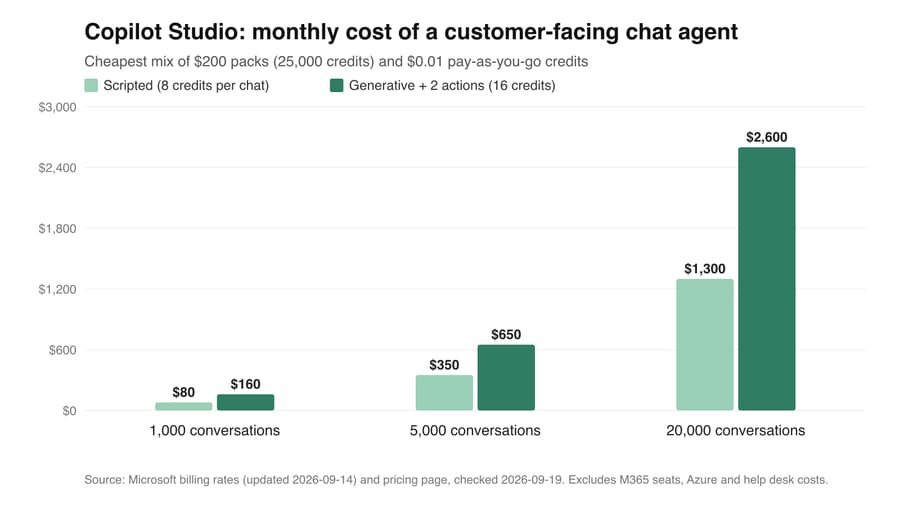
- A scripted customer-facing chat agent costs 8 credits per conversation, costing $80 a month at 1,000 conversations on pay-as-you-go and rising to $2,600 a month at 20,000 conversations for a generative agent with actions.
- Voice agents are billed per minute: 10 credits for classic voice, 35 for GenAI voice and 75 for premium GenAI voice, so a four-minute call costs 40, 140 or 300 credits.
- Reasoning models add 10 credits per 1,000 tokens on top of the normal feature rate, so a 2-credit generative answer that reasons through 2,000 tokens costs 22 credits, eleven times the listed rate.

Copilot Studio costs $200 a month for a capacity pack of 25,000 Copilot Credits, billed annually, or $0.01 a credit on pay-as-you-go, and a customer-facing chat agent in our model comes to $80 to $2,600 a month at 1,000 to 20,000 conversations.
What are Copilot Studio's plans and prices?
| Plan | Monthly | Annual | What's included | Caps and limits |
|---|---|---|---|---|
| Copilot Studio capacity pack | $200 per pack per month | Billed annually ($2,400 per pack a year) | 25,000 Copilot Credits pooled across the tenant; agents on any channel, including websites and apps; premium connectors | Unused credits don't carry over to the next month; agents are disabled once the tenant passes 125% of its prepaid capacity |
| Copilot Studio pay-as-you-go | $0.01 per credit, billed monthly in arrears to an Azure subscription | n/a | The same features as the pack, with no commitment | Needs an Azure subscription and a billing policy on each environment |
| Copilot Credit Pre-Purchase Plan (P3) | n/a | One-year prepay in nine tiers, 300,000 to 300,000,000 credits (3,000 to 3,000,000 commit units) | Commit units pay down credit usage at retail value (1 unit = $1 of usage = 100 credits) | 5% off at the smallest tier, 20% at the largest; unused credits expire at the end of the year; no cancellation or exchange; set to auto-renew by default |
| Microsoft Agent Pre-Purchase Plan | n/a | $19,000, $90,000 or $425,000 a year for 20,000, 100,000 or 500,000 Agent Commit Units | One prepaid pool for Copilot Studio and Microsoft Foundry (1 unit = $1 of usage = 100 credits) | 5%, 10% and 15% off; unused units don't roll over |
| Microsoft 365 Copilot (enterprise) | $31.50 a user a month, paid monthly on an annual commitment | $30 a user a month, paid yearly | Copilot Chat, internal agents, and the standard harness in Copilot Studio | Only employee-facing use by the licensed user is free; external agents still need credits. Microsoft's licensing guide says the product was renamed Microsoft Copilot in August 2026; the pricing pages still use the old name |
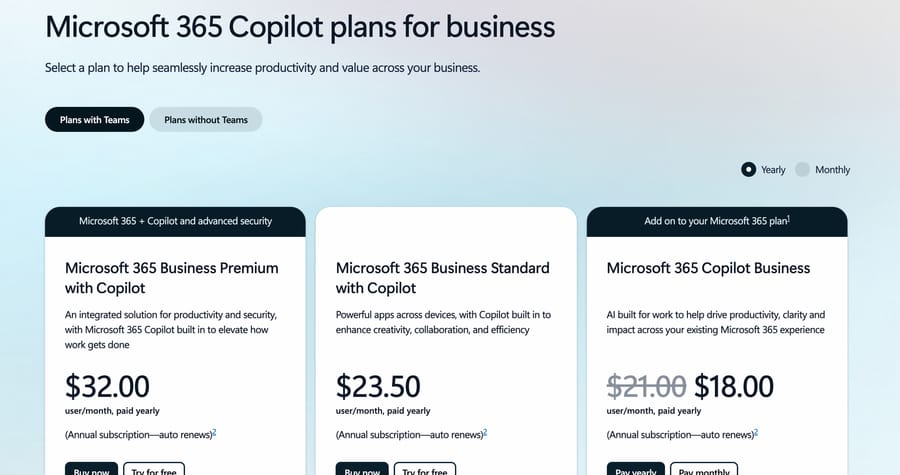
| Microsoft 365 Copilot Business (add-on) | $25.20 a user a month | $21 a user a month paid yearly ($18 in the first year on the current promotion) | Copilot for an existing Microsoft 365 Business plan | Agent inclusions are set in Microsoft's licensing guide |
| Copilot Studio trial | Free | n/a | Build and test agents in the test chat panel | Can't publish; extendable by 30 days |
Prices checked September 19, 2026 on Microsoft's Copilot Studio pricing page, the Copilot Studio Licensing Guide (September 2026), the Microsoft 365 Copilot pricing page and its enterprise page, Microsoft Learn's billing rates and licensing articles, and the Azure Retail Prices API.
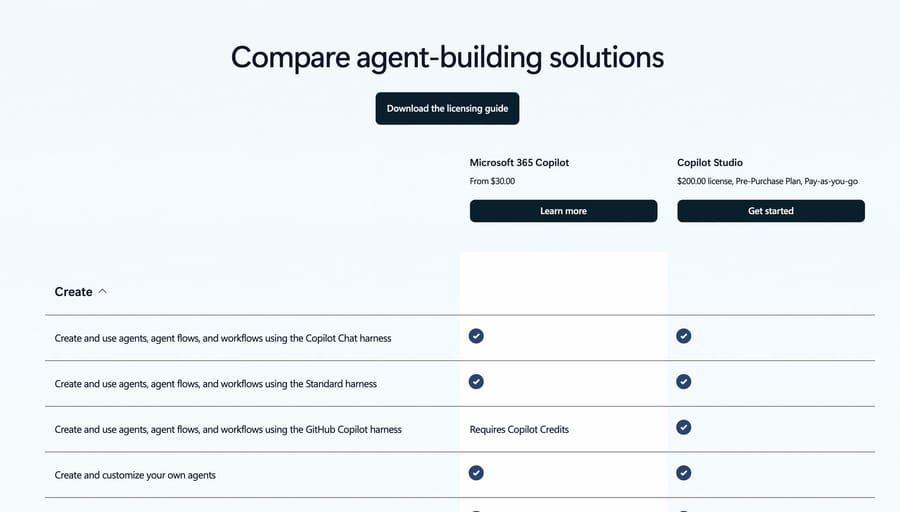
Microsoft's public retail price list shows "Pay As You Go Copilot Credit" at $0.01 in every region, effective September 1, 2025, and Microsoft's Copilot Credit Estimator states the same rate on its first screen. That date is also when Microsoft renamed the unit. The licensing article says the currency changed from "messages" to Copilot Credits on September 1, 2025, with no change to the pack size or the rate. Guides pricing "25,000 messages" describe the same pack.
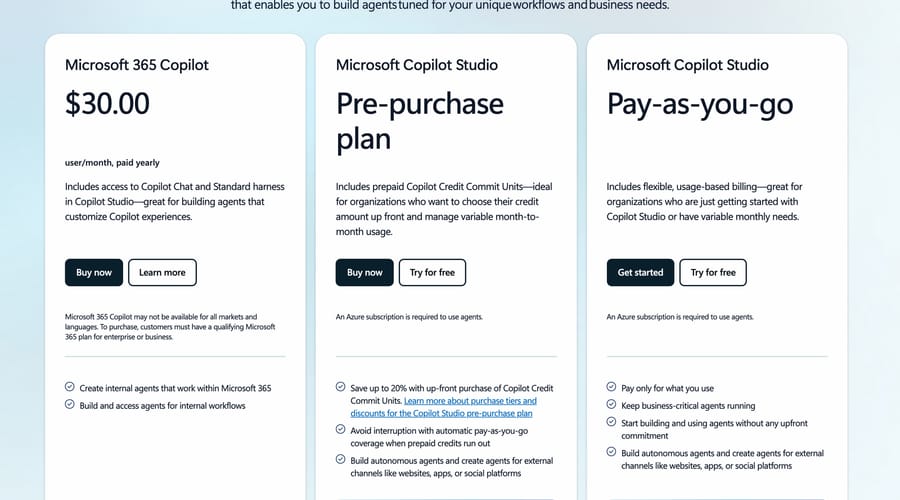
This post covers how many credits a real conversation burns and what that adds up to, which no plan card shows. For what Copilot Studio is, how it builds agents and what reviewers say about the product itself, see our Copilot Studio guide.
What does a Copilot Credit buy?
Every billable thing an agent does draws down credits at a fixed rate, whichever language model you pick. Microsoft publishes the table in its billing rates article, which we read on September 19, 2026.
| Agent feature | Credits | At pay-as-you-go ($0.01) | At pack rate ($0.008) |
|---|---|---|---|
| Classic answer (a scripted reply you wrote) | 1 | $0.01 | $0.008 |
| Generative answer (AI answer from your knowledge) | 2 | $0.02 | $0.016 |
| Agent action (trigger, reasoning step, topic transition, tool call) | 5 | $0.05 | $0.04 |
| Tenant graph grounding (search over Microsoft Graph) | 10 | $0.10 | $0.08 |
| Agent flow actions, per 100 | 13 | $0.13 | $0.104 |
| Text and generative AI tools, basic / standard / premium, per 10 responses | 1 / 15 / 100 | $0.01 / $0.15 / $1.00 | $0.008 / $0.12 / $0.80 |
| The same AI tools, per 1,000 tokens | 0.1 / 1.5 / 10 | $0.001 / $0.015 / $0.10 | $0.0008 / $0.012 / $0.08 |
| Content processing, per page | 8 | $0.08 | $0.064 |
| Classic voice (classic orchestration), per minute | 10 | $0.10 | $0.08 |
| GenAI voice, per minute | 35 | $0.35 | $0.28 |
| Premium GenAI voice, per minute | 75 | $0.75 | $0.60 |
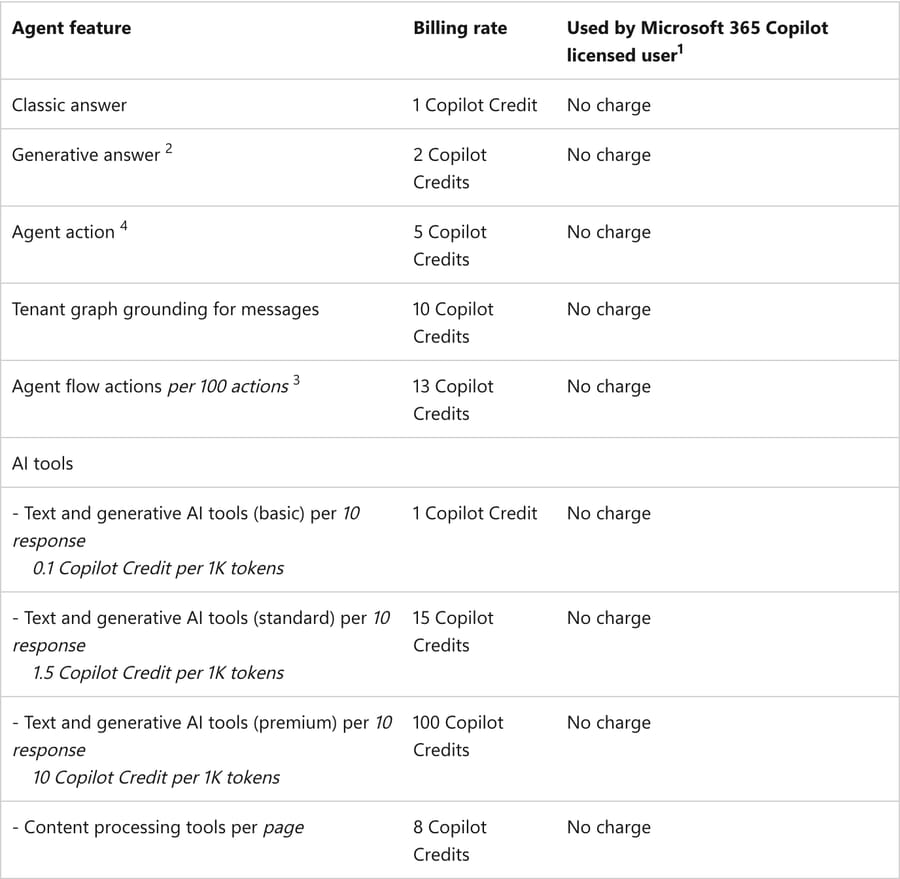
Microsoft lists the AI tools in two units on the same line of its table, per 10 responses and per 1,000 tokens. The per-token rate is the one its reasoning-model formula below uses.
A single customer message usually triggers more than one line. Microsoft's own example: an agent grounded in the tenant graph uses 12 credits to answer one complex prompt, 10 for the grounding and 2 for the generative answer. Under generative orchestration, the agent's decision to call a topic or a tool is itself an agent action at 5 credits, so a question that needs one lookup and one answer costs 7 credits before any grounding.
Reasoning models stack on top. The billing article says an operation on a reasoning model costs its normal feature rate plus the premium AI tools rate of 10 credits per 1,000 tokens. A generative answer (2 credits) that reasons through 2,000 tokens costs 22 credits, eleven times the listed rate, and nothing in the agent changed except the model picked in the dropdown.
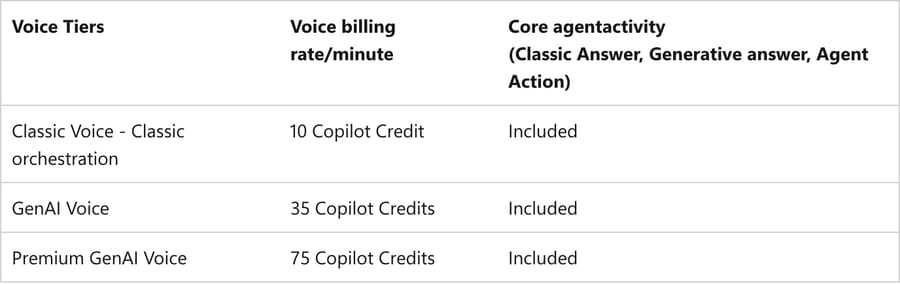
Voice is priced per minute, and the minute rate includes the classic answers, generative answers and agent actions inside the call. The voice tier moves the bill most. A four-minute call costs 40 credits on classic voice, 140 on GenAI voice and 300 on premium GenAI voice.
How does the harness you build on change the bill?
Copilot Studio now runs everything on one of three "harnesses", and Microsoft's harnesses overview says plainly that "the harness you use affects the billing". The rate table above applies to the standard harness, the rule-based one that follows the topics and paths you define.
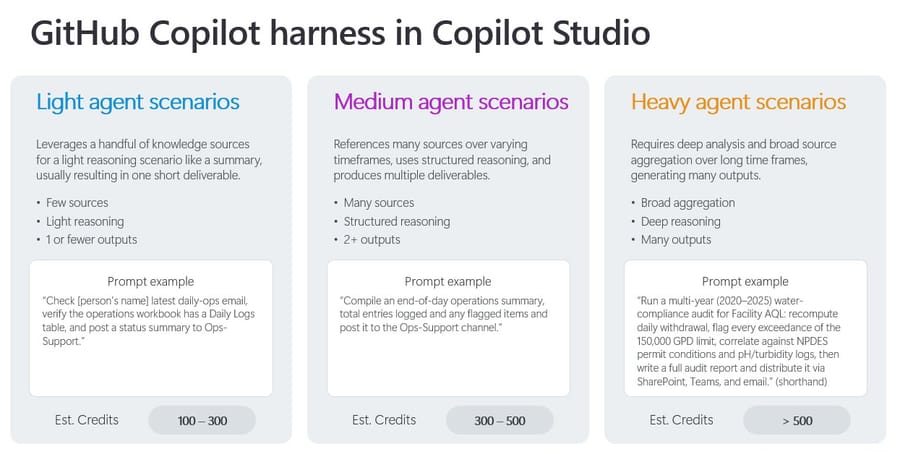
The GitHub Copilot harness, built for multi-step work that reasons toward a goal, bills differently. Its billing overview (updated September 17, 2026) charges credits for model tokens, tools and "the harness itself", and it gives estimated ranges per task instead of per-feature rates: 100 to 300 credits for a light task, 300 to 500 for a medium one, and over 500 for a heavy one. At pay-as-you-go, one light task costs $1 to $3. A standard-harness conversation in the worked costs below costs 6.5 to 16 cents.
The same page says the GitHub Copilot harness "charges credits from the moment you start building": describing the agent, previewing it, testing it and generating evaluations all consume credits. On the standard harness, billing starts after you publish, and test runs of agent flows are free. A team that iterates on a GitHub Copilot harness agent for two weeks has spent money before a single customer has seen it.
The third harness, Copilot chat, extends Microsoft 365 Copilot Chat for employees and is billed by consumption or included in the Microsoft 365 Copilot seat.
When does a Microsoft 365 Copilot seat make agents free?
The rate table has a third column, and every feature in it shows "No charge" when used by a Microsoft 365 Copilot licensed user. The footnote narrows it. The inclusion covers employee-facing use, where the person talking to the agent holds a Microsoft 365 Copilot license and the agent runs under that person's identity. Agent flows are only free when they start from the "When an agent calls the flow" trigger. Computer-using agents are excluded. It's also subject to fair-use limits that Microsoft "reserves the right to update".
So the seat helps an internal IT or HR agent used by licensed staff. It does nothing for a website chat agent, a customer email agent or any autonomous agent triggered by an event instead of a licensed person. Those draw credits at the standard rate.
Microsoft's sales-performance example shows the split. An agent in Copilot Chat used by 50 licensed and 100 unlicensed employees is billed only for the 100: four generative answers and four tenant-graph grounding calls per run, [(4×2)+(4×10)] × 100 = 4,800 credits a day.
Buying seats to avoid credits rarely pays. An employee who asks an internal agent 20 questions a month at 16 credits each uses 320 credits: $3.20 at pay-as-you-go, or $2.56 at the pack rate. The seat is $30 a month. Buy Microsoft 365 Copilot for what it does inside Word, Outlook and Teams, and treat free agent use as a side effect.
What does a customer-facing agent cost at three volumes?
These are customer-facing agents on the standard harness, so no Microsoft 365 Copilot inclusion applies. Two chat profiles:
- Scripted: Microsoft's own customer support example, four classic answers and two generative answers per conversation,
(4×1)+(2×2) = 8credits. - Generative with actions: our assumption for an agent that answers from knowledge and looks something up. Three generative answers and two agent actions (for example an order lookup and a topic transition),
(3×2)+(2×5) = 16credits.
Volumes: 1,000 conversations a month (a small web shop), 5,000 (a mid-sized support team), 20,000 (a large one). Credits come from packs ($200 per 25,000) plus pay-as-you-go for the remainder. The licensing guide recommends linking the pay-as-you-go meter for extra capacity and says credit consumption "won't be counted against the pay-as-you-go meter until credit packs have been exhausted". A leftover under 20,000 credits is cheaper on pay-as-you-go than as another pack, since 20,000 × $0.01 = $200.
| Monthly volume | Profile | Credits | Cheapest combination | Monthly cost | Per conversation |
|---|---|---|---|---|---|
| 1,000 chats | Scripted | 8,000 | Pay-as-you-go only | $80 | $0.08 |
| 1,000 chats | Generative + actions | 16,000 | Pay-as-you-go only | $160 | $0.16 |
| 5,000 chats | Scripted | 40,000 | 1 pack + 15,000 PAYG = $200 + $150 | $350 | $0.07 |
| 5,000 chats | Generative + actions | 80,000 | 3 packs + 5,000 PAYG = $600 + $50 | $650 | $0.13 |
| 20,000 chats | Scripted | 160,000 | 6 packs + 10,000 PAYG = $1,200 + $100 | $1,300 | $0.065 |
| 20,000 chats | Generative + actions | 320,000 | 12 packs + 20,000 PAYG, or 13 packs | $2,600 | $0.13 |
Voice at the same volumes, with an assumed four-minute average call:
| Monthly volume | Classic voice (40 credits a call) | GenAI voice (140 credits) | Premium GenAI voice (300 credits) |
|---|---|---|---|
| 1,000 calls | 40,000 credits: 1 pack + 15,000 PAYG = $350 | 140,000: 5 packs + 15,000 PAYG = $1,150 | 300,000: 12 packs = $2,400 |
| 5,000 calls | 200,000: 8 packs = $1,600 | 700,000: 28 packs = $5,600 | 1,500,000: 60 packs = $12,000 |
| 20,000 calls | 800,000: 32 packs = $6,400 | 2,800,000: 112 packs = $22,400 | 6,000,000: 240 packs = $48,000 |
The per-minute rates cover the agent's own activity. Microsoft's rate table lists no phone line, so budget telephony separately and treat these rows as the agent's share only.
What's missing from every row: Dataverse storage beyond what the license includes, any help desk or contact center the agent hands off to, and the people who build and maintain the topics. The Copilot Studio license comes with 15 GB of Dataverse database capacity, 20 GB of file capacity and 2 GB of log capacity. Above that, the licensing guide prices add-ons at $40, $2 and $10 per GB a month, billed annually, or $48, $2.40 and $12 per GB a month on the pay-as-you-go meters.
We ran both chat profiles through Microsoft's Copilot Credit Estimator on September 19, 2026, as a custom customer-facing agent; it needs no account. It models traffic as users times monthly interactions, a share of answers from knowledge, and tool calls per interaction. For the generative profile we entered 1,000 customers, five interactions each, 60% from knowledge and one connector call on the rest, which is three answers and two actions per customer.
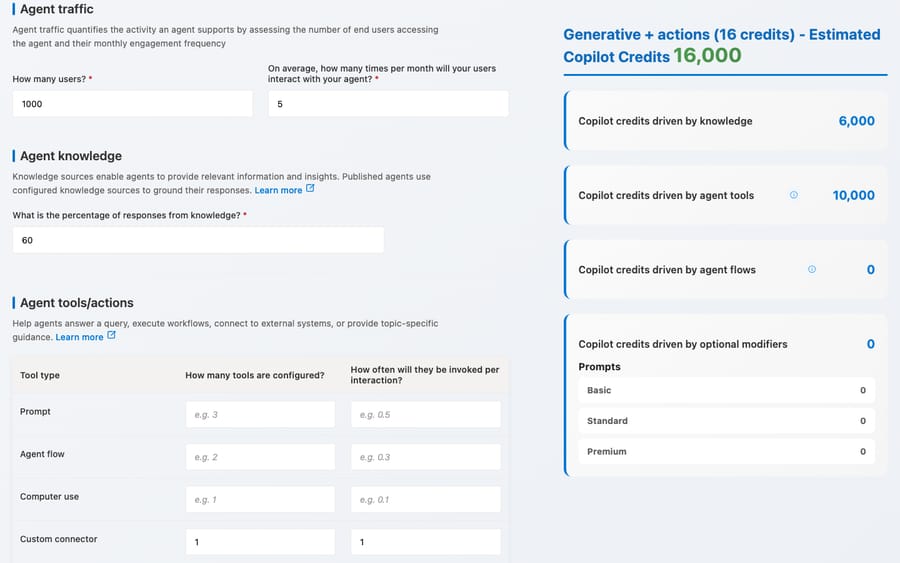
That came out at 16,000 credits (6,000 from knowledge, 10,000 from tools), matching the 1,000-chat row above. The scripted profile, entered as six interactions with 33% from knowledge, came out at 3,960, half the table's 8,000. The estimator's calculation script charges 2 credits per knowledge answer, 5 per tool call and nothing for a scripted reply, so the four classic answers per chat (4,000 credits a month) never reach its total, and 33% of 6,000 rounds to 1,980 knowledge answers.
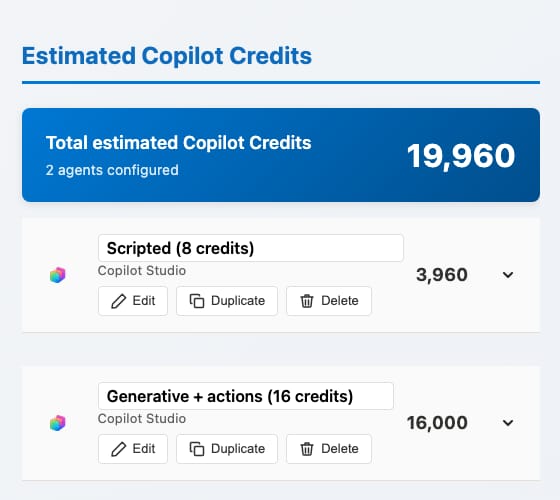
The billing-rate table charges a credit for every classic answer, so an agent built mostly from scripted topics costs about twice what the estimator shows. Its disclaimer already says it "should not be used as a pricing calculator".
Should you buy packs, pay-as-you-go or pre-purchase?
A pack only saves money if you use it. At $0.008 a credit against $0.01, a fully used pack is 20% cheaper than pay-as-you-go. Unused credits don't carry over, so a pack that's 80% used costs the same per credit as pay-as-you-go: 20,000 credits used for $200 is $0.01 each. Below 80% use, pay-as-you-go is cheaper.
The pack is also a yearly decision. Microsoft's licensing guide prices it at "$200 per credit pack/month (billed annually)", so the pack count you subscribe to is paid for in the quiet months too. Add a pack only if you'd use at least 80% of it across the whole year, and let pay-as-you-go absorb the rest. Take a tenant that uses 80,000 credits in ten months and 30,000 in the other two. Its third pack (credits 50,001 to 75,000) is full for ten months and empty for two, 250,000 of 300,000 credits or 83%, so it's worth buying. A fourth pack would catch only the 5,000 above 75,000 in the busy months, 17%. Three packs cost $7,700 for the year ($7,200 plus $500 of pay-as-you-go), against $7,800 with two ($4,800 plus ten busy months of 30,000 pay-as-you-go credits, $3,000) and $9,600 with four. The third pack saves $100 a year, which is the 80% rule at work: it catches 250,000 credits worth $2,500 at pay-as-you-go and costs $2,400.
The Copilot Credit Pre-Purchase Plan (P3) is an Azure purchase, and it isn't the same product as the capacity pack. You prepay a year of commit units; each unit pays for $1 of credit usage at retail price, which is 100 credits, and unused credits expire at the end of the year. On the pricing page, "Save up to 20% with up-front purchase of Copilot Credit Commit Units" sits under this plan, not under the pack, and the link beneath it opens Microsoft's Copilot Studio Licensing Guide, which lists the nine tiers and their discounts. The P3 article on Microsoft Learn gives the same tiers in commit units, with an illustrative 15,000-unit purchase for $14,100, a 6% saving on $15,000 of pay-as-you-go, which is tier 2 below. Purchases are final, with no cancellation or exchange, and the discount doesn't stack with other Microsoft discounts. The same article says plans "are configured to renew at the end of the one-year term" by default, so turn renewal off at purchase if you want the second year to be a fresh decision.
| P3 tier | Copilot Credits a year | Commit units | Discount | Price per credit |
|---|---|---|---|---|
| 1 | 300,000 | 3,000 | 5% | $0.0095 |
| 2 | 1,500,000 | 15,000 | 6% | $0.0094 |
| 3 | 3,000,000 | 30,000 | 7% | $0.0093 |
| 4 | 15,000,000 | 150,000 | 8% | $0.0092 |
| 5 | 30,000,000 | 300,000 | 10% | $0.009 |
| 6 | 75,000,000 | 750,000 | 12% | $0.0088 |
| 7 | 150,000,000 | 1,500,000 | 14% | $0.0086 |
| 8 | 225,000,000 | 2,250,000 | 17% | $0.0083 |
| 9 | 300,000,000 | 3,000,000 | 20% | $0.008 |
Tiers, credits and discounts are Microsoft's; the price per credit is our arithmetic, $0.01 less the discount, assuming every credit gets used.
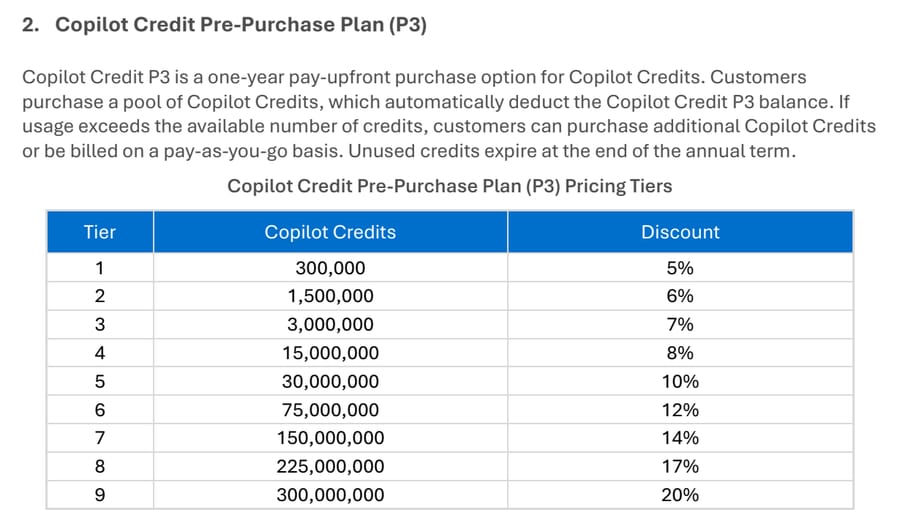
P3's discount runs 5% to 20%, and only its largest tier reaches the pack's rate. Tier 9's 20% makes a credit $0.008, the same as a fully used pack, and it takes 300 million credits a year. The heaviest row modeled above, premium voice at 20,000 calls, uses 72 million a year, which sits between tiers 5 and 6 at $0.009 or $0.0088 a credit. The smallest tier, 300,000 credits, is one pack's worth spread across a year, at $0.0095. So packs stay cheapest for every row in this post, as long as you use them. P3's advantage is flexibility, since its credits last the whole year and a quiet month doesn't throw credits away the way an unused pack does.
Microsoft sells a second prepaid option. The Microsoft Agent Pre-Purchase Plan is a pool of Agent Commit Units that pays for both Copilot Studio and Microsoft Foundry usage. The licensing guide says each unit is worth $1 of usage, or 100 Copilot Credits, and lists three tiers at 5%, 10% and 15% off. The Azure Retail Prices API lists them as one-year reservations: 20,000 units for $19,000, 100,000 for $90,000 and 500,000 for $425,000. That's $0.0095, $0.009 and $0.0085 a credit, so it doesn't beat a fully used pack either. It suits a company that also builds on Foundry and wants one prepaid pool for both.
What drives a Copilot Studio bill up?
Model choice. Reasoning models add 10 credits per 1,000 tokens to the feature rate. On a busy agent this can multiply the bill several times over, and it's one dropdown.
Tenant graph grounding. 10 credits per message, on top of the answer. It's optional and per agent, so turn it on only where Microsoft Graph content actually improves answers.
Agent actions under generative orchestration. Every topic transition and tool call is 5 credits. An agent that calls three tools per conversation spends 15 credits on actions before it answers.
Voice tier. Premium GenAI voice is 7.5 times classic voice per minute.
The GitHub Copilot harness. Per-task credit ranges of 100 and up, charged from the first build session.
Autonomous triggers. An agent triggered by an event (a new order, an incoming email) isn't used by a licensed person, so it always draws credits. Microsoft's order-processing example costs 20 credits per run: four agent actions.
Unused packs. Credits expire monthly, and the pack subscription is billed annually. Two packs you don't use are $400 a month of nothing, $4,800 over the year.
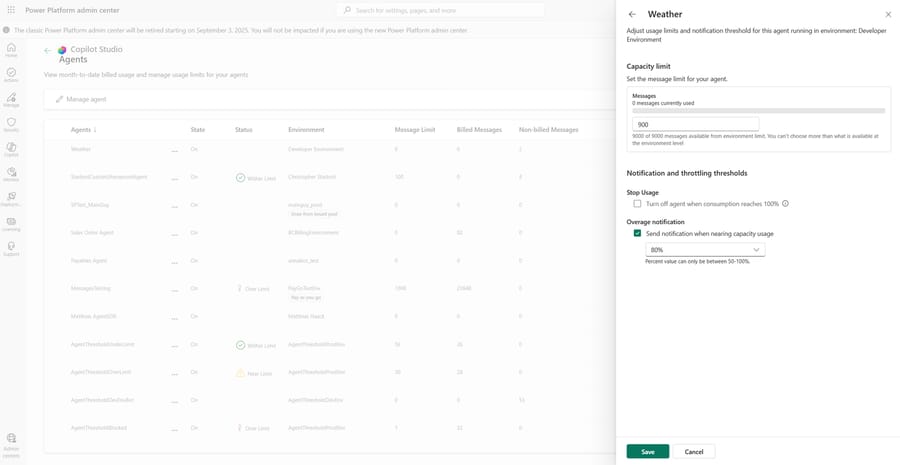
Enforcement. At 125% of prepaid capacity, custom agents are disabled and customers see "This agent is currently unavailable. It has reached its usage limit." Linking pay-as-you-go to the environment avoids that. Admins can also set a usage limit per agent in the Power Platform admin center, with an alert when an agent nears it and an option to turn the agent off at 100%.
The Teams plan ceiling. Some Microsoft 365 subscriptions include a Copilot Studio for Teams plan at no extra charge, but Microsoft's comparison shows it has no generative orchestration, no premium connectors and no handoff to a live representative. A support agent that needs any of those means a standalone subscription.
How do teams end up with surprise bills?
Every figure above is published, and none of it stops a bill arriving that nobody modeled. The surprises reported on r/copilotstudio, which is an active subreddit where the billing threads get the most replies, come in four shapes. Three of them are a direct consequence of how the meter is wired.
Turning on pay-as-you-go to publish also removes the ceiling
This is the mechanism behind the loudest thread in the sub, "Woke up to a $47K bill after deploying ONE Copilot Studio agent", which drew 59 comments. The poster's setup is ordinary: "I was testing Copilot Studio deployments, so I set up separate dev and prod environments on my developer tenant. To publish Copilot agent, I turned..." on pay-as-you-go, because publishing an agent outside the included paths needs paid capacity.
Here is what that switch also does. Microsoft's billing article says enforcement disables custom agents at 125% of prepaid capacity. It then says, of pay-as-you-go: "Enable pay-as-you-go billing by linking an Azure subscription billing plan to the environment. With pay-as-you-go, enforcement doesn't apply because overage is billed to your Azure subscription."
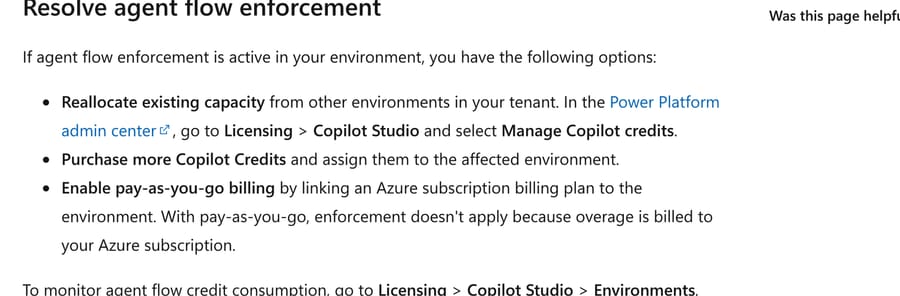
So the prepaid model has an automatic stop at 125% and pay-as-you-go has none. The step that makes publishing possible is the same step that uncaps spend, and nothing in the flow says so. $47,000 at the pay-as-you-go rate of $0.01 is 4.7 million credits. At 5 credits per agent action, that is 940,000 agent actions. At 22 credits for one generative answer on a reasoning model burning 2,000 tokens, it is about 214,000 answers. Either number is far beyond a single agent serving humans, which is what points at an autonomous trigger or a loop rather than traffic.
The fix, before you publish anything: set a per-agent monthly cap. Microsoft's own tip in the same article: "You can set monthly consumption limits for individual agents in the Power Platform admin center. Go to Licensing > Copilot Studio > Manage Agents to cap credit usage before enforcement is triggered." Do that for every agent in every environment that has pay-as-you-go linked, including the dev one, because a developer tenant bills the same as production.
Rate and model changes land on agents nobody touched
The second pattern is a bill that moves while the agent stays still. "Agent Costs - May Update?" reports it plainly: "Effective 5/26 we noticed a 1000%+ increase in Copilot Studio spend via Copilot Credits. Did anyone else see this spike out of nowhere? Nothing changed..." A separate thread, "Massive cost change / increase for pay-as-you-go beware", comes from a team already spending at scale: "We normally pay around $1,000 per day for our Copilot Studio agents."
We cannot verify either team's numbers, and neither poster publishes their agent's configuration. What the rate table does explain is how a change of that size is arithmetically possible without touching the agent. A generative answer is 2 credits. The same answer on a reasoning model is 2 credits plus 10 credits per 1,000 tokens of reasoning, so 2,000 tokens makes it 22. That is an eleven-fold move from one dropdown, and a platform-side default that switches which model an agent uses would produce it across every agent at once.
The check: in the Power Platform admin center, open Licensing > Copilot Studio > Environments and read the credit consumption grid line by line. The lines to compare month over month are agent actions, tenant graph grounding and the premium text and generative AI tools row, because that last one is where reasoning-model tokens land.
Pay-as-you-go does not always catch the fall
A third thread, "PAYG fallback not working when credit quota consumed", describes the opposite failure: prepaid credits run out, pay-as-you-go is supposed to take over, and instead the agent tells customers it needs credits. Microsoft's enforcement text gives the shape of the problem: pay-as-you-go applies to the environment it is linked to, through a billing policy, and capacity is pooled at the tenant while allocation happens per environment. An agent in an environment with no pay-as-you-go link draws on tenant capacity, and when the tenant is in overage, that agent stops.
The check: list your environments and confirm which ones have a billing policy attached. Microsoft's own enforcement example works through four environments where three behave differently, which is a fair signal of how easy this is to get wrong.
Nobody can see which agent spent the money
The fourth is not a bill so much as an inability to argue with one. A thread titled "Spend Report per Agent" comes from a team running "a prepaid credit pack + payg subscription model" and asking how to attribute spend. Consumption reporting exists in the Power Platform admin center, and it is where the per-agent usage limit lives too, so the fix and the visibility are the same screen.
What to do before launch, in order: run your agent design through Microsoft's own agent usage estimator, which takes agent type, traffic, orchestration, knowledge and tools and returns a credit volume. Then set a per-agent monthly limit at roughly 130% of that estimate, with the 80% alert on. Then publish. An estimate you wrote down is also the thing that tells you a spike is real when the bill moves and nobody changed anything.
What does per-credit billing reward?
A credit is charged per operation, whether or not the customer's problem got solved, and that sets Microsoft's incentive. That's the opposite of outcome pricing, where Zendesk bills per automated resolution and Fin per outcome. Per-operation pricing keeps Microsoft's revenue tied to how hard your agent works: more grounding, more reasoning tokens, more tool calls. An agent that loops through three failed lookups before handing off costs more than one that answers in a single turn.
The second incentive is seat coverage. Internal agent use is free for licensed staff and metered for everyone else, which quietly makes the unlicensed employees the reason to buy more seats. For a customer-facing agent none of that applies, and you're simply buying compute by the operation.
For a buyer, the upside is predictability at the feature level. You can look at an agent's design and count its credits before launch, which you can't do with a per-resolution price whose total depends on a resolution rate you don't yet know.
What do users say about the price?
G2 rates Microsoft Copilot Studio 4.4 out of 5 from 155 reviews, and Gartner Peer Insights gives it 4.3 from 89 ratings across all markets (both read on September 19, 2026). Price comes up in the complaints more than in the praise.
- An IT support reviewer at a small business (50 or fewer employees) wrote on G2 that "Pricing could be more affordable", alongside a request for more templates and troubleshooting documentation (July 1, 2025).
- A senior cloud engineer at an enterprise with more than 1,000 employees said its only drawback is that "it's fairly expensive" because it comes with a premium Microsoft 365 subscription (G2, June 6, 2026).
- A freelance AI app developer found "there isn't much transparency or any real version control" (G2, May 23, 2026). That one isn't about price.
Both price complaints, from a small business and a large enterprise, tie the cost to the Microsoft 365 licensing underneath. Our Copilot Studio guide has the fuller review picture, including PeerSpot's lower score from production users.
How does Copilot Studio compare at 5,000 chats a month?
Same volume for each: 5,000 customer chats a month of about three turns each. Each vendor bills a different unit, so each row states its assumption.
| Platform | Billing unit | Published price | 5,000 chats a month | Assumption |
|---|---|---|---|---|
| Microsoft Copilot Studio | Copilot Credit per operation | $200 per 25,000 credits; $0.01 PAYG | $350 to $650 | 8 to 16 credits a chat (profiles above) |
| Google Conversational Agents | Request (one per turn) | $0.007 Flows, $0.012 Playbooks | $105 to $180 | 3 requests a chat |
| Salesforce Agentforce | Flex Credits, 20 per action | 20 credits = $0.10 | $1,000 | 2 actions a chat, 200,000 credits |
| Zendesk AI agents | Automated resolution | Rate not published by Zendesk; third parties report $1.50 committed, $2.00 pay-as-you-go, beyond the allowance | $3,700 to $4,950 | 50% resolved (2,500), less a $50 allowance for 10 Suite Professional seats |
| Macha (on Zendesk, Freshdesk, Gorgias, Front, HubSpot, Intercom) | Ticket (one thread, one charge) | From $299/mo for 750 tickets (~$0.40/ticket), published | $1,999 (5,000-ticket tier) | Every chat is one ticket; setup and monitoring by the Macha team included |
Sources: Google's Conversational Agents pricing, which bills one request per turn when a Playbook is used; Salesforce's Agentforce pricing, where Flex Credits cost $0.10 per 20 and an action is 20 credits; Zendesk's outcome-based pricing post ($1.50 per automated resolution), its pricing page, which says AI agents are billed per automated resolution but doesn't publish the rate (third-party breakdowns report $1.50 committed and $2.00 pay-as-you-go) and its resolution allowance article ($5 a month per Suite Professional seat); Macha's pricing page.

The low rows are raw platform meters. Google and Copilot Studio charge for compute and leave the building, testing, knowledge upkeep and help desk integration to you. The Zendesk row charges only for resolved conversations, which is why it looks expensive per chat and cheap per success. Our Zendesk AI pricing breakdown and Agentforce guide cover those two in depth, and Google's options are in our Customer Engagement Suite guide.
Macha's row costs more than the raw meters because the price covers the finished agent. The Macha team builds, tests and monitors it inside the help desk your team already uses, and one ticket is one charge however many replies it takes. It fits a support team whose tickets already live in Zendesk, Freshdesk, Gorgias, Front, HubSpot or Intercom and who wants agents working in those tickets. It isn't a general agent studio, and a Microsoft-centric company building internal HR, IT and sales agents in one place is better served by Copilot Studio.
Who is Copilot Studio's pricing right for?
It suits organizations with Microsoft 365 Copilot seats that want internal agents for licensed staff, since most of that use costs nothing extra. It also suits teams that can count their agent's operations and want to pay only for those: a scripted agent at 8 credits a conversation costs 6.5 to 8 cents per chat, which few platforms beat.
Check the licenses you already hold before buying. Microsoft's licensing requirements page says the Digital Messaging and Chat add-ons for Dynamics 365 Customer Service include Copilot Studio entitlements, so a contact center already on Dynamics may have some of this covered.
It suits a small customer-facing deployment less well. The meter is cheap, but a website agent still needs someone to build topics, connect knowledge, set up handoff and watch the credit balance, and the review complaints from small teams are about exactly that overhead. If your need is AI on the tickets already arriving in a help desk, compare Copilot Studio with a help desk's own AI or an AI agent layer on your help desk before committing to building one. Our overview of AI agents for customer service covers those routes, and the conversational AI platform guide compares the builder platforms, including Kore.ai.
How we researched this
We checked Microsoft's Copilot Studio and Microsoft 365 Copilot pricing pages, the September 2026 Copilot Studio Licensing Guide, seven Microsoft Learn articles on billing, licensing, capacity, harnesses and the pre-purchase plan, and the Azure retail price list on September 19, 2026, and we built every cost row from those rates. G2 and Gartner Peer Insights ratings and quotes were read in a browser the same day. We did not build an agent in Copilot Studio. Its trial needs a work or school account, and Microsoft's sign-up notes say a personal email address is rejected, so the disposable address we use for vendor trials wouldn't qualify. The credits per conversation are therefore Microsoft's example (8) and our stated assumptions (16 credits, four-minute calls), not measured usage, and the admin-center screenshot is Microsoft's, from Learn, not our tenant. We did run both chat profiles through Microsoft's public Copilot Credit Estimator, which needs no account, on September 19, 2026; the two estimator screenshots are from that run.
Frequently asked questions
How much does Copilot Studio cost per month? A capacity pack is $200 a month for 25,000 Copilot Credits, billed annually, and pay-as-you-go credits are $0.01 each. A customer-facing chat agent in our model costs $80 to $160 a month at 1,000 conversations and $1,300 to $2,600 at 20,000, depending on how many generative answers and actions each conversation uses.
Do you have to pay for Microsoft Copilot Studio? To publish an agent, yes, unless it's an internal agent used only by Microsoft 365 Copilot licensed staff or a classic agent inside the Copilot Studio for Teams plan. The trial is free, but it can't publish agents.
Is Copilot Studio included in Microsoft 365 Copilot? Partly. A Microsoft 365 Copilot seat ($30 a user a month, paid yearly) includes Copilot Chat and the standard harness in Copilot Studio, and classic answers, generative answers, agent actions and graph grounding cost nothing when a licensed employee uses the agent under their own identity. Agents for customers, unlicensed users, autonomous triggers and the GitHub Copilot harness still need Copilot Credits.
Can you get Copilot Studio for free? You can build and test on the free trial, which can be extended by 30 days, but you can't publish. Some Microsoft 365 subscriptions include a Copilot Studio for Teams plan that publishes classic agents to Teams without extra cost; it has no generative orchestration, premium connectors or live-agent handoff. A new Azure account also comes with $200 of credit for its first 30 days that Microsoft says can be used on agents.
What is Copilot Studio pay-as-you-go pricing? $0.01 per Copilot Credit, billed monthly in arrears to an Azure subscription linked to the environment through a billing policy. There's no commitment, and you can unlink an environment at any time.
How are Copilot Credits calculated? Each feature has a fixed rate: 1 credit for a classic answer, 2 for a generative answer, 5 for an agent action, 10 for tenant graph grounding, 13 per 100 agent flow actions, and 10, 35 or 75 a minute for voice. A conversation's cost is the sum of what it used, plus 10 credits per 1,000 tokens when a reasoning model is involved.
How is the GitHub Copilot harness in Copilot Studio priced? In Copilot Credits, but per task instead of per feature, covering model tokens, tools and the harness itself. Microsoft estimates 100 to 300 credits for a light task, 300 to 500 for a medium one and more than 500 for a heavy one, and billing starts while you build and test.
Is there a Copilot Studio pricing calculator? Microsoft's Copilot Credit Estimator forecasts credits for an agent from its traffic, share of knowledge answers and tool calls, and it states "1 Copilot credit = $.01". In our run it matched our 16-credit generative profile exactly but counted a scripted agent at 3,960 credits instead of 8,000, because it gives classic answers no credits. Microsoft says it isn't a pricing calculator, so price the credits from the billing-rate table, using packs for your baseline and pay-as-you-go for the rest.
Does Copilot Studio have volume discounts? Yes, through prepurchase rather than packs. The Copilot Credit Pre-Purchase Plan gives 5% off a year of 300,000 credits, rising in nine tiers to 20% off 300 million, and the Microsoft Agent Pre-Purchase Plan, shared with Microsoft Foundry, gives 5% to 15% off. Only P3's top tier matches the $0.008 a credit of a fully used capacity pack.
What happens if you run out of Copilot Credits? With pay-as-you-go linked, overage is billed to Azure. Without it, agents keep running into overage until the tenant reaches 125% of prepaid capacity, then custom agents are disabled until capacity is added or resets, and agent flows stop starting new runs.
What are the limitations of Copilot Studio's pricing? Unused pack credits expire monthly while the pack subscription is billed annually, pre-purchase plans can't be canceled and renew automatically unless you switch that off, reasoning models and graph grounding raise the per-message cost with no change to the agent's design, and the free Microsoft 365 Copilot inclusion only covers licensed employees. The cost of building and maintaining the agent isn't in any meter.
Why did I get a huge Copilot Studio bill after publishing one agent? Because linking pay-as-you-go to an environment removes the automatic stop. Microsoft's billing article says custom agents are disabled at 125% of prepaid capacity, and that with pay-as-you-go "enforcement doesn't apply because overage is billed to your Azure subscription." Publishing needs paid capacity, so the switch that lets you publish is also the switch that uncaps spend. Set a per-agent monthly limit in the Power Platform admin center under Licensing > Copilot Studio > Manage Agents before you publish, in every environment including development.
How do I cap Copilot Studio spend? Three controls, in order of how much they save. Set a monthly consumption limit per agent in the Power Platform admin center, with the alert at 80% and the option to turn the agent off at 100%. Leave prepaid capacity unlinked from pay-as-you-go where you want the 125% enforcement stop to apply. And estimate before launch with Microsoft's agent usage estimator, so a later spike is measurable against a number you wrote down.
If your team already answers tickets in Zendesk, Freshdesk, Gorgias, Front, HubSpot or Intercom, you can see how Macha prices by ticket on the pricing page or start with $50 of free usage against your real tickets.
Sources: Microsoft Copilot Studio pricing · Microsoft 365 Copilot pricing · Microsoft 365 Copilot for enterprise · Billing rates and management (Microsoft Learn) · Standard harness licensing (Microsoft Learn) · Harnesses in Copilot Studio · GitHub Copilot harness billing · Copilot Credit P3 · Copilot Studio Licensing Guide, September 2026 · Microsoft Agent Pre-Purchase Plan prices (Azure Retail Prices API) · Manage Copilot Credits and capacity (Microsoft Learn) · Get access to the standard harness · Azure Retail Prices API · Copilot Credit Estimator · G2 reviews · Gartner Peer Insights · Google Conversational Agents pricing · Agentforce pricing · Zendesk outcome-based pricing · Zendesk AI agents buyer's guide · Zendesk resolution allowances
Simple per-ticket AI pricing
One thread with one person is one charge, however many replies it takes.