Intercom
 Shopify
 Stripe
 Slack
Slack Notion
 Google Workspace
 Confluence

How Do You Create Recurring Tickets in Freshdesk? Apps, API and Workarounds (2026)


Freshdesk has no native recurring ticket feature, and Freshworks' own support article, last modified in July 2017, still says "As of now, we do not have the ability to schedule recurring tickets." The workable options are four paid Marketplace apps, a scheduled job against the Create Ticket API, or Freshservice, which has a native Scheduler.
Key takeaways
- Freshdesk cannot create recurring tickets on any plan, and Freshworks' own support article saying so was last modified in July 2017.
- Recurring Ticket Schedules by Taroo is the most installed Freshdesk recurring ticket app, with 52 installs, version 19 and a price from ₹285 per agent per month.
- Three of the four Freshdesk recurring ticket apps charge per account rather than per agent, so the cheapest app depends on your team's headcount.
- A cron job calling POST /api/v2/tickets creates recurring Freshdesk tickets for free, within a Ticket Create limit of 50 a minute on Growth and 160 on Pro.
- Freshservice has a native Scheduler that creates recurring tickets on daily, weekly, monthly and yearly patterns, which Freshdesk still lacks.

Freshdesk cannot create recurring or scheduled tickets on any plan, so you pick a workaround: one of four paid Marketplace apps (from ₹285 per agent per month, each with a 21-day trial), a free cron job that calls the Create Ticket API, or Freshworks' own suggestion of a calendar event that emails your support address. Ten threads in the Freshworks community ask for this, between them drawing about 7,700 views, and nobody has been given a native answer in nine years.
| Option | Cost | Best for |
|---|---|---|
| Recurring Ticket Schedules app (Taroo) | From ₹285 / agent / month | Teams under about 10 agents |
| Per-account apps (Spritle, Taroo) | ₹1,247.43 to ₹2,599 / account / month | Larger teams |
| Create Ticket API on a cron job | Free, plus engineering time | Teams with a scheduler already running |
| Calendar event that emails support | Free | A reminder that just needs to become a ticket |
| Freshservice Scheduler | Included in Freshservice | Internal IT routines |
Does Freshdesk support recurring tickets natively?
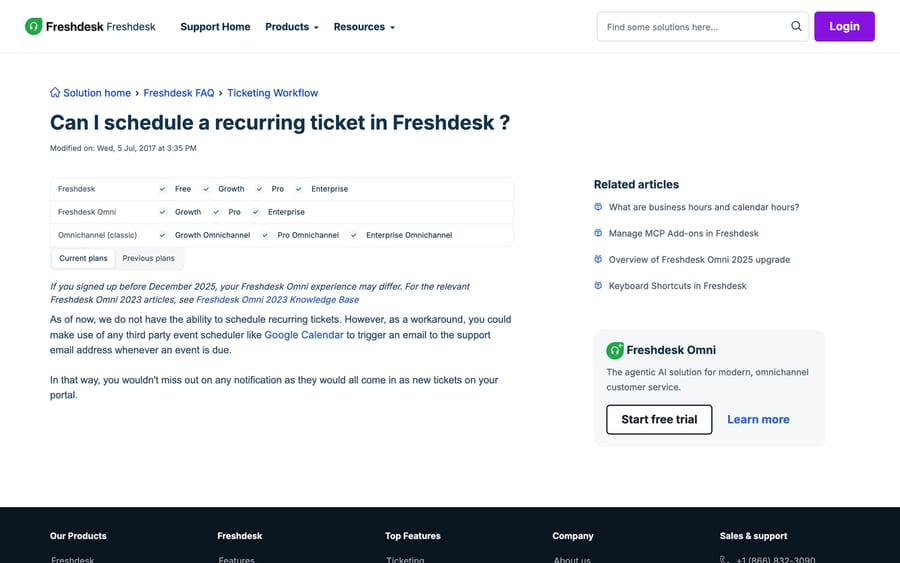
The article, Can I schedule a recurring ticket in Freshdesk?, applies to every plan including Free and Enterprise, and its recommended workaround is to use an external scheduler such as Google Calendar to send an email to your support address on a schedule, which creates a ticket the ordinary way.
That works. It's also a 2017 answer to a 2026 question, and it gives you no control over fields, no group assignment and no way to see the schedule from inside Freshdesk. Treat it as the free floor rather than the recommendation.
Freshservice, the sibling product, has this natively. Its Scheduler lives under Admin > Automation & Productivity > Agent productivity > Scheduler and creates recurring tickets on daily, weekly, monthly and yearly patterns, or once at a set time. If your recurring tickets are internal IT routines rather than customer conversations, that difference is worth knowing before you buy an app: it's one of the real functional splits between the two products, covered in Freshdesk vs Freshservice. Freshworks' Scheduler article doesn't state which Freshservice plans include it, so check that before you move.
Which Marketplace apps create recurring tickets, and what do they cost?
All four are paid, all four offer a 21-day free trial, and all four price in Indian rupees on the Marketplace as we saw it. We read every listing in a browser on 20 September 2026 and rechecked the publisher, version and update date on 24 September 2026.
| App | Publisher | Updated | Rating (ratings) | Installs | Version | Price after trial |
|---|---|---|---|---|---|---|
| Recurring Ticket Schedules | Taroo | about 3 months ago | 3.8 (12) | 52 | 19.0 | from ₹285 / agent / month |
| Recurring Tickets Pro | Spritle Software | about 10 months ago | 3.2 (6) | 22 | 3.0 | from ₹1,599 / account / month |
| Recurring Tickets Lite | Spritle Software | about 3 years ago | not rated | 15 | 1.0 | ₹1,247.43 / account / month |
| Recurring Ticket Schedules & Tasks | Taroo | about 10 months ago | 3.7 (3) | 8 | 7.0 | from ₹2,599 / account / month |
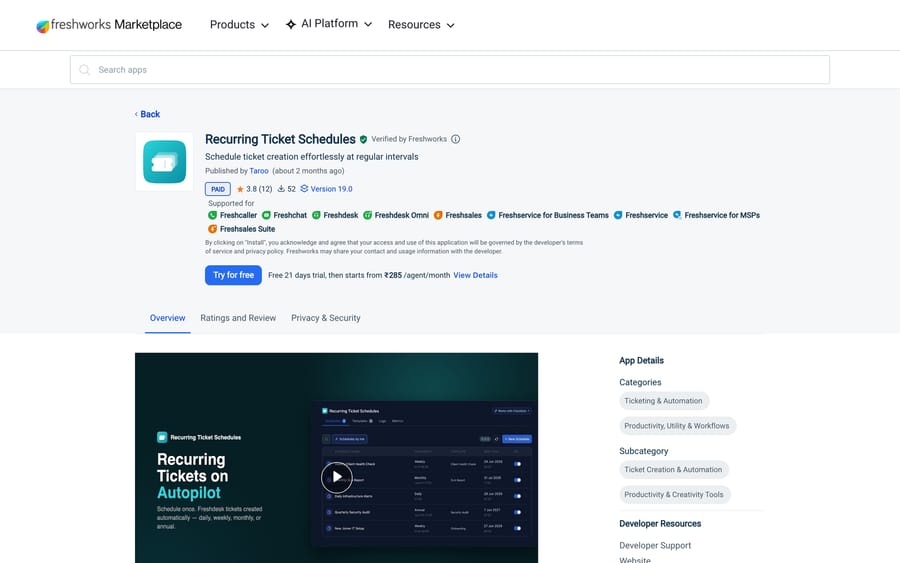
Four things that table tells you, and that no app listing says out loud.
The billing units differ, and that decides which is cheapest for you. Recurring Ticket Schedules charges per agent; the other three charge per account. On a five-agent team the per-agent app is the cheapest option by a wide margin. On a forty-agent team it's the most expensive, and a flat per-account app wins. Work out your own break-even before you trial one, because the trial won't.
Lite is barely cheaper than Pro, from the same publisher. Spritle's Lite is ₹1,247.43 a month against Pro at ₹1,599, a gap of about 28%, for an app that hasn't been updated in three years against one updated ten months ago and rated by six people. If you're choosing between those two, the version dates make the decision, not the price.
Version 19 versus version 1. Taroo's Recurring Ticket Schedules is on version 19 and was updated about three months ago. Recurring Tickets Lite is on version 1.0 and was last touched about three years ago. On a Marketplace app that creates tickets on a schedule, staleness is a real risk: when Freshworks changes an API or a plan tier, an abandoned app breaks silently and your scheduled tickets simply stop appearing.
The install counts are small. 52, 22, 15 and 8. For comparison, the Slack app has 4.9k installs. Almost nobody solves this with an app, which tells you most teams either live with the calendar-email workaround or build the API version below.
Name the incentive while you read those listings. All four are third-party apps, so their developer sets and collects the price, and Freshworks' interest is a populated Marketplace rather than a native feature. A native recurring-ticket scheduler in Freshdesk would make four paid listings redundant overnight, and it would also remove a reason to upgrade to Freshservice, which already has one. That isn't a scandal; it's the ordinary shape of a suite, and it's why the 2017 support article has never needed updating.
How do you create recurring tickets with the Freshdesk API?
If you have somewhere to run a scheduled job, this is the cheapest and most controllable option, and it's what the community's Creating Recurring tickets thread (about 2,100 views, 10 replies) converges on.
The whole mechanism is a cron job that calls the Create Ticket endpoint:
POST https://YOURDOMAIN.freshdesk.com/api/v2/tickets
Authorization: Basic base64(YOUR_API_KEY:X)
Content-Type: application/json

{
  "subject": "Monthly backup verification",
  "description": "Confirm last month's backups restored cleanly.",
  "email": "[email protected]",
  "group_id": 12345,
  "priority": 2,
  "status": 2,
  "tags": ["recurring", "monthly-backup"]
}
Run that from GitHub Actions on a schedule, a cron entry on any box you already own, or a scheduled task in whatever workflow tool you pay for. Four practical notes:
- The requester must exist or be creatable. Supply
email, and Freshdesk creates the contact if it doesn't already exist. Using a shared internal address keeps recurring operational tickets out of a real customer's history. - Tag every one of them. A tag like
recurringis what lets you exclude these from response-time reporting later, and reporting is where unlabeled robot tickets do the most quiet damage. - Make it idempotent. If your scheduler retries, you get duplicate tickets. Put the period in the subject, or check for an open ticket with the same tag before creating another one.
- Mind the rate limit. Ticket Create has its own per-endpoint ceiling on top of the account budget (100 calls a minute on Growth, 400 on Pro): 50 a minute on Growth and 160 on Pro. That's irrelevant for a monthly job and relevant if you're generating a few hundred at once.
The auth details, the status and priority integers and the per-endpoint limits are all in how to use the Freshdesk API, and how to create a ticket with the Freshdesk API walks the request field by field.
How do you snooze a Freshdesk ticket until a later date?
Two of the community's most-read threads on this topic aren't really about recurrence. "Sleep a ticket for a specified time", at about 1,400 views, and "Set Status as Open on Specific Date/Time", at about 1,800, both want one ticket to go quiet and come back on a date.
Freshdesk's native tool for that is a time-triggered automation, which is the third rule set under Admin > Workflows > Automations, alongside Ticket Creation and Ticket Updates. It fires on elapsed time rather than on an event, so the pattern is:
- Create a custom status such as "Snoozed" with its SLA timer switched off, under Admin > Workflows > Ticket fields > Status.
- Set the ticket to Snoozed, and record the wake date in a date custom field.
- Write a time-triggered rule: when status is Snoozed and hours since status changed is greater than your interval, set status to Open and notify the group.
That covers "come back in three days" cleanly. It does not cover "come back on 14 March," because time-triggered rules count elapsed time rather than comparing against a date field. For a specific date, the API job above is the honest answer. Freshdesk automations explained covers the three rule sets, and Freshdesk closed vs resolved covers custom statuses and the SLA timer toggle that stops a snoozed ticket breaching.
Which recurring ticket option should you choose?
- Fewer than about 10 agents, and you want it working this afternoon: Recurring Ticket Schedules, the per-agent app. It's the most maintained of the four and the per-agent price is in your favor at that size.
- A larger team: one of the per-account apps, and compare the total against your agent count rather than the headline number.
- You have engineering time and a scheduler already: the API job. It's free, it's version-controlled, and nothing about it can be abandoned by a third-party developer.
- Your recurring tickets are internal IT routines: look hard at Freshservice's native Scheduler before buying an app for Freshdesk.
- You only need a reminder email to become a ticket: Freshworks' own Google Calendar suggestion still works, costs nothing and takes five minutes.
How did we research this?
We read all four Marketplace listings in a browser on 20 September 2026, rechecked them on 24 September 2026, and took the publisher, last-updated date, star rating, rating count, install count, version and price from each page, plus a screenshot of one of them. Freshworks' position on native support comes from its own support article, and we quote its modified date because the age is part of the answer. The Freshservice comparison comes from Freshservice's own Scheduler article (last modified 6 September 2025). The API rate limits come from Freshdesk's developer docs. Community view counts come from our crawl of community.freshworks.com, where the recurring and scheduled-ticket cluster holds 10 threads and about 7,700 views. We don't run a Freshdesk account, so we installed none of these apps and ran none of the code above against a live help desk; the API request is written from Freshworks' documented field list.
Where does an AI agent layer fit, and where doesn't it?
Recurring tickets are a scheduling problem, and an AI agent layer is not a scheduler. Macha doesn't create tickets on a cron, and this post isn't the place to pretend otherwise.
What it does touch is what happens next. A scheduled ticket that always says "verify last month's backups" needs a person; a scheduled ticket that goes out to fifty customers as a renewal check generates fifty replies, and those replies are ordinary support conversations. Macha runs on top of the Freshdesk you already have and answers that kind of traffic: reading the reply, drafting or posting a grounded response, and looking up an account through a custom API tool when the answer needs one. It doesn't replace Freshdesk or its automations, and it isn't a help desk.
It suits teams whose recurring outreach generates a predictable wave of replies. It's the wrong fit if your recurring tickets are purely internal checklists, because nobody is writing back. Pricing is one plan on monthly ticket volume, from $299/month for 750 tickets, about $0.40 per ticket at every tier, with setup and monitoring by the Macha team, included on every plan. A ticket is one thread between Macha and one person, charged once no matter how many messages it takes. The trial is $50 of free usage (about 125 tickets), no credit card, no time limit. See Macha on Freshdesk and the pricing page.
Frequently asked questions
Does Freshdesk support recurring tickets natively? No. Freshworks' own support article says "As of now, we do not have the ability to schedule recurring tickets," and it applies to every plan from Free to Enterprise. The article was last modified in July 2017 and is still the current answer.
What is the best recurring ticket app for Freshdesk? Recurring Ticket Schedules by Taroo is the most installed and most maintained: 52 installs, 3.8 stars from 12 ratings, version 19, updated about three months before our 24 September 2026 check. It bills per agent, so compare it against the per-account apps at your own headcount before committing.
How much do Freshdesk recurring ticket apps cost? All four are paid with a 21-day free trial, and the Marketplace prices them in rupees: from ₹285 per agent per month for Recurring Ticket Schedules, ₹1,247.43 per account per month for Recurring Tickets Lite, from ₹1,599 per account for Recurring Tickets Pro, and from ₹2,599 per account for Recurring Ticket Schedules & Tasks.
Can I create recurring tickets with the Freshdesk API? Yes, and it's the cheapest route if you have anywhere to run a scheduled job. Point a cron task at POST /api/v2/tickets with Basic Auth, supply a requester email, a group and a tag, and make the job idempotent so a retry doesn't create duplicates.
How do I schedule a ticket for a specific future date in Freshdesk? Through the API rather than through automations. Freshdesk's time-triggered rules count elapsed time since an event, so they handle "in three days" but not "on 14 March". A scheduled job that creates the ticket on the day is the reliable version.
How do I snooze a Freshdesk ticket until later? Create a custom status such as Snoozed with its SLA timer off, set the ticket to it, then write a time-triggered automation that moves the ticket back to Open once the elapsed time passes your threshold. The SLA toggle is what stops a snoozed ticket breaching while it waits.
Does Freshservice have recurring tickets? Yes. Freshservice has a native Scheduler under Admin > Automation & Productivity > Agent productivity > Scheduler that creates tickets once or on daily, weekly, monthly and yearly patterns. Freshworks' article on it doesn't list which Freshservice plans include the feature, so confirm that with them before switching products for it.
Will a Marketplace recurring ticket app keep working? Check the version and last-updated date on the listing before you rely on it. Three of the four have been updated within the last year; Recurring Tickets Lite has not been touched in about three years and is still on version 1.0. An abandoned scheduling app fails quietly, which is the worst way for a scheduler to fail.
Sources:
- Can I schedule a recurring ticket in Freshdesk? (Freshworks support)
- Recurring Ticket Schedules (Freshworks Marketplace)
- Recurring Tickets Pro (Freshworks Marketplace)
- Recurring Tickets Lite (Freshworks Marketplace)
- Recurring Ticket Schedules & Tasks (Freshworks Marketplace)
- Schedule recurring tickets using Scheduler (Freshservice support)
- Freshdesk API rate limits
- Community: Creating Recurring tickets
- Community: Sleep a ticket for a specified time
- Community: Set Status as Open on Specific Date/Time
- Community: How do you schedule your tickets on a calendar?
Add AI agents to your Freshdesk
Macha reads the ticket, drafts the reply and takes the action, inside the Freshdesk you already run.