





 Shopify
 Stripe
 Slack
Slack Notion
 Google Workspace
 Confluence

How Do You Fix Gorgias Duplicate Tickets and Wrong Auto-Merges?


Duplicate tickets split one shopper's problem across several agents, and Gorgias auto-merge can fix that or fold two unrelated conversations into a thread you can never pull apart. The causes are mostly identity problems, and the fixes are a narrow time window, exclusion rules and clean customer profiles.
Key takeaways
- Gorgias duplicate tickets mostly come from one shopper having two customer profiles, and wrong auto-merges come from a time window set wider than the 1 to 3 days that catches real follow-ups.
- Gorgias auto-merge combines two open tickets from the same customer profile when their creation dates fall within a window of 1 to 180 days, with a default of 5 days.
- Neither auto-merged nor manually merged Gorgias tickets can be un-merged, because the source ticket is deleted and its messages fold into the target ticket.
- Gorgias manual merges let email and voice tickets merge with any channel, while chat, Instagram DM and Help Center tickets only merge within their own channel.
- Gorgias admins can protect distinct topics, VIP threads or a whole channel with the Exclude ticket from auto-merge action in a rule or macro.
Gorgias duplicate tickets usually come from one shopper having two customer profiles, and wrong auto-merges come from a time window set too wide: auto-merge joins any two open tickets from the same profile created within your window (1 to 180 days, default 5), and a merge can never be undone. The fix is to reconcile profiles, keep the window at 1 to 3 days, and add an "Exclude ticket from auto-merge" rule for topics that must stay separate.
| Problem | Cause | Fix |
|---|---|---|
| Same shopper, several tickets | Two profiles (different emails or channels) | Reconcile profiles in the customer sidebar, then merge |
| Fast follow-ups open new tickets | Threading headers don't match | Turn on auto-merge with a 1 to 3 day window |
| Unrelated topics merged | Window too wide; auto-merge ignores topic | Narrow the window; add exclusion rules by tag |
| Chat absorbed into email | Merged ticket takes the older ticket's channel | Exclude chat tickets from auto-merge |
Why does the same customer split into duplicate tickets?
Before you reach for auto-merge, it helps to know why duplicates appear at all, because most of the causes are identity problems, not ticketing problems. Gorgias groups messages into a ticket by matching them to a customer profile, and a single shopper can end up with several profiles.
- Different email addresses. A customer who bought using a personal Gmail but emails support from a work address looks like two people.
- Channel mismatch. The same person reaches you by email, then by chat widget, then by an Instagram DM. Each channel can spin up its own ticket if the underlying contact identifiers do not line up.
- Fast follow-ups. A shopper sends a second email before the first is answered, and if threading headers do not match, Gorgias opens a fresh ticket instead of appending.
- Closed-then-reopened gaps. A reply that arrives after a ticket is closed sometimes lands as a new ticket rather than reopening the old one.
The customer sidebar is where you confirm this: if one shopper shows up under two profiles with two order histories, deduplication is really about merging identities, and merging tickets is just cleaning up the symptom.
How does Gorgias auto-merge decide what to combine?
Auto-merge is Gorgias's automated answer to the fast-follow-up and split-thread problem. Per the Gorgias Tickets auto-merge documentation, it is available on all Helpdesk plans, and only admins can configure it. You reach the settings from your helpdesk by opening the top-left dropdown, choosing Workflows, then under Tools selecting Auto-merge.
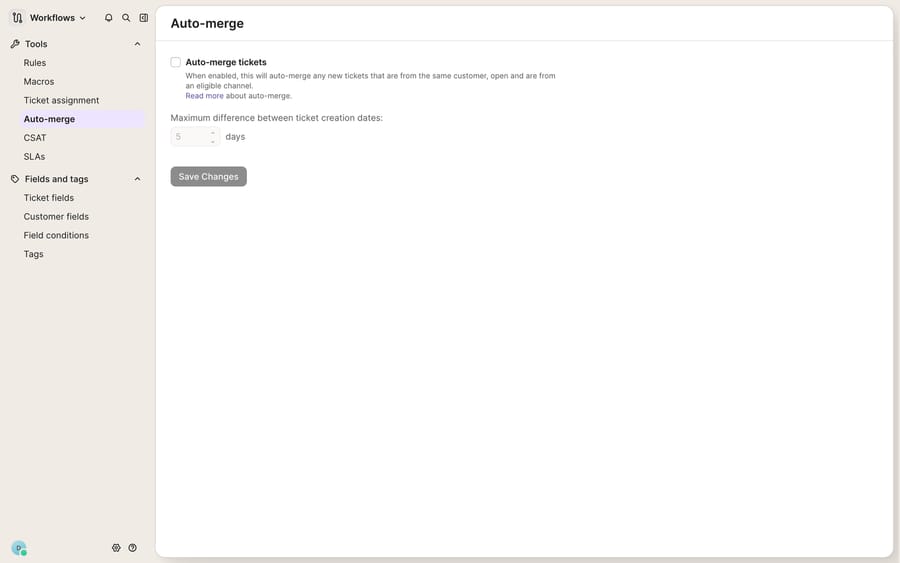
Once you check the Auto-merge tickets box, Gorgias will automatically combine two tickets when all of these are true (per the auto-merge docs, checked 24 September 2026):
- Eligible channel. Both tickets come from channels that auto-merge supports.
- Same customer. Both tickets are attached to the same customer profile.
- Both open. Neither ticket is closed at the time of the merge.
- Within the time window. The two creation dates fall inside the maximum difference between ticket creation dates you set — configurable from 1 day up to a maximum of 180 days, with a default of 5 days.
There is one behaviour that trips people up: when two tickets merge, the merged ticket takes the channel of the older of the two tickets. So a brand-new chat that auto-merges into a five-day-old email conversation becomes an email ticket. That is often fine, but it can quietly move a conversation off the channel your routing rules and views expect.
Can you undo a wrong auto-merge in Gorgias?
No. Here is the part to internalise before you flip the toggle: you cannot un-merge a ticket that has been auto-merged. The Gorgias docs state it plainly, and the same is true of a manual merge — per the Merge tickets documentation, "It isn't possible to un-merge a ticket. Proceed with care!" When two tickets combine, all messages and events appear in chronological order inside the target ticket, and the source ticket is deleted from your helpdesk entirely.
That permanence is exactly why auto-merge can hurt. The feature keys purely on same customer + open + within N days. It has no concept of topic. So if one customer opens a ticket about a return on Monday and a completely separate ticket about a subscription swap on Wednesday, and your window is five days, auto-merge will fold the subscription question into the returns thread — and now you have one ticket with two unrelated problems, no way to split them, and a deleted source ticket you cannot recover. A wide time window makes this dramatically more likely: 180 days means almost any two open tickets from a repeat customer are merge-eligible.
Tune it conservatively:
- Start the maximum difference small — 1 to 3 days catches genuine fast follow-ups without sweeping in unrelated future conversations.
- Only widen the window once you have watched it behave for a couple of weeks.
- Remember that closing tickets promptly is itself a guardrail, because auto-merge only ever touches tickets that are still open.
How do you stop auto-merge from combining the wrong tickets?
You do not have to accept auto-merge as all-or-nothing. Gorgias lets you carve out exceptions using the same automation engine that powers the rest of your workflows. Create a Rule (or add the step to a macro) and use the action Exclude ticket from auto-merge.
Practical patterns worth setting up:
- Protect distinct topics. If a ticket is tagged
returnand another is taggedsubscription, exclude tickets carrying those tags from merging so unrelated issues stay separate. - Protect high-value or escalated threads. Exclude tickets assigned to a specialist or flagged VIP, where an accidental merge would bury context.
- Protect a channel. If your chat routing depends on tickets staying on the chat channel, exclude chat tickets so they are not absorbed into older email threads.
Because a wrong merge is irreversible, treating exclusion rules as a safety net you build first — before widening the time window — is the sane order of operations.
How do you merge Gorgias tickets manually, and which channels can merge?
When duplicates slip past auto-merge (or you keep it off entirely), you merge by hand. Open the ticket, click the three-dots icon in the top-right corner, choose Merge ticket, and search for the target. Gorgias asks you to pick which Customer, Subject, and Assignee the merged result keeps, then combines everything into the target in chronological order and deletes the source.
Two constraints matter. First, there is no bulk merge: to combine more than two tickets you merge them one-by-one into the same target. Second, channels do not all merge with each other. Per the Merge tickets docs, email and voice are the flexible ones, and several channels only merge with themselves:
| Source channel | Can merge with |
|---|---|
| All channel types | |
| Voice | All channel types |
| Chat, Aircall, Contact Form, Facebook Messenger, Instagram DM, Help Center | Only the same channel, and the customer must match |
| SMS, WhatsApp, Facebook, Instagram (comments) | Email, or Voice when the customer matches |
All roles except Observer can merge tickets, and the capability is available on every Helpdesk plan.
What can't auto-merge fix, and where does an AI agent help?
Auto-merge is a genuinely useful, deterministic feature, and it is free on every Gorgias plan. It reliably cleans up the "same customer sent three emails in an hour" case. But be clear-eyed about what it cannot do. It merges on identity and time, not meaning — so it will happily combine unrelated topics and will never split them back out, because un-merging does not exist. It also depends entirely on the customer profiles being right: if a shopper has two profiles because they used two email addresses, auto-merge sees two people and never fires, and you are back to manual cleanup and the customer sidebar. And none of this actually answers the duplicate tickets — merging tidies the queue, but a human still has to read the combined thread and respond.
This is the seam where an AI agent layer fits. The broader category of AI agents for customer service exists to do the reasoning that merge rules cannot: understanding that two threads are about the same order, or that they are genuinely different, and answering accordingly. Macha is one such layer — it runs on top of the Gorgias you already use as a native connector (Macha runs on Zendesk, Freshdesk, Gorgias, Front, HubSpot or Intercom), and it does not replace your helpdesk, your rules, or your merge settings. Because a Macha agent looks up the customer's real order and account data before it replies — via a custom tool that turns a REST endpoint into something the agent can call — it can recognise that "where's my order" and "can I change the shipping address" are the same shopper and the same purchase, and give one grounded answer instead of spawning parallel drafts. If you want to script deduplication or reconcile profiles programmatically, the same data is reachable through the Gorgias API. (Macha bills per ticket — one conversation, charged once however many messages it takes — never per resolution or per merge, from $299 a month for 750 tickets; see the pricing breakdown.)
The clean division of labour: keep Gorgias auto-merge for the mechanical "same customer, same window" cleanup, keep your exclusion rules as the safety net, and layer an agent on top for the part the merge engine can't do — reading what the conversation is actually about and resolving it.
FAQ
Where do I turn on auto-merge in Gorgias? From your helpdesk, open the top-left dropdown, choose Workflows, then under Tools select Auto-merge, then check the Auto-merge tickets box and set the maximum difference between ticket creation dates (1 to 180 days, default 5). Only admins can configure it, and it is available on all Helpdesk plans.
Why does auto-merge combine unrelated tickets? Auto-merge keys on same customer + both open + within your time window — it has no concept of topic. If your window is wide, two unrelated open tickets from the same repeat customer become merge-eligible. Narrow the maximum-days setting and use an Exclude ticket from auto-merge rule to protect distinct topics.
Can a chat ticket be merged into an email ticket by hand? No. Per Gorgias's Merge tickets docs, chat tickets only merge manually with other chat tickets from the same customer. Auto-merge follows its own channel eligibility, and a merged ticket takes the channel of the older ticket.
Can I un-merge a Gorgias ticket? No. Neither auto-merged nor manually merged tickets can be un-merged — the source ticket is deleted and its messages fold into the target. Gorgias's own docs say to proceed with care. This is why a conservative time window and exclusion rules matter.
Why does the same customer keep creating duplicate tickets? Usually an identity mismatch: different email addresses, separate channels (email vs chat vs Instagram DM), or follow-ups whose threading headers don't match. Because auto-merge only fires when both tickets share one customer profile, duplicates from split profiles need the profiles reconciled first.
Can Macha replace Gorgias auto-merge? No. Macha is an AI agent layer that runs on top of Gorgias as a native connector — it doesn't replace auto-merge, rules, or your helpdesk. It complements them by reading the customer's real order and profile data before replying, so the same shopper gets one coherent, grounded answer rather than several parallel drafts.
Ready to stop duplicates turning into three half-answers? Start a free trial of Macha and connect it to your Gorgias in minutes.






