





 Shopify
 Stripe
 Slack
Slack Notion
 Google Workspace
 Confluence

Gorgias Migration Checklist (2026): What to Do Before, During and After, Plus a Rollback Plan


Moving support into Gorgias is two projects: moving the history, which is largely automated, and rebuilding the Rules, macros, Views and reports, which mostly is not. Teams that plan only for the first lose a weekend and some customer trust to the second.
Key takeaways
- A Gorgias migration runs in three phases: prep with automation Rules switched off, a monitored data transfer, and verification before re-enabling Rules one at a time.
- Gorgias' native Zendesk importer moves about 720 tickets per hour, while Help Desk Migration runs about 2,000 tickets per hour with the old desk still live.
- Gorgias' native importer splits a Zendesk ticket with more than 250 messages into several tickets, while Help Desk Migration warns tickets over 30 to 40 comments may not fully migrate.
- Gorgias imports On-hold, Solved and Closed Zendesk tickets all as Closed, and Pending tickets arrive Closed with a pending tag added automatically.
- The Gorgias migration rollback plan keeps the old help desk live for 5 to 10 business days before cancelling it or repointing email.

A Gorgias migration runs in three phases: prep (admin access, agents and fields created, automation Rules switched off), a monitored transfer that runs at about 720 tickets per hour with Gorgias' native Zendesk importer, and verification before you re-enable Rules one at a time. Tickets, customers and tags move as data. Rules, Views, Stats, auto-responders and business hours do not, so plan the rebuild as a separate project and keep the old help desk live for 5 to 10 business days as your rollback.
| Phase | Main tasks | Watch for |
|---|---|---|
| Before | Admin rights on both systems, create agents/groups/fields, disable Gorgias Rules, run a demo migration | Rules firing on historical tickets |
| During | Map fields, run the full import, monitor progress | Native importer: ~720 tickets/hour; Help Desk Migration: ~2,000 tickets/hour |
| After | Spot-check tickets, reconcile statuses, re-enable Rules one at a time | On-hold, Solved and Closed all land as Closed |
| Rollback | Old desk live 5 to 10 business days; email not repointed until verified | Cancelling the old plan too early |
What moves in a Gorgias migration, and what do you rebuild?
Every artifact in your current help desk is either a record or configuration, and the split decides your plan.
Records are the historical facts of support — tickets, customers, tags, attachments, conversation history. These are rows of data, and rows of data move. A migration tool (or Gorgias' own importer) reads them out of the source and writes them into Gorgias, preserving relationships.
Configuration is the logic that acted on those records — the Rules that auto-tagged and routed, the Macros your agents fired, the Views that organized the queue, the Stats that measured it. This is behaviour, not data, and it does not transfer. Gorgias' automation grammar is its own; even a "matching" rule has to be rebuilt in it. Hold onto that split and everything below falls into place.
What should you do before you migrate to Gorgias?
Most migration pain is un-prepped prep. Work this list first.
- Confirm admin access on both systems. Per Help Desk Migration's Gorgias checklist, you need admin rights on the source and the Gorgias account, plus OAuth credentials (email, password, account URL) to connect.
- Recreate your foundations first. Create your agents, groups, and custom fields in Gorgias before the test migration so tickets and comments land against the right people and structures instead of an "unassigned" void.
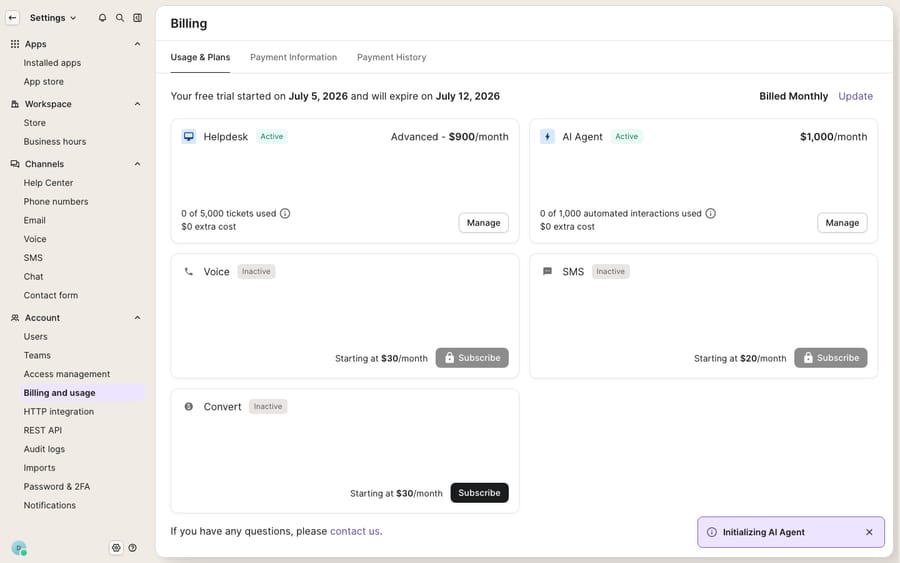
- Confirm your plan and usage headroom. Check your Gorgias Billing & usage screen so you know your ticket allowances before thousands of historical records land. A surprise overage on cutover day is avoidable.
- Inventory what you're rebuilding. Export or screenshot every Rule, Macro, View, auto-responder, and business-hours setting from the old desk. This becomes your rebuild backlog (macro template below).
- Disable active Gorgias automation rules. This is the one everyone skips. Historical tickets landing in Gorgias can trip live Rules — reassigning closed work or emailing customers about orders from two years ago. HDM's checklist is explicit: disable active automation rules to prevent unwanted status changes during import.
- Run a free Demo migration first. Don't start with the full run. The demo moves sample data so you can review it on the Gorgias side, and you can rerun it with adjusted settings as many times as needed until the mapping is right.
How long does the Gorgias migration itself take?
Map, then move. In the wizard, match agents, match groups, map ticket fields, and choose your automated options. Then run the full migration.
Know your speed, and plan the window around it. Gorgias' native Zendesk importer runs at roughly 720 tickets per hour on average, per Gorgias' own documentation, so 50,000 tickets is roughly three days of mostly unattended importing, not a lunchtime job. Third-party tools like HDM advertise a higher throughput (around 2,000 tickets/hour) and run "without a single second of downtime," because they read from one API and write to another while your old desk keeps serving customers.
Understand the import order. Gorgias imports Macros first, then Users, Tags, and Tickets, and it front-loads recency: "Tickets that were updated in the last 2 weeks will be imported first. The rest is imported starting from 2 years in the past." That two-week head start means your live, active conversations are available in Gorgias early — useful for a phased cutover.
Watch for the size trap. The two routes handle long threads differently. Gorgias' native importer splits a Zendesk ticket with more than 250 messages into several tickets of at most 250 messages each. Help Desk Migration warns that with more than 30 to 40 comments (depending on size), not all comments will migrate. If you have long, high-touch threads, flag them for the tool's custom split option, and note that splitting affects updated-date accuracy.
Which data ports as-is, and which do you rebuild?
This table is the heart of any migration plan. Records on top, configuration below.
| Artifact | Ports as data? | Ports as working config? | Reality |
|---|---|---|---|
| Tickets & conversations | Yes | n/a | Comments, authors, dates, visibility (public + private notes) move |
| Contacts / customers | Yes | n/a | Full contact migration supported |
| Agents & groups | Yes | n/a | Create them in Gorgias before the test run |
| Tags & custom fields | Yes | n/a | Migrate; map fields during setup |
| Attachments | Partial | n/a | Help Desk Migration moves them, except files over 10MB; the native Gorgias import skips attachments entirely |
| Organizations / companies | No | n/a | Not migrated by Help Desk Migration; rebuild company associations |
| CSAT / survey ratings | No | n/a | Native Zendesk import drops rating info; historical CSAT resets |
| Macros | Partial | No | The native Zendesk import brings macros first, but they can't be edited in Gorgias while the sync is on; rebuild or clean up after |
| Rules / automations | No | No | Rebuild in Gorgias' engine; nothing ports as live logic |
| Views | No | No | Recreate per team/queue |
| Stats & reports | No | No | Reporting cold-starts on Gorgias' own data model |
| Auto-responders & business hours | No | No | Reconfigure from scratch |
The reason Stats deserves its own row: even though the underlying tickets migrate, your historical analytics were computed in the old platform's reporting layer. Once tickets land, Gorgias' stats recalculate from its own model — so budget for a reporting cold start while fresh data accumulates. Keep an export of the old desk's reports for year-on-year comparisons.
What should you check after the migration?
Verify before you trust. Review the tool's completed/failed/skipped reports, then spot-check by hand: do ticket comments and their authors match? Are agents assigned correctly? Did knowledge articles keep their original status? Are attachments where they should be?
Reconcile the status mapping. This surprises Zendesk migrators specifically: Gorgias maps On-hold, Solved, and Closed tickets all to Closed, and Pending tickets arrive closed but auto-tagged pending. Confirm your open/closed counts make sense before you route anything.
Re-enable automations one at a time. Turn your Rules, auto-responders, and macros back on gradually, not all at once, so a single misfiring rule gets caught before it hits every ticket. This discipline on the way back up is what separates a calm cutover from agents fielding replies to ghosts.
Your rollback plan. Keep the old help desk live and in read-only-ish parallel for 5–10 business days. Don't cancel it, don't disconnect its email channels, and don't repoint DNS/forwarding until Gorgias is verified. If something's wrong, you revert email routing back to the old desk — no data is lost because you never tore it down. Help Desk Migration's higher support packages add a re-migration window (5 or 10 days after the full migration) plus delta migration for records created during or after the run, which is your safety net for a partial re-run without starting over.
What should you tell agents, and how do you rebuild macros?
Agent-comms template. Send this before cutover:
Team — on [date] we move to Gorgias. Your old logins stop working at [time]. Historical tickets and customer history are already in Gorgias. Note: some CSAT scores and attachments over 10MB won't carry over, and old ticket statuses may show as Closed — that's expected, not lost data. For [date–date], flag anything that looks wrong in [channel] and we'll fix mapping. New macros are named the same as before; report gaps to [owner].
Macro-rebuild template. For each macro you inventoried, capture: name, trigger context (when agents use it), body text with variables, actions (tag, assign, close), and the Gorgias macro equivalent. Rebuild the top 20% you use 80% of the time first; let the long tail follow. If you're coming from Freshdesk specifically, our Freshdesk to Gorgias migration guide covers the field-mapping quirks, and how to export data from Gorgias is worth reading if you ever need to leave.
Where does an AI agent fit after the migration?
The most laborious part of any migration is rebuilding the behaviour — the rules, macros, and routing that ran your queue. If you're rebuilding that logic from scratch anyway, it's the ideal moment to ask whether every rule needs to be brittle if-this-then-that automation, or whether some of that work belongs to an AI agent that reasons over the ticket instead.
Macha is one such layer: it runs on top of the Gorgias you just migrated into as a native connector. It does not replace Gorgias, and it isn't a Gorgias alternative. You connect Macha to Gorgias, and it reads and writes the same tickets you migrated: drafting or posting grounded replies, triaging by intent so the right agent gets the right ticket, and looking up Shopify order or subscription status through a custom tool that turns a REST API into something the agent can call. It bills per ticket, from $299/mo for up to 750 tickets, with one conversation charged once; see the pricing breakdown, and the Gorgias pricing explainer if you're modeling total cost of the move.
The clean division: let the importer move your records, rebuild the rules and macros that genuinely have to be deterministic, and let an agent take the reasoning-heavy work that used to eat your agents' day.
FAQ
How long does a Gorgias migration take? Gorgias' native Zendesk importer runs at roughly 720 tickets per hour, so a large historical set is a multi-day, mostly-unattended process. Third-party tools like Help Desk Migration are faster (around 2,000 tickets/hour) and run without downtime because they copy via API while your old desk stays live. Budget the calendar time around your ticket volume, not a single afternoon.
What data does not migrate to Gorgias? Configuration doesn't move: Rules, Macros, Views, Stats, auto-responders, and business hours are rebuilt by hand. On records, Gorgias' native import skips attachments, CSAT/rating data and lookup-type fields. With Help Desk Migration, organizations, CC fields and attachments over 10MB are excluded, and a ticket with more than 30 to 40 comments may not fully migrate. The native importer instead splits tickets over 250 messages.
Will migrating to Gorgias cause downtime? Not inherently. Migration tools read from your old system and write into Gorgias while the old desk keeps serving customers, so there's no mandatory blackout. The real risk is active Gorgias Rules firing on imported historical tickets — disable them before import and re-enable one at a time afterward.
What's the rollback plan if the migration goes wrong? Keep the old help desk live and untouched for 5–10 business days — don't cancel it or repoint email until Gorgias is verified. If something breaks, revert email routing to the old desk; no data is lost. Help Desk Migration's higher support packages add a 5- or 10-day re-migration window and delta migration to catch records created mid-run.
Can I add AI to Gorgias after migrating without replacing it? Yes. An AI agent layer like Macha connects to Gorgias as a native connector and runs on top of your migrated help desk — it doesn't replace Gorgias. It resolves and triages tickets using your Shopify data and knowledge, while Gorgias stays the system of record.
Just moved to Gorgias and rebuilding your automation from scratch? Start a free trial of Macha and connect it to your Gorgias in minutes.






