





 Shopify
 Stripe
 Slack
Slack Notion
 Google Workspace
 Confluence

How Do You Lower Your Front Bill in 2026 Without Losing Coverage?


Removing unused seats is the biggest saving on a Front bill, but Front's contract bars seat reductions mid-term, so the cut lands at renewal if you give 30 days' notice. After seats, the savings come from choosing the right tier, dropping unused AI add-ons and consolidating inboxes.
Key takeaways
- Removing unused seats is the fastest way to lower a Front bill, but an annual contract only shrinks at renewal, with 30 days' written notice before the term ends.
- Cutting one dormant Front Professional seat saves $65 a month, or $780 a year, on the next annual contract while keeping the teammate's conversation history.
- Front Starter allows up to 10 seats and a single channel type, so adding a second channel means a 2.6x per-seat jump to Professional.
- Front's AI add-ons stack on seat price: Copilot costs $20 a seat and Autopilot bills $0.05 per triage, $0.39 per handoff or $0.89 per resolution; Smart QA and Smart CSAT are Enterprise only as of October 2026.
- A 7-seat Front Professional team with Copilot pays $595 a month, or $85 a seat, while getting Smart QA and Smart CSAT now means Enterprise at $105 a seat, $735 a month.

The biggest cut to a Front bill comes from removing unused seats, since every seat costs $25 to $105 a month billed annually, but on an annual contract that saving only lands at renewal. Front's SaaS agreement says customers "may not downgrade its Subscription Plan or reduce the number of End User subscriptions during any Subscription Term" and asks for 30 days' written notice before the term ends (front.com/legal/saas-services-agreement, effective 8 May 2026). After seats, the savings come from the tier you pick, the AI add-ons you pay for, and how you structure inboxes.
| Lever | What it saves (front.com/pricing, 24 Sept 2026) | When it takes effect |
|---|---|---|
| Remove an unused Professional seat | $65/month annual ($780 a year), or $85/month on monthly billing | Next renewal on annual; next bill on monthly |
| Stay on Starter instead of Professional | $40 a seat a month ($25 vs $65) | At plan choice or renewal |
| Drop Copilot | $20 a seat a month | Add-on terms; check your contract |
| Smart QA + Smart CSAT | No longer sold on Starter or Professional as of October 2026 (they were $20 + $10, or $25 bundled); Enterprise only | If an older contract still lists them, ask Front at renewal |
| Limit Autopilot | $0.05 per triage, $0.39 per handoff or $0.89 per resolution, billed once per conversation | Usage-based |
How do you right-size your Front seats?
Front's pricing is per seat, and this is where most overspend lives. Starter is $25 a seat, Professional $65 and Enterprise $105 billed annually, and Front's help center says there's a one-license minimum on Starter and Professional (help.front.com). Drag's teardown of Front's plans puts the same range at "$25 to $105 a seat." Every active teammate is a line item, so the first move is auditing who's actually using their seat.
Go to Settings → Teammates. This is the screen where seats are managed, and it shows every teammate, their status and when they were invited. Look for employees who left, contractors whose project ended, seasonal agents from a past peak, and internal stakeholders added "just to have visibility" who haven't opened Front in months.
For each of those, the choice is deactivate or keep paying. Deactivating a teammate releases the seat while preserving their conversation history and assignments. You're not deleting data. The timing is the part most teams get wrong: on an annual contract, Front doesn't reduce your seat count mid-term, and it doesn't refund unused time. Its help center says payments are "nonrefundable" and that a team stays liable for "the entire upfront fee" for the period. So one dormant Professional seat is $65 a month, or $780 a year, off the next contract, provided you cut it with 30 days' notice before renewal. On monthly billing the same seat is $85 and the saving shows on the next bill.
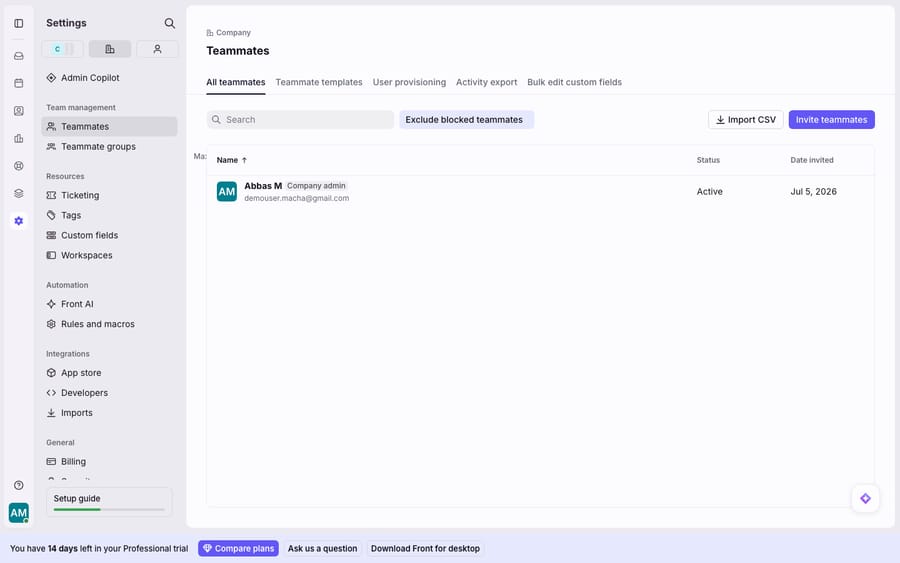
The discipline to build: treat seat management as an offboarding step, next to disabling the leaver's email. Then run a seat audit 45 to 60 days before every annual renewal: pull up the Teammates list, sort by last active, deactivate anyone who's gone dark, and send Front the reduced count in writing. That calendar reminder is the closest thing Front has to a "lower my bill" button.
How do you avoid the jump from Starter to Professional?
Front's tiers don't rise gently, they step. Checked 24 September 2026, the annual per-seat ladder is Starter $25, Professional $65, Enterprise $105 ($35 and $85 a seat for Starter and Professional on monthly billing). Starter to Professional is a 2.6x increase per seat, and it's easy to trip into.
The trap is that Starter is deliberately narrow. It caps at 10 seats and a single channel type, per Front's pricing page. That single-channel limit is the usual reason teams move up: the moment you need email and live chat, or email and SMS, Starter can't hold it and you're on Professional at more than double the per-seat price. Featurebase's pricing analysis frames the same dynamic, warning that Front's cost "looks simple at first glance, but once you dig in, you'll find multiple plans, AI add-ons, and hidden service fees that can quietly 2x your monthly bill."
How to avoid paying the jump before you have to:
- Confirm the whole team needs the second channel. If only two people handle SMS, routing that volume differently may keep everyone else on Starter.
- Don't upgrade the whole account for one feature. Map exactly which capability forces the move, and check whether a workflow change removes the need.
- If you're already on Professional, make every seat earn it. At $65 a seat, an unused Professional seat is the most expensive waste on the account, which takes you back to the seat audit.
Our full Front pricing breakdown lays out what unlocks at each tier, so you can check whether your plan matches the features you use.
Which Front AI add-ons can you drop?
This is where Front bills balloon quietly. On Starter and Professional, Front's AI features are paid add-ons that stack on top of the seat price. Front's pricing page lists Copilot at $20 a seat a month. Autopilot, the auto-resolution feature, is usage-billed "starting at $0.05 /conversation," and Front's Autopilot pricing bills each conversation once at its highest level: $0.05 for triage, $0.39 for a handoff and $0.89 for a resolution. Enterprise includes Copilot, Smart QA and Smart CSAT, and as of October 2026 Smart QA and Smart CSAT are Enterprise only (they were $20 and $10 add-ons on Starter and Professional until early October).
Do the arithmetic. A 7-seat Professional team pays $455 a month for seats. Add Copilot and it's 7 × ($65 + $20) = $595, or $85 a seat, before Autopilot usage. Until early October 2026 the Smart QA + CSAT bundle took that to 7 × ($65 + $20 + $25) = $770, more than Enterprise; as of October 2026 those two are Enterprise only, so wanting them means 7 × $105 = $735, which includes Copilot as well.
| What you're paying for | Add-on cost (Starter/Pro) | Cut it if… |
|---|---|---|
| Copilot (drafting assist) | $20/seat/mo | Agents rarely use the suggested drafts |
| Smart QA (auto quality scoring) | Not sold on Starter/Pro as of October 2026 (Enterprise only; was $20/seat/mo) | You already QA manually or don't score |
| Smart CSAT (auto sentiment) | Not sold on Starter/Pro as of October 2026 (Enterprise only; was $10/seat/mo) | You run surveys through another tool |
| Autopilot (auto-resolution) | $0.05 triage / $0.39 handoff / $0.89 resolution per conversation | Volume is low or answers need a human |
The audit: for each AI add-on, ask whether the team actually uses it every week. Add-ons get switched on during a trial or a "let's try AI" moment and then keep billing whether or not anyone touches them. If Copilot's suggestions get ignored, or Smart CSAT overlaps with a survey tool you already pay for, turning it off is money back. If you want Smart QA or Smart CSAT, Enterprise is now the only plan that has them (as of October 2026), so price it against Professional plus Copilot. Our Front AI explained guide covers what each feature does, so you can decide from capability rather than fear of missing out.
Does consolidating inboxes reduce the seats you need?
Seats are Front's paid unit, but how you spread them across inboxes and workspaces affects how many you need. Fragmentation inflates the seat count: when work is scattered across too many shared inboxes and workspaces, teams add people to seats just to give them visibility into a queue they'd otherwise miss.
Consolidation is the fix. A well-structured Front shared inbox setup, with fewer, broader shared inboxes and clear routing rules, means one teammate can cover more ground without a seat in five places. Before you add a seat, ask whether the coverage gap is a structure problem: could an existing teammate see this work if the inbox layout were simpler? Often the answer is yes, and the seat you were about to buy disappears.
This compounds with the tier decision. Tidy routing keeps channel volume manageable, and a lean account is far easier to audit for dormant seats before renewal.
Is Front worth the cost, and where does per-ticket AI change the math?
Front earns its keep for a lot of teams. Reviewers on Capterra consistently praise how it organizes email (sorting, assigning, keeping shared inboxes tidy) and how it handles multi-channel collaboration. The collaborative shared-inbox model is genuinely good, and for teams that live in it, the coverage is real.
The complaints are just as consistent, and they're about cost, not capability. Drag's summary matches the review chorus: "teams usually leave Front over cost, not capability," and "for a 15-person team, the all-in difference against a flatter-priced tool runs into thousands of dollars a year." The per-seat model punishes larger teams, the Starter-to-Professional step is steep, annual contracts lock the seat count for the term, and stacked AI add-ons surprise people on the invoice. If cost is your problem, our roundup of the best Front alternatives is a fair place to compare, though switching help desks is a heavy lift.
There's a lighter option that doesn't require leaving Front, and it's where the AI math flips. Front's Copilot is priced per seat: you pay $20 a seat whether that seat sends one draft or a thousand. A per-ticket AI layer inverts that: you pay for the conversations the agent handles. Macha is that layer (the broader category is AI agents for customer service), and it runs on top of the Front you already use through the Macha–Front connector, not as a replacement. Your inboxes, teammates and rules stay as they are. Macha bills per ticket: one conversation, charged once however many messages it takes, never per seat or per resolution, from $299 a month for up to 750 tickets with setup and monitoring by the Macha team included. And because the agent can pull a real order or account status through a custom tool, it resolves the conversation rather than just drafting a reply for a human to send. For a team where Copilot is switched on across every seat "just in case," moving from per-seat to per-ticket AI is often the single biggest line-item change available.
The playbook: deactivate dead seats before renewal, right-size the tier, drop unused AI add-ons, consolidate inboxes. Then, if AI is what's inflating the bill, move it to a per-ticket layer instead of a per-seat one.
FAQ
How is Front billed, per seat or per usage? Per seat, with a one-license minimum on Starter and Professional: $25 a seat on Starter, $65 on Professional and $105 on Enterprise billed annually, or $35 and $85 monthly for Starter and Professional. Autopilot is the one usage-billed item: $0.05 per triage, $0.39 per handoff or $0.89 per resolution, each conversation billed once.
Can I reduce seats in the middle of an annual Front contract? No. Front's SaaS agreement bars reducing seats or downgrading plans during a subscription term and asks for 30 days' written notice before the term ends. Deactivate unused seats before that deadline so the renewal is priced on the smaller count.
Does deactivating a teammate delete their data? No. Deactivating releases the seat, and the teammate's conversation history and past assignments are preserved. Put it on your offboarding checklist next to disabling email.
Why did my Front bill jump so much? Two usual culprits: the Starter-to-Professional step (Starter allows a single channel type, so adding a second channel means a 2.6x per-seat jump), and stacked AI add-ons. Copilot is a separate per-seat charge on lower tiers, and Autopilot bills per conversation; before Smart QA and Smart CSAT became Enterprise only in October 2026, Featurebase warned the add-ons could "quietly 2x your monthly bill."
Can I use AI on Front without paying per seat for it? Front's Copilot is priced per seat as an add-on, and Smart QA and Smart CSAT come only with Enterprise seats (as of October 2026). An AI agent layer like Macha connects to Front as a live connector and bills per ticket, one conversation charged once, so the cost tracks the volume you handle instead of a license on every teammate.
Is it worth switching off Front to save money? Only if cost outweighs the collaboration you'd lose, because switching help desks is a real migration. Before that, use the in-account levers (seats at renewal, tier, add-ons, consolidation). If AI cost is the driver, a per-ticket layer on top of Front often solves it without a migration.
Want to see the per-ticket math on your own Front volume? Start a free trial of Macha with $50 of free usage and no credit card, and connect it to your Front.






