





 Shopify
 Stripe
 Slack
Slack Notion
 Google Workspace
 Confluence

Is Front Good for Small Teams and Startups? Cost and Fit in 2026


Front fits a small team of three to eight people who work in a shared inbox all day, and it's overkill for one or two people who touch email a few times a day. Starter costs $25 a seat billed annually and caps at 10 seats, so the per-seat math decides most of it.
Key takeaways
- Front suits small teams of three to eight people who work in a shared inbox all day; for one or two people, a free shared Gmail label is enough.
- Front Starter costs $25 per seat a month billed annually or $35 monthly and caps at 10 seats; Professional costs $65 per seat annually and allows up to 50 seats.
- A five-person team on Front Starter pays about $125 a month, versus about $325 on Professional, before the Copilot add-on at $20 per seat.
- Front holds 4.5 out of 5 across 289 Capterra reviews, and smaller customers most often cite per-seat pricing and recent price increases as the main complaint.
- Missive is a cheaper shared-inbox alternative to Front, with Starter at $14 a user capped at five users and Productive at $24 a user.

Front is a good fit for a small team of roughly three to eight people who work in a shared inbox all day, and overkill for one or two: Starter costs $25 per seat a month billed annually ($35 monthly) and caps at 10 seats, so a five-person team pays about $125 a month before any AI add-on (front.com/pricing, checked 24 September 2026).
| Front plan | Annual billing | Monthly billing | Seat cap | Channels | AI (Copilot) |
|---|---|---|---|---|---|
| Starter | $25/seat/mo | $35/seat/mo | 10 seats | One channel type | $20/seat add-on |
| Professional | $65/seat/mo | $85/seat/mo | 50 seats | Omnichannel | $20/seat add-on |
| Enterprise | $105/seat/mo | Annual only | Unlimited | Omnichannel | Included |
How much does Front cost for a small team?
Front bills per seat, and for a small team that single fact drives almost every decision. Front's own pricing page lists Starter at $25 per seat/month billed annually, with a cap at ten seats and a single channel type (email, Front Chat or SMS). Professional is $65 per seat/month and supports up to fifty seats, adding omnichannel, SSO/SCIM and advanced analytics. Enterprise is $105 per seat/month and only sold annually. Pay month to month and Starter becomes $35 and Professional $85. For older third-party context, Hiver's breakdown of Front pricing covers the same tiers.
The math is easy to run. A five-person team on Starter is about $125/month; the same team on Professional is around $325/month. That's before AI. Front sells Copilot as a $20 per seat add-on on Starter and Professional and includes it on Enterprise; as of October 2026, Smart QA and Smart CSAT are Enterprise only. Switch on Copilot for all five people and the Starter bill moves from $125 toward $225/month. Front's AI agent, Autopilot, is priced separately and bills each conversation once at the highest level it reaches: $0.05 for triage, $0.39 for a handoff and $0.89 for a resolution (as of October 2026, per Front's Autopilot pricing).
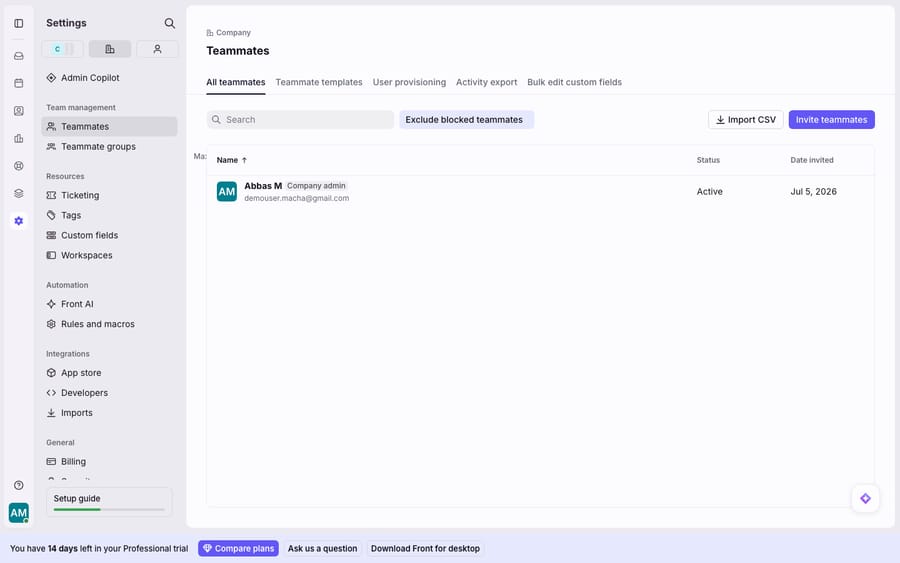
The seat roster below is the surface that decides all of this. Every teammate you add is another line on the invoice.
What do small-team reviewers say about Front?
Front holds 4.5/5 across 289 reviews on Capterra (checked 24 September 2026), so this isn't a product people regret. But the recurring theme among smaller customers is price relative to team size.
A co-founder at an 11–50-person company summed the objection up on Capterra: Front is "fairly expensive if you don't use it for a large number of folks," adding that "AI features are pretty limited right now." A content manager put it more bluntly: "the price is a real problem because it's charged per user, which tends to be quite expensive." And a lead product manager flagged the trajectory, citing "price increases over the last few years" to the point where "pricing is just not feasible."
Beyond cost, two operational complaints matter more to a lean team with no IT buffer. A director in machinery left a one-star review over sync: "Outlook sync is one-way only," so actions in Front didn't reflect back, leaving shared mailboxes cluttered. A senior operations coordinator mentioned "quite a few outages and crashes," and Front's UI redesign drew its own backlash, with one director calling the "horrible new UI" a downgrade they were never asked to trial. None of this is disqualifying, but a small team feels a bad sync day or a confusing redesign more than an enterprise with a dedicated admin.
When is Front overkill for a small team?
Front earns its keep when a team genuinely collaborates inside the inbox: assigning conversations, commenting internally, avoiding double-replies, and reporting on response times. Below a certain threshold, you're paying for coordination you don't need yet. As a rough guide:
| Your situation | Is Front the right call? |
|---|---|
| 1–2 people, email a few times a day | Overkill. Shared Gmail/Outlook labels are free and fine. |
| 3–8 people living in a shared inbox all day | Good fit. This is Front's sweet spot for small teams. |
| Single channel (just email), tight budget | Front works on Starter, but Missive is cheaper for the same core job. |
| Multi-channel (email + SMS + chat + social) from day one | Front is strong here, but you'll need Professional, so budget for $65 a seat. |
| You mainly want AI deflection, not collaboration | Front's Copilot is a $20/seat add-on below Enterprise and, per reviewers, still maturing. |
The tell that you've outgrown a free shared inbox is when messages start slipping through cracks, two teammates reply to the same customer, or you can't answer "how fast do we respond?" That's the collaboration problem Front was built for, and it's covered in more depth in our Front shared inbox explainer. If none of that hurts yet, Front is solving a problem you don't have.
What are the cheaper alternatives to Front, and what do you give up?
If Front feels like too much tool for your stage, there's a spectrum below it. Our full best Front alternatives roundup goes deeper, but the short version for a small team:
- Shared Gmail / Outlook (free): Labels and delegated access cost nothing. You lose assignment, collision detection, internal comments, and any real analytics. Fine for two or three people; painful past that.
- Missive ($14–$36/seat): Missive's own pricing page lists Starter at $14/user a month (capped at five users), Productive at $24 and Business at $36, with 20% off annually. That's materially cheaper than Front for the same core shared-inbox job (see also Hiver's Front-vs-Missive comparison). You give up some of Front's channel breadth and polish.
- Hiver ($25–$85/user annually): Hiver's pricing page lists Growth at $25, Pro at $55 and Elite at $85 per user a month billed annually. It's strongest if your team already lives in Gmail and Google Workspace.
The trade is real: the cheaper you go, the more you give up in multi-channel support, automation depth, and reporting. Front's premium buys polish and breadth. The question is whether your team is big enough, and busy enough, to feel the difference.
When should a startup upgrade to Front?
The graduation point is when coordination and reporting become the bottleneck, not the tooling. The moment you go multi-channel (email plus SMS, chat and social in one place) or need SSO, SCIM and CSAT reporting, the jump to Professional stops feeling expensive. Front's 14-day free trial runs on Professional features with no credit card, so you can test that tier before paying for it.
A note on startup discounts: earlier versions of this page described a Front startup program with about six months free. Front's own startups page returned a 404 when we checked on 24 September 2026, and the offer now appears only on third-party perk directories, so ask Front's sales team before counting on it. For the full tier-by-tier breakdown, see our Front pricing explained guide and the balanced Front app review.
Where does an AI agent fit for a small team on Front?
One thing a small team should weigh separately from which inbox is the AI. Front's Copilot is a per-seat add-on below Enterprise, so its cost scales with headcount rather than with the tickets it helps on. A different approach is to keep the Front you already use as your shared inbox and add an AI agent layer on top of it. Macha is one such layer. It connects to Front through the Macha–Front integration and doesn't replace your inbox, seats, or workflows. Macha bills per ticket rather than per seat or per resolution, starting at $299 a month for up to 750 tickets, so one conversation is charged once, however many messages it takes, and a custom tool lets the agent pull a real order or account status to answer, not just tag. For a small team watching every seat, paying by the volume you actually handle can be the more honest fit.
FAQ
Is Front worth it for a startup? Yes, if your small team collaborates inside a shared inbox all day and needs assignment, internal comments, and response-time reporting. Use Front's 14-day trial on Professional features to test the fit. If you're just two people touching email occasionally, a free shared Gmail or a cheaper tool like Missive is the smarter start.
How much does Front cost for a small team? Front bills per seat: $25/seat/month on Starter billed annually ($35 monthly, 10-seat cap, single channel type), $65 on Professional ($85 monthly), and $105 on Enterprise (annual only). A five-person Starter team is roughly $125/month before AI add-ons such as Copilot at $20/seat.
Is Front too expensive for small teams? It's a common complaint. Multiple Capterra reviewers call Front "quite expensive" because it's charged per user, and note recent price increases. It's worth it when you use the collaboration and multi-channel features fully; it's overkill if you don't.
What's a cheaper alternative to Front for a small team? Missive ($14–$36/user) is the closest cheaper like-for-like shared inbox, Hiver ($25–$85/user annually) is a strong Gmail-native option, and plain shared Gmail/Outlook is free if you can live without assignment and analytics.
Does Front still have a startup program? Not one we could confirm on Front's own site. Its startups page returned a 404 on 24 September 2026, so ask Front's sales team directly about any startup pricing.
Running Front on a small team and want more answered automatically without adding seats? Start a free trial of Macha and connect it to your Front inbox in minutes.






