





 Shopify
 Stripe
 Slack
Slack Notion
 Google Workspace
 Confluence

How Much Does Lindy AI Cost in 2026? Plans, Credits and Team Costs


Lindy charges $29.99 a user a month on Plus, $99.99 on Pro and $199.99 on Max, and each seat adds 3,000, 15,000 or 35,000 credits to one pool the whole workspace shares. A credit is worth about a cent, and extra credits cost $10 per 1,000.
Key takeaways
- Lindy charges per seat: $29.99 a user a month on Plus, $99.99 on Pro and $199.99 on Max, each adding 3,000, 15,000 or 35,000 credits to one shared workspace pool.
- A Lindy credit is worth about a cent, and Lindy's own examples put an everyday ask at 2 to 250 credits and a day's support-queue triage at 250 to 1,000 credits.
- When a workspace's credit pool runs out, Lindy pauses credit-using actions until the next billing cycle, and paused tasks do not restart on their own.
- Extra Lindy credits cost $10 per 1,000 as a top-up that never expires, while opt-in Overages cost about $0.02 a credit, twice the regular rate.
- For a 15-person team making 25-credit asks, Lindy's cheapest mix of seats costs $759.85 a month, against $969.85 with everyone on Plus plus top-ups.

Lindy costs $29.99 a user a month on Plus, $99.99 on Pro and $199.99 on Max, and each seat adds 3,000, 15,000 or 35,000 credits to one pool the whole workspace shares. Extra credits cost $10 per 1,000, and Enterprise is priced by sales.
How much does Lindy cost per user?
| Plan | Monthly price per user | Credits per user per month | Price per credit | What changes |
|---|---|---|---|---|
| Plus | $29.99 | 3,000 | $0.0100 | Everything in the product; 2 connected inboxes per the docs |
| Pro | $99.99 | 15,000 | $0.0067 | Adds computer use and live onboarding; 3 inboxes |
| Max | $199.99 | 35,000 | $0.0057 | 5 inboxes |
| Enterprise | Talk to sales | Custom, plus "shared usage + bonus credits" | Not published | SSO and SCIM, audit logs, HIPAA with a signed BAA, dedicated support |
| Top-up | $10 per 1,000 credits | n/a | $0.0100 | Bought in 1,000-credit blocks; never expire |
| Overages (opt-in) | 2x regular credits | n/a | about $0.02 | Keeps Lindy working past the pool |
Monthly billing only; the pricing page shows no annual option. New teammates who join through Slack get their first week free; direct signups are billed right away.
Prices checked September 19, 2026 and rechecked September 24, 2026 on Lindy's pricing page and its pricing, billing and usage docs.
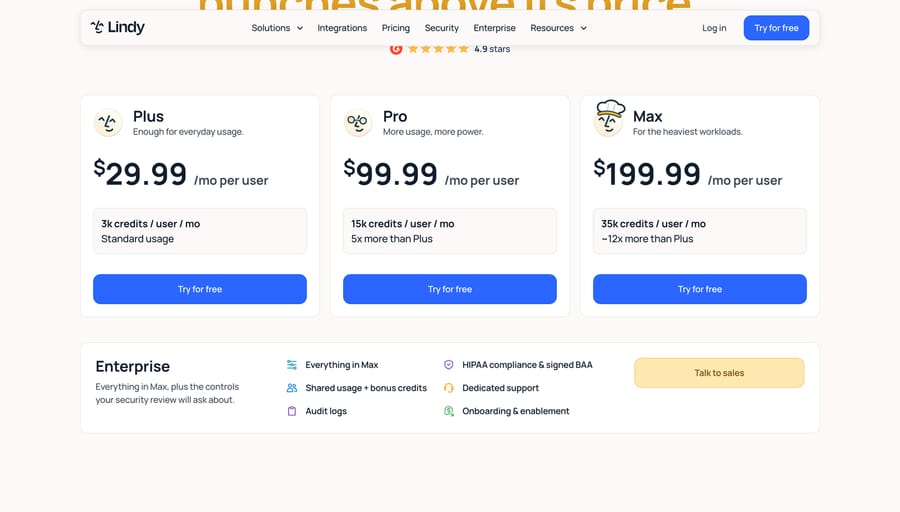
Lindy's own pages don't quite agree with each other. The pricing page says $29.99, $99.99 and $199.99; the docs pricing table and the in-app invite dialog say $30, $100 and $200; Max is "~12x more than Plus" on one and "~11x" on the other (35,000 ÷ 3,000 is 11.7). The pricing page also lists "Connect up to 5 inboxes" as included on every plan, while the docs cap Plus at 2 and Pro at 3. We've used the pricing page's prices and the docs' inbox limits. Budget on the round numbers if you want a margin.
For what Lindy does and how it works in Slack, see our Lindy AI guide. This post is about the bill.
What does a Lindy credit buy?
Lindy prices work in credits, "about one cent each", and publishes three bands instead of a rate card:
| Band | Credits | Lindy's examples |
|---|---|---|
| Everyday asks | 2 to 250 | Answers, summaries, lookups, updates in your tools, closing out a meeting, drafting a reply |
| Deep work | 250 to 1,000 | Researching a competitor, triaging a day's support queue, turning a week of calls into a proposal |
| Big builds | 1,000 to 2,500 | Dashboards and decks from your CRM and analytics, internal tools |
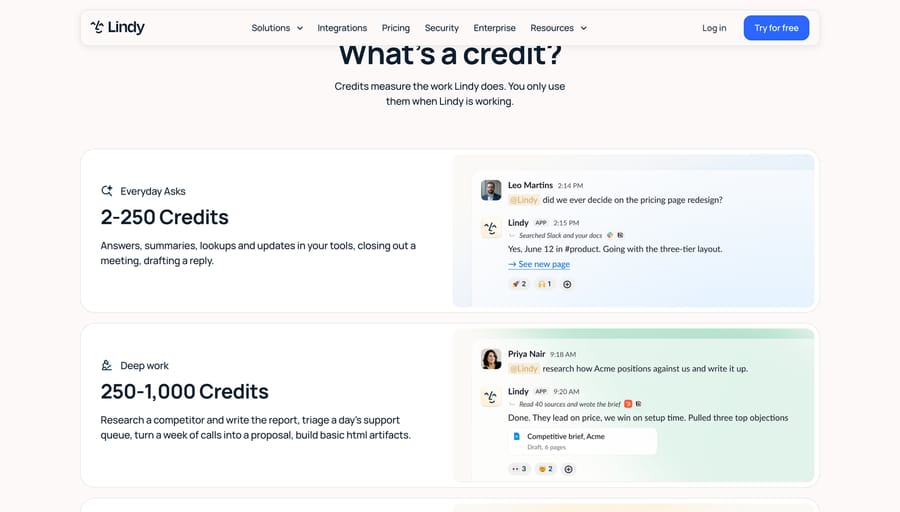
The range inside each band is the forecasting problem. An everyday ask can cost 2 credits or 250, a 125x spread. Lindy's usage doc gives only relative guidance: answering from team sources is "Low", drafting a document "Moderate", deep research "Varies". Its personal-assistant features (daily brief, email alerts, meeting prep) are "Very low".
A Plus seat's 3,000 credits come to about 136 a workday over 22 workdays. That's 68 answers at 2 credits, 5 at 25, or one support-queue triage every four or five days at the middle of the deep-work band. The usage doc says "Most teams never come close to their limit", and whether yours does depends almost entirely on how many credits your everyday asks really take, which you only learn after a week of use.
What happens when Lindy's credit pool runs out?
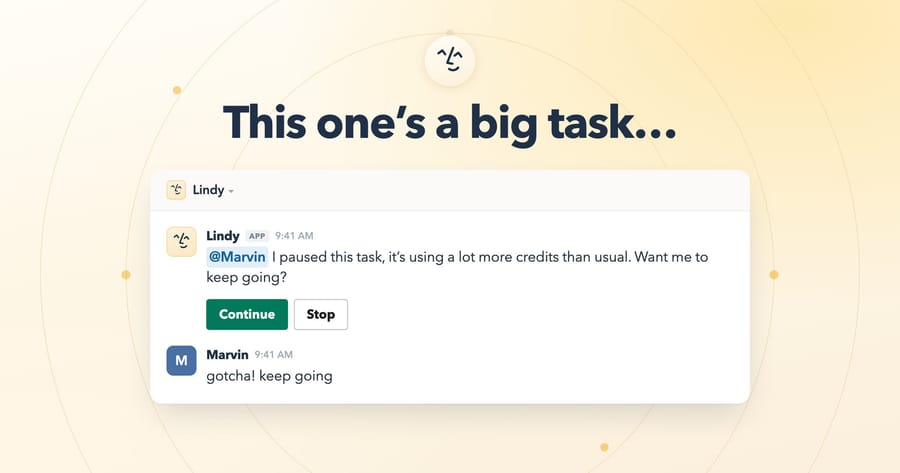
Every seat's credits go into one workspace pool. When the pool runs out, "Lindy pauses credit-using actions" until the next cycle, with "no surprise bill", and paused tasks don't restart on their own. Separately, Lindy pauses any single task that's using "significantly more resources than usual" and asks in the thread whether to continue.
The usage doc lists three ways to get more credits before the reset:
- Top up at $10 per 1,000 credits. Purchased top-ups carry over and don't expire.
- Upgrade seats to a higher tier, which takes effect immediately.
- Turn on Overages, which keeps Lindy working past the pool at "2x the cost of regular Lindy credits", about two cents each.
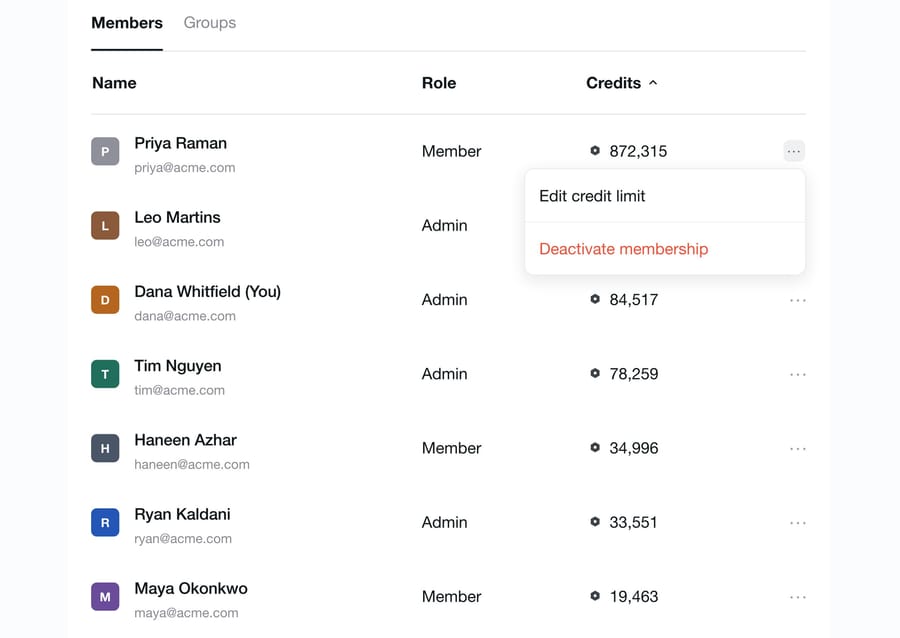
Admins can also cap any one person's draw from the pool. The team setup doc notes a limit: caps are enforced "after the limit has been exceeded, not at the exact threshold", so a task that starts under the cap finishes even if it runs over.
What is the cheapest way to buy Lindy credits?
Per credit, bigger seats are cheaper: a cent on Plus, two-thirds of a cent on Pro, just over half a cent on Max, a cent for a top-up and two cents on overages. And Lindy's invite dialog lets an admin pick the plan for each person, so a workspace can mix tiers.
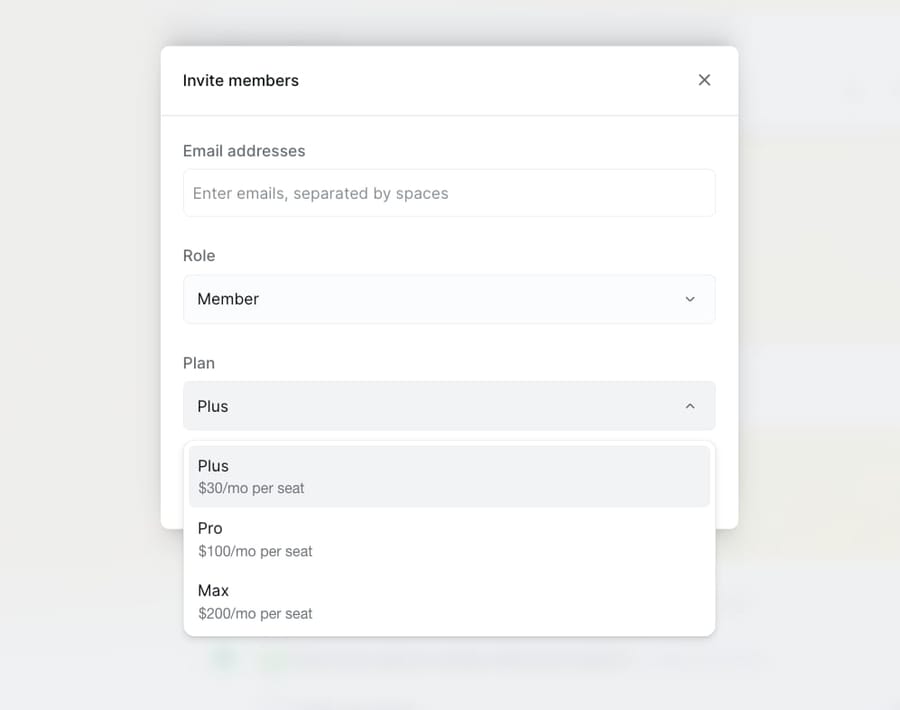
That makes the cheapest bill a small puzzle. Give most people Plus seats, then cover the rest of the team's usage with a few Pro or Max seats (for the heaviest users) and top-ups for the remainder, instead of putting everyone on Pro or leaving Overages on.
What does Lindy cost a 5, 15 or 40-person team?
Our assumption for a support team using Lindy alongside its help desk: each person makes 10 everyday asks a workday (a lookup, a summary, a drafted reply), and the team runs one routine that triages the day's queue each weekday at 625 credits, the middle of Lindy's deep-work band. 22 workdays. We priced three ask costs, 10, 25 and 50 credits, because Lindy doesn't publish a typical figure.
At 25 credits per ask:
| Team | Credits a month | Cheapest combination | Monthly cost | Per person | Everyone on Plus + top-ups |
|---|---|---|---|---|---|
| 5 people | 5 × 10 × 22 × 25 + 22 × 625 = 41,250 | 4 Plus + 1 Max ($119.96 + $199.99), pool 47,000 | $319.95 | $63.99 | $149.95 + 27 blocks ($270) = $419.95 |
| 15 people | 82,500 + 13,750 = 96,250 | 12 Plus + 2 Pro + 1 Max ($359.88 + $199.98 + $199.99), pool 101,000 | $759.85 | $50.66 | $449.85 + 52 blocks ($520) = $969.85 |
| 40 people | 220,000 + 13,750 = 233,750 | 36 Plus + 1 Pro + 3 Max + 6 top-up blocks ($1,079.64 + $99.99 + $599.97 + $60) | $1,839.60 | $45.99 | $1,199.60 + 114 blocks ($1,140) = $2,339.60 |
Leaving Overages on is the expensive path. The 5-person team on five Plus seats would pay $149.95 plus 26,250 credits at about two cents, roughly $675 a month, more than double the cheapest mix.
The ask cost moves the bill more than team size does:
| Team | 10 credits per ask | 25 credits per ask | 50 credits per ask |
|---|---|---|---|
| 5 people | $219.95 | $319.95 | $459.95 |
| 15 people | $469.85 | $759.85 | $1,189.85 |
| 40 people | $1,199.60 (40 Plus seats cover it) | $1,839.60 | $2,989.60 |
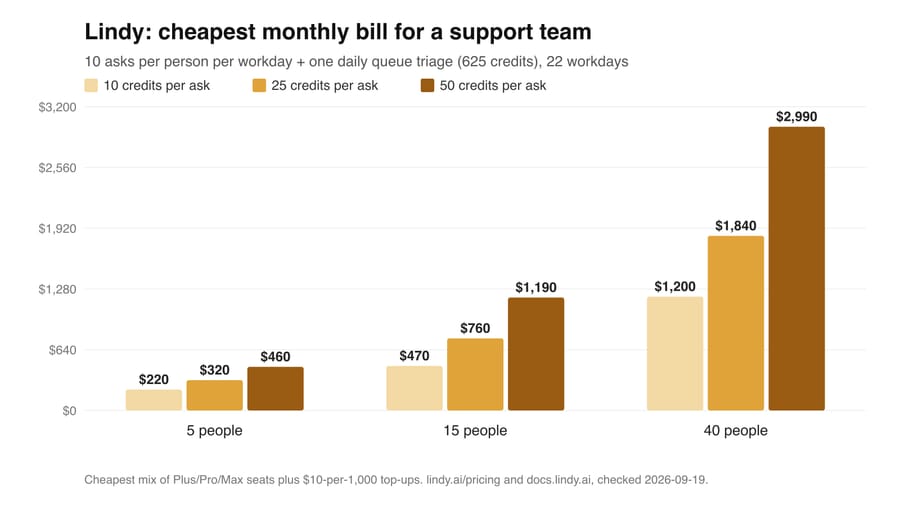
At 10 credits an ask, the seats' own credits nearly cover the work, and Lindy's claim that most teams stay under their limit holds. At 50, the 40-person bill is 2.5 times the 10-credit one. Run a week on Plus, read the per-person Credits column in Settings, then set seat tiers from real numbers.
What pushes a Lindy bill up?
Seats you didn't plan. "Anyone who uses Lindy takes a seat", including anyone who @mentions it in Slack for the first time. The Slack path gives a free week, then the seat bills until an admin removes it; removals take effect at the end of the cycle with no proration.
The spread inside a band. Everyday asks run 2 to 250 credits and deep work 250 to 1,000.
Team routines. They run "whether or not anyone reads the result", and a workspace-wide routine spends for the whole team each time it fires.
Broad team sources. The shared Lindy searches everything you've approved. Lindy's own advice is to narrow sources, which cuts cost and improves answers.
Overages. Two cents a credit against one for a top-up.
Credits that expire. Plan credits reset each month; only purchased top-ups carry over.
What does Lindy's billing model reward?
Lindy earns on two meters, and each carries its own incentive. Seats grow with the number of people who touch it, and because a first @mention in Slack creates a seat, adoption spreading through a workspace is also Lindy's revenue growth. Credits grow with how much those people ask of it, and plan credits that expire unused are margin.
The design choices that favor the buyer are real too: the pool is shared, the default is to pause instead of bill, top-ups never expire, and per-person caps exist. Overages are opt-in. The price of that safety is a support routine that can stop mid-month until someone buys credits.
What do users say about Lindy's price?
Lindy's own pricing page shows a G2 score of 4.9, and G2 confirms it: 4.9 out of 5 from 171 reviews, checked September 19, 2026, with "Expensive" and "High Subscription Cost" among the top complaint tags. Trustpilot rates lindy.ai 1.7 out of 5 from 39 reviews, and Capterra 3.5 from 2 (both read that day). Capterra still lists a "Starting price" of $49.99, a figure from before the current plans.
- A Trustpilot reviewer wrote on August 21, 2026 that "the cheap price is just bait", describing unlimited use during the 7-day trial and higher costs once billing started.
- Another, in December 2025, signed up for what they thought was a free trial that "ended up costing me $40+", then updated the review to say an email got an immediate response.
The complaints are about how fast credits and seats add up after the trial, and they match the mechanics above. Our Lindy guide covers the product reviews in more detail.
How does Lindy compare with Dust, Zapier Agents and Microsoft 365 Copilot?
The units differ, so the fair comparison is seat price and what each seat includes, for a 15-person team.
| Product | Billing unit | Published price | 15 people a month | What you get |
|---|---|---|---|---|
| Lindy | Seat plus pooled credits | $29.99 / $99.99 / $199.99 per user | $449.85 on Plus; $759.85 in our 25-credit model | 3,000 to 35,000 credits per seat, pooled |
| Dust | Seat plus per-seat credits | Pro $30 a month or $24 billed yearly; Max $150 or $120 | $450 on Pro ($360 billed yearly) | 8,000 Dust credits per Pro seat, reset monthly; Business plan up to 100 people |
| Zapier Agents | Activities, not seats | Pro $400 a year ($33.33 a month) | $33.33 for one Agents Pro plan (1,500 activities) | Agents on Zapier's app connections; activities are a separate meter |
| Microsoft 365 Copilot | Seat | $30 a user a month, paid yearly | $450 | Needs a Microsoft 365 plan; agents for customers bill Copilot Studio credits |
Sources: Dust pricing, Zapier Agents plans, Microsoft 365 Copilot pricing, checked September 19, 2026. More on a sales-led rival in our Relevance AI guide.
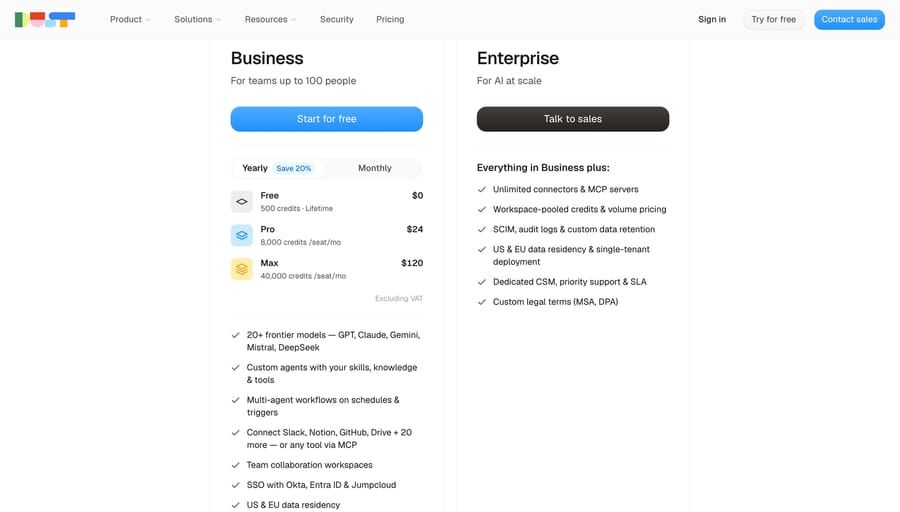
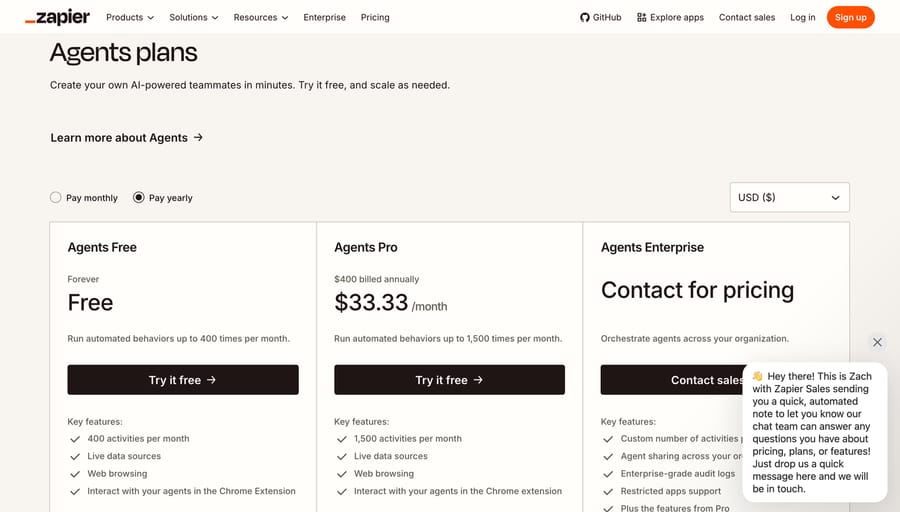
A Dust or Lindy credit isn't the same unit, so the seat prices are the comparable part: Plus, Dust Pro and Copilot all sit at about $30. Lindy's extra cost shows up in the credits a busy team buys on top.
For a support team, the question is which work Lindy should do. Its docs describe a helper for the people working the queue: triage summaries, drafted replies, lookups, all started by a person or a routine. A team that wants each incoming ticket answered in its help desk as it arrives needs an agent that runs per ticket. Macha fits teams already running Zendesk, Freshdesk, Gorgias, Front, HubSpot or Intercom: it's an AI agent layer on your help desk, priced from $299 a month for 750 tickets (about $0.40 a ticket), one charge per ticket however many replies it takes, with setup and monitoring by the Macha team. Our overview of AI agents for customer service covers both routes, and the n8n build guide covers doing it yourself.
How we researched this
We checked Lindy's pricing page and its pricing, billing, usage and team setup docs on September 19, 2026, along with AWS Marketplace, Vendr, Dust's and Zapier's pricing pages, and read Trustpilot and Capterra in a browser the same day. We did not create a Lindy account for this post, so every cost is arithmetic on published prices; the usage profile (10 asks per person per workday, one daily triage) is our assumption, and we show three ask costs because Lindy publishes bands, not a typical figure. We also read G2 (4.9 from 171 reviews, checked September 19, 2026), confirming Lindy's advertised 4.9.
If the Lindy bill doesn't fit your volume, our guide to Lindy alternatives compares the main options and how each one bills.
Frequently asked questions
How much does Lindy cost?
$29.99 a user a month on Plus (3,000 credits), $99.99 on Pro (15,000) and $199.99 on Max (35,000), with credits pooled across the workspace. Extra credits cost $10 per 1,000. Enterprise is priced by sales.
Is Lindy AI free to use?
No free plan. New teammates who join through Slack get a 7-day free trial before their seat is billed; people who sign up directly are billed right away. The old free plan with 400 credits belonged to Lindy's earlier agent builder.
What happens when Lindy runs out of credits?
It pauses credit-using actions until the pool resets at the start of the next cycle, and paused tasks have to be restarted by hand. Admins can buy top-ups at $10 per 1,000 credits, upgrade seats, or switch on Overages at twice the regular credit cost.
Do Lindy credits roll over?
Plan credits don't; they reset every billing cycle. Purchased top-up credits carry over and don't expire.
Who needs a paid Lindy seat?
Anyone who uses it: people who sign up, people invited to the workspace, and anyone who @mentions Lindy in Slack for the first time. A removed seat stays billed until the end of the cycle.
Can we mix Plus, Pro and Max seats?
Yes. The invite dialog assigns a plan per member, and each seat adds its tier's credits to the shared pool, which lets you buy most credits through a few Pro or Max seats instead of top-ups.
Is Lindy AI any good?
Reviews are split. Lindy's pricing page shows a 4.9 from G2, which matches G2's own page (4.9 from 171 reviews, checked September 19, 2026); Trustpilot rates it 1.7 from 39 reviews, with complaints about costs after the trial, and Capterra 3.5 from 2.
Who owns Lindy AI?
Lindy is an independent startup founded by Flo Crivello, who rebuilt his previous company, Teamflow, around it. Lindy doesn't publish its funding on its own site; our Lindy guide covers the company's history and the funding third parties report.
If your team's work is answering tickets in a help desk, see Macha's pricing page or start with $50 of free usage on your own tickets.
Sources: Lindy pricing · Lindy docs: Pricing · Lindy docs: Billing · Lindy docs: Understanding your usage · Lindy docs: Team setup · Capterra: Lindy (capterra.com/p/10027702/Lindy; loads in a browser, blocks scripted link checks) · Trustpilot: lindy.ai (trustpilot.com/review/lindy.ai; loads in a browser, blocks scripted link checks) · Dust pricing · Zapier Agents plans · Microsoft 365 Copilot pricing






