Intercom
 Shopify
 Stripe
 Slack
Slack Notion
 Google Workspace
 Confluence

What Are the Best Lindy AI Alternatives in 2026? 8 Options With Real Prices


The best Lindy AI alternatives are Dust, Zapier Agents, Gumloop, n8n, Relevance AI, ChatGPT Business, Microsoft 365 Copilot and Glean, and each fixes a different reason people leave Lindy. Most complaints are about the bill, a monthly credit pool that runs out in days and seats that appear the first time someone mentions Lindy in Slack, and the rest are about agents that stop working.
Key takeaways
- Dust is the closest Lindy AI alternative, pricing its agent at $30 a seat a month, or $24 billed yearly, with 8,000 credits per seat on the Pro plan.
- Lindy AI charges $29.99, $99.99 or $199.99 a user a month for Plus, Pro and Max, with credit pools running from 3,000 to 35,000 that one reviewer said ran out in a single day.
- n8n bills by workflow execution rather than by seat, at €24 a month, or €20 billed yearly, for 2,500 runs with unlimited users included.
- Gumloop charges from $37 a month for 20,000 credits with unlimited seats, plus an 8% orchestration fee on top of model and tool costs.
- A 15-person team on Lindy making 10 asks a day each would need about 96,000 credits a month, costing $759.85 on its cheapest seat mix.

The best Lindy AI alternatives are Dust for a similar Slack teammate, n8n for per-run billing (€20 a month billed yearly for 2,500 executions, unlimited users), Gumloop and Zapier Agents for unmetered seats, and ChatGPT Business, Microsoft 365 Copilot or Glean for company-wide rollouts. Every price here was checked on September 19, 2026, and the main ones again on September 24. Our Lindy AI guide covers what Lindy does today; this page is about leaving it.
Which Lindy alternative fits your reason for leaving?
| If your problem with Lindy is… | Look at | Why |
|---|---|---|
| Credits run out and you can't predict usage | n8n, Microsoft 365 Copilot, ChatGPT Business | n8n charges per workflow run however many steps it takes; the other two are flat seats for everyday use |
| Seats multiply as people try it | Gumloop, n8n, Zapier Agents | Unlimited seats or no seat meter at all |
| Agents that break or wander | n8n, Zapier Agents | Fixed workflows you can read step by step, with an agent only where you need one |
| You want the same kind of Slack teammate, cheaper | Dust | Same seat-plus-credits shape at $24 a seat billed yearly |
| Company-wide search and agents for a large org | Glean, Microsoft 365 Copilot | Built for rollouts to hundreds of people |
| What you really wanted was customer support answered | A support AI agent on your help desk | Lindy works for your team, not your customers |
Why do teams leave Lindy?
Lindy rates 1.7 out of 5 on Trustpilot from 39 reviews (checked September 19, 2026) and 3.5 on Capterra from just 2. Its pricing page shows a 4.9 badge from G2, and G2 confirms it: 4.9 out of 5 from 171 reviews, checked September 19, 2026. Thin, split reviews like these don't tell you much on their own, but the complaints repeat.
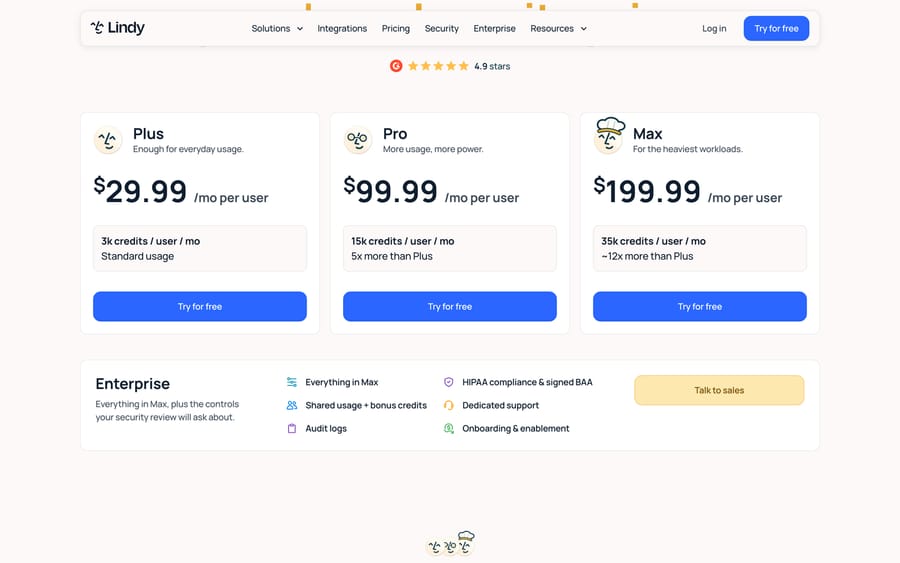
1. The credit pool runs out fast. Each seat adds 3,000 to 35,000 credits a month to a shared pool, and Lindy's own bands put an everyday ask anywhere from 2 to 250 credits. Yossi Coleman, reviewing on Trustpilot on August 20, 2026, wrote: "I managed to kill my months credits (3000) in one day!" When the pool empties, Lindy pauses until the next cycle unless you buy top-ups or switch on overages at twice the normal credit cost, according to its usage docs.
2. Heavy use costs more per unit. Jeremi Ramos, who moved to the 35,000-credit plan after the trial, wrote on August 18, 2026 that the pricing structure ends up "penalizing users with higher cost tokens for using more of the service forcing you to NOT want to use more of the service." Lindy's incentive is plain from the model: plan credits that expire unused are margin, and an overage credit costs twice what a top-up credit does.
3. Seats you didn't plan. Lindy's pricing page says anyone who uses it takes a seat, including anyone who @mentions it in Slack for the first time, and Slack joiners get a free week before billing starts. Adoption spreading through a workspace is also Lindy's revenue spreading.
4. Reliability. "When Lindy works, it works!" Ramos wrote. "Problem is getting it to work... and keeping it working." Ed Guy wrote on July 12, 2026 that "Lindy frequently hallucinates and gives you products that are not in the format you requested so you pay to have the searches done over."
5. Getting out. Jeff Meltzer wrote on June 30, 2026 that "there was no cancel button available in the billing settings" when he tried to cancel. We can't confirm that from outside an account, but it's worth checking before you add a card.
How do the alternatives compare on price?
| Tool | Billing unit | Entry price | Seats | Free option |
|---|---|---|---|---|
| Lindy (for reference) | Seat + pooled credits | $29.99 a user a month | Every user, including first Slack mention | 7 days for Slack joiners |
| Dust | Seat + per-seat credits | $30 a seat monthly, $24 billed yearly (8,000 credits) | Up to 100 people on Business | 500 lifetime credits |
| Zapier Agents | Activities | $33.33 a month billed yearly (1,500 activities) | Not seat-priced | 400 activities a month |
| Gumloop | Credits + 8% fee | From $37 a month (20,000 credits) | Unlimited | 14-day trial |
| n8n | Workflow executions | €24 a month, €20 billed yearly (2,500 executions) | Unlimited users | Free to self-host |
| Relevance AI | Actions + model credits | $29 a month, $19 billed yearly | 2 builders on Pro | Free plan retired |
| ChatGPT Business | Seat | ₹2,250 a month, ₹1,800 billed yearly (India pricing) | Per seat | No |
| Microsoft 365 Copilot Business | Seat | $25.20 a month; $21 billed yearly ($18 promo) | Per seat, on top of Microsoft 365 | Trial |
| Glean | Seat + FlexCredits | Quote only; Vendr median $98,890 a year | Per seat | No |
Prices from each vendor's pricing page or docs on September 19, 2026. ChatGPT's page showed rupees from our location in India, so we haven't converted it to a US figure.
What do 15 people pay on each entry plan?
Lindy's units don't line up with anyone else's, so here's the simplest comparison: a 15-person team on each tool's entry plan, monthly billing, before any usage beyond what the plan includes.
| Tool | What 15 people pay a month | What that covers |
|---|---|---|
| Zapier Agents Pro | $33.33 (billed yearly) | 1,500 activities for the account |
| Gumloop Pro | $37 | 20,000 credits, unlimited seats |
| n8n Starter | €24 | 2,500 workflow runs, unlimited users |
| Relevance AI Team | $349 | 5 builders, 45 end users, 7,000 Actions |
| Microsoft 365 Copilot Business | $378 (15 × $25.20) | Copilot in Microsoft 365 apps; needs a Microsoft 365 plan |
| Lindy Plus | $449.85 | 45,000 pooled credits |
| Dust Pro | $450 | 8,000 credits per seat |
| ChatGPT Business Standard | ₹33,750 (15 × ₹2,250) | Standard seats, India pricing |
The cheap rows aren't cheap for the same work. Zapier, Gumloop and n8n charge for what agents do, so a busy team moves up their tiers; the seat products charge for people and include most everyday use. In our Lindy pricing research, a 15-person team making 10 asks a day each at 25 credits needs about 96,000 credits, which is $759.85 a month on Lindy's cheapest seat mix. That's the number to beat.
What are the 8 best Lindy AI alternatives?
1. Dust
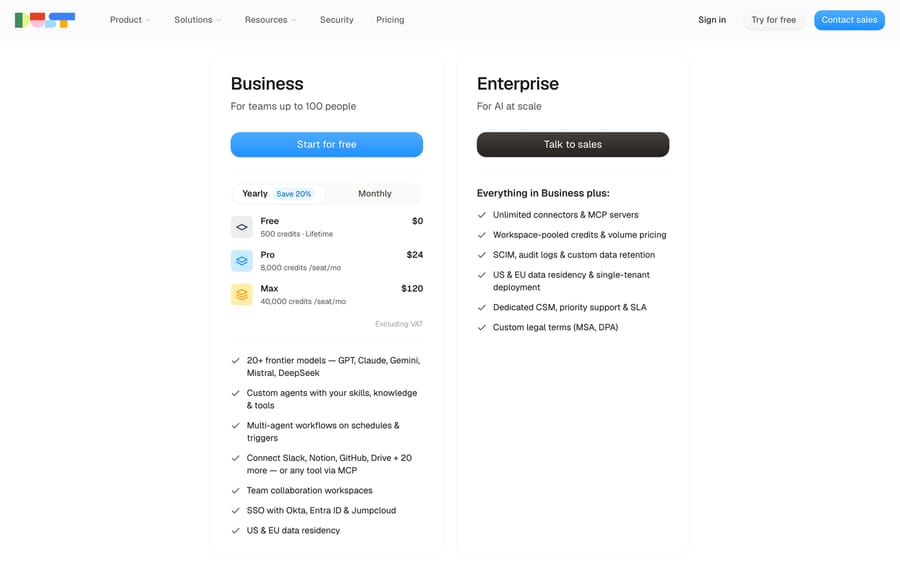
Dust is the closest like-for-like swap: custom agents that work over Slack, Notion, GitHub and Drive, priced per seat with credits. Pro is $30 a seat a month, or $24 billed yearly, with 8,000 credits per seat; Max is $150 or $120 with 40,000. The Business plan is "For teams up to 100 people", and a free seat comes with 500 lifetime credits.
Per seat, Dust's Pro credits cost less than Lindy's: 8,000 for $30 against Lindy Plus's 3,000 for $29.99. The watch-out is that it's the same two-meter shape, so the "credits ran out" complaint can follow you; and credits are per seat, not pooled, below Enterprise, where the page lists "Workspace-pooled credits."
Choose it if you like the Slack-teammate idea and Lindy's credit math was the problem.
2. Zapier Agents
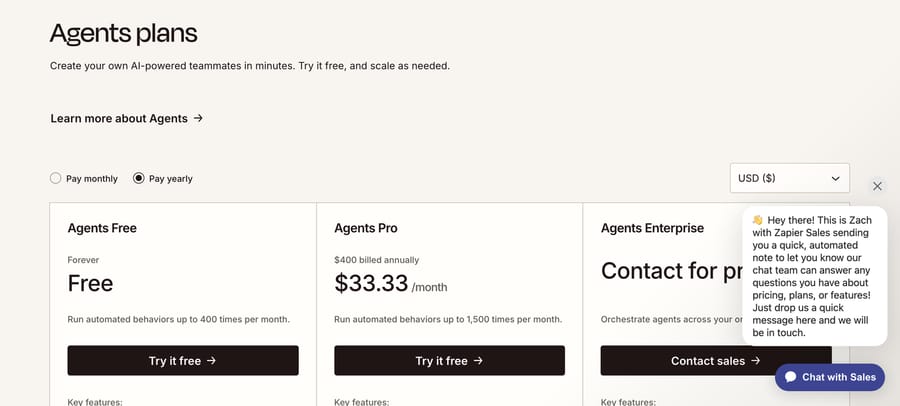
Zapier Agents sit on Zapier's app catalog and bill in activities, "any billable action an agent takes." Agents Free includes 400 a month; Agents Pro is $400 billed annually, $33.33 a month, for 1,500. There's no seat meter, which answers the Slack-mention complaint directly.
The watch-out is volume. 1,500 activities is light use for a team, and heavier agents push you toward an Enterprise quote. It's a second meter on top of any Zapier task plan you already pay for.
Choose it if your company already runs on Zapier and your agents are light.
3. Gumloop
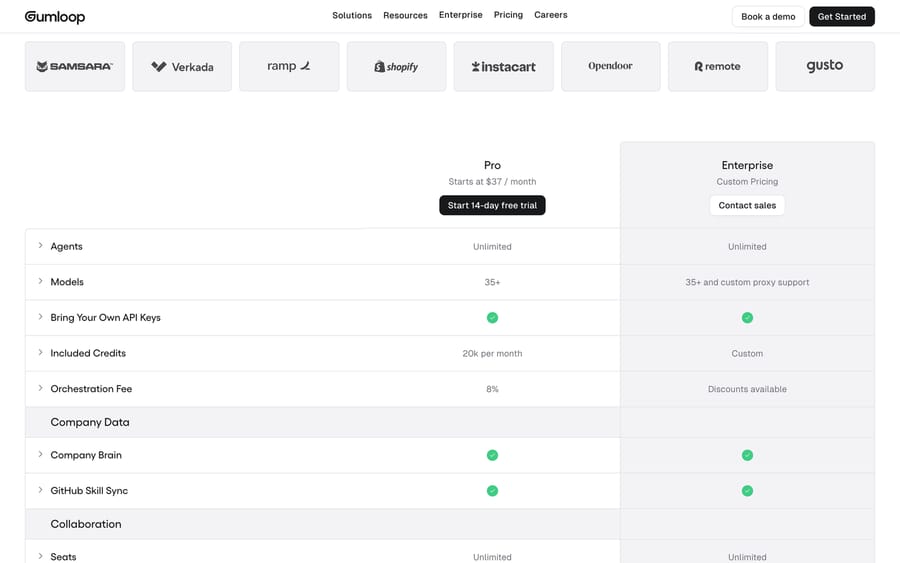
Gumloop wrote one of the pages that ranks for this search and lists itself first; here's what its pricing page actually says. Pro "Starts at $37 / month" with 20,000 credits, unlimited agents and seats, and an 8% orchestration fee on top of model and tool costs, with a 14-day free trial.
Unlimited seats fixes the Lindy seat problem. The credit problem stays: the pool is monthly, and the orchestration fee means Gumloop earns a little more each time a task costs more.
Choose it if many people need access and a few of them build the agents.
4. n8n
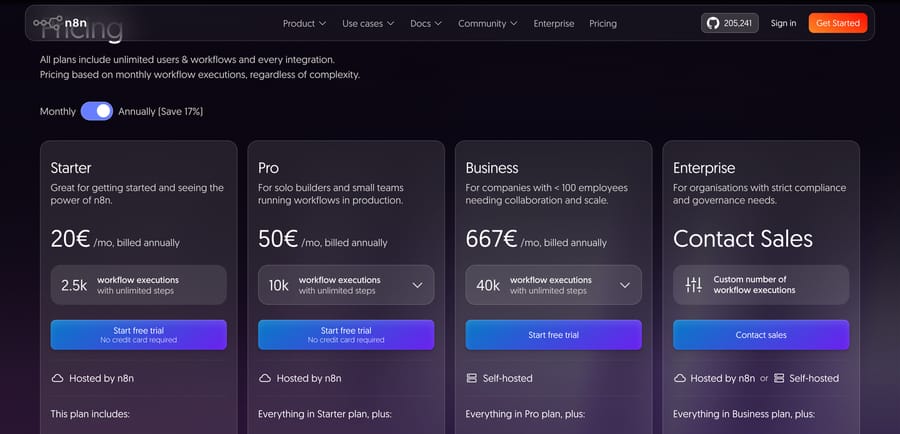
n8n is the answer for anyone burned by unpredictable credits. It bills per workflow execution, "with unlimited steps": Starter is €24 a month, or €20 billed yearly, for 2,500 executions; Pro is €50 billed yearly for 10,000. All plans include unlimited users, and the Community edition is free to self-host, which is also the answer to the "Lindy alternatives github" search.
The watch-out is effort. n8n is a workflow builder with AI steps, not a teammate that lives in Slack, and its AI nodes call models through your own API keys, so the model bill arrives separately. You'll need someone comfortable building workflows; our n8n build guide shows what that involves.
Choose it if you want fixed, readable workflows and a bill that doesn't change with how many steps an agent takes.
5. Relevance AI
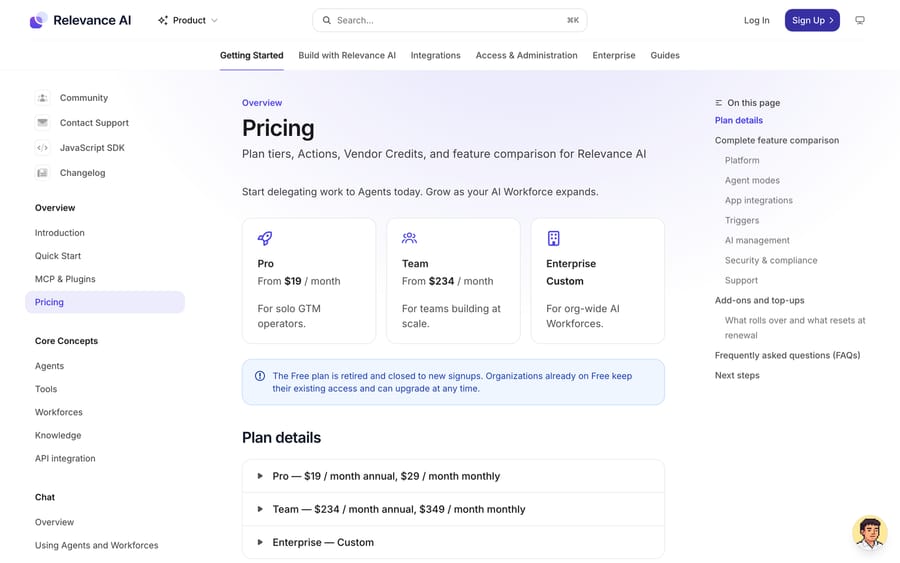
Relevance AI builds agents and multi-agent "workforces" for sales and operations teams. Its pricing lives in the docs: Pro is $19 a month billed yearly or $29 monthly, Team $234 or $349, and Enterprise is quoted. It bills on two meters, Actions for every tool run and Vendor Credits for model usage, and the Free plan is retired.
It's a closer fit than Lindy for teams building repeatable agent processes rather than asking a teammate for help. The watch-out is that two meters are harder to forecast than one, the same complaint Lindy users have. See our Relevance AI guide.
Choose it if you're building agents for a sales or ops process and want more control than a chat teammate gives.
6. ChatGPT Business
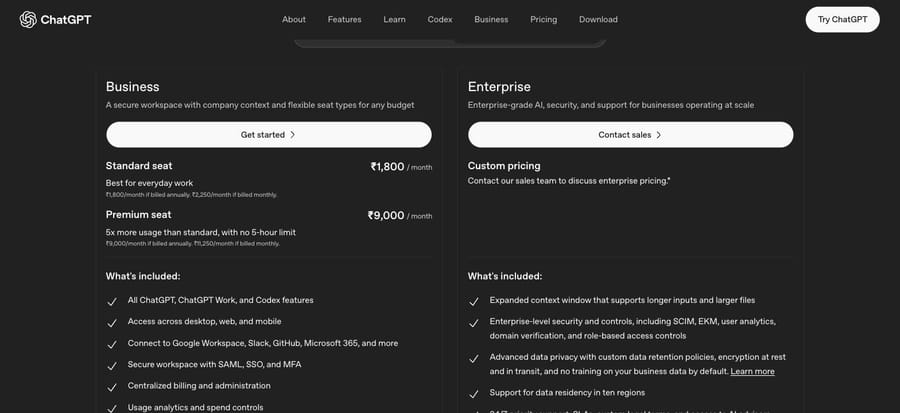
ChatGPT Business now includes "Workspace agents for customized workflows" and connections to Google Workspace, Slack, GitHub and Microsoft 365, which covers much of what people bought Lindy for. From India, the Standard seat was ₹1,800 a month billed annually or ₹2,250 monthly, and a Premium seat with "5x more usage than standard" was ₹9,000 or ₹11,250. Its pricing page returned rupees for us, so check your own region's price.
The appeal is a flat seat with no credit pool for everyday use. The watch-out is that its agents are general-purpose, so the deep approval flows and routines Lindy builds around email and meetings may take more setup.
Choose it if your team already uses ChatGPT and you'd rather add agents there than run a second tool.
7. Microsoft 365 Copilot
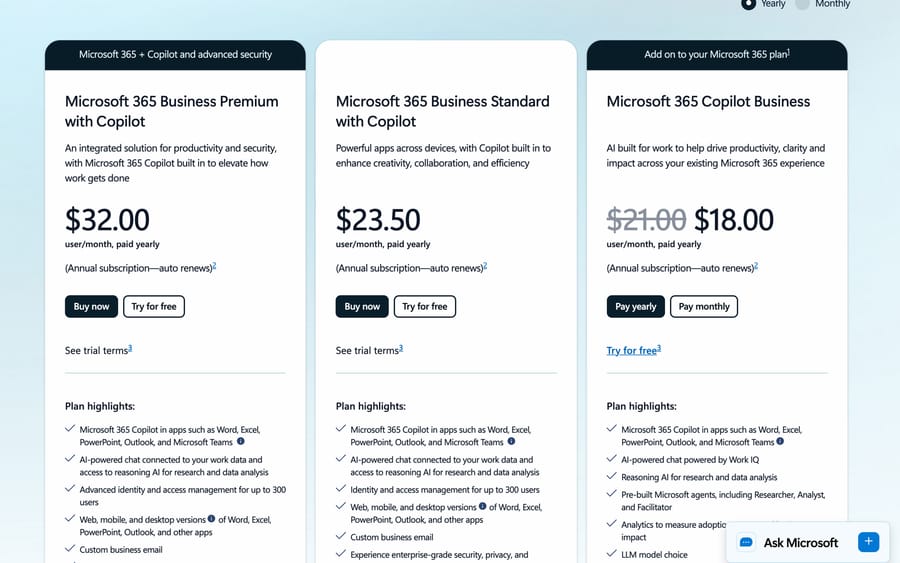
For a Microsoft 365 company, Copilot Business is the default. The add-on is $21 a user a month paid yearly, on promotion at $18, or $25.20 on monthly billing, and it needs a qualifying Microsoft 365 plan. Bundles with Copilot included are $23.50 (Business Standard) and $32 (Business Premium) a user a month, paid yearly. It includes pre-built agents, which the page names as "Researcher, Analyst, and Facilitator."
It's a flat seat for everyday use inside Outlook, Teams and Word. Custom agents that act outside Microsoft's apps are built in Copilot Studio, which bills separately; see our Copilot Studio guide.
Choose it if your email, calendar and chat already live in Microsoft 365.
8. Glean
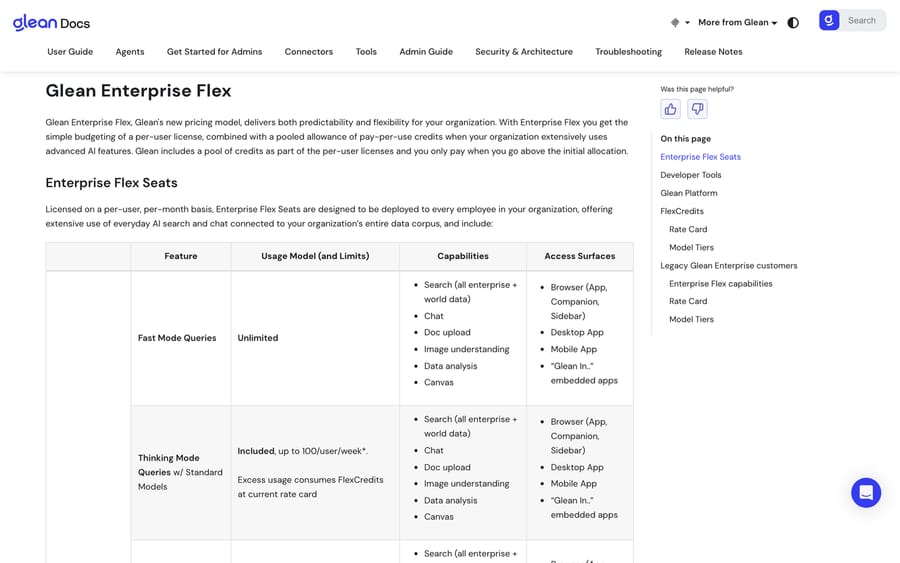
Glean is the enterprise version of the idea: company-wide search, chat and agents over every connected system. It publishes how it bills, a per-user seat plus pooled FlexCredits on its Enterprise Flex plan, but no price. Vendr, which negotiates software contracts for buyers, reports a median of $98,890 a year across 174 Glean purchases, with a range of $29,880 to $208,897.
That makes it a different purchase from Lindy's credit-card signup: a sales process, contracts Vendr reports starting around $30,000 a year, and an admin rollout. Our Glean guide covers what it does.
Choose it if you're rolling AI out to a whole company and search across your systems matters more than a Slack teammate.
Also considered. Make, Relay.app and Bardeen appear on the ranking listicles as workflow tools in the Zapier and n8n mold. Notion AI and Taskade suit teams whose work already lives in those workspaces.
What if you wanted customer support answered?
Lindy is a teammate for your staff: it drafts replies and triages the queue when someone asks. If what you needed was customers answered without a person starting each task, you want a support AI agent instead. Chatbase answers website chat from your docs. Macha fits teams already running Zendesk, Freshdesk, Gorgias, Front, HubSpot or Intercom: it's an AI agent layer on the help desk that works each ticket as it arrives, priced per ticket from $299 a month for 750 tickets (about $0.40 a ticket), with setup and monitoring by the Macha team; see pricing. Our overview of AI agents for customer service covers the options.
Who should stay on Lindy?
Lindy's design has real advantages. The credit pool is shared across the workspace, it pauses rather than billing you by surprise, purchased top-ups never expire, and admins can cap any one person's usage. If your team works in Slack, wants one assistant that handles email, meetings and follow-ups with approvals, and your usage fits inside the pool, switching buys you a different set of trade-offs rather than fewer. Run a week on Plus, check each person's credit use in settings, and set seat tiers from real numbers before deciding it's too expensive.
What moves when you switch from Lindy?
- Your routines and instructions don't move. Copy each Lindy's instructions and approval rules into a document before you cancel, then rebuild them in the new tool.
- Connections have to be re-authorized. Email, calendar, Slack and CRM access is granted per tool, so each one gets reconnected.
- Time the cancellation. Lindy's plan credits reset every cycle, while purchased top-ups carry over, and a removed seat stays billed to the end of the cycle with no proration, according to its pricing FAQ. Cancel near the end of a cycle and spend down the credits first.
- Budget the new meter. Run the replacement alongside Lindy for a week and count actual usage (executions, activities, credits) before choosing a tier.
How did we research this?
On September 19, 2026 we checked each tool's pricing page or pricing docs and captured them, read Lindy's reviews on Trustpilot, and read the pages that rank for "lindy ai alternatives." The Reddit thread that ranks first was blocked to our tools; G2 shows Lindy at 4.9 from 171 reviews (checked September 19, 2026). We didn't create an account on Lindy or any alternative, so nothing here comes from a hands-on test, and the 15-person figures are list-price arithmetic.
Frequently asked questions
What is the best alternative to Lindy AI? It depends on why you're leaving. For a similar Slack-based agent with more credits per seat, Dust. For predictable costs on multi-step work, n8n. For unlimited seats, Gumloop. For companies on Microsoft 365, Copilot Business. For light agents on apps you already connect, Zapier Agents.
Is there a free alternative to Lindy AI? n8n's Community edition is free to self-host, Zapier Agents has a free plan with 400 activities a month, and Dust gives a free seat with 500 lifetime credits. Lindy itself has no free plan; Slack joiners get a free first week.
Is there an open-source alternative to Lindy? n8n is the most common answer: its Community edition can be self-hosted from its public code at no cost, and paid plans add hosting and team features.
Why do people leave Lindy? On Trustpilot the recurring reasons are credits running out quickly, a pricing structure that costs more as you use more, agents that are hard to keep working, and trouble canceling. Lindy rates 1.7 from 39 reviews there.
Lindy vs Gumloop: which is cheaper? For a team, usually Gumloop. Its Pro plan starts at $37 a month with 20,000 credits and unlimited seats, while Lindy charges $29.99 per user. Gumloop adds an 8% orchestration fee on task costs, so heavy use still adds up.
Lindy vs Zapier Agents: what's the difference? Lindy is a teammate you talk to in Slack, priced per user with pooled credits. Zapier Agents run on Zapier's app connections and bill per activity, with 400 free a month and 1,500 on Pro for $33.33 a month billed yearly, and no per-seat charge.
Is Lindy AI worth it? It can be for a Slack-first team whose usage fits inside the credit pool. Run a week on Plus and check per-person credit use before buying higher tiers. Teams that need predictable bills or many occasional users usually do better on a per-run or unlimited-seat tool.
Can Lindy or its alternatives answer customer support tickets? Lindy and most tools here work for your staff. For customers, use a support AI agent: a chat agent such as Chatbase, or an agent layer on your help desk such as Macha, which runs on Zendesk, Freshdesk, Gorgias, Front, HubSpot or Intercom.
If your team's real workload is tickets in a help desk, start a Macha trial with $50 of free usage and no card, or compare tiers on our pricing page.
Sources: Lindy pricing, Lindy docs: usage, Lindy on Trustpilot, Dust pricing, Zapier Agents plans, Gumloop pricing, n8n pricing, Relevance AI pricing docs, ChatGPT pricing (chatgpt.com/pricing, read in a browser; it blocks our link checker), Microsoft 365 Copilot pricing, Glean Enterprise Flex docs, Vendr: Glean.
Simple per-ticket AI pricing
One thread with one person is one charge, however many replies it takes.