





 Shopify
 Stripe
 Slack
Slack Notion
 Google Workspace
 Confluence

What Should You Know Before Switching to Front? (2026)


Switching to Front works well for teams that live in shared email, but Front becomes your inbox rather than sitting beside it, and its costs and sync limits surface weeks after the demo. Reviewers and Front's own help center point to five catches worth checking before you sign.
Key takeaways
- Front replaces a team's inbox rather than sitting beside it, and Capterra reviewers describe a real learning curve before a whole team adapts to the new workflow.
- Front's Starter plan costs $25 a seat billed annually for up to 10 seats, so an 11th hire moves the whole team to Professional at $65 a seat.
- Front syncs HubSpot and Microsoft Entra contacts one way into Front only, and both syncs require the Professional plan or above.
- Front's Office 365 sync carries new messages, sent messages and spam status both ways, but read status, archiving, folders, trash and snooze never sync back to Outlook.
- When a team leaves Front, Hiver reports that shared inboxes and Gmail labels migrate but tags and internal notes cannot be exported.

The five things teams most often wish they'd known before switching to Front are that it replaces your inbox rather than sitting beside it, that the seat price steps up at 10 and 50 seats, that contact sync from HubSpot and Microsoft Entra runs one way, that Outlook read and archive status never syncs back, and that tags and notes are hard to take with you when you leave. Front's pricing page puts Starter at $25 a seat billed annually ($35 monthly) for up to 10 seats, Professional at $65 ($85 monthly) for up to 50, and Enterprise at $105 on annual billing only.
| What surprises teams | The detail | Source |
|---|---|---|
| Learning curve | Front becomes the inbox; the whole team changes how it works | Capterra reviewers, Keeping |
| Seat caps | Starter stops at 10 seats, Professional at 50 | front.com/pricing |
| One-way contact sync | HubSpot and Entra contacts flow into Front only, on Professional and above | Front help center |
| Outlook status | Read, archive, folder, trash and snooze actions don't sync back | Front help center |
| Exit | Tags and notes reportedly can't be exported | Hiver |
How steep is the learning curve when Front replaces your inbox?
The first surprise is philosophical, not technical. Front isn't a plugin that adds a shared label to Gmail or Outlook; it's a new home for email that your whole team is expected to move into. Keeping, a Gmail-native competitor, puts the trade-off bluntly in its comparison: "Front requires that your entire team adjusts how they use email. This is a big change and you can expect some resistance." That's a competitor talking, so weigh it accordingly, but it matches what neutral reviewers report.
On Capterra, users describe "quite a bit of a learning curve with Front" before they got their inbox organized the way they wanted, and one developer admitted that "at the beginning it seemed a bit difficult to understand" before it clicked. The reviews aren't uniformly negative: plenty of people call setup "not too bad" and say core use becomes intuitive after a week or two. Front's daily workflow is fast once your team has adopted it, and the adoption is the cost. Teams that treat the rollout as "just a new email tool" tend to get the resistance Keeping warns about; teams that budget real training time tend to be happy. Front offers a 14-day free trial with no card, which is enough to run one real shift on it before you commit. For the full feature picture, our Front app review and the what is Front primer are the place to start.
What does Front cost per seat, and where are the price jumps?
Front charges per seat, and the structure is the most consistent complaint in reviews. The current prices, from front.com/pricing on 24 September 2026:
| Plan | Annual billing | Monthly billing | Seat limit |
|---|---|---|---|
| Starter | $25/seat | $35/seat | Up to 10 |
| Professional | $65/seat | $85/seat | Up to 50 |
| Enterprise | $105/seat | Annual only | No cap |
Older write-ups quote a mid "Growth" tier at $59 and Keeping's line that Front "requires that you pay up front for an entire year, with a minimum of 5 users. That's $3,500 a year just to get started." Neither matches the current page, which has no Growth tier and offers monthly billing on Starter and Professional.
The cliffs are now the seat caps. A team of 10 on Starter pays $3,000 a year on annual billing. Hire an 11th person and Starter no longer fits, so the whole team moves to Professional: 11 seats at $65 is $8,580 a year. The same thing happens at 51 seats, where Enterprise at $105 turns a $39,000 Professional bill for 50 seats into $64,260. The features many teams switch for sit higher up too: Starter caps you at 10 automation rules, while Professional adds advanced analytics, 20 rules, SSO and SCIM, and the HubSpot and Entra contact syncs below.
AI is priced on top. Copilot is $20 a seat on Starter and Professional, and Autopilot bills each conversation once at the highest level it reaches: $0.05 for triage, $0.39 for a handoff and $0.89 for a resolution (Front's Autopilot pricing); Enterprise includes Copilot, Smart QA and Smart CSAT, and as of October 2026 Smart QA and Smart CSAT are no longer sold on Starter or Professional. Long-term Capterra reviewers also flag "significant price increases over the last few years" that made expanding the team "not feasible," and one verified reviewer criticized the lack of pro-rated refunds on annual plans. None of this makes Front overpriced for what it does. It makes the scaling curve the thing to model before you sign.
| Team size | Annual cost (annual billing) | The catch |
|---|---|---|
| 5 seats, Starter | $1,500/yr | 10-rule limit, basic analytics |
| 11 seats, Professional | $8,580/yr | Starter's 10-seat cap forces the move |
| 51 seats, Enterprise | $64,260/yr | Professional's 50-seat cap; annual billing only |
For a full breakdown of what each plan adds, see Front pricing explained.
Does Front sync contacts and CRM data both ways?
No, and this is the limit that doesn't show up in a demo and does show up in month two. Front's own help center says HubSpot contacts are "synced one-way from HubSpot to Front": changes usually arrive within seconds, with a full sync every 24 hours as a backstop. Directory contacts work the same way, "synced one-way from Microsoft Entra to Front" every 24 hours. Both syncs need the Professional plan or above.
One-way means an address or phone number your team corrects in Front stays wrong in HubSpot until someone fixes it there too. Reviewers also report a CRM integration "failing to sync customer data correctly," with HubSpot the usual example, which leaves teams copying between systems. Several 2026 reviews add that some connections lean on Zapier or developer work.
Does Front sync two ways with Outlook?
Only for a short list of events. Front's Office 365 sync article says new messages, sent messages and spam marking sync in both directions, and that "read/unread status, archived/unarchived status, folder/tag changes, trash and snooze actions" will not be synced. A reply sent from Front lands in Outlook's sent items; the message you read and archived in Front still sits unread in the shared Outlook mailbox.
A Capterra director rated Front 1.0 over exactly this, writing that "actions taken in Front don't sync back to Outlook." For a team where everyone moves to Front it barely matters. For a Microsoft 365 organization where only part of the team moves, it means double-handling: the Outlook side can't tell what Front users already dealt with. Test that workflow before rollout. Some teams in this exact position switched away over it.
Can you export your data if you leave Front?
Partly. Getting into Front is well supported; getting out is not.
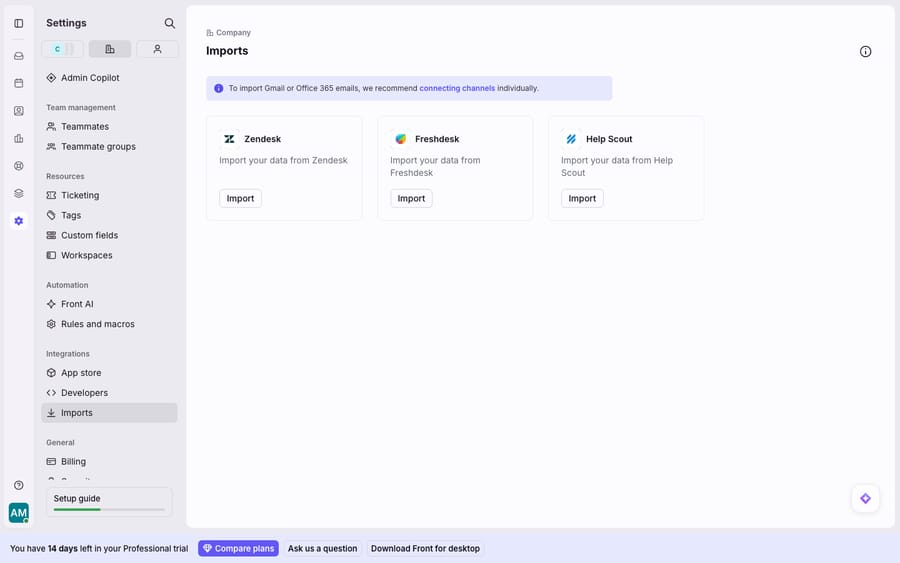
That screen, with one-click importers for Zendesk, Freshdesk and Help Scout, is the friendly face of switching to Front. The exit is rougher. In its migration guidance, Hiver notes that when moving off Front, "shared inboxes and Gmail labels can be migrated smoothly under supervision, but tags and notes cannot be migrated, as Front doesn't provide an export option for them." Hiver sells a competing product, but the point is easy to check in a trial. The internal context your team builds inside Front, the tags that drive reporting and the private notes on conversations, may not come with you, and rules have to be rebuilt in the next tool.
That isn't a reason to avoid Front. It's a reason to export your data periodically and to keep your tag and rule structure documented outside Front, so a future migration is a decision and not a trap.
Is Front worth it, and where does an AI layer fit?
Front earns its reputation. For teams that want a real shared inbox with assignment, internal comments and collaborative drafting, it's one of the best-designed tools in the category, and most reviewers who push through the learning curve stay. The five catches are real too: it replaces the inbox, seat caps at 10 and 50 force plan jumps, contact sync runs one way, Outlook status doesn't sync back, and tags and notes are hard to export.
Teams often switch to Front partly for AI-assisted replies, and the AI is a separate decision from the inbox. Front's own AI is billed per seat for Copilot and per conversation for Autopilot. The broader category of AI agents for customer service handles the reasoning-heavy part of support that a shared inbox alone can't. Macha is one such layer, and it isn't a Front replacement: it runs on top of the Front you already use through the live Macha–Front connector. Your inboxes, team and workflows stay in Front; the agent reads a conversation, works out intent, and drafts or sends a grounded reply, pulling a real order or account status through a custom tool when it needs live data. Macha bills per ticket, from $299 a month for 750 tickets, charged once however many messages a ticket takes, so the AI cost tracks the volume you handle rather than the size of your team. The Macha team builds, tests and monitors the agents on every plan. If you're weighing whether Front is the right base at all, our best Front alternatives roundup and the Front shared inbox explainer are the fair place to compare.
FAQ
Is switching to Front worth it? For collaborative, shared-inbox teams, usually yes: Front's daily workflow is well liked once adopted. The caveats are per-seat pricing with caps at 10 and 50 seats, a real learning curve because Front replaces your inbox, one-way contact sync, and Outlook status that doesn't sync back. Model the scaling cost and test your CRM and Outlook workflows during the 14-day trial.
How much does Front cost per seat? Starter is $25 a seat billed annually ($35 monthly) for up to 10 seats, Professional is $65 ($85 monthly) for up to 50, and Enterprise is $105 on annual billing only. AI is extra: Copilot $20 a seat, and Autopilot $0.05 triage / $0.39 handoff / $0.89 resolution per conversation; Smart QA and Smart CSAT are Enterprise only (as of October 2026). See Front pricing explained.
Does Front sync two-way with Outlook? Only partly. New messages, sent messages and spam status sync both ways, but read/unread, archive, folder and tag changes, trash and snooze don't, per Front's help center. Mixed Front and Outlook teams should test this before rolling out.
Can I export my data if I leave Front? Partially. Shared inboxes and conversation history can generally be migrated, but tags and internal notes reportedly can't be exported, and you'll need to rebuild rules in the new tool. Keep periodic exports and document your tag structure outside Front from day one.
Can I add AI to Front without replacing it? Yes. An AI agent layer like Macha connects to Front as a live connector and runs on top of your existing inboxes. Your team keeps working in Front while the agent reads conversations and drafts or sends grounded replies, priced per ticket rather than per seat.
Weighing the switch and want the AI part handled without another per-seat bill? Start a free trial of Macha ($50 of usage, no card) and connect it to your Front.






