Intercom
 Shopify
 Stripe
 Slack
Slack Notion
 Google Workspace
 Confluence

How to Connect Instagram to Front (2026): Setup Steps and Fixes for Missing DMs


Connecting Instagram to Front takes about five minutes in Settings, but the Instagram account must be a Business account linked to a Facebook Page, and only messages that arrive after you connect ever reach the inbox. Most "messages not showing" reports trace back to that missing history, a skipped Facebook permission or a message past Meta's seven-day reply window.
Key takeaways
- Connecting Instagram to Front runs through Settings, Channels and Connect channel, and you sign in with the Facebook Business account whose Page is linked to the Instagram Business Account.
- Front's setup article requires the Professional plan or above for Instagram, at $65 per seat per month billed annually, even though Front's integration page still lists Starter.
- Front's Instagram channel never imports historical DMs or comments, so only messages that arrive after the channel is connected show up in the inbox.
- Instagram messages in Front carry a seven-day reply window: after that, the message stays visible but sending a reply from Front produces an error.
- Front caps automation rules at 10 on Starter, 20 on Professional and unlimited on Enterprise, which matters for the rule that separates Instagram comments from DMs.
To connect Instagram to Front, open Settings, click Channels, then Connect channel, choose Instagram under Messaging and sign in with the Facebook Business account whose Page is linked to your Instagram Business Account. The setup takes about five minutes. Front's setup article puts the channel on the Professional plan or above ($65 a seat a month billed annually), Creator accounts are not supported, and only messages that arrive after you connect ever sync.
We checked every label, plan name and limit below against Front's current help center and integration pages on September 20, 2026, re-checked the plan gate and pricing on September 24, 2026, and captured the screenshots from those same pages the same day. We do not run a Front instance, so nothing here is a click-by-click recording of our own account. If you are wiring up the rest of your social channels, our guide to connecting WhatsApp, Instagram and SMS to Front covers the other two, and the best Front integrations covers the wider connector list.
Which Instagram messages reach a Front inbox?
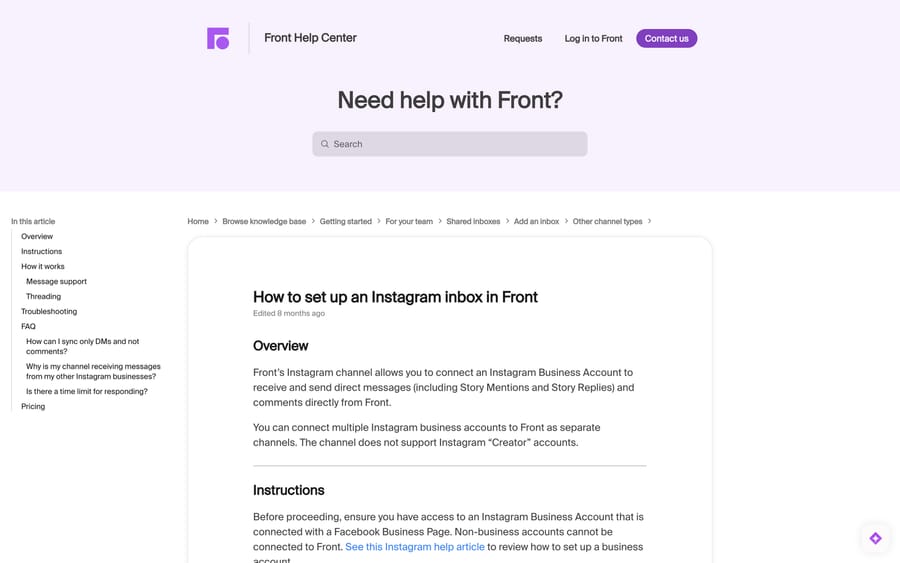
Front's Instagram channel connects one Instagram Business Account and pulls three things into a shared inbox: direct messages, Story Mentions and Story Replies, and comments on your posts. Front's setup article describes it as letting you "receive and send direct messages (including Story Mentions and Story Replies) and comments directly from Front."
The list of what stays on Instagram is longer than most teams expect, and it is worth reading before you promise anyone a single inbox for social:
| Works in Front | Stays on Instagram |
|---|---|
| Direct messages, threaded per person | Historical messages from before you connected |
| Story Mentions and Story Replies | Reels |
| Comments on posts, one conversation per comment thread | Reactions and edited messages |
| Media attachments coming in (GIFs, audio) | Replying with an image or attachment |
| Plain text replies and emojis going out | Ad comments and multi-post shares sent by DM |
Two of those deserve a flag. Replies out of Front are text and emoji, so an agent who wants to send a size chart as an image has to open Instagram. And Front creates a separate conversation for every comment thread on a post, which means a popular post can spray twenty conversations into an inbox that was sized for DMs.
What do you need before connecting Instagram to Front?
The setup fails at the Facebook screen more often than it fails in Front, and it is nearly always one of these:
- The Instagram account is a Business account. Front's article is explicit that the channel "does not support Instagram 'Creator' accounts." Switching a Creator account to Business is done in Instagram, not in Front.
- The Instagram Business Account is linked to a Facebook Business Page. Front authenticates through Facebook, so the Page is the thing it actually asks for.
- You are signing in with the Facebook Business account, not Instagram credentials. This is the step people get wrong first, because the button says "Connect to Instagram."
You also need admin rights on the Facebook Page and enough permission in Front to create channels. On the Instagram side, "Allow Access to Messages" has to be switched on in the Instagram account's own settings, which Front lists as a troubleshooting check rather than a setup step.
How do you connect Instagram to Front, step by step?
The path below matches Front's current help article. Labels in italics are the exact button and menu names.
- Click the gear icon, then pick workspace or personal settings in the sidebar.
- Click Inboxes in the left menu and create the shared or individual inbox you want Instagram to land in. Doing this first saves you a second pass.
- Click Channels in the left menu, then click Connect channel.
- Under Messaging, choose Instagram and click Connect to Instagram.
- Sign in with your Facebook Business account.
- Pick the one Instagram Business Account you want connected.
- Pick the Facebook Page it is linked to.
- Approve the permissions Facebook asks for. If you are shown a summary screen, click Edit settings and turn on every scope. A half-approved scope list is the single most common reason messages never arrive.
- Select the Page and click Submit.
- Choose the inbox that should receive the conversations and click Save.
- Rename the channel if you want something better than the default Instagram label. Teams running several storefronts should do this now.
You can connect more than one Instagram Business Account, each as its own channel.
Which Front plan do you need for Instagram?
Front's Instagram integration page lists the channel as "Available on Starter, Professional, Enterprise." The setup article says "This feature is available on the latest Professional plan or above." Those cannot both be true, and Front's pricing page sides with the article: Starter is described as a single channel type (email, chat or SMS) at $25 per seat per month on annual billing ($35 billed monthly), while omnichannel with social starts on Professional at $65 ($85 billed monthly). Both pages still said the same thing when we re-checked them on September 24, 2026.
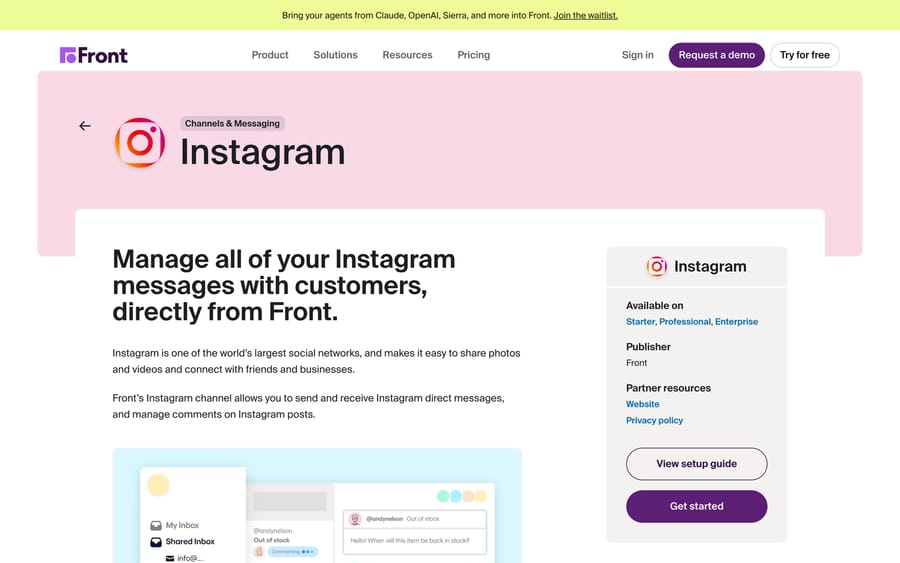
Treat Professional as the real floor and confirm with your account team before you build a rollout plan on Starter. The gap matters at scale: a ten-seat team moving from Starter to Professional to add one Instagram channel pays $40 more per seat per month, which is $4,800 a year for a channel that might carry thirty DMs a week. That arithmetic is worth doing before the channel goes live, not after.
The incentive behind seat pricing is worth naming while you are here. Front charges per seat, so the cost of adding a channel is zero and the cost of adding the people to watch it is everything. That pushes teams toward routing rules and shared ownership rather than a dedicated social agent, and it is why the rules section below matters more than it looks.
How do Instagram conversations thread in Front?
Front threads Instagram by sender for DMs and by post for comments. Direct messages with the same person collapse into one conversation, and Story Mentions and Story Replies from that person join it. Each comment thread on a post becomes its own conversation.
This is different from how email threads in Front, and it catches people out in two ways. A customer who DMs you in March and again in September lands in the same conversation, so archiving does not close the relationship, it just tidies the inbox until they write again. And a comment thread that turns into a DM becomes two conversations about one customer, which is where Front's tags earn their place.
Why are Instagram messages not showing in Front?
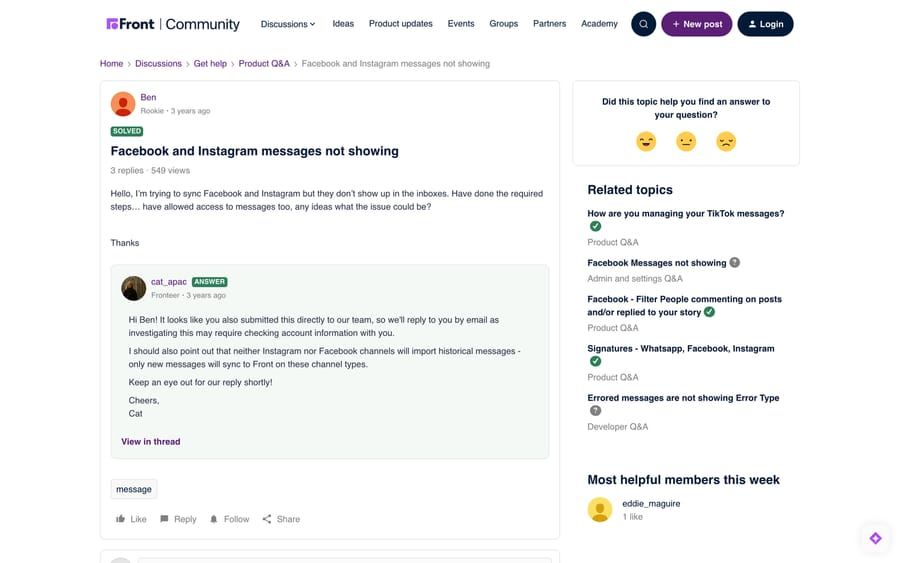
This is the failure the community sees most. Front's own support team answered it publicly in a thread titled "Facebook and Instagram messages not showing," where a user had completed the setup, allowed access to messages, and still saw an empty inbox.
Work the causes in this order.
1. You are waiting for old messages. Front's reply on that thread is the answer most people need: "neither Instagram nor Facebook channels will import historical messages - only new messages will sync to Front on these channel types." Send yourself a test DM from a personal account after connecting. If that arrives, the channel works and the backlog is simply out of scope.
2. A permission scope was skipped. Front's troubleshooting section tells you to click Edit settings during Facebook authorization and enable all the required scopes. Facebook's consent screen pre-selects some and leaves others off, and a missing messaging scope produces exactly the symptom above: a connected channel with no traffic.
3. "Allow Access to Messages" is off in Instagram. This lives in the Instagram account's settings, not in Front or Facebook. It is a single toggle and it silently blocks everything.
4. The account is a Creator account. If the connection completed but the account was never converted to Business, convert it in Instagram and reconnect.
5. The Instagram account is not linked to the Facebook Page you selected. Front's article asks you to check this in Page Settings. A Page that was relinked to a different Instagram account after the Front channel was created keeps the old authorization.
6. The channel needs reauthorizing. Front's token for a channel can be revoked when credentials change, when access is removed on the provider's side, when the token goes unused for a long stretch, or when a subscription renewal attempt fails. Go to the gear icon, workspace or personal settings, Channels, pick the channel, open the Settings tab, and click Reauthorize. Front imports any missed messages once the channel reconnects.
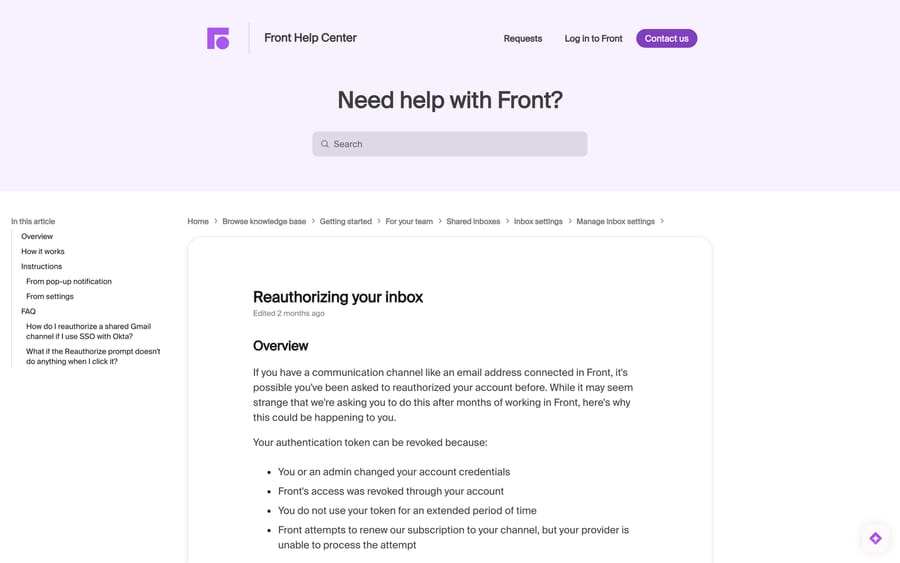
7. You reconnected the channel to a different Instagram business. Front's FAQ covers this: if you point an existing channel at a new Instagram business, you can keep receiving messages from the previous one. Create a new channel instead of reauthorizing the old one.
If email is the channel that has gone quiet rather than Instagram, the causes are different, and Front not syncing emails walks through those separately.
How long do you have to reply to an Instagram message in Front?
Front's FAQ states the rule plainly: you have seven days to reply to an Instagram message. After that, the message is still visible in Front, but sending a reply produces an error.
That window is Meta's, not Front's, and the incentive it serves is Meta's too. Platform messaging policies exist to stop businesses reopening cold threads at will, which pushes anyone who needs to re-engage a customer toward paid ad formats. Front is just relaying the constraint.
Practically, it means an Instagram inbox with a two-day first response time is fine and one with a weekly triage rhythm is quietly losing conversations. Set an SLA on the Instagram inbox, or at minimum a rule that pings a channel when an Instagram conversation goes unanswered for 48 hours. If you have not set SLAs in Front before, our rules setup guide covers the builder.
Can you send Instagram DMs and comments to different inboxes?
Front syncs DMs and comments into the same channel, and its FAQ says there is currently no filter to bring in one without the other. The workaround Front recommends is a rule: match on the comment message type and archive it automatically, or move it to a different inbox.
That is the right shape for most teams. Comments are usually public-facing marketing work and DMs are usually support, and they rarely want the same owner, the same SLA or the same tags. A rule that tags comment conversations and routes them to a social inbox costs ten minutes and saves an argument about whose queue is whose.
Front's plans also cap rules: 10 on Starter, 20 on Professional, unlimited on Enterprise, per the pricing page. A team already close to 20 rules should count before adding two more.
Can you see Instagram Story Mentions in Front?
Story Mentions reach Front and you can reply to them from Front. You cannot see the Story itself there. Front's support team answered this directly in the community: "You will be able to reply to mentions through Front, however to view the mention you will need to log into Instagram to see it."
For an agent, that means a mention arrives as text with no visual context. If your brand gets tagged in Stories often, keep Instagram open on a second tab, or accept that mention replies are going to be generic.
Do Front signatures work on Instagram replies?
Signatures behave differently across Front's social channels, and teams regularly discover this when a formatted email signature shows up as a wall of plain text under a two-word Instagram reply. Check what your signature rules apply to before you connect the channel. Our post on Front signatures covers how the assignment logic works and where the broken-logo and "Sent from Front" problems come from.
Where does an AI agent fit on an Instagram inbox?
Instagram volume is spiky and heavily repetitive. A product launch generates the same six questions on a post's comment thread for two days, then nothing for a week. That is a poor fit for staffing and a good fit for an agent layer.
Macha sits on top of Front and works inside the conversation: it reads the thread, drafts or sends the reply from your knowledge base, and tags or routes what it cannot answer. On an Instagram inbox the useful jobs are the repetitive ones, answering stock and shipping questions on comment threads, and making sure nothing sits past the seven-day window unanswered. It suits teams already running Front who want coverage on a channel that does not justify a dedicated person. It is not a replacement for Front, and it will not get around Meta's reply window, because nothing can. Pricing starts at $299 a month for 750 tickets, about $0.40 a ticket, and setup is done by our team. The details are on the Macha on Front page and on pricing.
Common questions
Does Front import my old Instagram DMs? No. Front's support team confirmed in the community that neither Instagram nor Facebook channels import historical messages, and only new messages sync after you connect. Plan any migration around that: keep the Instagram app available for history, and treat the Front channel's connect date as day one.
Which Front plan do I need for Instagram? Front's setup article says the latest Professional plan or above, and Professional is where the pricing page puts omnichannel support, at $65 per seat per month on annual billing. Front's integration directory page still lists Starter as well, so confirm with your account team before you commit to the cheaper plan.
Can I connect more than one Instagram account to Front? Yes. Each Instagram Business Account connects as its own channel, and you can route each one to a different inbox. If you are moving an existing channel to a different Instagram business, create a new channel instead of reauthorizing the old one, or you can keep receiving messages from the previous account.
Why can I see an Instagram message in Front but not reply to it? Almost always the seven-day window. Front's FAQ says messages older than seven days stay visible but produce an error when you try to send. Check the timestamp on the customer's last inbound message before you assume the channel is broken.
Can I sync Instagram DMs without comments? Not as a channel setting. Front's FAQ says both types sync together, and recommends a rule that automatically archives comment-type messages. Rules are capped at 10 on Starter and 20 on Professional, so check your count first.
Does Front support Instagram Reels or reactions? No. Front's article lists Reels, reactions, edited messages, ad comments, quick replies and multi-post DM shares as unsupported, along with replying to a customer with an image or attachment. Text and emoji replies go out from Front; anything visual needs the Instagram app.
How do I fix an Instagram channel that stopped receiving messages after months of working? Reauthorize it. Front's article lists four reasons a token gets revoked: changed credentials, access removed on the provider side, a token unused for a long period, or a failed subscription renewal. The path is gear icon, settings, Channels, pick the channel, Settings tab, Reauthorize. Front imports missed messages once the channel reconnects.
Sources:
- How to set up an Instagram inbox in Front (Front help center, checked September 20 and 24, 2026)
- Reauthorizing your inbox (Front help center)
- Front's Instagram integration page
- Front pricing
- Facebook and Instagram messages not showing (Front Community, July 31, 2023)
- Instagram Mention (Front Community, May 14, 2024)
Add AI agents to your Front
Macha reads the conversation, drafts the reply and takes the action, inside the Front you already run.