Intercom
 Shopify
 Stripe
 Slack
Slack Notion
 Google Workspace
 Confluence

How Do Intercom Conversations Map to Freshdesk Tickets? Intercom to Freshdesk Migration Guide (2026)


Moving from Intercom to Freshdesk is mostly a translation job: a rolling Intercom conversation has to become a Freshdesk ticket with one numeric status, one source value and one priority. Intercom's four export routes each leave something out, and Freshdesk's ticket API doesn't take a created date, which quietly breaks reporting on migrated history.
Key takeaways
- An Intercom to Freshdesk migration turns each Intercom conversation into one Freshdesk ticket with a numeric status: Open is 2, Pending is 3, Resolved is 4 and Closed is 5.
- Intercom's bulk UI export handles 200 to 300 conversations per operation as PDF or text, and internal notes are excluded from transcript exports.
- Freshdesk's Create a Ticket endpoint does not list created_at or updated_at among its parameters, so a naive scripted import stamps every migrated ticket with the run date.
- Freshdesk can link one contact to up to 20 companies on Pro and above, and accepts up to 9 secondary emails per contact in a CSV import.
- Since August 28, 2026, Intercom exports any saved Inbox View to CSV, downloading up to 25,000 cells instantly and emailing larger files.

An Intercom to Freshdesk migration turns each Intercom conversation into one Freshdesk ticket with a numeric status (Open 2, Pending 3, Resolved 4, Closed 5), matches contacts on email, and maps collections, sub-collections and articles to solution categories, folders and articles. Intercom gives you four export routes and none of them is complete alone, so plan to combine the Conversations API with S3 or Dataset export.
If you're still deciding, our Freshdesk vs Intercom comparison covers the platforms side by side. How to migrate from Intercom is the destination-agnostic version of this page, and how to migrate to Freshdesk covers the receiving end from any source.
How do Intercom objects map to Freshdesk?
| Intercom | Freshdesk | Notes |
|---|---|---|
| Conversation (Messenger or email thread) | Ticket | A multi-topic conversation becomes a single ticket. Split before you move, not after. |
| Ticket, customer type | Ticket | Closest structural match. Use the Type field to keep the distinction. |
| Ticket, back-office type | Ticket with a Type value, or an internal group | Nothing customer-facing; route it to a group, not a queue customers can see. |
| Contact (user) | Contact | Matched on email. |
| Contact (lead) | Contact | Leads have no verified email in many cases; decide whether to import them at all. |
| Company | Company | Freshdesk links one contact to up to 20 companies on Pro and above. |
| Teammate | Agent | Create agents before importing, so ownership lands correctly. |
| Team | Group | |
| Tag | Tag | Comma-separated in a CSV import. |
| Note | Private note | A separate API call from the reply. |
| Macro | Canned response | Rebuilt by hand. |
| Workflow | Automation rule or Scenario | Rebuilt by hand. |
| Collection | Solution category | |
| Sub-collection | Folder | |
| Article | Solution article | |
| Fin AI Agent | Freddy AI Agent | Different retrieval, different bill, rebuilt from scratch. |
Which Freshdesk status should each Intercom state get?
Freshdesk uses fixed numeric values, published in its API reference, and your import will set them whether you think about it or not. Status: Open is 2, Pending is 3, Resolved is 4, Closed is 5. Priority: Low 1, Medium 2, High 3, Urgent 4. Source: Email 1, Portal 2, Phone 3, Chat 7, Feedback Widget 9, Outbound Email 10.
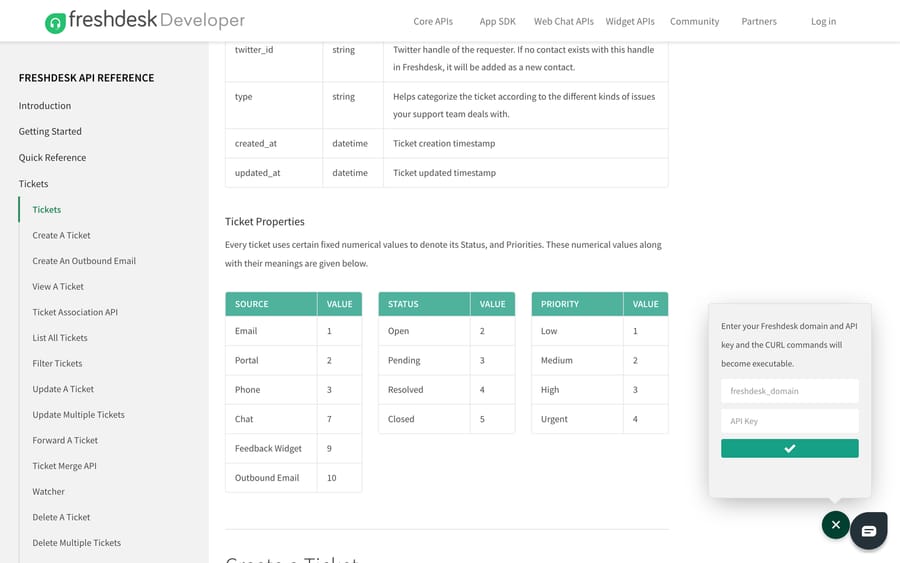
Intercom's ticket states are Submitted, In progress, Waiting on customer and Resolved. The mapping most teams land on is Submitted to Open (2), In progress to Open (2), Waiting on customer to Pending (3), and Resolved to Resolved (4) or Closed (5) depending on whether you want migrated history reopenable. Pick one and apply it consistently, because Freshdesk SLA policies and automations key off status, and a set of historical tickets landing on Open will wake up every rule you own.
Source is the value people forget. A Messenger conversation is closer to Chat (7) than Email (1), and getting that wrong distorts every channel report you build afterwards.
How do you get your data out of Intercom?
Dataset export, for metrics
Reports > Dataset export gives you all 13 reporting datasets with full attribute coverage, custom column selection and attribute filtering. Downloads are instant up to 10,000 rows and arrive by email above that, and you can schedule them to repeat. You need two permissions: "Can access Chart drill-in" and "Can export CSV".
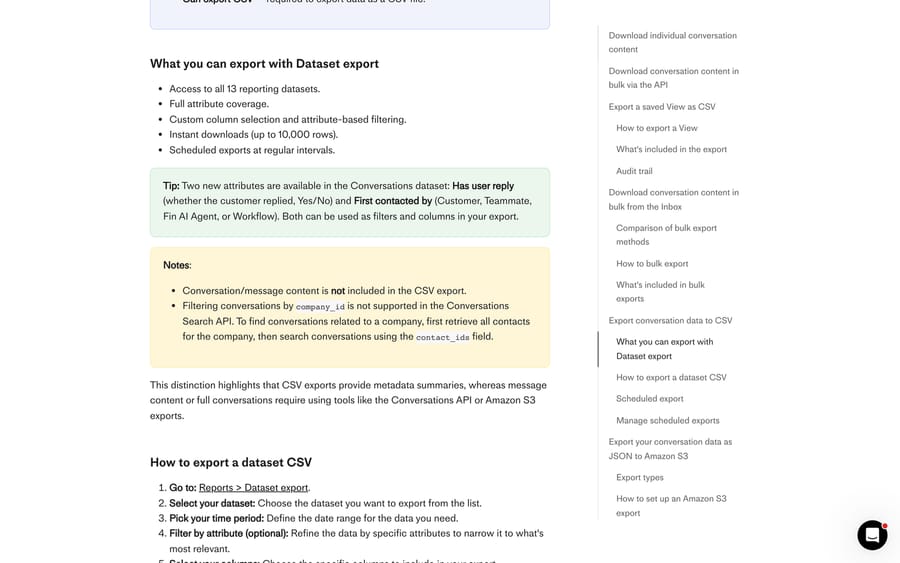
The limitation is the one that matters for a migration: conversation and message content is not included in the CSV export. This route gives you metadata, which is excellent for reconciling counts after the move and useless as the migration payload.
Bulk export from the Inbox, for small volumes
Intercom's UI will export conversation content in bulk as PDF or text, at 200 to 300 conversations per operation. Above that, its own documentation points you at the Conversations API. There's also a per-conversation export from the three-dot menu, as text or PDF, and a caveat worth knowing before you promise anyone a complete archive: internal notes are excluded from transcript exports.
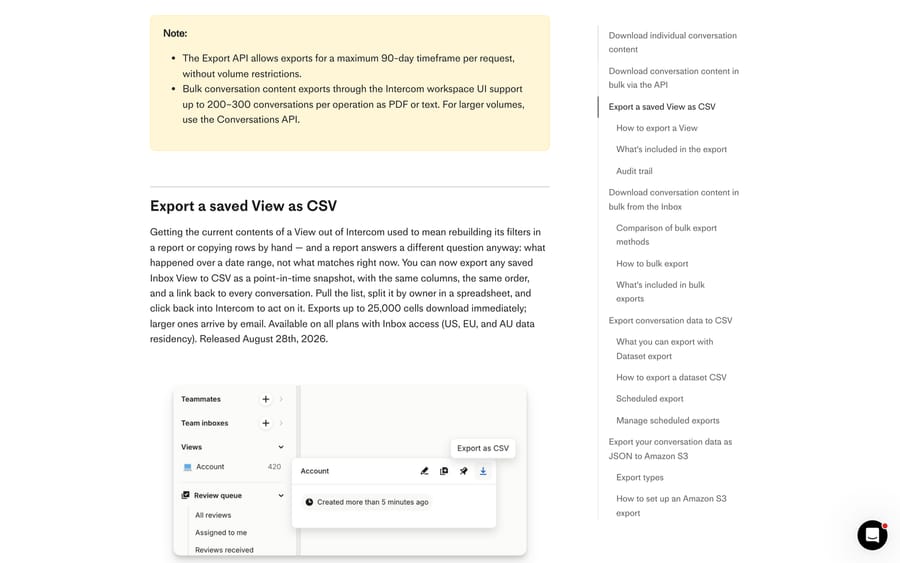
A newer option sits alongside these: since August 28, 2026 you can export any saved Inbox View to CSV as a point-in-time snapshot, with the same columns in the same order and a link back to every conversation. It exports up to 25,000 cells instantly and emails larger files, needs the "Can export conversation data" permission and an Inbox seat, and every export is written to the Team Activity Log. It's a work-allocation tool rather than a migration payload, but it's the fastest way to hand your team a list of what's still open on cutover day.
Amazon S3 JSON export, for volume
Settings > Data > Imports & exports > Export data sets up Intercom's Data Export to an S3 bucket, in two modes. Historical covers up to two years of conversation data. Periodic runs hourly or daily for new and updated conversations, which is exactly what a delta sync needs. Files arrive as JSONL with ISO-format names.
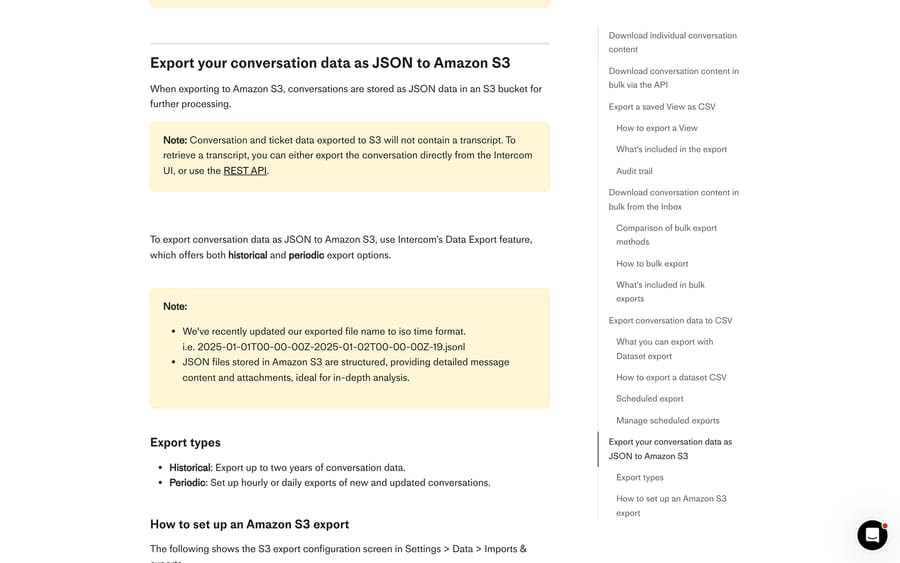
Read Intercom's own note before you build on this: conversation and ticket data exported to S3 will not contain a transcript. For transcripts you go back to the UI export or the REST API. S3 gives you the structure and the metadata at scale; the message bodies come from elsewhere.
The Conversations API, for everything else
GET /conversations lists IDs, then a GET on each ID pulls the detail. Intercom notes the Export API allows a maximum 90-day timeframe per request, without volume restrictions, so a two-year archive is eight or nine windowed jobs rather than one.
How do you import the data into Freshdesk?
Contacts and companies by CSV
Freshdesk imports contacts and companies from a CSV, including custom fields, and the rules are specific enough to get wrong on the first pass:
- The first line is the column header.
- Each row needs Name plus Email, or Name plus Phone, or the contact is skipped.
- The email address is the unique identifier. A row carrying an existing contact's email overwrites that contact. Two people can share a name; they can't share an email.
- Up to 9 secondary emails can sit alongside the primary, in Freshdesk's documented double-pipe format.
- Phone numbers need the country code, so
4088481234becomes+14088481234. - Dropdown values have to match choices that already exist on the field. Checkbox fields accept yes or no, and anything else is read as no.
- Tags go in one column, separated by commas. The file is UTF-8.
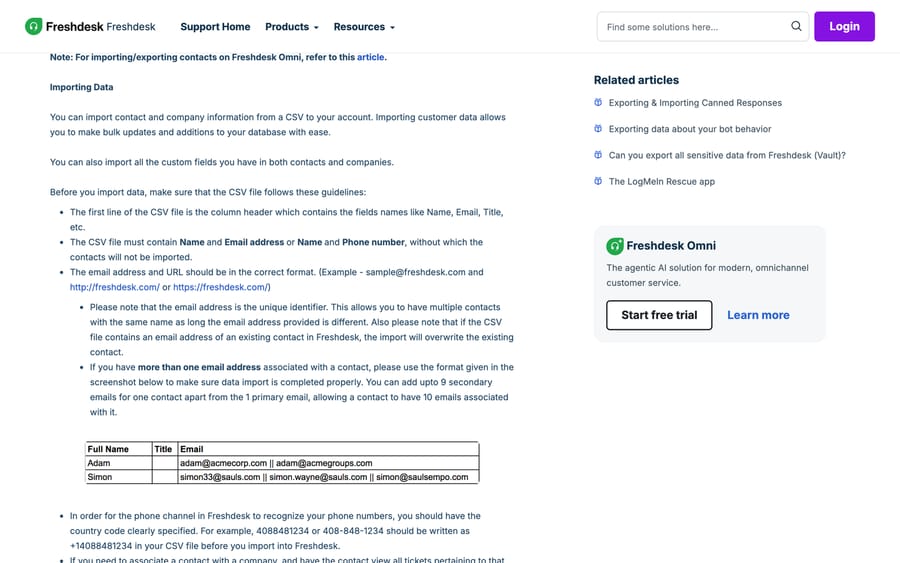
Do this first. Every ticket you import afterwards references a requester, and a requester that doesn't exist yet gets created implicitly from the email you pass, which quietly produces duplicate contacts with no company link.
Tickets by API
Freshdesk creates a ticket with POST /api/v2/tickets, and the published parameters cover requester identity (email, requester_id, phone, unique_external_id and more), subject, type, status, priority, description, responder_id, attachments (20MB total), cc_emails, custom_fields, due_by, fr_due_by, group_id, parent_id, product_id, source, tags and company_id. Replies and private notes are separate calls afterwards: POST /api/v2/tickets/[id]/reply and POST /api/v2/tickets/[ticket_id]/notes. If you haven't worked with it before, our Freshdesk API guide covers authentication and rate limits, which vary by plan and will throttle a large replay.
Now the timestamp problem. Intercom's Create conversation endpoint accepts a created_at Unix timestamp, and its API reference describes that field as recommended specifically for migrating past conversations from another source. Going the other way, created_at and updated_at are listed as attributes of the Freshdesk ticket object, but not among the parameters on Create a Ticket. We checked the Create a Ticket parameter table directly in a browser on September 20, 2026 to confirm that.
The practical consequence: a naive scripted import stamps your entire Intercom archive with the date you ran it, and every Freshdesk report on first response time, resolution time and volume-by-month is then fiction for that set. Two ways out. Ask Freshworks support whether your account can set those values on import, since the ticket object holds them. Or use a migration service, which handles historical timestamps as part of the job. Decide this before you write the script, not after you look at the first report.
Solution articles
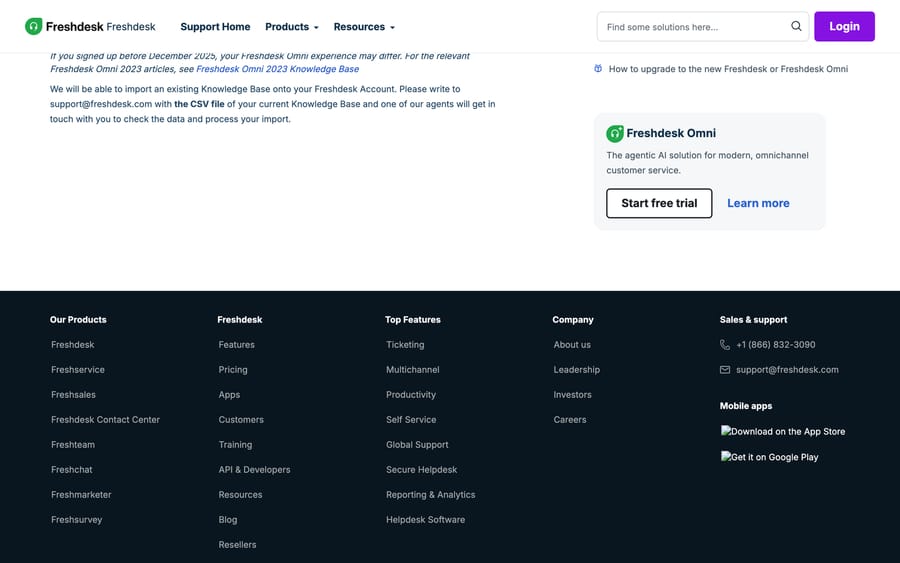
Freshdesk's documented route for bringing an existing knowledge base in is a hand-off rather than a tool: write to [email protected] with the CSV file of your current knowledge base, and an agent checks the data and processes the import. Worth noting the age of that page, which Freshdesk last modified in August 2018, so confirm the current process with your account team before you build a CSV around it. The self-serve alternative is the Solutions API, creating categories, folders and articles in that order.
How we researched this
Every path, parameter and numeric value above was read on September 20, 2026 from Intercom's help center and API reference, Freshdesk's support documentation, and the Freshdesk API reference opened in a browser, where we checked the Create a Ticket parameter table programmatically rather than trusting a summary. We did not run this migration, and no workspace of ours appears in any screenshot. Where a vendor states a hard limit, we quote its wording.
What sequence keeps the migration clean?
- Build Freshdesk first. Agents, groups, ticket types, custom fields, statuses. Ownership and field mapping both need targets that already exist.
- Import contacts and companies. Dedupe in Intercom before you export, because merging in Freshdesk after the fact is slower.
- Decide the status, source and timestamp policy and write it down. This is the step that separates a clean migration from a confusing one.
- Run a sample of 20 to 50 tickets and read them as an agent would. Check thread order, attachments, requester, group, status and date.
- Migrate closed history, then cut the channels over, then run a delta for anything created in the window. Intercom's periodic S3 export exists for exactly this.
- Reconcile counts against the Dataset export you pulled at the start.
- Rebuild the operational layer. Macros to canned responses, Workflows to automation rules, Fin to Freddy.
Where does an AI agent fit once you're on Freshdesk?
Step 7 is where a lot of teams discover the rebuild is the project. Fin doesn't port, and a fresh Freddy setup starts from the knowledge you just moved.
This is the one place in this guide where we have a product in the frame, so here's the scoped version. Macha is an AI agent layer that runs on top of the help desk you already use; it isn't a help desk and it doesn't replace Freshdesk. It fits teams on Zendesk, Freshdesk, Gorgias, Front, HubSpot or Intercom who want agents resolving inside the ticket, reading the solution articles and past tickets you just migrated, and escalating with context when they aren't confident. It's a candidate for the "rebuild your bot flows" line rather than another thing to configure from zero.
On the incentive, since that's the fair question to ask anyone recommending their own product: our pricing is published as one plan billed on monthly ticket volume, so one thread with one person is one charge however many replies it takes. Setup and monitoring by the Macha team is included, and how it works on Freshdesk has the detail.
Frequently asked questions
How do Intercom conversations map to Freshdesk tickets? One conversation becomes one ticket. The mismatch to plan for is that an Intercom conversation is a rolling thread that can cover several topics over weeks, while a Freshdesk ticket is a single request with one status, one source and one priority. Split multi-topic conversations in Intercom before you migrate, and set Freshdesk's Type field to preserve the distinction between Intercom's customer and back-office tickets.
What Freshdesk status should migrated Intercom conversations get? Freshdesk's status values are fixed numbers: Open is 2, Pending is 3, Resolved is 4 and Closed is 5. Most teams map Intercom's Submitted and In progress to Open, Waiting on customer to Pending, and Resolved to Resolved or Closed. Choose Closed for historical tickets if you don't want SLA policies and automations firing on a few thousand freshly imported records.
Will migrated tickets keep their original Intercom dates? Not by default. created_at and updated_at are attributes of the Freshdesk ticket object, but they aren't listed among the parameters on Create a Ticket, so a scripted import stamps every ticket with the run date. Confirm the options with Freshworks support, or use a migration service that handles historical timestamps, before your reporting depends on it.
How do I export conversation content out of Intercom? Four routes, and they do different jobs. Bulk export from the Inbox handles 200 to 300 conversations per operation as PDF or text. The Conversations API covers larger volumes, with the Export API limited to a 90-day window per request. The Amazon S3 export gives you structured JSONL at scale but carries no transcript. Dataset export gives you metrics without message content. A real migration uses the API for content and S3 or Dataset export for reconciliation.
Do Intercom articles move to Freshdesk automatically? Freshdesk's documented route is to email [email protected] with a CSV of your knowledge base so an agent can process the import, and that support page was last modified in 2018, so confirm the current process with your account team. The self-serve alternative is the Solutions API, creating categories, then folders, then articles. A migration service will map Intercom collections to categories and sub-collections to folders for you.
What order should I migrate in? Build Freshdesk's agents, groups, ticket types and custom fields first, then import contacts and companies, then tickets, then articles. Ticket imports reference a requester, and if that contact doesn't exist yet Freshdesk creates one from the email address you pass, which produces duplicates with no company association.
Does anything from Intercom carry over automatically? Your data can, with the right route. Your operational layer never does. Macros become canned responses, Workflows become automation rules or Scenarios, and Fin becomes Freddy, each rebuilt by hand. Export your Intercom macro and Workflow lists before you cancel the workspace, since you lose access to them with it.
Sources: Intercom: export your conversations data · Intercom: historical data migration · Intercom API: create a conversation · Freshdesk API reference · Freshdesk: importing and exporting customer data · Freshdesk: importing an existing knowledge base · Freshworks: Freshdesk · Help Desk Migration: Intercom
Add AI agents to your Freshdesk
Macha reads the ticket, drafts the reply and takes the action, inside the Freshdesk you already run.