





 Shopify
 Stripe
 Slack
Slack Notion
 Google Workspace
 Confluence

Is Front Right for Sales, Support or Logistics Teams? (2026)


Front fits support teams best, logistics and ops teams nearly as well, and sales teams only for light email outreach. The catch is plan-gating: SLA rules and sequences start on Professional, not Starter.
Key takeaways
- Front fits support teams best, with a When/If/Then rules engine, SLA time goals that apply a warning tag before a breach, and an integrated knowledge base.
- Front's SLA time goal rules and sales sequences both require the Professional plan, priced at $65 a seat a month billed annually for up to 50 seats.
- Front's sales sequences run 1 to 10 stages labeled A through J, accept a single CSV of up to 200 addresses, and stop for any recipient who replies.
- Front lists 18 apps in its Logistics & Maritime category, and an AI agent on Front should automate shipment status and ETA emails first, since they need only a tracking lookup; Macha's team builds that lookup and the agent for you, with a dedicated success manager included at about $0.40 a ticket.
- Logistics and operations teams get most from Front's Starter-level basics, priced at $25 a seat billed annually: assignment, comments and @mentions, shared drafts, and routing rules.

Front fits support teams best, logistics and operations teams a close second, and sales teams only for light email outreach, and the features each team needs start on different plans: SLA time goal rules and sales sequences both require Professional ($65 a seat a month billed annually, up to 50 seats), while shared inboxes, assignment and rules work on Starter ($25 a seat billed annually, up to 10 seats). Prices are from front.com/pricing, checked 24 September 2026.
| Team | Fit | Features that matter | Lowest plan for them |
|---|---|---|---|
| Support | Strongest | Rules, SLA time goals with warning tags, knowledge base | Professional (SLAs); Starter has a basic knowledge base |
| Logistics and ops | Strong, underrated | Shared inboxes, assignment, comments, shared drafts, rules | Starter |
| Sales | Narrow | Sequences of 1 to 10 stages, auto-stop on reply | Professional |
If you're here for AI on a logistics inbox, the section on what an AI agent can automate for logistics and 3PL teams starts with shipment status emails and prices it at 1,000 and 3,000 conversations.
What do all three teams get from Front?
Before splitting teams apart, it's worth naming the foundation they share. Front's core object isn't a ticket; it's a conversation in a shared inbox that a whole team can see, assign, comment on, and reply to together. Every team gets its own inbox (support@, sales@, shipping@, dispatch@) in one sidebar, and the collaboration primitives (assignment, internal comments and @mentions, and shared drafts so two people don't send conflicting replies) are the same everywhere. That's the reason a support team, a sales team, and a logistics team can all live in one Front account without stepping on each other.
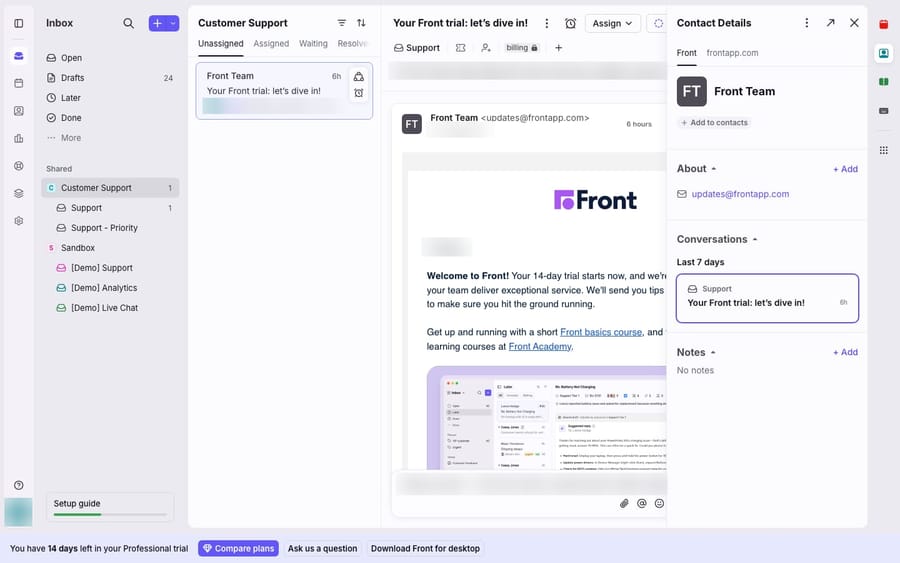
If you're new to the model, what Front is and the Front shared inbox explained cover the ground; team inboxes covers how each team gets its own space. With that shared, keep the split in mind: the primitives are common, but the power features are team-specific.
Is Front good for support teams?
Support is where Front is most obviously built out, because it has the three things a support team actually needs beyond a shared mailbox: automation, SLAs, and a knowledge base.
Rules do the routing and tagging. Front's rule engine follows a simple When (trigger) → If (condition) → Then (action) model: an inbound message arrives, the subject matches a keyword or comes from a domain, and Front tags it, assigns it, or moves it to the right inbox automatically. It's the deterministic dispatcher every support queue needs; Front rules explained breaks down the model in full.
SLAs enforce response times. Front lets you set reply and resolution time goals (time goal rules need the Professional plan or above, per Front's help center) and, per Front's SLA guide, attach a pre-breach warning that "applies an SLA warning tag" so a conversation gets flagged before it breaches, and can be routed to an urgent inbox or pinged into a Slack channel. Each SLA gets its own pre-built analytics report covering breaches and response times.
The knowledge base gives repeatable answers. Front includes an integrated help center where teams "create, organize, and publish a library of information," with editing roles split between help center admins (full access) and knowledge base content editors (content-only), per Front's knowledge base docs.
Verdict: For support, Front is a strong, purpose-built fit. Rules, SLAs, and a knowledge base are exactly the trio a support operation runs on, and they're native. Budget for Professional, though: Starter's knowledge base is the basic version and SLA rules are not on it.
Can sales teams use Front?
Front is not a full sales-engagement platform, and it doesn't pretend to be one: there's no built-in dialer or deal pipeline. What it does give a sales team is sequences: automated, multi-stage outreach that lives right in the same inbox reps already reply from.
Per Front's sequences documentation, a sequence works like this:
- Build 1 to 10 stages (labeled A through J). Each stage is an email step.
- Set a per-stage sending delay: a stage fires only if the recipient hasn't replied within a set number of days.
- Upload recipients: a single CSV of up to 200 addresses.
- Personalize with template variables like
{{first_name}}drawn from message templates. - Launch. Front throttles sends to avoid provider rate limits: 7.5 seconds between emails on Gmail and Office 365 channels (1 second on other channels), so a full 200-recipient sequence takes up to roughly 25 minutes to go out.
Reply detection stops the sequence: a sequence automatically stops for any recipient who replies (auto-replies like out-of-office don't count), so a prospect who answers stage B never gets stage C. It turns cold-ish outreach into something that behaves like a real conversation the moment someone engages.
The catch is plan-gating: sequences require the Professional plan or above. On the entry tier, the sales story is just "a shared sales@ inbox," which is fine for inbound but not for structured outreach. Front sequences explained goes deeper on stages and limits.
Verdict: For sales, Front is a genuine but bounded fit: good for light-touch, email-first outreach layered onto a shared inbox, not a replacement for Outreach or Salesloft. Best when your reps already live in Front for support-adjacent conversations.
Is Front good for logistics and operations teams?
Front markets this use case less than support, but the fit is close. Logistics, dispatch, ops, and account-management teams live inside a handful of shared mailboxes (shipping@, orders@, dispatch@, ap@) that a small group must answer together, in order, without dropping anything or double-replying.
That's the profile Front's logistics industry page is written for. That page pitches Front as a place to "manage quotes, shipment updates, and carrier coordination in one workspace". The features that matter here aren't sequences or SLAs. They're the collaboration basics:
- Assignment so every shipment query has one clear owner.
- Comments and @mentions to loop in a warehouse contact without forwarding a messy email chain.
- Shared drafts so two coordinators don't send a customer two different delivery dates.
- Rules to route a carrier's automated notifications into the right inbox.
Verdict: For logistics and ops, Front fits well: it turns a shared mailbox into a queue where every shipment email has an owner, and dispatch work is mostly a team sharing email.
What can an AI agent automate for logistics and 3PL teams on Front?
Start with shipment status and ETA emails: they're read-only, repetitive and answerable from a tracking or TMS lookup, and Front's own directory already has 18 apps in its Logistics & Maritime category (of 192 integrations we counted on front.com/integrations on September 28, 2026), most of which put tracking data next to the conversation. An AI agent can use the same data to write the reply. Quotes, changes and exceptions come later, because they either need a pricing engine, write into the TMS, or carry money and liability.
| Logistics email | What answering it needs | Automate first? | Who can do it on Front today |
|---|---|---|---|
| "Where's my shipment?" / tracking and ETA | Read lookup by PRO, AWB or tracking number in a carrier or TMS API | Yes | Carrier apps show status in the sidebar (UPS "real-time shipping status", OnTrac and airline cargo apps link the tracking page); an AI agent answers from the same lookup; Burt and Levity (AI apps in the same category) read these emails and trigger tracking workflows |
| Proof of delivery, BOL or invoice copy | Read lookup plus a document link from the TMS | Yes, if the TMS exposes documents by API | Burt (its listing covers "document requests") or an AI agent through a custom API tool; human if documents live only in a portal |
| Driver or load location | Read lookup in a visibility tool | Yes | TextLocate shows driver location in Front; an agent can answer with it via API |
| Rate or quote request | Lane, weight and accessorials against a rate engine | Draft first; automate once rates come from a rate engine you trust | Quoting apps in the category (Vooma, S2Q Systems, Tabi Connect); a human approves the price |
| Delivery-window or address change | Write to the TMS or carrier | Later, with a confirmation rule in the agent's instructions | AI agent through a custom API tool that writes, or a human |
| Damage, shortage or delay claim | Judgment, liability, carrier claim windows | No: triage and summarize, then hand off | Human, with the AI tagging and summarizing |
| Carrier check-ins and automated notices | Classification and routing | Yes | Front rules for fixed senders; an AI agent for free-text emails |
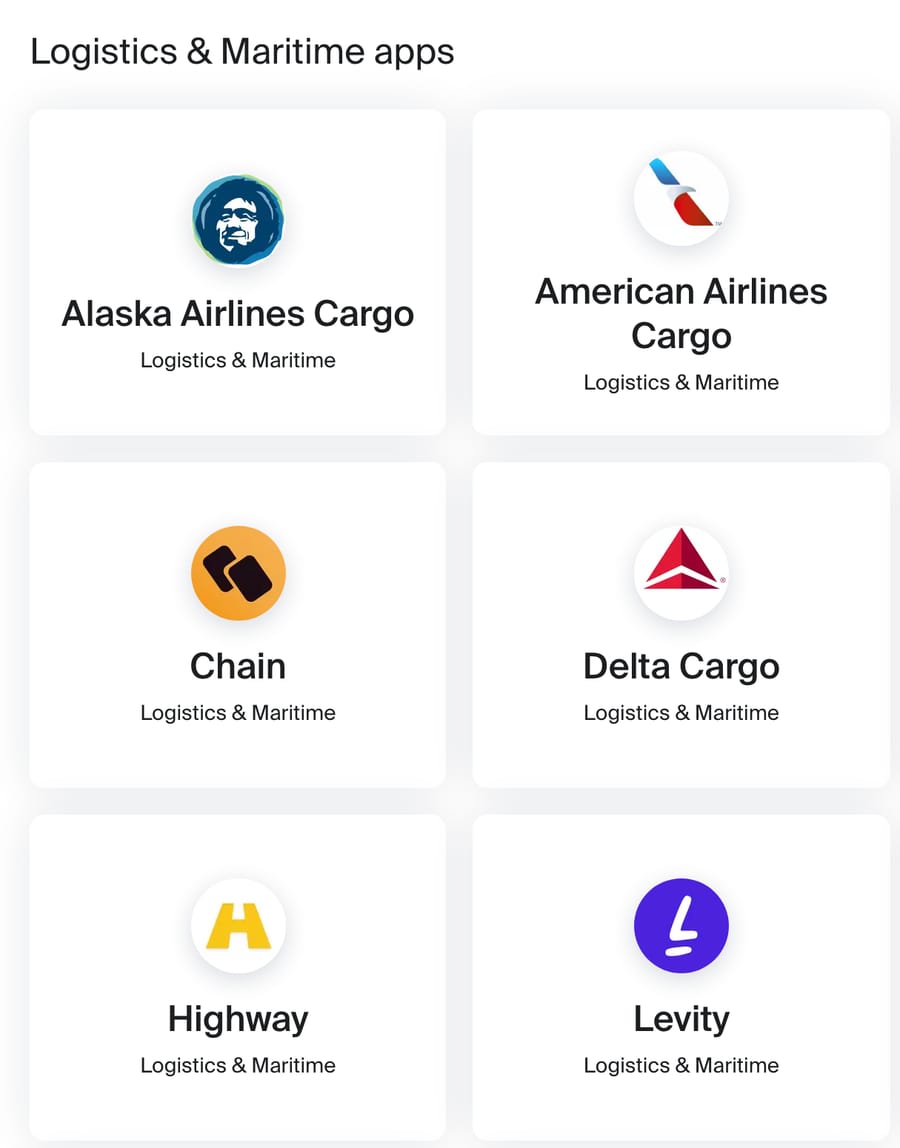
Front's own AI covers part of this. Autopilot AI agents now handle conversations assigned to them, guided by Playbooks and knowledge sources (the older Topic-based auto-replies are Front's legacy version as of October 2026), and Front's Autopilot help article says only English is officially supported. Front says Autopilot "executes across systems exactly as defined" once a Playbook is set up; Front doesn't list which systems, so ask whether yours is one (Front AI explained has the full capability table). Two apps in Front's Logistics & Maritime category are AI agents built for this queue: Burt's listing says it reads "tracking updates, document requests, quote inquiries" and triggers workflows, and Levity says it answers "track & trace requests" and updates the TMS. Vooma automates "logistics email quoting". Separately, Front's logistics page quotes Load One's director of operations: "With Front, we are doing 400-600 automatic quotes per business day" (a vendor-published customer story that doesn't name the tool behind it). If your queue is freight brokerage, compare these first.
Macha's route is the shipment-status and document work in the first rows. On Front, Macha reads the shipping@ thread, replies on it, tags it and assigns exceptions to a named dispatcher, starting when a conversation arrives or a customer writes back. The lookup into your TMS, WMS or carrier account connects through a custom API tool that Macha's team sets up during onboarding, using an API key, Bearer or Basic auth, and custom tools can send several fixed headers where a carrier API wants them. OAuth-only carrier APIs aren't feasible that way today. Macha fits teams already running Zendesk, Freshdesk, Gorgias, Front, HubSpot or Intercom whose shipping@ inbox is mostly status questions with a tracking number in them.
A synthetic example of the instruction for that agent, written for acting:
When a message contains a PRO, AWB or tracking number, call the carrier_lookup tool with it. Reply with the current status, last scan location and ETA from the result. If the status is an exception or the ETA has passed, don't reply: add an internal comment summarizing the lookup, @mention the dispatcher on shift, and assign the conversation to that dispatcher by name (Maria Lopez on weekdays, Sam Okoro on weekends). If no number is in the message, ask for one in a single sentence.
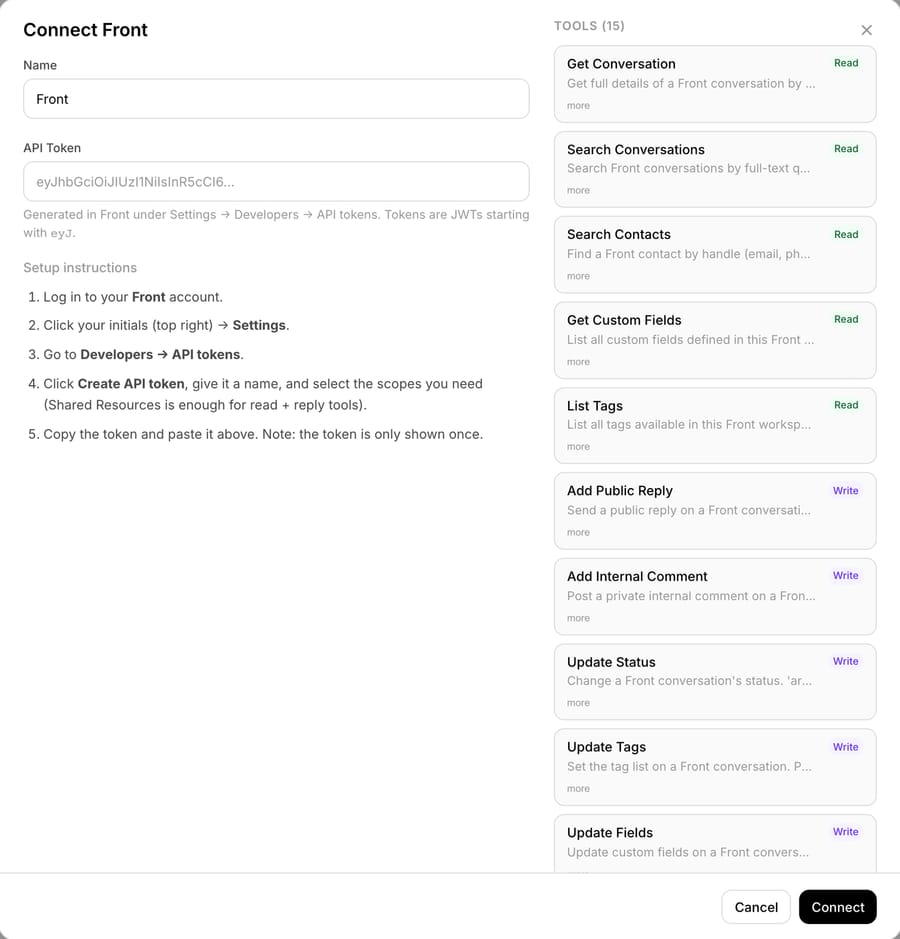
To check that instruction against the product, we opened the Front connector in our Macha Demo workspace on 28 September 2026. That workspace has no Front account connected, so the capture below is the connect screen and its tool list, not a running agent.
What does AI cost for a logistics team on Front at 1,000 and 3,000 conversations?
We used five Front Professional seats at $65 a seat billed annually ($325 a month) and published list prices. Macha doesn't need Professional: a logistics team on Starter (5 x $25 = $125) would pay $599 + $125 = $724 at 1,000 conversations and $1,199 + $125 = $1,324 at 3,000. Autopilot is an add-on on every Front plan as of October 2026; we keep Professional on its rows for a like-for-like comparison, so they keep the $325. Macha's plans cover up to 1,500 tickets for $599 and up to 3,000 for $1,199, charged per ticket whether the agent resolves it or hands it to a coordinator. As of October 2026, Front's Autopilot pricing bills each conversation once at the highest level it reaches: $0.05 for triage (tagging and routing only), $0.39 for a handoff (the agent drafts or replies and a human takes over) and $0.89 for a resolution. We priced $0.89 per resolution plus $0.39 for every other conversation at two resolution rates, 45% and 65%, the median and top-quartile rates in Gorgias's Ecom Lab research (a vendor self-report on Gorgias merchants, not logistics teams).
| Monthly | 1,000 conversations | 3,000 conversations |
|---|---|---|
| Front Professional, 5 seats | $325 | $325 |
| Autopilot triage only, no replies ($0.05) | $50 + $325 = $375 | $150 + $325 = $475 |
| Autopilot agent: $0.89 per resolution, $0.39 per handoff, 45% / 65% resolved | 450 x $0.89 + 550 x $0.39 = $615, so $940 with seats / 650 x $0.89 + 350 x $0.39 = $715, so $1,040 | 1,350 x $0.89 + 1,650 x $0.39 = $1,845, so $2,170 / 1,950 x $0.89 + 1,050 x $0.39 = $2,145, so $2,470 |
| Macha plan on top of Front | $599 + $325 = $924 | $1,199 + $325 = $1,524 |
Triage-only Autopilot is far below Macha at both volumes, but it doesn't reply. Once the agent answers, Front's October 2026 rates put Autopilot slightly above Macha at 1,000 conversations ($940 or $1,040 against $924) and well above it at 3,000 ($2,170 or $2,470 against $1,524). If your queue only needs tagging and routing, Autopilot triage is the cheaper route. The case for a layer is the lookup: a logistics answer is only useful if it carries the real ETA from your TMS, and that's where a custom API tool earns the difference. Macha's price also covers the work: on the trial and every plan, the Macha team builds that tool and the agent, tests it on your past shipping@ threads, and runs it in safe mode, with drafts as internal comments in Front, until the replies are right. About $0.40 a ticket includes a dedicated success manager who handles your changes afterwards, such as a new carrier, instruction changes or new tools. A sales-led meter gives Front the incentive to price to your volume and your alternatives, so get Autopilot's rate in writing before comparing; the Front AI pricing breakdown has the questions to ask.
Where does Front run out, and where does an AI layer fit?
Power features are plan-gated. Sequences and SLA time goal rules need Professional or above, which also adds SSO and SCIM and a customizable knowledge base. Custom roles and a multi-language knowledge base sit on Enterprise at $105 a seat, billed annually only. A small team on Starter gets the shared inbox and basic rules, but not the sales or SLA machinery, and Starter stops at 10 seats.
Collision detection needs teammates. Front's collaboration value (seeing who's replying, comments, shared drafts) only exists because other people are in the inbox with you. It's a shared-inbox tool; a solo operator gets far less from it than a team does.
Everything is deterministic. Rules match patterns, not meaning. A rule can route "refund" to billing, but it can't read "I was double-charged and want my money back," pull the customer's actual invoice, and write the answer. Sequences send the same templated stages to everyone; they don't reason about a specific reply.
That last gap is where an AI layer earns its place, on the reading-and-answering work a keyword match can't do; AI agents for customer service covers the category. Macha is one such layer: it runs on top of the Front you already use through the live Macha–Front connector; it does not replace Front, your shared inboxes, your rules, or your sequences. Whichever team the conversation lands in, Macha's agent reads it, understands intent rather than keywords, and drafts or sends a grounded reply, pulling a real order status, shipment ETA, or account detail through a custom tool that turns your REST API into something the agent can call. That's the same layer working across all three teams: it answers the support question, replies on the sales thread, and, once a custom API tool reaches your TMS, gives ops the shipment status. Macha bills per ticket (one conversation, charged once however many messages it takes), never per resolution, so the bill never hangs on an outcome definition you don't control.
How we researched this
- front.com/pricing, checked 24 September 2026: Starter $25 and Professional $65 a seat billed annually, seat caps, SLA and sequence plan gates, and Autopilot's "starting at $0.05 /conversation".
- front.com/integrations, parsed on 28 September 2026 for category counts: 192 integrations in total, 18 in Logistics & Maritime. App descriptions are quoted from those listings.
- front.com/industries/logistics, read 28 September 2026: the Load One figure is a vendor-published customer story, not our measurement.
- Front's Autopilot help article, read 28 September 2026, for English-only support, and its pricing section (edited 5 October 2026, rechecked 14 October 2026) for the $0.05 triage, $0.39 handoff and $0.89 resolution rates, each conversation billed once.
- eesel.ai, retrieved 24 September 2026: the $0.89 per resolution figure, since confirmed by Front's own help center (October 2026).
- Gorgias Ecom Lab (28 April 2026): the 45% and 65% resolution rates are a vendor self-report on Gorgias merchants.
- Arithmetic: 5 x $65 = $325; 5 x $25 = $125; 1,000 x $0.05 = $50; 3,000 x $0.05 = $150; 450 x $0.89 = $400.50 and 550 x $0.39 = $214.50, total $615; 650 x $0.89 = $578.50 and 350 x $0.39 = $136.50, total $715; 1,350 x $0.89 = $1,201.50 and 1,650 x $0.39 = $643.50, total $1,845; 1,950 x $0.89 = $1,735.50 and 1,050 x $0.39 = $409.50, total $2,145; each plus $325 in seats; $599 + $325 = $924; $1,199 + $325 = $1,524; $599 + $125 = $724; $1,199 + $125 = $1,324.
- The agent instruction and the dispatcher names in it are synthetic. The Front inbox screenshot is our own trial account; the Macha connect dialog is our own demo workspace.
FAQ
Is Front good for support teams? Yes, it's the strongest fit of the three. Front gives support the trio it actually needs: a When/If/Then rules engine for routing and tagging, SLA time goals with pre-breach warning tags and analytics (Professional plan or above), and an integrated knowledge base with admin vs content-editor roles.
Can Front be used for sales? Yes, but narrowly. Front offers sequences: 1-to-10-stage automated outreach with per-stage delays, template variables like {{first_name}}, and auto-stop-on-reply, layered onto a shared inbox. It's not a full sales-engagement platform (no dialer or pipeline), and sequences require the Professional plan or above.
Is Front good for logistics or operations teams? It's an underrated fit. Front's logistics page quotes customers such as Load One and Priority 1, and its shared inbox plus assignment, comments/@mentions, and shared drafts turn a chaotic dispatch@ or shipping@ mailbox into a coordinated, no-double-reply queue.
What can AI automate for a logistics team on Front? Shipment status and ETA emails first, because they're read-only and answerable from a carrier or TMS lookup by tracking, PRO or AWB number. Proof-of-delivery requests and carrier check-ins come next. Quotes should stay drafts for a human, and damage or delay claims should be triaged by AI and handled by a person.
Which logistics apps work with Front? Front's integrations directory listed 18 apps in its Logistics & Maritime category on September 28, 2026, out of 192 integrations, including UPS, OnTrac, Delta Cargo, United Cargo, Tai Software TMS, TextLocate, Vooma and Highway. Most show tracking or carrier data inside the conversation.
Which Front features are plan-gated? Sequences, SLA time goal rules, and SSO/SCIM need Professional ($65 a seat billed annually) or above; custom roles need Enterprise ($105 a seat). Starter ($25 a seat billed annually, up to 10 seats) still gets shared inboxes and basic rules, so smaller teams can start there and grow into the sales and SLA features.
How much does Front cost in 2026? Starter is $25 a seat a month billed annually ($35 monthly) for up to 10 seats, Professional is $65 billed annually ($85 monthly) for up to 50 seats, and Enterprise is $105 a seat on annual billing only, per front.com/pricing on 24 September 2026.
Can I add AI to Front without replacing it? Yes. An AI agent layer like Macha connects to Front as a live connector and runs on top of your existing inboxes, rules, and sequences, for support, sales, and logistics alike. Front keeps routing and collaborating; the agent reads the conversation, understands intent, and drafts or sends a grounded reply.
Want the shipping@ inbox answered from your own tracking data? Start a free trial of Macha, connect your Front, and Macha's team sets up the TMS or carrier lookup during onboarding.






