





 Shopify
 Stripe
 Slack
Slack Notion
 Google Workspace
 Confluence

How Do You Auto-Tag and Triage Front Conversations With AI? Topics, Autopilot and AI Agents Compared (2026)


To auto-tag Front conversations with AI in 2026, you have three native routes and a few outside ones: keyword rules on every plan, Topics on Starter and above, and Autopilot branching at $0.05 a conversation. Front's older AI Tagging rule is no longer available to new users. We compare them with eesel, Zapier and Macha, and show a live triage run in a Front sandbox.
Key takeaways
- Front's legacy AI Tagging rule is no longer available to new users; Front now points teams to Topics and to rules that branch on an Autopilot answer.
- Front Topics is included on Starter, Professional and Enterprise, works in shared inboxes only and is designed for inboxes with more than 1,000 conversations a month.
- Autopilot's Triage level, which covers tagging and routing, costs $0.05 a conversation, so 2,000 conversations a month is $100 on top of seats.
- In our 8 October 2026 Front sandbox test, Macha tagged a double charge as Refund request and Negative sentiment, assigned it, and left a comment quoting the deciding sentence.
- Macha costs about $0.40 a ticket from $299 a month for 750 tickets, with setup done for you and a dedicated success manager on the trial and every plan.

To auto-tag Front conversations with AI in 2026, you have three native routes and a few outside ones. Front rules tag by keyword and sender on every plan. Front Topics, included on Starter, Professional and Enterprise, labels shared-inbox conversations by contact reason, and a rule can act on "Topic is detected". The Autopilot add-on tags and routes from a plain-English question at $0.05 a conversation for its Triage level. Front's older AI Tagging rule is no longer available to new users. If you also want the agent to look up the order, explain its choice and draft the reply, the realistic outside options are eesel AI, a Zapier flow with an AI step, and Macha, which starts at $299/month for 750 tickets (about $0.40 a ticket) with setup done for you.
| Option | Native or add-on | What it actually does | Write actions | Setup | Pricing unit | Entry price (checked 8 Oct 2026) | Where it falls short |
|---|---|---|---|---|---|---|---|
| Front rules (Tag by keywords) | Native, all plans | Matches senders, inboxes and words you list | Tags, assign, move inbox, status, and more | Self-serve | Included | Included in your seat plan (Starter $25/seat/month, billed annually) | Misses anything phrased differently from your keywords |
| Front Topics + a rule | Native, Starter and above | Groups conversations into contact reasons; a rule acts when a Topic is detected | Whatever the rule does | Self-serve | Included | Included on Starter, Professional and Enterprise | Shared inboxes only; designed for inboxes with 1,000+ conversations a month; Topics are English only |
| Front Autopilot (Tag with Autopilot, Branch with Autopilot) | Native add-on, all plans | Asks a yes/no or multiple-choice question about the message and branches the rule on the answer | Tags, routing, summaries, extracted values | Self-serve | Per conversation | Triage $0.05; Handoff $0.39; Resolution $0.89 | Shared inboxes only; English-optimized; you write and maintain every branch |
| eesel AI | Third-party AI layer | An agent reads the conversation and acts from your instructions | Add tags, assign teammates, update fields, close, internal comments | Self-serve | Credits (1 ticket = 1 credit) | $299/month for 500 credits | Self-serve: you write the instructions and tune them; one fixed trigger per automation |
| Zapier + an AI step | Automation platform | A Zap sends each new inbound message to an AI step, then adds the tag it returns | Add Conversation Tags and other Front actions you wire up | You build it | Tasks | Professional $19.99/month (annual) for 750 tasks | You own the prompt, retries and error handling |
| Macha | AI agent layer on your help desk | One agent reads the conversation, tags it, assigns it and leaves an internal comment that explains the call | Update Tags, Update Fields, Assign Conversation, Update Status, Add Internal Comment, Add Public Reply | Done for you by the Macha team, with a dedicated success manager, included | Per ticket | $299/month for 750 tickets (about $0.40 a ticket) | Costs more than Autopilot if tags are all you need; tags must already exist; assigns to teammates, not teams or inboxes (a Front rule handles those) |
Most Front teams already tag, usually by hand. A teammate who opens a conversation, reads it, picks "Billing" and assigns it to finance has spent a minute on work a rule could do in a millisecond, if the customer had used the word "invoice". Customers don't. "I was charged twice" is billing, and "can you stop it before it goes out?" is a cancellation, and neither contains the word your rule is waiting for.
What happened to Front's AI Tagging feature?
Front used to have a rule template called "Tag with AI prompt". You picked up to 50 tags per shared inbox, wrote a description for each, then trained the rule by approving 10 example messages per tag before it tagged on its own. It read the subject and message body only, worked on email channels only, and allowed one AI Tagging rule per inbox.
Front's help center now labels that article "Legacy" and says AI Tagging "is no longer available to new users". Existing users are pointed to two replacements: Topics, and rules that branch on an Autopilot answer. If you search for "Front AI tagging" today and land on a guide that walks you through approving 10 messages per tag, it describes a feature you can't turn on.
The idea that carried over is the tag description. Topics and Autopilot both work best when each label has a written definition of when it applies. If your tags don't have descriptions yet, write them first: one sentence each, saying when the tag should be added, not when it shouldn't.
How do you auto-tag Front conversations with rules?
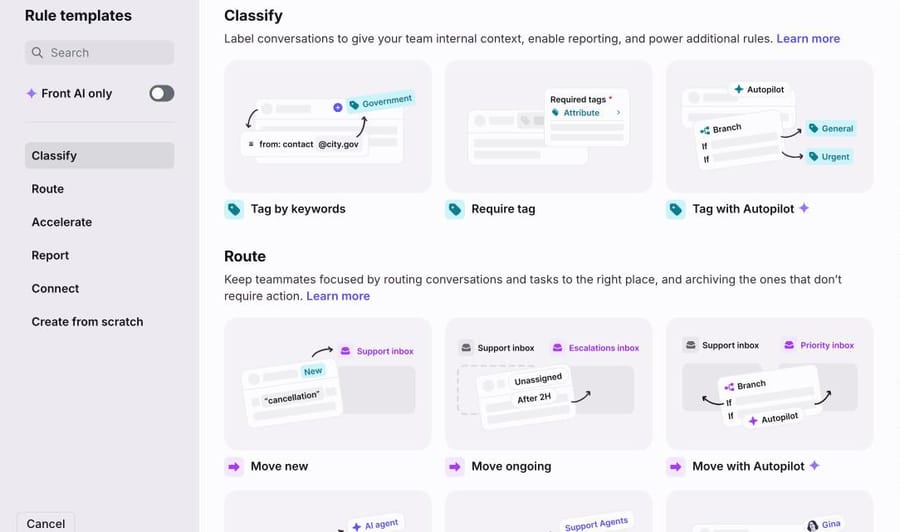
Rules are on every Front plan and are still the right tool for anything structured. In Settings, open your workspace, then Rules and macros, and click Create rule. The template library groups rules into Classify, Route, Accelerate, Report and Connect. Under Classify you get three starting points: Tag by keywords, Require tag, and Tag with Autopilot.
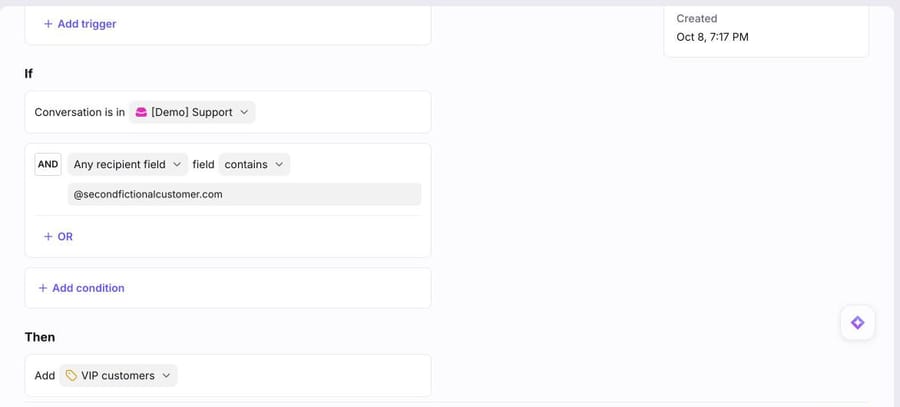
A keyword or sender rule has three parts. When: the trigger, usually "Inbound message is received". If: the conditions, such as the inbox and a field that contains a value. Then: the action, such as adding a tag. The rule below was already set up in our sandbox. It tags every inbound message in the [Demo] Support inbox from one customer domain as "VIP customers".
A few mechanics decide whether keyword tagging holds up:
- Use shared or company tags. Front has private tags (one teammate), shared tags (a workspace) and company tags (across workspaces, Enterprise). A rule or view built on a private tag only works for its owner. Our explainer on Front tags covers the three types.
- Order matters. Front runs rules in the order listed. Put tagging rules before assignment rules, so an assignment rule that checks a tag sees it.
- Rules don't trigger each other. A rule whose action adds a tag won't set off a second rule that waits for "a tag is added". Our guide to how Front rules work explains the cascade behavior.
- Branching rules let one rule hold several condition sets, checked in priority order. They're on all plans, but they don't support delayed conditions.
For a team with four or five categories that customers describe in predictable words (order numbers, "invoice", a known sender domain), rules are enough. You'll know you've outgrown them when the list of "subject contains" conditions keeps growing and the misses keep coming. Step-by-step setup is in how to set up tags and auto-tagging in Front.
How do Front Topics tag conversations, and what do they need?
Topics is Front's built-in classifier. Front AI reads conversations in the shared inboxes you select, works out why customers write in, and groups those reasons into Topics. New conversations get a Topic when they match a known reason. You turn it on under Settings, Front AI, "Topics and summaries", by choosing the inboxes in "Enable in". Front says the first set of Topics takes 1 to 2 hours to appear.
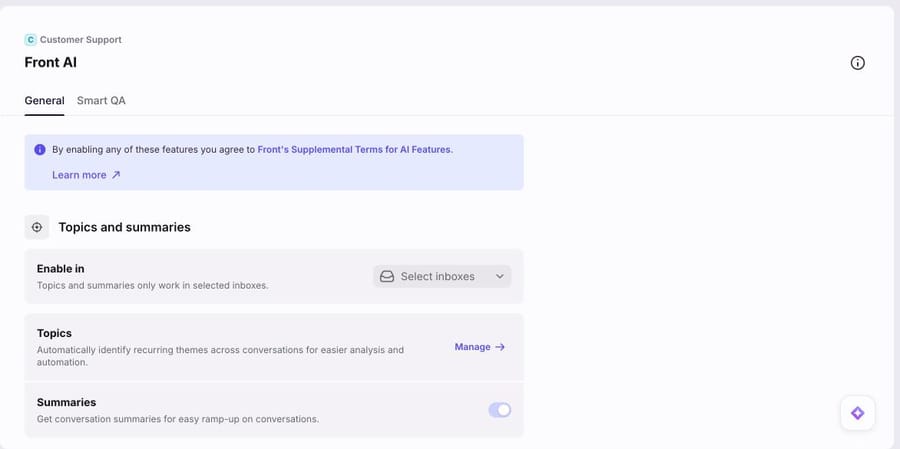
To act on a Topic, build a rule with the condition "Topic is detected" and give it a routing or tagging action. You can rename, merge and delete Topics, move a conversation to a different Topic from its header, and create a custom Topic once you've manually added at least 5 conversations to it.
The requirements are what decide whether Topics fits you:
- Plan: included on Starter, Professional and Enterprise, with no add-on.
- Volume: Front says Topics is designed for inboxes that receive more than 1,000 conversations a month. Below that, there isn't much for it to group.
- Scope: shared inboxes only. Channels include email, Front Chat, portal, Slack, SMS and WhatsApp.
- Language: Topics are in English only, though Front says it can interpret conversations in dozens of languages and file them under English Topics.
- Accuracy: Front reports an average conversation-to-Topic accuracy of 85%. At 2,000 conversations a month, that's about 300 that land in the wrong Topic, so keep a person checking the high-stakes ones.
With Topics you don't define the categories up front; Front finds them. You also live with Front's grouping of your contact reasons, and you shape it afterwards by merging and moving.
What does Autopilot add for tagging, and what does it cost?
Autopilot is Front's AI agent, sold as an add-on on every plan. For tagging, the useful part is Autopilot inside rules. "Branch with Autopilot" asks a natural-language question about the conversation, either yes/no or multiple choice, and sends it down a different branch for each answer. Each branch can add a tag, assign, or move the conversation. By default it reads the last message; you can tell it to review the whole conversation. "Extract with Autopilot" pulls a value (text, a date, a number or a true/false) out of a message, such as an order number, and "Summarize with Autopilot" writes a summary into the rule. The templates "Tag with Autopilot" and "Move with Autopilot" in the screenshot above start you off.
Front prices Autopilot by what it does to each conversation, invoiced monthly:
- Triage, $0.05 a conversation: organizing, which Front defines as routing, summarizing, tagging and otherwise classifying, with no drafting or replying.
- Handoff, $0.39: drafting, replying or taking an action that a person then takes over.
- Resolution, $0.89: the conversation is resolved with no human reply.
Do the arithmetic for a tagging-only setup. 2,000 conversations a month at the Triage rate is 2,000 × $0.05 = $100 a month, on top of seats (10 teammates on Professional at $65 is $650 a month, billed annually). If tags are all you need and you're happy writing the branches, that's cheaper than any third-party option on this page, and we'd tell a small team to start there. The pricing also shows Front's incentive. The same conversation is worth $0.05 to Front when Autopilot tags it and $0.89 when Autopilot resolves it, so every tagged conversation is a candidate for the more expensive tier.
Autopilot branching answers a question about the message. Checking an order's status or a customer's plan means adding a Front Connector to the rule, which you build and maintain yourself. Front lists Autopilot as optimized for English. For a full breakdown of the add-ons, see how much Front AI costs.
Which third-party AI tools can tag Front conversations?
We only list tools whose public docs show them writing tags to Front. Prices were checked on 8 October 2026.
eesel AI
eesel's Front integration connects through an authorization flow where you pick the workspaces it can use. Its docs list three groups of actions: respond (replies or internal comments as drafts for review), manage (add tags, assign to teammates, update conversation fields, close or archive) and look up (read threads, list conversations, tags and teammates). Two limits from the same page: the agent "never creates a new tag in Front", and it assigns to individual teammates, not teams. Each automation has one fixed trigger. There's a free plan with 100 credits; paid pricing is $299 a month for 500 credits, where a ticket the agent works on is 1 credit, scaling to $1,749 for 5,000; paying a year upfront gets two months free. It's self-serve: you write the instructions and tune them.
Zapier with an AI step
The do-it-yourself route. Front's Zapier app has a "New Inbound Message" trigger and an "Add Conversation Tags" action. Put an AI step between them that returns one tag name from your list, and you have AI tagging without a vendor contract. Zapier's Professional plan is $19.99 a month billed annually for 750 tasks, and every action step in a run counts toward that. You own the prompt, the handling of an answer that isn't one of your tags, and the retries when Front's API rate-limits you.
Macha
Macha runs AI agents on the help desk you already use (Zendesk, Freshdesk, Gorgias, Front, HubSpot or Intercom). On Front, the agent's tools include Get Conversation, List Tags, Update Tags, Update Fields, List Teammates, Assign Conversation, Update Status and Add Internal Comment, and it runs on a Front trigger such as Conversation Created. Setup is covered in connecting Front to Macha and on the Front integration page; anything with an API, such as your own account system, can become a custom tool. It's the one we ran end to end, below.
How does Macha triage a Front conversation? A live test
We connected a Front sandbox (a Professional trial) to our Macha Demo workspace on 8 October 2026 and created synthetic conversations in its [Demo] Support inbox, all from made-up @example.com senders. Then we created five shared tags with one-line descriptions (Refund request, Order status, Billing, Bug report, Cancellation) plus Negative sentiment and Needs review. The agent picks from tags that exist, so the tags come first.
The agent (we named it "P10-19 Front triage" after this guide) has six Front tools attached: Get Conversation, List Tags, Update Tags, List Teammates, Assign Conversation and Add Internal Comment. It has no reply tool, so it can't write to the customer. This is the instruction, verbatim:
You triage new conversations in our Front [Demo] Support inbox. You never reply to the customer.
1. Read the conversation with Get Conversation. Note the tags already on it.
2. Call List Tags. Pick exactly one topic tag: Refund request, Order status, Billing, Bug report or Cancellation. Read the tag descriptions. Customers rarely use these words, so decide from what they want, not from the words they use.
3. Also add Negative sentiment if the customer is angry, threatens to dispute a charge or leave, or says they've already asked.
4. If no topic fits, or two fit equally well, add Needs review instead of a topic tag.
5. Update Tags takes the full list of tags, so pass the tags already on the conversation plus the new ones. Never remove a tag.
6. Routing: Billing, Refund request and Cancellation conversations go to our billing teammate. Call List Teammates and assign the conversation to Abbas M. Leave everything else unassigned; our round-robin rule picks it up.
7. Finish with a one or two line internal comment: the topic, the sentiment, the language the customer wrote in, and the sentence from the message that decided it.
Update Tags sets the conversation's full tag list, so step 5 has the agent pass the existing tags along with the new ones. Step 7 makes the triage auditable. Every conversation carries the sentence the agent decided on, so a teammate can disagree in two seconds.
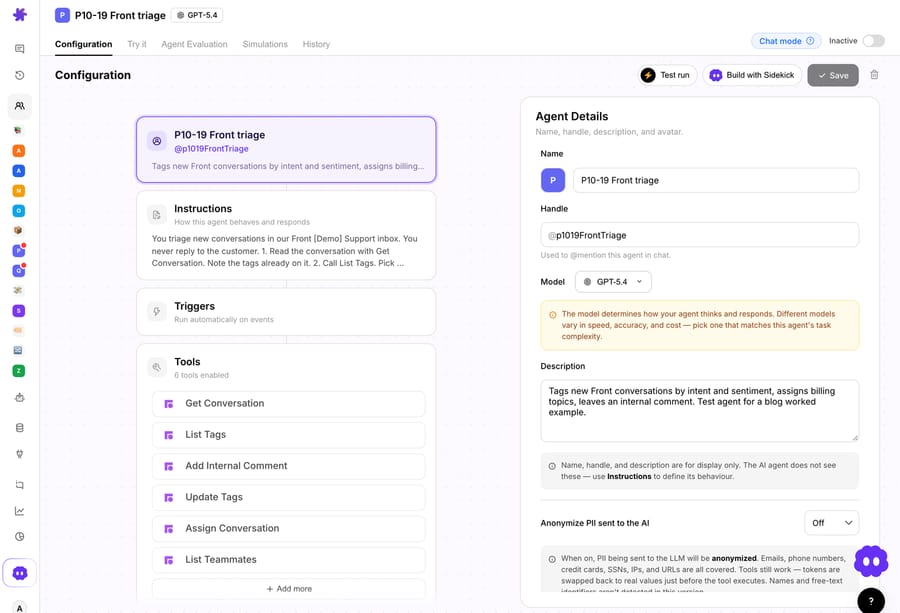
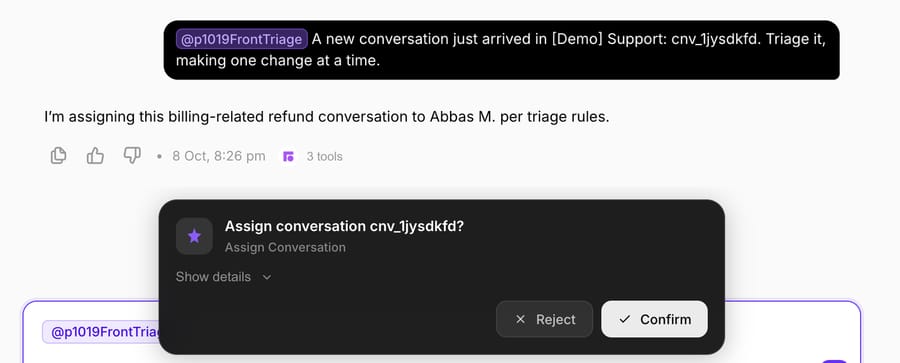
We left the agent inactive with no trigger and ran it from its Try it chat, giving it a conversation ID. In chat, each Front write pauses for a confirmation card; on a live trigger the same writes run directly, as the instruction says. We asked it to make one change at a time so we could confirm each write.
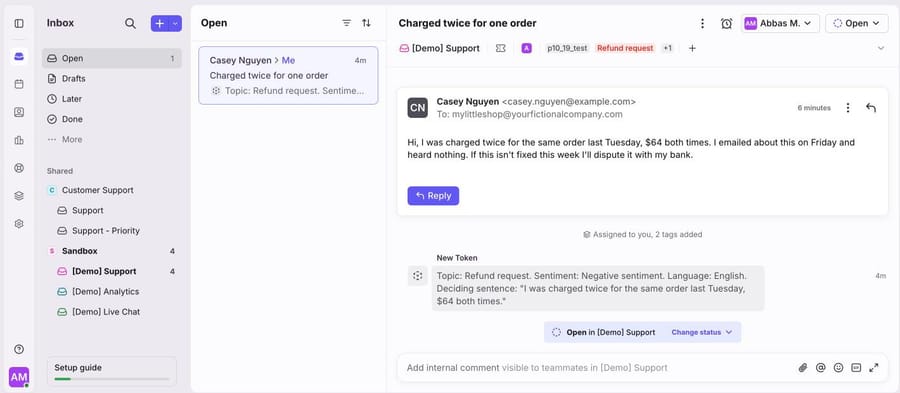
Run 1, a double charge with a chargeback threat. Casey Nguyen wrote: "I was charged twice for the same order last Tuesday, $64 both times. I emailed about this on Friday and heard nothing. If this isn't fixed this week I'll dispute it with my bank." None of the words "refund", "billing" or "urgent" appear. The agent read the conversation and the tag list, then asked to update the tags, assign the conversation and add a comment, one card at a time.
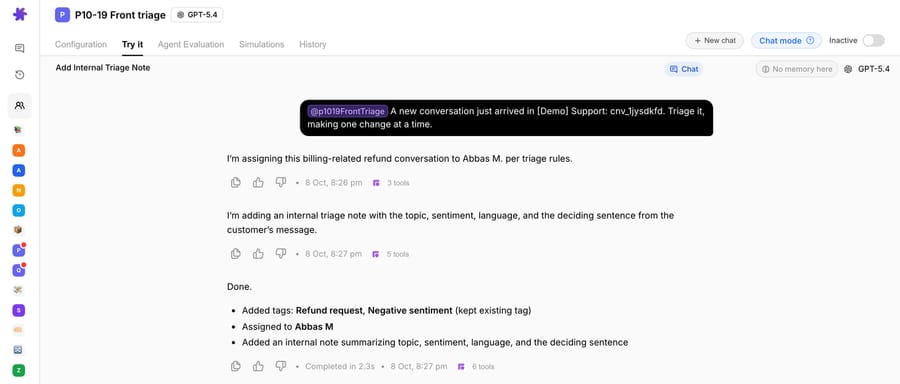
In Front, the conversation now shows the p10_19_test tag we use to mark test conversations, Refund request and Negative sentiment (Front folds the second into a +1 chip), Abbas M. as assignee, and the internal comment: "Topic: Refund request. Sentiment: Negative sentiment. Language: English." followed by the sentence that decided it.
Run 2, a Spanish order question. Sofia Ramos wrote in Spanish that an order from two weeks ago hadn't arrived. The agent tagged it Order status, left it unassigned for the round-robin rule, and commented "Language: Spanish" with the Spanish sentence it decided on. A keyword rule written in English would have missed it entirely.
![Sofia Ramos's Spanish conversation in Front's [Demo] Support inbox](/images/grid/6ac7b0bad6cdbd598d30024b?w=900)
Run 3, a bug report that never says "bug". Dana Okafor wrote that "the checkout page keeps spinning after I enter my card details". The agent tagged it Bug report, added no sentiment tag, left it unassigned and commented with that sentence.
Two practical points from the build. First, the agent doesn't move conversations between inboxes; Macha's Front tools tag, assign, set fields and status, and comment. If your routing is inbox-based, keep a Front rule that moves conversations by tag, and test it on one conversation before you rely on it. Second, Macha can read more than Front. Attach the Shopify or Stripe tools and the same agent can check whether the double charge is real before it tags Refund request, without a Connector for each data source. Our guide to AI routing with tags, assignment and @mentions covers the routing patterns.
On price, $299 gets you 750 tickets on Macha and 500 on eesel: $0.40 a ticket against $0.60, with setup done for you included. Against Autopilot's $0.05 Triage rate, Macha only makes sense when the triage is part of a bigger job, such as tagging and drafting the reply on the same ticket, which Macha bills as one ticket however many tools it calls.
Which Front tagging option should you choose?
- Under 1,000 conversations a month per inbox, predictable wording: rules. Write tag descriptions now so you're ready for Topics later.
- 1,000+ conversations a month in English, and you want to discover categories: Topics, with rules on "Topic is detected". It's included in your plan.
- You want to define the categories yourself and only need tags and routing: Autopilot branching at $0.05 a conversation. It's the cheapest AI option here.
- You want tags plus an explanation, a lookup in Shopify or Stripe, and a drafted reply from the same agent: an AI agent layer. Pick eesel if you want to build and tune it yourself. Pick Macha if you want the Macha team to build it, run it in safe mode and keep tuning it: about $0.40 a ticket, which includes setup and a dedicated success manager who handles your changes.
If you run more than one help desk, the same comparison for other platforms is in our guides to auto-tagging and routing Zendesk tickets, Freshdesk triage and routing and Gorgias triage.
How do you roll out AI tagging in Front without mislabeling live conversations?
- Write the tag descriptions first. One sentence each, saying when the tag applies. Every option above reads them, including people.
- Start with tags and comments only. For the first two weeks, let the AI tag and explain without assigning. Compare its tag with what your team would have picked.
- Keep a review lane. A Needs review tag, and a view filtered on it, catches the conversations the AI wasn't sure about instead of letting it guess.
- Make the categories exclusive. If "Billing" and "Refund request" overlap, decide in the descriptions which wins ("a double charge is a Refund request").
- Then switch on assignment and count reassignments: a conversation whose assignee changes after the first assignment is a misroute. That number should fall.
- Revisit monthly. Merge Topics that drift together, retire tags nobody reports on, and add a category when Needs review keeps filling with the same request.
Once tagging is stable, the next step for most Front teams is drafts: see drafting Front replies with AI and the hub of AI automations worth setting up in Front.
Frequently asked questions
Does Front have AI tagging? Yes, in two forms. Topics, included on Starter, Professional and Enterprise, labels shared-inbox conversations by contact reason, and rules can act on "Topic is detected". Autopilot, a paid add-on, can tag and route from a yes/no or multiple-choice question in a rule. The older AI Tagging rule template is no longer available to new users.
How much does AI tagging cost in Front? Topics is included in your plan. Autopilot's Triage level, which covers tagging, routing and summarizing, is $0.05 a conversation on Front's help center as of 8 October 2026, on top of seats from $25 per seat per month (Starter, billed annually).
Why don't Topics show up in my Front account? Topics work only in shared inboxes you've enabled under Settings, Front AI, and Front says Topics is designed for inboxes with more than 1,000 conversations a month. The first Topics take 1 to 2 hours to appear after you enable them.
Can Front tag conversations written in other languages? Topics are English only, though Front says Front AI can interpret conversations in dozens of languages, and Autopilot is optimized for English. An AI agent layer reads the message in whatever language it's written; in our test, Macha tagged a Spanish order question as Order status.
Can an AI agent assign Front conversations to a team? Macha's Assign Conversation tool and eesel's both assign to individual teammates. To route to a team or another inbox, tag the conversation with the AI and let a Front rule do the move.
Which is best for a small team? Rules, if your categories are predictable. If you want AI tags and nothing else, Autopilot's Triage level is the cheapest option. If you'd rather have the AI tagging, looking things up and drafting replies, set up for you, Macha starts at $299 a month for 750 tickets, with setup and a dedicated success manager on the trial and every plan.
How we researched this
Front facts come from Front's help articles on AI Tagging (legacy), Topics, Autopilot and its pricing levels, Autopilot features in rules and branching rules, Front's community post on branching rules by AI instructions, and front.com/pricing, all accessed 8 October 2026. Competitor details come from eesel's Front integration docs, eesel.ai/pricing, Zapier's "How to get started with Front on Zapier" help article and zapier.com/pricing, accessed the same day. Prices change; we dated each one.
What we ran live on 8 October 2026: we opened our Front sandbox (a Professional trial) and captured its rule templates, an existing keyword rule and the Front AI settings page; we did not enable Topics or Autopilot, because the sandbox has a handful of conversations against the 1,000 a month Topics is designed for and Autopilot is a paid add-on. We created synthetic conversations through Front's API in the [Demo] Support inbox and ran the Macha agent shown above from its Try it chat, confirming each write. All names, emails and order numbers are made up. Arithmetic: 2,000 × $0.05 = $100; 10 × $65 = $650; 2,000 × 15% = 300; $299 / 750 = $0.40; $299 / 500 = $0.60.






