





 Shopify
 Stripe
 Slack
Slack Notion
 Google Workspace
 Confluence

What Do Front Terms Mean? Rules, Sequences, Comments, Tags and Inboxes Glossary (2026)


In Front, rules react to inbound messages, sequences send staged outbound follow-ups, templates store canned replies, comments stay internal and tags label conversations. Each term below comes with its Settings path and the plan it needs.
Key takeaways
- In Front, rules react to inbound events, sequences send staged outbound follow-ups to a contact list, and templates store reusable canned text.
- Front sequences support 1 to 10 stages labelled A through J, take up to 200 contacts per CSV upload, and need the Professional plan or above.
- Front company rules run across every inbox, always execute before workspace rules, and need the Enterprise plan or the Autopilot add-on.
- Front's pricing lists Starter at $25 a seat a month with up to 10 automation rules, Professional at $65 with up to 20, and Enterprise at $105.
- Front tags are managed under Settings, then Tags, and connect automation to triage because one rule can add a tag and another rule can act on it.
In Front, the shared-inbox app, a rule reacts to inbound events, a sequence sends up to 10 staged outbound follow-ups, a template stores canned text, a comment is an internal note, a tag is a label, an inbox holds conversations and a channel feeds messages into it. The table below gives each term's Settings path and plan gate, and the sections after it define each one in plain English.
| Term | What it is | Where to find it | Plan note |
|---|---|---|---|
| Inbox | Container where conversations live | Settings → Inboxes | All plans |
| Channel | Email address, chat, SMS or social account feeding an inbox | Settings → Channels | All plans |
| Comment / @mention | Internal note that notifies a teammate | Inside any conversation | All plans |
| Tag | Label for triage and automation | Settings → Tags | All plans |
| Rule | When → If → Then automation | Workspace settings → Rules and macros | 10 rules on Starter, 20 on Professional, unlimited on Enterprise |
| Sequence | Staged outbound follow-up emails | Front's Sequences view | Professional or above |
| Template | Reusable canned reply | Settings → Templates | All plans |
Which "Front" does this glossary mean?
Front is a piece of software, not a place or a car part. The term gets confused constantly, so here is the disambiguation.
- Front (the app): the subject of this glossary. Front's homepage now pitches it for "complex customer operations." In practice it is a shared inbox that unifies email, chat, SMS, and social messages so a whole team can reply, collaborate, and stay accountable in one place. That is the definition we use everywhere below. If you want the full tour, start with what is Front app.
- A front desk: the reception counter at a hotel or office. Nothing to do with the software.
- A storefront / shop front: the retail face of a business. Also unrelated.
- Front-wheel drive: a car's drivetrain layout. Definitely not this.
Everything from here on refers to Front the software, per Front's own homepage and help center.
What are inboxes, channels, and teammates in Front?
Inbox: the container where conversations live. A shared inbox is the heart of Front: multiple teammates can see, assign, and reply to the same conversations without forwarding email back and forth. A team inbox is a shared inbox scoped to a specific team. You will find them under Settings → Inboxes. For the full model, see Front shared inbox explained and Front team inboxes explained.
Channel: the actual source feeding messages into an inbox: an email address, a chat widget, an SMS number, a social account. One inbox can gather several channels. Managed under Settings → Channels.
Teammate: a user in your Front company. Teammates are invited under Settings → Teammates, given access to specific inboxes, and assigned roles (member, admin, or company admin). Who can edit what, including rules, tags, and channels, depends on that role.
What are comments, mentions, and shared drafts?
Comment: an internal note posted inside a conversation. Comments are private to your team and never sent to the customer. Per Front's guide to @mentions, the discussion is "saved right within the Front conversation for future reference, so everyone can see what's going on." It is how you coordinate before hitting reply.
@mention: typing @ plus a teammate's name inside a comment to notify them and pull them into the thread. The mentioned person sees the conversation in their Mentions section. Worth knowing: @all in a shared inbox notifies only teammates who have access to that inbox, and mentioning someone from another workspace shares that one conversation with them (Front prompts you to confirm). Full detail in Front comments and mentions explained.
Shared draft: a reply that two or more teammates can compose together before it goes out, so a manager can review or a specialist can weigh in without re-typing anything. See Front shared drafts explained.
What is a tag in Front?
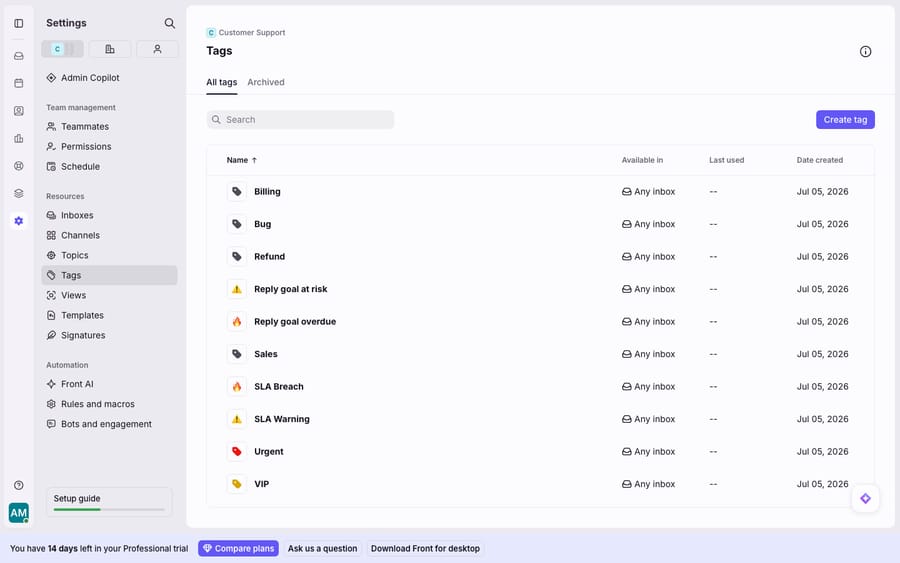
Tag: a colored label you apply to conversations. Front's help center defines tags simply: labels you "use to organize your inbox, signal your teammates to take a certain action, or automate tasks with rules." In the screenshot above you can see a real tag list (Billing, Bug, Refund, SLA Breach, Urgent, VIP), the kind of taxonomy most teams grow into. Tags are managed under Settings → Tags, and they are the glue between manual triage and automation: a rule can add a tag, and another rule can act on that tag. Deep-dive: Front tags explained.
What is the difference between rules, sequences, and templates?
These three get mixed up more than any others, so here is the one-line difference before the definitions: rules react, sequences reach out, templates are canned text.
Rule: an automation built as a When (trigger) → If (condition) → Then (action) sentence. When an inbound message arrives, if the subject contains "invoice," then add the Billing tag and assign to a teammate. Rules come in three scopes, and the scope decides who they affect and who can edit them, per Front's rules documentation:
- Individual rules: apply only to your personal inbox; anyone can create them under Personal settings → Rules; exempt from plan rule limits.
- Workspace (shared) rules: apply to a team's shared inboxes; admin-created under Workspace settings → Rules and macros; capped by plan.
- Company rules: apply across all inboxes company-wide; company-admin only, under Company settings → Rules; always run first, so a workspace rule cannot trigger them; need the Enterprise plan or the Autopilot add-on.
Full walkthrough in Front rules explained.
Sequence: automated outbound follow-up. A sequence sends a staged series of emails to a list of contacts and stops for any recipient who replies (auto-replies don't count as a reply). Front supports 1 to 10 stages (labelled A–J), each stage a reply to the previous, and each CSV upload takes up to 200 contacts. Per Front's sequences guide, sequences are a Professional-plan-or-above feature, and some older plans include them too. See Front sequences explained.
Message template: predetermined answers to common questions, so you reply faster to repetitive FAQs. Templates are the fixed text a rule or a teammate can drop in; they live under Settings → Templates.
Rules vs sequences vs templates: the decision guide
| Rule | Sequence | Template | |
|---|---|---|---|
| What it does | Reacts to inbound events | Sends staged outbound follow-ups | Stores reusable canned text |
| Direction | Inbound (triage/route) | Outbound (outreach) | Either |
| Trigger | An event (message, tag, assignment) | You start it on a contact list | A teammate or rule inserts it |
| Best for | Routing, tagging, assignment, auto-reply | Sales/CS cadences, chasers | FAQ answers, standard replies |
| Plan note | Workspace rules capped by plan; company rules Enterprise or Autopilot add-on | Professional+ | All plans |
What are Autopilot, Copilot, and Topics in Front?
Front ships its own native AI suite, and it is worth knowing the names so you can tell them apart from a third-party layer.
- Copilot: AI that assists a human, drafting or improving replies while a teammate stays in control.
- Autopilot: Front's omnichannel AI agent that handles conversations more autonomously, sold as an add-on on every plan.
- Topics: AI that auto-categorizes conversations by subject, included on all plans. Smart QA and Smart CSAT add AI quality scoring and inferred satisfaction; as of October 2026 both are Enterprise only (included in Enterprise, no longer sold as add-ons on Starter or Professional).
These are Front's first-party features. A platform like Macha is a different thing: an AI agent layer that runs on top of Front rather than inside it. More on that below.
Which Front terms are gated by plan?
The glossary is friendly; the pricing page is where terms get teeth. Front's pricing lists three plans, billed annually: Starter at $25 a seat a month (up to 10 seats), Professional at $65 (up to 50 seats) and Enterprise at $105. A few caveats worth internalizing:
- Rules are capped by plan. Starter allows up to 10 automation rules, Professional up to 20, and Enterprise unlimited. Individual rules are the exception; they do not count against the limit.
- Sequences and company rules are gated. Sequences need Professional or above; company rules need Enterprise or the Autopilot add-on. If a term above is missing from your account, a plan tier is usually why.
- Collaboration features assume teammates. Comments, mentions, and shared drafts only shine when you actually have multiple people in a shared inbox. They are collaborative by design, not solo tools.
- Native rules match patterns, not meaning. A rule that keys on
subject contains "refund"cannot understand "you charged me twice and I want it back." It routes; it does not reason.
That last point is the seam where an AI layer earns its keep. The broader category of AI agents for customer service exists for the reasoning-heavy work a keyword match structurally can't do. Macha is one such layer: it runs on top of the Front you already use through the Macha–Front connector, and it never replaces Front, your shared inboxes, your tags, or your rules. You keep the deterministic dispatcher; Macha's agent reads the routed conversation, understands intent, and drafts or sends a grounded reply, pulling a real order or account record through a custom tool that turns your REST API into something the agent can call. If you want to wire it up yourself, how to use the Front API covers the developer side. Macha bills per ticket, from $299 a month for up to 750 tickets: one conversation, charged once however many messages it takes, never per resolution.
FAQ
What is Front, in one sentence? Front is an AI-powered customer service and shared-inbox platform that unifies email, chat, SMS, and social messages so a whole team can reply, collaborate with internal comments, and stay accountable in one place. It is not a front desk, a storefront, or front-wheel drive.
What's the difference between a rule and a sequence in Front? A rule reacts to inbound events (a message arrives, a tag is added) and performs actions like routing or tagging. A sequence reaches out: it sends a staged series of follow-up emails to a contact list and stops for anyone who replies. Rules are inbound; sequences are outbound.
Are Front comments visible to customers? No. Comments and @mentions are internal and private to your team, saved inside the conversation for context. Only actual replies go to the customer.
Which Front terms are gated behind a paid plan? Sequences require Professional or above, company rules require Enterprise or the Autopilot add-on, and workspace rules are capped at 10 on Starter and 20 on Professional. Individual rules are exempt from the rule limit. Check Front's pricing for the current tiers.
Can I add AI to Front without replacing any of this? Yes. An AI agent layer like Macha connects to Front as a live connector and runs on top of your existing inboxes, tags, and rules. Your rules keep routing and tagging deterministically; the agent reads the routed conversation, understands intent, and drafts or sends a grounded reply.
Ready to turn a tag into an actual answer? Start a free trial of Macha and connect it to your Front in minutes.






