Intercom
 Shopify
 Stripe
 Slack
Slack Notion
 Google Workspace
 Confluence

What Are the Best Jira Service Management Alternatives in 2026? 10 Scored, With Real Prices


Jira Service Management scores 28 out of 30 on our rubric, the highest in this research, so most teams should check their reason for leaving first. For those with a real reason, we scored ten alternatives and costed each at twenty-five agents and 750 AI resolutions a month, from $675 to $3,725.
Key takeaways
- ManageEngine ServiceDesk Plus is the cheapest complete Jira Service Management alternative at $675 a month for twenty-five agents, and one of two with a self-hosted edition.
- Jira Service Management scores 28 out of 30 on its own alternatives rubric, the highest score in this research, ahead of all ten alternatives.
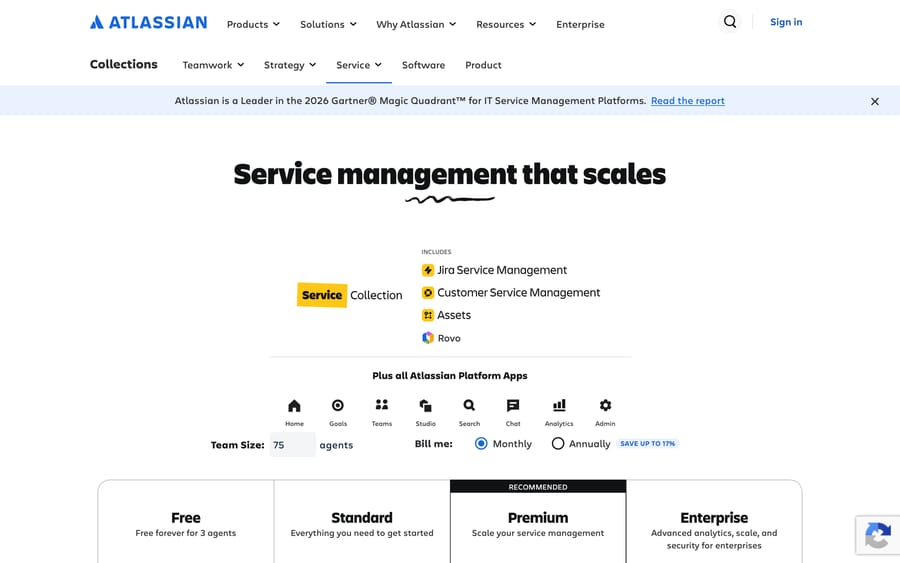
- Jira Service Management is free for three agents, then $20 per agent a month on Standard and $51.42 on Premium, where the virtual service agent arrives.
- At twenty-five agents and 750 AI resolutions a month, the ten Jira Service Management alternatives cost from $675 on ManageEngine to $3,725 on Atera.
- Macha does not run on Jira Service Management as a help desk, but its live Jira connector can search, create, comment on and transition JSM requests.

The best Jira Service Management alternative for most IT teams is ManageEngine ServiceDesk Plus, which scores 25 out of 30, is free for five technicians and costs $675 a month at twenty-five agents and 750 AI resolutions, the cheapest complete swap we priced. Jira Service Management itself scores 28 out of 30, the highest in this research, with a free plan for three agents, $20 an agent on Standard and $51.42 on Premium, so check your reason for leaving before you check the list.
Macha publishes this page. Macha isn't an IT service management platform and is not one of the ten, so it's absent from the ranking and appears once, in a clearly marked section near the end. Every seat and AI rate here was read on the vendor's own live page, forced to the US region, on 22 September 2026.
Which Jira Service Management alternatives score highest? (prices checked 22 September 2026)
Legend: ✅ native · ➕ configurable, you build it · ✖ not a focus.
| Alternative | Best for | Entry price | Self-hosted edition | AI rate you can calculate | Score |
|---|---|---|---|---|---|
| ManageEngine ServiceDesk Plus | Reading a price instead of booking a call | Free for 5 techs; US$13 per tech/mo | ✅ | Zia bundled, no meter | 25/30 |
| Freshservice | Mid-market IT with the best evidence base | $19 per agent/mo annual | ✖ | Freddy, Copilot $29/agent | 24/30 |
| SysAid | Settling the AI question at purchase | $89 per agent/mo | ✖ | Uncapped, bundled | 23/30 |
| InvGate Service Management | A small desk with a budget line | $1,499/yr for 5 agents | ✖ | AI Service Agent, no meter | 22/30 |
| Atera | IT teams who run the endpoints too | $149 per tech/mo annual | ✖ | AI copilot, bundled | 22/30 |
| Vivantio | Desks with a compliance list | $49–$99 per agent/mo annual | ✖ | Included, no meter | 21/30 |
| Zendesk | The customer-facing half of JSM | $55 per agent/mo annual | ✖ | $1.50 per committed resolution (Zendesk pricing page) | 21/30 |
| SolarWinds Service Desk | Discovery and CMDB | $39 per tech/mo annual | ✖ | Virtual Agent, no meter | 20/30 |
| Halo | One platform across IT, HR and facilities | $99 per agent/mo annual | ✖ | Halo AI, included | 19/30 |
| Deskpro | Self-hosting without an ITSM stack | $39 per agent/mo, min 5 | ✅ | Deskpro AI, no meter | 19/30 |
| Jira Service Management, the incumbent | Atlassian shops | Free for 3; $20 per agent/mo | ✖ (cloud) | $1 per resolution | 28/30 |
Two of the ten have a current self-hosted edition, and that's the column to read first if hosting is why you're here.
What are the good reasons to leave Jira Service Management?
1. You aren't an Atlassian shop. This is the big one. Jira Service Management's real advantage is that IT work hands to engineering without an integration in the middle. If your developers are in GitHub Issues or Linear and your company isn't on Confluence, you're paying for gravity you don't have.
2. You need to host it yourself. Two of the nine results on page one for this search are about that: a Reddit thread asking for on-premises alternatives, and a rival's page titled "Jira Service Management Data Center Alternatives". If self-hosting is a hard requirement, only two products on this list answer it, and there's a section on them below.
3. The caps bite before the seats do. Jira Service Management's bill isn't really per agent. Rovo credits are 250, 700 and 1,500 per user a month on Standard, Premium and Enterprise. Indexed objects are 1,000, 2,500 and 6,250 per user. Automation steps are 3,000, 6,500 and 9,500 per user. Assets objects are 5,000, 50,000 and 500,000 per site. A team whose CMDB or automation volume outgrows a tier gets pushed up a tier for a reason that has nothing to do with headcount.
4. The virtual service agent is a Premium feature. The AI that answers employees is "Not included" on Free and Standard, and arrives on Premium at $51.42 an agent with 1,000 assisted conversations a month. That is a two-and-a-half-times jump from the $20 Standard seat, bought for one capability. Separately, the Customer Service AI Agent is "Included. $1 per resolution" from Standard upwards, which is a different product doing a different job, and the two get confused constantly.
Worth naming the incentive while we are here, because it explains the shape of the whole table below: a per-seat price earns the vendor more as you hire, a per-resolution meter earns more the more the AI closes, and a per-credit allowance earns more as your automation and your CMDB grow. Atlassian charges on all three. Most of the ten below charge on one, which is simpler and not automatically cheaper.
What does a real month cost at 25 agents and 750 AI resolutions?
Every row uses the cheapest plan on that vendor's own price list that carries its AI, annual billing where it's offered.
| Alternative | Plan | Seats (25) | AI at 750 resolutions | Monthly total |
|---|---|---|---|---|
| ManageEngine ServiceDesk Plus | Professional | $675 | Zia bundled, no published meter | $675 |
| InvGate Service Management | Pro | $1,042 | AI Service Agent included | $1,042 |
| Vivantio | Single plan | $1,225–$2,475 | Included | $1,225–$2,475 |
| Jira Service Management (benchmark) | Premium | $1,285 | Inside the included 1,000 conversations | $1,285 |
| Deskpro | Professional | $1,475 | Deskpro AI included | $1,475 |
| SysAid | Professional | $2,225 | Uncapped agentic AI | $2,225 |
| Zendesk | Suite Team | $1,375 | 750 × $1.50 − $50 allowance = $1,075 | $2,450 |
| Freshservice | Pro | $2,475 | Freddy Copilot a further $29/agent | $2,475 |
| SolarWinds Service Desk | Advanced | $2,475 | Virtual Agent included | $2,475 |
| Halo | Single plan | $2,475 | Halo AI included | $2,475 plus onboarding |
| Atera | Professional | $3,725 | AI copilot included | $3,725 |
Four notes before anyone quotes that.
Jira Service Management is in the cheap third of its own alternatives table. At twenty-five agents Premium costs $1,285 and the 750 AI resolutions fit inside its included 1,000 assisted conversations, so the AI column is zero. Only three products undercut it, and one of those is priced as a range.
Two products genuinely undercut it by a lot. ManageEngine ServiceDesk Plus Professional is $675 at twenty-five technicians with the full ITIL set, and InvGate Pro is $1,042. If price is the reason you're leaving, those are the two rows to look at, and nothing else on this page will save you money.
Deskpro's row is exactly at its minimum. Professional has a ten-agent minimum, so twenty-five is comfortably above it, but an eight or nine-person team would pay for ten.
Halo's row is a floor. Its pricing page carries the footnote "Onboarding packages are required with purchase at a bespoke cost depending on scope", so $2,475 isn't a quote.
How were the alternatives scored?
Five of the top eight results for this search are rival ITSM vendors' blogs, and the first is Zendesk's. Ours is published by a vendor too, which is why the scoring below is printed in full, with every score visible, including the incumbent's.
Six criteria, each scored 0 to 5, for a maximum of 30. A product needs 18 out of 30, or 60%, to get a full entry. Anything below the line is named at the end with its score. Ties are broken by ITIL process depth, then by the independent review base.
The sixth criterion is the one that matters most for this particular migration. Jira Service Management's bill is driven by credits, objects and automation steps rather than by seats, so we score every alternative on whether it prints its own caps where you can see them before you buy.
| Criterion | 5 points | 0 points |
|---|---|---|
| Published pricing | Every tier and AI rate on the vendor's own page | Nothing public |
| Entry cost for a small IT team | A free plan with real volume, or under $25 a seat | Over $120 a seat, or no published entry |
| ITIL process depth | Incident, problem, change, release, CMDB and assets | Ticketing only |
| AI that resolves | Built in, with a rate or allowance you can calculate | No AI a requester ever meets |
| Independent review base | 1,000 or more G2 ratings | None |
| Allowance transparency | Every credit, object and volume cap printed | Caps exist and are not published |
| Product | Pricing | Entry | ITIL | AI | Reviews | Allowances | Total | Score |
|---|---|---|---|---|---|---|---|---|
| Jira Service Management (benchmark) | 5 | 5 | 4 | 5 | 4 | 5 | 28 | 93% |
| ManageEngine ServiceDesk Plus | 5 | 5 | 5 | 2 | 3 | 5 | 25 | 83% |
| Freshservice | 4 | 4 | 4 | 4 | 5 | 3 | 24 | 80% |
| SysAid | 4 | 3 | 4 | 4 | 4 | 4 | 23 | 77% |
| InvGate Service Management | 5 | 5 | 4 | 3 | 1 | 4 | 22 | 73% |
| Atera | 5 | 2 | 3 | 3 | 5 | 4 | 22 | 73% |
| Vivantio | 3 | 4 | 4 | 3 | 3 | 4 | 21 | 70% |
| Zendesk | 4 | 2 | 2 | 5 | 5 | 3 | 21 | 70% |
| SolarWinds Service Desk | 4 | 3 | 4 | 3 | 4 | 2 | 20 | 67% |
| Halo | 4 | 3 | 5 | 3 | 1 | 3 | 19 | 63% |
| Deskpro | 4 | 3 | 3 | 3 | 2 | 4 | 19 | 63% |
Three results that look wrong at a glance and aren't.
The incumbent wins, and we aren't going to pretend otherwise. Jira Service Management takes 5 for published pricing, 5 for entry cost (free forever for three agents), 5 for the AI rate and 5 for allowance transparency, because everything we just complained about in section three is printed on its own page where you can read it before buying. It loses a point on ITIL depth against ManageEngine and Halo, and a point on review base against Freshservice. If your reason for leaving isn't one of the four above, the rubric says stay.
SysAid takes 4 for allowance transparency with one published number. Its pricing page says "unlimited agentic AI. No usage caps, no continuous approvals, no surprise invoices", which is the strongest possible answer to a credit allowance, and it loses a point because Enterprise is custom.
Atera scores 22 and is the most expensive row in the cost model. It publishes more of its pricing than almost anyone, has 1,267 G2 ratings, and is an endpoint-management product with a service desk attached rather than the reverse, which is why its ITIL score is 3.
Macha isn't scored here. It is not an IT service management platform, and putting a non-ITSM product on an ITSM rubric would rig the table in one direction or the other.
Which alternatives can you host yourself?
Two of the ten have a current self-hosted edition, and this is the sub-question the Reddit thread on page one is really asking.
ManageEngine ServiceDesk Plus sells cloud and on-premises editions from the same pricing page, with a toggle between them, and a separate on-premises product page. Every figure in this guide is from the cloud side; switch the toggle before you compare. It is also the only product here with the full ITIL set on the self-hosted side.
Deskpro sells Deskpro Cloud and Deskpro Private as two lines, each with its own pricing page. Private is the answer if you want a modern help desk you control, and Deskpro is candid that it's a help desk with ITSM leanings rather than a full ITSM platform, which is why it scores 3 on process depth.
Everything else on this page is cloud-only. If self-hosting is a hard requirement and neither of those two fits, the open-source branch of this market is worth a separate look; it's a different evaluation with a different cost structure, and it isn't what this page covers.
What are the ten best Jira Service Management alternatives?
1. ManageEngine ServiceDesk Plus, the transparent one
Best for: IT teams who want the full ITIL set, a self-hosted option and a price they can read without a call.
Key features: incident, problem, change, release and project management; CMDB and asset discovery; a service catalog; multi-instance support for separate departments; Zia across the product; cloud and on-premises editions.
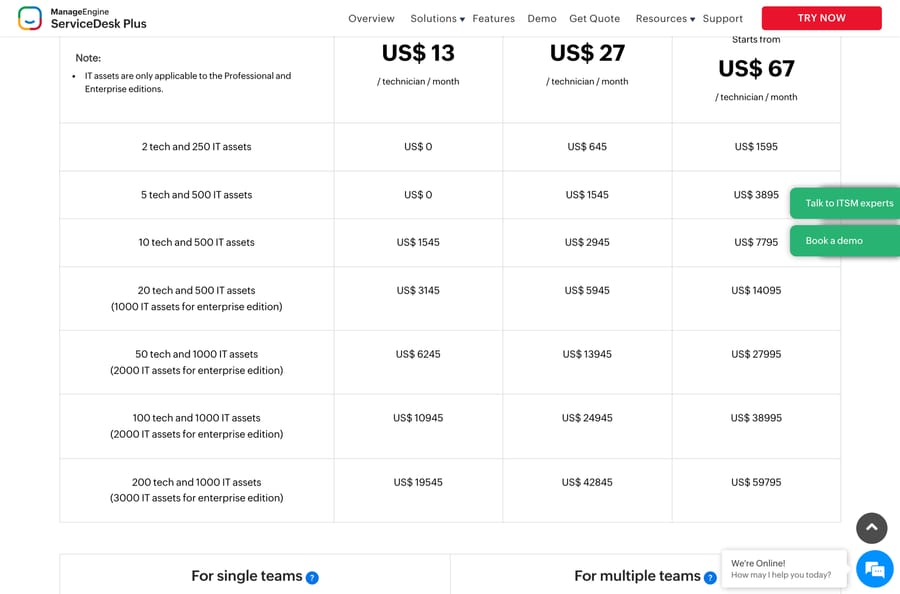
Pros: it publishes more pricing detail than anyone else in this research, a full annual grid by technician count and asset count across three editions, from US$0 at five technicians on Standard to US$59,795 at two hundred on Enterprise, plus itemized add-ons. The free edition genuinely covers five technicians. At twenty-five technicians on Professional it's $610 a month cheaper than Jira Service Management Premium for the same headcount.
Where it falls short: the AI is the weakest of the ten on the one thing this rubric measures. Zia is bundled into the seat with no published meter and no stated resolution behavior, so it scores 2, and a team leaving JSM specifically for its virtual service agent will find this a downgrade. The interface is the most dated here, and 4.2 from 251 G2 ratings is both the lowest average and a thin base for a product this old. Several capabilities that Jira Service Management bundles are priced add-ons on the lower editions, so the headline US$13 is rarely what you pay.
Pricing (cloud edition; the page has a Cloud / On-Premises toggle): Standard US$13, Professional US$27, Enterprise from US$67 per technician a month; free edition for 5 technicians on Standard; 30-day trial.
2. Freshservice, the best-evidenced swap
Best for: mid-market IT teams who want ITIL-shaped process from a vendor with a deep review base and no Atlassian dependency.
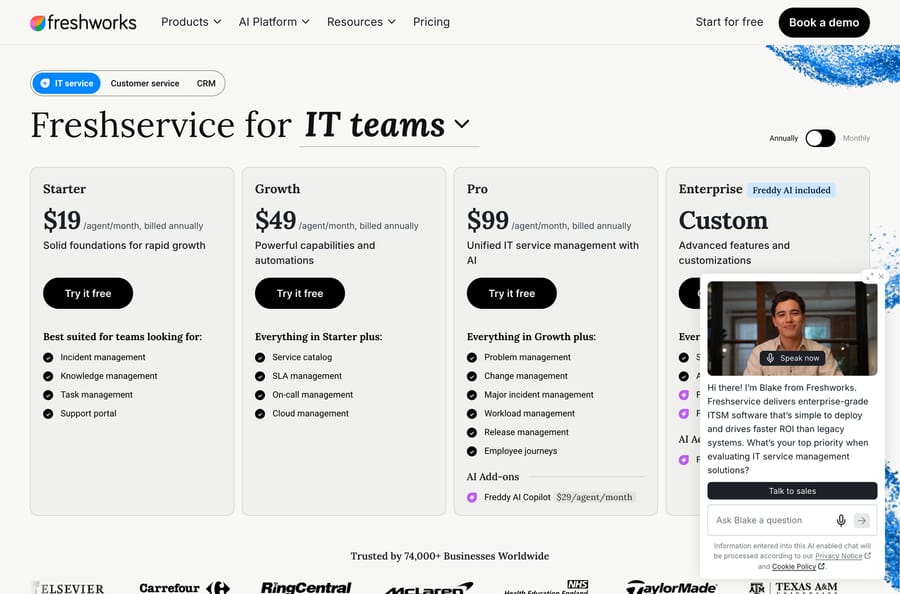
Key features: incident and knowledge management from Starter; service catalog, SLA and on-call from Growth; problem, change, release, major incident and employee journeys on Pro; Freddy AI across the platform and bundled on Enterprise. Our Freshservice explainer covers the product and the pricing breakdown goes tier by tier.
Pros: 4.6 from 1,355 G2 ratings, the deepest independent evidence of any dedicated ITSM product here, and Freshworks is a named Leader in the 2026 Gartner Magic Quadrant for ITSM Platforms per the claim on its own G2 listing. Starter at $19 undercuts Jira Service Management Standard by a dollar.
Where it falls short: the process half you probably came for (problem, change and release) starts on Pro at $99, five times the headline price and nearly double Jira Service Management Premium. Freddy AI Copilot is a further $29 an agent, and the pricing page publishes no session or resolution rate for the customer-facing AI agent, so you can't forecast that line, which is why it scores 3 on allowance transparency. Our Freshservice alternatives page covers the other direction.
Pricing: Starter $19, Growth $49, Pro $99 per agent a month billed annually; Enterprise custom with Freddy AI included; Freddy AI Copilot $29 per agent; 14-day trial.
3. SysAid, the flat-rate AI bet
Best for: IT teams whose specific complaint is the Rovo credit allowance, and who want the AI question settled at purchase.
Key features: request, incident, change and problem management; all-in-one asset management; agentic AI that resolves incidents, fulfils requests and builds automations; a sandbox and tailor-made agents on Enterprise.
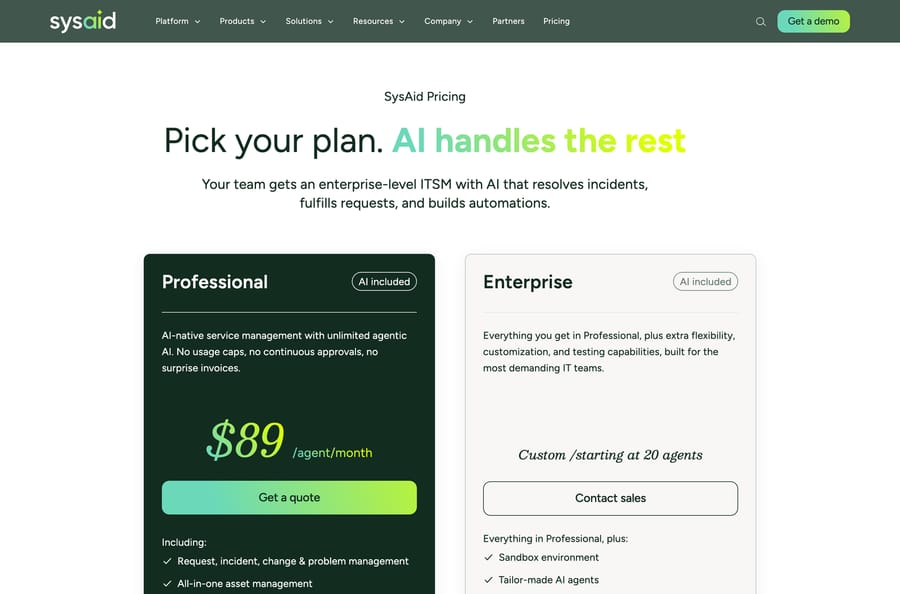
Pros: SysAid is the only vendor here that makes uncapped AI the headline of its pricing page, in its own words "unlimited agentic AI. No usage caps, no continuous approvals, no surprise invoices". For a team that has just spent a renewal cycle counting Rovo credits, that's the most directly relevant proposition on this list, and 4.5 from 753 G2 ratings is a solid base.
Where it falls short: exactly one number is published. The page prints $89 an agent a month for Professional and "Custom, starting at 20 agents" for Enterprise, with no annual-versus-monthly distinction and a Get a quote button where the buy button should be. At twenty-five agents it is $940 a month more than Jira Service Management Premium, so "uncapped" is not the same as "cheaper".
Pricing: Professional $89 per agent a month with AI included; Enterprise custom, starting at 20 agents.
4. InvGate Service Management, the small-desk budget line
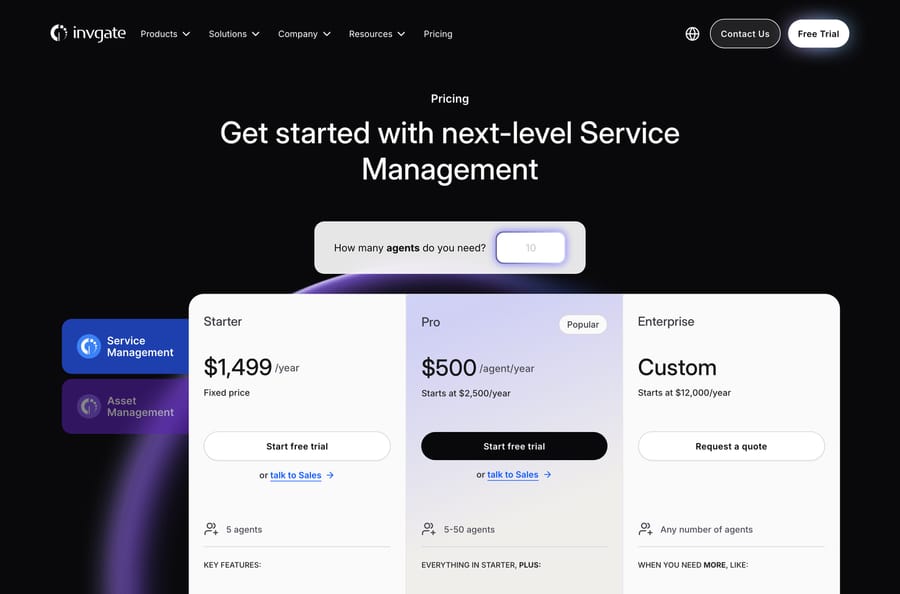
Best for: a five-to-fifty person IT team that needs real ITIL process and an annual number it can put in a budget.
Key features: incident, request, problem and change workflows; a no-code workflow builder; SSO and an AI Hub on every plan; an AI Service Agent and Microsoft Teams and WhatsApp intake on Pro; unlimited end users and approvers throughout.
Pros: the pricing is unusually legible. Starter is a flat $1,499 a year for five agents rather than a per-agent rate, and Pro is $500 per agent a year, about $41.67 a month, which makes it the second-cheapest row in the cost model. Thirty-day trial, no card, and no credit allowances to count.
Where it falls short: twenty G2 ratings. That is the thinnest evidence base on this page alongside Halo's, and for a system of record it matters more than it does for a tool you can swap out in a week. The AI Service Agent is Pro-only and carries no published meter. Enterprise starts at $12,000 a year, a sharp step up from Pro for a fifty-agent desk.
Pricing: Starter $1,499 a year fixed for 5 agents; Pro $500 per agent a year, starting at $2,500 a year, for 5 to 50 agents; Enterprise custom from $12,000 a year.
5. Atera, if you run the endpoints too
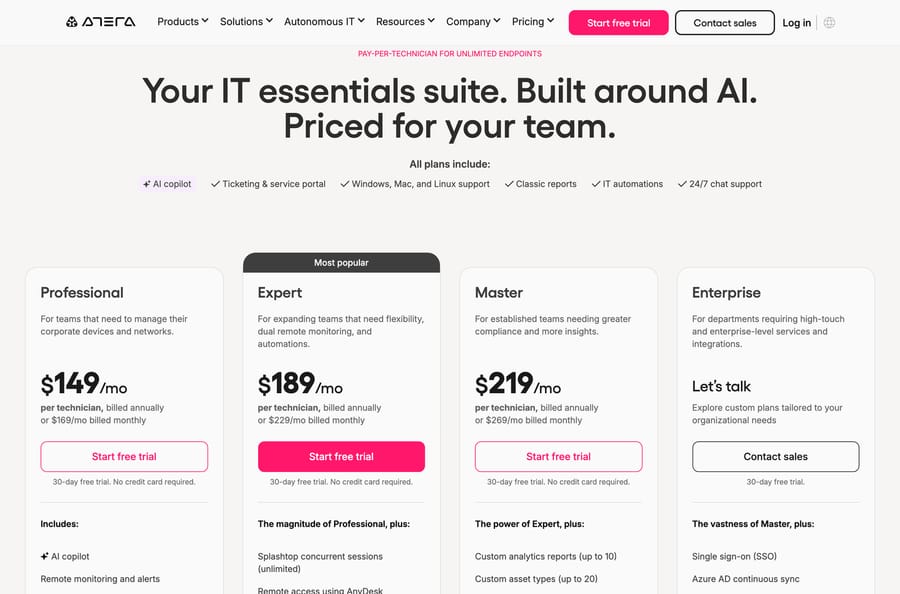
Best for: small internal IT teams buying remote monitoring, patching and a service desk in one purchase, who count devices rather than tickets.
Key features: pay per technician for unlimited endpoints; remote monitoring and alerts; ticketing and a service portal; Windows, Mac and Linux support; IT automations; an AI copilot on every plan.
Pros: the pricing page is the most complete on this list after ManageEngine's, down to per-endpoint add-on rates, and the unlimited-endpoint model inverts the arithmetic for a team managing a lot of machines with few people. 4.6 from 1,267 G2 ratings and a 30-day trial with no card.
Where it falls short: it is not an ITIL platform and does not pretend to be, which is why it scores 3 on process depth. Change and problem management are thin and a CMDB in the Jira Assets sense is not there. It is also the most expensive row in the cost model at $3,725 for twenty-five technicians, because the model assumes you are replacing an RMM as well. If you are not, you are paying for half a product.
Pricing: Professional $149, Expert $189, Master $219 per technician a month billed annually, or $169, $229 and $269 monthly; Enterprise by quote; 30-day trial, no card.
6. Vivantio, for desks with a compliance list
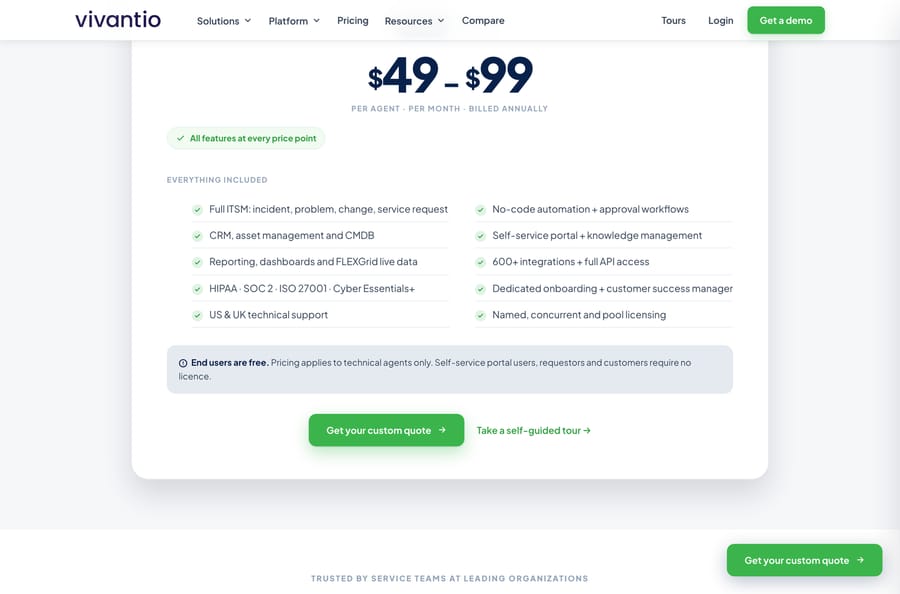
Best for: internal service desks that have to answer an auditor, where the certification list is part of the requirement.
Key features: full ITSM across incident, problem, change and service request; CRM, asset management and a CMDB; no-code automation and approval workflows; self-service portal and knowledge management; 600-plus integrations and full API access; named, concurrent and pool licensing.
Pros: every feature ships at every price point, so there is no tier-shopping and no capability sitting behind an upgrade, which is the structural opposite of Jira Service Management's Premium gate. End users are free. HIPAA, SOC 2, ISO 27001 and Cyber Essentials+ are all listed on the pricing page itself, which is rare at this size. Named, concurrent and pool licensing in one product suits a desk with shift patterns.
Where it falls short: the published price is a range, $49 to $99, with no plan names and no rule for where you land in it, so you cannot cost a month without talking to someone, which is why it scores 3 on published pricing. The AI is bundled with no meter and no stated resolution behavior. 4.3 from 295 G2 ratings puts it mid-table on evidence.
Pricing: $49 to $99 per agent a month billed annually, all features included, end users free.
7. Zendesk, for the customer-facing half
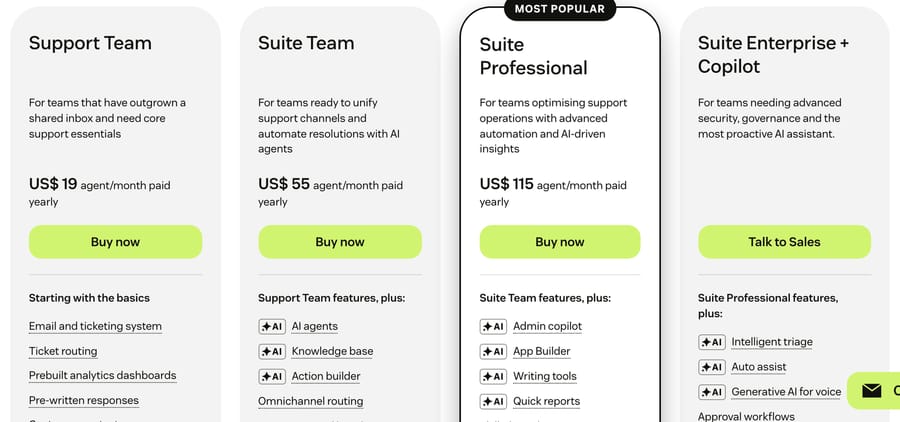
Best for: teams who adopted Jira Service Management for external customer support rather than internal IT, which is a surprisingly common way to end up here.
Key features: omnichannel ticketing across email, chat, messaging, social and voice; the deepest routing and business rules in the category; AI agents that resolve and a Copilot that drafts; the largest app marketplace here. Our Zendesk against Jira Service Management comparison takes the head-to-head.
Pros: the largest independent review base on this page by an order of magnitude, 4.3 from 7,075 G2 ratings and 4.4 from 1,049 on Gartner Peer Insights, and per-resolution AI billing minus a monthly dollar allowance per seat ($2, $5 or $10 by plan since 18 May 2026). Zendesk's pricing page lists the resolution rate at $1.50 committed or $2.00 pay-as-you-go, and its plan table includes 5 automated resolutions per agent a month on Support Team and Suite Team and 10 on Suite Professional, the same allowance the help center describes in dollars. Our Zendesk AI pricing breakdown does the arithmetic.
Where it falls short: it is not an ITSM platform, which is why it scores 2 on process depth. No native change management, no problem management, no CMDB; you build those with custom objects or buy them elsewhere. The AI allowance is stated two ways (resolutions per agent on the pricing page, dollars per seat in the help center), so costing next month takes a spreadsheet. And at $55 a seat it is nearly three times Jira Service Management Standard. Our Zendesk alternatives roundup is the other side.
Pricing: Suite Team $55, Growth $89, Professional $115 per agent a month billed annually; automated resolutions $1.50 committed or $2.00 pay-as-you-go, per the same page.
8. SolarWinds Service Desk, discovery first
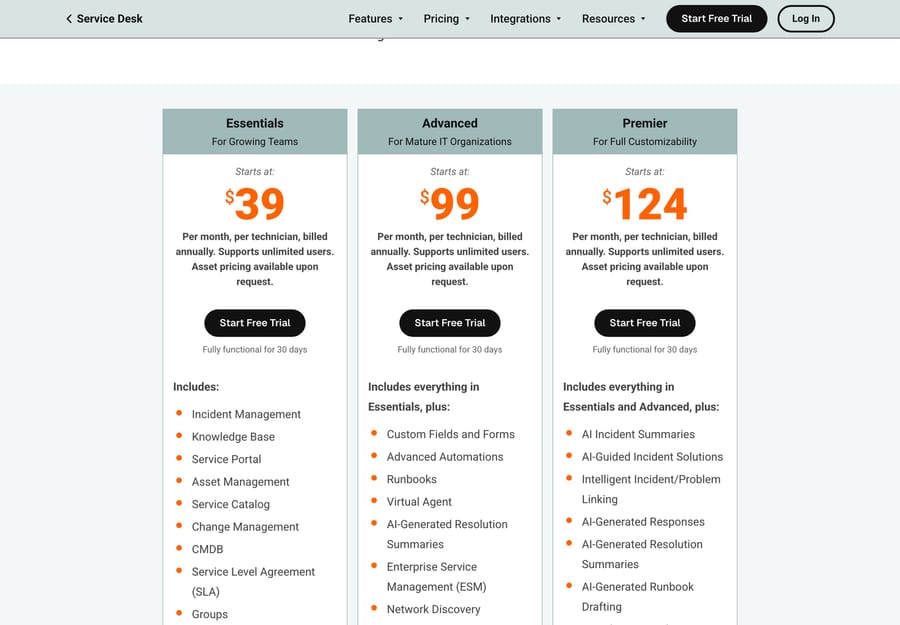
Best for: IT teams whose real problem is knowing what they own, and who found Jira Assets' object counts a poor fit for a real estate of devices.
Key features: incident, problem, change and release management; asset management, CMDB and network discovery; a service portal and catalog; a Virtual Agent from Advanced; AI incident summaries, guided solutions and runbook drafting on Premier.
Pros: unlimited requesters on every plan, so the license counts only technicians, and the $39 Essentials tier already includes change management and a CMDB, which Jira Service Management gates behind Assets object allowances. 4.3 from 787 G2 ratings. The plan feature lists are unusually specific about which AI capability sits on which tier.
Where it falls short: "Asset pricing available upon request" sits under all three plans, which is exactly the allowance opacity this rubric penalizes, and it is why the product scores 2 there despite being the asset specialist. The Virtual Agent has no published rate. SolarWinds' Vendr median across the whole company is $31,815 a year, a reminder that the listed seat price is a starting point in an enterprise negotiation.
Pricing: Essentials $39, Advanced $99, Premier $124 per technician a month billed annually; unlimited requesters; asset pricing on request; 30-day trial.
9. Halo, one platform across every department
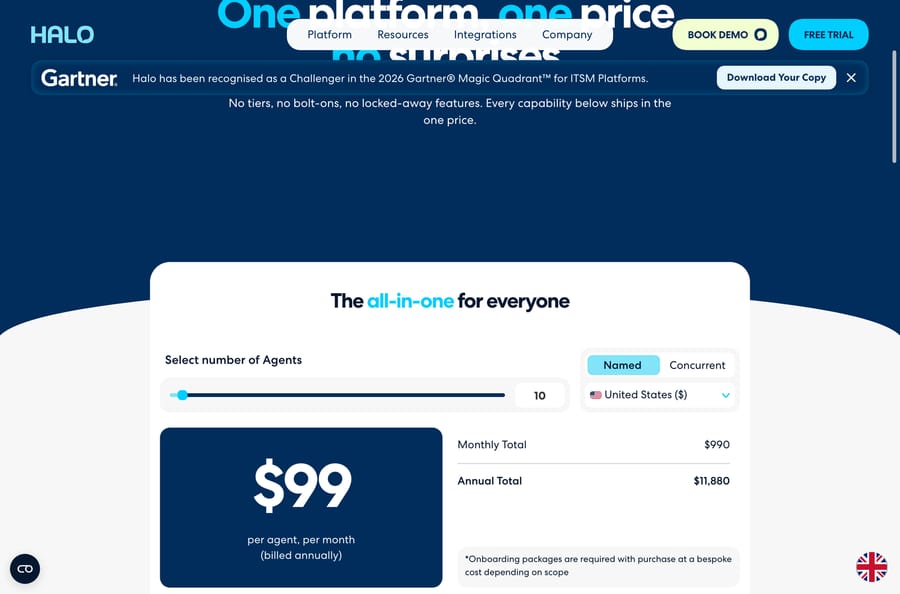
Best for: organizations that want IT, HR, facilities and customer service on one license rather than four products, which is the enterprise-service-management pitch Jira Service Management also makes.
Key features: ITSM with incident, service request, change, problem and major incident management; enterprise service management for HR, finance, legal and facilities; a customer-service module with an omnichannel inbox and live chat; CMDB, asset discovery and software asset management; project management and billing; Halo AI for agents, suggested replies, sentiment and triage.
Pros: the broadest functional footprint on this page for a single per-agent price, with no tiers, editions or add-ons; the page's own claim is "No tiers, no bolt-ons, no locked-away features." Its site banner claims Challenger placement in the 2026 Gartner Magic Quadrant for ITSM Platforms. At ten agents the US price prints as $990 a month and $11,880 a year.
Where it falls short: two things pull the score down hard. Seventeen G2 ratings is the smallest evidence base here, and the pricing page carries the footnote "Onboarding packages are required with purchase at a bespoke cost depending on scope", so the transparent single price is not the whole bill. The page also defaults to GBP unless you change the region selector, so check the symbol before you quote it. Halo AI is included with no meter.
Pricing: $99 per agent a month billed annually in the United States, plus a required onboarding package at bespoke cost; an Enterprise Package with unlimited licenses and funded implementation at a fixed $1M a year.
10. Deskpro, self-hosting without the ITSM stack
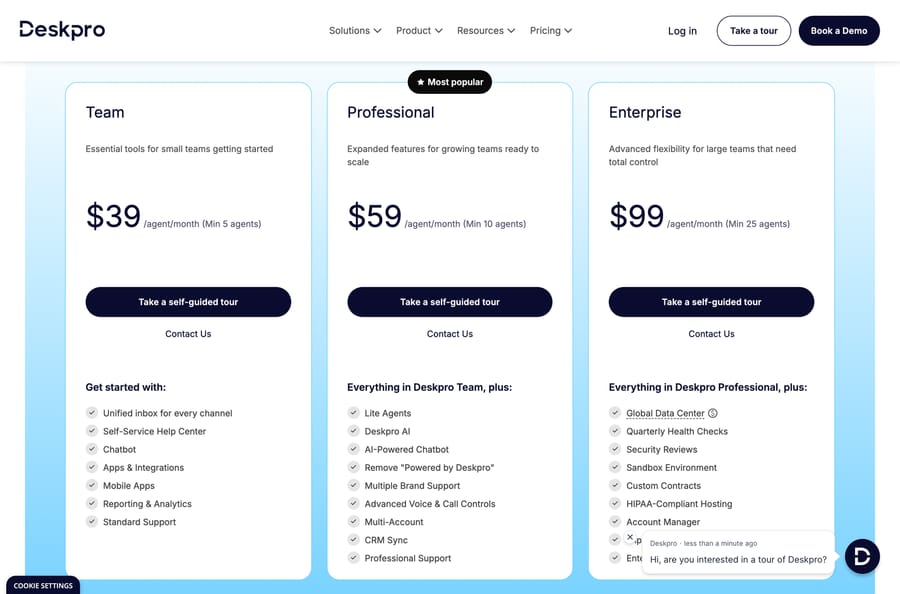
Best for: teams whose reason for leaving is hosting rather than process, and who would rather run a good help desk themselves than a heavy ITSM platform.
Key features: unified inbox across email, chat, phone, Slack, Teams, social, WhatsApp and SMS; a self-service help center; Deskpro AI and an AI-powered chatbot from Professional; multiple brand support and CRM sync; HIPAA-compliant hosting and a sandbox on Enterprise; a separate Deskpro Private line with its own pricing page.
Pros: it is one of only two products here with a current self-hosted edition, and the only one of those two that is a modern help desk rather than a legacy ITSM suite. The widest channel list on this page at the lowest tier, no credit allowances to count, and prices published per tier.
Where it falls short: the agent minimums. Team is $39 with a five-agent minimum, Professional $59 with ten, Enterprise $99 with twenty-five. It is a help desk with ITSM leanings, not an ITSM platform: no change management and no CMDB in the Jira Assets sense, which is why it scores 3 on process depth. 98 G2 ratings is the thinnest base on this page apart from InvGate's and Halo's, Deskpro AI has no published per-resolution rate, and the buying flow is a self-guided tour and a Contact Us rather than a signup.
Pricing: Deskpro Cloud Team $39 (minimum 5 agents), Professional $59 (minimum 10), Enterprise $99 (minimum 25) per agent a month; Deskpro AI from Professional; Deskpro Private priced separately.
Which tools missed the cut, and why?
Five platforms that rank on page one for this search or appear on rivals' shortlists scored below 18 and get named rather than listed.
- Xurrent, 14/30. A credible ITSM and ESM platform with a good G2 average (4.6 from 87 ratings for Xurrent ITSM) and a pricing page that describes three tiers by platform-user count and prints no prices at all. Its own FAQ asks "What are the specific prices for each license plan?" and answers with a contact form. It also has no Vendr page, so there is no third-party number either.
- TeamDynamix, 14/30. Strong in higher education, no-code, 4.5 from 101 G2 ratings for its ITSM product, and no published price on its own site and no Vendr page.
- ServiceNow, 14/30. The deepest product in the category and the opposite of this page's brief. No published price at all; Vendr's contract data puts the median buyer at $127,118 a year, which is about eight times Jira Service Management Premium at twenty-five agents.
- Ivanti ITSM, 15/30. The deepest ITIL feature set outside ServiceNow, and the only one here with a Vendr median that undercuts it meaningfully at $11,212 a year. It loses on transparency, on evidence (4.0 from 323, the lowest average in this research) and on allowance visibility.
- HelpSpot and Motadata both rank on page one and were read but not scored, because neither publishes enough on its own pricing page for the first criterion to mean anything.
Who should stay on Jira Service Management?
This is the section most pages with this title leave out.
You are an Atlassian shop. If your engineers are in Jira Software and your docs are in Confluence, the handoff from a service request to a development ticket is the product, and no alternative on this page replicates it.
Your volume fits inside the allowances. At twenty-five agents on Premium you get 17,500 Rovo credits, 62,500 indexed objects, 162,500 automation steps and 1,000 assisted conversations a month, plus 50,000 Assets objects. Count your actual usage against those before assuming the caps are the problem. For a lot of teams they never bind.
You want a free tier while you evaluate. Free forever for three agents with unlimited customers is a real starting point, and only ManageEngine ServiceDesk Plus offers anything comparable.
What migrates from Jira Service Management, and what does not?
Budget a quarter if Assets is in scope, a month if it is not.
Migrates cleanly: users and groups, request types as a list, knowledge base articles as HTML (though Confluence-backed spaces need exporting first), and ticket history as a flat export.
Migrates with work: SLA definitions, queues and approval chains, all of which every vendor models differently. Assets is the hard part: object schemas, attributes and relationships rarely survive, and discovery usually re-runs from scratch on the new platform.
Does not migrate: automation rules, which are the single biggest sunk cost in a mature Jira Service Management site, anything built with Forge or Connect apps from the Atlassian Marketplace, and any dashboard built on JQL. Those are rewrites. Your reporting baselines go too, because no two vendors count a resolution the same way. Our explainer on what deflection rate really measures covers why.
What if the platform is fine and only the AI disappoints?
There's one more answer that isn't on the list, and it needs saying plainly because it's the one we sell.
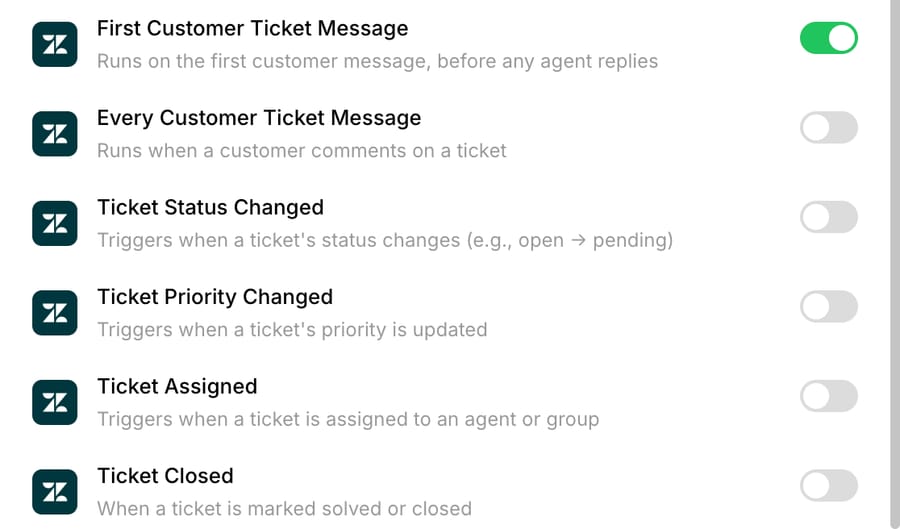
If the ticketing works and the only frustration is the AI attached to it, you can add an agent layer instead of migrating. That's what Macha is: an AI agent layer that runs on top of the help desk a team already uses, never a replacement for it, and it's out of the ranking because it isn't an IT service management platform and can't be scored as one. Every agent you build is set by you to reply to the requester, write an internal note for a human, or only change fields on the ticket. It's priced on monthly ticket volume, from $299 a month for 750 tickets, about $0.40 a ticket at every tier, with setup and monitoring by our team included on every plan. A ticket is one thread with one person, charged once however many replies it takes. Full detail is on our pricing page.
Where it falls short, in the same terms as everything above: Macha does not run on Jira Service Management as its help desk, and of the ten platforms on this page only Zendesk is a help desk it runs on. Macha does have a live Jira connector that searches and reads issues, creates and comments on them, transitions their status and fires on new issues; JSM requests are Jira issues, so an agent can work a service project through it, as our guide to building an AI agent for Jira Service Management sets out. It runs on Zendesk, Freshdesk, Gorgias and Front, and on Intercom and HubSpot; the current list is on our integrations page. It also has no independent review base at all, zero G2 ratings as of 22 September 2026, no voice channel, and an agent does what its instructions say, so vague instructions make a vague agent.
The honest version for this reader is narrow: it applies if you are moving the customer-facing half to Zendesk and want the AI sorted at the same time, or if you are staying on JSM and want an agent to triage requests through the Jira connector. If you are replacing internal ITSM, one of the ten above is the move. Our piece on adding an AI layer instead of rip-and-replace makes both cases, and our help desk roundup covers the customer-service branch.
How we researched this
We checked every seat and AI rate on the vendor's own live page on 22 September 2026, in a real browser forced to the US region: US locale, New York timezone, English-US headers and the MaxMind geoip lookup stubbed, because Halo and Vivantio both default to pounds and ManageEngine and Freshworks switch currency by location. Every figure printed here starts with a dollar sign on the page it came from. Halo's region selector was set to United States before the screenshot, and ManageEngine's Cloud / On-Premises toggle was left on Cloud, which we say wherever those figures appear.
Jira Service Management's allowance numbers come from the feature-comparison table on its own pricing page rather than from the plan cards, because the cards do not carry them. SolarWinds returns Access Denied to a default scripted request and was captured with full browser headers. G2 returns a 403 to every scripted request, so all fifteen G2 listings were read in a real Chrome session the same day. Gartner Peer Insights' ITSM market page rendered only its navigation for us, so we quote no Gartner rating and use G2 consistently. For the vendors with no self-serve price we also checked Vendr; Xurrent and TeamDynamix have no page there, and we say there is no number rather than inventing one.
We did not build a service desk on any of these platforms for this guide, and we are not quoting benchmark results we did not run.
Frequently asked questions
How much does Jira Service Management cost? Free forever for three agents with unlimited customers, then Standard $20 and Premium $51.42 per agent a month, with Enterprise billed annually. The Customer Service AI Agent is included at $1 per resolution from Standard upwards, and the internal virtual service agent arrives on Premium with 1,000 assisted conversations a month included.
What is the cheapest alternative to Jira Service Management? ManageEngine ServiceDesk Plus Professional, at US$27 a technician a month, or $675 at twenty-five technicians against Jira Service Management Premium's $1,285. InvGate Pro is next at $1,042. Everything else on this page costs more than the product you are leaving.
Which alternatives can I host on-premises? Two. ManageEngine ServiceDesk Plus sells cloud and on-premises editions from the same pricing page with a toggle between them, and Deskpro sells Deskpro Cloud and Deskpro Private as separate lines with separate pricing pages. Every other platform on this page is cloud-only.
Is Freshservice better than Jira Service Management? On our rubric Freshservice scores 24 against Jira Service Management's 28, and it has a deeper review base at 4.6 from 1,355 G2 ratings. Freshservice wins if you are not an Atlassian shop and you want a vendor that lives in ITSM rather than in developer tooling. Jira Service Management wins on price, on its free tier and on printing its own caps where you can see them.
What are Rovo credits and do they matter? Rovo credits meter Atlassian's AI search, chat and agents, and they are allocated per user per month: 250 on Standard, 700 on Premium and 1,500 on Enterprise, alongside 1,000, 2,500 and 6,250 indexed objects. For a lot of teams they never bind. For teams running heavy AI search across a large document estate they are the reason the bill moves, and they are the single most common reason people go looking for an alternative that bundles AI flat.
Does Jira Service Management have a free plan? Yes, and it is one of the better ones in this category: free forever for three agents with unlimited customers, 100 email notifications a day and 1,250 automation steps a month for the whole subscription. Assets and the virtual service agent are not included on Free.
Which alternative is best if I only use Jira Service Management for customer support? Zendesk, which scores 21 here despite taking 2 for ITIL process depth, because that depth is not what you are using. Our Zendesk against Jira Service Management comparison takes that fork properly, and the help desk category rather than the ITSM one is the right shortlist.
Does Macha work with Jira Service Management? Partly, and we'd rather say exactly how. Macha's help-desk integrations are Zendesk, Freshdesk, Gorgias, Front, Intercom and HubSpot, and of the ten platforms above only Zendesk is on that list. Macha also has a live Jira connector (search and read issues, create and comment, status transitions, a new-issue trigger), and because JSM requests are Jira issues, an agent can work a service project through it. Test whether a connector comment lands as public or internal on your service project before you rely on it.
Which Jira Service Management alternative should you pick?
Jira Service Management scores 28 out of 30 on our own rubric and sits in the cheap third of its own alternatives table, so the honest headline is that most people searching this should check their reason for leaving before they check the list. The four reasons that hold up are not being an Atlassian shop, needing to host it yourself, outgrowing the credit and object allowances, and resenting the Premium jump for the virtual service agent.
If one of those applies: ManageEngine ServiceDesk Plus is the cheapest complete swap and one of two with a self-hosted edition, Freshservice has the best evidence base, SysAid is the answer to the allowance complaint, InvGate the answer to a small budget, Vivantio the answer to a compliance list, SolarWinds Service Desk the answer to an asset estate, Halo the answer to enterprise service management, Deskpro the answer to hosting, Zendesk the answer if you were using it for customers all along, and Atera only if you are replacing endpoint management at the same time.
Run the cost model on your own technician count before you compare headline prices, because the spread at twenty-five agents is more than five to one. And if the platform is fine and only the AI is the problem, adding an agent layer to the desk you already run is cheaper than a migration, on the desks we support, starting with $50 of free usage and no credit card.
Sources: Jira Service Management pricing · ManageEngine ServiceDesk Plus pricing · ServiceDesk Plus on-premises · Freshservice pricing · SysAid pricing · InvGate pricing · Atera pricing · Vivantio pricing · SolarWinds Service Desk pricing · Halo pricing · Deskpro Cloud pricing · Deskpro Private pricing · Xurrent pricing · Vendr: ServiceNow · Macha pricing
Simple per-ticket AI pricing
One thread with one person is one charge, however many replies it takes.