Intercom
 Shopify
 Stripe
 Slack
Slack Notion
 Google Workspace
 Confluence

What Are the Best LiveChat Alternatives in 2026? 10 Scored, With Real Prices


Tidio and Zendesk are the best-scoring LiveChat alternatives in 2026, tied at 26 out of 30 on a published rubric, and a five-agent, 250-chat month across the ten costs anywhere from $0 to $516. LiveChat's own Team plan costs $245 for the same month, because its $19 Starter plan covers exactly one user.
Key takeaways
- Tidio and Zendesk tied for the highest score among ten LiveChat alternatives, at 26 out of 30 on Macha's published rubric.
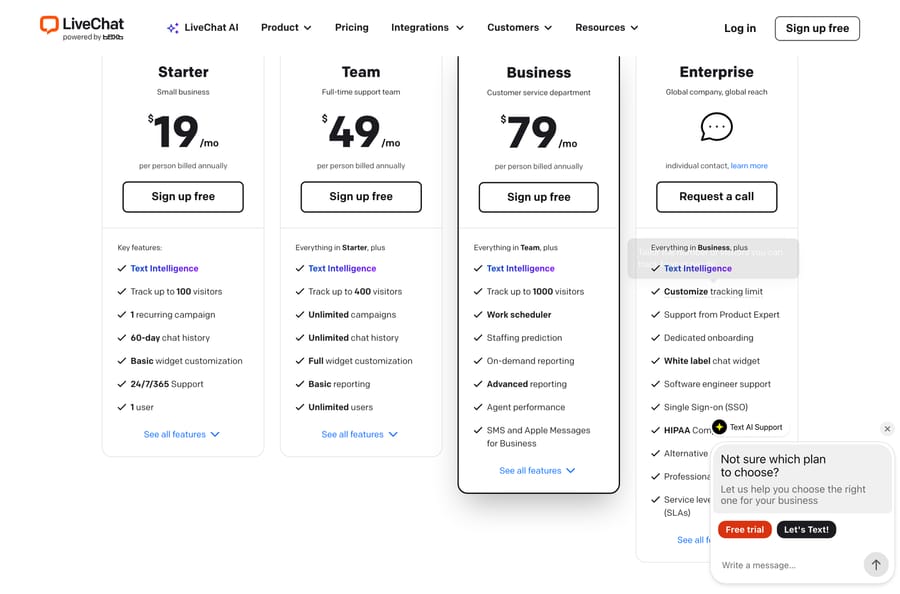
- LiveChat's Starter plan costs $19 a person a month but covers exactly one user, so a five-person team needs the $49-a-person Team plan at $245 a month.
- At five agents and 250 chat conversations a month, costs across ten LiveChat alternatives ranged from $0 on tawk.to's free plan to $516 on Olark's AI Website Agent plan.
- Intercom's Essential plan costs $29 a seat billed annually and includes Fin at $0.99 per outcome, so five agents cost $145 a month before AI outcomes.
- Crisp prices per workspace rather than per seat, covering ten seats for $95 a month on its Essentials plan with $25 of AI credits included.

The best LiveChat alternatives in 2026 are Tidio and Zendesk, which tie at 26 out of 30 on our published rubric, followed by Crisp, HubSpot, Intercom and Freshdesk Omni at 25. For five agents answering 250 chats a month, the same work costs $0 on tawk.to, $49.17 on Tidio and $245 on LiveChat's own Team plan.
Macha publishes this page. Macha is not a live chat platform and is not one of the ten, so it is absent from the ranking and appears once, in a clearly marked section near the end. Every price here was read on the vendor's own live page, forced to the US region, on 22 September 2026, with one labeled exception.
How do the LiveChat alternatives compare? (prices checked 22 September 2026)
Legend: ✅ native · ➕ configurable, you build it · ✖ not a focus.
| Alternative | Best for | Entry price | Priced per | AI that answers customers | Score |
|---|---|---|---|---|---|
| Tidio | Small stores that want the AI included | Free for 50 chats; $24.17/mo | Conversation | Lyro, quota-based | 26/30 |
| Zendesk | Teams whose chat is one channel of many | $55 per agent/mo annual | Agent seat + resolution | Per automated resolution, $1.50 committed | 26/30 |
| Crisp | Small teams who hate per-seat math | Free for 2 seats; $45/mo | Workspace | AI credits in dollars | 25/30 |
| HubSpot | Companies already on HubSpot CRM | Free for 2 users; $90 per seat/mo | Seat + credits | ~$0.50 per resolution | 25/30 |
| Intercom | Chat-led SaaS that wants the AI first | $29 per seat/mo annual | Seat + outcome | $0.99 per Fin outcome | 25/30 |
| Freshdesk Omni | Chat plus a real ticket queue | $29 per agent/mo annual | Agent seat + session | $49 per 100 sessions | 25/30 |
| Chatwoot | Teams who want to self-host | Free for 2 agents; $19 per agent/mo | Agent seat | Captain AI credits | 23/30 |
| tawk.to | Anyone whose budget is zero | Free forever, unlimited agents | Nothing | AI Assist $29/mo | 22/30 |
| Zoho SalesIQ | Zoho shops and lead-led chat | Free for 3 operators; $7 per operator/mo | Operator seat | Zobot, bundled | 21/30 |
| Olark | Teams who want AI at a flat fee | $29 per agent/mo classic | Agent seat, or a flat AI plan | Unlimited, $400/mo flat | 20/30 |
| LiveChat, the incumbent | Chat-first teams with budget | $19 per person/mo annual | Person | Separate Text products | 18/30 |
The column to read twice is priced per. Crisp charges per workspace and includes ten seats at $95. tawk.to charges nothing and caps nothing. Tidio charges for conversations, so a big team answering few chats pays less than a small team answering many. Everyone else charges for people, which is the model LiveChat uses and the one most people are trying to leave.
Why do teams leave LiveChat?
LiveChat is a good product with a 4.5 from 812 G2 ratings, and the complaints are narrow and consistent. The five most common negative tags on that listing are Not Intuitive (7 mentions), Chatbot Issues (6), Improvements Needed (5), Expensive (5) and Chat Management (5).
Three things drive the search:
- The entry plan is one seat. Starter at $19 a person tracks up to 100 visitors, keeps 60 days of chat history, and its own feature list says "1 user". Unlimited users and unlimited chat history start at Team, $49 a person, so a five-person team pays $245 a month before anything else.
- The AI is a different product with a different bill. LiveChat is one of Text's products, and the chatbot, the help desk and the AI pieces are sold separately as ChatBot, HelpDesk and Text Intelligence. That is a coherent business, and it is also why a LiveChat quote rarely stays a LiveChat quote.
- Cost at the top tiers is the recurring review theme. A mid-market IT operations manager wrote on 6 May 2026: "Small businesses may find that the more expensive tiers can be so costly that it's difficult to justify them over the other platforms available. Furthermore, the mobile application can also suffer from notification delays."
Worth naming the incentive, since it explains the shape of every plan below: a per-seat price earns the vendor more as you hire, so nothing in it rewards them for answering more chats with fewer people. Four of the ten alternatives here charge per workspace, per conversation or not at all, and that single choice moves the bill more than any feature does.
What does a month cost with 5 agents and 250 chats?
Every row uses the cheapest plan on that vendor's own price list that covers five agents and 250 chat conversations, annual billing where it is offered.
| Alternative | Plan | Monthly total | What the AI costs on top |
|---|---|---|---|
| tawk.to | Free | $0 | AI Assist $29/mo, optional |
| Tidio | Growth | $49.17 | Lyro conversations bought as a quota |
| Zoho SalesIQ | Professional | $63.75 | Zobot bundled, no published meter |
| Chatwoot | Startups | $95 | 300 Captain AI credits included |
| Crisp | Essentials | $95 | $25 of AI credits included |
| Olark (classic) | Live chat only | $145 | No AI on this plan |
| Freshdesk Omni | Growth | $145 | First 500 Freddy sessions free, then $49/100 |
| Intercom | Essential | $145 | $0.99 per Fin outcome |
| LiveChat (benchmark) | Team | $245 | ChatBot and Text Intelligence priced separately |
| Zendesk | Suite Team | $275 | Per automated resolution; $1.50 committed on Zendesk's pricing page |
| HubSpot Service Hub | Professional | $450 | 50 credits a resolution, about $0.50 |
| Olark (with AI) | AI Website Agent | $516 | Included, unlimited |
Four things worth saying before anyone quotes that table.
The free end is not a toy. tawk.to's platform is genuinely free with unlimited agents, and it includes ticketing and a hosted help center. Its business runs on four optional add-ons priced per property rather than per seat, and its own site says 99% of its users never buy one.
Crisp and Tidio break the per-seat model in opposite directions. Crisp Essentials is $95 a month for the whole workspace with ten seats included, so the fifth agent is free and so is the tenth. Tidio prices on billable conversations, so seats are not the variable at all. If your team is five people answering 250 chats, both land near $95 and LiveChat lands at $245.
Olark's two plans are two different products. The classic live-chat-only plan is $29 an agent. The AI plan is $400 a month flat for unlimited AI conversations, with human agents at $29 each on top, which is why the same vendor appears at both $145 and $516 in one table.
HubSpot's $1,500 onboarding fee is not in the monthly column because it is not monthly. It is roughly three months of the whole bill, paid once, before anything runs. HubSpot also has a genuinely free live chat tier for two users, which is why its entry score is not the worst on the page.
How were the LiveChat alternatives scored?
Most pages ranking for this search are published by someone selling one of the products on them. Ours is no exception, which is why the scoring below is printed in full, with every score visible.
Six criteria, each scored 0 to 5, for a maximum of 30. A platform needs 18 out of 30, or 60%, to get a full entry. Ties are broken by entry cost, because the people searching this are leaving a $19-a-seat product, and then by the independent review base.
| Criterion | 5 points | 0 points |
|---|---|---|
| Published pricing | Every plan and AI rate on the vendor's own page, in dollars | Nothing public |
| Entry cost | A free plan with real volume, or under $20 a seat | Over $100 a month minimum |
| Channels beyond the widget | Email, social, WhatsApp and messaging, voice | Website chat only |
| AI that answers customers | Built in, with a rate or quota you can calculate | No AI a customer ever talks to |
| Independent review base | 1,000 or more G2 ratings | None |
| Ticketing behind the chat | Chats become tracked tickets with assignment and SLAs | Transcripts only |
| Platform | Pricing | Entry | Channels | AI | Reviews | Ticketing | Total | Score |
|---|---|---|---|---|---|---|---|---|
| Tidio | 4 | 5 | 4 | 5 | 5 | 3 | 26 | 87% |
| Zendesk | 4 | 2 | 5 | 5 | 5 | 5 | 26 | 87% |
| Crisp | 5 | 5 | 5 | 3 | 3 | 4 | 25 | 83% |
| HubSpot | 4 | 3 | 4 | 4 | 5 | 5 | 25 | 83% |
| Intercom | 4 | 3 | 5 | 5 | 5 | 3 | 25 | 83% |
| Freshdesk Omni | 4 | 3 | 5 | 4 | 4 | 5 | 25 | 83% |
| Chatwoot | 5 | 5 | 5 | 3 | 1 | 4 | 23 | 77% |
| tawk.to | 5 | 5 | 3 | 2 | 3 | 4 | 22 | 73% |
| Zoho SalesIQ | 3 | 5 | 4 | 3 | 3 | 3 | 21 | 70% |
| Olark | 5 | 3 | 2 | 5 | 3 | 2 | 20 | 67% |
| LiveChat (benchmark) | 4 | 3 | 3 | 2 | 4 | 2 | 18 | 60% |
Three scores that look wrong at a glance and aren't. LiveChat lands on the line at 18, which is not a verdict on the chat widget, the best-reviewed part of the product; it is a verdict on a one-seat entry plan, an AI story that lives in sibling products, and ticketing you buy separately. Chatwoot takes 5 for pricing and 1 for reviews, because it publishes a complete per-agent table and has sixteen G2 ratings. Intercom takes 3 for ticketing because its $29 Essential plan has a shared inbox and tickets but no round-robin assignment or multiple team inboxes; those start on Advanced at $85. And Zoho SalesIQ takes 3 for published pricing despite publishing prices, because zoho.com served us rupees from both a script and a browser, so the dollar figures on this page come from G2's pricing tab, carrying that label wherever they appear.
Macha is not scored here. It is not a live chat platform, and putting a non-chat product on a live chat rubric would rig the table in one direction or the other.
The ten best LiveChat alternatives
1. Tidio, the closest like-for-like swap
Best for: small stores and SaaS teams who want a chat widget that answers on its own, priced on volume rather than headcount.
Key features: live chat and ticketing in one tool; Flows, a visual automation builder; the Lyro AI agent; live visitors list, operating hours and macros; channels across email, Messenger, Instagram and WhatsApp.
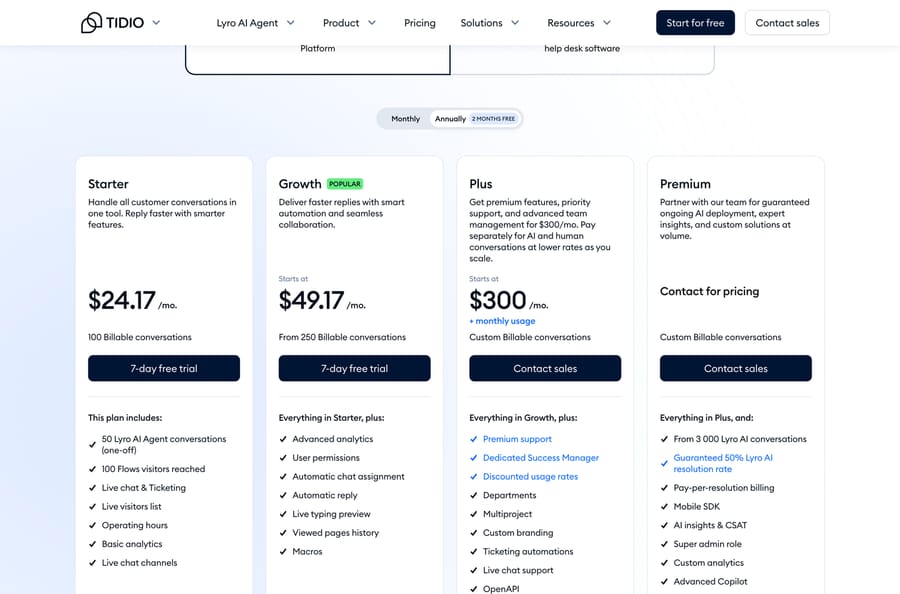
Pros: the strongest review base of any dedicated chat product here, 4.6 from 1,962 G2 ratings, and the only one whose AI comes with a published guarantee. The Premium tier advertises a guaranteed 50% Lyro resolution rate and pay-per-resolution billing, which is a vendor putting its own number in writing. At five agents and 250 conversations it is the second-cheapest row in the cost model.
Where it falls short: three separate limits catch people out and they are easy to confuse. The Free plan allows 50 billable conversations a month, Flows are capped at 100 unique visitors a month, and the 50 free Lyro conversations are a one-off rather than a monthly allowance. Cost is also the loudest complaint on its G2 listing: Expensive is tagged 76 times and Cost a further 56, alongside Limited Customization at 57. And the trial is seven days, the shortest here. Our Tidio alternatives roundup covers the other direction if you end up leaving it too.
Pricing: Free $0 for 50 billable conversations a month; Starter $24.17 for 100; Growth from $49.17 from 250; Plus from $300 plus usage; Premium by quote from 3,000 Lyro conversations. 7-day trial.
2. Zendesk, if chat is one channel of several
Best for: teams whose chat widget is one inbox among email, social and voice, and who need routing and SLAs behind it.
Key features: omnichannel ticketing; messaging across web, mobile, WhatsApp and social; AI agents that resolve and a Copilot that drafts; the deepest business rules in the category; the largest app marketplace here.
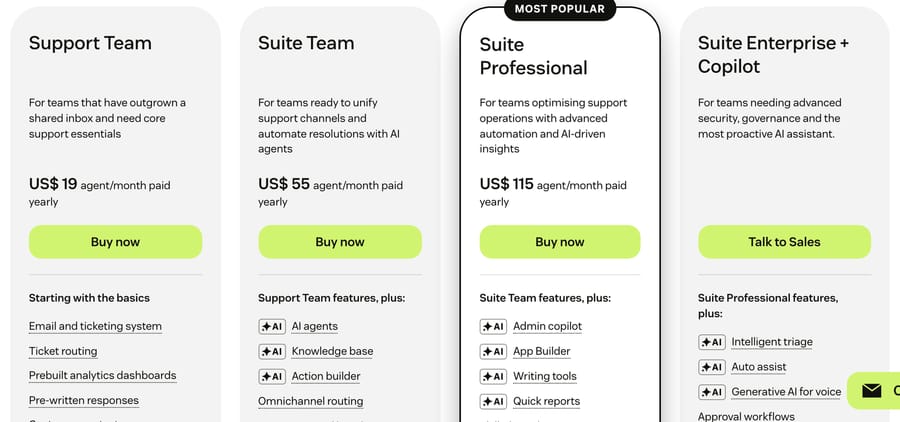
Pros: the largest independent review base on the page by a wide margin, 4.3 from 7,075 G2 ratings, and an AI bill charged per automated resolution. Zendesk's pricing page lists the rate at $1.50 committed or $2.00 pay-as-you-go, and its plan table includes 5 automated resolutions per agent a month on Support Team and Suite Team and 10 on Suite Professional; Zendesk's help center describes that allowance as a monthly dollar amount per seat of $2, $5 or $10 by plan since 18 May 2026, capped at $5,000 a year. Our Zendesk AI pricing breakdown does the arithmetic, and Zendesk against LiveChat takes the head-to-head.
Where it falls short: it is the second most expensive seat in the cost model and the heaviest product on this page by some distance. If all you want is a widget on a marketing site, Zendesk is an enormous amount of machinery to configure and pay for. Two AI allowance models are also live at once, so costing next month takes a spreadsheet rather than a glance.
Pricing: Suite Team $55, Growth $89, Professional $115 per agent a month billed annually; automated resolutions at $1.50 committed or $2.00 pay-as-you-go, per Zendesk's pricing page.
3. Crisp, the one that stops charging per seat
Best for: small teams who want to add the sixth and seventh agent without the bill moving.
Key features: website chat widget, shared inbox and shared email inbox; chat triggers, private notes and shortcuts; an omnichannel inbox and AI chatbot from Essentials; knowledge base, routing rules and workflow automation; a ticketing system on Plus.
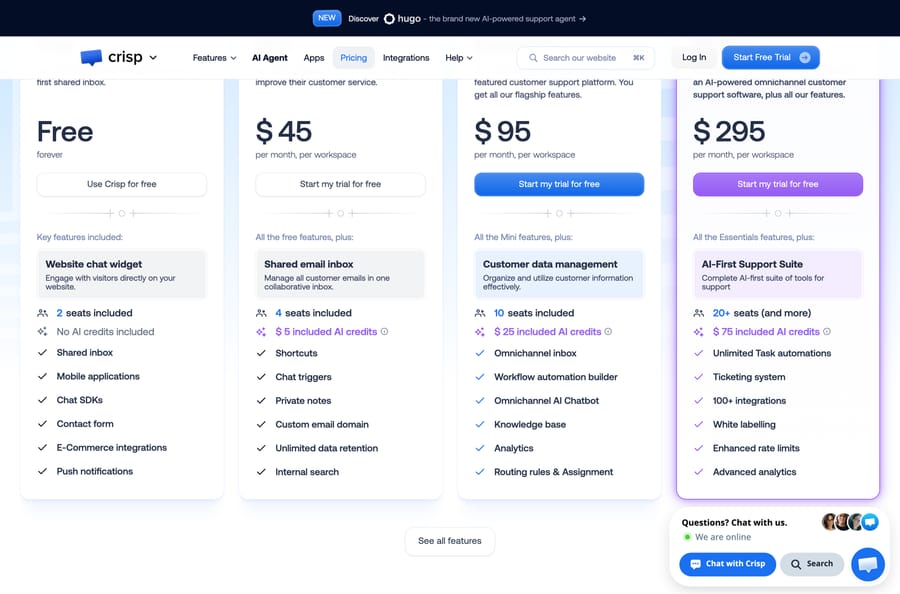
Pros: the cleanest pricing model on this page. Free forever covers two seats, Mini is $45 a month for four, Essentials $95 for ten and Plus $295 for twenty or more, all per workspace rather than per person. AI credits are denominated in dollars and printed on the plan card, $5, $25 and $75 a month, which is unusually legible for a bundled AI allowance.
Where it falls short: the free plan includes no AI credits at all, so the AI story starts at $45. There is no published per-resolution rate, only a dollar pot that runs down at a rate the page doesn't state, which is why it scores 3 on AI. At 4.5 from 204 G2 ratings, the evidence base is thin next to Tidio's or Zendesk's. Our Crisp alternatives page has the other side.
Pricing: Free forever for 2 seats; Mini $45, Essentials $95, Plus $295 per month per workspace, with 4, 10 and 20+ seats and $5, $25 and $75 of AI credits. 14-day trial, no card.
4. HubSpot, if the CRM is already HubSpot
Best for: companies whose sales and marketing already run on HubSpot and who want chat on the same customer record.
Key features: live chat and a chatbot builder on the free tier; tickets, a help desk workspace and a knowledge base on paid plans; Customer Agent for resolution; Breeze AI across the platform.
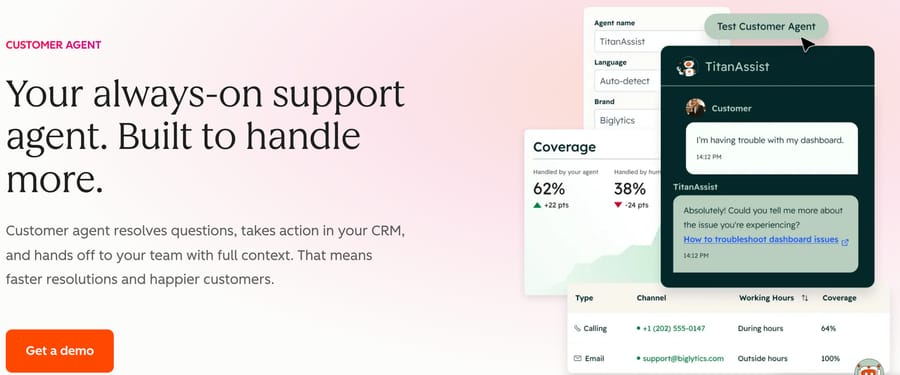
Pros: the AI arithmetic is public and simple. Customer Agent costs 50 credits per conversation resolved and extra credits cost about a cent each on annual billing, which puts a resolution at about $0.50 at list, the cheapest published per-resolution figure on this page. The free tier includes real live chat for two users, and 4.4 from 3,014 G2 ratings is a deep evidence base.
Where it falls short: the jump from free to useful is brutal. Professional starts at $90 a seat a month and carries a one-time $1,500 onboarding fee, which is more than a year of Crisp. Professional includes 3,000 credits a month, which is sixty resolved conversations before you buy more. And none of it makes sense unless HubSpot is already the CRM.
Pricing: Free for up to 2 users; Professional from $90 a seat a month plus $1,500 one-time onboarding; Enterprise from $150 plus $3,500. Customer Agent 50 credits (about $0.50 at list) per resolved conversation.
5. Intercom, the AI-first end of the market
Best for: chat-led SaaS companies who want the AI to be the product rather than an add-on, and who have the budget to prove it.
Key features: messenger, shared inbox and tickets; Fin, the AI agent, across chat, email and messaging; proactive messages, tours and a help center; workflows and custom actions.
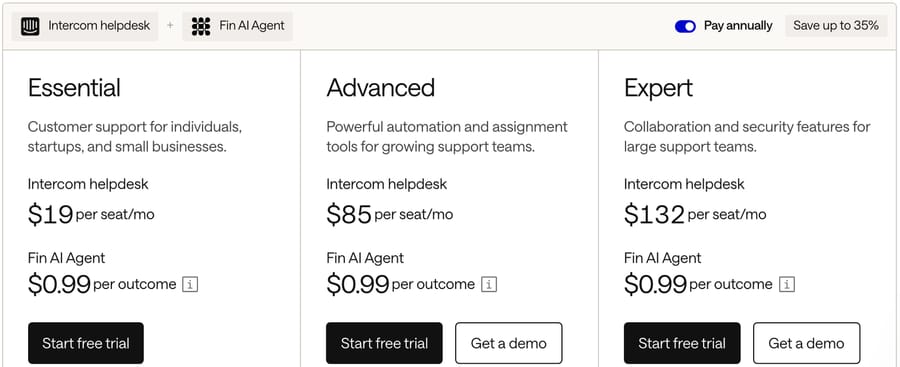
Pros: the most convincing AI story here, a $29 Essential seat that already includes Fin and unlimited live chat, and the clearest outcome-based bill: $0.99 per Fin outcome, where a resolution means no further help is requested after Fin's last answer. Procedure handoffs and disqualifications also cost $0.99 and qualifications $9.99, and a plain handoff with no outcome is not charged. 4.5 from 3,913 G2 ratings on the listing, which is now titled Fin after the company renamed itself in May 2026. Our Fin explainer covers the mechanics.
Where it falls short: Essential stops at one shared inbox with no workflow builder or round-robin assignment, so a team that needs routing moves to Advanced at $85 a seat annually, which would take the five-agent month to $425. Intercom has also shown a $19 Essential price in a live pricing test, so check the page on the day you buy. The 50-outcome monthly minimum on Fin applies only when Fin runs on a help desk other than Intercom. Salesforce completed its acquisition of the company on 10 September 2026, which is worth knowing before you sign a multi-year deal. Our piece on cheaper Intercom alternatives exists because this is the single most common reason people leave it.
Pricing: Essential $29, Advanced $85, Expert $132 per seat a month billed annually ($39, $99 and $139 monthly); Fin $0.99 per outcome, qualifications $9.99.
6. Freshdesk Omni, chat with a real queue behind it
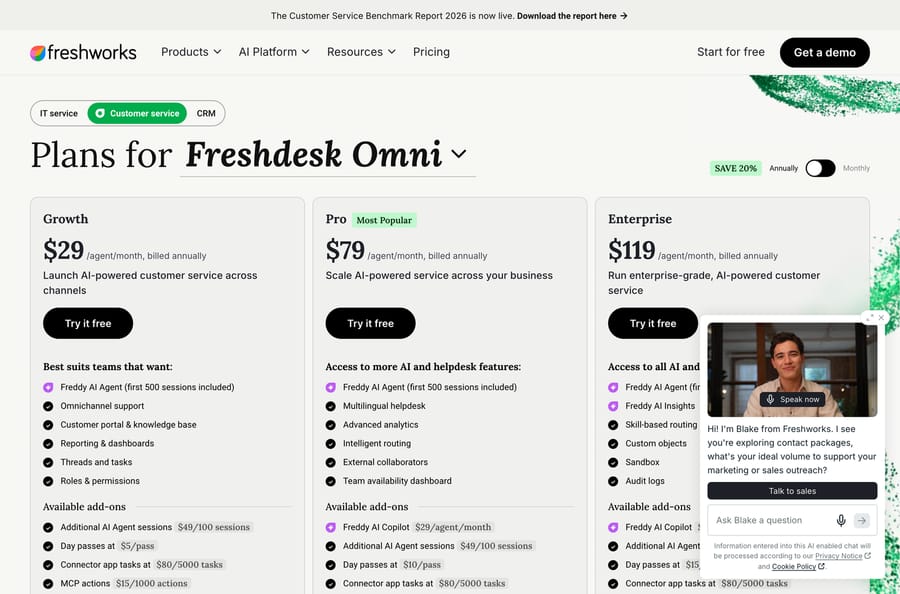
Best for: teams who want a chat widget and a proper ticket queue from the same vendor without paying Zendesk's seat price.
Key features: omnichannel support across chat, email, social and voice; a customer portal and knowledge base; intelligent routing and skill-based routing; Freddy AI Agent for answering customers and Freddy AI Copilot for drafting.
Pros: $29 a seat is the cheapest full omnichannel entry here, and the AI meter is simple arithmetic: the first 500 Freddy AI Agent sessions are included, then $49 per 100. Freshworks also publishes the rates for every peripheral thing that usually hides in a quote, including day passes, connector app tasks and MCP actions.
Where it falls short: the 500 complimentary Freddy sessions are once per account rather than monthly, which catches people out. Freddy AI Copilot is a further $29 an agent and only on Pro and above. And plain Freshdesk, the cheaper line, has no free plan on its pricing page: the old free-forever tier is gone, and what remains is a Free program for up to 2 agents that lasts 6 months, alongside a 14-day trial.
Pricing: Growth $29, Pro $79, Enterprise $119 per agent a month billed annually; Freddy AI Agent 500 sessions free once per account, then $49 per 100; Freddy AI Copilot $29 per agent.
7. Chatwoot, the open-source option
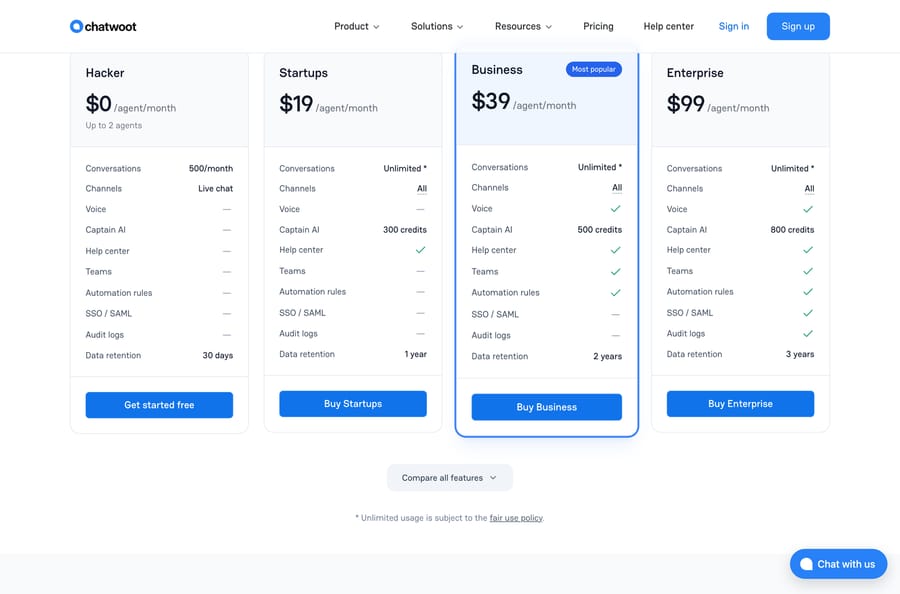
Best for: teams with an engineer who would rather host the thing themselves than accept a vendor's data policy.
Key features: live chat, email, WhatsApp, Facebook, Instagram, SMS and Telegram in one inbox; a help center; teams, automation rules and macros; Captain AI; voice from the Business plan; a self-hostable open-source edition.
Pros: every price is published per agent with the feature differences laid out in a single table, and the free Hacker plan covers two agents and 500 conversations a month. All channels are available from the $19 Startups plan, which is unusual at that price. Self-hosting removes the seat question entirely.
Where it falls short: sixteen G2 ratings. That is the thinnest evidence base on this page by a wide margin, and for a system you route customer conversations through it matters. Captain AI is sold as credits (300, 500 and 800 by plan) with no published per-resolution rate. The free plan is live chat only, with 30 days of data retention, and unlimited usage on paid plans is explicitly subject to a fair use policy. Our Chatwoot explainer covers the self-hosted route in more detail.
Pricing: Hacker $0 for up to 2 agents and 500 conversations a month; Startups $19, Business $39, Enterprise $99 per agent a month.
8. tawk.to, if the budget is zero
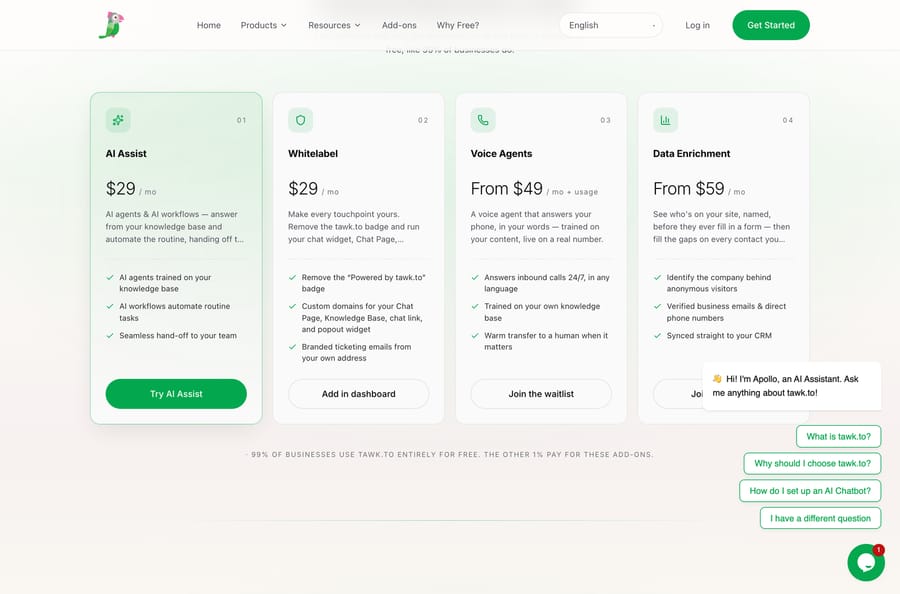
Best for: anyone who needs a working chat widget this afternoon and has no budget line for it.
Key features: live chat with unlimited agents; free ticketing; a hosted knowledge base; a chat page and popout widget; mobile apps; AI Assist as a paid add-on.
Pros: it really is free, with no seat cap and no conversation cap, and the ticketing and help center come with it. Four add-ons are published and priced per property rather than per seat: AI Assist $29 a month, Whitelabel $29, Voice Agents from $49 plus usage, Data Enrichment from $59. tawk.to's own page says 99% of its users buy none of them.
Where it falls short: the widget carries a "Powered by tawk.to" badge until you pay $29 a month to remove it, and reporting is the weakest here. The AI is an add-on rather than a built-in agent, which is why it scores 2 on the AI criterion, and Voice Agents are still on a waitlist. There is no WhatsApp or Instagram channel natively. 4.5 from 203 G2 ratings is respectable rather than deep. If free is the requirement, our free help desk roundup covers the rest of that branch.
Pricing: free forever, unlimited agents. Add-ons: AI Assist $29/mo, Whitelabel $29/mo, Voice Agents from $49/mo plus usage, Data Enrichment from $59/mo.
9. Zoho SalesIQ, the lead-led one
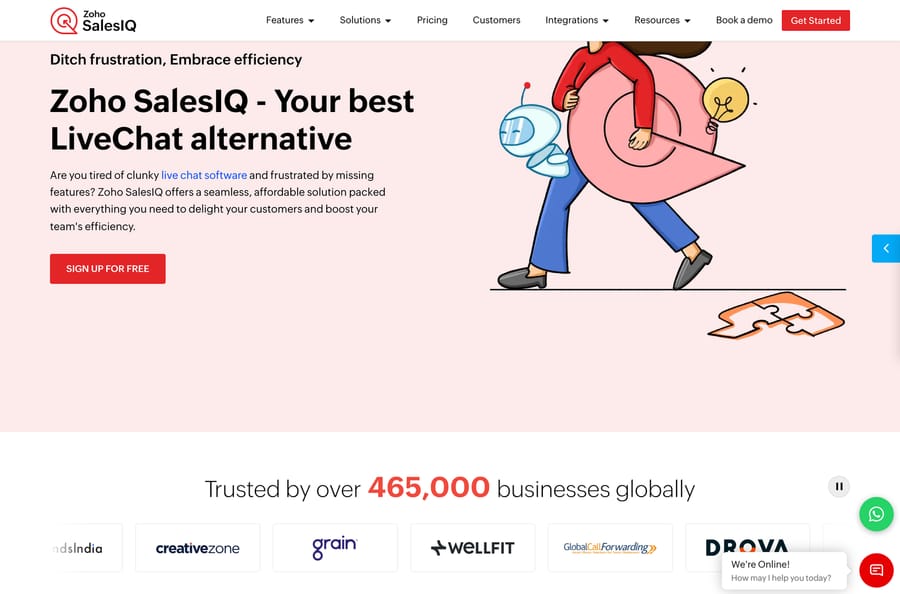
Best for: teams whose chat widget is as much a lead-capture tool as a support tool, and especially teams already inside Zoho.
Key features: visitor tracking and scoring; a chat widget with proactive triggers; Zobot, the bot builder; WhatsApp, Instagram, Telegram and Facebook channels; deep handoff into Zoho CRM and Zoho Desk.
Pros: the cheapest paid seat on this page, and a free plan that covers three operators. Zoho wrote its own page titled "Zoho SalesIQ - Your best LiveChat alternative", which ranks on page one for this search, so it is competing for exactly this reader and has priced accordingly. 4.4 from 256 G2 ratings.
Where it falls short: we could not read a dollar price on Zoho's own site at all. zoho.com/salesiq/pricing.html served us rupees from both a script and a real browser with the location forced to New York, so the USD figures here come from G2's pricing tab, which states it was last updated on 30 April 2026. That is a labeled third-party number, not a vendor-published one. Zobot is bundled with no published meter, and the visitor-tracking limits, rather than the seats, are what actually gate the plans.
Pricing (from G2's pricing tab, last updated 30 April 2026, because zoho.com serves rupees to us): Free $0 for 3 operators; Basic $7, Professional $12.75, Enterprise $20 per operator a month.
10. Olark, AI at a flat fee
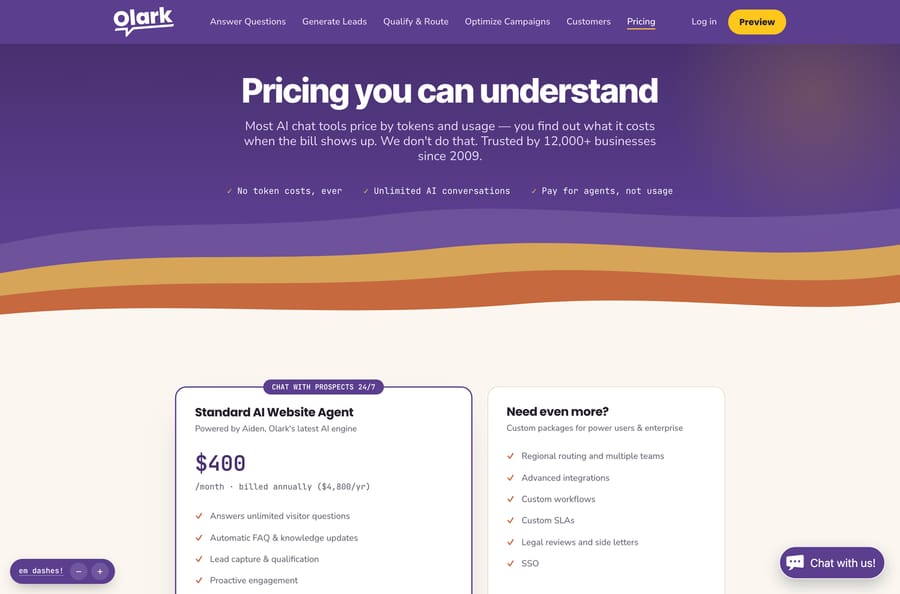
Best for: it suits teams who want an AI agent answering visitors and would rather pay a fixed number than watch a meter.
Key features: live chat with targeted triggers and offline messages; the Aiden AI website agent; automatic FAQ and knowledge updates; lead capture and qualification; proactive engagement; regional routing and custom workflows on the enterprise package.
Pros: the most honest pitch on this page, and the only flat-fee AI plan here. Olark's pricing page says it directly: "No token costs, ever", "Unlimited AI conversations", "Pay for agents, not usage." At $400 a month billed annually the AI plan is expensive at low volume and gets cheaper every month your chat volume grows, which is the opposite incentive to everybody else's per-resolution meter.
Where it falls short: it is chat and nothing else. No email, no WhatsApp, no social, and no real ticketing behind the conversation, which is why it scores 2 on both of those criteria. The $400 is also a cliff rather than a ramp: below a few hundred AI conversations a month, a per-resolution vendor is cheaper. 4.3 from 224 G2 ratings is the lowest average on this page.
Pricing: classic live-chat-only plan $29 per agent a month; Standard AI Website Agent $400 a month billed annually ($4,800 a year) with unlimited AI conversations, plus human agents at $29 each.
Which tools were considered and left out?
Gorgias was left out on scope, not on score. It is an excellent chat and help desk product with published prices and a per-resolution AI rate, and it is built around ecommerce: its AI ships with order actions, returns and refunds. A LiveChat buyer who isn't running a store would be paying for machinery that never fires. If you are running a store, read it as an eleventh option.
ChatBot and HelpDesk, Text's sibling products, are the two things a LiveChat customer is most often quoted next. They are worth pricing before you leave, because "LiveChat plus two more Text products" is the comparison most of the alternatives above are really beating, not LiveChat alone.
Who should stay on LiveChat?
Two situations where none of the ten is an upgrade.
Your team is one or two people and the widget is the whole product. Starter at $19 covers one user, and the chat widget itself is the best-reviewed part of LiveChat: Ease of Use is its most-tagged strength on G2. If nobody is asking for AI, ticketing or WhatsApp, switching buys you very little.
If you already run ChatBot and HelpDesk, stay. Once the Text stack is configured and the handoffs work, the migration cost is three products, not one, and the per-seat saving rarely covers it.
What migrates from LiveChat, and what does not?
Migrates cleanly: canned responses as a text export, agent accounts, and the widget snippet, which is one line of JavaScript on every platform here.
Migrates with work: chat transcripts. Most platforms will import them as a flat archive rather than as searchable conversation history attached to a contact, so budget for losing the search.
Does not migrate: chat routing rules, triggers and automation flows. Every vendor models those differently and they are rebuilds. So are any integrations you built against LiveChat's API, and your reporting baselines, because no two vendors count a "conversation" the same way. Our explainer on what deflection rate really measures is the background reading on why those definitions differ so much.
What if the widget is fine and only the AI disappoints?
There is one more answer that isn't on the list, and it needs saying plainly because it's the one we sell.
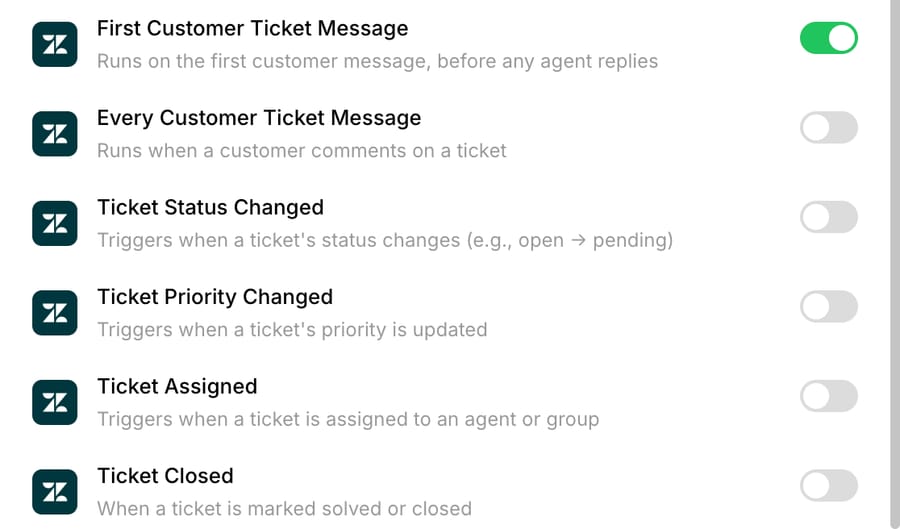
If the chat itself works and the only frustration is the AI attached to it, you can add an agent layer instead of migrating. That's what Macha is: an AI agent layer that runs on top of the help desk a team already uses, never a replacement for it, and it's out of the ranking above because it isn't a chat platform and can't be scored as one. Every agent you build is set by you to reply to the customer, write an internal note for a human, or only change fields on the ticket. It's priced on monthly ticket volume, from $299 a month for 750 tickets, about $0.40 a ticket at every tier, with setup and monitoring by our team included on every plan. A ticket is one thread with one person, charged once however many replies it takes. Full detail is on our pricing page.
Where it falls short, in the same terms as everything above: Macha does not connect to LiveChat, and it doesn't connect to Crisp, tawk.to, Olark, Zoho SalesIQ, Chatwoot or Tidio either. It runs on Zendesk, Freshdesk, Gorgias and Front, and on Intercom and HubSpot, and the current list is on our integrations page. It also has no independent review base at all, zero G2 ratings as of 22 September 2026, no voice channel, and an agent does what its instructions say, so vague instructions make a vague agent.
The honest version for this reader is narrow: four of the ten above are desks we connect to, so if your shortlist lands on Zendesk, Freshdesk Omni, Intercom or HubSpot, you can pick the desk on its own merits and treat the AI as a separate decision. Our piece on adding an AI layer instead of rip-and-replace makes that case, and our live chat roundup covers the widget side.
How was this researched?
We checked every plan and AI rate on the vendor's own live page on 22 September 2026, in a real browser forced to the US region: US locale, New York timezone, English-US headers and the MaxMind geoip lookup stubbed. Every figure printed here starts with a dollar sign on the page it came from, with one exception we label twice. Zoho serves our location rupees from both a script and a browser, so SalesIQ's dollar prices come from G2's pricing tab with its own last-updated date attached.
We captured each pricing page ourselves. G2 returns a 403 to every scripted request, so all nine G2 listings were read in a real Chrome session the same day, and the rating, the review count and the negative-tag counts all come from those reads. We did not build a chat widget on any of these platforms for this guide, and we are not quoting benchmark results we did not run.
Frequently asked questions
What is the best free alternative to LiveChat? tawk.to, by a distance. The platform is free forever with unlimited agents, and free ticketing and a hosted help center come with it; you pay only if you want the "Powered by tawk.to" badge removed ($29 a month) or one of three other add-ons. Crisp, Chatwoot, Tidio, HubSpot and Zoho SalesIQ all have free tiers too, but every one of them caps seats or conversations.
What is the cheapest paid LiveChat alternative? At five agents and 250 conversations a month, Tidio Growth at $49.17 and Zoho SalesIQ Professional at $63.75 are the two lowest, and Crisp Essentials at $95 flat covers ten seats rather than five. LiveChat's own Team plan is $245 for the same month.
Which LiveChat alternative has the best AI? Intercom's Fin has the clearest outcome-based bill at $0.99 per resolution, and Tidio is the only one that publishes a resolution-rate guarantee, 50% on its Premium tier. Olark is the outlier: $400 a month flat for unlimited AI conversations, which beats everybody per conversation at high volume and nobody at low volume.
Does LiveChat have a free plan? No. LiveChat runs a 14-day free trial with no credit card, and the cheapest paid plan is Starter at $19 a person a month billed annually, which covers one user with 60 days of chat history.
Is Tidio better than LiveChat? On our rubric Tidio scores 26 against LiveChat's 18, mostly on entry cost and on having an AI agent built into the same product rather than sold as a sibling one. LiveChat wins on the widget itself, which its reviewers rate highly, and on chat history and reporting at the higher tiers. If you have one or two agents and no AI ambitions, the gap is smaller than the scores suggest.
Can I move my chat history when I switch? Partly. Most platforms will import transcripts as a flat archive, but not as searchable history attached to a contact record, so plan on losing the search. Canned responses and agent accounts move easily; routing rules, triggers and automation flows are rebuilds on every platform here.
How do I compare AI costs between these tools? Convert everything to a cost per resolved conversation and read each vendor's definition of "resolved", because they differ. Zendesk bills per verified automated resolution ($1.50 committed on its pricing page), Intercom charges $0.99 per outcome, HubSpot about $0.50 in credits, Freshworks $49 per 100 sessions. Crisp, Chatwoot and Zoho bundle AI as credits with no published per-resolution rate, and Olark charges a flat $400 a month for unlimited conversations.
Does Macha work with LiveChat? No, and we'd rather say so than stretch. Macha runs on Zendesk, Freshdesk, Gorgias, Front, HubSpot or Intercom. Four of the ten platforms above are on that list, so if your shortlist lands there you can decide on the desk first and the AI layer second.
Which LiveChat alternative should you pick?
The right LiveChat alternative depends on which of its three limits sent you looking. Tidio is the closest like-for-like swap and the cheapest credible upgrade. Crisp is the answer if per-seat pricing is the problem, because it charges per workspace. tawk.to is the answer if the budget is zero. Zendesk and Freshdesk Omni are the answers if chat is one channel of several and you need a real queue behind it. Intercom is the answer if the AI is the point, starting at $29 a seat plus $0.99 per Fin outcome. HubSpot only makes sense if HubSpot is already the CRM, Chatwoot if you want to self-host, Zoho SalesIQ if the widget is half a lead tool, and Olark if you would rather pay a flat fee than watch a meter.
Run the cost model on your own agent count and chat volume before you compare headline prices, because the spread at five agents and 250 conversations is $0 to $516. And if the chat is fine and only the AI is the problem, adding an agent layer to the desk you already run is cheaper than a migration, starting with $50 of free usage and no credit card.
Sources: LiveChat pricing · Tidio pricing · Crisp pricing · Chatwoot pricing · tawk.to add-ons · tawk.to: why free · Olark pricing · Zoho SalesIQ: LiveChat alternative · Freshdesk Omni pricing · Zendesk pricing · fin.ai pricing · HubSpot Service Hub pricing · Macha pricing
Simple per-ticket AI pricing
One thread with one person is one charge, however many replies it takes.