





 Shopify
 Stripe
 Slack
Slack Notion
 Google Workspace
 Confluence

What Do Gorgias Rules, Macros, Tags, Views and Flows Mean? A 2026 Glossary


Gorgias, the ecommerce helpdesk, runs on five core terms: Rules, Macros, Tags, Views and Flows, plus a handful of smaller ones like Auto-merge and CSAT. Each definition below gives the menu path, the documented limits and a link to a deeper guide (this is the support software, not Plato's dialogue).
Key takeaways
- Gorgias support is built on five core terms: Rules, Macros, Tags, Views and Flows, with Rules, Macros and the tag list managed from Workflows then Tools.
- Gorgias Rules use a WHEN/IF/THEN structure with 6 triggers, such as Ticket Created and New Message In Ticket, and 20 actions including Apply macro and Assign team.
- Gorgias Views come in three kinds: built-in Default Views, up to 500 Shared Views created by admins or leads, and up to 20 Private Views per person.
- Gorgias Flows are guided self-service paths that require an active AI Agent subscription and can run in Chat, the Help Center and the Contact Form.
- Gorgias bills AI Agent separately from the helpdesk plan, at $0.90 per resolved interaction on most plans and $1 on Starter, per its own pricing explainer; its pricing FAQ gives $1.00 monthly and $0.90 annual (October 2026).

Gorgias's core vocabulary is five terms: Rules (WHEN/IF/THEN automations with 6 triggers and 20 actions), Macros (saved replies plus actions), Tags (ticket labels), Views (filtered ticket lists, up to 500 shared and 20 private) and Flows (guided self-service paths that need an active AI Agent subscription). Rules, Macros and the tag list live in the Workflows area; Views sit in the left sidebar.
| Term | What it is | Where it lives |
|---|---|---|
| Rule | WHEN/IF/THEN automation | Workflows → Tools → Rules |
| Macro | Saved reply + actions | Workflows → Tools → Macros |
| Tag | Ticket label | Fields & tags; applied everywhere |
| View | Saved filtered ticket list (500 shared, 20 private) | Left sidebar |
| Flow | Guided self-service automation | Chat, Help Center, Contact Form (AI Agent) |
| Auto-merge | Combines duplicate tickets | Workflows → Tools → Auto-merge |
| CSAT | Post-resolution survey | Workflows → Tools → CSAT |
Where do Gorgias's automation settings live?
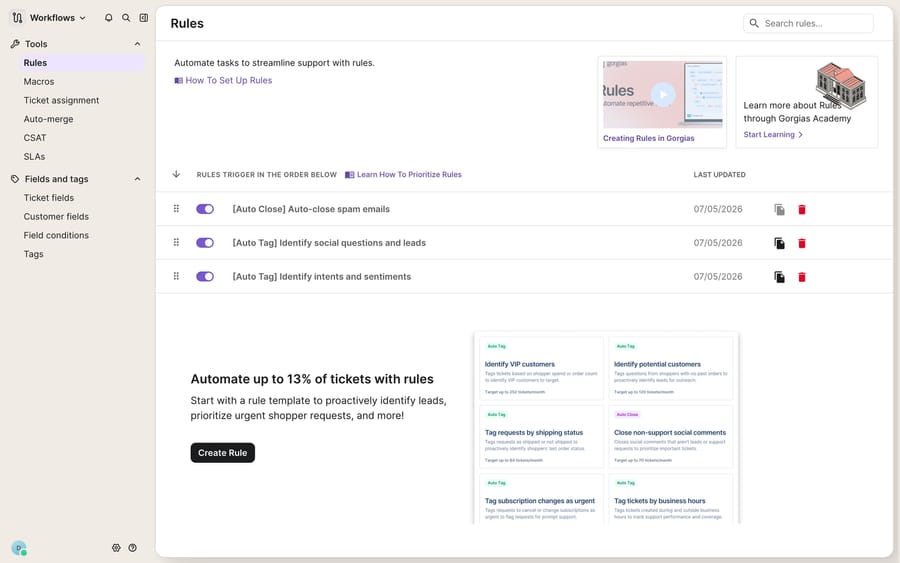
Most of the automation terms live in one place: the Workflows area, reached from the dropdown menu in the top-left of the app. Inside Workflows sits a Tools navigation with tabs for Rules, Macros, Ticket assignment, Auto-merge, CSAT, SLAs, and Fields & tags. When someone on your team says "add a rule" or "edit that macro," this is the screen they mean. The screenshot below shows that module with the Rules list open and the Tools sidebar visible.
If you're brand new to the platform, start with our overview of what Gorgias is for the big picture, then use the definitions below as a reference you can jump back to.
What do Rules, Macros, Tags, Views and Flows mean in Gorgias?
Rules. A Rule is Gorgias's if-this-then-that automation engine. It's built on a WHEN / IF / THEN structure: a trigger fires (WHEN), conditions are evaluated (IF), and actions run (THEN). Per the Gorgias Rules Glossary, there are 6 triggers: Ticket Created, Ticket Updated, Ticket Assigned To User, Ticket Snooze Delay Ends, New Message In Ticket, and Satisfaction Survey Responded. The glossary lists 20 actions, from replying to the customer, adding an internal note and applying a macro to setting status or priority, assigning an agent or team, snoozing, and adding, removing or resetting tags. Rules are where auto-tagging, auto-replies, and routing actually happen. Full walkthrough: Gorgias Rules explained.
Macros. A Macro is a saved, reusable response: a template reply plus an optional bundle of actions. You reach them from menu → Workflows → Tools → Macros, then Create macro. Beyond canned text, a macro can carry actions like Add tags, Set status, or Set priority, and, when a Shopify store is connected, order actions like duplicate, cancel, refund, or edit an order. Agents apply macros by hand, and Rules can apply them automatically with the Apply macro action. Deep dive: Gorgias Macros explained.
Tags. Tags are labels you stick on tickets to categorize them: refund, sizing, wismo, and so on. Pick one naming convention (all lowercase is the easy one) before the list grows, because near-duplicates like Refund and refund are the usual source of a messy taxonomy. Tags are the glue between Rules, Macros, and Views: a Rule adds a tag, a View filters on it, a Macro references it. More on keeping them clean: Gorgias Tags explained.
Views. A View is a saved, filtered slice of your ticket list that shows up in the left sidebar. Per Gorgias's Manage Views and Sections docs there are three kinds: Default Views (built in: Assigned to me, Unassigned, All, Snoozed, Closed, Trash, Spam), Shared Views (created by account owners, admins or leads, up to 500, visible to everyone they're shared with), and Private Views (anyone can make up to 20, visible only to them). Each View is defined by one or more Filters, and every filter is three parts: the filter, the operator, and the value. See Gorgias Views explained.
Flows. Flows are guided, scripted conversation paths. Gorgias's Flows 101 says you need an active AI Agent subscription to use them, and that they can run in Chat, the Help Center and the Contact Form on Shopify, BigCommerce and Magento 2 stores. They often handle the first part of a conversation (sizing questions, order-status prompts, policy clarifications) before AI Agent takes over if the shopper needs more. Think of a Flow as a decision tree you draw and AI Agent as the free-form reasoner behind it. Details: Gorgias Flows explained.
What other Gorgias terms will you run into?
Beyond the big five, a handful of terms round out day-to-day Gorgias fluency:
- Chat: the on-site widget shoppers message you through; one of the places Flows and AI Agent live. See Gorgias Chat explained.
- Customer sidebar: the panel beside a ticket showing the shopper's profile, order history, and integration data, so agents don't leave the conversation to answer "where's my order?" Walkthrough: the Gorgias customer sidebar explained.
- Ticket: a single customer conversation, threaded across email, chat, social, and SMS into one object.
- Auto-merge: the Tools feature that fuses duplicate tickets from the same customer so two agents don't reply to the same person. A Rule action can exclude a ticket from it.
- CSAT: the satisfaction survey sent after a ticket closes; a "Satisfaction Survey Responded" event can even trigger a Rule.
- Fields & tags: the Tools tab where you define custom ticket fields and manage your tag list.
- Stats & reporting: the analytics area for volume, response time, and agent performance. See Gorgias stats and reporting explained.
- API: the REST interface for programmatic access to tickets, customers, macros, and views. Start with how to use the Gorgias API.
What can't Gorgias's Rules and Flows do?
Gorgias's building blocks are strong, and much of this is included natively: Rules, Macros, Tags, and Views are core to every plan, and the WHEN/IF/THEN builder is deterministic and dependable. Two caveats belong in any glossary.
First, the deepest automation is Shopify-gated. The macro order actions (duplicate, cancel, refund, edit an order) and the richest order-management context only light up when a Shopify or other supported ecommerce store is connected. On a bare helpdesk, those actions aren't available. AI Agent, and the Flows that depend on it, is also billed separately from the helpdesk plan: Gorgias's AI Agent pricing explainer puts it at $0.90 per resolved interaction on most plans and $1 on Starter, and Gorgias's pricing FAQ, as of October 2026, gives $1.00 on monthly plans and $0.90 on annual.
Second, everything above is rules-based, not reasoning-based. A Rule fires on a trigger and a matched condition; a Flow follows a branch you drew by hand. Neither reads an ambiguous message, works out what the shopper actually meant, and composes a new answer. The moment a ticket falls outside the tree you built, it lands on a human. That's the seam where an AI agent layer fits, and it's worth thinking through the build-versus-buy tradeoff before you reach for one.
How does an AI agent fit on top of Gorgias?
Macha is one such layer. It runs on top of the Gorgias you already use as a live native connector; it does not replace Gorgias, your Rules, or your Macros. The broader category of AI agents for customer service exists to do the reasoning-heavy work a Rule or Flow can't: read the ticket, understand intent, look up a live order through a custom tool that turns a REST API into something the agent can call, and draft or send a grounded reply. Macha bills per ticket, from $299 a month for 750 tickets: one conversation, charged once however many messages it takes, never per resolution. The clean division of labour: keep Gorgias's Rules, Macros, Views, and Tags as your deterministic backbone, and layer an agent on top for the judgement calls the vocabulary doesn't have a word for.
FAQ
Is "Gorgias" the software or Plato's dialogue? Both share a name. This glossary is about the ecommerce helpdesk software Gorgias. Plato's Gorgias is a Socratic dialogue from around 380 BC named after the Sicilian sophist Gorgias of Leontini, unrelated to the support tool beyond the spelling.
What's the difference between a Rule and a Macro in Gorgias? A Macro is a saved reply plus optional actions that an agent applies (or a Rule triggers). A Rule is the automation itself: a WHEN/IF/THEN condition that runs actions, one of which can be "apply macro." Macros are content; Rules are logic.
What are Flows versus AI Agent? Flows are guided, scripted conversation paths that need an active AI Agent subscription; they handle predictable first steps in Chat, the Help Center or the Contact Form. AI Agent is the free-form model that answers open-ended questions and takes over when a Flow reaches its limit.
How many Views can I create? Admins and leads can create up to 500 Shared Views; any user can create up to 20 Private Views visible only to themselves. Default Views are built in and can't be edited.
How many triggers do Gorgias Rules have? Six: Ticket Created, Ticket Updated, Ticket Assigned To User, Ticket Snooze Delay Ends, New Message In Ticket, and Satisfaction Survey Responded. Conditions then narrow which tickets the 20 available actions run on.
Can I add AI to Gorgias without replacing it? Yes. A layer like Macha connects to Gorgias as a native connector and runs on top of your existing Rules, Macros, Views, and Tags. It handles the reasoning-heavy tickets your rules-based automations can't, while Gorgias stays the system of record.
Want the reasoning layer your Rules and Flows can't provide? Start a free trial of Macha and connect it to your Gorgias in minutes.






