





 Shopify
 Stripe
 Slack
Slack Notion
 Google Workspace
 Confluence

What Is an AI Ticketing System? Best Options for Support and IT in 2026, and What They Cost


An AI ticketing system is a help desk or service desk that uses AI to tag, prioritize, route and resolve tickets. For a 10-agent support team with 1,500 tickets a month, the options we priced cost from about $588 to $1,950 a month, and IT service desks range from $200 to five figures.
Key takeaways
- An AI ticketing system uses AI at four points in a ticket's life: intake, triage, routing, and resolution or assist, either built into a help desk or added as a layer on top.
- For a 10-agent team with 1,500 tickets a month and 450 AI resolutions, Help Scout Standard with AI Answers costs about $588 a month, while Zendesk Suite Team with AI agents at $1.50 per committed resolution costs about $1,205.
- In a three-ticket triage test on a free ElevenLabs agent, all three priorities came back correct but two of the three categories were wrong.
- On internal IT ticketing, a 10-agent team pays $200 a month on Jira Service Management Standard but about $10,593 a month on ServiceNow, based on Vendr's $127,118 median contract.
- Macha adds AI to the help desk you already run and is the done-for-you option: its team analyzes your tickets, builds the agent and runs it in safe mode, with a dedicated success manager included at about $0.40 a ticket.

An AI ticketing system is a help desk or service desk that uses AI to tag, prioritize, route and resolve tickets, and for a 10-agent support team handling 1,500 tickets a month the options we priced run from about $588 a month (Help Scout with AI Answers) to $1,950 (Salesforce Service Cloud Core, before Agentforce). If you already run a help desk, the question is usually which AI to add, not which ticketing system to replace it with.
Which AI ticketing system fits your situation?
| Your situation | Route | Start with |
|---|---|---|
| Customer support team already on Zendesk, Freshdesk, Gorgias, Front, HubSpot or Intercom, wanting AI to triage and resolve tickets there | AI agent layer on your help desk | Macha |
| Customer support team choosing a help desk now, and wanting AI built in | Help desk with native AI | Zendesk, Freshdesk, Intercom, Gorgias for Shopify |
| B2B support in Slack or Teams channels | Help desk for shared channels | Pylon |
| Internal IT team replacing spreadsheets or email | IT service desk with AI | Freshservice, Jira Service Management, SysAid, InvGate |
| Large enterprise IT, many workflows, an RFP | Enterprise ITSM platform | ServiceNow |
| Employees asking IT for help in Slack or Teams | Employee AI agent on top of the service desk | Moveworks, Aisera |
How do the leading AI ticketing systems compare on price and ratings?
Prices are from each vendor's page or its AWS Marketplace listing, checked September 19, 2026, with Zendesk, Intercom, HubSpot, Help Scout, Gorgias and Freshservice rechecked September 24. G2 was rate-limiting our browser when we reached the IT tools, so those rows carry Capterra ratings instead; support rows keep the G2 figures we read the day before.
| System | Market | Price we found | Reviews | Gartner Peer Insights | Best for |
|---|---|---|---|---|---|
| Zendesk | Customer support | Suite from $55 per agent a month (annual); AI agents billed per automated resolution at $1.50 committed or $2.00 pay-as-you-go (Zendesk pricing page), beyond a $2 to $10 monthly allowance per seat | G2 4.3 (7,075); Capterra 4.4 (4,091) | 4.3 (47, AI agents for customer service) | Support teams of any size |
| Freshdesk | Customer support | From $19 per agent a month (annual); Freddy AI Agent $49 per 100 sessions | G2 4.4 (3,771); Capterra 4.5 (3,474) | 4.4 (2,294, Freshworks whole company) | Cost-conscious support teams |
| Intercom | Customer support | Essential $29 a seat billed annually (Intercom has also shown $19 in a pricing test); Advanced $85, Expert $132; Fin $0.99 per outcome | G2 4.5 (3,912, whole product) | 4.3 (257, whole company) | Chat-first SaaS support |
| Salesforce Service Cloud | Customer support | From $25 (Starter Suite) to $550 (Max) per user a month | Capterra 4.5 (830); G2 4.3 (1,694, Agentforce) | 4.3 (72, Agentforce) | Companies whose customer data lives in Salesforce |
| Freshservice | Internal IT | $19, $49 and $99 per agent a month (annual); AWS lists $29 to $167 monthly | Capterra 4.6 (798) | 4.4 (975, ITSM) | Mid-sized IT teams |
| Jira Service Management | Internal IT | $20 Standard, $51.42 Premium per agent a month as shown | Capterra 4.5 (777) | 4.4 (1,229, ITSM) | Teams already on Jira |
| SysAid | Internal IT | Professional $89 per agent a month, AI included | Capterra 4.5 (522) | 4.5 (691, ITSM) | IT teams wanting AI with no usage meter |
| ServiceNow | Internal IT, enterprise | Quote only; Vendr median $127,118 a year | Capterra 4.5 (358) | 4.3 (2,029, ITSM) | Large enterprises |
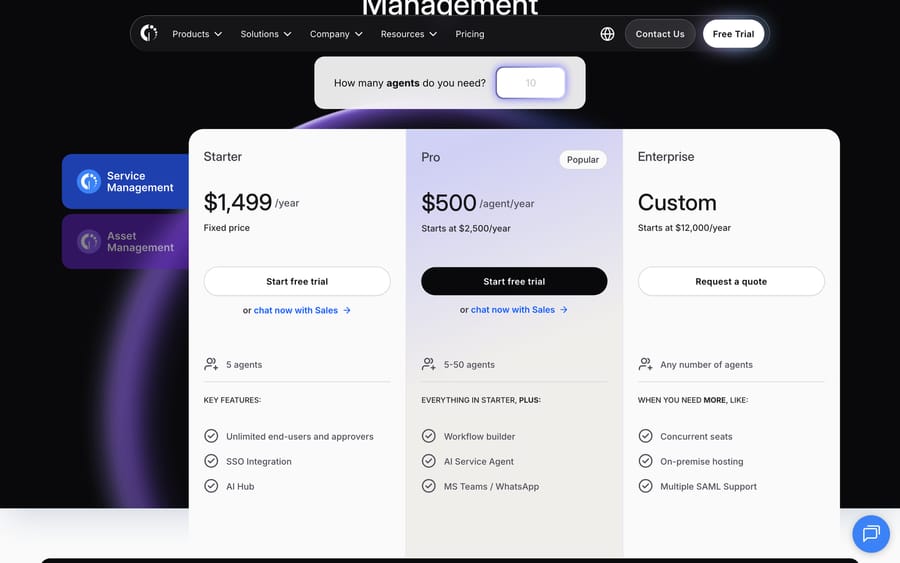
| InvGate | Internal IT | $1,499 a year for 5 agents; Pro $500 per agent a year | Capterra 4.6 (108) | 4.8 (352, ITSM) | Small and mid-sized IT teams on a budget |
| Pylon | B2B customer support | Not on its site; AWS lists $70 to $167 per seat a month plus AI add-ons | See entry | Not listed | B2B support in Slack and Teams |
| Macha | AI agent layer on your help desk | From $299/mo for 750 tickets (~$0.40/ticket), published | Not rated here | Not listed | Teams on Zendesk, Freshdesk, Gorgias, Front, HubSpot or Intercom; setup done for you by the Macha team, with a dedicated success manager, included; $50 free usage |
What does an AI ticketing system do?
A ticketing system turns requests into records with a status, an owner and a history. The AI part works on those records at four points.
- Intake. Email, chat, web forms, Slack and phone all become tickets. AI can split a long email into the actual request and pull out an order number or an employee ID.
- Understanding and triage. A model reads the ticket and sets fields: category, priority, sentiment, language. Zendesk's guide to AI-powered ticketing, which ranks on page one, describes its intelligent triage as detecting "intent, sentiment, language, and urgency".
- Routing. Rules or the model assign the ticket to a team or a person, by skill, workload or customer tier.
- Resolution or assist. An AI agent answers routine tickets and takes actions (refund, password reset, order lookup), or a copilot drafts the reply for a human to send.
The first three save minutes per ticket and rarely need a customer-facing decision. The fourth is where the savings and the risk both sit, because it's the step that talks to the customer or changes an account. Most teams should turn them on in that order.
How do customer support and IT ticketing differ?
The search results mix two kinds of buyer, and the tools barely overlap.
| Customer support ticketing | IT service management (ITSM) | |
|---|---|---|
| Who files tickets | Customers | Employees |
| Typical requests | Orders, billing, returns, how-to | Password resets, access, hardware, incidents |
| What the AI connects to | Order systems, billing, CRM | Identity, device management, asset inventory |
| Common systems | Zendesk, Freshdesk, Intercom, Gorgias, Salesforce, Help Scout | ServiceNow, Jira Service Management, Freshservice, SysAid, InvGate |
| Usual billing | Per agent, plus AI per resolution or session | Per agent, often AI included or a per-user add-on |
Our help desk vs service desk explainer goes deeper on the difference. The rest of this page treats both, starting with support.
How do AI ticketing systems charge?
| Billing unit | Examples | What rises with it | Whose incentive it serves |
|---|---|---|---|
| Per agent seat, AI included | SysAid Professional, Jira Service Management with Rovo | Headcount | Predictable for you; the vendor bets you'll add seats |
| Per agent plus per AI resolution | Zendesk, Intercom with Fin, Help Scout | Tickets the AI closes | The vendor earns more as the AI succeeds, as the vendor counts success |
| Per agent plus AI sessions | Freshdesk and Freshservice with Freddy | Conversations the AI touches, resolved or not | Volume |
| Per ticket | Macha | Tickets you hand the agent, one charge per thread | Coverage; the vendor earns more as you add ticket categories |
| Annual contract | ServiceNow, Pylon, enterprise tiers | Whatever the contract counts | Committed spend and renewal |
Each unit tells you what the vendor is optimizing for. A per-resolution vendor earns more when its AI closes tickets, and it also decides what counts as closed; a seat vendor earns more when you hire. The practical difference shows up in triage. Tagging and routing all your tickets costs nothing extra on a seat plan, including SysAid's "unlimited agentic AI", and billed per session on Freddy. On a resolution-priced plan it isn't billed at all, because triage doesn't resolve anything, which is also why some vendors gate it to their higher tiers instead.
What does a 10-agent team pay per month?
Assumptions: 10 agents; 1,500 tickets a month; AI triages every ticket and resolves 450 (30%). Annual billing where the vendor offers it, the cheapest tier that includes an AI agent or AI triage, and the vendor's own published price, or a third-party figure where the vendor doesn't publish one. Checked September 19, 2026 and rechecked September 24.
Customer support
| System | Monthly cost | How we got it |
|---|---|---|
| Help Scout Standard with AI Answers | About $588 | 10 × $25 + 450 × $0.75 |
| Macha | $599, plus your help desk seats | The published 1,500-ticket plan on our pricing page; triage and replies on every ticket, one charge each |
| Intercom Essential with Fin | About $736 | 10 seats × $29, billed annually, + 450 × $0.99 |
| Gorgias Pro, AI included | About $861 | $471 a month billed annually ($550 monthly) includes 2,000 tickets and 190 automated interactions; 260 more at $1.50; no per-seat charge |
| Freshdesk Growth with Freddy AI Agent | $925 | 10 × $19 + 15 packs of 100 sessions at $49 (AI touches every ticket) |
| HubSpot Service Hub Pro with Customer Agent | About $1,076, plus $1,500 once | 10 × $90 + (450 × 50 credits − 3,000 included) × $0.009 |
| Zendesk Suite Team with AI agents | About $1,205 committed to $1,430 pay-as-you-go | 10 × $55 = $550, + 450 resolutions × $1.50 committed = $675, or × $2.00 pay-as-you-go = $900 (the rates on Zendesk's pricing page), less the $2-a-seat monthly allowance ($20). Zendesk's plan table lists intelligent triage with Suite Enterprise plus Copilot, which is by quote |
| Salesforce Service Cloud Core | $1,950, before Agentforce | 10 × $195; AI agents add Flex Credits at $500 per 100,000 |
Internal IT
| System | Monthly cost | How we got it |
|---|---|---|
| Jira Service Management Standard | $200 | 10 × $20, Rovo agents included with 250 Rovo credits per user |
| InvGate Pro | About $417 | 10 × $500 a year ÷ 12; AI Service Agent included on Pro |
| Jira Service Management Premium | About $514 | 10 × $51.42 |
| SysAid Professional | $890 | 10 × $89, AI included with no usage caps |
| Freshservice Pro with Freddy Copilot | $1,280 | 10 × ($99 + $29); Freddy AI Agent sessions come with Enterprise |
| Pylon Professional with one AI agent | $1,280 | 10 × $118 + $100, from Pylon's AWS listing |
| ServiceNow | About $10,593 | Vendr median of $127,118 a year ÷ 12; its range starts at $42,842 |
On support, Help Scout ($588), Macha ($599) and Intercom (about $736) land close together at this volume, and the spread comes from what you already own: Macha's figure assumes you keep paying for your help desk, while Help Scout and Intercom include theirs. Zendesk's $1,205 to $1,430 depends on whether you commit to resolutions or buy them pay-as-you-go. On IT, the spread is wider, from $200 for Jira Service Management to five figures for ServiceNow, and headcount matters more than ticket volume.
How accurate was AI triage in our test?
We read the ranking pages for "ai ticketing system" on September 19, 2026: InvGate's and Zendesk's guides, the SysAid, Salesforce and Aisera pages, and the listicles from Pylon and Risotto, both of which list themselves first. The top result, an r/msp thread, is blocked to our tools. We checked each vendor's pricing page, AWS Marketplace and Vendr, read Gartner Peer Insights' IT service management market in a browser, and used Capterra for ratings once G2 began rate-limiting us.
For the test, we reused a free ElevenLabs agent from our earlier work and gave it a triage-only prompt: return a category (billing, shipping, returns, damaged item, account, product question, other), a priority, a sentiment and a route, and mark a ticket urgent only for a chargeback threat, legal threat or a safety issue. We sent three tickets for a fictional candle shop.
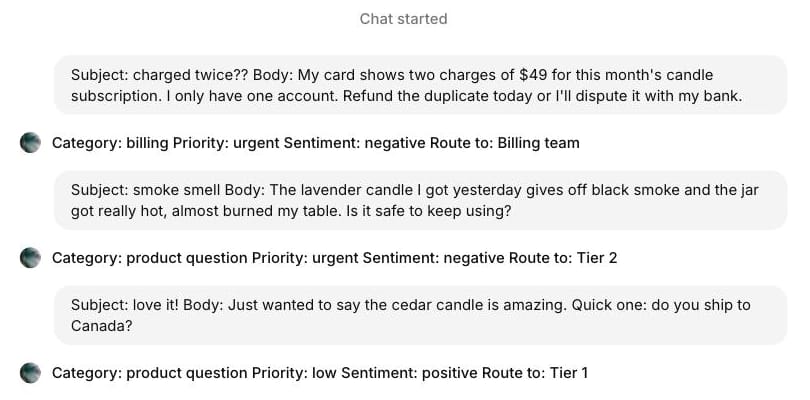
The priorities were all right. A duplicate-charge ticket threatening a bank dispute came back urgent, billing, Billing team. A candle giving off black smoke and overheating its jar came back urgent and routed to Tier 2, which is the safety rule working. A friendly note asking about shipping to Canada came back low priority and positive.
Two of three categories were wrong. The smoking candle went to "product question" instead of "damaged item", and the Canada question went to "product question" instead of "shipping". Neither mistake would have hurt a customer today, but both would skew a category report, and a routing rule keyed on "shipping" would have missed the second ticket. Categories need written definitions and a few examples in the prompt, and a weekly check of what landed in "other" and its neighbors.
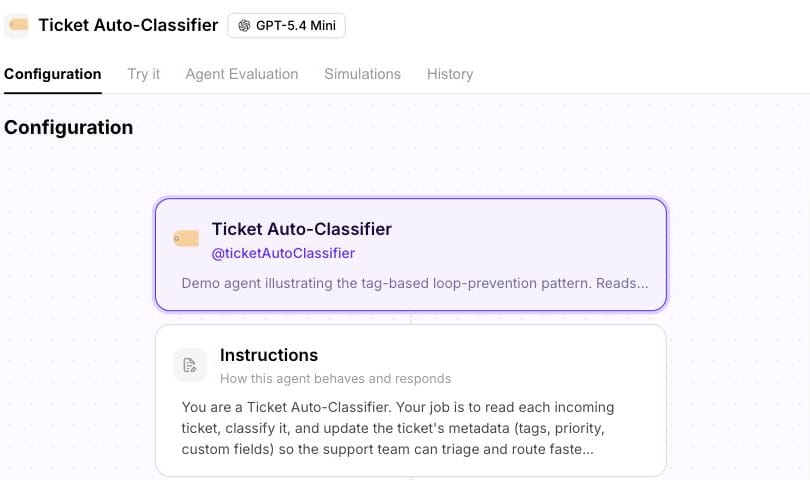
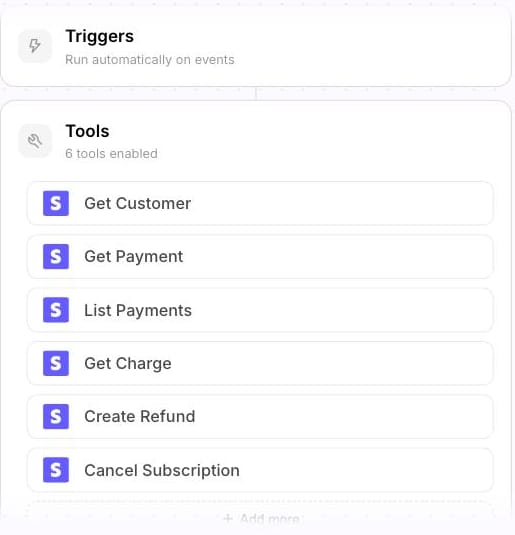
In our Macha Demo workspace, the same job is two agents. A classifier reads each new ticket and updates its tags, priority and custom fields; a triage agent has tools to look up the customer and their payments before acting. The classifier's chat preview didn't respond when we tried it, so we show its configuration only. We created no new vendor accounts for this page and ran no voice test.
How should you evaluate an AI ticketing system?
- Which AI steps are on which tier. Triage, routing, drafting and autonomous resolution are often priced separately; Zendesk's plan table lists intelligent triage with Enterprise plus Copilot.
- What counts as billable. A resolution, a session, a credit or a ticket. Model a normal month before signing.
- Field control. Can the AI set your own categories and custom fields, and can you see why it chose one?
- Actions and permissions. Which systems can it change (refunds, access requests), and can you cap what it's allowed to do?
- Handoff. A human should get the ticket with a summary and the fields already set.
- Measurement. Accuracy of categories, resolution rate, reopen rate and CSAT on AI-closed tickets, reported separately from human ones.
- Where the tickets live. Adding AI to the system you have is usually cheaper than migrating; our explainers on the Zendesk, Freshdesk and Gorgias ticketing systems cover what each does natively.
Which AI ticketing systems suit customer support?
Zendesk
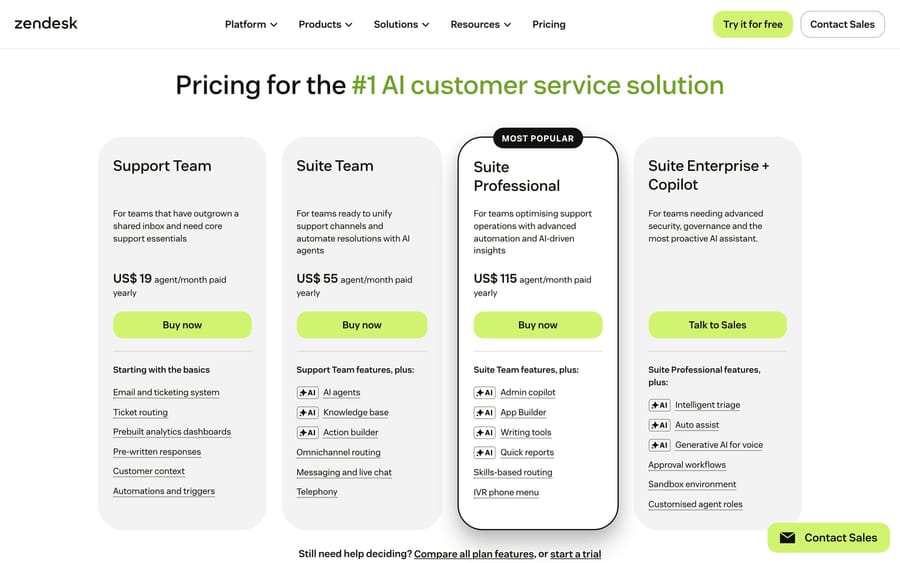
Zendesk's AI agents are included in every Suite plan and bill per automated resolution; since May 18, 2026, only LLM-verified resolutions draw down the allowance, per its resolution tiers article. Zendesk's pricing blog says it "charges $1.50 per automated resolution" (updated May 12, 2026), and its buyer's guide markets the same agents; its pricing page says AI agents are included and billed per automated resolution and lists the rate: $1.50 for a committed automated resolution and $2.00 pay-as-you-go. The pricing page's plan table includes 5 automated resolutions per agent a month on Support Team and Suite Team and 10 on Suite Professional (up to 10,000 a year); the help center describes that as a monthly resolution allowance per seat of $2 on Suite Team, $5 on Growth and Professional and $10 on Enterprise, capped at $5,000 a year. Zendesk's own AWS Marketplace listing shows the same $1.50 under a banner saying "Please DO NOT PURCHASE via this public offering". Suite Team is $55 per agent a month on annual billing, and the plan table places intelligent triage with Suite Enterprise plus Copilot, which costs $50 per agent a month and can be added from Suite Professional up.
It rates 4.3 from 7,075 on G2 and 4.4 from 4,091 on Capterra. A support coordinator wrote on G2 that implementing its AI agents and agent assist "requires time and effort" (May 10, 2023). It suits teams that want one vendor for ticketing and AI. Skip it if you need triage but not the Enterprise tier. More in our Zendesk AI pricing breakdown.
Freshdesk and Freddy AI
Freshdesk starts at $19 per agent a month on annual billing, and its Freddy AI Agent costs $49 per pack of 100 sessions with 500 free once, per Freshdesk's add-ons article; the chat agent needs Freshdesk Omni, and Freddy AI Copilot is $29 per agent a month on Pro and Enterprise. It rates 4.4 from 3,771 on G2 and 4.5 from 3,474 on Capterra. Sessions bill whether or not the AI resolves anything, so a triage-heavy setup should be modeled on every ticket, as we did above. It suits cost-conscious teams; skip Freddy's agent if you only need triage and routing, which Freshdesk's rules already handle. Our Freddy AI guide has the detail.
Intercom with Fin
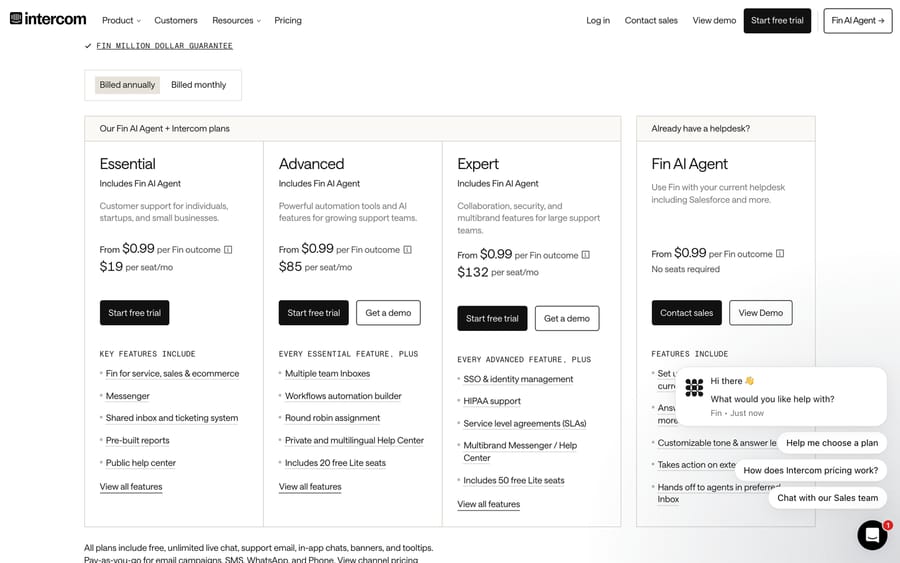
Intercom's pricing page lists Advanced at $85 and Expert at $132 a seat a month billed annually, or $99 and $139 billed monthly. Essential, the entry plan, is $29 a seat billed annually; Intercom has also shown $19 in a pricing test. Each comes with Fin at $0.99 per outcome, and Fin also runs on other help desks, where a 50-outcome monthly minimum applies. Salesforce completed its acquisition of Fin, the company formerly called Intercom, on 10 September 2026, and cites a 76% average resolution rate. Fin rates 4.5 from 3,912 on G2, a count for the whole Intercom product. A support specialist wrote that "Sometimes Fin can be repetitive in the way it handles a conversation" (G2, September 11, 2026). It suits chat-first SaaS support. Skip it if most of your tickets are email that ends in a handoff, since procedure handoffs bill as outcomes. See our Fin guide.
Salesforce Service Cloud
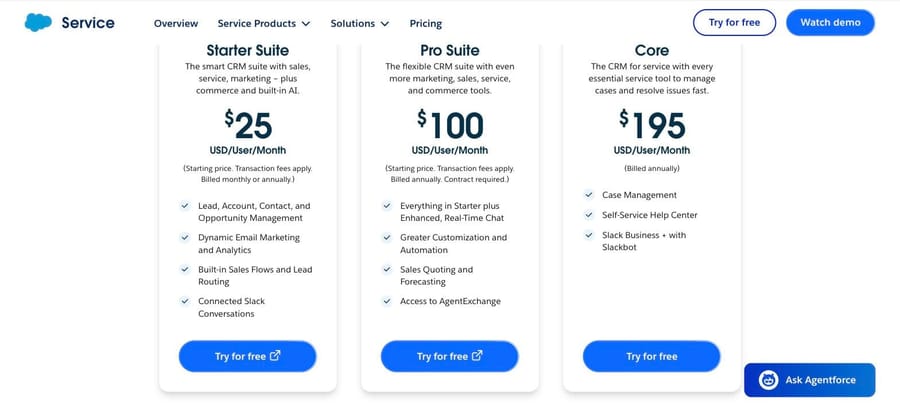
Salesforce's pricing page lists Starter Suite at $25, Pro Suite at $100, Core at $195, Advanced at $395 and Max at $550 per user a month; Advanced adds case classification and routing predictions, and AI agents run on Agentforce Flex Credits. It rates 4.5 from 830 on Capterra, and Agentforce has the most ratings in Gartner's AI agents for customer service market, 4.3 from 72. A Salesforce architect wrote that Agentforce "still requires fine-tuning and a strong admin setup to achieve consistent results" (G2, October 16, 2025). It suits companies already on Salesforce; skip it without an admin. See our Agentforce guide.
Also for support: Gorgias bundles AI into every plan and prices by ticket volume rather than seats (Pro is $471 a month billed annually, or $550 monthly, for 2,000 tickets and 190 automated interactions, then $1.50 each), which suits Shopify brands. Help Scout charges $0.75 per AI resolution on top of seats from $25. HubSpot's Customer Agent costs 50 credits per resolved conversation, $0.50 at the list credit price or $0.45 on extra credits at $9 per 1,000 billed annually. Zoho Desk includes its Zia AI on higher tiers; its pricing page showed only rupees from our location, so we haven't quoted it.
Pylon
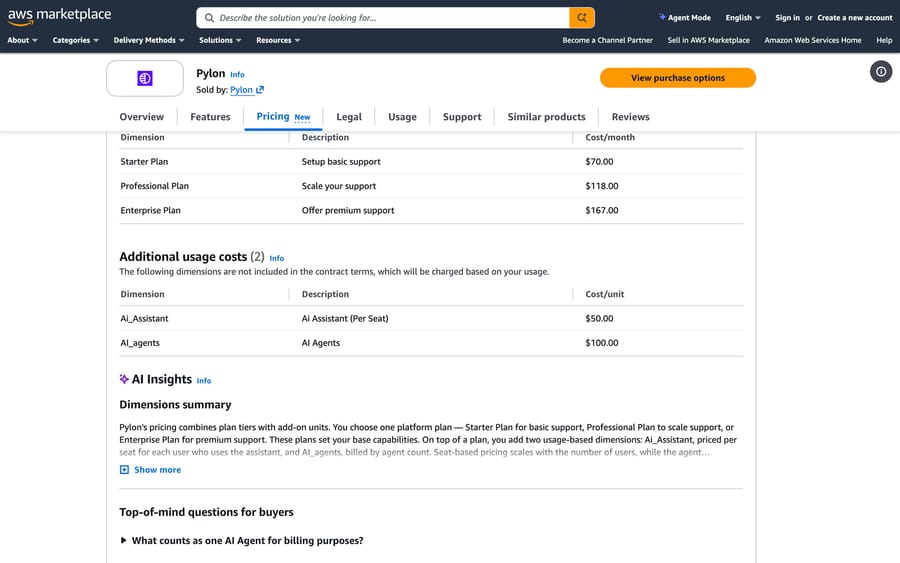
Pylon is a B2B support platform built around shared Slack and Teams channels, and it wrote the listicle that ranks on page one, listing itself first. Its pricing page redirects to a demo form, but its AWS Marketplace listing prices Starter at $70, Professional at $118 and Enterprise at $167 per seat a month, with an AI Assistant at $50 per seat and AI Agents at $100 each as usage dimensions. Vendr's median buyer pays $100,800 a year. We couldn't find a Pylon rating on the review sites we could reach, since Capterra's "Pylon" is an unrelated product. It suits B2B teams supporting customers in shared channels. See our Pylon guide.
Which AI ticketing systems suit internal IT?
ServiceNow
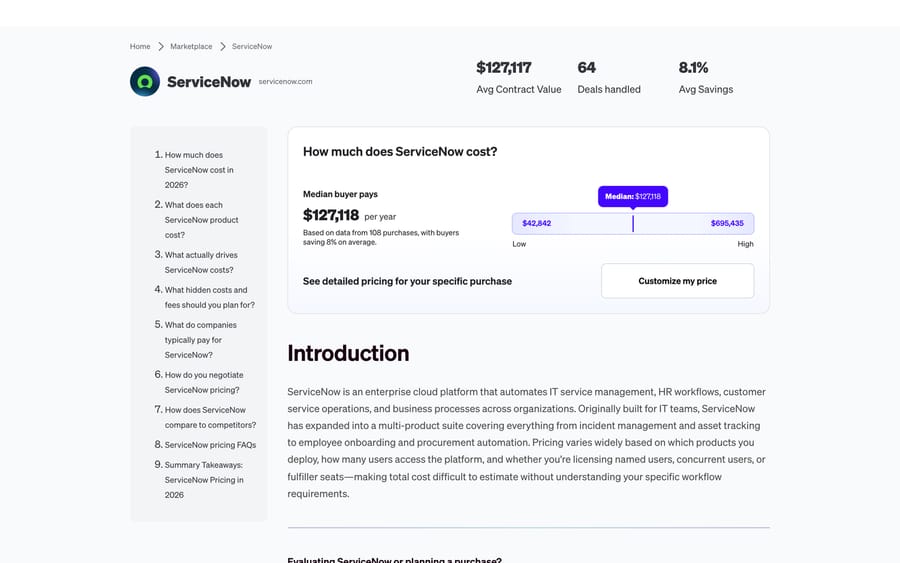
ServiceNow is the default for large-enterprise IT and the most-rated product in Gartner's IT service management market, 4.3 from 2,029. It doesn't publish prices. Vendr puts the median buyer at $127,118 a year across 108 purchases, from $42,842 to $695,435.
Capterra shows 4.5 from 358. Reviewers praise the depth and name the cost of it: one wrote that "some advanced features can take time to learn and configure" and the interface "can also feel a little complex when handling large workflows or multiple modules" (Capterra, August 6, 2026). It suits enterprises running IT, HR and security workflows on one platform. Skip it if you have one IT team and no platform admin; the Vendr floor alone is over $3,500 a month.
Jira Service Management
Atlassian's service desk now comes with Rovo AI. Its pricing page showed Free for three agents, Standard at $20 and Premium at $51.42 per agent a month, with 250 and 700 Rovo credits per user and Rovo agents for employee and customer support on Standard. The price per agent changes with team size.
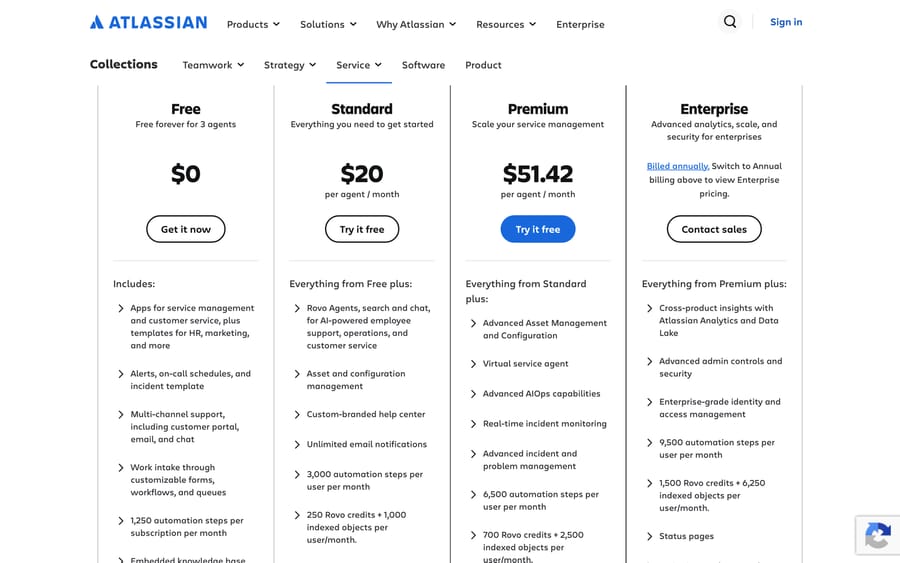
Gartner shows 4.4 from 1,229 and Capterra 4.5 from 777. Billing surprises are the pointed complaint: a director of digital transformation wrote that users "were automatically assigned as users" and "I didn't realize what was happening until I received the invoice for additional users" (Capterra, January 27, 2026). It suits teams already on Jira; our guide to building an AI agent for Jira Service Management covers extending it. Skip it if nobody will manage licenses.
Freshservice
Freshservice is Freshworks' IT service desk. Its pricing page lists Starter at $19, Growth at $49 and Pro at $99 per agent a month billed annually, with Freddy AI Copilot at $29 per agent on Growth, Pro and Enterprise, and 1,200 Freddy AI Agent (Classic) sessions a year included with Enterprise. There's no free plan, only a 14-day trial. Its AWS Marketplace listing sells the same tiers at $29, $59, $119 and $167 a month.
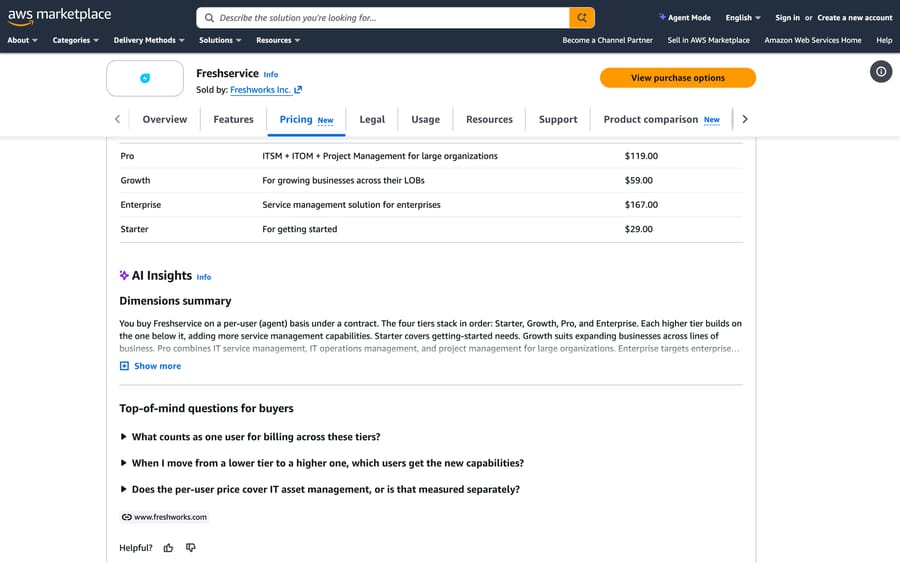
It rates 4.4 from 975 on Gartner and 4.6 from 798 on Capterra. An analyst wrote that it has "Less features than ServiceNow. Limited reporting features" (Capterra, September 1, 2026). It suits mid-sized IT teams that want to be running in weeks. Skip it if you need deep custom workflows. Our Freshservice pricing guide has the full breakdown.
SysAid
SysAid sells one self-serve plan: Professional at $89 per agent a month on its pricing page, described as "AI-native service management with unlimited agentic AI" and "No usage caps", with pre-built AI agents and 100,000 Workato credits. Enterprise starts at 20 agents.
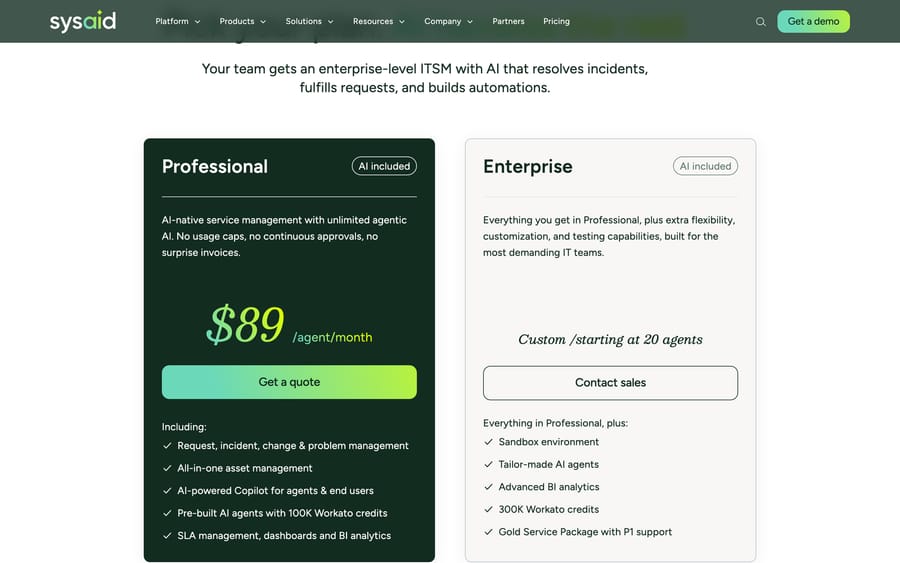
Gartner shows 4.5 from 691 and Capterra 4.5 from 522. The complaint to weigh is interface churn: a reviewer wrote that the move "from Classic to Spaces UI has been ongoing for years now" and called Spaces "half-baked with tons of issues" (Capterra, November 5, 2025). It suits IT teams that want AI priced into the seat. Skip it if you're under 20 agents and need Enterprise features.
InvGate rates highest in the ITSM market we read, 4.8 from 352 on Gartner, and publishes simple prices: $1,499 a year for five agents on Starter, $500 per agent a year on Pro (from $2,500), where its AI Service Agent is included, and Enterprise from $12,000 a year. A 2024 Capterra reviewer wrote that it "lacks proper AI integration", which predates the current AI Hub. Its blog post ranks on page one for this search.
Employee AI agents. Moveworks, now part of ServiceNow, and Aisera, acquired by Automation Anywhere on November 4, 2025, sit on top of a service desk and answer employees in Slack or Teams. See our Moveworks and Aisera guides.
Can you add AI to the ticketing system you already have?
Most teams reading this already have tickets somewhere, and migrating costs more than the AI saves in the first year. The alternative is a layer that works inside the existing system.
Macha
This is us, so here is the scoped version. Macha is an AI agent layer on Zendesk, Freshdesk, Gorgias, Front, HubSpot or Intercom. Agents run on help desk events such as a new ticket, read the ticket, set tags, priority and fields, look things up in connected tools, and reply or leave an internal note. It isn't a ticketing system and doesn't replace one, and it doesn't cover internal IT service desks. Pricing is one plan on monthly ticket volume, from $299 for 750 tickets, about $0.40 a ticket, one charge per thread however many replies, and $50 of free usage with no card. Macha on your help desk shows the connection.
Macha is the done-for-you option on this page. Your part is connecting your help desk and the tools your answers come from, about 15 minutes. The Macha team then runs a Past Tickets Analysis on about a month of your tickets, grading each by kind, resolution path and category, and picks the one category to automate first. It builds the knowledge base and the agent, tests it on a sample of past tickets, and runs it in safe mode, with drafts as internal notes in your help desk, until the drafts are right. That's included on the trial and every plan. About $0.40 a ticket covers setup and a dedicated success manager who handles your changes after go-live, such as new ticket categories, instruction edits and new tools, so your admins don't manage the AI themselves.
It fits support teams on those help desks who want AI triage and replies without changing systems. It's the wrong fit for IT ticketing or for teams without a help desk. For the wider picture, see our overview of AI agents for customer service and our AI help desk comparison.
Who should not buy each type
A help desk with native AI is wrong if you'd migrate only to get the AI. An enterprise ITSM platform is wrong without a platform admin. A seat-priced IT desk is wrong if the AI you need is autonomous resolution the tier doesn't include. Per-resolution AI is wrong when most tickets end in a handoff. And Macha is the wrong fit for IT tickets or for teams not on a help desk it connects to: Zendesk, Freshdesk, Gorgias, Front, HubSpot or Intercom today.
Frequently asked questions
What is an AI ticketing system? A help desk or service desk that uses AI to read tickets, set category and priority, route them, draft or send replies, and resolve routine requests. It can be built into the ticketing system or added as a layer on top.
What are the top 5 ticketing systems? For customer support, the most-reviewed on G2 among those here are Zendesk (7,075 reviews), Fin by Intercom (3,912) and Freshdesk (3,771). For IT, Gartner's most-rated IT service management platforms are ServiceNow (2,029 ratings), ServiceDesk Plus (1,248) and Jira Service Management (1,229), as of September 19, 2026.
How much does Zendesk AI cost? AI agents come with Suite plans from $55 per agent a month on annual billing, and automated resolutions bill on top. Zendesk's pricing page lists $1.50 each on a committed plan, or $2.00 pay-as-you-go, less a monthly allowance of $2 to $10 per seat. For 10 Suite Team seats and 450 AI resolutions a month, that's about $1,205 committed, or $1,430 pay-as-you-go.
Is there a free AI ticketing system? Jira Service Management is free for three agents with limited Rovo credits. Freshdesk has no free plan on its pricing page, though a Free program covers up to 2 agents for 6 months, and Freshservice offers a 14-day trial. Freddy's 500 free sessions are a one-time allowance per account. See our lists of free IT ticketing systems and open-source ticketing systems.
How do I create my own ticketing system? You can start with an open-source desk such as osTicket or Zammad, or a free tier of a hosted one, then add AI through an agent that reads new tickets and writes back fields. Building the ticket store yourself is rarely worth it; the AI is the part worth customizing.
Can AI triage tickets accurately? Priority and routing are usually reliable with clear rules. Categories need definitions: in our three-ticket test, the priorities were all right and two of three categories were wrong, until you define each category with examples.
What's the difference between an AI ticketing system and an AI chatbot? A chatbot talks to customers in a widget. An AI ticketing system works on the ticket record: fields, routing, notes and replies across email and chat, with a person in the loop.
Are AI ticket bots for Discord or ticket reselling the same thing? No. Discord "ticket bots" open private help threads in a server, and ticket reselling means event tickets. Neither is a support ticketing system.
Is Macha a ticketing system? No. Macha is an AI agent layer that runs inside Zendesk, Freshdesk, Gorgias, Front, HubSpot or Intercom and works on the tickets there. The Macha team sets up the agents for you, on the trial and every plan, and a dedicated success manager handles changes after go-live, at about $0.40 a ticket.
If your support tickets already live in Zendesk, Freshdesk, Gorgias, Front, HubSpot or Intercom, start a Macha trial with $50 of free usage and point one agent at triage first.
Sources: Zendesk, AI-powered ticketing, Zendesk pricing, Zendesk, About automated resolution tiers, Zendesk Add-Ons on AWS Marketplace, Freshdesk pricing, Freshdesk, Freddy AI add-ons, Freshservice pricing, Freshservice on AWS Marketplace, Intercom pricing, Salesforce Service Cloud pricing, Agentforce pricing, Gorgias pricing, Help Scout pricing, HubSpot Service Hub pricing, Jira Service Management pricing, SysAid pricing, InvGate pricing, InvGate, AI ticketing systems, Vendr, ServiceNow, Pylon on AWS Marketplace, Vendr, Pylon, Pylon, best AI ticketing systems, Automation Anywhere, Aisera acquisition, Gartner Peer Insights, IT Service Management Platforms, Gartner Peer Insights, AI agents for customer service and support, Capterra review pages for ServiceNow, Jira Service Management, Freshservice, SysAid and InvGate (read in a browser; Capterra refuses automated link checks, so they are named rather than linked), G2, Zendesk for Customer Service reviews, G2, Freshdesk reviews, G2, Fin reviews, G2, Salesforce Agentforce reviews. Our own triage test on a free ElevenLabs agent and the Macha Demo workspace, September 19, 2026.






