





 Shopify
 Stripe
 Slack
Slack Notion
 Google Workspace
 Confluence

What Is an AI Knowledge Base? How It Works, the Best Tools and What They Cost in 2026


An AI knowledge base is a store of company knowledge that software searches by meaning and answers from, for employees or for customers and the agents serving them. We priced the main tools for a 50-person team and a 10-agent support desk, and tested the same policy document in two AI agents.
Key takeaways
- An AI knowledge base splits documents into chunks, stores them as embeddings and retrieves passages by meaning, so a customer saying their candle arrived busted still finds the cracked-items article.
- For 50 employees, published internal knowledge base prices run from about $279 a month on Confluence Standard to $1,225 a month on eGain's AWS Marketplace listing.
- For a 10-agent support desk with 1,500 AI-answered questions a month, costs run from $1,199 on Macha, where the Macha team builds the knowledge base and the agent for you, to $3,530 on Zendesk Suite Team at the reported pay-as-you-go rate.
- Intercom Essential with Fin comes to $1,775 a month for 10 seats at $29 billed annually plus 1,500 outcomes at $0.99 each.
- In a live test, a Voiceflow agent with a hard-coded 30-day return rule ignored its own knowledge base document until one sentence in its instructions pointed it there.

An AI knowledge base is a store of company knowledge that software searches by meaning and answers from, and for 50 employees the published prices run from about $279 a month (Confluence Standard) to $1,225 (eGain's AWS listing). For a 10-agent support desk with 1,500 AI-answered questions a month, the range is $1,199 on Macha to $3,530 on Zendesk Suite Team at the pay-as-you-go rate third parties report. Decide first whether it's for employees or for customers, because the tools barely overlap.
Which AI knowledge base fits your situation?
| Your situation | Kind to look at | Start with |
|---|---|---|
| Customers need answers from your help center, and you already run Zendesk, Intercom, Help Scout or Freshdesk | Help center with AI | Your help desk's own knowledge base and AI agent |
| Support tickets in Zendesk, Freshdesk, Gorgias, Front, HubSpot or Intercom, with answers spread across help center, Confluence, Notion, Google Docs and (on Zendesk) past tickets | Knowledge inside a support AI agent | Macha |
| Employees keep asking the same questions in Slack or Teams, and your docs live in one wiki | Team wiki with AI | Confluence with Rovo, Notion, Slite or Tettra |
| Support or sales teams need verified answers, with owners and review dates | Verified knowledge platform | Guru or Bloomfire |
| Knowledge is scattered across dozens of apps and nobody will migrate it | Enterprise search | Glean, Amazon Q Business, Microsoft 365 Copilot |
| It's just you, your notes and a laptop | Personal knowledge base | Obsidian with a local-embedding plugin |
How do the AI knowledge base tools compare?
Prices come from each vendor's own page and, where the vendor doesn't publish one, from AWS Marketplace and Vendr, checked September 18 and 19, 2026. Gartner ratings are from its Knowledge Management Software market unless noted. "Whole company" means the only listing we found covers the vendor rather than this product.
| Tool | Kind | Price we found | G2 | Gartner Peer Insights | Best for |
|---|---|---|---|---|---|
| Zendesk Knowledge | Help center with AI | Suite from $55 per agent a month (annual); AI billed per automated resolution at $1.50 committed or $2.00 pay-as-you-go, beyond a $2 to $10 monthly allowance per seat | 4.3 (7,075, Zendesk for Customer Service) | 4.3 (47, AI agents for customer service market) | Zendesk support teams |
| Intercom Knowledge Hub and Fin | Help center with AI | Essential seat $29 a month billed annually; Advanced $85, Expert $132; Fin $0.99 per outcome | 4.5 (3,912, whole product) | 4.3 (257, whole company) | Intercom teams |
| Document360 | Help center with AI | Quote only; its AWS listing is a per-user contract | 4.7 (542) | 4.2 (44) | Product documentation teams |
| Atlassian Confluence with Rovo | Team wiki with AI | $3,350 (Standard) or $6,600 (Premium) a year for 50 users, Rovo included | 4.1 (4,369) | 4.4 (450) | Teams already on Jira and Confluence |
| Notion | Team wiki with AI | Business $20 per member a month, billed yearly | 4.6 (13,844) | 4.5 (115) | Teams that plan and document in one tool |
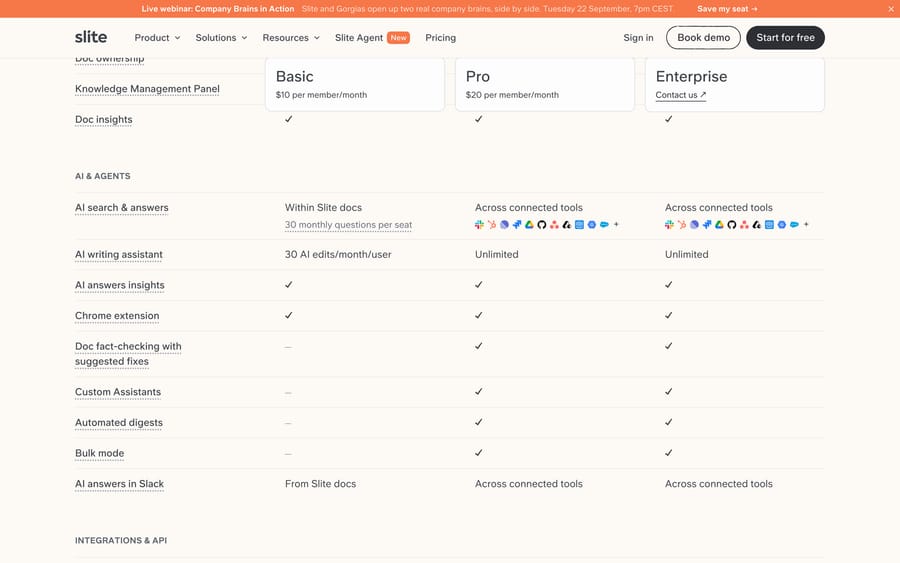
| Slite | Team wiki with AI | $10 and $20 per user a month, billed yearly | 4.6 (275) | 4.2 (10) | Small teams that want answers across their tools |
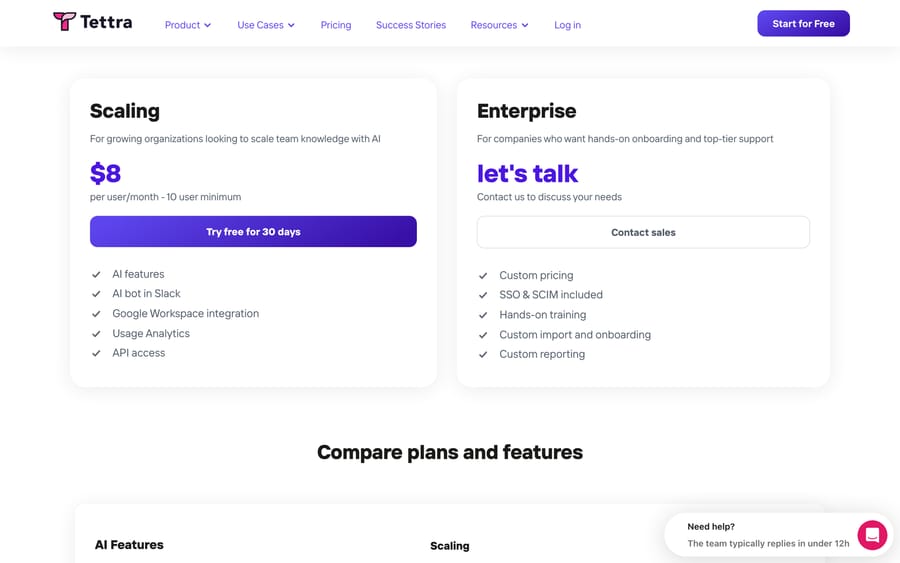
| Tettra | Team wiki with AI | $8 per user a month, 10-user minimum | 4.7 (161) | 4.3 (23) | Slack-first teams answering repeat questions |
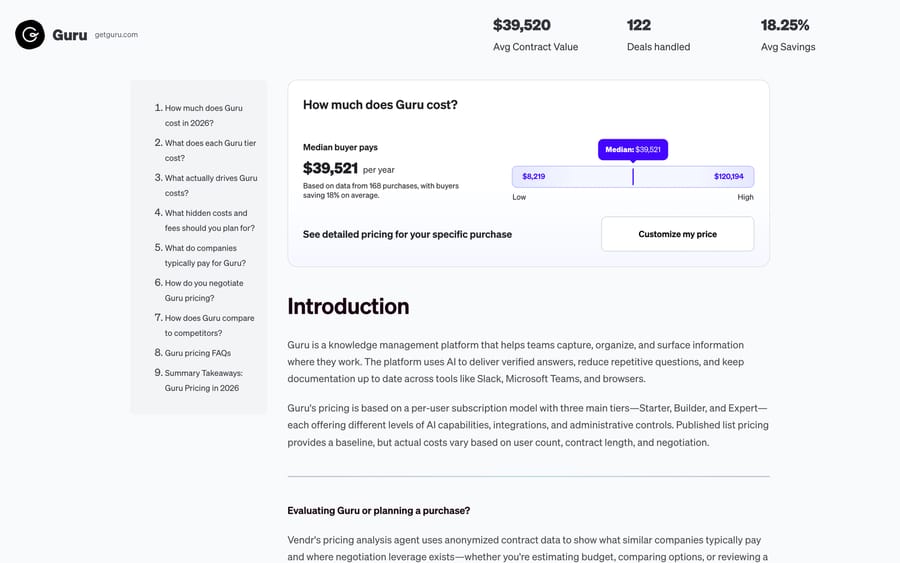
| Guru | Verified knowledge platform | Quote only; Vendr median $39,521 a year | 4.7 (2,323) | 4.7 (138) | Support and sales teams that need verified answers |
| Bloomfire | Verified knowledge platform | Quote only, annual fixed cost; Vendr median $128,333, with no purchase count shown | 4.6 (515) | 4.6 (42) | Company-wide research and knowledge sharing |
| Glean | Enterprise search | Quote only; Vendr median $98,890 a year | 4.7 (336) | 4.4 (10) | Large companies with knowledge in many apps |
| Obsidian | Personal knowledge base | App free; Sync $4 a month billed yearly | 4.5 (13) | Not in the market's top 20 | One person's notes, kept local |
| Macha | Knowledge inside a support AI agent on your help desk | From $299/mo for 750 tickets (~$0.40/ticket), published | Not rated here | Not listed | Teams on Zendesk, Freshdesk, Gorgias, Front, HubSpot or Intercom; knowledge base and agent built for you by the Macha team, with a dedicated success manager, included; $50 free usage |
What is an AI knowledge base, and how does it differ from a regular one?
A regular knowledge base is written for people to browse: a help center with categories, a wiki with a sidebar, a search box that matches keywords. An AI knowledge base keeps the same documents but adds three things. It indexes them by meaning, so "my candle showed up busted" finds the article about cracked items. It answers with a language model that reads the matching passages and writes a reply, ideally with a citation. And it tells you what's missing or stale, from the questions it couldn't answer.
| Regular knowledge base | AI knowledge base | |
|---|---|---|
| How people find things | Browse categories, keyword search | Ask in plain language, get an answer |
| What gets matched | Words in the title and body | Meaning, through embeddings |
| What comes back | A list of articles | A written answer plus the passages it used |
| Who reads it | People | People and AI agents |
| How it stays current | Someone remembers to update it | Gap reports, verification dates, synced sources |
The term covers two audiences that the search results mix together. An internal knowledge base answers employees: policies, runbooks, product specs, sales material. An external one answers customers and the support agents serving them. The tools overlap less than their marketing suggests, so decide which you're buying before you compare. Our guide to knowledge base software covers the non-AI side.
How does an AI knowledge base find answers?
It splits documents into chunks, turns each chunk into an embedding, and retrieves the closest chunks for each question. Almost every tool on this page uses that pipeline, usually called retrieval-augmented generation.
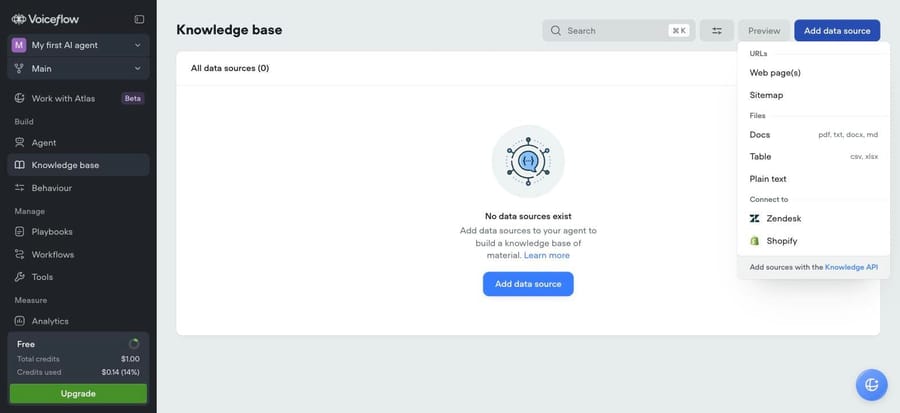
- Import. You connect sources: uploaded files, a website crawl, a help center, a wiki, past tickets. Voiceflow's menu is typical: web pages, a sitemap, PDF, TXT, DOCX and Markdown files, CSV and XLSX tables, plain text, and connectors for Zendesk and Shopify.
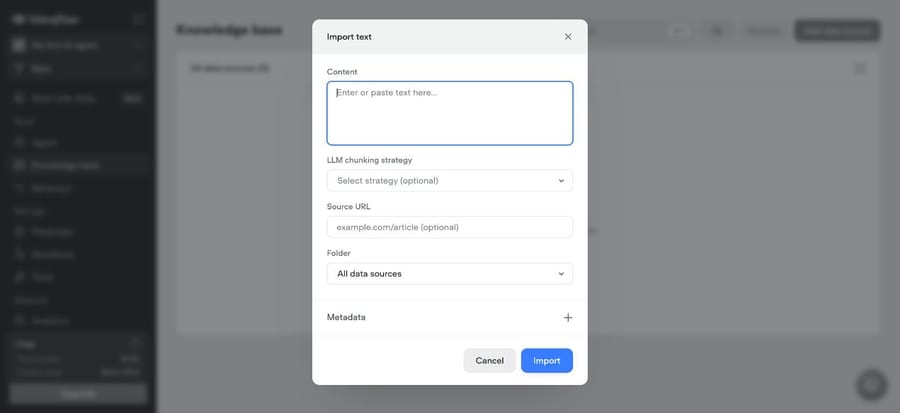
- Chunk. Each document is split into passages. Voiceflow offers an optional "LLM chunking strategy" at import, which lets a model decide where a passage ends instead of cutting at a fixed length.
- Embed. Each chunk becomes a vector, a list of numbers that places similar meanings close together. ElevenLabs lets you pick an English-optimized or a multilingual embedding model.
- Retrieve. A question is embedded the same way, and the closest chunks come back. ElevenLabs exposes the knobs: a 50,000-character limit on what's retrieved, a limit of 20 chunks, and a vector distance cutoff that drops weak matches.
- Answer. The model writes a reply from the question plus the retrieved chunks, and the better tools show which sources they used.
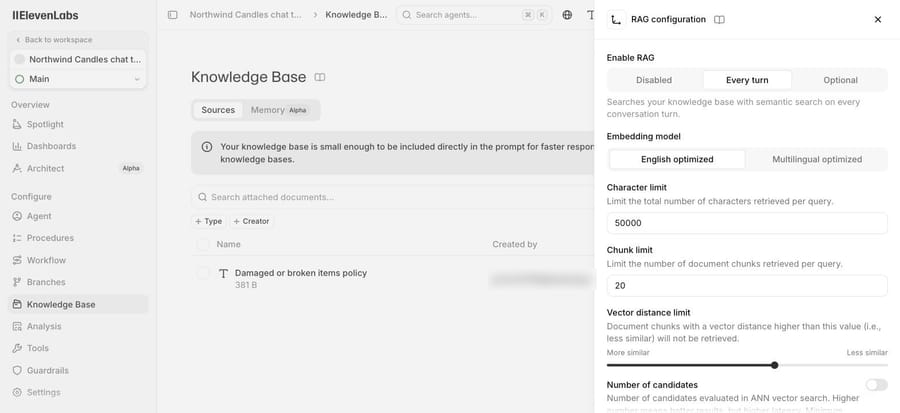
Small knowledge bases often skip retrieval entirely: ElevenLabs tells you your "knowledge base is small enough to be included directly in the prompt" and doesn't recommend RAG for it, so the whole document rides along on every turn. And retrieval only happens if the agent decides to search. As our test below shows, an agent with a confident rule in its instructions may never look.
What kinds of AI knowledge base are there?
There are six kinds, and the kind decides who reads it, where the content lives and what you pay for.
| Kind | Examples | Main reader | Where the content lives | Billing unit |
|---|---|---|---|---|
| Help center with AI | Zendesk Knowledge, Intercom Knowledge Hub, Document360, Help Scout Docs, KnowledgeBase.com | Customers and support agents | Public or private help center | Agent seats, plus AI per resolution or outcome |
| Team wiki with AI | Confluence with Rovo, Notion, Slite, Tettra, ClickUp | Employees | The wiki itself | Per user, sometimes AI credits on top |
| Verified knowledge platform | Guru, Bloomfire, eGain | Support, sales and operations staff | Curated cards or posts with owners and review dates | Per user or annual fixed fee, by quote |
| Enterprise search | Glean, Amazon Q Business, Microsoft 365 Copilot, Google Gemini Enterprise | Employees | Your existing apps, indexed in place | Per user, often by contract |
| Knowledge inside a support AI agent | Macha, Fin, Decagon, Chatbase, Voiceflow | Customers, through the agent | Sources the agent is connected to | Per ticket, outcome, message or credit |
| Personal knowledge base | Obsidian with plugins, a personal Notion | One person | Local files or a personal workspace | Free, or a small sync fee |
Three questions sort most readers. Is the audience employees or customers? Does your knowledge already live in one place, or across many apps? And will someone own it, reviewing and retiring articles, or does it need to maintain itself? One place, employees and an owner: a team wiki. Many apps and no owner: enterprise search. Customers and a help desk: a help center with AI, or knowledge inside a support agent.
Two routes sit outside the six. Build your own is what the "open source" and "github" searches are after: you store embeddings in a vector database and wire up retrieval yourself, or use a managed service such as Amazon Bedrock Knowledge Bases. It's the cheapest per query and the most work. And ChatGPT with uploaded files answers from documents you give it in a conversation or a custom GPT, but it isn't a shared, permissioned knowledge base for a team or for customers.
How do AI knowledge bases charge, and whose incentive does each model serve?
| Billing unit | Who uses it | You pay for | What it rewards the vendor for |
|---|---|---|---|
| Per user | Notion, Slite, Tettra, Confluence, ClickUp, Amazon Q Business | Every person with access, reading or not | More seats; the AI is bundled or a per-user add-on |
| AI credits on top of seats | Confluence (Rovo credits), Notion (agent credits), ClickUp (AI Super Credits) | Heavier AI use past a monthly allowance | Features that burn more credits |
| Annual fixed fee or contract | Guru, Glean, Bloomfire, Document360, eGain | A committed number, often plus implementation | Committed spend and renewal |
| Per resolution or outcome | Zendesk, Fin, Help Scout AI Answers | Answers the vendor counts as resolved | Resolution as the vendor defines it |
| Per ticket | Macha | Each thread with one person, once, however many replies | Tickets you hand the agent, resolved or not; the vendor earns more as you connect more categories |
| Free or sync fee | Obsidian | Optional sync and publishing | A small subscription from people who want convenience |
Per-user pricing is simple, and it charges the same for someone who asks one question a quarter as for someone who asks fifty a day. That's why the wikis add AI credit allowances: Confluence's plan table lists no Rovo credits on Free and 25, 70 and 150 per user a month on Standard, Premium and Enterprise, and Notion's agents run on credits at $10 per 1,000 past the trial. The vendor gets a second meter that grows with use. Resolution pricing points the other way. It ties the cost to answers that worked, and it also means the vendor earns more as your help center gets better at deflecting, which is worth knowing when the same vendor sells you the tools to write it.
How much does an AI knowledge base cost per month?
Here are two normal months, one per audience.
Internal: 50 employees, one wiki or search tool, AI answers for everyone. Customer-facing: a 10-agent support team with a help center, 3,000 customer questions a month, 1,500 of them answered by AI. We used each vendor's published price for that size and noted where the price depends on billing period or team size. Prices checked September 18 and 19, 2026.
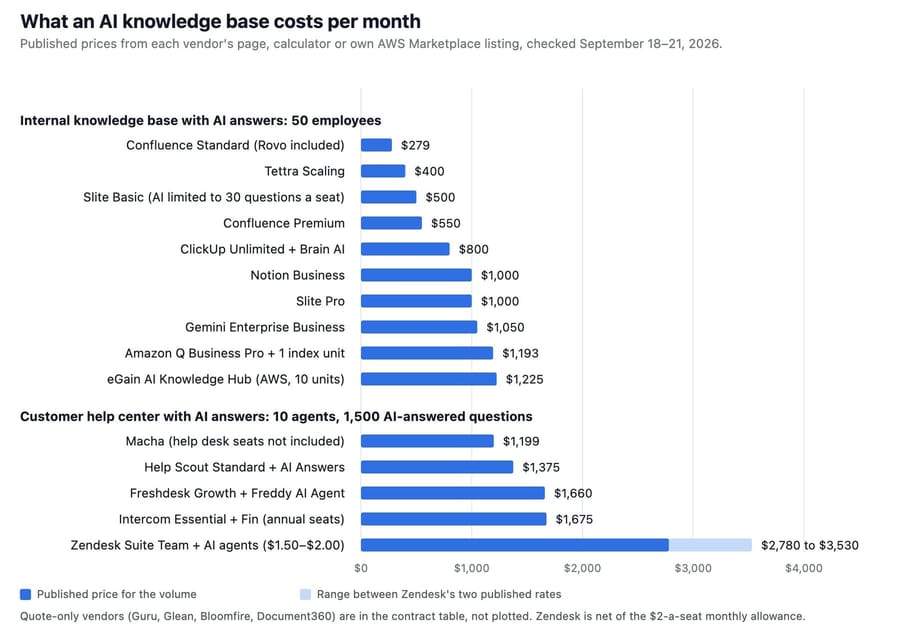
Internal knowledge base, 50 employees
| Tool | Monthly cost | How we got it |
|---|---|---|
| Confluence Standard | About $279 | $3,350 a year for 50 users billed annually, from Atlassian's price calculator; Rovo included with 25 credits per user |
| Tettra Scaling | $400 | 50 × $8, above the 10-user minimum; AI answers and the Slack bot included |
| Slite Basic | $500 | 50 × $10 billed yearly; AI search limited to 30 questions per seat a month, Slite docs only |
| Confluence Premium | $550 | $6,600 a year for 50 users billed annually; 70 Rovo credits per user |
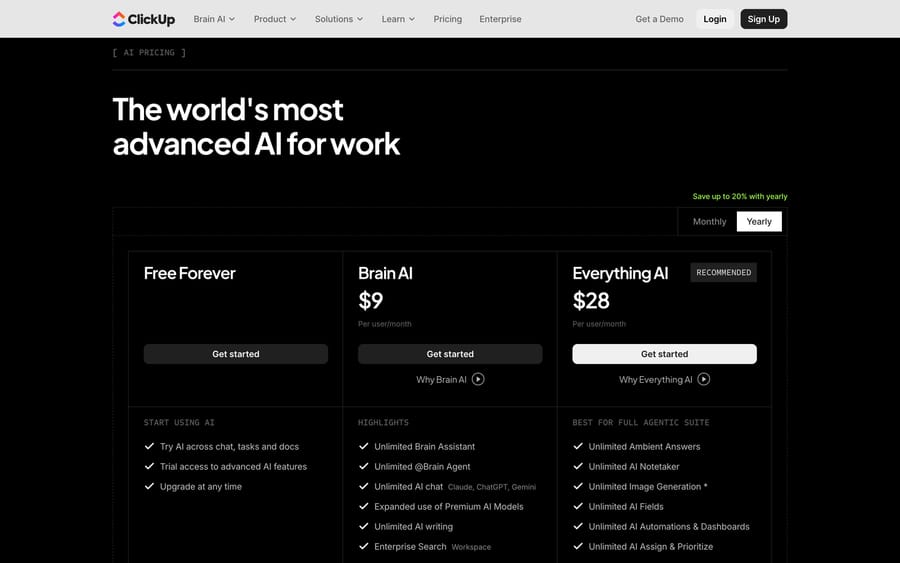
| ClickUp Unlimited with Brain AI | $800 | 50 × ($7 + $9), billed yearly |
| Notion Business | $1,000 | 50 × $20 billed yearly; Notion Agent and Enterprise Search (beta) included; agent work past the trial at $10 per 1,000 credits |
| Slite Pro | $1,000 | 50 × $20 billed yearly; unlimited AI questions across Slite and 12-plus connected tools |
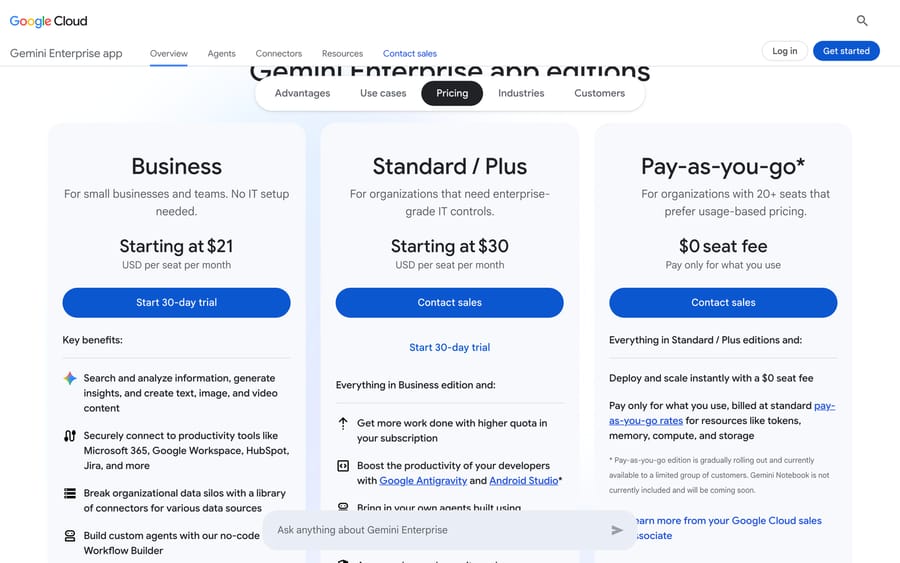
| Google Gemini Enterprise Business | $1,050 | 50 × $21 starting price; Business edition, for teams up to 300 |
| Amazon Q Business Pro | About $1,193 | 50 × $20, plus one Enterprise Index unit at $0.264 an hour (about $193) |
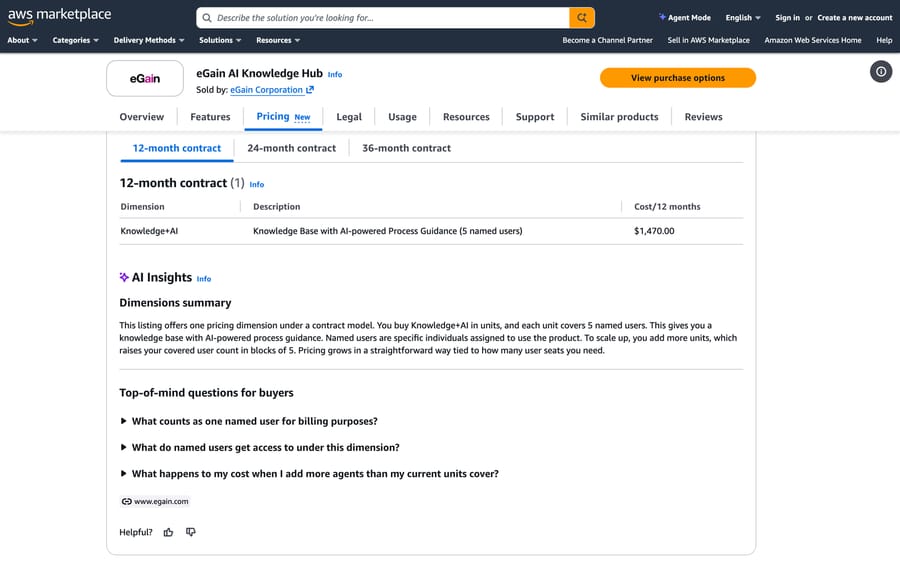
| eGain AI Knowledge Hub | $1,225 | Its AWS listing sells 5 named users for $1,470 a year; 10 units ÷ 12 |
Customer help center with AI answers, 10 agents and 1,500 AI-answered questions
| Tool | Monthly cost | How we got it |
|---|---|---|
| Macha | $1,199, plus your help desk seats | The published 3,000-ticket plan on our pricing page; it answers inside the help desk you already pay for |
| Help Scout Standard with AI Answers | $1,375 | 10 × $25 (annual) + 1,500 × $0.75 per resolution; Docs sites included |
| Freshdesk Growth with Freddy AI Agent | $1,660 | 10 × $19 (annual) + 3,000 sessions at $49 per 100. The 500 free sessions are once per account, per Freshworks' pricing FAQ, so a steady month pays for all 3,000; the chat agent needs Freshdesk Omni, per Freshdesk's add-ons article |
| Intercom Essential with Fin | $1,775 | 10 seats × $29, billed annually, + 1,500 × $0.99; Intercom has also shown $19 a seat in a pricing test |
| Zendesk Suite Team with AI agents | $2,780 committed to $3,530 pay-as-you-go | 10 × $55 (annual) = $550, + 1,500 resolutions × $1.50 committed = $2,250, or × $2.00 pay-as-you-go = $3,000 (the rates on Zendesk's pricing page), less the $2-a-seat monthly allowance ($20) |
Quote-only tools: contract prices and estimates
| Tool | What we found | Monthly equivalent |
|---|---|---|
| Guru | Vendr, a neutral buying service: median $39,521 a year from 168 purchases, $8,219 to $120,194. Guru's AWS listing is a per-user contract with a placeholder price | About $3,293 |
| Glean | Vendr: median $98,890 a year based on 174 purchases, $29,880 to $208,897. Its AWS listing uses a placeholder per-seat price | About $8,241 |
| Bloomfire | Vendr: median $128,333 a year, $20,449 to $214,950, with no purchase count shown. Bloomfire's page says "Annual fixed cost" plus migration and implementation fees | About $10,694 |
| Notion Enterprise | Notion's own AWS listing: 100 Enterprise seats for $38,400 a year, $32 per extra user. Vendr: median $57,147 a year from 244 purchases | $3,200 for 100 seats |
| Document360 | Quote only; its AWS listing is a per-user contract with a placeholder price, and Vendr has no page | Not published |
The internal numbers are close enough that price rarely decides it. At 50 people, nine of the ten published rows land between $400 and $1,225 a month, and the gap to Guru, Glean or Bloomfire is where the real decision sits: those vendors charge for curation, governance and search across everything, and a wiki doesn't do those.
How we researched this, and the knowledge base we built twice
We pulled the live Google results for "ai knowledge base" on September 19, 2026, including the AI Overview and People Also Ask, and read the pages ranking in the top ten: the guides from Fin, Zendesk, Slack and Decagon, the Slite, KnowledgeBase.com and eGain pages, and the PeopleManagingPeople listicle. Fin and Zendesk each wrote a complete guide that ranks on page one and features their own product. We couldn't read the Reddit thread that ranks on page one, because Reddit blocks both our fetcher and our browser. We checked every vendor's pricing page, searched AWS Marketplace, Microsoft's Azure Marketplace, Google Cloud Marketplace and Vendr for the ones that don't publish prices (Azure lists Teams, Outlook or SharePoint apps for Guru, Bloomfire, Document360 and eGain, a Document360 SaaS listing with a $0 placeholder plan, and nothing for Glean; Google Cloud lists only Glean, with no price shown), and read G2 and Gartner Peer Insights in a browser until G2 started rate-limiting us.
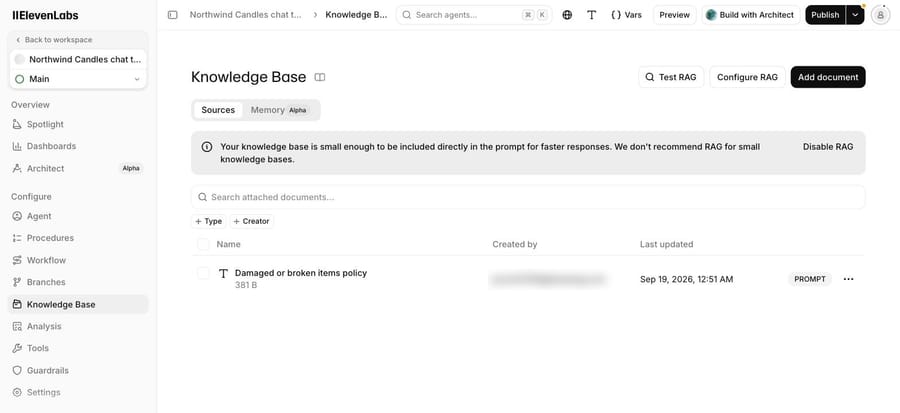
For the first-hand part, we used two free plans already open to us, Voiceflow and ElevenLabs, and created no new accounts. Both hold the same Northwind Candles support agent, a fictional shop. Both are support agents: we didn't test an internal wiki such as Notion or Slite, because that needed new accounts, so the internal tools on this page are judged on their published features, prices and reviews. We wrote one short policy document, "damaged or broken items": a cracked candle doesn't need to be sent back, the customer never pays shipping for it, and a teammate reviews a photo within one business day before sending a replacement or refund. We loaded it into each agent's knowledge base and asked about a cracked candle in words the document doesn't use.
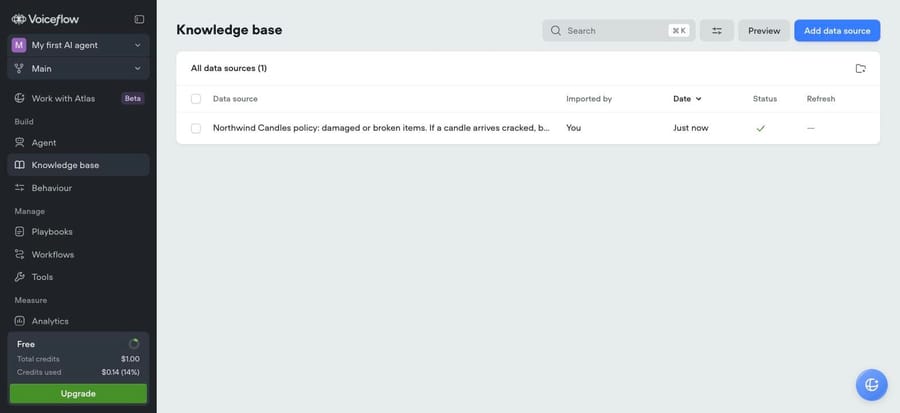
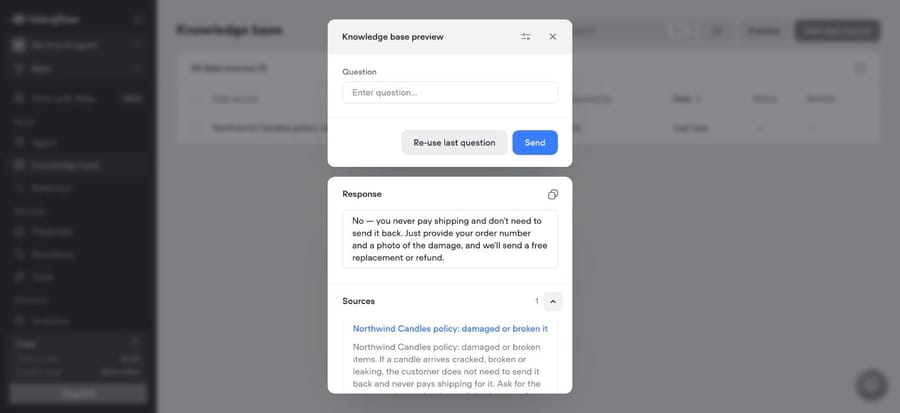
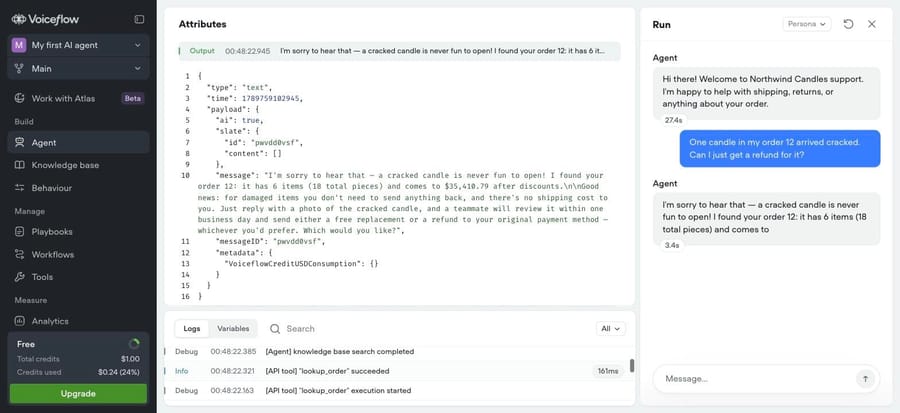
Retrieval by meaning worked. Asked "my candle showed up busted in the box, do I have to pay to mail it back?", Voiceflow's knowledge base preview answered from the cracked-items policy, its one source, though its one-line answer dropped the teammate review and promised the replacement or refund outright. The preview clears the question once it answers, so the second shot shows the same question put to the agent itself, with "knowledge base search completed" in its log.
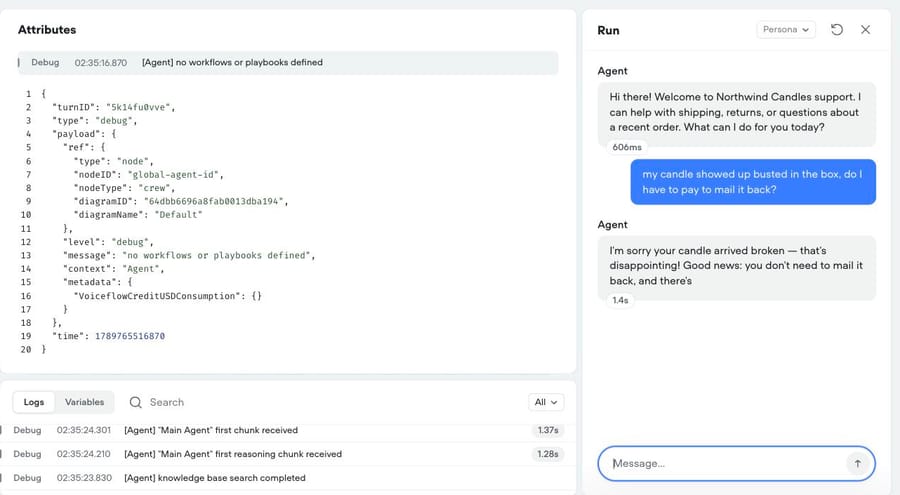
The agent ignored it at first. The same Voiceflow agent had one rule in its instructions: unused items can be returned within 30 days and the customer pays return shipping. Asked "One candle in my order 12 arrived cracked. Can I just get a refund for it?", it answered from that rule instead of the policy document. It told the customer that unused items can be returned within 30 days "(you'd cover the return shipping)", then offered a teammate follow-up "within one business day". It also quoted the order total as $37,710.79, where the second run, on the same order, gave $35,410.79.
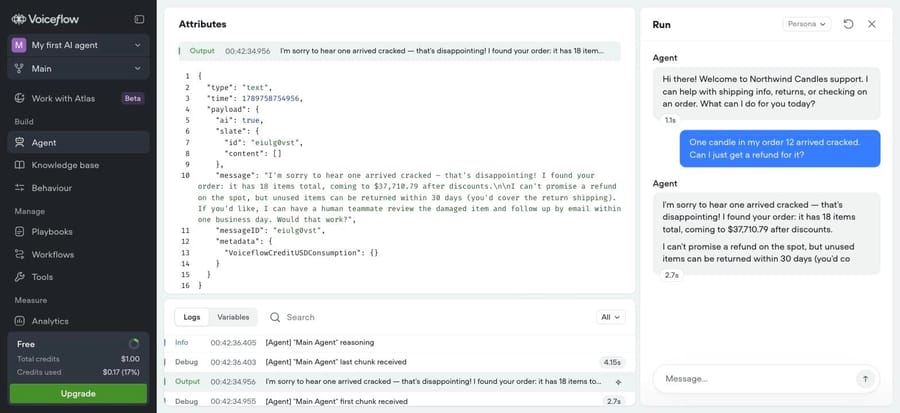
One sentence fixed it. We replaced the hard-coded rule with "Answer shipping, returns and damaged-item questions from the knowledge base, and follow the policy you find there." On the same question, the log shows "knowledge base search completed", the reply followed the damaged-items policy (no return, no shipping cost, a photo and a teammate review), and the order total came back correct at $35,410.79.
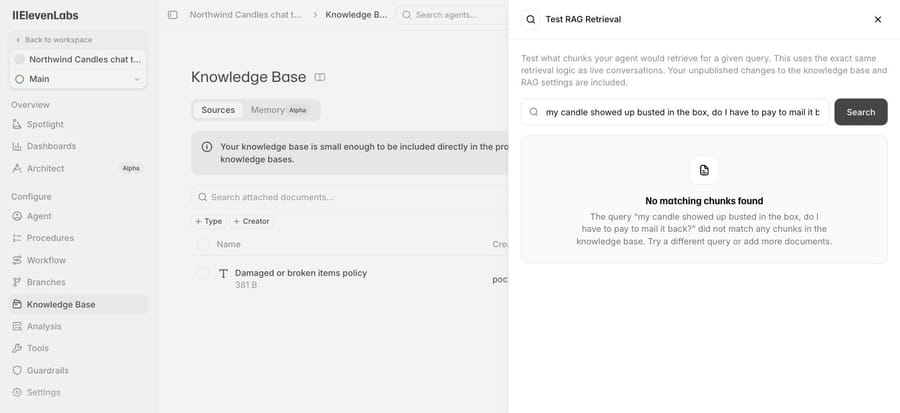
ElevenLabs handled it differently. Because the document is 381 bytes, it marked it "PROMPT" and put the whole text in the agent's instructions rather than indexing it. Its Test RAG tool then found "No matching chunks" for our "busted" question, since nothing had been chunked. The agent itself answered correctly on the first try. ElevenLabs also connects to Macha, as a speech-to-text tool rather than a knowledge source; our ElevenLabs integration post covers that.
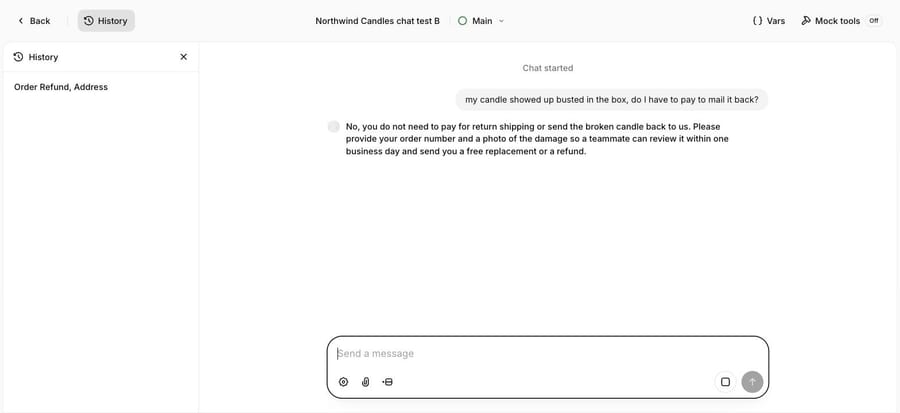
Neither agent had a tool for recording the photo, and ElevenLabs had no tool at all; the Voiceflow agent's one tool was the order lookup. We ran text only, with no voice turn, because this page is about knowledge rather than channels. Adding a document doesn't mean the agent uses it. Test the questions your instructions already half-answer, and check the log for a search.
How should you evaluate an AI knowledge base?
- Sources and sync. List where your answers actually live and check each connector re-syncs on its own. Slite's Pro plan searches across 12-plus connected tools; Basic searches only Slite.
- Permissions. An internal knowledge base must respect who can see what. Ask whether answers are permission-aware per user, which enterprise search tools such as Glean and Amazon Q Business are built around.
- Freshness and ownership. Look for verification dates, owners and stale-content alerts. An IT administrator at a mid-market company wished for more ways "to alert us on outdated or unconsulted content" (G2, May 18, 2026).
- Gap detection. The tool should report the questions it couldn't answer, which is the backlog of articles to write.
- Citations. Every answer should show its sources, so a reader can check and a writer can fix the right article.
- Retrieval controls. Chunking, embedding model, number of chunks and a relevance cutoff. You won't tune them daily, but they explain why an answer was missed.
- Compliance and data handling. SSO, audit logs and zero data retention are usually top-tier features; Notion lists zero data retention with LLM providers on Enterprise, and Guru lists SOC 2 Type II and HIPAA.
Help centers with AI
These put a knowledge base in front of customers and let an AI agent answer from it. They're the natural choice when the help desk is already chosen.
Zendesk Knowledge
Zendesk's knowledge base ships with every Suite plan, from $55 per agent a month billed annually. Zendesk's own AI knowledge base guide lists generative search, Agent Workspace answers, out-of-the-box connectors, generative AI for knowledge and a Knowledge Builder that generates a knowledge base "centred around your business context and historical tickets", and says Zendesk can detect content gaps and flag outdated articles. AI agents answering customers bill per automated resolution. Zendesk's pricing page says they're included and billed that way, and lists $1.50 per resolution on a committed plan and $2.00 pay-as-you-go for the agents marketed in its buyer's guide; its pricing blog also says $1.50. The same page's plan table includes 5 automated resolutions per agent a month on Support Team and Suite Team and 10 on Suite Professional, which Zendesk's help center describes as a monthly dollar allowance per seat since 18 May 2026, $2 to $10 by plan, capped at $5,000 a year. Zendesk's own AWS Marketplace listing shows the same $1.50 under a banner saying "Please DO NOT PURCHASE via this public offering".
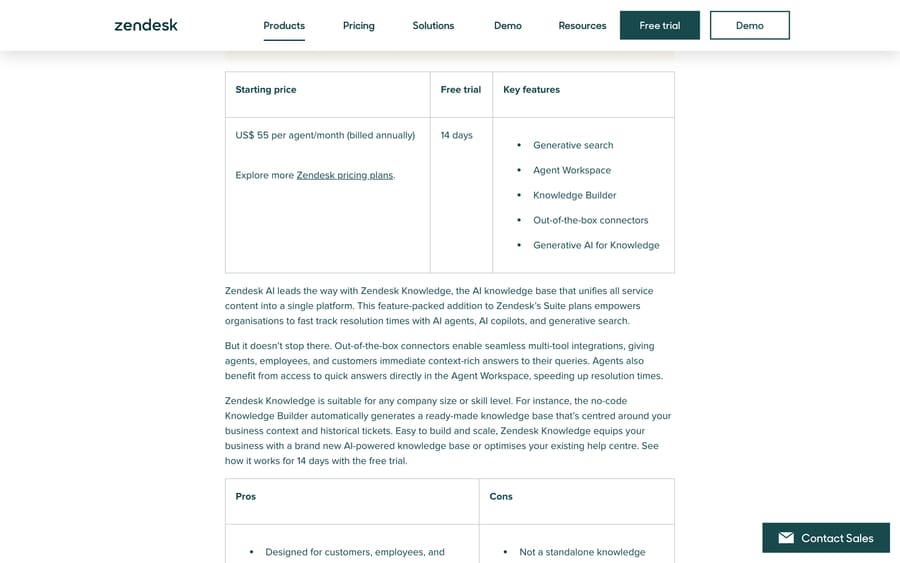
Zendesk for Customer Service rates 4.3 from 7,075 reviews on G2 and 4.3 from 47 in Gartner's AI agents market. A mid-market consulting reviewer described the knowledge-adjacent gap well: "Unanswered posts just sit there with no real way to auto-escalate them into an actual ticket" (G2, August 31, 2026), about Zendesk's community forum.
It suits teams already on Zendesk. Skip it if you'd pay for Zendesk seats only to get the knowledge base; a standalone help center costs less. Our Zendesk Guide explainer covers setup.
Intercom Knowledge Hub and Fin
Intercom's help center and Knowledge Hub come with every plan: a public help center on Essential, private and multilingual on Advanced and Expert. Its pricing page lists Essential at $29, Advanced at $85 and Expert at $132 a seat a month billed annually; Intercom has also shown $19 for Essential in a pricing test. Fin costs $0.99 per outcome on all of them. Salesforce completed its acquisition of Fin on 10 September 2026 and cites a 76% average resolution rate; Fin's own guide to AI knowledge bases, which ranks on page one for this search, gives 67%. Both are the vendor's numbers, not independent ones.
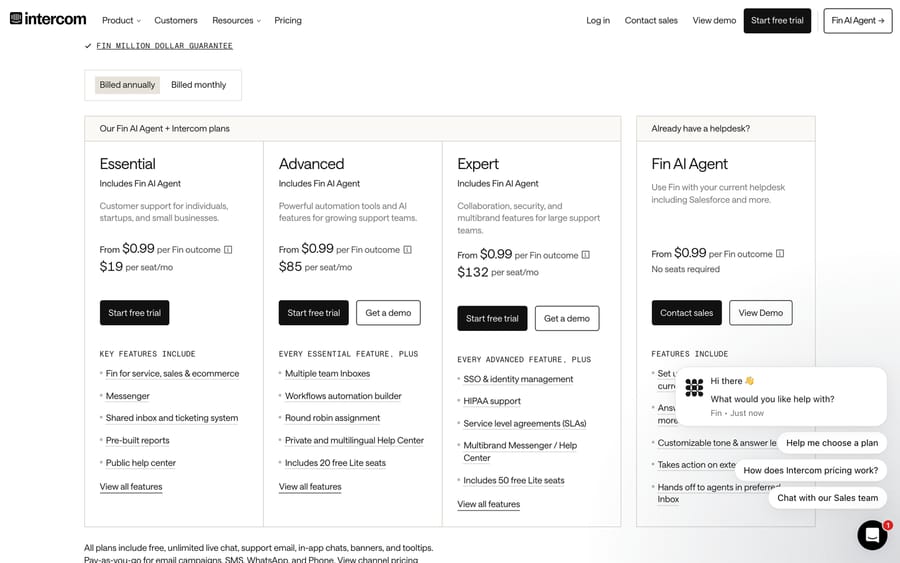
Fin rates 4.5 from 3,912 on G2, a count for the whole Intercom product, and Gartner shows 4.3 from 257 for the whole company. A mid-market support specialist wrote that "Sometimes Fin can be repetitive in the way it handles a conversation" (G2, September 11, 2026). Fin's outcomes include procedure handoffs, so a knowledge gap that ends in a handoff can still bill.
It fits teams on Intercom. Skip it if your knowledge lives outside Intercom and you'd rather not copy it in. Our Fin guide has more.
Document360
Document360 is a documentation platform for product and support teams, with an AI assistant called Eddy. It doesn't publish prices: its pricing page quotes around team accounts, workspaces, languages, SSO, privacy model and "AI Premium Suite usage", with a 14-day trial. Its AWS Marketplace listing sells a per-user contract at a placeholder price, and Vendr has no page for it.
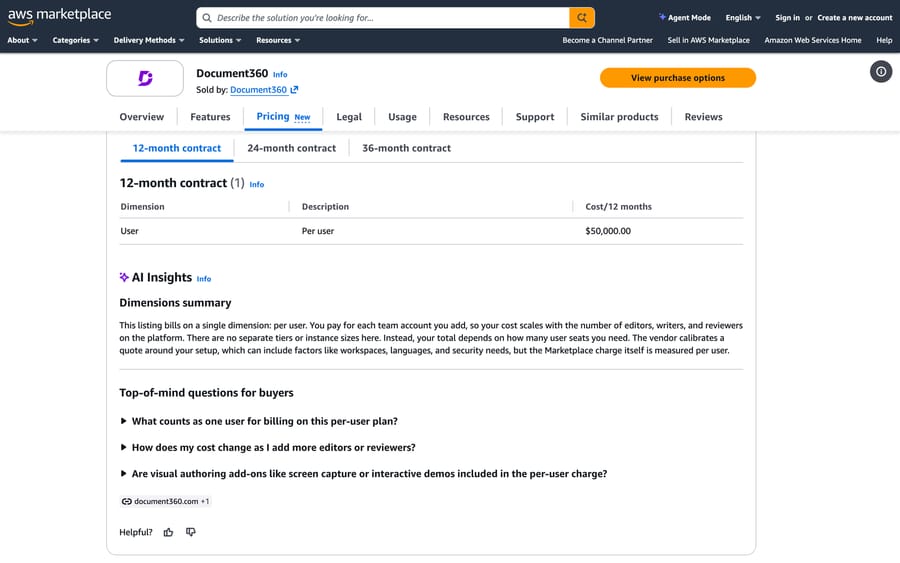
G2 gives 4.7 from 542 reviews and Gartner 4.2 from 44. The complaints are small and practical, with "Missing Features" (9) and "Expensive" (8) among the tags; a reviewer in computer software wrote that its advanced search "is great but not, currently, configurable" (G2, December 12, 2022).
It suits teams publishing structured product documentation in several languages. Skip it if you want a price before a sales call.
Help Scout Docs and AI Answers
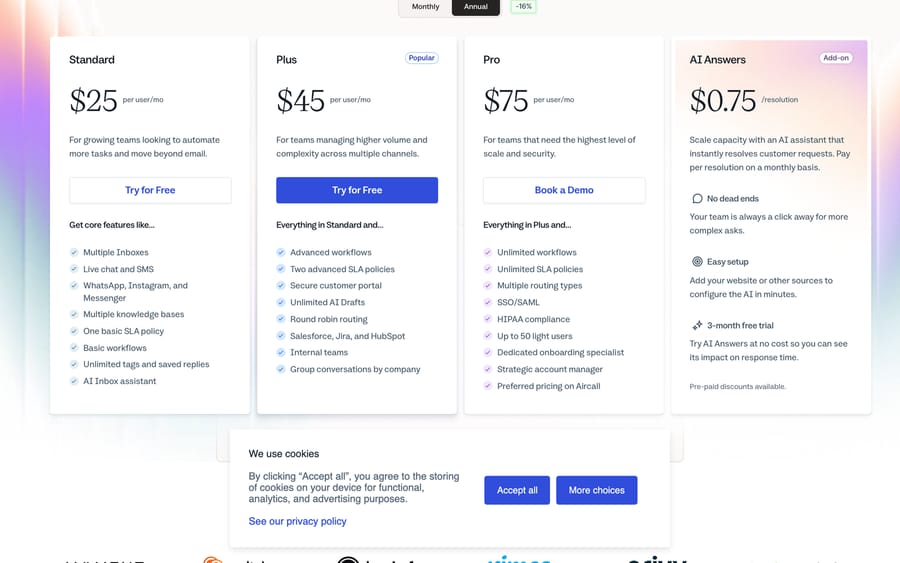
Help Scout includes Docs sites on every plan (one on Free, two on Standard), with seats at $25, $45 and $75 a month on annual billing. Its pricing page sells AI Answers at $0.75 per resolution with a three-month free trial, the cheapest per-resolution rate on this page. Help Scout rates 4.6 from 226 on Capterra (G2 was rate-limiting our browser when we got to it). Watch the per-resolution meter if your help center is thin, since every AI answer bills. It suits small teams on Help Scout; our Help Scout Docs guide has more.
KnowledgeBase.com
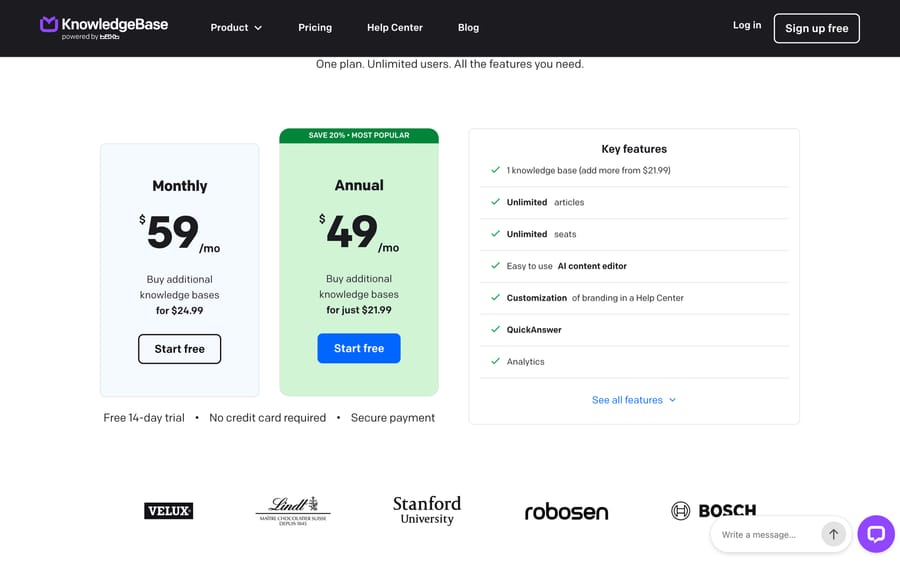
KnowledgeBase ranks on page one with its homepage. Its pricing page has one plan, $49 a month billed yearly or $59 monthly, with unlimited articles and seats, an AI content editor and a QuickAnswer feature, plus extra knowledge bases from $21.99. Capterra lists it with no reviews yet. It's a help center rather than an AI agent, and the cheapest way to publish one; if you need AI answers in chat, you'll add a separate tool.
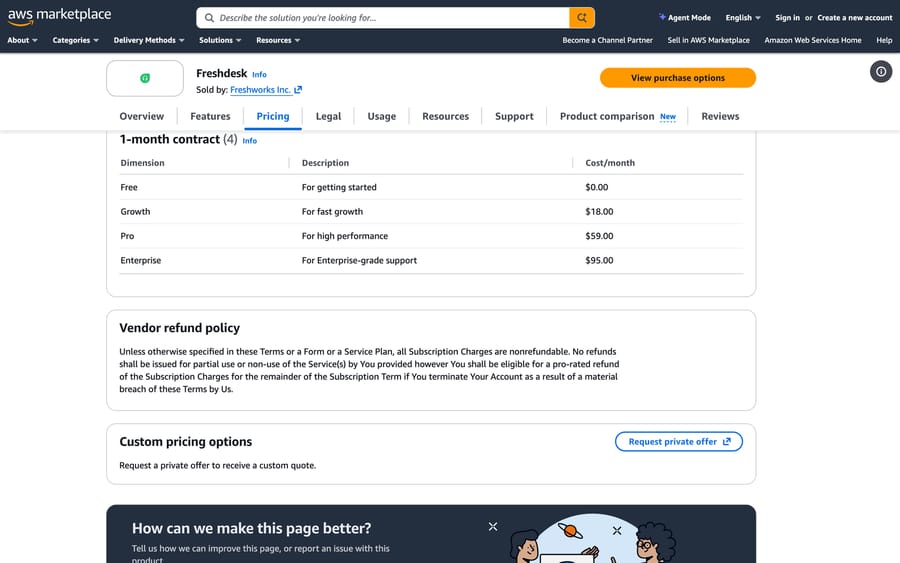
Freshdesk also includes a knowledge base on every plan, and its Freddy AI Agent answers from it at $49 per 100 sessions, with 500 free sessions once per account. Freshdesk sells through AWS Marketplace too, at $18, $59 and $95 per agent a month on a one-month contract; see our Freshdesk knowledge base explainer.
Team wikis with AI
These are where most internal knowledge already lives. The AI is a search-and-answer layer over pages your team writes.
Atlassian Confluence with Rovo
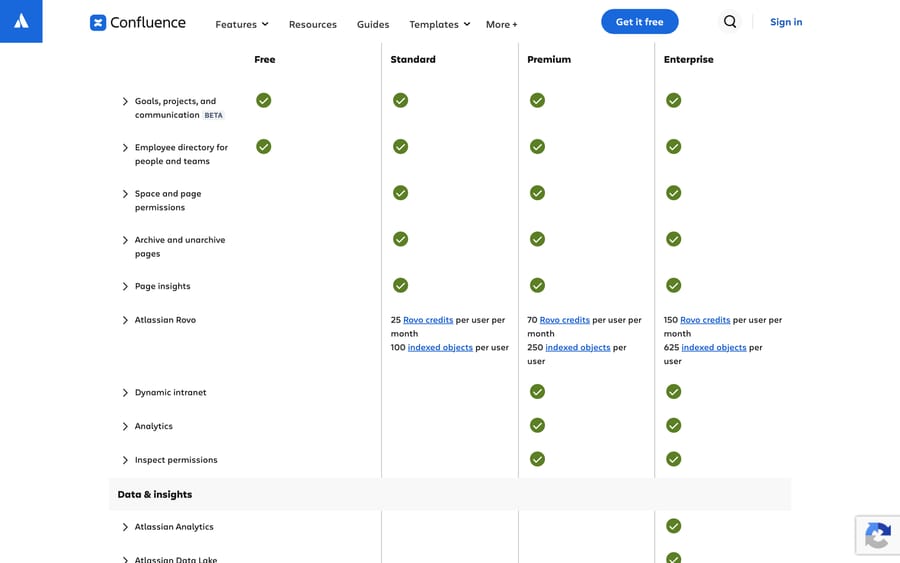
Confluence is the most-reviewed tool in Gartner's knowledge management market, 4.4 from 450, and Atlassian's AI, Rovo, comes with its plans. The pricing page prices per user on a sliding scale. At 50 users billed annually, its calculator gives $3,350 a year for Standard and $6,600 for Premium, about $279 and $550 a month. The plan table grants no Rovo credits on Free and 25, 70 and 150 per user a month on Standard, Premium and Enterprise.
G2 is less warm, 4.1 from 4,369, with "Not Intuitive" (84) and "Slow Performance" (83) leading the cons. The most useful complaint for this page is about search: a QA engineer at a mid-market health care company wrote that "Confluence search often surfaces outdated drafts or duplicate pages first" (G2, September 7, 2026).
It fits teams already in Jira and Confluence. Skip it if nobody retires old pages, because an AI answering from stale drafts is worse than a search that just shows them. Our Confluence integration post covers using it as a source for a support agent.
Notion
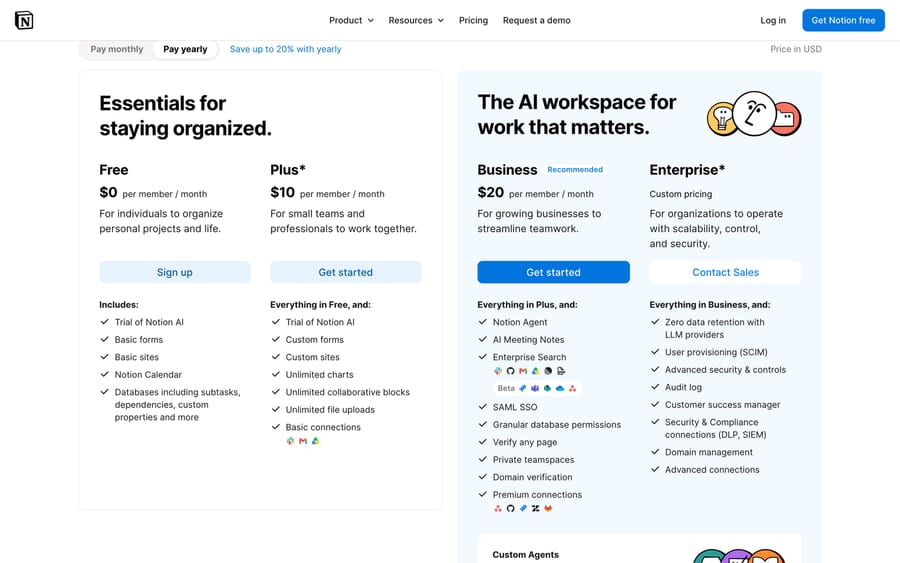
Notion's pricing page lists Free, Plus at $10 and Business at $20 per member a month billed yearly. Free and Plus get a trial of Notion AI; Business adds the Notion Agent, AI Meeting Notes and Enterprise Search, marked beta. Agents past the trial run on Notion credits at $10 per 1,000. Notion's own AWS listing sells 100 Enterprise seats for $38,400 a year, $32 a seat, and Vendr puts the median Notion contract at $57,147 a year from 244 purchases.
Notion has the largest review base here, 4.6 from 13,845 on G2, and 4.5 from 115 on Gartner. "Learning Curve" (1,895) is the most common con tag, and a guest reviewer at a small software company (a review G2 excludes from its score) noted that "large databases (10k+ rows) get noticeably slow to filter" (G2, September 15, 2026).
It suits teams that plan and document in one workspace. Skip it if you need a curated, verified answer set rather than a flexible workspace. Our Notion integration post shows it feeding a support agent.
Slite
Slite ranks on page one with a homepage that calls it a "self-maintaining" AI knowledge base, and the AI Overview names it. Its pricing page lists Basic at $10 and Pro at $20 per user a month billed yearly. The difference is the AI: Basic allows 30 Ask questions per seat a month over Slite docs only, while Pro makes Ask unlimited across Slite and 12-plus connected tools and adds doc fact-checking.
It rates 4.6 from 275 on G2 and 4.2 from 10 on Gartner. A mid-market CTO wrote that "the lack of offline work is something that could be improved", and that the table search filter "and other controls have a few limitations" (G2, April 27, 2026).
It suits small and mid-sized teams that want answers across their tools without enterprise search pricing. Skip Basic if your people will ask more than 30 questions a month each; the AI stops.
Tettra
Tettra is named in the AI Overview's list and built around Slack. Its pricing page has one self-serve plan, Scaling, at $8 per user a month with a 10-user minimum and 20% off yearly, including AI answers, page tagging and an AI bot in Slack; Enterprise is for 250-plus licenses.
G2 shows 4.7 from 161 and Gartner 4.3 from 23. Reviewers are candid about search: a mid-market marketing manager wrote "Search ability could be improved" (G2, December 8, 2025), and another reviewer called Tettra "an input-based platform, meaning you get out of it what you put into it".
It suits teams whose repeat questions arrive in Slack. Skip it if your knowledge is mostly outside Tettra, since it answers from its own pages.
ClickUp also belongs here: its pricing page sells Unlimited at $7 and Business at $12 per user a month billed yearly, with Brain AI at $9 and Everything AI at $28 per user. It rates 4.1 from 38 on Gartner and suits teams that already run projects in ClickUp.
Verified knowledge platforms
These add ownership, verification dates and governance on top of the content.
Guru
Guru now sells only by quote. Its pricing page says the price is "tailored to your organization's scale, knowledge complexity, and AI maturity" and includes solution engineers and knowledge architecture work, with SOC 2 Type II and HIPAA listed. Its AWS listing is a per-user contract with a placeholder price. Vendr's median buyer pays $39,521 a year across 168 purchases, from $8,219 to $120,194.
Guru rates 4.7 on both G2 (2,323) and Gartner (138), the highest pairing on this page. Search is still the complaint: "Inefficient Search" (146) and "Search Functionality Issues" (134) lead the con tags, and a quality and knowledge specialist wrote that "The card-based UI/UX is overly rigid for long-form technical documentation, causing fragmentation" (G2, June 15, 2026).
It suits support and sales teams that need short, verified answers with an owner on each. Skip it for long-form documentation, or if a five-figure contract is out of range.
Bloomfire
Bloomfire's pricing page lists Team, Department and Enterprise access, each priced as an "Annual fixed cost" plus fees for data migration and implementation, and says it doesn't charge per user. Vendr puts the median at $128,333 a year, from $20,449 to $214,950, but unlike its Guru and Glean pages it shows no purchase count, so treat it as a rough marker.
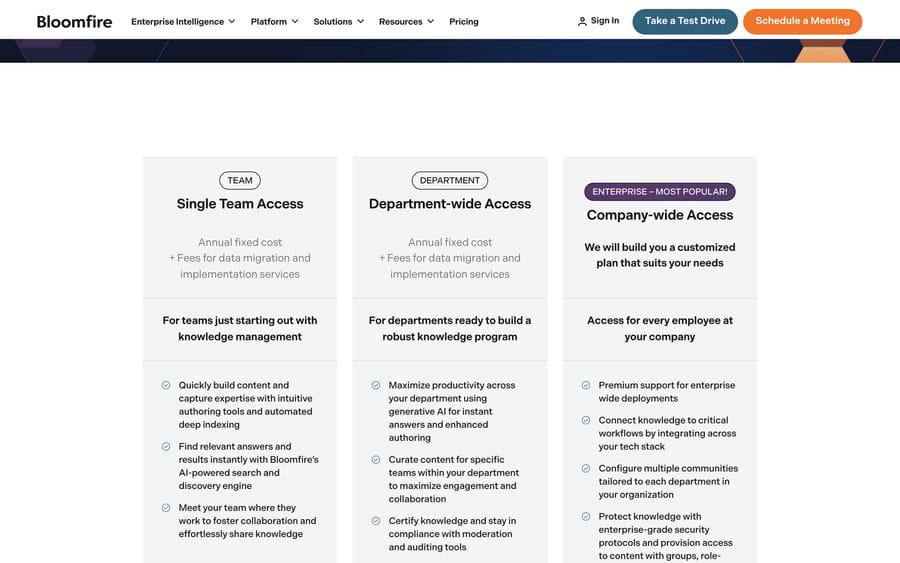
G2 shows 4.6 from 515 and Gartner 4.6 from 42. The recurring issue is finding things: a mid-market investment management reviewer wrote that "Some of our back office associates and CSRs have a hard time finding the data or answers needed", and that its AI "does better when asked a question vs. a CSR typing in a phrase" (G2, May 29, 2024).
It suits companies sharing research and knowledge across departments without counting seats. Skip it if you want to start small and self-serve.
eGain sells its AI Knowledge Hub to contact centers, and its AWS listing prices "Knowledge+AI" at $1,470 a year for five named users, about $24.50 a user a month. Its explainer ranks on page one for this search, and Capterra lists the product without reviews, so ask for references.
Enterprise search across your tools
Enterprise search leaves knowledge where it is and indexes it: Slack, Google Drive, Jira, Salesforce, the wiki. The appeal is no migration; the risk is answering from whatever is findable, current or not.
Glean
Glean is the enterprise search product buyers name first, and it appears on both Slack's and PeopleManagingPeople's lists. There's no public price. Its AWS listing is a per-seat contract with a placeholder price, and Vendr's median is $98,890 a year based on 174 purchases, from $29,880 to $208,897.
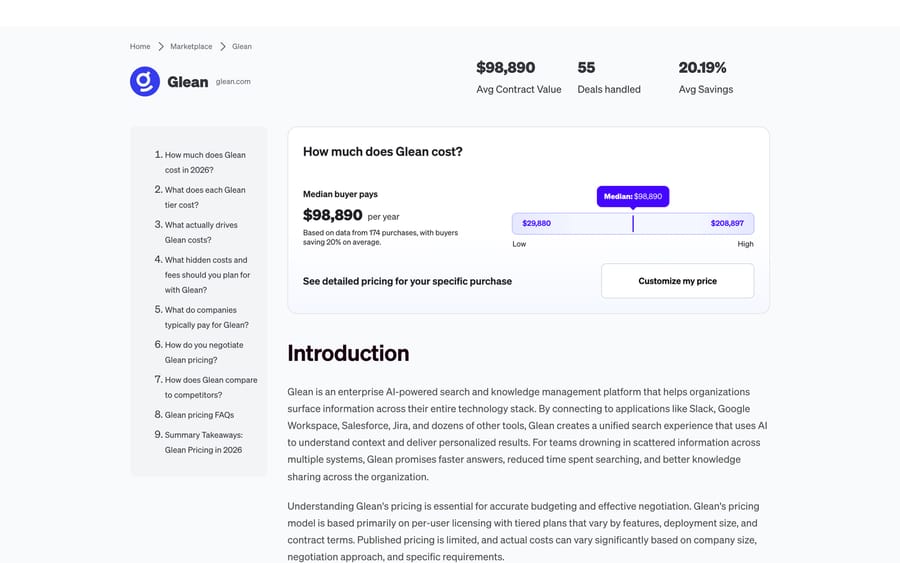
G2 gives 4.7 from 336 and Gartner 4.4 from 10. A cash application specialist at a mid-market company wrote that "One area that could be improved is the consistency of the search results. Occasionally, Glean surfaces outdated or less relevant documents before the most useful information" (G2, August 25, 2026).
It suits large companies with knowledge in dozens of apps and budget for a contract near six figures. Skip it below a few hundred employees, where Vendr's low end is still about $30,000 a year; per-user options such as Amazon Q Business and Gemini Enterprise suit smaller teams.
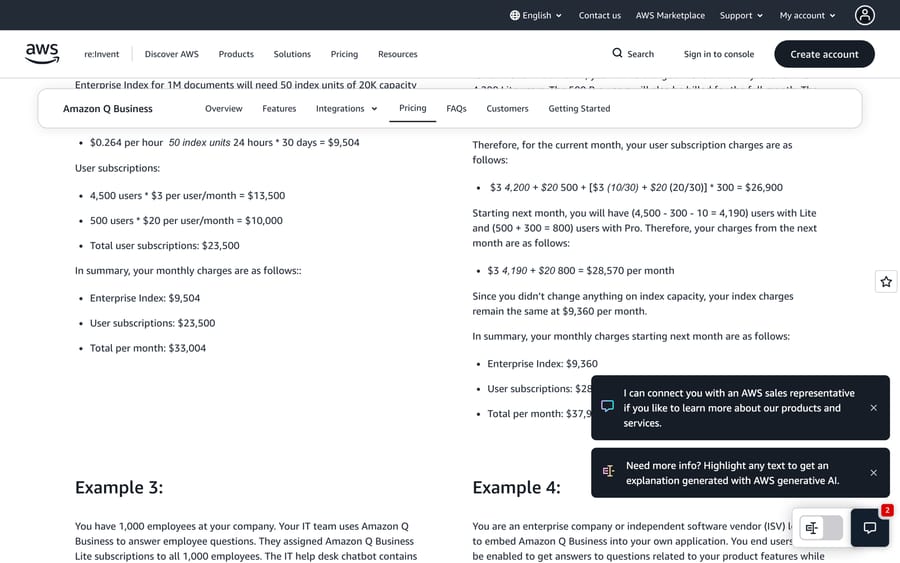
Amazon, Microsoft and Google. Amazon Q Business charges $3 (Lite) or $20 (Pro) per user a month plus index capacity on its pricing page, which also says it has been succeeded by Amazon Quick Suite; it rates 4.8 from 17 on Gartner. Microsoft 365 Copilot lists at $30 per user a month paid yearly on Microsoft's Copilot Studio pricing page. Google's Gemini Enterprise page lists the Business edition from $21 per seat a month, for teams up to 300, and Standard and Plus from $30, with connectors to Microsoft 365, Google Workspace, HubSpot and Jira; 50 Business seats come to $1,050 a month.
Personal knowledge bases
Obsidian
Obsidian is a note app that stores Markdown files on your own device, and the AI Overview names it for personal knowledge management. Its pricing page says the app is "Free without limits", with Sync at $4 and Publish at $8 a month billed yearly and an optional $50-a-year commercial license. The app has no built-in AI; that comes from community plugins. The most popular, Smart Connections, has 1.2 million downloads and says a local embedding model powers its semantic search, with nothing to set up and no key from an AI provider required.
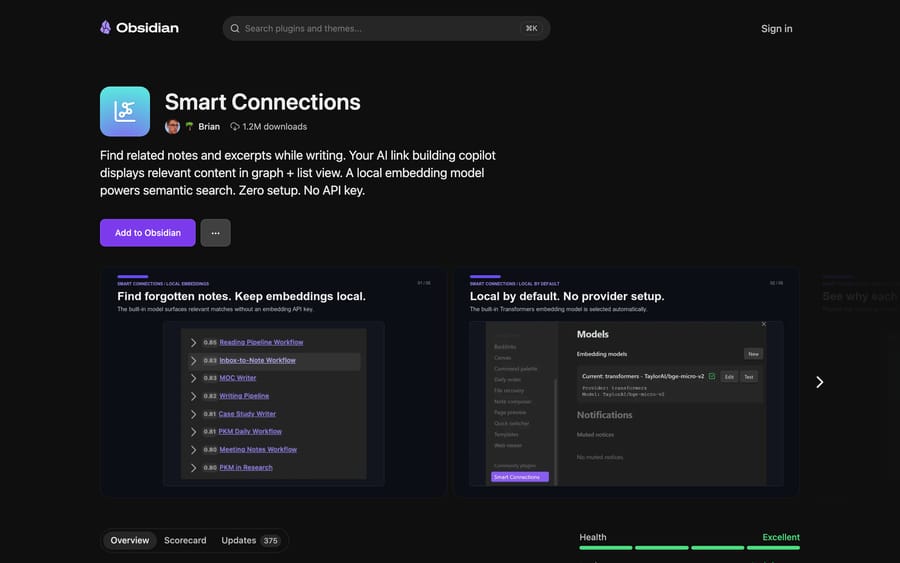
G2 lists 13 reviews at 4.5, and it isn't in Gartner's market. The trade-off is ownership: your notes stay local and private, and nobody else can search them, set permissions or review them.
It suits one person building a second brain. Skip it for a team or for customer answers.
Knowledge inside a support AI agent
The last kind treats the knowledge base as something an agent reads rather than a place people browse, which is how most AI agents for customer service work. Fin, Decagon, Chatbase and Voiceflow all work this way; see our Decagon, Chatbase and Voiceflow guides, and our AI chatbot comparison for pricing. Documentation-focused agents such as kapa.ai and Brainfish answer developer and product questions from docs.
Macha
This is us, so here is the scoped version. Macha is an AI agent layer on top of Zendesk, Freshdesk, Gorgias, Front, HubSpot or Intercom, and its agents answer tickets from the sources you connect. On the Sources page you can upload PDF, DOCX, TXT, CSV and XLSX files, crawl a website, add a single page, connect a help center, and connect tools such as Confluence and Google Workspace, which stay live through their connectors. The AI Knowledge Builder drafts articles from past Zendesk tickets, which is the one help desk it reads today; the wider picture is in how Macha brings your knowledge sources into Zendesk.
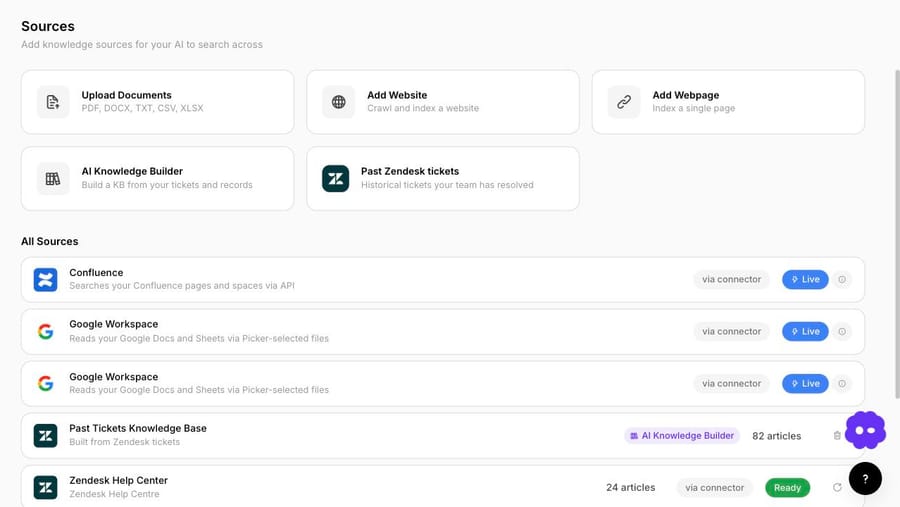
The Knowledge Builder reads Zendesk tickets your team has already resolved and drafts articles from the answers. Each article is indexed and usable by your agents as soon as it's generated, you can edit it at any time, and it keeps a link back to the tickets it was built from, so you can check where an answer came from. Our post on connecting a knowledge base to an AI agent covers the setup.
It isn't a wiki, a help center or enterprise search, and it doesn't replace your help desk's knowledge base; it reads it. Pricing is one plan on monthly ticket volume, from $299 for 750 tickets, about $0.40 a ticket, one charge per thread however many replies, and $50 of free usage with no card. It fits teams on those help desks whose answers are scattered across several tools.
Macha is also the done-for-you option in this list: you don't build the knowledge base yourself. Your part is connecting your help desk and the tools your answers come from, about 15 minutes. The Macha team analyzes about a month of your past tickets, builds the knowledge base from your help center, a crawl of your website, your documents and, on Zendesk, articles drafted from past tickets, and fills the gaps for the first ticket category before go-live. It then builds the agent, tests it on a sample of past tickets, and runs it in safe mode, with drafts as internal notes in your help desk, until the drafts are right. That's included on the trial and every plan. About $0.40 a ticket covers setup and a dedicated success manager who handles your changes after go-live, such as new categories, instruction edits and new tools. Macha on your help desk shows how it connects, and our guide to designing knowledge sources covers the setup work.
Also considered
From Gartner's knowledge management top 20 and the ranking lists: Stonly (4.8 from 42 on Gartner) for interactive guides; Shelf (4.7 from 14) for contact-center content quality; USU (4.2 from 43), Lighthouse and IT Glue for IT documentation; Archbee (4.5 from 23) and KnowledgeOwl (4.5 from 15) for product docs; Zoho Learn and Trainual for training; Slack, whose Enterprise+ plan adds search across connected apps; Salesforce Knowledge for Service Cloud teams; and the HR-focused picks on PeopleManagingPeople's list (Haystack, Deel, HR Cloud).
Who should not buy each type?
A help center with AI is wrong if you'd adopt a help desk just to get it. A team wiki is wrong if nobody will retire stale pages, because the AI will answer from them. A verified knowledge platform is wrong for a team that won't do the verification. Contract-priced enterprise search is wrong below a few hundred employees; per-user options such as Amazon Q Business and Gemini Enterprise change that. A personal knowledge base is wrong for anything shared. And Macha is the wrong fit if you don't run one of the help desks it connects to, or if the knowledge base you need is for employees rather than customers.
How do you build an AI knowledge base?
- Pick the audience and the kind. Internal or external decides most of the shortlist.
- Start from what customers or employees actually ask. Pull the top questions from tickets or Slack, not from the table of contents.
- Write one article per question, with the policy in plain words. Our cracked-candle test failed until a dedicated article existed.
- Connect sources rather than copying them, so updates flow through.
- Check the instructions don't contradict the knowledge base. A hard-coded rule in the prompt can stop the agent from searching.
- Test with paraphrases and read the logs. Confirm a search happened and the right source came back.
- Review the gap report monthly and retire what's stale.
Frequently asked questions
What is an AI knowledge base? A knowledge base that software can search by meaning and answer from. It splits documents into chunks, stores them as embeddings, retrieves the closest passages for each question and writes an answer with a language model, ideally citing the sources.
Is an AI knowledge base for customers or employees? Either, and the tools differ. Customer-facing ones are help centers with AI answers, such as Zendesk, Intercom and Help Scout. Internal ones are wikis and search tools such as Confluence, Notion, Slite, Guru and Glean.
What is the best AI knowledge base? For customer support on an existing help desk, use that help desk's knowledge base or an agent that reads it. For internal wikis, Confluence, Notion and Slite are the common starting points; Guru rates highest on both G2 and Gartner (4.7 on each) among the tools here with over 100 reviews on both.
Does ChatGPT have a knowledge base? ChatGPT can answer from files you upload to a conversation or attach to a custom GPT. That isn't a shared, permissioned knowledge base for a team or for customers, which is what the tools on this page provide.
Is there an open-source AI knowledge base? You can build one from open-source parts: a vector database, an embedding model and a retrieval framework, which is what the "github" searches find. Managed options such as Amazon Bedrock Knowledge Bases do the plumbing for you. Obsidian is free, and its Smart Connections plugin adds local semantic search.
Can I use Obsidian as an AI knowledge base? For personal notes, yes. The app is free and has no built-in AI, but community plugins such as Smart Connections add semantic search with a local embedding model. It has no shared permissions, so it doesn't suit a team.
What is an AI knowledge base builder? A feature that drafts articles for you, usually from past tickets or existing documents. Zendesk's Knowledge Builder and Macha's AI Knowledge Builder both generate articles from historical tickets; Macha's reads past Zendesk tickets, and its articles are live when generated and editable at any time.
How much does an AI knowledge base cost? For 50 employees, published prices in our model run from about $279 a month (Confluence Standard at 50 users) to $1,225 (eGain's AWS price). For a 10-agent support desk answering 1,500 questions with AI, they run from $1,199 (Macha, plus help desk seats) to $3,530 (Zendesk Suite Team at its $2.00 pay-as-you-go rate; $2,780 if you commit). Quote-only tools are higher: Vendr's median buyer pays $39,521 a year for Guru and $98,890 for Glean.
What are some AI knowledge base examples? A help center that answers "where is my order" by reading the shipping policy and the order record; an internal wiki that answers "what's our parental leave policy" in Slack; a support agent that drafts replies from past resolved tickets; and a personal note vault that surfaces related notes as you write.
Can I learn AI by myself? Yes. Free plans from builders such as Voiceflow and ElevenLabs are enough to load a document, ask questions and read the retrieval logs, which is how we ran the tests on this page.
What is the basic knowledge of AI? For an AI knowledge base, three ideas cover most of it. A large language model writes an answer from the text it's given. Retrieval decides which text that is. Embeddings let retrieval match a question to a passage by meaning rather than exact words, which is why "busted" found our cracked-items policy.
What are the top 5 AI skills? For knowledge bases specifically: writing clear source articles, structuring content so each question has one answer, testing retrieval with real phrasings, writing agent instructions that point at the knowledge instead of overriding it, and reading logs to find gaps.
What are the 7 main types of AI? There's no single standard list. For knowledge bases, two types matter: embedding models that match meaning, and large language models that write the answers.
What does Gartner say about AI knowledge bases? Gartner Peer Insights runs a Knowledge Management Software market, where Confluence (4.4 from 450), Guru (4.7 from 138) and Notion (4.5 from 115) have the most ratings as of September 19, 2026.
Is Macha a knowledge base? No. Macha is an AI agent layer that runs on Zendesk, Freshdesk, Gorgias, Front, HubSpot or Intercom and answers from the knowledge sources you connect, including your help center, documents, wikis and, on Zendesk, past tickets. The Macha team builds that knowledge base and the agent for you, on the trial and every plan, at about $0.40 a ticket including a dedicated success manager who handles your changes.
If your support knowledge is spread across a help center, a wiki and years of resolved tickets, start a Macha trial with $50 of free usage and connect those sources to one agent first.
Sources: Fin, AI knowledge base guide, Zendesk, AI knowledge base guide, Decagon, knowledge base AI, Slack, what is an AI knowledge base, Zendesk Add-Ons on AWS Marketplace, Intercom pricing, Document360 pricing, Document360 on AWS Marketplace, Help Scout pricing, KnowledgeBase pricing, Confluence pricing, Notion pricing, Notion on AWS Marketplace, Slite pricing, Tettra pricing, ClickUp pricing, Guru pricing, Guru on AWS Marketplace, Vendr, Guru, Bloomfire pricing, Vendr, Bloomfire, eGain AI Knowledge Hub on AWS Marketplace, Glean on AWS Marketplace, Vendr, Glean, Amazon Q Business pricing, Amazon Bedrock Knowledge Bases, Microsoft Copilot Studio pricing, Obsidian pricing, Smart Connections plugin, Gartner Peer Insights, Knowledge Management Software, G2, Confluence reviews, G2, Notion reviews, G2, Guru reviews, G2, Slite reviews, G2, Document360 reviews, G2, Glean reviews, G2, Bloomfire reviews, G2, Tettra reviews, G2, Zendesk for Customer Service reviews, G2, Fin reviews. PeopleManagingPeople's "10 Best AI Knowledge Base Tools" list and the Gartner Peer Insights vendor pages, read in a browser September 19, 2026. Our own free-plan tests on Voiceflow and ElevenLabs and the Macha Demo workspace, September 19, 2026.






